
這是歷史版本頁面 — 看 1Password for Windows 最新版本
密碼多到記不住?1Password for Windows 能幫你管什麼
 1Password for Windows 4.1.0.520
資料更新 2014-10-13
閱讀約 5 分鐘
你每天打開瀏覽器,登入公司信箱、網路銀行、購物網站、社群帳號,每一處都要密碼。有些網站要求大小寫加符號,有些規定不能跟別站重複,你根本記不住,最後不是按「忘記密碼」重新設定,就是偷偷把密碼寫在記事本裡。明明知道這樣不安全,但面對十幾個帳號,實在沒有更好的辦法。
用瀏覽器內建的自動填入,換一台電腦或換瀏覽器,密碼就全部不見了;用記事本記,等於把鑰匙放在門口腳踏墊下面。這類密碼管理工具的切入點,是把所有帳號密碼收進一個加密的資料庫,你只需要記住一組主密碼,其餘交給軟體自動填入、自動產生強密碼,並在需要時同步到其他裝置。
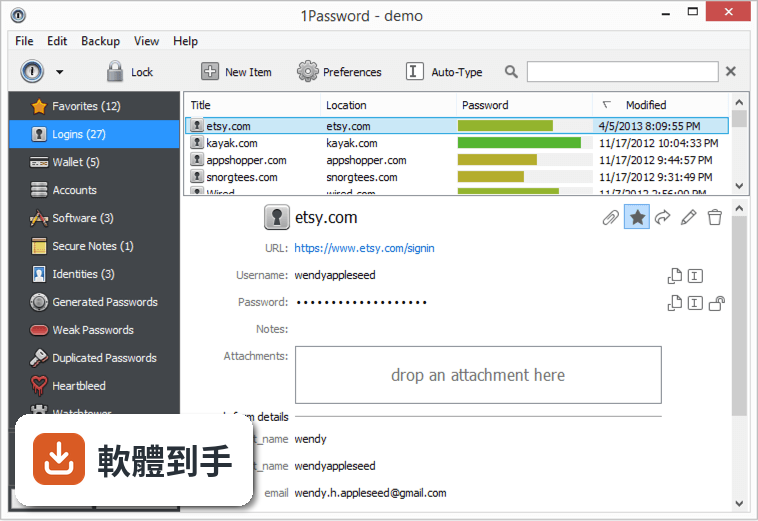
011Password for Windows 到底能拿來做什麼?
它主要做三件事:產生高強度隨機密碼、幫你在網站登入時自動填入帳號密碼、把信用卡、身分證字號、筆記等敏感資料加密存放在保險庫裡。另外它會偵測你哪些密碼太弱、被重複使用,或出現在已知的資料外洩事件中,並提醒你更換。
02它怎麼幫我自動填入網站的登入資料?
安裝後它會在 Chrome、Firefox、Edge 等瀏覽器加入擴充功能。當你登入一個網站,它會詢問是否儲存這組帳號密碼,下次再開同一個網站,點一下擴充功能圖示就能自動填入。就算你換瀏覽器,只要登入同一個 1Password 帳戶,密碼都會跟著過去。
03我有很多信用卡和會員卡資料,它也能一起管理嗎?
可以。它的保險庫除了登入資料,也支援信用卡、護照、會員卡、銀行帳戶等類別。填寫購物結帳表單時,它能自動帶入姓名、地址、卡號等欄位,不用逐格打字。你也可以把不適合貼在電腦上的純文字筆記,例如 Wi-Fi 密碼或保險單號,一起收進去。
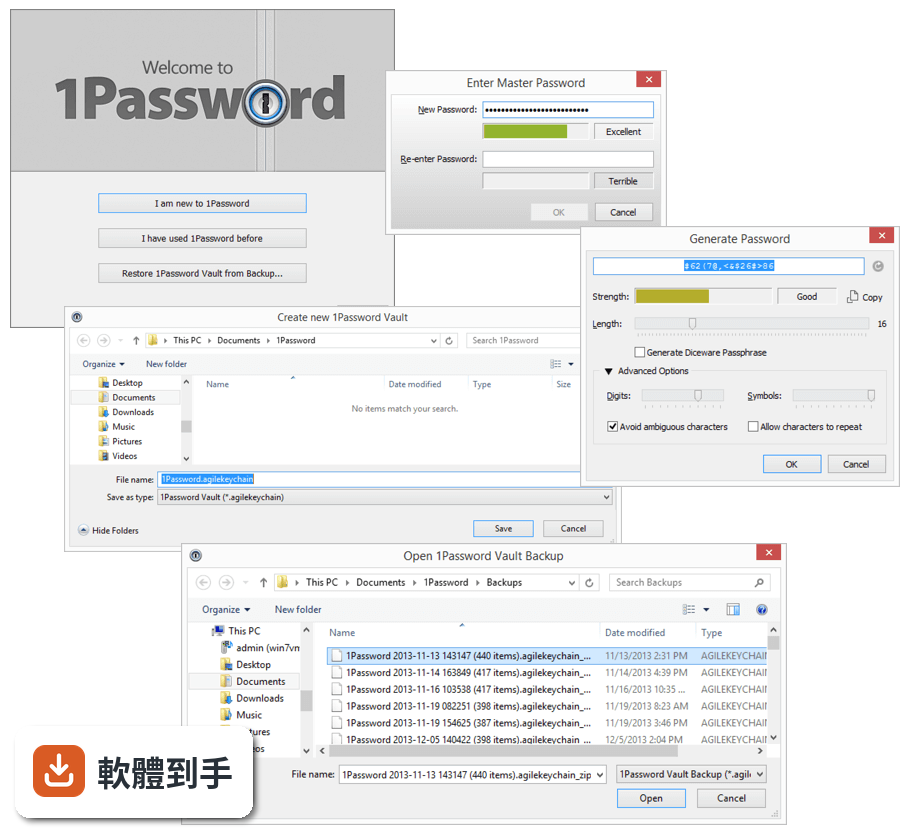
04它能不能幫我產生不容易被破解的密碼?
內建密碼產生器,可以指定長度和是否包含符號,一鍵產生隨機密碼並直接存進保險庫。你不需要知道產生的密碼內容,反正登入時它會自動填入。這樣做的好處是每個網站都用完全不一樣的密碼,就算某個網站被駭,其他帳號不會跟著遭殃。
05換電腦或手機的時候,我的密碼要怎麼帶過去?
它支援 Windows、macOS、iOS、Android,以及瀏覽器擴充功能。你在新裝置安裝軟體後,用同一組帳戶和主密碼登入,保險庫內容就會同步過來。官方說明提到可透過 iCloud、Dropbox 或區域 Wi-Fi 同步,其中 Wi-Fi 同步時資料不會離開你的區域網路。
06我家人也想用,這套軟體有家庭方案嗎?
官方有 Family Plan,一個訂閱最多涵蓋 5 個成員,每個人有自己的保險庫,也可以共用特定密碼,例如家裡共用 Wi-Fi 或串流平台帳號。管理員可以透過簡易控制台管理成員權限。如果你只是個人使用,也有 Individual Plan 可選。
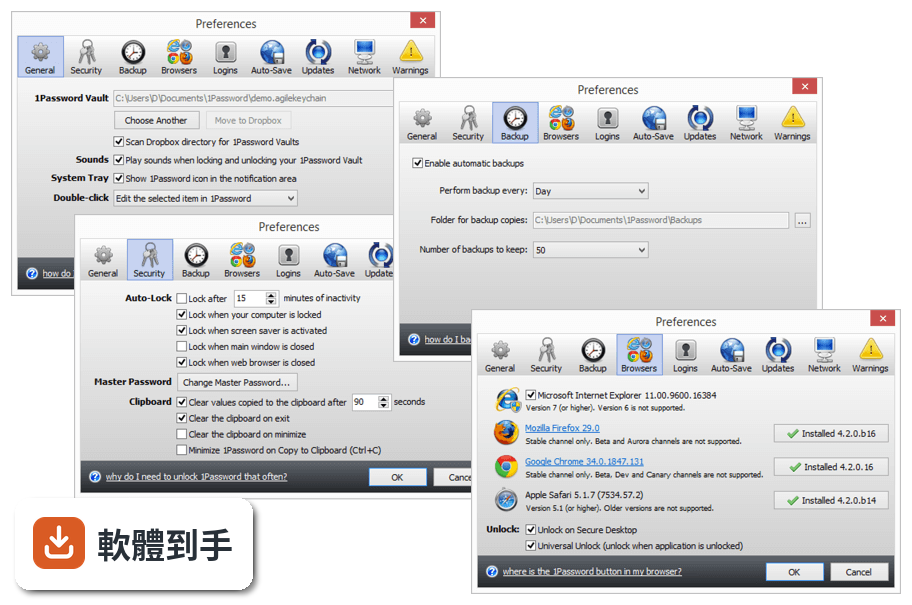
07我忘了主密碼,還有辦法救回來嗎?
它採用零知識架構,意思是你的保險庫內容只有用主密碼才能解開,官方也無法幫你解密。如果你忘了主密碼,必須靠註冊時取得的 Emergency Kit,裡面有帳戶資料和救援金鑰。沒有 Emergency Kit 就無法恢復,這點在註冊時就要妥善保管。
08我現在用的是其他密碼管理軟體,可以轉過來嗎?
官方說明指出,它支援從 LastPass 和 Dashlane 等常見密碼管理工具匯入資料。你不需要手動一筆一筆重新輸入,匯入後再檢查一下分類是否正確即可。如果你用的工具不在官方列出的名單中,可能需要先確認是否有匯出功能,再手動整理。
09這套軟體有試用版嗎?要怎麼開始用?
官方提供所有方案的免費試用,你可以在試用期間測試功能再決定是否付費。安裝流程是下載安裝檔、執行安裝程式、註冊帳戶、設定主密碼,然後在其他裝置登入同步。要注意的是,介面語言是英文,沒有繁體中文介面,操作上需要基本的英文閱讀能力。
10什麼樣的人不適合用這套軟體?
如果你完全無法接受英文介面,這套軟體操作起來會比較吃力。如果你不想付月費或年費,它沒有永久免費方案,試用期結束後需要選擇訂閱方案才能繼續使用。另外,如果你對「忘了主密碼就無法恢復」這點感到不安,可能需要考慮其他提供帳戶恢復機制的服務。
下載與官方連結
前往官方網站 下載 1Password for Windows
1Password-4.1.0.520.exe · 9.47 MB · 連結指向軟體原廠
版本紀錄
- 2026-10-20 1Password 8.12.42 185 MB
- 2026-10-02 1Password 8.12.40 185 MB
- 2026-10-02 1Password 8.12.38 185 MB
再看 5 筆
- 2026-09-09 1Password 8.12.36 185 MB
- 2026-08-25 1Password 8.12.34 185 MB
- 2026-08-11 1Password 8.12.32 185 MB
- 2024-02-22 1Password 8.10.26
- 2024-02-22 Select Version
這一版改了什麼
What's new in this version:
New:
- Setting: View > Show Rich Icons
- Setting: Help > Advanced > "Verify web browser code signature".
- Added the current keyboard layout name to the unlock window.
- File > Preferences (Ctrl+P) > Security > Lock when web browser is closed.
- File > Preferences (Ctrl+P) > Logins > Show X more items...
Improvements:
- The Enter key opens a Login item in the web browser if the 1Password popup menu shows one matching item only.
- Ctrl+N should create a new item (not a new vault).
- Added latest version of 1PasswordAnywhere.
- The "Scan Dropbox for 1Password Vaults" feature should limit itself to 2 folders deep at most.
- Clicking "Last Generated Password" should always copy the password to clipboard.
- Added the 30-day trial expiration date to the About dialog.
- The agent/helper is not going to install the low-level mouse hook if auto-lock (after X minutes of inactivity) is turned off.
- Added "Icon:" label to Software License items.
- Updated help links (pointing to https://guides.agilebits.com now).
- Updated the list of countries (ISO 3166, June 2014).
- Added support for Waterfox web browser.
- Updated the 32x32 taskbar icon.
- Updated a few icons (courtesy of Jessica Jansen).
- Added attachments to Generated Password items.
- Added the following custom field types: "URL" and "Email".
- Added support for Comodo Dragon web browser.
- Added some more info about IE to the "enhanced protected mode" error window.
- Added "Copy Password" (Ctrl+Shift+C) to the (right-click) popup menu.
- Added Wi-Fi Sync log to the diagnostics report.
- Improved searching for tags (Alt+DownArrow).
- Added spinner to the Wi-Fi Sync window (Ctrl+W).
- If you have more than 4 Login items that match the current URL, then the 1Password browser extension will display this: "Show X more items..."
- Notes field in the edit window is resizable.
- When editing an item, dynamically disable Up/Down button if it can't do anything.
- Added "No to All" button when importing a 1PIF.
Fixed:
- Bug: when running .opvault the "New Item" button displays a few deprecated account items. Fixed.
- Bug:
Minimize 1Password
Sleep your PC
Unlock 1Password in web browser
Click on 1Password tray icon
Result: a second unlock is required. Expected result: 1Password should be unlocked because "universal unlock" is turned ON.
- Bug: Tags are not saved properly when pressing Enter to save. Fixed.
- Bug: Inconsistent behavior with automatic section collapsing and up button. Fixed.
- Bug: CC item created on Windows does not sync date fields to iOS via Wi-Fi. Fixed.
- Bug: the search popup menu (that appears when you immediately start typing) steals the focus from the browser window. Fixed.
- Bug: the setting to scan the Dropbox folder is not retained after exiting the program. Fixed.
- Bug: when running in IE9, the 1Password extension might mistakenly think EPM is turned on. Fixed.
- Bug: http vs. HTTP can prevent icon downloads. Fixed.
- Bug: error when trying to add attachment to Generated Password item. Fixed.
- Bug: filling a password containing special characters in Internet Explorer results in a failure upon submission. Fixed.
- Bug: search in web browser doesn't let you fill into the currently open page and provides Go & Fill only. Fixed.
- Bug: after a reboot, 1Password isn't restored to the previous maximized window state. Fixed.
- Bug: error when username contains a backslash and the data is imported from 1PIF. Fixed.
- Bug: when you assign a custom icon to a Login item, this icon is now visible for ALL of your Logins in the details view. Fixed.
- Bug: restarting 1Password helper can cause following error: "Invalid data type. This key was updated via Amazon GPO to fight W32/Lovsan.worm". Fixed.
- Bug: the 1Password agent/helper might slow down typing in other apps. Fixed.
- Bug: memory dump file contains decrypted data when 1Password is locked. Reported by Roger Wolfson. Fixed.
- Bug: saving a new Login item in the web browser can cause an access violation. Fixed.
- Bug: the old %APPDATA%Agile Web Solutions directory is created when you enter your license key. Fixed.
- Bug: Auto-Type does not work in the OneDrive sign-in window (the first character of the user name goes missing). Fixed.
- Bug: when you edit a web form field, then the "Generate" button should enable itself if Type *or* Designation is set to "password". Fixed.
- Bug: the secret key that is displayed in the Wi-Fi Sync window is not accessible. Fixed.
- Bug: Internet Explorer 11 on Windows 7 (64-bit) mistakenly thinks Enhanced Protected Mode is on. Fixed.
- Bug: tags should be in alphabetical order. Fixed.
- Bug: a restart of 1Password is required after the Bonjour service is installed. Fixed.
- Bug: on Russian systems, the close button for tags looks like the Russian letter "?". Fixed.
- Bug: collapsed sections will auto expand if any of the Credit Card fields (e.g. Valid From) has been deleted. Fixed.
- Bug: when you add (or edit) an identity and then re-size this window on a high-DPI screen, the fields in the left section disappear. Fixed.
- Bug: saving a new Login item in the web browser can cause the following error: "Cannot create file XXXXXXXXXXXXXXXXXXXXXXXXXXXXXXXX.png". Fixed.
- Bug: Wi-Fi Sync with 1Password 5 (for iOS 8) keeps prompting for the master password. Fixed.
- Bug: UI glitch on the lock icon next to the password field (does not reset properly). Fixed.
- Bug: if your PC resumes from sleep, then the 1Password agent/helper might stop making backups. Fixed.
- Bug: double-click on a Login item opens the URL in the web browser, but does not fill the credentials. Fixed.
- Bug: HMAC is not added to .opvault attachments. Fixed.
- Bug: the new password window isn't high-DPI aware. Fixed.
- Bug: tags are not imported from a 1PIF file. Fixed.
- Bug: custom field sorting changes aren't saved. Fixed.
- Bug: when you duplicate an item, attachment is NOT duplicated. Fixed.
- Bug: 1PIF import not handling escaped quotes in title property value. Fixed.