
這是歷史版本頁面 — 看 1Password for Windows 最新版本
密碼多到記不住?1Password for Windows 能幫你管什麼
 1Password for Windows 4.3.0.556
資料更新 2015-03-23
閱讀約 5 分鐘
你每天打開瀏覽器,登入公司信箱、網路銀行、購物網站、社群帳號,每一處都要密碼。有些網站要求大小寫加符號,有些規定不能跟別站重複,你根本記不住,最後不是按「忘記密碼」重新設定,就是偷偷把密碼寫在記事本裡。明明知道這樣不安全,但面對十幾個帳號,實在沒有更好的辦法。
用瀏覽器內建的自動填入,換一台電腦或換瀏覽器,密碼就全部不見了;用記事本記,等於把鑰匙放在門口腳踏墊下面。這類密碼管理工具的切入點,是把所有帳號密碼收進一個加密的資料庫,你只需要記住一組主密碼,其餘交給軟體自動填入、自動產生強密碼,並在需要時同步到其他裝置。
011Password for Windows 到底能拿來做什麼?
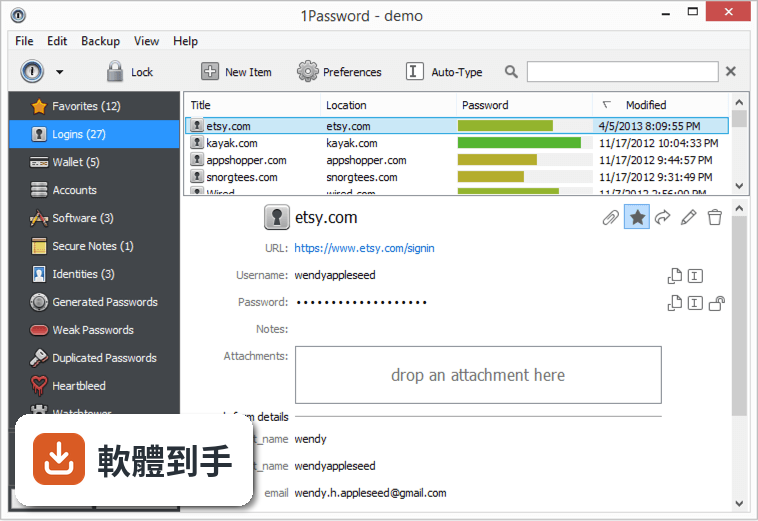
它主要做三件事:產生高強度隨機密碼、幫你在網站登入時自動填入帳號密碼、把信用卡、身分證字號、筆記等敏感資料加密存放在保險庫裡。另外它會偵測你哪些密碼太弱、被重複使用,或出現在已知的資料外洩事件中,並提醒你更換。
02它怎麼幫我自動填入網站的登入資料?
安裝後它會在 Chrome、Firefox、Edge 等瀏覽器加入擴充功能。當你登入一個網站,它會詢問是否儲存這組帳號密碼,下次再開同一個網站,點一下擴充功能圖示就能自動填入。就算你換瀏覽器,只要登入同一個 1Password 帳戶,密碼都會跟著過去。
03我有很多信用卡和會員卡資料,它也能一起管理嗎?
可以。它的保險庫除了登入資料,也支援信用卡、護照、會員卡、銀行帳戶等類別。填寫購物結帳表單時,它能自動帶入姓名、地址、卡號等欄位,不用逐格打字。你也可以把不適合貼在電腦上的純文字筆記,例如 Wi-Fi 密碼或保險單號,一起收進去。
04它能不能幫我產生不容易被破解的密碼?
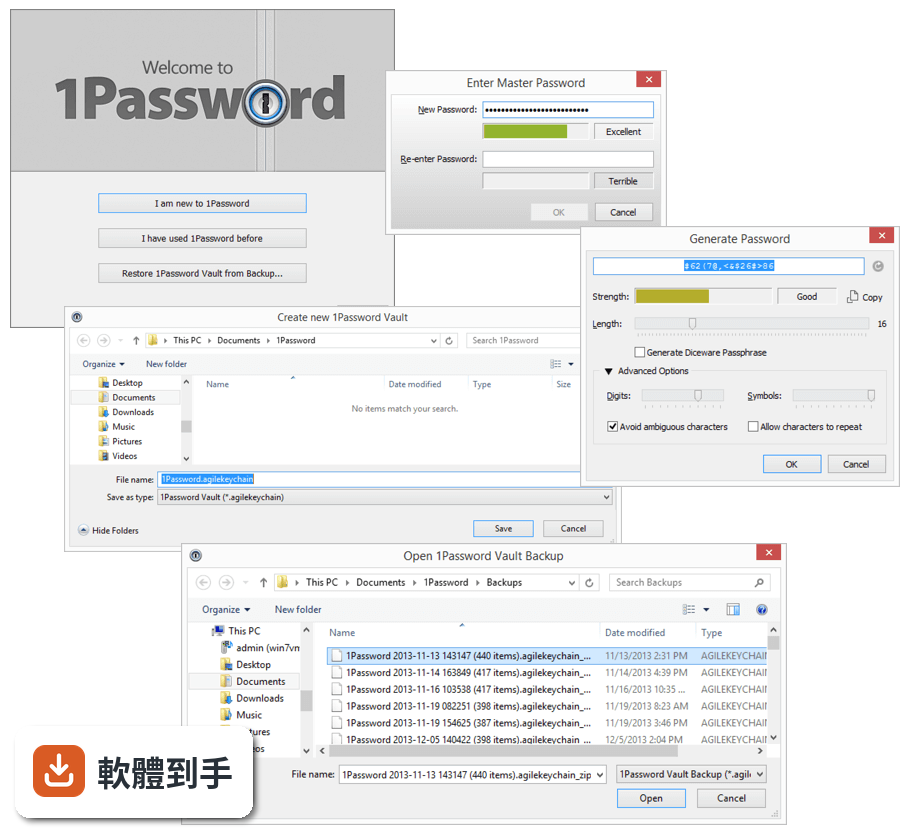
內建密碼產生器,可以指定長度和是否包含符號,一鍵產生隨機密碼並直接存進保險庫。你不需要知道產生的密碼內容,反正登入時它會自動填入。這樣做的好處是每個網站都用完全不一樣的密碼,就算某個網站被駭,其他帳號不會跟著遭殃。
05換電腦或手機的時候,我的密碼要怎麼帶過去?
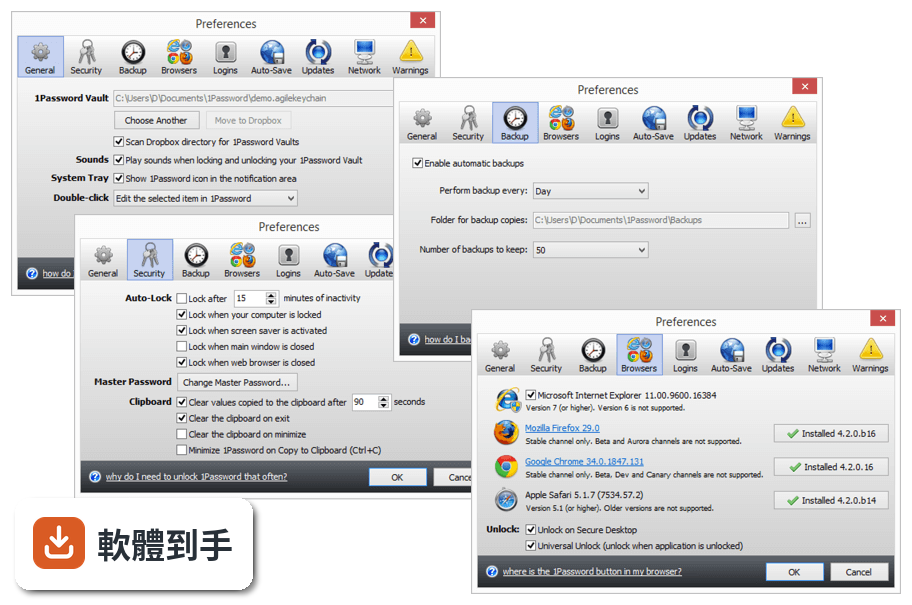
它支援 Windows、macOS、iOS、Android,以及瀏覽器擴充功能。你在新裝置安裝軟體後,用同一組帳戶和主密碼登入,保險庫內容就會同步過來。官方說明提到可透過 iCloud、Dropbox 或區域 Wi-Fi 同步,其中 Wi-Fi 同步時資料不會離開你的區域網路。
06我家人也想用,這套軟體有家庭方案嗎?
官方有 Family Plan,一個訂閱最多涵蓋 5 個成員,每個人有自己的保險庫,也可以共用特定密碼,例如家裡共用 Wi-Fi 或串流平台帳號。管理員可以透過簡易控制台管理成員權限。如果你只是個人使用,也有 Individual Plan 可選。
07我忘了主密碼,還有辦法救回來嗎?
它採用零知識架構,意思是你的保險庫內容只有用主密碼才能解開,官方也無法幫你解密。如果你忘了主密碼,必須靠註冊時取得的 Emergency Kit,裡面有帳戶資料和救援金鑰。沒有 Emergency Kit 就無法恢復,這點在註冊時就要妥善保管。
08我現在用的是其他密碼管理軟體,可以轉過來嗎?
官方說明指出,它支援從 LastPass 和 Dashlane 等常見密碼管理工具匯入資料。你不需要手動一筆一筆重新輸入,匯入後再檢查一下分類是否正確即可。如果你用的工具不在官方列出的名單中,可能需要先確認是否有匯出功能,再手動整理。
09這套軟體有試用版嗎?要怎麼開始用?
官方提供所有方案的免費試用,你可以在試用期間測試功能再決定是否付費。安裝流程是下載安裝檔、執行安裝程式、註冊帳戶、設定主密碼,然後在其他裝置登入同步。要注意的是,介面語言是英文,沒有繁體中文介面,操作上需要基本的英文閱讀能力。
10什麼樣的人不適合用這套軟體?
如果你完全無法接受英文介面,這套軟體操作起來會比較吃力。如果你不想付月費或年費,它沒有永久免費方案,試用期結束後需要選擇訂閱方案才能繼續使用。另外,如果你對「忘了主密碼就無法恢復」這點感到不安,可能需要考慮其他提供帳戶恢復機制的服務。
下載與官方連結
前往官方網站 下載 1Password for Windows
1Password-4.3.0.556.exe · 9.86 MB · 連結指向軟體原廠
版本紀錄
- 2026-10-20 1Password 8.12.42 185 MB
- 2026-10-02 1Password 8.12.40 185 MB
- 2026-10-02 1Password 8.12.38 185 MB
再看 5 筆
- 2026-09-09 1Password 8.12.36 185 MB
- 2026-08-25 1Password 8.12.34 185 MB
- 2026-08-11 1Password 8.12.32 185 MB
- 2024-02-22 1Password 8.10.26
- 2024-02-22 Select Version
這一版改了什麼
What's new in this version:
Improvements:
- Added a "Delete" menu item to the (right-click) popup menu for attachments.
- Added "Copy to Clipboard" button to easily copy URL of Login items.
- Improved demo vault. It contains additional entries (Mailchimp, Tumblr, WordPress, and Kickstarter) with TOTP as well as adding TOTP to Evernote and Dropbox.
- Date handling has been revamped.
- First, we look for your license in %APPDATA%. Then we look for the license in %COMMONAPPDATA%. This allows for enterprise distribution.
- Improved TOTP formatting (made it more memorable/readable).
- When you export to comma-delimited text, then the default extension is .csv (otherwise, the default extension is .txt).
- Added an error message if the helper cannot verify the code signature of the web browser.
- View Log button in the Wi-Fi Sync window changes its name depending on the state.
- opvault performance improvements.
- Improved reliability of the Ctrl+ keyboard shortcut in the web browser.
- Allow passwords in the Password category to be edited.
Fixed:
- Bug: adding a new custom address field in 1Password for iOS causes 1Password for Windows to crash. Fixed.
- Bug: attachments should be sorted alphabetically. Fixed.
- Bug: if your trial has expired, then the about window should read "expired on" (not "expires on"). Fixed.
- Bug: the Github TOTP is incorrect. Fixed.
- Bug: the browser extension does not offer any Logins for about:accounts in Firefox. Fixed.
- Bug: if you have used 1Password to fill a login in IE, then auto-save is dead (until you restart IE). Fixed.
- Bug: Go & Fill (from the app) is not working in Safari if the latter is NOT running. Fixed.
- Bug: CSV does not import nested (sub)folders from Moon Software's Password Agent. Fixed.
- Bug: if you're running opvault and then create a new credit card item, the 1Password extension cannot fill your credit card into your web browser. Fixed.
- Bug: legacy fields (for backwards-compatibility with 1Password 3 for Mac) make your agilekeychain unneccessary bulky. Fixed.
- Bug: you can resize the notes field and make it larger, but it is close to impossible to make it smaller. Fixed.
- Bug: when you create an Identity in the German locale and then later edit it in the English locale, all your fields are duplicated. Fixed.
- Bug: create a credit card on Windows. Wi-Fi Sync it to iOS. Change the credit card on iOS. Wi-Fi- Sync it to Windows. Result: the credit card appears not to be synced to Windows. Fixed.
- Bug: if a field name is too long (must be truncated) and contains at least one dot, then this causes a buffer overflow. Fixed.
- Bug: when switching vaults, search filters are not cleared. Fixed.
- Bug: if you click the 1Password button in your web browser twice (before the 1Password popup menu appeared), then you might end up with two popup menus (where one of them refuses to disappear). Fixed.
- Bug: some attachments could fail to be decrypted. Fixed.
- Bug: security vulnerability with Auto-Type + Go & Fill (from the app) + Internet Explorer. Fixed.
- Bug: 1Password mistakenly thinks www.livejournal.com and borzdeg.livejournal.com aren't in the same domain. Fixed.
- Bug: Go & Fill (from the web browser) does not work in 1Password extension 4.4.0.BETA-1. Fixed.