
這是歷史版本頁面 — 看 1Password for Windows 最新版本
密碼多到記不住?1Password for Windows 能幫你管什麼
 1Password for Windows 6.8.488
資料更新 2017-12-18
閱讀約 5 分鐘
你每天打開瀏覽器,登入公司信箱、網路銀行、購物網站、社群帳號,每一處都要密碼。有些網站要求大小寫加符號,有些規定不能跟別站重複,你根本記不住,最後不是按「忘記密碼」重新設定,就是偷偷把密碼寫在記事本裡。明明知道這樣不安全,但面對十幾個帳號,實在沒有更好的辦法。
用瀏覽器內建的自動填入,換一台電腦或換瀏覽器,密碼就全部不見了;用記事本記,等於把鑰匙放在門口腳踏墊下面。這類密碼管理工具的切入點,是把所有帳號密碼收進一個加密的資料庫,你只需要記住一組主密碼,其餘交給軟體自動填入、自動產生強密碼,並在需要時同步到其他裝置。
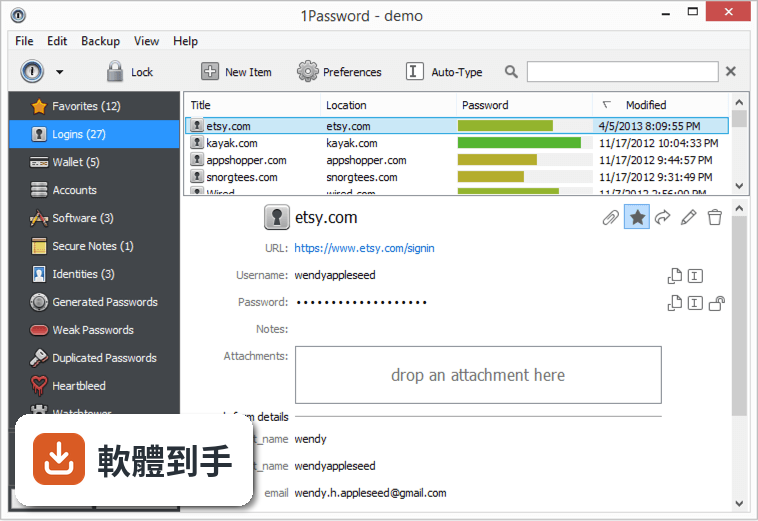
011Password for Windows 到底能拿來做什麼?
它主要做三件事:產生高強度隨機密碼、幫你在網站登入時自動填入帳號密碼、把信用卡、身分證字號、筆記等敏感資料加密存放在保險庫裡。另外它會偵測你哪些密碼太弱、被重複使用,或出現在已知的資料外洩事件中,並提醒你更換。
02它怎麼幫我自動填入網站的登入資料?
安裝後它會在 Chrome、Firefox、Edge 等瀏覽器加入擴充功能。當你登入一個網站,它會詢問是否儲存這組帳號密碼,下次再開同一個網站,點一下擴充功能圖示就能自動填入。就算你換瀏覽器,只要登入同一個 1Password 帳戶,密碼都會跟著過去。
03我有很多信用卡和會員卡資料,它也能一起管理嗎?
可以。它的保險庫除了登入資料,也支援信用卡、護照、會員卡、銀行帳戶等類別。填寫購物結帳表單時,它能自動帶入姓名、地址、卡號等欄位,不用逐格打字。你也可以把不適合貼在電腦上的純文字筆記,例如 Wi-Fi 密碼或保險單號,一起收進去。
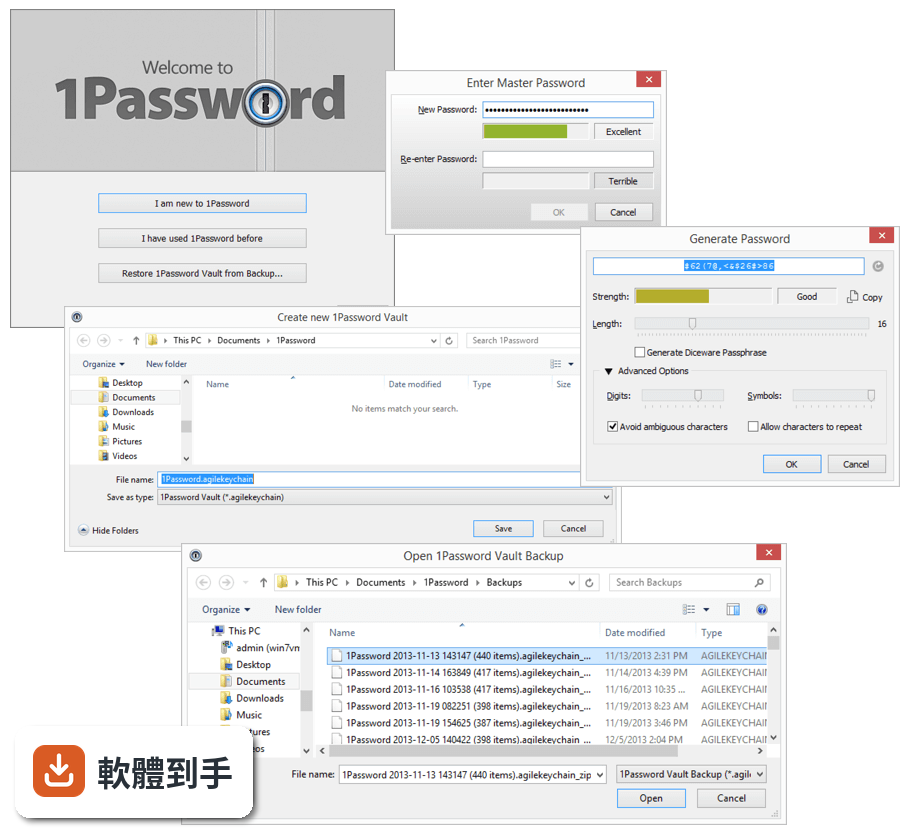
04它能不能幫我產生不容易被破解的密碼?
內建密碼產生器,可以指定長度和是否包含符號,一鍵產生隨機密碼並直接存進保險庫。你不需要知道產生的密碼內容,反正登入時它會自動填入。這樣做的好處是每個網站都用完全不一樣的密碼,就算某個網站被駭,其他帳號不會跟著遭殃。
05換電腦或手機的時候,我的密碼要怎麼帶過去?
它支援 Windows、macOS、iOS、Android,以及瀏覽器擴充功能。你在新裝置安裝軟體後,用同一組帳戶和主密碼登入,保險庫內容就會同步過來。官方說明提到可透過 iCloud、Dropbox 或區域 Wi-Fi 同步,其中 Wi-Fi 同步時資料不會離開你的區域網路。
06我家人也想用,這套軟體有家庭方案嗎?
官方有 Family Plan,一個訂閱最多涵蓋 5 個成員,每個人有自己的保險庫,也可以共用特定密碼,例如家裡共用 Wi-Fi 或串流平台帳號。管理員可以透過簡易控制台管理成員權限。如果你只是個人使用,也有 Individual Plan 可選。
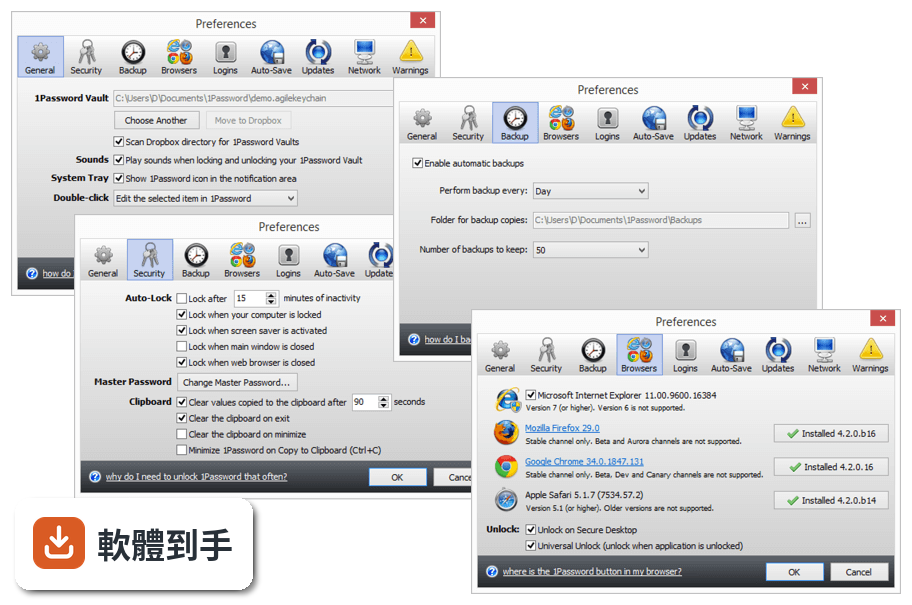
07我忘了主密碼,還有辦法救回來嗎?
它採用零知識架構,意思是你的保險庫內容只有用主密碼才能解開,官方也無法幫你解密。如果你忘了主密碼,必須靠註冊時取得的 Emergency Kit,裡面有帳戶資料和救援金鑰。沒有 Emergency Kit 就無法恢復,這點在註冊時就要妥善保管。
08我現在用的是其他密碼管理軟體,可以轉過來嗎?
官方說明指出,它支援從 LastPass 和 Dashlane 等常見密碼管理工具匯入資料。你不需要手動一筆一筆重新輸入,匯入後再檢查一下分類是否正確即可。如果你用的工具不在官方列出的名單中,可能需要先確認是否有匯出功能,再手動整理。
09這套軟體有試用版嗎?要怎麼開始用?
官方提供所有方案的免費試用,你可以在試用期間測試功能再決定是否付費。安裝流程是下載安裝檔、執行安裝程式、註冊帳戶、設定主密碼,然後在其他裝置登入同步。要注意的是,介面語言是英文,沒有繁體中文介面,操作上需要基本的英文閱讀能力。
10什麼樣的人不適合用這套軟體?
如果你完全無法接受英文介面,這套軟體操作起來會比較吃力。如果你不想付月費或年費,它沒有永久免費方案,試用期結束後需要選擇訂閱方案才能繼續使用。另外,如果你對「忘了主密碼就無法恢復」這點感到不安,可能需要考慮其他提供帳戶恢復機制的服務。
下載與官方連結
前往官方網站 下載 1Password for Windows
1PasswordSetup-6.8.488.exe · 4.39 MB · 連結指向軟體原廠
版本紀錄
- 2026-10-20 1Password 8.12.42 185 MB
- 2026-10-02 1Password 8.12.40 185 MB
- 2026-10-02 1Password 8.12.38 185 MB
再看 5 筆
- 2026-09-09 1Password 8.12.36 185 MB
- 2026-08-25 1Password 8.12.34 185 MB
- 2026-08-11 1Password 8.12.32 185 MB
- 2024-02-22 1Password 8.10.26
- 2024-02-22 Select Version
這一版改了什麼
What's new in this version:
New:
- 1Password now uses a custom title bar with menus to help you quickly manage some of your settings
- 1Password sidebar is now translucent and comes with a refreshed design for the context menu throughout the app
- New design for the Settings view, you can now find it via 1Password Menu > Settings or just press F9
- Also new in Settings, All Vaults is available to let you pick specific vaults to view in All Vaults, which is great for excluding your archival vault if you don't need to see it all the time
- Fill Login keyboard shortcut support (Control + ) is now available for 1Password extension in Microsoft Edge
- The Autosave dialog now has the Never AutoSave for this Site option available in the dropdown option on the Not Now button
- Press Control + C any time in the 1Password mini password generator window to copy it automatically, no need to select the password or click the copy button
- When creating a new password on a site with 1Password mini password generator, 1Password will now save the site's address into the Password item
- Added new search filters; tag:, id: and uuid:. tag: can be used to narrow the list to a specific tag without selecting a tag in the sidebar and you can also enter it without any values to find all items without a tag. The last two are for filtering the item list to the specific item's internal database ID or its UUID; this is useful for the diagnostics purposes
- Wildcard (*) is now supported in the Autosave exclusion list (Settings > Browsers > Autosave)
- Edit is now available for the right-click menu on the item list
- In the item list, you can now type to scroll to the first match
- 1Password will select the first category, Logins, when displaying the New Item menu and it now supports type to select, typing 'b' would select `Bank`
- 1Password account avatars are now supported
- Authenticated proxies and proxy auto-config files (PAC) are now supported
- 1Password will now display international Unicode domains (punycode) in the website fields and also, display the English translation next to it
- 1Password log console is now directly accessible via Control + ` in its new console design to help with real-time diagnostics when reproducing issues
Improvements:
- Design improvements on the custom title bar, its menus, item list, and the sidebar
- We've redesigned the buttons and applied to all the buttons we can find in the app
- Updated the vault menu style on the Import, Save Login, and Vault for Saving views
- General UI improvements throughout the app; denser item list, an improved icon styling with a border, a new sidebar tab indicator, new button design for web form details/password history, one time password digits are separated more consistently, and more
- We've redesigned the Share menu; it now includes vault icons, it is more accessible, and grouped by 1Password accounts. The Share menu is also disabled when there is nothing to copy
- The tags has been redesigned in the item viewer, it now has bubbles! The new design is coming to the item editor soon
- Favorite button has been moved below the item title in the item details viewer, matching the design of other 1Password apps
- 1Password will now get Rich Icons using the Login's entire website address instead of its main domain only
- 1Password now validates the Login's URL and software titles before requesting for a Rich Icon; it will no longer request it for Login items that have example.com URL saved, IP addresses and other invalid addresses. In addition, software license items must have a title, which cannot be the default title and it must be less than 80 characters
- Search is now more responsive by waiting a bit after user input before starting the search or clearing it
- Revealing super-long passwords are no longer truncated if it doesn't fit, it'll wrap to the next line
- 1Password no longer display extra confirmation dialogs when trashing and restoring items as these actions are no longer irreversible as it was in the first early builds of 1Password 6
- Pressing the space bar now works on drop-down controls to bring up its menu and pressing space bar on a selected item will select it
- Major accessibility fixes throughout the app; majority of item details viewer, item editor, and Settings are now accessible
- Accessibility; account names are included when announcing the vaults in the Share Menu
- Error messages are announced to screen readers when there are errors on the 1Password Sign In view
- Changing vaults in 1Password is now consistent with both 1Password window and 1Password mini in sync.
- When manually entering the account details on the Sign In view, 1Password will append the sign-in address to help complete it quickly
- We've rebuilt some icons that are stored in our custom font to support the improved font rendering at the smaller font sizes
- For 1Password Teams customers, modifying custom templates will now be updated in real time within 1Password
- Updated to the latest 1Password.com authentication APIs
- Updated to the latest 1Password Brain version, 26, for improved 1Password extension filling and saving
- 1Password can now handle up to 10 concurrent native messaging pipes, meaning you can run up to 10 different browser user profiles at the same time
- 1Password now updates your account profile regularly to ensure that it is displaying the correct information for the devices you use
- 1Password also includes its user agent when connecting to 1Password.com
- 1Password should now display sharper text on regular monitors and on older Windows versions
- Export is now available as a contextual menu option; select the items you want to export and right-click to export them
- Changed the keyboard shortcut for Settings from F10 to F9 as F10 is reserved by Windows for the title bar menus
- Syncing in 1Password is now done in its own sync thread and as the result of this, using 1Password should not be affected by a sync session in the background. 1Password now also works better offline
- Major improvements to the database structure to improve the support for custom icons, attachments, documents, avatars, and more for future planned features, as well as general security improvements
- 1Password mini now mentions Microsoft Edge instead of RuntimeBroker when using Edge
- When exporting items via text format, multiple-line fields are encoded with quotes
- Opening 1Password manually via desktop or taskbar no longer open it minimized if 1Password was already running in the notification tray area
- Clicking on the notification about rejected connections for 1Password extensions will take you to 1Password browser settings
- Network (Proxy) settings has been moved to the Advanced section
- Internal changes to support upcoming features
- 1Password log files are now stored within its own subdirectory, Logs, instead of reusing user's data folder
- Added system and app uptime to the 1Password diagnostics report
- 1Password diagnostics report now includes the browser name when logging specific browser logs
- 1Password now shares (not user-data) more details about the site forms to the 1Password extension that will be used for future extension improvements
- When logging common events, 1Password will now increment the repeating log events instead of duplicating them
- Installation logs are moved from the temporary folder to the 1Password's logs subdirectory, and they're also time-stamped, so that reinstalling the same 1Password version would not overwrite previous logs
- 1Password now stream its log to a file on disk instead of holding it in memory. This reduce memory consumption and ensure the very most recent logs are saved prior to any abnormal exists
- 1Password now includes the browser version when generating a diagnostics report
- The 1Password Diagnostics report will now collect the details on the current native messaging support in 1Password and if the computer was being accessed remotely, which sometime caused unexpected interface issues
- 1Password will now throttle itself when attempting to reconnect to our 1Password.com service if the user's network went down but did not fully recover
Fixed:
- 1Password would require a restart to update certain vault permission changes
- Pressing the menu key or Shift + F10 would show up far away from the selected item instead of right below it
- In 1Password mini, selecting an item to view or edit in 1Password main window would not work if the main window is in the middle of a search
- Control + Shift + C didn’t work in the main window
- Doing a manual save a specific domain would not work if the said domain is on the Never AutoSave on these domains list
- Watchtower filtered the item list based on the selected tags/categories instead of the selected vault
- Watchtower incorrectly flagged Login items with no password fields
- The Watchtower red banner had rounded corners, it is now flat to fit the overall design
- Certain UI elements didn’t show up on older low-resolution monitors
- Tabbing through the item editor did not leave the editor, it would loop back into the editor instead of the next view
- 1Password would not work in safe mode without networking
- If the 1Password account was deleted or suspended remotely, the app did not update the view right away or take user to the Sign In view if there were no other accounts to switch to
- In 1Password settings, it was not accepting changes in certain text fields (Autosave exclusion list, keyboard shortcut) if you didn't defocus the text field first
- A crash when attempting to establish a notifier connection to our server but experienced an unknown network error
- Clicks are sometime not registered on the sidebar, the category gets selected but the item list doesn't refresh
- Removed the websocket support for 1Password extension as we now use Native Messaging for all 1Password extensions
- On Windows 7, 1Password lock view didn't use the correct font for its master password field
- On the Sign In view, 1Password was focusing the master password field when 1Password Account Code is not being used, it now focuses the first field
- If the 1Password database was copied to another computer, 1Password would crash due to the use of local device encryption keys
- Crashes from reconnecting 1Password to the internet
- Removed the plural form of one second and minute from 1Password options
- Removed an extra vault change notification check that is not needed to update the local database
- Removed the Watchtower URL configuration setting from the application configuration files
- Typography, wording, and alignment improvements throughout the app
- 1Password mini would show all password items for the site you're on if there is an existing Login item for the site
- 1Password was showing the default vault icon as the user avatar in the Accounts menu
- In search fields, typing a long entry can make it appear under the clear 'x' button instead of stopping right before it
- When performing a moving operation, 1Password logged it as copying instead
- Removed the Register 1Password Helper option as it will be done automatically if it is not registered at each 1Password start
- Restored support for onepassword:// URI schemes that is used for adding accounts via links on 1Password.com site
- After signing out of an account, 1Password didn't refresh its view to show All Vaults and incorrectly opened the Settings view
- It wasn't possible to create a new item in the vault that had the Create Item permission but not the Update Item permission
- Account names were missing in the frozen account message
- More wording and design improvements for upcoming features
- Updating very old items in 1Password may cause 1Password for Mac to crash
- Fixed a crasher that occurs when closing 1Password quickly while 1Password was in the middle of focusing a field
- Clicking on a banner within 1Password mini may show a 1Password window that's mostly translucent with only the Settings view shown
- If Firefox was used to launch 1Password, terminating Firefox would also terminate 1Password