
這是歷史版本頁面 — 看 Ableton Live 最新版本
編曲到一半卡住?Ableton Live 的 Session View 能幫你什麼
 Ableton Live 10.1.13
資料更新 2020-05-06
閱讀約 6 分鐘
寫歌寫到一半,靈感斷掉,看著編曲軟體的時間軸一片空白,不知道下一步要放什麼。或者你已經有一堆零散的旋律片段、鼓點、貝斯線,卻怎麼排都覺得不對勁,拖來拖去就是組不成一首完整的歌。這種「有素材卻拼不起來」的卡關,是很多做音樂的人共同的困境。
傳統的編曲方式是把所有素材照時間順序排好,但靈感往往不是線性出現的。當你只是想快速試試「這段配那段好不好聽」,或想在演出時即時觸發不同段落,一條時間軸反而礙手礙腳。於是有些音樂軟體改從「即興、拼貼、即時觸發」的角度切入,讓你先在一個自由的空間裡亂試,試出感覺後再整理成完整作品。
01Ableton Live 跟其他編曲軟體差在哪?
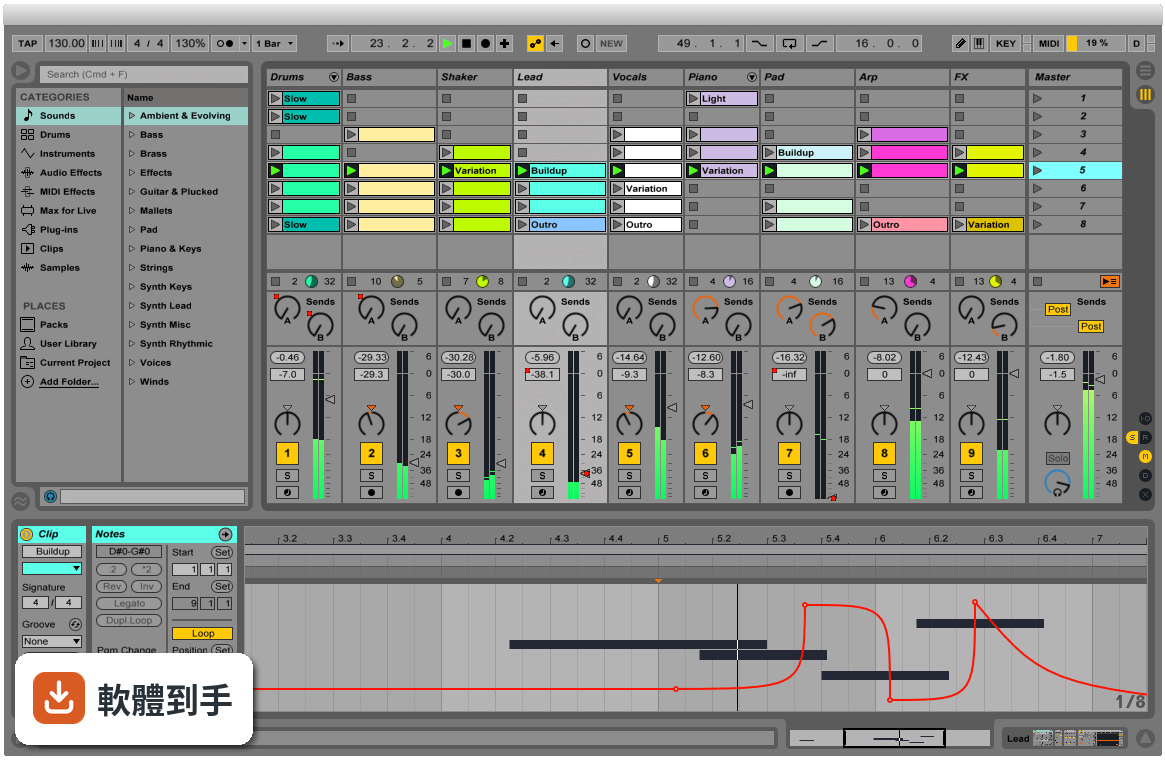
它最特別的是同時提供兩種工作視圖。Arrangement View 跟傳統編曲軟體一樣,把素材沿時間軸排列;Session View 則是一格格可以隨時觸發的格子,你可以把各種聲音片段放進去,用滑鼠或 MIDI 控制器即時開關、重疊、組合。這種設計讓「試東西」變得很直覺,不用先想好順序,先玩再說。
02它的 Session View 實際用起來是什麼感覺?
想像你把幾十個聲音片段擺在一個大面板上,每個片段都可以獨立播放或停止。你可以一邊放著鼓組,一邊試著觸發不同的貝斯或和弦片段,看哪幾個搭在一起順耳。找到喜歡的組合後,再把這些片段錄進 Arrangement View 排成完整歌曲。對習慣先亂試再整理的人來說,這個流程比直接面對一條時間軸順手很多。
03它能不能錄音?MIDI 編輯方便嗎?
可以。官方說明明確提到能從任何來源錄製音訊和 MIDI,也提供 MIDI 和音訊效果器、虛擬樂器。MIDI 編輯方面,它具備完整的編輯工作流程,可以處理音符、力度、長度等細節。不過實際編輯手感好不好,還是建議自己下載試用版操作看看,每個人習慣的編輯方式不太一樣。
04它內建的音色和效果器夠用嗎?
官方說明提到內建大量聲音、樂器和效果器,涵蓋合成器、取樣、EQ、壓縮器等常用工具。Intro、Standard、Suite 三個版本內容不同,Standard 和 Suite 有更多樂器、音色包和效果器。如果你需要特定類型的音色,也可以透過 Max for Live 擴充,社群做了很多免費或付費的裝置可以裝。
05現場演出用這套軟體實際嗎?
官方把現場演出列為主要用途之一。它會自動幫你對齊拍點,讓你可以即時觸發迴圈、播放軟體或硬體樂器、處理其他樂手的音訊輸入,不用手忙腳亂地對拍。Session View 的格子設計本來就很適合現場即時觸發不同段落,很多電子音樂演出者確實用它來做現場編排。
06新手學音樂製作適合用這套嗎?
官方說它「快速、有趣、直覺」,介面也強調可自訂。但要注意介面語言只有英文,不熟悉英文介面的人初期會比較吃力。另外它功能很多,Intro 版功能較精簡,對新手來說反而比較不會被淹沒。建議先從 Intro 版開始,或下載試用版摸熟流程,再決定要不要升級。
07做電子音樂的人是不是比較適合它?
它的即時音訊處理、時間拉伸、音高轉換、Audio-to-MIDI 轉換等功能,對電子音樂製作確實很實用。你可以把一段錄音直接轉成 MIDI 再編輯,或把任何音訊素材任意變速變調。不過這不代表其他曲風不能用,只是它的工作流程設計上,對以片段拼貼、電子聲響為主的創作方式特別友善。
08我英文不好,介面只有英文會很卡嗎?
會,這點要老實說。它的介面語言只有英文,沒有中文選項。如果英文閱讀不順,初期光是搞懂每個按鈕和選單的功能就要花不少時間。雖然網路上有很多教學影片可以參考,但操作時還是得面對英文介面。英文真的不行的話,可以考慮其他有中文介面的編曲軟體。
09我只有 Mac 或手機,能用嗎?
官方 FAQ 說它目前提供 macOS 和 Windows 版本,你提供的資料顯示支援 Windows 10/11 64 位元。手機和平板沒有原生版本,只有第三方 app 可以跟 Ableton Live 專案做某種程度的整合,但無法完整使用這套軟體。如果你主要用手機或平板創作,這套軟體現階段不適合你。
10想跟朋友線上一起做音樂,這套行嗎?
官方 FAQ 明確說它沒有原生支援即時協作。你們可以互相交換專案檔或音訊檔來合作,但沒辦法像 Google Docs 那樣兩個人同時在同一個專案裡編輯。如果你很需要即時線上協作,這套軟體做不到,得另外找其他工具搭配,或考慮其他有協作功能的音樂軟體。
11預算有限,試用版夠用嗎?
它的授權型式是 Trial,代表你可以先試用再決定。但試用版通常有功能限制或使用期限,實際限制要看官方規定。如果你只是偶爾做做音樂、不想花錢,可以考慮其他免費或開源選項,例如 MuseScore 雖然定位不同,但至少是免費的。長期要認真做的話,再評估付費購買哪個版本。
12它跟 Cubase、REAPER 那些比起來,我該選哪個?
這要看你的工作習慣。Ableton Live 的強項是 Session View 的即興創作和現場演出流程;Cubase 和 REAPER 在傳統線性編曲、混音方面有各自的擁護者。評分方面,Cubase Pro 有 501 人評分,REAPER 有 117 人,Ableton Live 是 277 人評 7.58 分。建議先想清楚你主要做錄音混音還是做電子音樂、現場演出,再下載試用版實際比較。
下載與官方連結
ableton_live_trial_10.1.13_64.zip · 連結指向軟體原廠
版本紀錄
- 2026-11-01 Ableton Live 12.4.16 4.2 GB
- 2026-10-26 Ableton Live 12.4.7 4.1 GB
- 2026-09-18 Ableton Live 12.4.6 4.1 GB
再看 5 筆
- 2026-08-27 Ableton Live 12.4.5 4.1 GB
- 2026-07-14 Ableton Live 12.4.3 4.1 GB
- 2026-06-12 Ableton Live 12.4.2 4.1 GB
- 2026-05-29 Ableton Live 12.4.1 4.1 GB
- 2026-05-05 Ableton Live 12.4 4.1 GB
這一版改了什麼
What's new in this version:
Bugfixes:
Interface Improvements:
- On Windows, when the Computer MIDI Keyboard is enabled, menus can now be accessed via their keyboard shortcuts (e.g., using "ALT"+"F" to access the "File" menu). Previously, this only worked when the Computer MIDI Keyboard was disabled.
- In the Arrangement, time signature markers that change to 4/4 time are now indicated by a "4/4" text label near their markers
- Fixed a bug that prevented undo and redo operations upon creating a computer keyboard mapping, as well as redo operations after deleting a computer keyboard mapping
- Fixed a visual glitch that appeared when moving the mouse over an automation envelope
Midi Recording and Editing:
- Fixed some bugs that affected consolidating MIDI clips
- Previously when dragging a velocity marker, the mouse cursor would jump back to its initial position
- It is now possible to send MIDI clock messages to Live when External Sync is enabled and the transport is stopped, without causing all playing MIDI notes to be cut off. Also, sending a MIDI Start/Continue message to Live when it is already playing will no longer cause playback to briefly stop and then start again – instead, Live will simply continue to play.
- When using an encoder on a MIDI controller to control a device parameter with discrete values, the control functionality will no longer be inverted
Devices:
- Previously, when instantiating an Audio Unit plug-in, Live would sometimes display an error message about a folder that could not be created
- Previously, after replacing a Max for Live device and then undoing the operation, the wrong device name would be displayed
- Fixed a crash that occurred after unfreezing a track containing Wavetable, and then deleting the Wavetable device
- Parameter banks in the Wavetable device will now be correctly mapped to control surfaces
- Fixed a crash that occurred when selecting and freezing multiple tracks containing the External Instrument device
- If a track with a plug-in device is unfrozen, has its plug-in parameters or preset changed, and is frozen again, it will now record new audio instead of using the old frozen audio file
- Max for Live devices that are not visible are now correctly notified of active state changes
Control Surfaces:
- When Push 1 is power-cycled or turned on while Live is running, the touch strip will now be correctly updated in Note Mode
- Previously, after cropping an audio file in Live, a flat line might appear on Push 2's display
- Push will now display the correct notifications for playing clips (e.g., "Press Up Arrow to edit playing clip") on the selected track
- When changing integer values of Max for Live devices from Push, the values are always in sync with those shown in Live
- When using Push, Akai Force MPC, Novation SL MkIII or KeyLab Essential, encoders that are not currently in use will no longer send MIDI CC messages to the selected track
- In Volume Mode on the Novation Launchpad Pro MK3 controller, button faders will no longer be set to an incorrect color when changes to return tracks are made
General:
- Older Live Sets with missing components will now be correctly opened in Live