
這是歷史版本頁面 — 看 Ableton Live 最新版本
編曲到一半卡住?Ableton Live 的 Session View 能幫你什麼
 Ableton Live 11.0
資料更新 2021-02-23
閱讀約 6 分鐘
寫歌寫到一半,靈感斷掉,看著編曲軟體的時間軸一片空白,不知道下一步要放什麼。或者你已經有一堆零散的旋律片段、鼓點、貝斯線,卻怎麼排都覺得不對勁,拖來拖去就是組不成一首完整的歌。這種「有素材卻拼不起來」的卡關,是很多做音樂的人共同的困境。
傳統的編曲方式是把所有素材照時間順序排好,但靈感往往不是線性出現的。當你只是想快速試試「這段配那段好不好聽」,或想在演出時即時觸發不同段落,一條時間軸反而礙手礙腳。於是有些音樂軟體改從「即興、拼貼、即時觸發」的角度切入,讓你先在一個自由的空間裡亂試,試出感覺後再整理成完整作品。
01Ableton Live 跟其他編曲軟體差在哪?
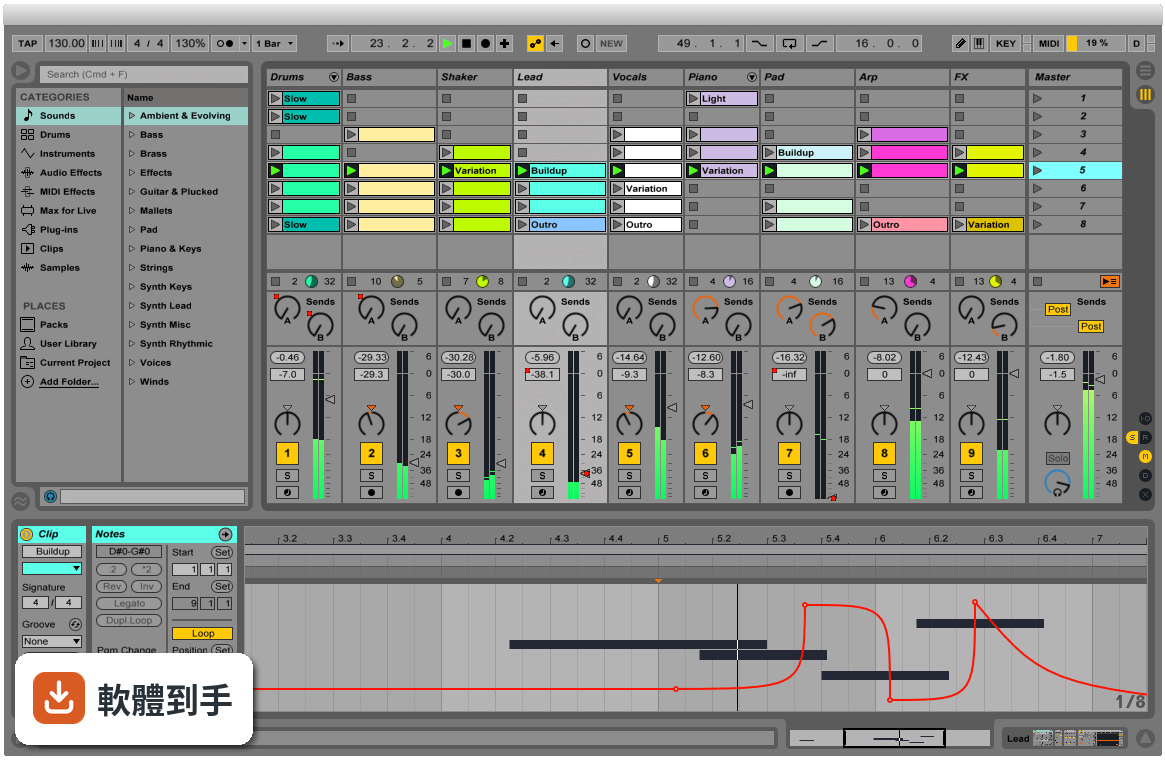
它最特別的是同時提供兩種工作視圖。Arrangement View 跟傳統編曲軟體一樣,把素材沿時間軸排列;Session View 則是一格格可以隨時觸發的格子,你可以把各種聲音片段放進去,用滑鼠或 MIDI 控制器即時開關、重疊、組合。這種設計讓「試東西」變得很直覺,不用先想好順序,先玩再說。
02它的 Session View 實際用起來是什麼感覺?
想像你把幾十個聲音片段擺在一個大面板上,每個片段都可以獨立播放或停止。你可以一邊放著鼓組,一邊試著觸發不同的貝斯或和弦片段,看哪幾個搭在一起順耳。找到喜歡的組合後,再把這些片段錄進 Arrangement View 排成完整歌曲。對習慣先亂試再整理的人來說,這個流程比直接面對一條時間軸順手很多。
03它能不能錄音?MIDI 編輯方便嗎?
可以。官方說明明確提到能從任何來源錄製音訊和 MIDI,也提供 MIDI 和音訊效果器、虛擬樂器。MIDI 編輯方面,它具備完整的編輯工作流程,可以處理音符、力度、長度等細節。不過實際編輯手感好不好,還是建議自己下載試用版操作看看,每個人習慣的編輯方式不太一樣。
04它內建的音色和效果器夠用嗎?
官方說明提到內建大量聲音、樂器和效果器,涵蓋合成器、取樣、EQ、壓縮器等常用工具。Intro、Standard、Suite 三個版本內容不同,Standard 和 Suite 有更多樂器、音色包和效果器。如果你需要特定類型的音色,也可以透過 Max for Live 擴充,社群做了很多免費或付費的裝置可以裝。
05現場演出用這套軟體實際嗎?
官方把現場演出列為主要用途之一。它會自動幫你對齊拍點,讓你可以即時觸發迴圈、播放軟體或硬體樂器、處理其他樂手的音訊輸入,不用手忙腳亂地對拍。Session View 的格子設計本來就很適合現場即時觸發不同段落,很多電子音樂演出者確實用它來做現場編排。
06新手學音樂製作適合用這套嗎?
官方說它「快速、有趣、直覺」,介面也強調可自訂。但要注意介面語言只有英文,不熟悉英文介面的人初期會比較吃力。另外它功能很多,Intro 版功能較精簡,對新手來說反而比較不會被淹沒。建議先從 Intro 版開始,或下載試用版摸熟流程,再決定要不要升級。
07做電子音樂的人是不是比較適合它?
它的即時音訊處理、時間拉伸、音高轉換、Audio-to-MIDI 轉換等功能,對電子音樂製作確實很實用。你可以把一段錄音直接轉成 MIDI 再編輯,或把任何音訊素材任意變速變調。不過這不代表其他曲風不能用,只是它的工作流程設計上,對以片段拼貼、電子聲響為主的創作方式特別友善。
08我英文不好,介面只有英文會很卡嗎?
會,這點要老實說。它的介面語言只有英文,沒有中文選項。如果英文閱讀不順,初期光是搞懂每個按鈕和選單的功能就要花不少時間。雖然網路上有很多教學影片可以參考,但操作時還是得面對英文介面。英文真的不行的話,可以考慮其他有中文介面的編曲軟體。
09我只有 Mac 或手機,能用嗎?
官方 FAQ 說它目前提供 macOS 和 Windows 版本,你提供的資料顯示支援 Windows 10/11 64 位元。手機和平板沒有原生版本,只有第三方 app 可以跟 Ableton Live 專案做某種程度的整合,但無法完整使用這套軟體。如果你主要用手機或平板創作,這套軟體現階段不適合你。
10想跟朋友線上一起做音樂,這套行嗎?
官方 FAQ 明確說它沒有原生支援即時協作。你們可以互相交換專案檔或音訊檔來合作,但沒辦法像 Google Docs 那樣兩個人同時在同一個專案裡編輯。如果你很需要即時線上協作,這套軟體做不到,得另外找其他工具搭配,或考慮其他有協作功能的音樂軟體。
11預算有限,試用版夠用嗎?
它的授權型式是 Trial,代表你可以先試用再決定。但試用版通常有功能限制或使用期限,實際限制要看官方規定。如果你只是偶爾做做音樂、不想花錢,可以考慮其他免費或開源選項,例如 MuseScore 雖然定位不同,但至少是免費的。長期要認真做的話,再評估付費購買哪個版本。
12它跟 Cubase、REAPER 那些比起來,我該選哪個?
這要看你的工作習慣。Ableton Live 的強項是 Session View 的即興創作和現場演出流程;Cubase 和 REAPER 在傳統線性編曲、混音方面有各自的擁護者。評分方面,Cubase Pro 有 501 人評分,REAPER 有 117 人,Ableton Live 是 277 人評 7.58 分。建議先想清楚你主要做錄音混音還是做電子音樂、現場演出,再下載試用版實際比較。
下載與官方連結
ableton_live_trial_11.0_64.zip · 連結指向軟體原廠
版本紀錄
- 2026-11-01 Ableton Live 12.4.16 4.2 GB
- 2026-10-26 Ableton Live 12.4.7 4.1 GB
- 2026-09-18 Ableton Live 12.4.6 4.1 GB
再看 5 筆
- 2026-08-27 Ableton Live 12.4.5 4.1 GB
- 2026-07-14 Ableton Live 12.4.3 4.1 GB
- 2026-06-12 Ableton Live 12.4.2 4.1 GB
- 2026-05-29 Ableton Live 12.4.1 4.1 GB
- 2026-05-05 Ableton Live 12.4 4.1 GB
這一版改了什麼
What's new in this version:
Create your perfect take:
Take recording and comping:
- Live organizes multiple passes of an audio or MIDI performance into individual takes. Pick the best moments of each performance and combine them to create your perfect take. Or approach sound design in a new way by splicing together random samples from your library.
Linked-track editing:
- Link two or more tracks to edit their content simultaneously. This makes editing multi-tracked instruments or performances with multiple musicians easy and fast whilst keeping everything in time across tracks. This feature also works for MIDI tracks.
Add more feeling to your music:
Use your MPE-capable controller:
- Plug in your MPE-capable controller and immediately add bends, slides and pressure for each individual note in a chord. Add subtle expression variations, morph between chords and create evolving sonic textures.
- What is MPE?
- MPE stands for MIDI Polyphonic Expression. This way of using MIDI allows MPE-capable devices to control multiple parameters of every note in real time for more expressive instrumental performances.
Note Expression View:
- Edit the pitch, slide and pressure envelopes of each note to refine the expression of your takes. Or take your sound design further by sequencing polyphonic sound variations.
- More expressive sounds included:
- Wavetable, Sampler and Arpeggiator are all updated to support MPE. And Live comes with MPE presets for each device that bring new dimensions of interaction and playability to your sound. The new expressive possibilities also enable polyphonic aftertouch on Push.
Experiment with new devices:
Hybrid Reverb:
- Hybrid Reverb combines convolution and algorithmic reverbs. Place your sounds in any space, from accurate real-life environments to those that defy physical reality. Use the algorithmic side to add control and modulate the reverb tail, run it in parallel or in series with the convolution side, or play Hybrid Reverb like an instrument for real-time sound design.
Spectral Resonator:
- Breaks the spectrum of an incoming audio signal into partials, then stretches, shifts and blurs the result by a frequency or a note in subtle or radical ways. The MIDI sidechain input also allows musicians to process material in key and even play the device as if it were a polyphonic instrument.
Spectral Time:
- Transforms sound into partials and feeds them into a frequency-based delay, resulting in metallic echoes, frequency-shifted and reverb-like effects. The Freeze function captures and holds a slice of audio – either free-running or in time with the beat – for stuttered, glitched and washed-out effects.
PitchLoop89:
- Create jittery glitch effects, delayed digital shimmers and outlandish vibrato with this Max for Live pitch shifting device created in collaboration with Robert Henke and inspired by the Publison DHM 89 – an early digital effects processor. It’s a flexible tool to add character to sounds in the studio, or for in-the-moment experimentation onstage.
Inspired by Nature:
- Six playful instruments and effects created in collaboration with Dillon Bastan that use natural and physical processes as their inspiration
Do more on stage:
Tempo Following:
- Live listens to and adjusts its tempo based on incoming audio in real time, making it a dynamic part of the band instead of the tempo source that everyone has to follow. When you DJ, you can even turn Live into a tempo-synced FX box.
Macro Snapshots:
- Store the state of your Macros for later recall – perfect for creating instant variations to your sounds or builds and drops during performance
Rack improvements:
- Configure your Racks to have between 1 and 16 Macros. Randomize the state of your Macros with the randomization button. Map this control to MIDI and perform drastic changes in real time to surprise your audience and yourself.
Be unpredictable:
Note chance:
- Set the probability that a note or drum hit will occur and let Live generate surprising variations to your patterns that change over time
Velocity chance:
- Define ranges for velocity probability for subtle, humanized variations in the dynamics of your patterns
Do more with Follow Actions:
- Follow Actions can now be linked to the clip length, making it faster to create interesting sequences of clips. Scene Follow Actions let you create evolving arrangements. You can also set Follow Actions to jump to specific clips and enable and disable Follow Actions globally.
Work with new sounds:
New instruments:
- Created in collaboration with Spitfire Audio, these three Instrument Packs bring the dynamic chamber ensemble textures to any production.
Upright Piano:
- Upright Piano infuses your productions with the natural warmth of an upright piano. Close-recorded for an intimate feel, this classic sound is at home in many styles of music – whether it’s used at its purest in a folk song or transformed in an electronic track.
Brass Quartet:
- Feature a rich blend of trumpet, flugelhorn, tenor horn and trombone in your music. The instrument highlights the natural breathiness, range of expression and broad tonality of this brass quartet’s instrumentation.
String Quartet:
- From delicate pizzicato droplets to full, vibrant layers, get the authentic timbres and textures of a string quartet. This combination of two violins, viola and cello has a sound that is immediately intimate, and is also a great starting point for sonic exploration.
New Curated Collections:
- These Packs capture the musical threads that tie evolving styles and scenes together. Each is a curated selection of instruments, clips and samples that share a common sonic theme
Voice Box:
- Voice Box invites you to get inventive with vocals. This Pack features a comprehensive collection of contemporary vocal samples from multiple voices, a set of playable vocal instruments, and Effect Racks designed for vocal processing.
Mood Reel:
- Set the scene with a collection of sounds for making music with a modern narrative feel. Evocative layered instruments combine organic and synthetic sounds with textural elements to add mood, space and movement to productions.
Drone Lab:
- Drone Lab is a place of sustain. Weave complex, evolving threads through your productions with tonal and textural samples, generative noise, multisampled instruments, plus devices and Effect Racks designed for experimentation.