
這是歷史版本頁面 — 看 Ableton Live 最新版本
編曲到一半卡住?Ableton Live 的 Session View 能幫你什麼
 Ableton Live 11.2
資料更新 2022-09-27
閱讀約 6 分鐘
寫歌寫到一半,靈感斷掉,看著編曲軟體的時間軸一片空白,不知道下一步要放什麼。或者你已經有一堆零散的旋律片段、鼓點、貝斯線,卻怎麼排都覺得不對勁,拖來拖去就是組不成一首完整的歌。這種「有素材卻拼不起來」的卡關,是很多做音樂的人共同的困境。
傳統的編曲方式是把所有素材照時間順序排好,但靈感往往不是線性出現的。當你只是想快速試試「這段配那段好不好聽」,或想在演出時即時觸發不同段落,一條時間軸反而礙手礙腳。於是有些音樂軟體改從「即興、拼貼、即時觸發」的角度切入,讓你先在一個自由的空間裡亂試,試出感覺後再整理成完整作品。
01Ableton Live 跟其他編曲軟體差在哪?
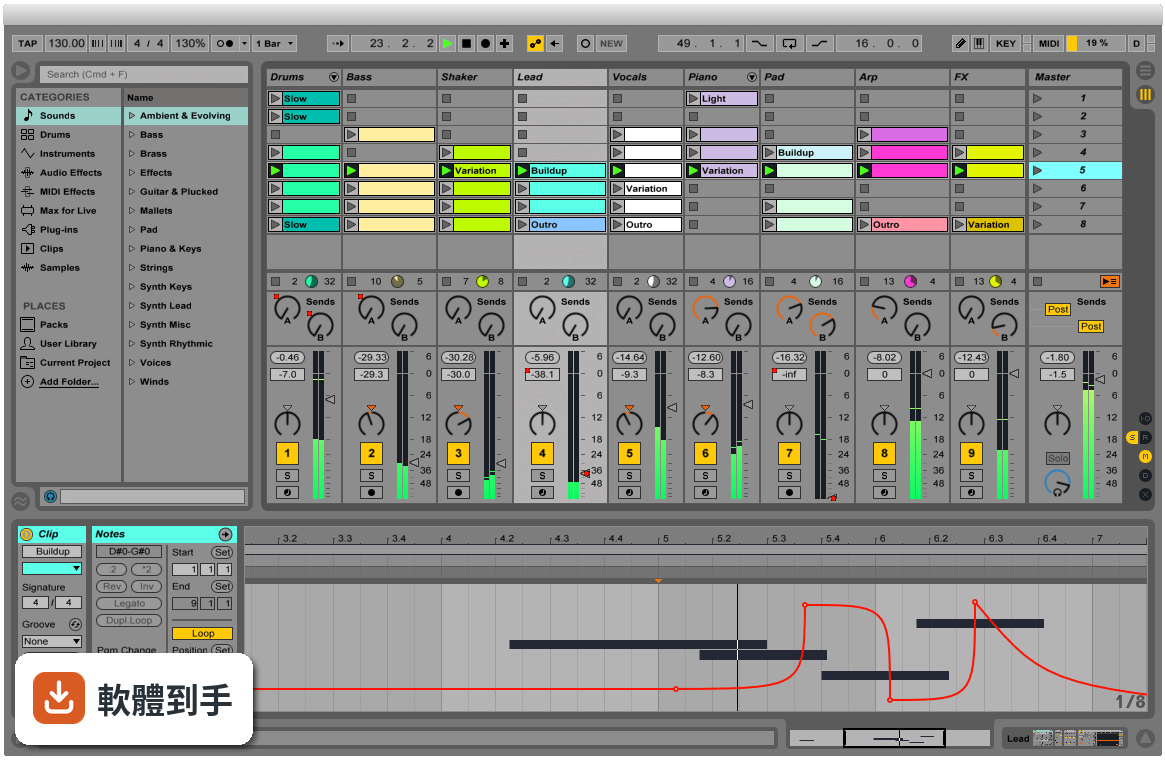
它最特別的是同時提供兩種工作視圖。Arrangement View 跟傳統編曲軟體一樣,把素材沿時間軸排列;Session View 則是一格格可以隨時觸發的格子,你可以把各種聲音片段放進去,用滑鼠或 MIDI 控制器即時開關、重疊、組合。這種設計讓「試東西」變得很直覺,不用先想好順序,先玩再說。
02它的 Session View 實際用起來是什麼感覺?
想像你把幾十個聲音片段擺在一個大面板上,每個片段都可以獨立播放或停止。你可以一邊放著鼓組,一邊試著觸發不同的貝斯或和弦片段,看哪幾個搭在一起順耳。找到喜歡的組合後,再把這些片段錄進 Arrangement View 排成完整歌曲。對習慣先亂試再整理的人來說,這個流程比直接面對一條時間軸順手很多。
03它能不能錄音?MIDI 編輯方便嗎?
可以。官方說明明確提到能從任何來源錄製音訊和 MIDI,也提供 MIDI 和音訊效果器、虛擬樂器。MIDI 編輯方面,它具備完整的編輯工作流程,可以處理音符、力度、長度等細節。不過實際編輯手感好不好,還是建議自己下載試用版操作看看,每個人習慣的編輯方式不太一樣。
04它內建的音色和效果器夠用嗎?
官方說明提到內建大量聲音、樂器和效果器,涵蓋合成器、取樣、EQ、壓縮器等常用工具。Intro、Standard、Suite 三個版本內容不同,Standard 和 Suite 有更多樂器、音色包和效果器。如果你需要特定類型的音色,也可以透過 Max for Live 擴充,社群做了很多免費或付費的裝置可以裝。
05現場演出用這套軟體實際嗎?
官方把現場演出列為主要用途之一。它會自動幫你對齊拍點,讓你可以即時觸發迴圈、播放軟體或硬體樂器、處理其他樂手的音訊輸入,不用手忙腳亂地對拍。Session View 的格子設計本來就很適合現場即時觸發不同段落,很多電子音樂演出者確實用它來做現場編排。
06新手學音樂製作適合用這套嗎?
官方說它「快速、有趣、直覺」,介面也強調可自訂。但要注意介面語言只有英文,不熟悉英文介面的人初期會比較吃力。另外它功能很多,Intro 版功能較精簡,對新手來說反而比較不會被淹沒。建議先從 Intro 版開始,或下載試用版摸熟流程,再決定要不要升級。
07做電子音樂的人是不是比較適合它?
它的即時音訊處理、時間拉伸、音高轉換、Audio-to-MIDI 轉換等功能,對電子音樂製作確實很實用。你可以把一段錄音直接轉成 MIDI 再編輯,或把任何音訊素材任意變速變調。不過這不代表其他曲風不能用,只是它的工作流程設計上,對以片段拼貼、電子聲響為主的創作方式特別友善。
08我英文不好,介面只有英文會很卡嗎?
會,這點要老實說。它的介面語言只有英文,沒有中文選項。如果英文閱讀不順,初期光是搞懂每個按鈕和選單的功能就要花不少時間。雖然網路上有很多教學影片可以參考,但操作時還是得面對英文介面。英文真的不行的話,可以考慮其他有中文介面的編曲軟體。
09我只有 Mac 或手機,能用嗎?
官方 FAQ 說它目前提供 macOS 和 Windows 版本,你提供的資料顯示支援 Windows 10/11 64 位元。手機和平板沒有原生版本,只有第三方 app 可以跟 Ableton Live 專案做某種程度的整合,但無法完整使用這套軟體。如果你主要用手機或平板創作,這套軟體現階段不適合你。
10想跟朋友線上一起做音樂,這套行嗎?
官方 FAQ 明確說它沒有原生支援即時協作。你們可以互相交換專案檔或音訊檔來合作,但沒辦法像 Google Docs 那樣兩個人同時在同一個專案裡編輯。如果你很需要即時線上協作,這套軟體做不到,得另外找其他工具搭配,或考慮其他有協作功能的音樂軟體。
11預算有限,試用版夠用嗎?
它的授權型式是 Trial,代表你可以先試用再決定。但試用版通常有功能限制或使用期限,實際限制要看官方規定。如果你只是偶爾做做音樂、不想花錢,可以考慮其他免費或開源選項,例如 MuseScore 雖然定位不同,但至少是免費的。長期要認真做的話,再評估付費購買哪個版本。
12它跟 Cubase、REAPER 那些比起來,我該選哪個?
這要看你的工作習慣。Ableton Live 的強項是 Session View 的即興創作和現場演出流程;Cubase 和 REAPER 在傳統線性編曲、混音方面有各自的擁護者。評分方面,Cubase Pro 有 501 人評分,REAPER 有 117 人,Ableton Live 是 277 人評 7.58 分。建議先想清楚你主要做錄音混音還是做電子音樂、現場演出,再下載試用版實際比較。
下載與官方連結
ableton_live_trial_11.2_64.zip · 連結指向軟體原廠
版本紀錄
- 2026-11-01 Ableton Live 12.4.16 4.2 GB
- 2026-10-26 Ableton Live 12.4.7 4.1 GB
- 2026-09-18 Ableton Live 12.4.6 4.1 GB
再看 5 筆
- 2026-08-27 Ableton Live 12.4.5 4.1 GB
- 2026-07-14 Ableton Live 12.4.3 4.1 GB
- 2026-06-12 Ableton Live 12.4.2 4.1 GB
- 2026-05-29 Ableton Live 12.4.1 4.1 GB
- 2026-05-05 Ableton Live 12.4 4.1 GB
這一版改了什麼
What's new in this version:
New features and improvements:
Capture MIDI:
- Capture results are no longer influenced by the song tempo set by the target track's previous Capture attempts
- When Live’s transport is running, Capture MIDI will keep longer phrases in captured clips
Control Surfaces:
- In the Launchkey MK3 Control Surface script, the Quantise button can now quantize clips in Session or Arrangement View
- The Launchkey MK3 Control Surface script now also works with the Launchkey 88
- On the PreSonus ATOM SQ, it is now possible to scroll between device parameter banks by holding the bank navigation buttons down
- In the ATOM SQ Control Surface script, it is now possible to control the Master Track volume and pan in Song mode when the Master Track is selected
- The encoder sensitivity for the ATOM SQ Control Surface script has been refined to better match the parameters they control. Additionally, the encoders can be used to fine tune parameter values when the Shift button is pressed.
Core Library:
- Added audio and MIDI clips to Session View in Live’s Demo Song
- In the DS Drum Rack preset, devices contained in the selected chain are now always shown by default
Interface:
- The icons in Live’s Preferences and dialogs have been improved
- Updated the appearance of the "Record/Warp/Launch" tab in Live's Preferences
- The error dialog window that appears when loading a Live Set with disabled plug-ins now displays the track name before the timestamp
- Live now shows different icons for Live Clip (.alc) files that distinguish between Audio and MIDI content in the browser
- When renaming tracks, [Tab] will navigate to the next track or chain header, while [Shift][Tab] navigates to the previous track or chain header
- Value ranges on vertical rulers in the MIDI Note Editor are now always displayed as two values stacked vertically
- Improved drag and drop behavior within list views (such as the Groove Pool and device chains). Instead of always being inserted before the target item, dropped items will now be placed dynamically, depending on which half of the target item the cursor hovers over. In addition, the copy modifier [ALT] now works more consistently.
- When Num Lock is switched off on Windows, the number pad arrows, PgUp, PgDn, Home, and End keys now function as expected.
- Disabled devices now display an alert icon above error messages in Device View
- When exporting multiple tracks, the option to also export video at the same time is now deactivated in the Export Audio/Video dialog
- Updated various software texts
- Updated various Help View lessons
- Updated various software text and Help View lesson translations in German, Spanish, French, Italian, Japanese, and Simplified Chinese
Max for Live:
- live.banks: added warnings to explain non-reactivity in Max-only
- Dynamic Colors: changed label of ‘live_control_fg’ to ‘Text /Icon’
- jweb / CEF: fixed usage in Max for Live (Windows)
- live.* ui objects: updated color code
- live.banks: banks configuration is retained if device is opened and saved in Max
- live.comment: linecount is preserved
- live.gain~: @orientation 1 typed-in a box works as expected
- live.gain~: auto-adapts when transforming to MC version
- live.observer: fixed value output after opening/closing Max editor
- crosspatch: works in the context of a Max for Live device hosted in Live
- Max for Live / Gen: improved fixes for intermittent crashes
- A new property in the Max for Live API allows users to observe the number of visible Macro Controls for a RackDevice.
- Audio driver input and output latencies are now taken into account for Max for Live devices that contain audio routings to external targets. If needed, users can revert to the previous behavior by using the -DisableM4LRoutingCompensation debug option in an Options.txt file.
- The time_signature_numerator, time_signature_denominator, time_signature_enabled and tempo_enabled properties are now available in the Max for Live API. Corrected descriptions for the properties have also been added.
- Improved and updated the scale_name and scale_intervals descriptions in the Max for Live API.
New Devices and Device Improvements:
Reverb:
- The Reverb device's interface has been updated with a fresh design
- The Reverb device's Density and Quality parameters have been renamed to Diffusion and Density. The parameter values for Density (previously Quality) have also been changed from Eco, Mid, and High to Sparse, Low, Mid, and High. Sparse mode allows for lower CPU usage.
- Added a Smooth dropdown menu to the Reverb device. You can now specify how the Size parameter responds when changed using the Smooth options None, Slow, or Fast.
- Setting Smooth to None means that some artifacts may occur when changing the Size parameter values. The Slow and Fast options ensure that new delay times are updated over a specific period of time, resulting in a more musical sound.
- Added a switchable filter type to the High filter in Reverb’s Diffusion Network. You can choose between a one-pole low-pass filter or a low-shelf filter.
- Optimized for better CPU performance
Tuner:
The Tuner device now includes three new options for note spellings. You can access a menu with these options when you right-click anywhere within Tuner's UI:
- Sharps (C#)
- Flats (D♭)
- Sharps and Flats (C#/D♭)
- It is now possible to zoom out to a full octave in Tuner's Histogram View by clicking the interface and dragging the cursor horizontally.
- In the Phaser-Flanger device, the Phase parameter of the LFO now has a default value of 180 degrees.
- The Excitator section of the Tension device is now called “Exciter” in Live and on Push.
- A context menu option for a Hi-Quality mode has been added to the Delay device. Switching off Hi-Quality uses less CPU resources.
- The Channel EQ device now uses less CPU resources.
- Presets containing the Saturator device now run with improved CPU usage.
- Inactive visualization data will no longer be sent in the Wavetable and Phaser devices, resulting in slightly improved performance.
- When mapping and unmapping device parameters to Macros, the Map/Unmap labels now appear as expected.
- A Hi-Quality option has been added to the [right-click](Win) / [CTRL-click](Mac) context menu of the Redux device. Using Redux with Hi-Quality switched off saves some extra CPU.
Plug-ins:
- Added native support for AUv3 plug-ins on macOS 10.15 or higher
- Live's Preferences now include options to enable both AUv2 and AUv3 plug-ins
- Plug-in errors are now shown in Live’s Status Bar, along with a linked detailed error report
- If the connection to an AUv3 plug-in gets lost, an error message will be displayed. The plug-in will also be disabled, the output muted, and the plug-in window closed.
Push:
- On Push 2, the parameter names of the AAS devices (Analog, Collision, Tension and Electric) have been improved and aligned with the UI for readability
Session View Improvements:
- It is now possible to simultaneously rename multiple Rack chains in Session View
- When navigating tracks and device chains using the left arrow key in Session View, navigation will stop at the first track header as expected
Setup:
- To avoid incompatibilities, you will be asked to save Live Sets created with an older version of Live as a new file in Live 11.2
- Renamed the Customization section of Live's Preferences to Display Customization, which now also includes the Zoom Display setting
- Metal rendering is now enabled on macOS by default to improve UI rendering performance. To deactivate this, use the Options.txt entry -DisableGraphicsHardwareAcceleration.
- Bugfixes
Live Bugfixes:
- Improved Live's performance when selecting or deselecting many clips
- On macOS, Live's UI would sometimes show graphical errors after opening Live on a HiDPI monitor, changing the Zoom Display settings to a value other than 100%, and moving the window to a LowDPI monitor.
- Fixed the appearance of the Phaser-Flanger device's Env Fol parameter when the device is deactivated
- Fixed a bug that would stop the manual freeze output when switching the Spectral Time device's Freezer Fade Shape from Crossfade to Envelope mode
- Fixed an issue that caused the Corpus device to output silence when using larger buffer sizes on Windows
- Added info texts for the Frz > Dly and Dly > Frz toggles in the Spectral Time device
- Added a missing info text for the Env Amt parameter in Collision’s Noise Filter section
- Fixed some issues with the LFO and MPE Control devices
- Previously, Live would crash when routing an Ext. Instrument's MIDI output to an MPE routing target if the track's device chain also contained a plug-in, Max for Live device, or certain built-in audio effects.
- The dropdown menu for Reverb's Density parameter is now 2px wider to avoid cutting off the word "Sparse.”
- Fixed an issue that could cause an invalid selection when selecting all chains in a Drum Rack in Session View
- On Windows, Live’s UI now refreshes as expected after tapping [ALT] to open the main menu
- Any time the Clip Detail view panels are arranged vertically, Live now opens the Envelopes panel and scrolls it into view when creating per-step automation on Push or using the "Show Automation" or "Show Modulation" context menu entries on a parameter.
- Opening a context menu on Windows with the keyboard shortcut [Shift][F10] no longer changes the time selection in Arrangement View, Session scene selection, or browser selection
- On Windows, opening a context menu with the [Shift][F10] keyboard shortcut no longer changes the selected Session track header or Session clip
- Fixed an issue that could cause artifacts when using the Complex or Complex Pro warping mode on clips that were only slightly warped
- Fixed an issue that caused unnecessary freeze tail clips when freezing and flattening clips with small gaps between them
- Fixed a bug that caused MIDI notes and audio waveforms to jiggle slightly when adjusting clip edges in Arrangement View
- Selecting a velocity or probability marker and typing in a number sets the value as expected
- When Rack Macro Controls and chains are unfolded, the Rand and Map buttons are now properly aligned
- When showing or hiding chains in a Rack, the buttons would previously move up and down depending on the view shown. These buttons are now evenly spaced at all times.
- Fixed an issue that caused Session clips to be added over Arrangement clips when copying a track in Session View and pasting it into Arrangement View.
- Fixed an issue that caused inconsistent time signatures when launching scenes with specific time signatures in Session View, and then quickly going back to the Arrangement View. This issue could also cause the Re-enable Automation button to become stuck.
- When a track is frozen, the Velocity Range slider will now freeze as expected in MIDI clips
- Fixed an issue that prevented the keyboard shortcut to expand Clip View [CTRL][ALT][E] (Win) / [CMD][OPT][E] (Mac) from working when switching from Session View to Arrangement View (or vice versa) when no clip was selected.
- Selecting time in the MIDI Velocity Editor now works as expected when multi-clip editing
- When a user changes the MIDI Envelope Auto-Reset option in a set, they will be prompted to save the changes when they close the set or quit Live.
- Fixed an issue that caused Live to hang when zooming out of a clip with a small loop region that was being recorded
- Fixed a crash that occurred when loading certain Live Sets containing more than 1,000 tracks
- Fixed a crash that occurred when using the header area of a time selection to select time in a MIDI clip when in the Expression tab
- Fixed a potential crash when opening old Live Sets that contained devices that have since been removed from Live
- AU plug-ins are now informed about silent inputs so that they can release CPU resources and report output silence if possible. This will allow any device in the device chain after the AU plug-in to release CPU resources as well.
- Fixed an issue that caused note feedback to break when using certain Control Surface script interactions, such as repeatedly switching the note layout on Push while a MIDI clip was playing
- Fixed an issue that inadvertently showed blue hand icons and device locking options for particular device control features not available in some Control Surface scripts
- Fixed a bug that kept internal buffers of VST3 plug-ins from resetting properly. As a result of this fix, lingering signals (like reverb and delay tails) are now reset before audio export starts. Lingering signals can also be cut off quickly by clicking the Stop button three times.
- Fixed an issue with certain VST3 plug-ins that created unwanted artifacts in rendered audio
- Fixed a crash that occurred when loading a Live Set with plug-in automation on the Master track, or on a Return or Group Track
- Live no longer hangs when opening a dropdown menu while Grammarly is running
- Fixed a crash that would occur when VST plug-ins requested the dedicated GPU, or when the user changed the macOS Battery "Automatic graphics switching” preference.
- Fixed a bug that caused silence and/or hanging notes when recording MIDI notes into clips that already contained those same notes
Improved high DPI support for VST3 plug-ins on Windows:
- Plug-ins that support high DPI and IPlugViewContentScale should be the correct size
- Plug-ins that have their own resizing logic should not resize when the user drags the window around
- Plug-in windows are instantiated with the correct size in both scaled and non-scaled modes
- Plug-ins that support host-initiated resizing are interrogated by calling checkSizeContraint in the correct place
- Plug-ins that support host-initiated resizing can be maximized by double-clicking on the title bar
- Fixed a potential crash on Windows that occurred when closing Live right before the program tried to install default Packs
- Fixed an issue with various Control Surface scripts that caused clip launch button LEDs to be in an incorrect state when changing the input type of a track
- When using the ATOM, ATOM SQ, and FANTOM Control Surface scripts, Arm button LEDs now reflect a track’s implicit armed state
- Fixed an issue in the SL_MKIII Control Surface script that resulted in incorrect LED button states when exiting Drum Mode
- Fixed a crash when loading a corrupt Live Set containing non-unique Pointee IDs. Live now recognizes if the set is corrupt and displays a corresponding error message. Users can reach out to Support to see if their sets can be repaired.
- Fixed a bug where context menus would close abruptly if Voice Control was enabled on System Settings on macOS
- Switching between Session and Arrangement View while a launched clip is playing on Push will now always display the clip as expected
- Previously, Live would crash when deleting an instance of Simpler from a Drum Rack pad while the Simpler's Envelopes view was visible on Push
- Previously, Live would crash when using the Extract Chains command on a Drum Rack chain that had automation or modulation for the Chain Send Level
- Fixed an issue that deselected AU plug-ins after duplicating a selected plug-in
- Fixed a crash that sometimes occurred when loading a plug-in that could not instantiate its presets
- Fixed an issue that caused Live’s menu bar to become invisible after deleting all video clips if the video window was in Full Screen Mode on macOS
- Fixed a crash that occurred when dragging and dropping another Live Set with Group Tracks into Session View as a new scene in certain circumstances
Max for Live Bugfixes:
- Fixed a bug where adding Expression Control would create unnecessary undo steps
- Fixed an issue that caused Shaper MIDI to produce unnecessary Undo steps
- Fixed an issue that resulted in incorrect Undo values when using Align Delay in Distance mode