
這是歷史版本頁面 — 看 Ableton Live 最新版本
編曲到一半卡住?Ableton Live 的 Session View 能幫你什麼
 Ableton Live 11.3.10
資料更新 2023-08-22
閱讀約 6 分鐘
寫歌寫到一半,靈感斷掉,看著編曲軟體的時間軸一片空白,不知道下一步要放什麼。或者你已經有一堆零散的旋律片段、鼓點、貝斯線,卻怎麼排都覺得不對勁,拖來拖去就是組不成一首完整的歌。這種「有素材卻拼不起來」的卡關,是很多做音樂的人共同的困境。
傳統的編曲方式是把所有素材照時間順序排好,但靈感往往不是線性出現的。當你只是想快速試試「這段配那段好不好聽」,或想在演出時即時觸發不同段落,一條時間軸反而礙手礙腳。於是有些音樂軟體改從「即興、拼貼、即時觸發」的角度切入,讓你先在一個自由的空間裡亂試,試出感覺後再整理成完整作品。
01Ableton Live 跟其他編曲軟體差在哪?
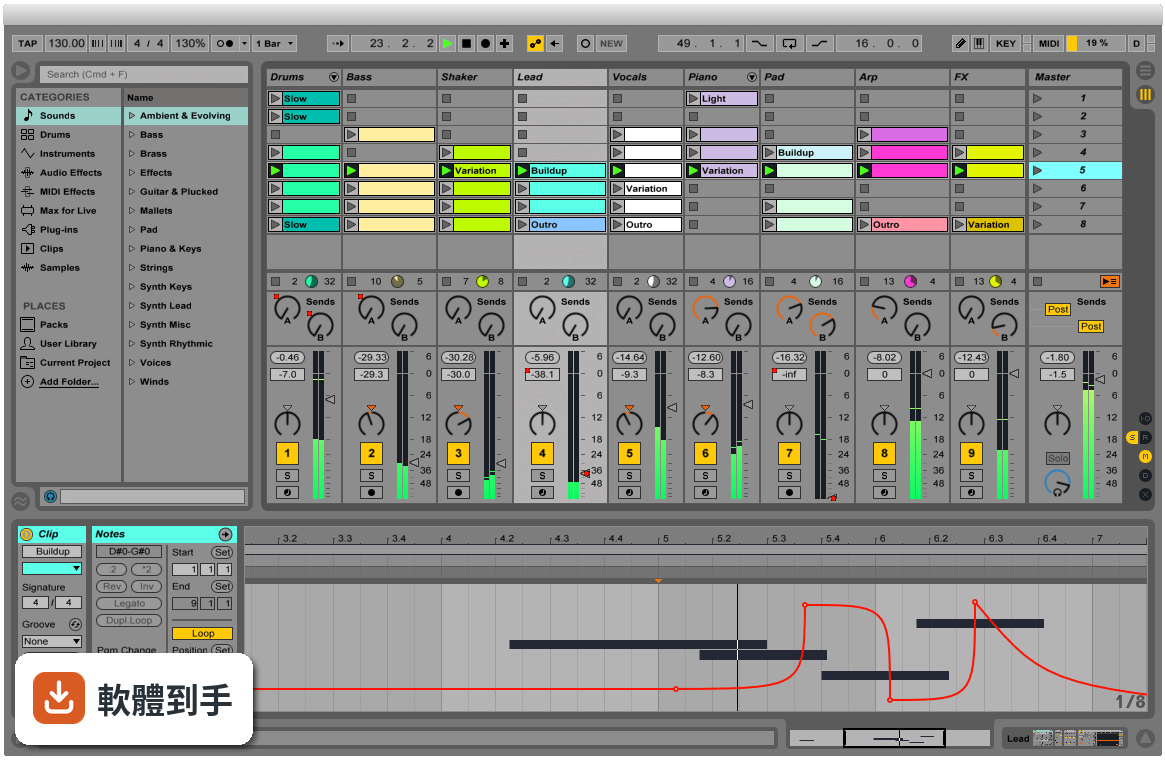
它最特別的是同時提供兩種工作視圖。Arrangement View 跟傳統編曲軟體一樣,把素材沿時間軸排列;Session View 則是一格格可以隨時觸發的格子,你可以把各種聲音片段放進去,用滑鼠或 MIDI 控制器即時開關、重疊、組合。這種設計讓「試東西」變得很直覺,不用先想好順序,先玩再說。
02它的 Session View 實際用起來是什麼感覺?
想像你把幾十個聲音片段擺在一個大面板上,每個片段都可以獨立播放或停止。你可以一邊放著鼓組,一邊試著觸發不同的貝斯或和弦片段,看哪幾個搭在一起順耳。找到喜歡的組合後,再把這些片段錄進 Arrangement View 排成完整歌曲。對習慣先亂試再整理的人來說,這個流程比直接面對一條時間軸順手很多。
03它能不能錄音?MIDI 編輯方便嗎?
可以。官方說明明確提到能從任何來源錄製音訊和 MIDI,也提供 MIDI 和音訊效果器、虛擬樂器。MIDI 編輯方面,它具備完整的編輯工作流程,可以處理音符、力度、長度等細節。不過實際編輯手感好不好,還是建議自己下載試用版操作看看,每個人習慣的編輯方式不太一樣。
04它內建的音色和效果器夠用嗎?
官方說明提到內建大量聲音、樂器和效果器,涵蓋合成器、取樣、EQ、壓縮器等常用工具。Intro、Standard、Suite 三個版本內容不同,Standard 和 Suite 有更多樂器、音色包和效果器。如果你需要特定類型的音色,也可以透過 Max for Live 擴充,社群做了很多免費或付費的裝置可以裝。
05現場演出用這套軟體實際嗎?
官方把現場演出列為主要用途之一。它會自動幫你對齊拍點,讓你可以即時觸發迴圈、播放軟體或硬體樂器、處理其他樂手的音訊輸入,不用手忙腳亂地對拍。Session View 的格子設計本來就很適合現場即時觸發不同段落,很多電子音樂演出者確實用它來做現場編排。
06新手學音樂製作適合用這套嗎?
官方說它「快速、有趣、直覺」,介面也強調可自訂。但要注意介面語言只有英文,不熟悉英文介面的人初期會比較吃力。另外它功能很多,Intro 版功能較精簡,對新手來說反而比較不會被淹沒。建議先從 Intro 版開始,或下載試用版摸熟流程,再決定要不要升級。
07做電子音樂的人是不是比較適合它?
它的即時音訊處理、時間拉伸、音高轉換、Audio-to-MIDI 轉換等功能,對電子音樂製作確實很實用。你可以把一段錄音直接轉成 MIDI 再編輯,或把任何音訊素材任意變速變調。不過這不代表其他曲風不能用,只是它的工作流程設計上,對以片段拼貼、電子聲響為主的創作方式特別友善。
08我英文不好,介面只有英文會很卡嗎?
會,這點要老實說。它的介面語言只有英文,沒有中文選項。如果英文閱讀不順,初期光是搞懂每個按鈕和選單的功能就要花不少時間。雖然網路上有很多教學影片可以參考,但操作時還是得面對英文介面。英文真的不行的話,可以考慮其他有中文介面的編曲軟體。
09我只有 Mac 或手機,能用嗎?
官方 FAQ 說它目前提供 macOS 和 Windows 版本,你提供的資料顯示支援 Windows 10/11 64 位元。手機和平板沒有原生版本,只有第三方 app 可以跟 Ableton Live 專案做某種程度的整合,但無法完整使用這套軟體。如果你主要用手機或平板創作,這套軟體現階段不適合你。
10想跟朋友線上一起做音樂,這套行嗎?
官方 FAQ 明確說它沒有原生支援即時協作。你們可以互相交換專案檔或音訊檔來合作,但沒辦法像 Google Docs 那樣兩個人同時在同一個專案裡編輯。如果你很需要即時線上協作,這套軟體做不到,得另外找其他工具搭配,或考慮其他有協作功能的音樂軟體。
11預算有限,試用版夠用嗎?
它的授權型式是 Trial,代表你可以先試用再決定。但試用版通常有功能限制或使用期限,實際限制要看官方規定。如果你只是偶爾做做音樂、不想花錢,可以考慮其他免費或開源選項,例如 MuseScore 雖然定位不同,但至少是免費的。長期要認真做的話,再評估付費購買哪個版本。
12它跟 Cubase、REAPER 那些比起來,我該選哪個?
這要看你的工作習慣。Ableton Live 的強項是 Session View 的即興創作和現場演出流程;Cubase 和 REAPER 在傳統線性編曲、混音方面有各自的擁護者。評分方面,Cubase Pro 有 501 人評分,REAPER 有 117 人,Ableton Live 是 277 人評 7.58 分。建議先想清楚你主要做錄音混音還是做電子音樂、現場演出,再下載試用版實際比較。
下載與官方連結
ableton_live_trial_11.3.10_64.zip · 連結指向軟體原廠
版本紀錄
- 2026-11-01 Ableton Live 12.4.16 4.2 GB
- 2026-10-26 Ableton Live 12.4.7 4.1 GB
- 2026-09-18 Ableton Live 12.4.6 4.1 GB
再看 5 筆
- 2026-08-27 Ableton Live 12.4.5 4.1 GB
- 2026-07-14 Ableton Live 12.4.3 4.1 GB
- 2026-06-12 Ableton Live 12.4.2 4.1 GB
- 2026-05-29 Ableton Live 12.4.1 4.1 GB
- 2026-05-05 Ableton Live 12.4 4.1 GB
這一版改了什麼
What's new in this version:
Live - New features and improvements:
- Users that have Cloud enabled but are not logged in will be greeted with a new landing view when selecting the Cloud label in the browser
- Updated the Core Library to make adjustments to Note Pitch Bend settings for some MIDI clip presets
- Users can now control Drift using Max for Live
- Added default values to Drift's Stereo and Unison modes
- Users will now be redirected to the online manual on ableton.com when clicking on links to the manual in Help View lessons
- Added software texts for Pitch Bend Range and Note PB Range in the MIDI/MPE tab in Collision
- Added software texts for the Global/MPE radio buttons in Analog
- Updated various software texts for Drift and the Cloud label
- Updated some software text translations in French, German, Italian, Japanese, and Spanish
- Updated the Max for Live Devices Help View lesson
- Fixed a typo in the A Tour of Live Help View lesson
- Updated the bundled Max build to version 8.5.5
Live - Bugfixes:
Auto-Warp fixes:
- Fixed a bug that caused Live to hang when browsing factory packs and loading multisampled instruments
- Improved the loading speed for Sets that contain samples which include .asd files, as well as for Packs that contain sampled instruments
- Fixed an issue that caused noise artifacts to be added to audio signals when using the Complex or Complex Pro warp modes on Apple silicon computers
- When auto-warping samples that were created at a fixed tempo, Live will now often warp these files using a single warp marker with a constant tempo
- Improved the tempo choice of the “Warp From Here (Straight)” context menu option
- Recording samples will no longer result in UI lag
- When the Auto-Warp Long Samples option in Live's Record/Warp/Launch Preferences is switched off, opening existing Live Sets will no longer cause UI freezes due to auto-warp analysis. However, there a few scenarios that could still result in a UI freeze or lag
- If the preference “Auto-Warp Long Samples” is switched on in the Record/Warp/Launch Preferences, long samples will be analyzed when they are imported into Live
- If “Auto-Warp Long Samples” preference is switched off and a sample is imported or recorded directly in Live, the sample will be analyzed when using the context menu options “Warp From Here” or “Warp From Here Straight." Similarly, if an unwarped sample is warped using a context menu option, it will be analyzed
- Updated the End User License Agreement in Live’s installer
- When selecting one or more notes in the MIDI Note Editor and entering a velocity value with the keyboard, the possible velocity range is now limited to 1-127 rather than 0-127
- Fixed a bug which sometimes caused a MIDI note’s velocity value shown in the MIDI Note Editor to be different from the velocity value shown in the Status Bar
- The screen no longer flashes pink when starting Live in full screen on macOS ARM-based machines
- Fixed a bug that prevented Wavetable’s expanded view from filling the entire width of the Live window
- Fixed a bug that caused grooves to replace existing grooves in the Groove Pool instead of being copied when dragging and dropping grooves from Live’s browser or clips while holding the copy modifier CTRL (Win) / ALT (Mac)
- In Drift, using a Sample & Hold LFO Waveform in combination with the Retrigger option now correctly changes the initial value of the shape with each triggered note
- Fixed an issue in Drift’s filter that sometimes caused notes to sound as if attack was applied to them
- When using Drift with a sustain pedal, releasing the pedal no longer stops notes that are still held on a MIDI keyboard or Push
- Fixed a bug in the Analog device that caused negative values of the Pitch Env Initial parameter to behave as positive values
- Note-off velocity is now correctly passed through in MPE Control
- On macOS, Live no longer crashes when the Output Device in Audio Preferences is set to "Use System Device" and the Input Device is set to a device which is incompatible with the Output Device
- On macOS, Live no longer crashes when disconnecting certain audio interfaces while the Input Config dialog is open
- Fixed a potential crash that could occur when audio devices or their properties were changed in Live’s Audio Preferences
- Max for Live devices that have only an external output routing no longer cause unwanted delay compensation
- Fixed a crash that sometimes occurred when loading the Samplex3 VST3 plug-in. As a result of this fix, the Device View now displays the Show/Hide Plug-In Window wrench icon for VST3 plug-ins
- Fixed an issue that caused plug-ins with 17 output busses to crash Live in some circumstances
- Fixed a crash that occurred when changing a parameter or recording automation while adding or editing an automation value
- On macOS, fixed a crash that sometimes occurred when opening drop-down menus containing very long entries
- Fixed an issue that caused Live to hang at the end of a Pack installation
- Fixed an issue on Apple silicon computers that caused CPU overload and dropouts when using multiple Simpler devices on a drum pad within a Drum Rack
- Fixed a bug that caused Min/Max values for mapped Macro parameters in AUv2 plug-ins to be lost when loading a preset or a Live Set
Push 3 - New features and improvements:
- Updated the Push 3 software package to version 1.3.0 (includes XMOS 1.0.71 firmware)
- User Mode is now available when using Push in Control Mode. All of Push's built-in functionality can be deactivated via User Mode. This allows Push to be reprogrammed to control alternate functions in Live or other software. Press the User button to enter User Mode.
- Items in the Projects folder are now arranged according to the selected sorting criteria
Made the following changes to Browse Mode:
- Packs are now shown with the Packs folder
- The Favorites button is now no longer shown when navigating away from a folder
- Browse Mode can now be closed correctly if the User Mode was toggled when viewing the browser
- Improved discoverability of available Pushes in Live’s browser
- Improved the design of various icons in Browse Mode
- It is now possible to set global launch quantization by holding the Metronome button and turning the fifth encoder from the left
Push 3 - Bugfixes:
- Fixed an issue that prevented the XMOS firmware from being updated correctly for some units
- Fixed an issue that caused lost or jumping notes when pressing a column of pads with considerable force
- Fixed a bug that caused ADAT clock synchronization to be intermittently lost when changing sample rates
- When using Hot-Swap Mode to swap an empty pad after swapping a non-empty pad, the browser will now open the location of the non-empty pad. This behavior matches hot-swapping on Push 2
- Fixed an issue that caused an error message stating Live had crashed to appear when first turning on a new Push unit. This fix also prevents the same message from appearing when turning on Push in Standalone Mode after shutting it down
- Fixed a bug that caused Live to hang when attempting to recover the Live Intro demo Set after loading the Set crashed Live
- Fixed an issue that made it seem as if Push was in recovery mode after a software update. Rebooting after a software update will now correctly trigger shutdown and startup animations
- Max for Live devices which use grab_midi and receive_midi now work correctly when Push is in Control Mode
- When changing octaves while a clip is playing in Note Mode, the pad feedback will now be updated immediately
- The connect screen is now displayed on Push when Live is closed and Push is in Control Mode
- Improved reliability of pads when using low pressure values
- Double triggers on certain drum hits are now suppressed
- Fixed an issue that caused the touch strip to get stuck
- Fixed a bug that caused some firmware update failures
- Fixed a bug that caused the velocity curve to jump after connecting Push to Live
- Fixed an issue that caused double-finger hits of non-drum MPE pads to be lost
- Fixed an issue where the external ADAT clock source was not working on macOS
- Fixed a crash that occurred when loading a Set with the Master track selected and then pressing the Master Track button
- When the amount of Gain on a sample in Simpler is turned down to the minimum, the value will now be correctly displayed as -inf
- Fixed an issue that prevented users from changing the length of notes in clips when using pads in the step sequencers
- Fixed a bug that prevented audio clips from being immediately available for conversion after being recorded
- Fixed a bug that caused display visualizations to overlap when holding a step in a step sequencer for automation recording while the Setup menu was open
- The input meter will now indicate clipping in cases where too much digital gain is applied
- A value of -0.0 no longer appears when fine-tuning Wavetable's parameters
- When attempting to load a Max for Live device that cannot be opened on Push, an error message will now be immediately displayed on the hardware
- Added icons for Group Tracks and tracks containing Drum Racks or Instrument Racks
- If a new Set is created as a part of a lesson on Push, the display no longer shows a notification about a new Set
- Fixed an issue that caused the sensitivity curve to change abruptly when adjusting settings in the Sensitivity tab of the Setup menu
- Fixed a bug that resulted in parameters representing notes to display an integer value instead of the note name
- Increased the encoder sensitivity when adjusting the pitch bend range in Drift
- When playing repeated notes using the Repeat button in the 16-Velocities layout, changing pressure on the pads will no longer change the velocity of the notes
- Removed the option to choose a different volume option by holding the Select button and tapping the Volume encoder
- Adjusting pressure applied to the pads when playing repeated notes while using the Poly or Mono Aftertouch Expression Modes will now correctly affect the velocity of the notes
- Fixed a bug that prevented the Mute button from working when attempting to mute steps in a step sequencer
- Fixed an issue that could result in the shutdown confirmation message being displayed at the same time as the save confirmation message
- Improved responsiveness of the touch strip when changing octaves in Note Mode while playing back a Set with a high CPU load
- Fixed an issue where Packs available for download or update were not visible after using the Hot-Swap Mode
- Fixed a bug that caused the battery charge level to be displayed as “N/A” after charging to 99%
- Improved handling of data removal, so that installing and then uninstalling a Pack when using Push in Standalone Mode will now result in the same amount of free disk space as before installation
- Deleting the last item in a given folder will now result in the browser returning to the parent folder
- When dragging and dropping a clip onto the Push label in Live’s browser, the cursor now changes to indicate that the action cannot be performed
- Pressing the Preview upper display button in Push’s browser now affects the state of the Preview switch in Live’s browser and vice versa
- Fixed a crash that occurred when stopping all playing clips with a return track selected
- Fixed a bug that sometimes caused the upper display buttons and editing options for MIDI clips to appear in white instead of matching the clip’s color
- It is now possible to adjust Drift’s Voice Count parameter on Push
- The available options for the Type B parameter in the EQ Eight device are now represented by icons