
這是歷史版本頁面 — 看 Adobe DNG Converter 最新版本
RAW格式太多怕以後打不開,Adobe DNG Converter在做什麼
 Adobe DNG Converter 14.1
資料更新 2020-04-14
閱讀約 6 分鐘
你翻出幾年前拍的RAW檔,想重新整理一下,卻發現當初那台相機早就停產,原廠軟體也停止維護,新裝的看圖軟體根本打不開這些檔案。更麻煩的是,你手上有兩三台不同品牌的相機,每台都有自己的RAW格式,每次要處理照片就得在不同軟體之間切換,光是想把檔案統一歸檔就卡關。
一般人遇到這種狀況,最直接的想法是轉成TIFF或JPEG,但TIFF檔案巨大、JPEG又會壓縮掉原始資料,兩種都不是理想的保存格式。這類工具的切入點,是提供一個中立的、公開規格的RAW格式,讓你把各家相機的專屬RAW檔轉成同一種格式,既保留原始感光資料,又不用擔心未來某家廠商不玩了、格式失傳的問題。
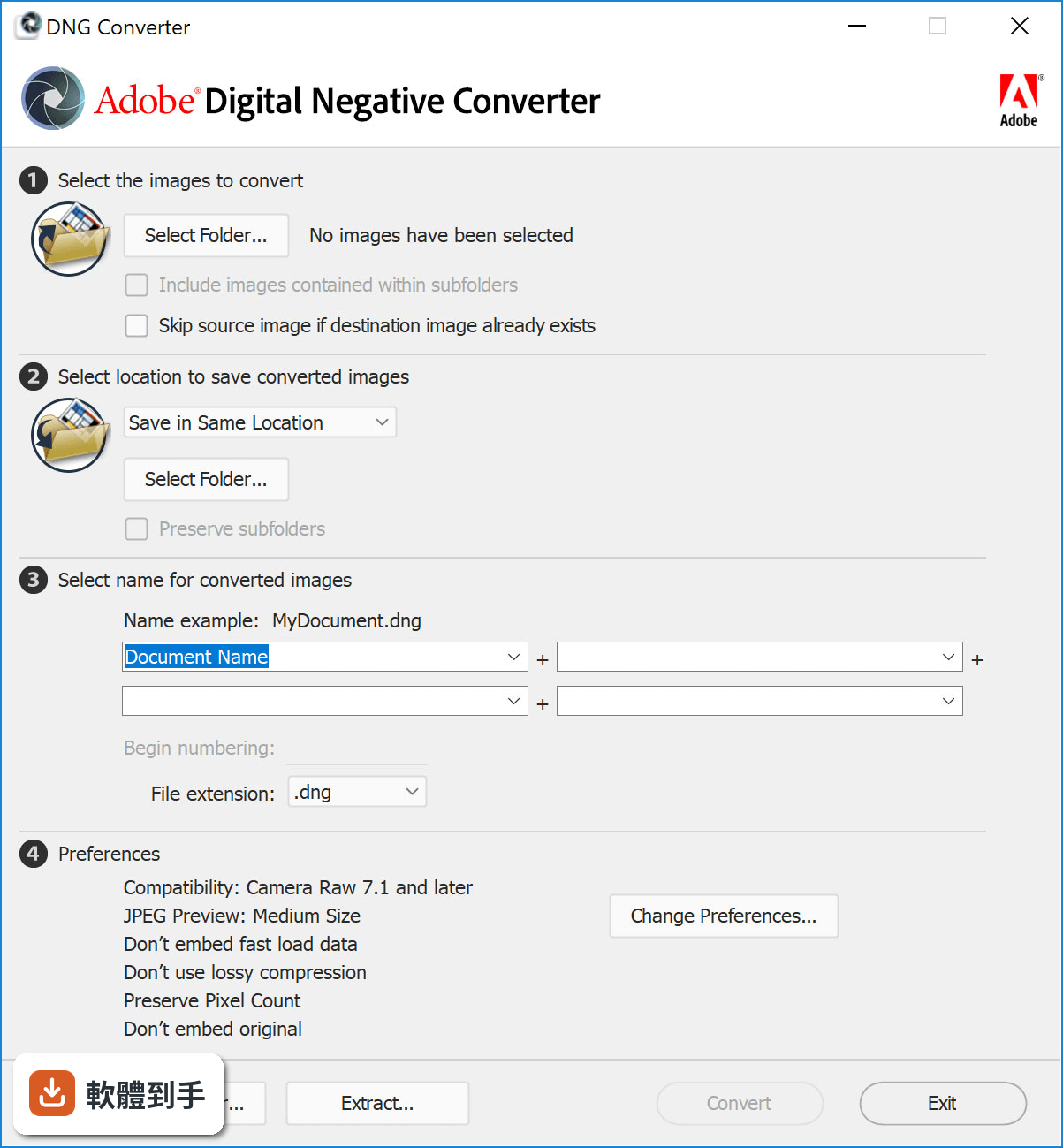
01Adobe DNG Converter到底是做什麼用的,我原本的RAW檔直接丟進Photoshop不行嗎?
它專門把各家相機的RAW檔轉成DNG格式。你原本的RAW檔如果Photoshop或Lightroom認得,確實可以直接開,但問題在於RAW格式是各廠商自家的規格,未來支援可能中斷。轉成DNG之後,檔案變成公開的開放標準,任何支援DNG的軟體都能開啟,不用擔心原廠哪天停止支援你的相機型號。
02轉檔之後畫質會不會變差,我辛辛苦苦拍的原始資料會不會不見?
轉換過程保留原始感光元件資料,包含中繼資料和色彩描述檔,不會重新壓縮或破壞畫質。DNG本身是未壓縮或無損壓縮的格式,轉檔後你還是可以像原本的RAW檔一樣調整白平衡、曝光、雜訊抑制,編輯彈性不會打折。
03我一次要轉好幾百張照片,它能不能一次處理完?
可以,它支援批次處理。你只要指定來源資料夾和目的地資料夾,它就會把整個資料夾裡的RAW檔全部轉成DNG,不用一張一張手動轉。轉檔期間你可以去做別的事,跑完再回來檢查結果。
04我的相機是比較舊的型號,它還認得嗎?
官方說明指出它支援超過600款相機,涵蓋Canon、Nikon、Sony、Fujifilm等主要品牌,而且持續更新以加入新相機的支援。你的舊型號如果不在支援清單裡,可以到Adobe官方網站的Camera Raw頁面查詢完整清單,確認你的相機型號有沒有列在上面。
05轉成DNG之後,對後續編輯有什麼好處?
DNG格式在Adobe軟體裡有更好的編輯彈性,例如雜訊抑制、亮部還原、白平衡調整的效果都比原本的專屬RAW格式來得好。另外,因為DNG是開放標準,不只Adobe的軟體,其他支援DNG的第三方軟體也能開啟,你未來要換編輯軟體也不會被綁住。
06我只是一般拍照的人,不是專業攝影師,用得到這套軟體嗎?
如果你手上有不同品牌的相機,或者你習慣把照片長期保存、幾年後還會回頭整理,那統一格式對你就有實際幫助。如果你只有一台相機、拍完馬上修圖、不會留著RAW檔好幾年,那轉檔對你來說就比較無感,可以不用多這道手續。
07我已經在用Lightroom管理照片了,還需要另外轉檔嗎?
Lightroom本身就有匯入時轉DNG的功能,如果你已經用Lightroom管理全部照片,其實不太需要另外開DNG Converter。這套軟體比較適合的場景是:你有一批舊RAW檔想一次轉完、或者你不想開Lightroom只想單純轉檔、又或者你根本不用Adobe的編輯軟體。
08這套軟體只有英文介面,我看不懂英文會不會很難操作?
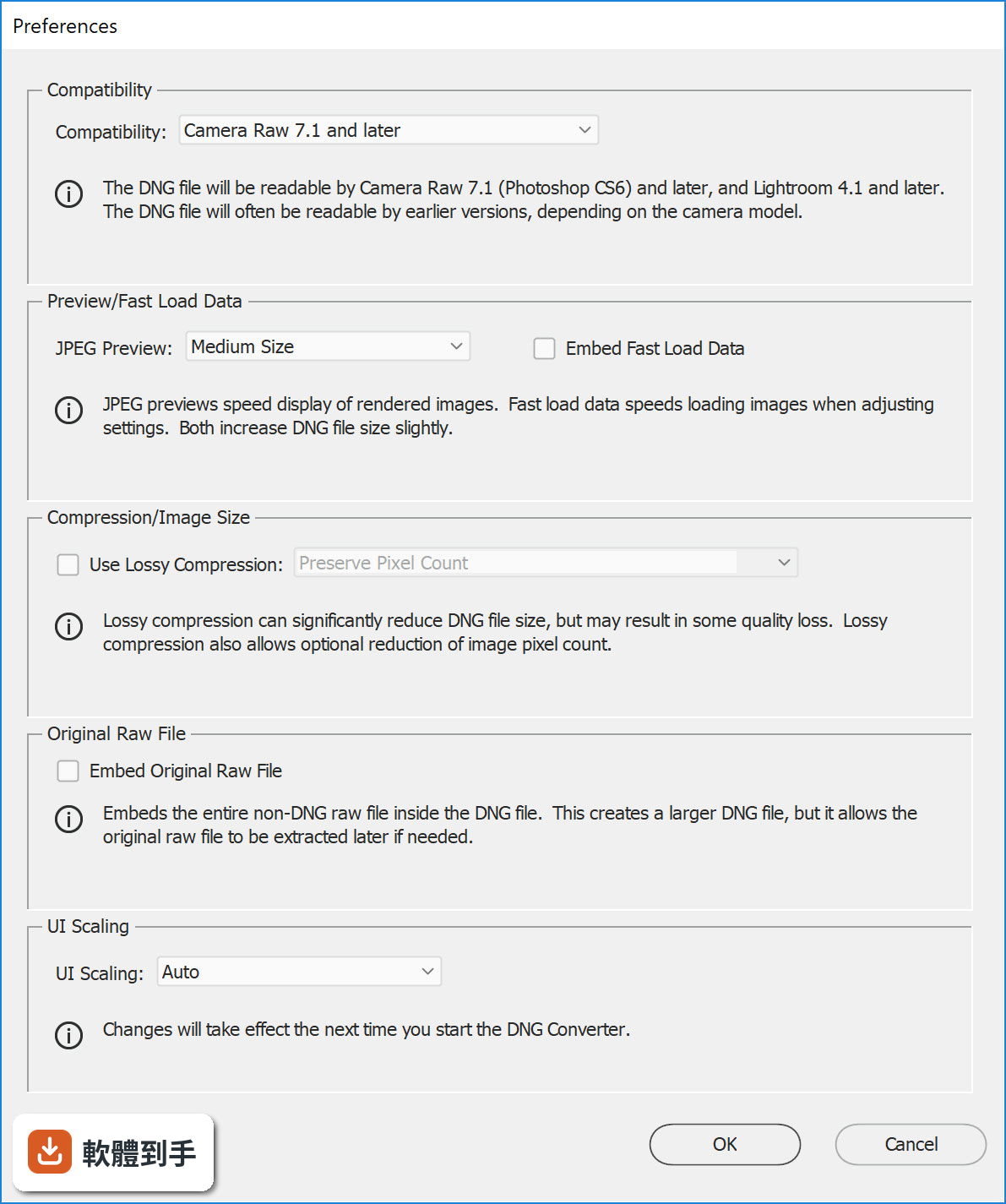
介面確實只有英文,但操作流程很單純:選來源資料夾、選目的地資料夾、按Convert按鈕,就這幾個步驟。如果你只是要轉檔,不太會遇到看不懂的選項。但如果你需要調整進階設定,例如重新命名規則或相容性選項,那就需要基本的英文閱讀能力。
09我主要是用Mac電腦,這套軟體有Mac版嗎?
官方說明提到它支援Windows和macOS兩種系統,你提供的資料只列出了Windows 10和Windows 11的支援,macOS版本需要到Adobe官方網站確認目前支援的系統版本。建議直接上官網看下載頁面,上面會列出完整的系統需求。
10這套軟體跟Adobe Camera Raw有什麼不同,我該用哪一個?
Camera Raw是Photoshop和Lightroom裡面的RAW處理引擎,負責解讀和編輯RAW檔,它不是獨立轉檔工具。DNG Converter是獨立的免費工具,專門把RAW轉成DNG,不做編輯。如果你只是要轉檔,用DNG Converter;如果你要編輯RAW檔,用Camera Raw。兩者可以搭配使用,先轉DNG再進Camera Raw編輯。
11我聽說RawTherapee也是免費的RAW處理軟體,跟這套比起來如何?
RawTherapee是完整的RAW編輯軟體,包含轉檔、調整、輸出等功能,而DNG Converter只做單一事情:把RAW轉成DNG。如果你需要的是編輯功能,RawTherapee能做的事情多很多;如果你只是想把RAW統一成DNG格式,DNG Converter更輕量、操作更單純。兩者定位不同,看你需要的是什麼。
12這套軟體一直有在更新嗎?會不會用一用就沒人維護了?
從版本紀錄來看,它更新頻率相當高,近一年內有多次更新,而且持續加入新相機的支援。Adobe有持續維護這套免費工具,因為DNG格式是Adobe推廣的開放標準,他們有動機維持這套轉檔工具的可用性。不過軟體維護狀況隨時可能改變,建議使用前到官方網站確認最新狀態。
下載與官方連結
Premiere_Pro_Set-Up.exe · 2 MB · 連結指向軟體原廠
版本紀錄
- 2026-10-16 Adobe DNG Converter 18.7 1.7 GB
- 2026-08-26 Adobe DNG Converter 18.6 1.7 GB
- 2026-08-05 Adobe DNG Converter 18.5 1.7 GB
再看 5 筆
- 2026-07-10 Adobe DNG Converter 18.4.1 1.7 GB
- 2026-06-22 Adobe DNG Converter 18.4 1.7 GB
- 2026-06-04 Adobe DNG Converter 18.3.2 1.7 GB
- 2026-05-20 Adobe DNG Converter 18.3.1 1.7 GB
- 2026-04-24 Adobe DNG Converter 18.3 1.7 GB
這一版改了什麼
What's new in this version:
Adobe Premiere Pro CC 2020 14.1
Production panel:
- Productions provides a flexible, scalable framework for organizing multi-project workflows. With Productions, complex workflows can be divided into manageable projects, for overall efficiency and collaboration using shared local storage.
Project locking:
- When working within a Production in Premiere Pro, you can lock a project when editing to prevent unwanted conflicts
- Cross project referencing
Cross-project referencing:
- A clip in one project can be reused throughout every other project in the production. This reduces the need for duplicate master clips
Shared project settings:
- Project settings include important settings such as scratch disk, GPU renderer, and capture settings. A benefit of having project settings synchronized is shared preview render files.
Adobe Premiere Pro CC 2020 14.0.4
- Play button does not revert back to "stopped" state after reaching the end of a preview
- Editable text blocks do not appear in Caption panel for 708 Captions and may cause non-responsiveness
- Slip/Slide edit tool cursor icon incorrectly appears as disabled
- Timeline clip may not update from Label color changes
- Keyboard shortcut for "select next panel" is not working as expected
- Playback preferences are not retained for audio devices
- Paste clipboard shape support for Boris FX
- Undo of Label change does not automatically update. You need to force update
- Clicking on a Motion Graphics template while the cursor stays in the search box may cause application to crash
- Hover scrub in Stock view does not work until you mouse off and back on
- Export of ProRes 4444 may result in corrupt file
- Improved support of DJI Phantom 3 files
Adobe Premiere Pro CC 2020 14.0.3
General:
- Tracks tab focus issue in New Sequence dialog box longer results in invalid state
- Timecode of captions now functions correctly when the caption file is modified from the Timeline panel
- Fixed an issue with dragging an effect up and down on the Master Clip
- Fixed an issue with disappearing cursor when closing panel or switching workspaces
- Occasional issue with exporting sequences originally created in Premiere Pro 2019 has been fixed
- Fixed an issue with the ctrl + @ shortcut toggling full screen
Audio:
- Dynamic Link between Premiere Pro and Audition now opens files and sequences on macOS Catalina
- Performance improvements to Vocal Enhancer effect
- Fixes for automation and effect envelope behaviors
- Fixed multicam clip multichannel mappings
Adobe Premiere Pro CC 2020 14.0.2.104
General:
- Tracks tab focus issue in New Sequence dialog box longer results in invalid state
- Timecode of captions now functions correctly when the caption file is modified from the Timeline panel
- (Windows) Fixed an issue with dragging an effect up and down on the Master Clip
- Fixed an issue with disappearing cursor when closing panel or switching workspaces
- Occasional issue with exporting sequences originally created in Premiere Pro 2019 has been fixed
- Fixed an issue with the ctrl + @ shortcut toggling full screen
Audio:
- Performance improvements to Vocal Enhancer effect
- Fixes for automation and effect envelope behaviors
- Fixed multicam clip multichannel mappings
Adobe Premiere Pro CC 2020 14.0.1.71
- Change log not available for this version
Adobe Premiere Pro CC 2020 14.0.0.572
- Change log not available for this version
Adobe Premiere Pro CC 2020 14.0.0.571
- Change log not available for this version
Adobe Premiere Pro CC 2019 13.1.5
- Change log not available for this version
Adobe Premiere Pro CC 2019 13.1.4
- Change log not available for this version
Adobe Premiere Pro CC 2019 13.1.3
- Change log not available for this version
Adobe Premiere Pro CC 2019 13.1.2
- Change log not available for this version
Adobe Premiere Pro CC 2019 13.1.1
- Crash opening a project or working with a project on macOS
- Premiere Pro crashes on launch
- Premiere Pro crashes while rendering
- Premiere Pro crashes on launch on macOS because of issues with preferences in the Permissions folder
- Premiere Pro crashes on launch or while switching workspaces
- Opening Premiere Pro with missing font graphic in project on Windows causes Premiere Pro to crash
Adobe Premiere Pro CC 2019 13.1.0
Project panel for free forms:
- Visually inspect, organize, and create a storyboard for your media files. Assemble the raw materials and then drag them directly onto the timeline to edit them
Rigles and guides:
- New rulers, guides and networks simplify the sizing and alignment of charts and titles. Fix graphics on guides or between them. Color-coded guides ensure consistent positioning for lower thirds, logos, and more
Automatically reduce the volume of ambient sound:
- Offered by Adobe Sensei, Automatic Volume Down Volume Reduction uses Artificial Intelligence technology to detect overlapping dialogue or voice and automatically adjust background sound. Adjustments are of the keyframe type and are easy to adjust fine
Better monitoring of masks:
- Accelerate color gradation and workflow for effects with improved performance for HD, 4K resolution and higher resolution
Enhanced titles tools:
- All your title and graphic tools are found in the key graphics panel, along with new options such as multiple brush strokes, brush stroke style, and background fills. Replace font families in one-click animation template
Graphic improvements:
- Drag and drop multiple animation templates into the key graphics panel. Form groups and apply masks from the key graphics panel
View menu:
- A Dedicated View menu consolidates the commands in the program monitor, such as magnification and playback performance, and new guides
Audio efficiency:
- User-requested enhancements include the ability to reorder audio effects and copy and paste effects into clips and projects
Improvements in performance:
- Enhancements include a new 10-bit hardware decoding for a more uniform HEVC rendering on Windows, faster hardware decoding for H.264 and HEVC on MacOS, and RED Metal Acceleration
Replacing the frame for decoding errors:
- Instead of replacing frames with frames with red frames, they are now replaced with a copy of the adjacent frame
Help fast for non-English keyboards:
- Quick commands are automatically mapped to non-English keyboards, including German, Japanese, French, Chinese, Korean, Spanish, Russian, Italian, Portuguese, and Norwegian
Scaling options for images:
- Choose between absolute or proportional scaling to maintain the correct position when rewinding or resizing sequences
Extended format support:
- Import the native Sony Venice V3 files and 32-bit AIFF audio media, along with the newly introduced support for ProRes Windows (13.0.2) and ProRes HDR (13.0.2)
- Trimiteți feedback
- Istoric
- Salvate
- Comunitate
Adobe Premiere Pro CC 2018 13.0.3
- Change log not available for this version
Adobe Premiere Pro CC 2018 13.0.2
- Apple ProRes support: With the latest Adobe updates, export presets for Apple ProRes, including ProRes 4444 and ProRes 422 formats are available within Premiere Pro, After Effects, and Media Encoder on both macOS and Windows 10.
- HEIF files, recorded on iOS devices can be imported into Premiere Pro and Media Encoder on macOS and Windows. This feature requires macOS 10.13, or higher, and Windows 10 (version 1809 or higher).
- Faster decoding for Canon Cinema RAW Light footage provides improved playback on multicore Windows 10 machines.
- Support for ProRes HDR footage allows for accurate import of Rec2020 and PQ/HLG color information from HDR media in ProRes containers.
Adobe Premiere Pro CC 2018 13.0
Selective color grading:
- Take the guess work out of curve adjustments with innovative new Lumetri Color tools for selective color correction.
Display color management:
- To display accurate colors on any system, enable Display Color Management. It automatically converts colors to the color space of your display (including Rec. 709, Rec. 2020, and P3).
- In the past, it was necessary to manually set your OS display profile to be sure that you were seeing accurate colors, and sometimes it was not possible. Display color management takes the guesswork and displays correct colors no matter what ICC profile your display is set to in the operating system.
Create and edit multiple Lumetri color effects:
- In the Lumetri Color panel, you can now have multiple effects or layers stacked. After you create a new Lumetri color effect, you can rename it, add more layers, or subtract layers.
- You can now easily select which instance of Lumetri you want to work on in the Lumetri panel. You can also add, subtract, and delete specific Lumetri instances using the same dropdown.
Edit Premiere Rush files in Premiere Pro:
- Premiere Rush CC is an all-new mobile and desktop app that lets you create and publish professional-quality video, including color, audio, and motion graphics from almost anywhere. You can capture and edit footage using Premiere Rush on iOS, macOS, or Windows.
- When you want to take editing to the next level, you can open native Premiere Rush projects in Premiere Pro and continue to edit them in Premiere Pro.
Intelligent audio cleanup:
- Instantly improve your audio by removing background noise or reverb. The new Reduce Noise and Reduce Reverb sliders in the Essential Sound panel let you dial down, or remove, background noise and reverb. These options are also available as effects (DeNoise and DeReverb) in the Effects panel. You can apply them to your audio track and then control the intensity of the effect using the Effect Controls panel.
Edit and transform vector graphics:
- Vector motion controls reduce pixelation and eliminate render bounds. To transform layers of the graphics, and adjust and set keyframes directly, use the vector motion controls in the Effects Control panel.
- When you edit graphics using the vector motion controls, they are retained as vector graphics preventing pixelation.
Essential Graphics and Motion Graphics Template enhancements:
Ability to fine-tune Motion Graphics templates in Premiere Pro:
Turn numbers into stories using data-driven Motion Graphics templates:
- n Premiere Pro, you can now add your own spreadsheet to a data driven After Effects Motion Graphic template (MOGRT) and drive the animation or make changes to the data in the MOGRT.
- In earlier releases, you had to make a lot of tedious changes manually. For example, if you wanted to change the numbers in a chart for all months, January-December, you had to change 12 values manually. Now, if you have the data in a spreadsheet, you can simply map the spreadsheet to the MOGRT and all values are updated automatically.
Edit source text properties in Motion Graphics templates:
- You can now edit source text properties in Motion Graphics templates (if they are enabled for editing by the author in After Effects)
Some of the properties you can edit are:
- Font selection
- Font size adjustment
- Faux styles
Improved search experience of Motion Graphics templates in Adobe Stock:
- You can now search and sort cinematic footage and professionally designed Motion Graphics templates more efficiently with the pagination improvements in the Essential Graphics panel.
VR enhancements:
- You can create 180VR video with optimized ingest, editorial, and effects, for otoscopic and stereoscopic content that puts your audience right in the middle of the action. You can also output finished videos in the Google VR180 format for YouTube, Facebook, or other platforms.
Add spatial markers to immersive media:
- You can now place spatial markers on your media while wearing your HMD (Head Mounted Display). In earlier versions of Premiere Pro, it required you to remove your headset to add markers.
New Theater mode in Adobe Immersive Environment:
- Theater Mode gives you a new portable reference monitor within the Adobe Immersive Environment. This mode acts as a virtual screening room for collaborating with your director or producer, whether for 2D or immersive content, or a combination of both.
- When you try to view footage with Adobe Immersive Environment (AIE) active, you now enter a virtual room with a monitor ahead of you that represents something like a home theater experience. Adobe Immersive Environment automatically switches to this "theater mode" when the Source or Program Monitor encounters traditional 2D, non-immersive footage.
Collaboration enhancements:
Group invites for Team Projects:
- You can now invite collaborators to your team project using groups that are synced from your organization's directory (for enterprise users). You can also invite others to collaborate on your team project by inviting a group instead of typing individual email addresses.
Creative Cloud Libraries enhancements:
You can now:
- Click drag-and-drop multiple asset types such as AI, PSD, and other file formats into the CC Libraries panel
- Share your Libraries and Library assets among team members
- Export your Libraries and store them with the rest of your assets upon completing a project, knowing that the Library can be restored if needed
- Performance enhancements and file format support:
New file format support:
- Premiere Pro now supports the following new file formats:
- Decode support for ARRI Alexa LF media
- Decode support for Sony Venice X-OCN V2 media including anamorphic sources
- High Efficiency Image Format (HEIF) capture format used by iPhone 8 and iPhone X (macOS 10134 and later)
- Updated to the latest RED SDK (RED SDK 708), which includes performance and stability improvements
Support for Australian Closed captioning standard:
- Premiere Pro now supports the Australian OP4T2 closed captioning standard
Performance improvements:
- Hardware-based decoding for H264 and native HEVC provides better performance for those formats and faster rendering
- Improved image processing provides more responsive playback, rendering, and Lumetri Color performance
New Home Screen:
When you launch Premiere Pro, it now displays a Home Screen, which includes options to:
- Open a wide range of tutorials to help you quickly learn the basic workflows, and more advanced tips and tricks.
- Create a project or open an existing project.
Auto-save improvements:
- A new option Auto Save also saves the current project(s) has been added to the Auto Save preferences panel. When you enable this option, Auto Save creates an archived copy of one or more current projects, but also saves the current working project. This setting is off by default.
- Auto saved versions have a suffix with the date and time it was saved (yy-mm-dd-hh-mm-ss) appended to the project name (for example, ProjectName-2018-08-31_09-53-41.prproj).
- When an auto save occurs, Premiere Pro creates a new backup project file and adds it to the auto-save folder as an emergency project backup. This file is always the latest saved version of that project.
Other changes:
- Premiere Pro now shows a confirmation dialog if you delete preferences using the Alt or Opt keys at launch
- You can now use shorthand substitutes when you enter timecode values (for example, a period instead of two zeros) You no longer have to type the zeros manually For more information, see Use shorthand substitutes while entering timecode
- You can now delete clip markers on clips in the sequence without having to load them back into the Source monitor first to delete For more information, see Delete markers
- You can now press the Esc key to deselect anything that is selected in the Timeline
- Label colors now remain visible when video clips are selected