
這是歷史版本頁面 — 看 Advanced SystemCare Free 最新版本
電腦變慢想免費清理?Advanced SystemCare Free 能做什麼
 Advanced SystemCare Free 12.3.0.335
資料更新 2019-05-20
閱讀約 6 分鐘
電腦用了一陣子之後,開機越來越慢,開個瀏覽器要等半天,磁碟空間也莫名其妙一直減少。你想把系統整理一下,但不知道從哪裡開始——那些暫存檔、登錄檔殘留、開機啟動的雜七雜八程式,到底哪些能刪、哪些不能動,心裡完全沒底。手動去翻系統設定又怕弄壞東西,最後只能放著不管,繼續忍受越來越卡的電腦。
一般人遇到這種狀況,直覺是裝個清理工具按一下「掃描」就結束。但市面上的清理軟體有的要付費、有的介面複雜、有的裝完還偷渡一堆廣告程式。這類工具真正的切入點,是幫你把「判斷哪些東西可以清」這件事自動化——它掃描系統、列出問題、你按一下修復,剩下的交給它處理。至於它掃得乾不乾淨、會不會誤刪、免費版夠不夠用,就是選型時要確認的重點。
01Advanced SystemCare Free 到底能幫我解決什麼問題?
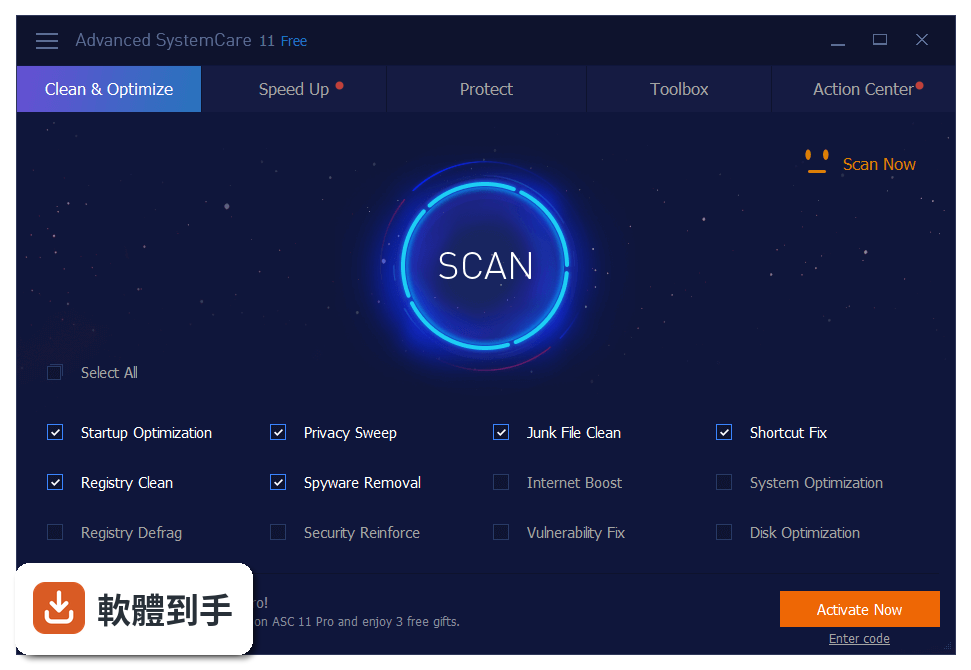
它主要做四件事:清垃圾檔案(包含暫存檔、登錄檔殘留、解除安裝後的殘留檔案)、最佳化開機啟動項目、清除瀏覽器歷史與隱私痕跡、以及透過 Turbo Boost 模式暫時停用背景程式來釋放系統資源。另外還有間諜軟體掃描和瀏覽器保護功能。掃描後會列出問題清單,你可以逐項檢視再決定要不要修復,不是一鍵全刪。
02它的 AI 模式是什麼?跟一般掃描有什麼不同?
I 模式會根據你的使用習慣和電腦目前效能狀態,自動決定要清哪些東西、清到什麼程度。一般掃描是照預設規則跑,AI 模式則會「看情況」調整——例如你常開的軟體產生的快取,它會判斷哪些可以清、哪些留著反而順。官方說法是每天按一次就能完成維護,適合不想研究細節的人。但 AI 判斷的邏輯沒有公開,實際效果要自己用過才知道。
03用 Turbo Boost 真的能讓遊戲跑比較順嗎?
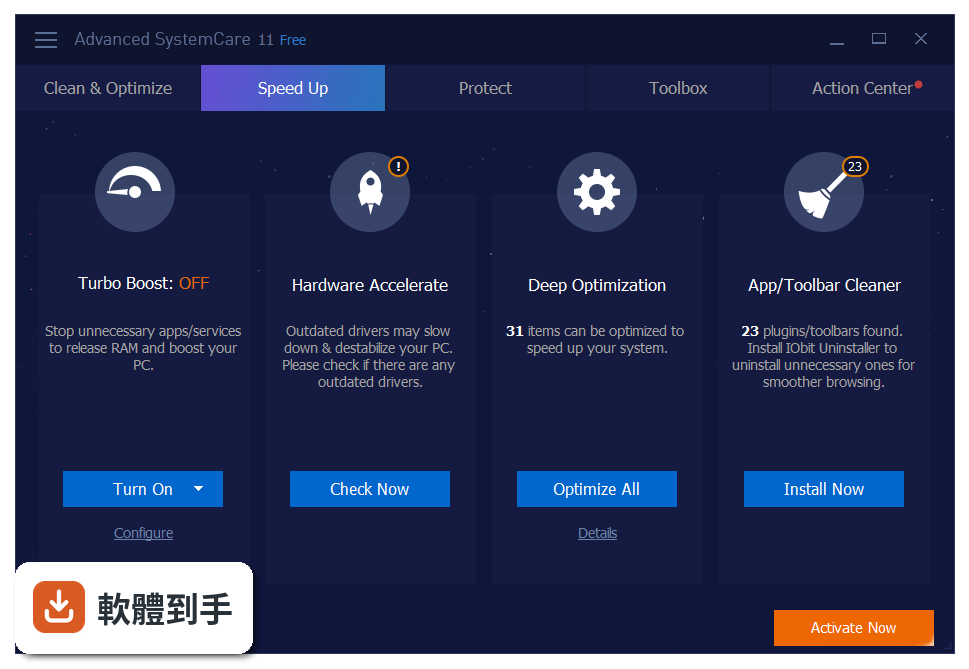
Turbo Boost 的原理是暫時停用不需要的背景服務和應用程式,把 CPU、記憶體、磁碟資源騰出來給前景程式用。如果你玩遊戲時背景掛著一堆下載、同步、更新程式,開了確實有差。但它只是「暫時」停用,不是永久關閉,遊戲結束後要手動恢復,而且哪些程式會被停用、停用後會不會影響其他功能,需要自己觀察。
04免費版和付費版功能差在哪裡?
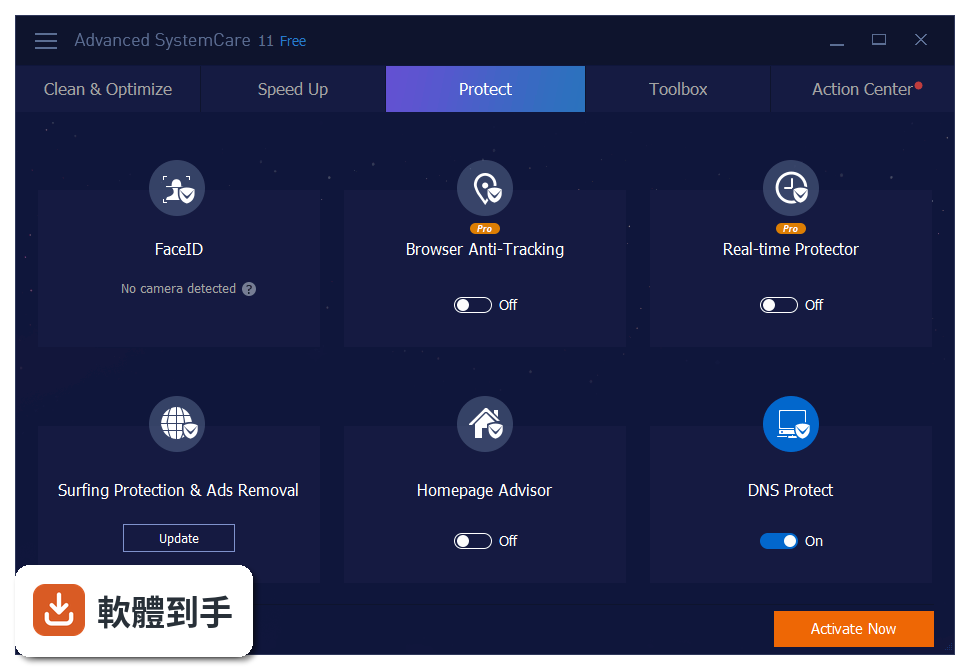
根據官方說明,免費版包含垃圾清理、隱私保護、系統最佳化、Turbo Boost、間諜軟體掃描這些核心功能。付費版(Pro)才有的包括:即時保護、深度登錄檔清理、自動更新。也就是說,免費版是「你按一下它才動」,付費版是「它隨時在背景幫你顧」。如果你只是定期手動清理,免費版夠用;想要即時防護就得升級。
05它掃描登錄檔安不安全?會不會把系統弄壞?
登錄檔清理本來就有風險,這套軟體會先掃描、列出問題項目,並提供說明,讓你在修復前知道每一項是什麼。但登錄檔是 Windows 的核心資料庫,刪錯可能導致某些程式無法啟動或系統不穩。建議做法是:修復前先建立系統還原點,或只清除你確定是殘留的項目。官方沒有保證百分之百安全,任何登錄檔清理工具都一樣。
06我電腦不太懂,這套軟體適合我嗎?
介面設計上,它把功能分成「Care」「Speed Up」「Protect」幾個頁籤,主畫面就是一個掃描按鈕,按下去等結果、再按修復,流程算直覺。但要注意:介面是英文的,如果你不習慣看英文,操作上會卡卡的。另外安裝過程中會出現可選的額外軟體,要留意不要一路「下一步」裝到不需要的東西。整體來說,懂基本英文、願意看畫面上的說明,就能上手。
07它支援哪些 Windows 版本?
官方列出的支援系統是 Windows 7、8、8.1、10、11,處理器 1 GHz 以上、記憶體 1 GB 以上、磁碟空間 300 MB 以上。也就是說,從舊到新的 Windows 都能裝,但 Windows 7 已經停止支援,裝了能不能正常運作、有沒有相容性問題,官方沒有額外說明,需要自己確認。
08這套軟體多久更新一次?還有人在維護嗎?
從版本紀錄來看,收錄了 24 個版本,最早是 2015 年,最近一次更新在 2026 年 8 月,但近 12 個月只更新 1 次、近 24 個月也只有 1 次。也就是說,它還在維護,但更新頻率不高。如果你在意軟體是否持續跟上 Windows 最新變化,這點要列入考量。評分人數 779 人、平均 8.18 分,算是有人用、但不是超大眾的軟體。
09安裝的時候會不會被裝一堆廣告或綁架瀏覽器?
官方說明有提到,安裝過程中會包含可選的額外元件(bundled software),也就是說,如果你沒仔細看安裝畫面,有可能會裝到其他程式。這是免費軟體常見的營利方式。建議安裝時選擇「自訂安裝」,把不需要的勾選項目取消。另外,官方也提醒要從官網下載,避免抓到假版本。
10有沒有其他功能相近、更多人用的選擇?
官方列出的替代方案包括 CCleaner、Ashampoo WinOptimizer、Glary Utilities Pro、System Mechanic Pro、Wise Care 365 Pro。其中 CCleaner 是市場上知名度最高的同類工具,功能也涵蓋垃圾清理、登錄檔清理、隱私保護。如果你不確定要選哪套,可以比較一下介面語言(CCleaner 有中文版)、更新頻率、免費版功能限制,再決定。Advanced SystemCare Free 的優勢是免費版功能給得算多,但英文介面是它的門檻。
下載與官方連結
前往官方網站 下載 Advanced SystemCare Free
advanced-systemcare-setup.exe · 40.7 MB · 連結指向軟體原廠
版本紀錄
- 2026-10-16 Advanced SystemCare Free 20.0.1.256 58.3 MB
- 2026-09-10 Advanced SystemCare Free 19.6.0.238 60.9 MB
- 2026-08-14 Advanced SystemCare Free 19.5.0.231 60.8 MB
再看 5 筆
- 2019-10-26 Advanced SystemCare Free 13.0.2.170 48.8 MB
- 2019-10-09 Advanced SystemCare Free 12.6.0.369 45.6 MB
- 2019-09-12 Advanced SystemCare Free 12.6.0.368 45.6 MB
- 2019-06-28 Advanced SystemCare Free 12.5.0.354 45.1 MB
- 2019-05-30 Advanced SystemCare Free 12.4.0.351 44.3 MB
這一版改了什麼
What's new in this version:
Advanced SystemCare Pro 12.3.0.335
- Software Updater supports updating the latest WinRAR to fix the critical security vulnerability
- Enhanced Junk File Clean to clean more installed driver packages, the latest Dropbox 65.4, and more
- Strengthened Privacy Sweep to clean the latest Chrome 73.0, Firefox65.0, Opera 58.0, WinRAR 5.70, and more
- Improved Registry Clean to clean more redundant registry entries for higher system performance
- Expanded the database of Startup Optimization to support managing more startup items for faster PC startup
- Larger database of Surfing Protection & Ads Removal for a safer and ad-free online experience
- Updated multiple languages
- Some UI optimization for a better user experience
- Fixed all known bugs
Advanced SystemCare Pro 12.3.0.332
- Change log not available for this version
Advanced SystemCare Pro 12.2.0.314
- Change log not available for this version
Advanced SystemCare Pro 12.2.0.311
- Change log not available for this version
Advanced SystemCare Pro 12.2.0.226
- Enhanced Junk File Clean to better clean Windows Downloads Folder and Installed Driver Packages
- Simplified the operation of Privacy Shield and Browser Anti-Tracking
- Improved Startup Manager to support managing more startup items for faster PC startup
- Strengthened Privacy Sweep to clean the latest Firefox64.0, Adobe Air 32.0, and more
- Expanded the database of Spyware Removal and Real-time Protector to remove more threats
- Larger database of Surfing Protection & Ads Removal for a safer and ad-free online surfing experience
- Updated multiple languages
- Fixed all known bugs
Advanced SystemCare Pro 12.1.1.213
- Change log not available for this version
Advanced SystemCare Pro 12.1.0.210
- Change log not available for this version
Advanced SystemCare Pro 12.0.3.202
- Change log not available for this version
Advanced SystemCare Pro 12.0.3.199
- Change log not available for this version
Advanced SystemCare Pro 12.0.3.192
- Brand new Privacy Shield protects your sensitive data against blackmail software, phishing sites, and junk messages
- Brand new Digital Fingerprint Protection protects you from invasive online tracking
- Newly built Junk File Clean to clean more files including Windows 10 icon cache, Microsoft Office cache, Google Chrome logs and temporary files, software redundant files, and uncompleted download files
- Newly enhanced Privacy Sweep to support cleaning the latest Chrome, Opera, even Chromium-based browsers, and Facebook
- Latest revised Homepage Advisor strengthens the detection of malicious modification on homepage and search engine
- Rebuilt Startup Manager to further shorten your PC's boot time and support removing Microsoft Edge extensions
- Rebuilt Surfing Protection & Ads Removal to support Microsoft Edge and block more cryptocurrency mining attacks, annoying ads, and malicious sites
- Improved Software Updater to support updating Spotify, Internet Download Manager, and more
- Optimized Performance Monitor to remember its last opened position and customize its window size
- Redesigned Turbo Boost to switch among different boost modes easily and quickly
- Brand new UI for more intuitive and fluent experience
- Supported 32 languages
Advanced SystemCare Pro 11.5.0.242
- Larger database of Spyware Removal and Real-time Protector to remove more threats
- Improved Privacy Sweep to support the latest Chrome 67.0, Firefox 61.0, Opera 54.0, Foxit Reader 9.0, Adobe Air 30.0, Any Video Converter 6.2.4, and Shockwave Player 12.3
- Enhanced Junk File Clean to support the latest Dropbox 53.4 and Ashampoo Burning Studio 19.0
- Improved Homepage Advisor for higher stability
- Improved Software Updater to support updating the latest Chrome 67.0, Firefox 61.0, and WinRAR
- Improved Cloned File Scanner to search and delete more cloned files
- Updated multiple languages
- Fixed all known bugs
Advanced SystemCare Pro 11.4.0.232
- Enhanced Privacy Sweep to support clearing Facebook browsing data, Facebook app cache, Chrome download history, iTunes installer cache, the latest Chrome 66.0, Firefox 60.0, and more
- Improved Junk File Clean to support cleaning the latest Dropbox 50.4 and GIMP 2.10, and to clear Windows Font Cache more comprehensively
- Strengthened Surfing Protection & Ads Removal for a safer online surfing experience
- Enhanced Registry Clean to improve system performance
- Enhanced Startup Manager for a faster PC startup
- Improved Software Updater to support updating the latest Chrome 66.0 and Firefox 60.0
- Strengthened Large File Finder to support the latest Microsoft Word and Excel file formats
- Updated multiple languages
- Fixed all known bugs
Advanced SystemCare Pro 11.3.0.220
- Enhanced Startup Manager for a faster PC startup
- Strengthened Surfing Protection & Ads Removal for a safer online surfing experience
- Enhanced Real-time Protection for a more secure system
- Improved Privacy Sweep to support Chrome 65.0, Firefox 59.0, Opera 52.0, VLC Media Player 3.0, PhotoDirector 9.0, and RealTimes 18.1
- Improved Junk File Clean to support Dropbox 44.4, Acronis True Image 2018, and CyberLink Power2Go 11.0
- Enhanced Registry Clean to improve system performance
- Minor user interface improvements
- Updated multiple languages
- Fixed all known bugs
Advanced SystemCare Pro 11.2.0.210
- Change log not available for this version
Advanced SystemCare Pro 11.0.3.189
- New Security Reinforce helps diagnose and fix system security weaknesses with 1-click
- New Homepage Advisor detects any changes to your homepage and search engine to avoid browser hijacking
- Rebuilt Performance Monitor intelligently monitors and optimizes system resources for top PC performance
- New disk optimization engine improves disk performance to a large extent
- Rebuilt IObit Undelete to support NTFS & FAT file systems, and portable storage devices, and also improve file search & preview
- Newly designed cool UI for more intuitive and fluent experience
- Enhanced Junk File Clean to clean more programs including Dropbox, Steam, Java, Windows Defender, Adobe Photoshop Lightroom, AVG Internet Security, and Windows Installer Unused Files
- Enhanced Privacy Sweep to clean Chrome 620, Firefox 560, Opera 480, ACDSee Photo Studio Standard 210, Adobe Flash Player 270, Thunderbird 524, and many more
- Improved Surfing Protection & Ads Removal to prevent more online threats and blocks various ads to secure your online surfing
- Expanded the database of Spyware Removal and Real-time Protector for a more secure PC
- Optimized Startup Manager to further shorten your PC's start time
- Improved scan engine for much faster scan and cleanup
- Smaller installation package for quicker installation with less disk usage
- Improved the workflow of Favorites in Toolbox to add/delete favorite tools more conveniently
- Improved several tools including Default Program, Startup Manager, Cloned File Scanner, and Internet Booster to further optimize your PC
Advanced SystemCare Pro 10.4.0.760
- Expanded database of Spyware Removal protects your PC against WannaCry 2.0 and EternalRocks attacks proactively
- Added the cleaning for WhatsApp, Chrome58.0, Firefox53.0, Opera45.0, Camtasia Studio9.0, and Adobe Air25.0 etc. Strengthened the cleaning for Chrome Cookies and Dropbox.
- Optimized scanning algorithms of Registry Clean to scan registry deeper and faster for better system performance
- Expanded database of Surfing Protection & Ads Removal provides more secure surfing environment without annoying ads
- Improved FaceID provides troubleshooting tips for camera connection problems
- Software Updater supports updating Firefox 64-bit
- Optimized Game Mode brings you much smoother gaming experience
- Improved multiple languages
- Fixed all known bugs
Advanced SystemCare Pro 10.3.0.740
- Improved FaceID captures intruders' images quickly and accurately
- Added Firefox Site Preferences cleaning, and strengthened the cleaning for Internet Explorer, Vuze, Ad-Aware Antivirus++, SketchUp Make, and Adobe Air
- Added support for latest Chrome and Firefox in Homepage Protection and Surfing Protection & Ads Removal
- Improved Software Updater keeps your important programs always up to date, supporting latest Chrome and Firefox
- Expanded the database of Surfing Protection & Ads Removal provides more secure surfing environment without annoying ads
- Enhanced Browser Anti-Tracking supports to clean Vivaldi privacy traces automatically
- Improved Default Program supports to set Vivaldi as default browser
- Improved Spyware Removal and Startup Optimization further protect your PC and reduce its boot time
- Fixed all known bugs
Advanced SystemCare Pro 10.2.724
- Added the privacy cleaning for Vivaldi browser to ensure safer surfing
- Added support for Nitro Pro 10, Nitro Pro 11, STDU Viewer, and Zoner Photo Studio in Default Program tool
- Expanded Ads Removal database provides you with an ad-free network
- Better privacy protection with expanded privacy database, newly supporting Opera 42.0, Dropbox 16.4, Ashampoo Burning Studio 18.0, PhotoDirector 8.0, HandBrake1.0, etc
- Fixed the occasional failure when modifying or deleting scheduled tasks in Auto Shutdown
- Better support for large fonts
- Improved log display for easier view
- Improved multiple languages
- Fixed all known bugs
Advanced SystemCare Pro 10.1.695
- Optimized FaceID supports to recognize multiple cameras with better stability
- Better privacy protection with expanded privacy database. Added the cleaning for Auslogics Disk Defrag7.1, Dropbox14.4, Winzip21.0, Foxit Reader8.1, Firefox 50.0, Chrome 55.0, Opera 41.0, etc
- Improved Turbo Boost offers you much easier solutions to get faster and smoother PC
- Enhanced Startup Optimization helps further shorten your computer's boot time
- Improved Surfing Protection & Ads Removal blocks more malicious websites and removes more annoying ads
- Added support for Light Alloy in Default Program helps you set it as your default video player easily
- Better user experience with the optimized Quick Settings, Surfing Protection & Ads Removal, Screenshot, etc
- Optimized multiple languages
- Fixed all known bugs
Advanced SystemCare Pro 10.0
- New FaceID: Automatically catches intruders who are secretly accessing your PC and prying into your privacy with new facial recognition technology
- No Annoying Ads and Safer Surfing: Removes various online ads and blocks more malicious websites with the larger online database, supporting Google Chrome, Mozilla Firefox, and Internet Explorer
- Faster Startup: Optimizes startup items to shorten boot time with new Startup Optimization in Clean & Optimize
- Smoother PC: New Resource Manager in Performance Monitor provides an easy way to check the processes taking high RAM/CPU/disk usage in real-time
- No Malicious Modification: Redesigned Homepage Protection shields homepage and search engine against malicious modifications
- No Privacy Leak: Enhanced Privacy Sweep supports cleaning more programs and Windows apps and secures your privacy
- Improved Junk Files Clean: Added cleaning for installed driver packages to free up more disk space
- Always Up-to-date Software: Enhanced Software Updater supports to update more popular programs
- More Powerful Uninstall: Supported uninstalling more stubborn programs & browser toolbars and removing more malicious & ad-based plug-ins with new IObit Uninstaller 6
- Larger Database: Expanded database of Spyware Removal, Real-time Protector, and Registry Fix for a more secure PC
- Better Experience: Brand new intuitive UI and decent support for high DPI displays & high resolution screens
- Supported 36 languages
- And more can be discovered by you