
這是歷史版本頁面 — 看 Arduino 最新版本
寫程式上傳到 Arduino 板子,Arduino IDE 能做什麼
 Arduino 1.6.6
資料更新 2015-11-03
閱讀約 5 分鐘
買了一塊 Arduino 板子,接上電腦,卻不知道下一步要做什麼。你想讓它閃一顆 LED、讀一個感測器,或控制一顆馬達,但打開電腦發現自己連要裝什麼軟體都不知道。網路上到處都是教學,但每一篇都預設你已經有某個工具,你連第一步都還沒跨出去。
有人會想,寫程式用記事本不就好了?但 Arduino 的程式不是寫完就結束,它需要經過編譯、轉成板子看得懂的格式,再透過 USB 上傳進去。這些步驟如果全部自己來,光處理板子型號、連接埠、程式庫相依就夠你忙了。這類工具把編輯、編譯、上傳、監看串列輸出整合在一起,讓你把心力放在程式本身,而不是跟工具搏鬥。
01Arduino IDE 到底是做什麼用的?
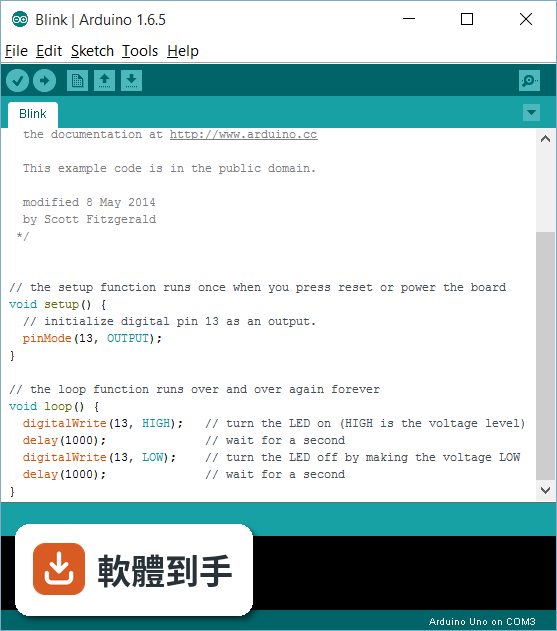
它是用來寫程式、編譯、上傳到 Arduino 板子的整合開發環境。你可以在裡面寫程式,按一下按鈕就編譯並上傳到板子,還可以用內建的序列埠監控視窗看板子回傳的數據。官方說明提到它支援所有 Arduino 板子,也支援 ESP8266、ESP32 等相容微控制器。
02這套軟體能寫什麼樣的程式?
從最簡單的讓 LED 閃爍,到複雜的機器人控制都可以。官方說明列舉了內建範例,涵蓋各種功能與專案,你可以直接開啟範例來改。它也支援第三方程式庫,所以感測器、顯示器、馬達驅動等常見元件的程式碼都可以直接引用,不用從零開始寫。
03它能不能用在我買的板子上?
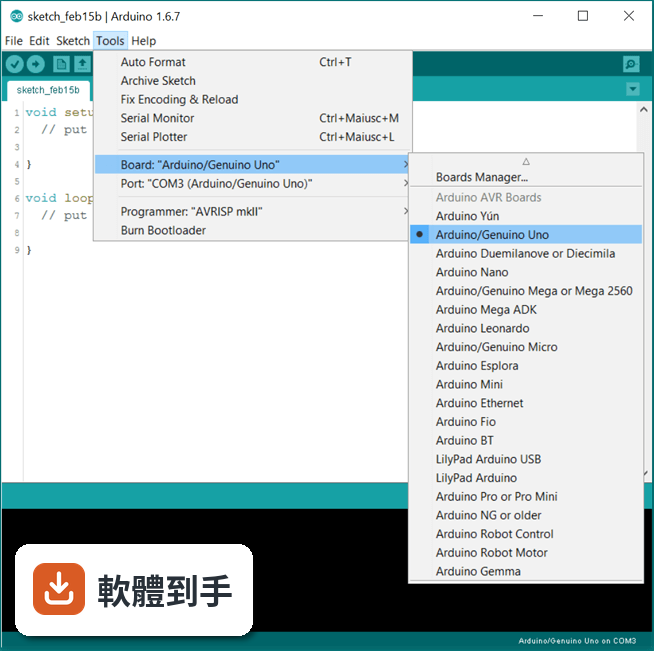
官方說明指出,這套軟體可以用在任何 Arduino 板子上。另外,FAQ 提到它也支援 ESP8266 和 ESP32 這類相容微控制器。你可以在「工具」選單中選擇對應的板子型號,如果沒有,可以透過板子管理員安裝需要的定義。
04有沒有內建範例可以參考?
有。官方功能說明提到內建範例涵蓋各種功能與專案,從基本的 LED 閃爍到進階的網路功能都有。你可以直接從選單開啟範例,改一改就上傳到板子,是學習或快速驗證想法最直接的方式。
05寫完程式要怎麼看板子回傳的數據?
用內建的序列埠監控視窗。官方說明提到,你可以在程式裡用 Serial.println() 輸出數據,然後在工具選單開啟序列埠監控,就能即時看到板子回傳的內容。另外還有序列繪圖器,可以把數據畫成圖表,方便觀察變化趨勢。
06我是初學者,這套軟體會不會太難?
官方 FAQ 明確說它提供初學者友善的環境,有大量文件與社群支援。介面分為工具列、程式編輯區、訊息區三塊,操作直覺。內建範例和程式庫管理員也降低入門門檻,你不需要先懂底層硬體就能開始寫程式。
07有經驗的開發者用它會不會不夠用?
官方說明提到它具備程式碼自動完成、語法標示、版本控制等功能,對一般開發足夠。但如果你需要進階的除錯、多平台專案管理,官方列出的替代方案如 PlatformIO IDE for VSCode 可能更適合。它定位是簡單直覺,進階需求可能要搭配其他工具。
08介面只有英文,看不懂怎麼辦?
這套軟體的介面語系是英文,沒有中文介面。官方說明沒有提到中文支援,所以如果你對英文介面不熟悉,可能需要花時間適應。不過操作流程相對固定,常用功能就那幾個,搭配線上教學應該能克服。
09有沒有其他更多人用的選擇?
資料中列出的功能相近軟體,如 VirtualBreadboard、Microsoft Windows SDK、Processing、Qt Creator、.NET Framework,評分人數都少於 Arduino IDE 的 1103 人。以評分人數來看,Arduino IDE 是目前最多人使用的選擇。但如果你需要特定功能,例如 Atmel Studio 的進階除錯,可以另外評估。
10Chromebook 能不能用這套軟體?
官方說明明確指出,桌面版 Arduino IDE 不相容於 Chrome OS。但如果你用 Chromebook,可以改用 Arduino Web Editor,它是在瀏覽器上運作的線上版本,可以把程式碼存在雲端。不過功能可能與桌面版有差異,需要自行確認是否符合需求。
11這套軟體還有在更新嗎?
根據版本紀錄,它從 2015 年開始收錄,最近一次更新在 2026 年,近 12 個月更新 4 次,近 24 個月 8 次,顯示開發團隊持續維護。官方說明也提到新的 arduino-builder、可插拔 USB 核心等功能,代表不是放著不管的專案。
下載與官方連結
arduino-1.6.6-windows.exe · 80.3 MB · 連結指向軟體原廠
版本紀錄
- 2026-06-10 Arduino 2.3.10 151 MB
- 2026-05-27 Arduino 2.3.9 151 MB
- 2026-03-01 Arduino 2.3.8 151 MB
再看 5 筆
- 2025-12-18 Arduino 2.3.7 151 MB
- 2025-04-09 Arduino 2.3.6 150 MB
- 2025-04-03 Arduino 2.3.5 150 MB
- 2024-12-04 Arduino 2.3.4 144 MB
- 2024-09-26 Arduino 2.3.3 144 MB
這一版改了什麼
What's new in this version:
IDE:
- Switched to Java 8, which is now both bundled and needed for compiling the IDE
- Added link to unofficial boards support list in preferences
- Limit of possible new sketches in a day raised to 676. Thanks @Chris--A
- Windows: fixed a bug when running username had non ASCII chars
- Lots of fixes
- ArduinoISP examples moved under 11.ArduinoISP folder
- MacOSX: binary is now able to tell the IDE its current working directory. Eases life to those using the IDE from the CLI
- CLI: if specified board doesn't exist, fail instead of using a default one
- Windows: IDE stores its stuff under %LOCALAPPDATA% instead of %APPDATA% (which was a roaming folder). %APPDATA% content is automatically migrated to new location
- Added 74880 baud rate to serial monitor. Thanks @Chris--A
- When changing tab, file name is shown in window title
- IDE groups compiled files into "libraries", "core" and "sketch" folders
- Added Serial Plotter. Thanks @henningpohl
- Editor: triple click selects whole line
- Windows: IDE startup feels faster
- Examples of libraries with a .development flag file in their root folder won't get marked as read-only. See #2619
- Update notifications: when updates are available from either Library or Boards Managers, a popup will be shown
- Introducing arduino-builder, a command line tool that properly calls gcc. Fixes lots of issues about buggy preprocessing.
- Each open sketch gets built in its own folder, allowing the IDE to recycle previous compilations and being much faster
- "Go to line": CTRL+L or Edit > Go to line... will open a dialog where you can type the line number where you want the editor to jump to
- Added boards.local.txt support: like platform.local.txt, allows to enrich a boards.txt definition without modifying the original file. Thanks @Wackerbarth
- Library to library dependencies: when your sketch imports a library, and that library uses another, the IDE will find out without you having to add a useless #include to your sketch
- Allow per-platform keywords.txt. Thanks @PaulStoffregen
- Allow spaces in IDE install path on Linux. Thanks @matthijskooijman
- Fixed a lot of documentation. Thanks to @per1234 @q2dg
- Fixed parsing for SystemProfiler when scanning for available serial ports on Macosx El Capitan
Libraries:
- Bridge: YunClient.connected() returns true if there are bytes available for read. Thanks @RobAtticus
- Bridge: YunClient.stop() now empties all buffers. Thanks @RobAtticus
- Ethernet: Added missing keywords. Thanks @per1234
- Ethernet: Fixed DNSClient.inet_aton() function. Thanks @jhorck
- Ethernet: Expose optional DHCP timout parameters to Ethernet:begin(). Thanks @chaveiro
- Wire: Implemented Wire.end().
- Wire: Fixed bug with repeated START for AVR. Thanks Nate Williams
- Wire: Resolved timing issues on AVR. See #2173 #1477.
- Wire: Fixed bug in repeated start in slave mode on SAM. See #3908
- SD: Change "char *" to "const char *" on methods accepting a string as a parameter. Thanks @Ivan-Perez
- Scheduler: Added support for cortex-M0. Thanks @PeterVH
Core:
- Added new PluggableUSB and HID support. This change introduces a more powerful API for
- libraries that wants use advanced features of USB-Device.
- Thanks to @obra @NicoHood @matthijskooijman @nospam2000 @weizenspreu
- AVR: fixed wrong turnOffPWM() for TIMER0B. Thanks @gonzoveliki
- AVR: added support for AtmegaXXu2. Thanks @NicoHood
- AVR: a bunch of USB Core bug fix. Thanks @NicoHood
- AVR: Expose serial setting from USB-CDC serial port. Thanks @matthijskooijman
- ArduinoISP is now compatible with every architecture (not only AVR) and is much more stable. Thanks @PeterVH
- Print not aborting on write() failure. Thanks @stickbreaker
- AVR: Faster interrupts patch. Thanks @xxxajk
- AVR: Fixed pulseInLong wrong measurements.
- AVR: Removed a bunch of compiler warnings. Thanks @NicoHood
- Improved variants files for Boards Gemma and Ethernet