
這是歷史版本頁面 — 看 Arduino 最新版本
寫程式上傳到 Arduino 板子,Arduino IDE 能做什麼
 Arduino 2.0.4
資料更新 2023-02-28
閱讀約 5 分鐘
買了一塊 Arduino 板子,接上電腦,卻不知道下一步要做什麼。你想讓它閃一顆 LED、讀一個感測器,或控制一顆馬達,但打開電腦發現自己連要裝什麼軟體都不知道。網路上到處都是教學,但每一篇都預設你已經有某個工具,你連第一步都還沒跨出去。
有人會想,寫程式用記事本不就好了?但 Arduino 的程式不是寫完就結束,它需要經過編譯、轉成板子看得懂的格式,再透過 USB 上傳進去。這些步驟如果全部自己來,光處理板子型號、連接埠、程式庫相依就夠你忙了。這類工具把編輯、編譯、上傳、監看串列輸出整合在一起,讓你把心力放在程式本身,而不是跟工具搏鬥。
01Arduino IDE 到底是做什麼用的?
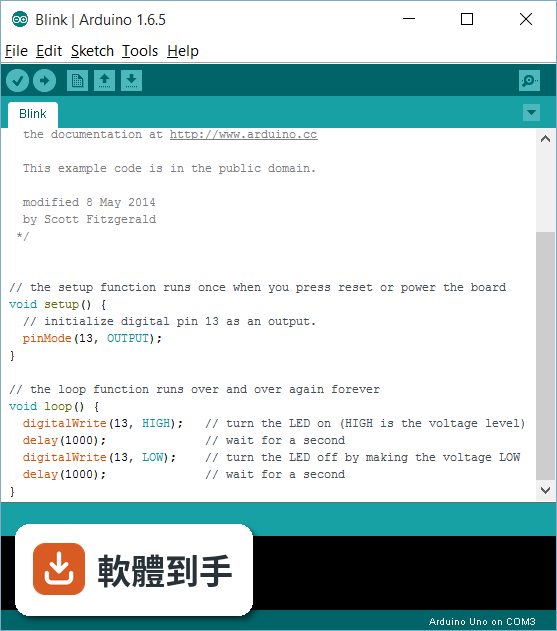
它是用來寫程式、編譯、上傳到 Arduino 板子的整合開發環境。你可以在裡面寫程式,按一下按鈕就編譯並上傳到板子,還可以用內建的序列埠監控視窗看板子回傳的數據。官方說明提到它支援所有 Arduino 板子,也支援 ESP8266、ESP32 等相容微控制器。
02這套軟體能寫什麼樣的程式?
從最簡單的讓 LED 閃爍,到複雜的機器人控制都可以。官方說明列舉了內建範例,涵蓋各種功能與專案,你可以直接開啟範例來改。它也支援第三方程式庫,所以感測器、顯示器、馬達驅動等常見元件的程式碼都可以直接引用,不用從零開始寫。
03它能不能用在我買的板子上?
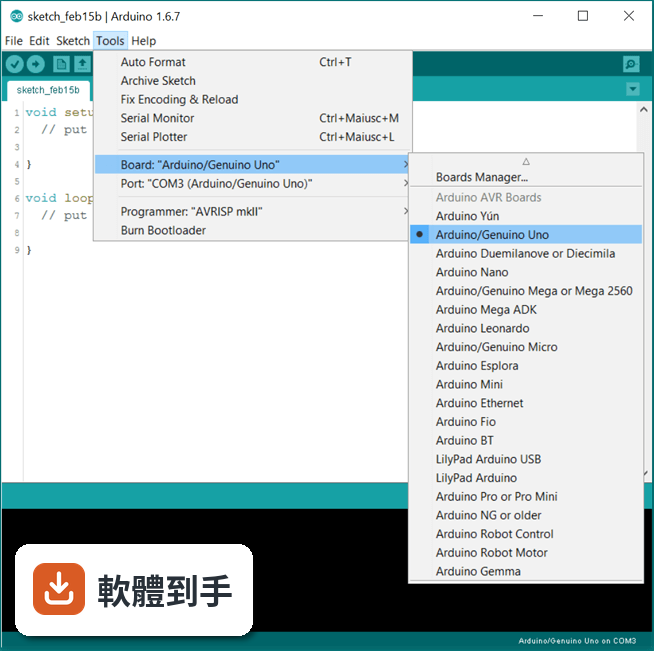
官方說明指出,這套軟體可以用在任何 Arduino 板子上。另外,FAQ 提到它也支援 ESP8266 和 ESP32 這類相容微控制器。你可以在「工具」選單中選擇對應的板子型號,如果沒有,可以透過板子管理員安裝需要的定義。
04有沒有內建範例可以參考?
有。官方功能說明提到內建範例涵蓋各種功能與專案,從基本的 LED 閃爍到進階的網路功能都有。你可以直接從選單開啟範例,改一改就上傳到板子,是學習或快速驗證想法最直接的方式。
05寫完程式要怎麼看板子回傳的數據?
用內建的序列埠監控視窗。官方說明提到,你可以在程式裡用 Serial.println() 輸出數據,然後在工具選單開啟序列埠監控,就能即時看到板子回傳的內容。另外還有序列繪圖器,可以把數據畫成圖表,方便觀察變化趨勢。
06我是初學者,這套軟體會不會太難?
官方 FAQ 明確說它提供初學者友善的環境,有大量文件與社群支援。介面分為工具列、程式編輯區、訊息區三塊,操作直覺。內建範例和程式庫管理員也降低入門門檻,你不需要先懂底層硬體就能開始寫程式。
07有經驗的開發者用它會不會不夠用?
官方說明提到它具備程式碼自動完成、語法標示、版本控制等功能,對一般開發足夠。但如果你需要進階的除錯、多平台專案管理,官方列出的替代方案如 PlatformIO IDE for VSCode 可能更適合。它定位是簡單直覺,進階需求可能要搭配其他工具。
08介面只有英文,看不懂怎麼辦?
這套軟體的介面語系是英文,沒有中文介面。官方說明沒有提到中文支援,所以如果你對英文介面不熟悉,可能需要花時間適應。不過操作流程相對固定,常用功能就那幾個,搭配線上教學應該能克服。
09有沒有其他更多人用的選擇?
資料中列出的功能相近軟體,如 VirtualBreadboard、Microsoft Windows SDK、Processing、Qt Creator、.NET Framework,評分人數都少於 Arduino IDE 的 1103 人。以評分人數來看,Arduino IDE 是目前最多人使用的選擇。但如果你需要特定功能,例如 Atmel Studio 的進階除錯,可以另外評估。
10Chromebook 能不能用這套軟體?
官方說明明確指出,桌面版 Arduino IDE 不相容於 Chrome OS。但如果你用 Chromebook,可以改用 Arduino Web Editor,它是在瀏覽器上運作的線上版本,可以把程式碼存在雲端。不過功能可能與桌面版有差異,需要自行確認是否符合需求。
11這套軟體還有在更新嗎?
根據版本紀錄,它從 2015 年開始收錄,最近一次更新在 2026 年,近 12 個月更新 4 次,近 24 個月 8 次,顯示開發團隊持續維護。官方說明也提到新的 arduino-builder、可插拔 USB 核心等功能,代表不是放著不管的專案。
下載與官方連結
arduino-ide_2.0.4_Windows_64bit.exe · 連結指向軟體原廠
版本紀錄
- 2026-06-10 Arduino 2.3.10 151 MB
- 2026-05-27 Arduino 2.3.9 151 MB
- 2026-03-01 Arduino 2.3.8 151 MB
再看 5 筆
- 2025-12-18 Arduino 2.3.7 151 MB
- 2025-04-09 Arduino 2.3.6 150 MB
- 2025-04-03 Arduino 2.3.5 150 MB
- 2024-12-04 Arduino 2.3.4 144 MB
- 2024-09-26 Arduino 2.3.3 144 MB
這一版改了什麼
What's new in this version:
Added:
- Enable rename and delete of Cloud sketches
- Add activity bar icon for Arduino Cloud login
- Add support for macOS notarization during local builds
Changed:
- Show custom board option settings in Tools menu
- Use a local npm registry for app packaging
- Always show File > Sketchbook menu item
- Always show Tools > Port menu item
- Use more efficient method to get Arduino CLI version
- Remove encoding from status bar
- Allow addition of existing code files to sketch
- Communicate cause of debugger not starting with uncompiled sketch
- Add leading+trailing line break to "Copy for Forum" content
- Improve contrast of cursor color in "Dark (Arduino)" theme
- Improve contrast of "Output" view stderr text in "Light (Arduino)" theme
- Bump Arduino CLI to 0.31.0
- Use hardwareId for board auto-selection
- Update translations
Fixed:
- Fix File > Preferences disabled if dialog used soon after IDE startup
- Prevent opening of multiple "Preferences" dialog instances
- Fix support for user-installed theme extensions
- Always set "Updatable" filter when Boards Manager/Library Manager opened from update offer dialog
- Fix corruption of multi-byte UTF-8 symbols in Serial Monitor
- Fix Sketch > Upload/Upload Using Programmer menu items remaining disabled after completion of upload
- Fix proxy protocol incorrectly shown as "SOCKS" in "Preferences" dialog
- Fix support for SOCKS5 proxy protocol
- Fix IDE startup hang if sketchbook folder location not accessible
- Update affected UI elements after "Sketchbook location" preference change
- Update affected UI elements after "Add .ZIP Library..." operation
- Restart language server after change to platform or library
- Support IDE installation paths that contain #
- Pass custom board option settings to language server
- Make File > Sketchbook menu reflect sketchbook folder structure
- Populate "Board Info" dialog from port data
- Use established sort order in Boards Manager and Library Manager listings
- Prevent creation of sketches with non-compliant names
- Correct handling of primary sketch tab deletion
- Fix missing toolbar context menu items when editor doesn't have focus
- Fix unexpected sketch deletion when location inside sketch folder selected as rename target