
這是歷史版本頁面 — 看 Bandicam 最新版本
錄遊戲畫面老是卡頓?Bandicam 能解決什麼
 Bandicam 4.1.0 Build 1362
資料更新 2017-12-21
閱讀約 5 分鐘
玩遊戲遇到精彩時刻想錄下來,或想錄一段操作流程做教學影片,打開錄影軟體卻發現畫面卡成幻燈片,錄出來的檔案大到硬碟快爆,甚至錄到一半直接當機。你只是想好好把畫面存下來,結果光跟錄影工具搏鬥就耗掉大半時間,最後什麼也沒錄成。
很多人第一個念頭是用 Windows 內建的錄影功能,或隨便抓個免費工具來用,但錄出來的影片常常不是畫質模糊、檔案肥到傳不出去,就是錄到一半聲音跟畫面不同步。這類工具的切入點其實很單純:錄得順、檔案小、格式不用轉就能用。Bandicam 就是針對這些痛點設計的螢幕錄影工具,下面用問答方式說明它實際能做到什麼。
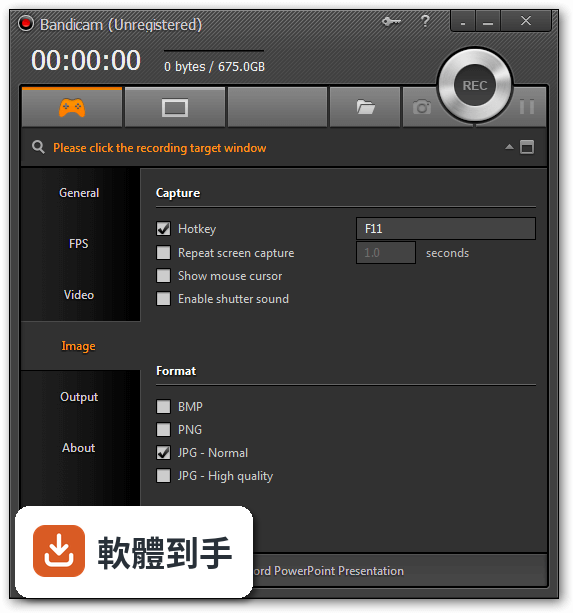
01Bandicam 錄遊戲畫面會不會很吃效能?
官方說明指出,Bandicam 在錄影時會即時壓縮影片,並支援 Nvidia NVENC/CUDA、Intel Quick Sync Video、AMD APP 等硬體加速 H.264 編碼器,宣稱能降低 CPU/GPU/RAM 使用率,減少錄影時的延遲。實際表現會因電腦硬體而異,但它的設計方向就是讓錄影過程不要拖垮遊戲效能。
02它除了錄遊戲,還能錄什麼?
它有三種主要錄影模式:遊戲錄影(支援 DirectX/OpenGL 程式)、螢幕錄影(錄整個桌面或指定視窗)、裝置錄影(接 Webcam、Xbox/PlayStation、手機、IPTV 等外部裝置)。所以除了遊戲,PowerPoint 簡報、YouTube 影片、Skype 視訊通話、串流影片都能錄。
03錄出來的檔案會不會很大?
官方宣稱錄影時會即時壓縮,檔案大小約是其他軟體的 1/5 到 1/20,而且支援 AVI 2.0 格式,只要硬碟有空間,單一檔案大小沒有限制。這代表長時間錄影不用擔心檔案爆掉,但實際壓縮比還是要看錄影內容和設定。
04可以同時錄系統聲音和麥克風嗎?
可以。在音訊設定選單中,可以同時開啟系統音訊和麥克風輸入,兩者會一起錄進去。這對錄製遊戲實況或教學影片很實用,不用事後再另外對軌。
05錄教學影片有沒有輔助功能?
有。螢幕錄影模式支援滑鼠游標即時反白和點擊效果,錄影時還可以用即時繪圖功能在畫面上畫線、框選、標示重點。這些功能搭配麥克風錄音,很適合做軟體教學或操作示範影片。
06這套軟體適合什麼樣的人用?
適合需要錄製遊戲畫面、製作教學影片、錄製線上課程或研討會的人。它有三種錄影模式對應不同需求,加上排程錄影功能可以設定自動錄影,方便錄固定時段的直播或網路研討會。介面設計也偏直觀,初次使用的人可以從三種模式中直接選一種開始。
07它支援 4K 錄影嗎?需要什麼條件?
支援,最高可錄 3840x2160 的 4K Ultra HD 解析度。官方說明提到要確保硬體符合需求才能順暢錄 4K,但沒有列出明確的硬體規格。如果你的電腦不夠力,建議先錄 1080p 就好,免得錄到一半卡住。
08免費版和付費版差在哪?
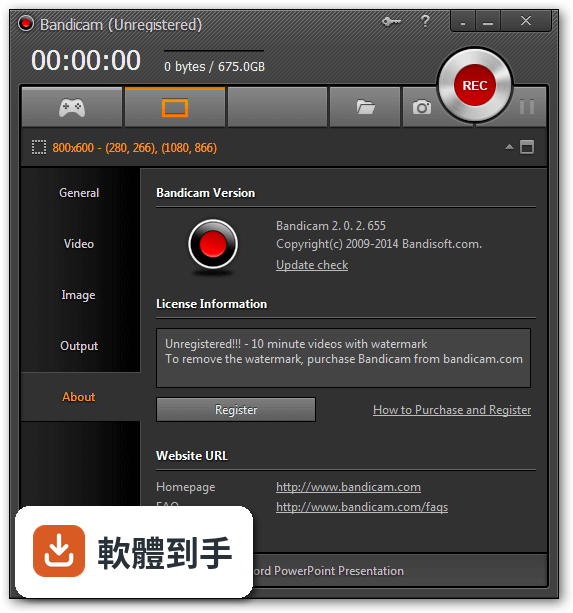
免費版(Demo)有單一檔案 10 分鐘的錄影時間限制,付費的完整版會移除這個限制,可以無限時錄影。其他功能像是 4K 錄影、即時繪圖、滑鼠效果等,官方說明沒有提到免費版有額外限制,但購買前最好自己確認清楚。
09這套軟體只有英文介面嗎?
是,介面語系只有英文。雖然操作介面不算複雜,錄影模式、開始停止按鈕這些基本功能看圖示就能懂,但如果你對英文介面不熟悉,設定選單裡的選項可能會需要花時間摸索。官方說明沒有提到其他語言版本。
10它的更新頻率如何?還有人在維護嗎?
根據收錄的版本紀錄,Bandicam 從 2013 年開始持續更新,最近一次更新在 2026 年 6 月,近 12 個月更新 1 次。以商業軟體來說,更新頻率不算高,但至少還持續在維護,不是放著不管的軟體。
11跟 Fraps、oCam 這些軟體比起來,選哪個好?
Bandicam 在評分人數上比 Fraps(103 人)、oCam(55 人)、HyperCam(42 人)都多,有 228 人評分,平均 8.8 分。官方說明也直接點名它是 Fraps 的替代方案,宣稱錄影時延遲更低、檔案更小。但每個人電腦環境不同,建議先試用免費版,實際錄一段看看再決定。
12什麼情況不該選 Bandicam?
如果你需要中文介面,它只有英文,操作門檻會比較高。如果你只是偶爾錄個短影片,免費版 10 分鐘限制可能夠用,但長期錄影就得買完整版。另外,如果你習慣用 Mac 或 Linux,它只支援 Windows 7 到 11,其他系統不能用。評分人數 228 人其實不算多,參考價值有限,建議多看幾個評測再決定。
下載與官方連結
bdcamsetup.exe · 連結指向軟體原廠
版本紀錄
- 2026-10-16 Bandicam Screen Recorder 27.0.7 Build 2687 60.5 MB
- 2026-06-28 Bandicam Screen Recorder 8.3.1 Build 2537 30 MB
- 2023-07-14 Bandicam Screen Recorder 6.2.4 Build 2083
再看 5 筆
- 2023-07-05 Bandicam Screen Recorder 6.2.3 Build 2078
- 2023-06-08 Bandicam Screen Recorder 6.2.2 Build 2072
- 2023-05-26 Bandicam Screen Recorder 6.2.1 Build 2068
- 2023-05-25 Bandicam Screen Recorder 6.2.1 Build 2067
- 2023-04-18 Bandicam Screen Recorder 6.2.0 Build 2057
這一版改了什麼
What's new in this version:
Bandicam 4.1.0 Build 1362
- The webcam preview function is now available in Screen Recording Mode
- The webcam preview function is now available in Device Recording Mode
- Added support for resizing the mouse cursor, the mouse click effect and the mouse highlight effect
- Added support for the preview of the mouse effect settings
Bugs fixed:
- The recorded video was garbled when the 'Prefer RGB colorspace' option was used for the External codec
- The 'Run Bandicam on Windows startup' option didn't work in Non-Admin mode of Bandicam (bdcam_nonadmin.exe)
- Other minor bugs fixed
Bandicam 4.0.2 Build 1352
- Bandicam is now able to add a logo to the captured images
- Bandicam is now able to set the quality of JPEGs
- Improved the webcam preview UI in the webcam overlay menu
- Added support for the "HDYC colorspace" in Device Recording Mode
- Bandicam did not terminate automatically while Windows was shutting down after the Windows 10 Fall Creators update
- Other minor bugs fixed
Bandicam 4.0.1 Build 1339
- Added the Facebook upload function (How to upload a video to Facebook)
- Fullscreen mode: Added the pin icon to show/hide the recording control bar
- Fullscreen mode: Added the opacity adjustment function
- Fullscreen mode: Bandicam now shows the display number in the recording information status line
- Added the Khmer(Cambodian) language file by touch sovannara
- Bugs fixed ◦The taskbar was not recorded when using the around mouse screen recording mode
- Other minor bugs fixed
Bandicam 4.0.0 Build 1331
- Change log not available for this version
Bandicam 4.0.0 Build 1330
- Applied new UI design for Bandicam 4.0
- Added support for the "new Fullscreen" recording mode
- Added support for the "Around Mouse" recording mode
- Added the 'bdcam_nonadmin.exe' file which allows non-admin users (standard users) to use Bandicam without administrator privileges
- Added support for text input in the drawing function
- Added the "Get Started" menu for beginners
- Added the Belarusian, Burmese language files
- The mouse cursor/effect settings status is displayed on the main window
- The microphone settings status is displayed on the main window
- Improved the switching speed to Game Recording Mode
- The maximum length of the format/size preset name is limited to 100 characters
- The DPI scaling of the rectangle window and device recording window is adjusted automatically according to the Bandicam main window
Bugs fixed:
- The bdcam64.bin process remained after crashing
- The record button was not active after the Auto Complete Recording function was used
- A file dragging bug of the video/image file list has been fixed
- Other minor bugs fixed
Bandicam 3.4.4.1264
- Improved the hooking stability of DirectX 12 games (Tom Clancy's The Division)
Bugs fixed:
- Failed to start recording or take a screenshot on some computers
- Other minor bugs fixed
Bandicam 3.4.3.1262
- Improved AMD APP H.264 codec recognition of AMD RX 460/470/480
Bugs fixed:
- The YouTube upload function didn't work properly on some computers
- Other minor bugs fixed
Bandicam 3.4.2.1258
- The webcam preview was upside down in Game Recording Mode with some webcam devices
- Other minor bugs fixed
Bandicam 3.4.1.1256
- Improved the stability of the Intel Quick Sync Video encoder
- Improved the recording performance of the webcam overlay
- Bandicam is now able to save a webcam overlay video in 60FPS (while saving the webcam overlay video as a separate file)
- The default recording time for Auto Complete Recording has changed from 10 minutes to 60 minutes
- The default rectangle size for screen recording has changed from 640x480 to 1280x720
Bugs fixed:
- Failed to use the webcam recording function while ESET AntiVirus was running
- The input format of a specific webcam device wasn't applied to the webcam overlay function
- The Drawing mode menu was disabled while not recording
- Other minor bugs fixed
Bandicam 3.4.0.1227
- Bandicam is now able to add numbers to highlight steps of video tutorials
- Bandicam is now able to draw arrows with customized colors and sizes
- Improved the real-time drawing function
- The real-time drawing feature can be used in a moving video
- The drawing feature can be used when capturing images
- Added a new size preset (1920x1080) on the rectangle window
- Separated the FPS position hotkey and the FPS show/hide hotkey
- Improved the writing efficiency of PCM audio data with the .avi container
Bugs fixed:
- RGB24 codec resulted in quality loss in the registered version
- External codec which supports RGB input such as MagicYUV, Lagarith, x264 resulted in quality loss
- Bandicam crashed when the smallest size was selected and the H264(CPU) codec was used in Screen Recording Mode
- Other minor bugs fixed
Bandicam 3.3.3.1209
- Added the "Prefer RGB colorspace" option for the External codec - VFW (Video for Windows)
- Added the command line for license registration
- Registration from the setup file: bdcamsetup.exe /S /reg email serial#
- Registration from the program file: bdcam.exe /reg email serial#
- Improved the "Open output folder" function on the context menu in the Output tab
- Improved security of Bandicam installer (DLL Hijacking)
- Bandicam now doesn't allow the user to enter the same preset name in the format and position/size preset settings
Bugs fixed:
- The preset name in the format and position/size preset settings couldn't be edited/deleted
- Specific data of large AVI files was broken (Around 150 GB or bigger files)
- Other minor bugs fixed
Bandicam 3.3.2.1195
- NVENC encoder could not be detected on some computers when the Nvidia Geforce 378.49 driver was installed
- Other minor bugs fixed
Bandicam 3.3.1.1192
- Change log not available for this version
Bandicam 3.3.1.1191
- Bandicam is now able to save videos and images into different folders
- Added the 'Mono' option for professional mono devices/microphones
Bugs fixed:
- The 'Failed to initialize codec' error occurred when the NVENC codec was used on some games (Outlast)
- The Keyframe interval function of the H264 (CPU) encoder didn't work properly
- The webcam preview function didn't work properly on some games. (GTA: San Andreas)
- Other minor bugs fixed
Bandicam 3.3.0.1175
- Bandicam is now able to record Vulkan games/programs (Dota 2, Doom, etc.)
- Improved the DirectX 11 hooking compatibility
- Improved the DirectX 9 hooking compatibility (PlanetSide 2)
- Improved the MJPG format compatibility with the 'Device Recording Mode'
- Improved AMD APP H.264 codec recognition of AMD Radeon R series
- Bandicam now supports 60FPS for webcam recording (Logitech C922 Pro)
- Bandicam now prevents the computer from sleeping while the preview window of the 'Device Recording Mode' is full screen
- Bandicam now hides the mouse cursor if the preview window of the 'Device Recording Mode' is full screen
Bugs fixed:
- Frames were skipped if a user set a high bitrate on AMD APP H.264 encoder
- Bandicam stopped working when a frame was not updated in 'Screen Recording Mode' under certain conditions
- The Keyframe interval function of NVIDIA® NVENC/HEVC encoder didn't work properly
- Some registry entries remained after uninstallation
- Other minor bugs fixed
Bandicam 3.2.5.1125
- The maximum FPS has changed from 120 to 144
- Improved the hooking compatibility with BlueStacks
- Improved the hooking compatibility with Forza Horizon 3
- [Fix] Computer stopped working after hooking Windows Store apps/games under certain situations
Bandicam 3.2.4.1118
- Improved the DirectX 12 hooking compatibility with AMD Radeon graphics cards
- The hooking function didn't work on some computers if the "Windows Store Apps (UWP)" option was checked
- Other minor bugs fixed