
BullGuard Antivirus 評價低又停更,還值得裝嗎
 BullGuard Antivirus 2020 21.0.385.9
資料更新 2020-09-30
閱讀約 6 分鐘
你電腦最近怪怪的,開網頁一直跳廣告、瀏覽器首頁被換掉,甚至三不五時跳出「系統偵測到威脅」的視窗。你想找一套防毒軟體把這些髒東西清乾淨,但又不想花大錢買年度授權,於是開始找那種裝了就能擋、介面別太複雜的軟體。你大概已經試過幾套免費防毒,結果不是一直彈升級通知,就是掃描時電腦卡到滑鼠都不太會動。
免費防毒軟體常常綁一堆額外功能,裝完之後背景程式一大堆,開機變慢、玩遊戲掉幀。你真正需要的其實是「裝了之後不用管、平常不礙事、真的中標時擋得住」的輕量方案。這類工具的切入點是:用行為偵測抓未知病毒、擋掉廣告軟體和惡意網頁,同時盡量不佔用系統資源。問題是,市面上的選擇很多,有些看起來功能齊全,實際上是舊引擎換新皮,你得先弄清楚它到底還在不在維護。
01BullGuard Antivirus 到底能幹嘛?
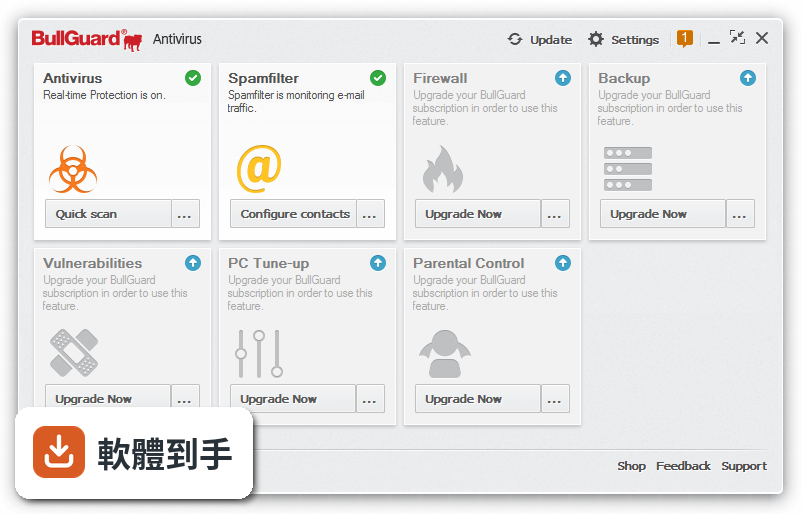
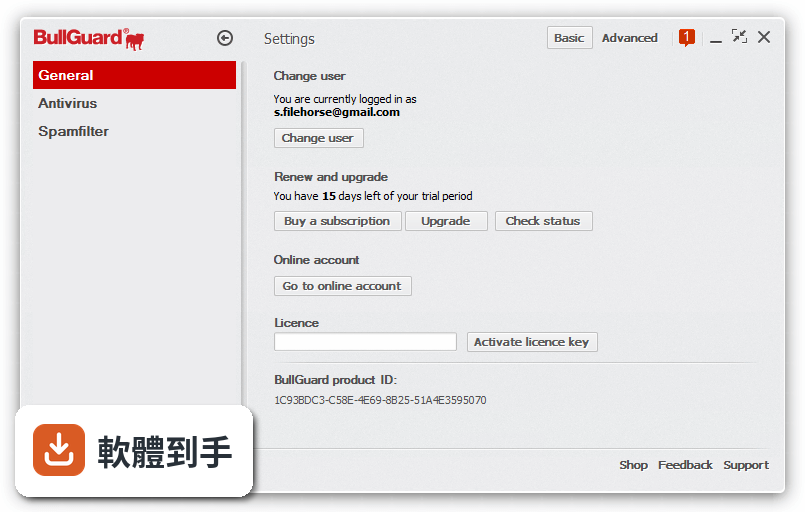
它是一套防毒軟體,主要功能包含傳統的病毒掃描與行為偵測,官方宣稱能攔截已知和未知的惡意程式。另外還有垃圾郵件過濾、惡意網頁警告,以及擋掉會修改瀏覽器設定的廣告軟體。介面設計得比較簡單,安裝後可以調整掃描排程和防護等級。要注意的是,它只有 15 天試用期,不是免費軟體。
02它的防毒效果真的像官方說的那麼強嗎?
官方宣稱獨立測試實驗室證實它有最高的惡意軟體攔截率,但這份資料沒有提供具體的測試機構名稱或報告年份。從使用者評分來看,34 人給出 5.92/10 的分數,算是中下水準。如果你很在意實測數據,建議去 Virus Bulletin、AV-Comparatives 這類獨立測試網站查有沒有近期的評測報告,不要只看官方說法。
03它會不會拖慢電腦速度?
官方強調這套軟體在遊戲、寫程式或設計時不會明顯降低系統效能,但沒有提供任何效能測試數據。防毒軟體對效能的影響通常取決於掃描引擎的寫法和你電腦的硬體等級。如果你用的是舊電腦或文書機,裝之前最好先看官方有沒有提供試用,實際裝起來跑一輪掃描,感受一下會不會卡。
04它能不能擋掉垃圾郵件和釣魚網站?
可以,官方功能列表中有 spam filter 和 safe browsing 兩項。垃圾郵件過濾器會擋掉廣告信和釣魚郵件,安全瀏覽功能則會在你要點進惡意網站時跳出警告。不過這兩個功能在免費防毒軟體裡也滿常見的,不是它獨有的強項。實際擋得乾不乾淨,還是要看它的資料庫更新頻率。
05它跟其他防毒軟體比起來有什麼不同?
這份資料列了幾個功能相近的軟體,包括 Adaware Antivirus Free(233 人評分)、Avast Pro Antivirus(79 人評分)、Comodo Cloud Antivirus(78 人評分)。BullGuard 只有 34 人評分,樣本數明顯少很多。它的特色是強調行為偵測和遊戲模式,但這些功能其他幾套也有。沒有特別突出的差異點。
06這套軟體適合什麼樣的人用?
適合只想要基本防護、不想研究複雜設定的使用者。它的介面設計得比較直覺,安裝快、管理簡單,可以調整防護等級和掃描排程。如果你用的是 Windows 7 或 Windows 8 這種舊系統,它支援到 Windows 10,所以舊電腦也能裝。但要注意它只有試用版,不是免費軟體,試用期過了就要付費。
07我電腦很舊,跑得動嗎?
官方說它不會拖慢系統效能,但沒有提供最低硬體需求。舊電腦裝防毒軟體最怕的是背景掃描佔資源,建議你先裝試用版,觀察開機時間和日常操作有沒有明顯變慢。如果電腦已經跑不太動,可以考慮更輕量的方案,例如 Windows 內建的 Microsoft Defender,或這份資料裡提到的 Comodo Cloud Antivirus。
08它有沒有中文介面?
這份資料沒有提到介面語言,官方功能說明是英文的,開發商 BullGuard Team 的總部在丹麥。從產品定位來看,它主要面向英文市場,中文介面的可能性不高。如果你英文不熟,操作起來可能會卡卡的。這點在安裝前最好先確認,免得裝完看不懂設定選項。
09它跟免費防毒軟體比起來,有什麼優勢?
它的優勢是整合了垃圾郵件過濾和廣告軟體攔截,不用另外裝外掛。但免費防毒軟體如 Avast 免費版或 Adaware 免費版也有類似功能,而且評分人數多很多。BullGuard 只有 15 天試用期,時間到了就要付費,免費軟體則可以一直用。如果你不想花錢,直接選免費方案比較實際。
10這套軟體是不是已經沒在更新了?
從版本紀錄來看,它收錄了 13 個版本,最早的版本是 2017 年 11 月,最近一次更新停在 2020 年 9 月,之後就沒有再出新版本。防毒軟體如果長期不更新病毒碼,遇到新型惡意軟體就擋不住。這點是很大的警訊,代表開發商可能已經停止維護這套產品。
11我該不該花錢買這套軟體?
不建議。理由有三:第一,它只有 15 天試用期,之後要付費,但評分只有 5.92/10;第二,超過兩年沒有更新,病毒碼和引擎都停留在舊狀態;第三,市場上有更多人在用、評分樣本數更多的選擇,例如 Avast Pro Antivirus 或 Comodo Cloud Antivirus。花同樣的錢,可以買到持續維護的產品。
12那有沒有其他替代方案可以考慮?
這份資料列出的 Adaware Antivirus Free 有 233 人評分,Avast Pro Antivirus 有 79 人評分,Comodo Cloud Antivirus 有 78 人評分,都是可以參考的對象。如果你不想花錢,Windows 內建的 Microsoft Defender 其實也夠用。重點是選一套還在持續更新的軟體,不要選這種已經停更的產品。
下載與官方連結
BullGuardDownloaderAV.exe · 1.1 MB
版本紀錄
- 2020-09-30 BullGuard Antivirus 2020 21.0.385.9 1.1 MB
- 2020-07-02 BullGuard Antivirus 2020 20.0.381.0 1.1 MB
- 2020-05-09 BullGuard Antivirus 2020 20.0.378.1 1.1 MB
再看 5 筆
- 2020-03-12 BullGuard Antivirus 2020 20.0.375.1 409.6 KB
- 2020-02-26 BullGuard Antivirus 2020 20.0.374.2 307.2 KB
- 2020-01-30 BullGuard Antivirus 2020 20.0.373.6 307.2 KB
- 2019-12-20 BullGuard Antivirus 2020 20.0.373.3 307.2 KB
- 2019-09-27 BullGuard Antivirus 2020 20.0.371.5 307.2 KB
這一版改了什麼
What's new in this version:
BullGuard Antivirus 2020 21.0.385.9
- Game Booster: Some of the most popular streaming applications and services have been whitelisted, enabling Game Booster to be even more streamer friendly
BullGuard Antivirus 2020 20.0.381.0
- Change log not available for this version
BullGuard Antivirus 2020 20.0.378.3
- Change log not available for this version
BullGuard Antivirus 2020 20.0.378.1
- Change log not available for this version
BullGuard Antivirus 2020 20.0.375.1
- Change log not available for this version
BullGuard Antivirus 2020 20.0.374.2
- Change log not available for this version
BullGuard Antivirus 2020 20.0.373.6
- Change log not available for this version
BullGuard Antivirus 2020 20.0.373.3
- Change log not available for this version
BullGuard Antivirus 2020 20.0.371.21
- Change log not available for this version
BullGuard Antivirus 2020 20.0.371.5
Fully Rounded Identity Protection:
- Keep all your important personal information from data thieves and cyber criminals. Protect information such as email address, phone numbers, credit and debit cards, driving licence, passport, loyalty cards, ID cards, international bank account and more. If the identity protection system detects your data you receive an email alert warning you allowing you to take the necessary protective steps. It beats back the identity thieves.
Secure Browser:
- A custom-built secure browser that enables a safer way to browse the Internet and a much safer platform from which to make online payments. Its layered protection keeps you safe from a wide range of well-known and dangerously damaging browser-based attacks. It doesn’t load cookies, plug-ins or extensions without your permission yet delivers the functionality of a browser you would expect such as address bar hints, suggestions, shortcuts and more. It’s how a browser should be.
Advanced Machine Learning:
- Sophisticated mathematical algorithms and deep learning methods deliver lightning fast threat detection against new, emerging and advanced threats. Multiple learning layers analyze malware properties to identify malicious code and apply the learning to similar code, all without requiring virus updates. This ensures that zero-day threats are identified and nullified as soon as they emerge keeping you safe from advanced types of malware.
BullGuard Antivirus 19.0.370.0
Improvements:
- General: Implemented an optimization that enables BullGuard to delete crash data directories older than 60 days
Bug fixes:
- General: Fixed an error that prevented BullGuard from disabling Windows Defender in some Windows 7 environments
- Firewall: Fixed an error that prevented Firewall setting changes to be applied
BullGuard Antivirus 19.0.366.5
Improvements:
General:
- Improved service health and service performance telemetry schedule
- Improved the updater alert notification logic
- Included the computer name in the application logs for Support troubleshooting purposes
- Added a remote setting to better handling the application error reports containing application logs
- Antivirus: Added an experimental machine learning to Sentry
Bug fixes:
- Antivirus: Fixed various crashes
BullGuard Antivirus 19.0.365.0
Improvements:
General:
- Added signature version in the update report
- Reduce traffic created by settings.xml checks
- Improved elevation method of collecting user application logs
- Firewall: Updated digital signature for Firewall service' surrogate
Bug fixes:
General:
- Fixed user application log collection utility
- Fixed installer application images to scale on hi-DPI
- Ammended various UI improvements
- Solved Bullguard Security Helper crashes when collecting user application logs
BullGuard Antivirus 19.0.364.0
Improvements:
General:
- Upgrade the XML parsing library to version 2.9.9
- Modified BullGuard Tray to scale better on hi-DPI systems
- Firewall: Upgraded BdNet.sys to build 2.4.0.44
- PC Tune UP: Optimized the module scanning progress
Bug fixes:
Firewall:
- Allowed Firewall to support long paths programs
- Allowed Firewall to support special characters programs
- Rearchitectured to use thread pools
BullGuard Antivirus 19.0.359.1
- Change log not available for this version
BullGuard Antivirus 19.0.355.9
- Change log not available for this version
BullGuard Antivirus 19.0.355.4
- Change log not available for this version