
這是歷史版本頁面 — 看 cFosSpeed 最新版本
打遊戲ping值飄高想降延遲,cFosSpeed 能幫上什麼忙
 cFosSpeed 11.00 Build 2420
資料更新 2020-04-21
閱讀約 5 分鐘
你正在打一場會戰,畫面突然卡住,ping 值從 30 跳到 200,等畫面恢復你已經躺在地上了。同一時間,家人正在看串流影片、背景還有下載在跑,頻寬被分走,你最在意的遊戲延遲反而沒人理。你想讓遊戲的封包優先通過,而不是跟其他流量擠在一起。
一般人的直覺是升級網路方案或換路由器,但這只解決頻寬不夠的問題,沒有處理「誰先走」的順序。就算頻寬再大,只要下載塞滿線路,延遲照樣飆高。這類工具的切入點是流量塑形——幫你決定哪些程式的封包優先送出,讓遊戲、視訊通話這類對延遲敏感的流量先走,而不是大家一起擠。
01cFosSpeed 是做什麼用的?
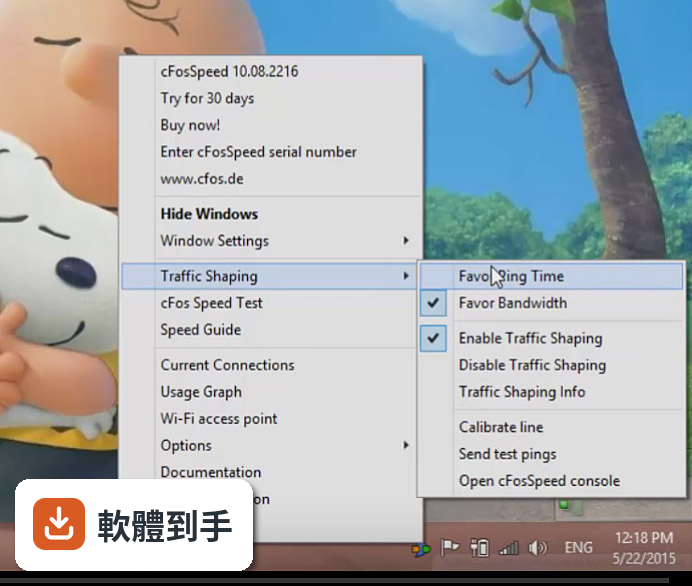
它是一套安裝在 Windows 上的網路流量管理工具,核心功能是幫你調整封包傳送的優先順序。你可以把遊戲、視訊通話這類需要低延遲的程式設為高優先權,讓它們的封包先送出去;下載、P2P 這類不趕時間的流量排在後面。它也提供即時流量監控,讓你看見哪些程式正在佔用頻寬。
02它真的能降低遊戲的 ping 值嗎?
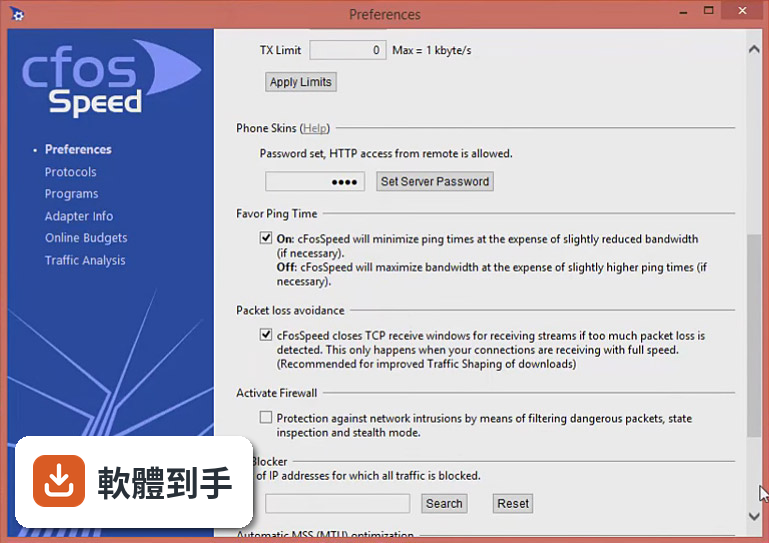
官方說明指出,它透過優化資料傳輸來減少 ping 時間,讓線上遊戲的延遲更穩定。實際效果取決於你的網路環境——如果延遲是因為頻寬被其他程式佔滿,它會有幫助;如果是實體線路問題或伺服器距離太遠,它無法改變。官方也提到,它不會直接影響下載或上傳速度,而是改善整體網路表現。
03安裝之後要怎麼設定才能發揮作用?
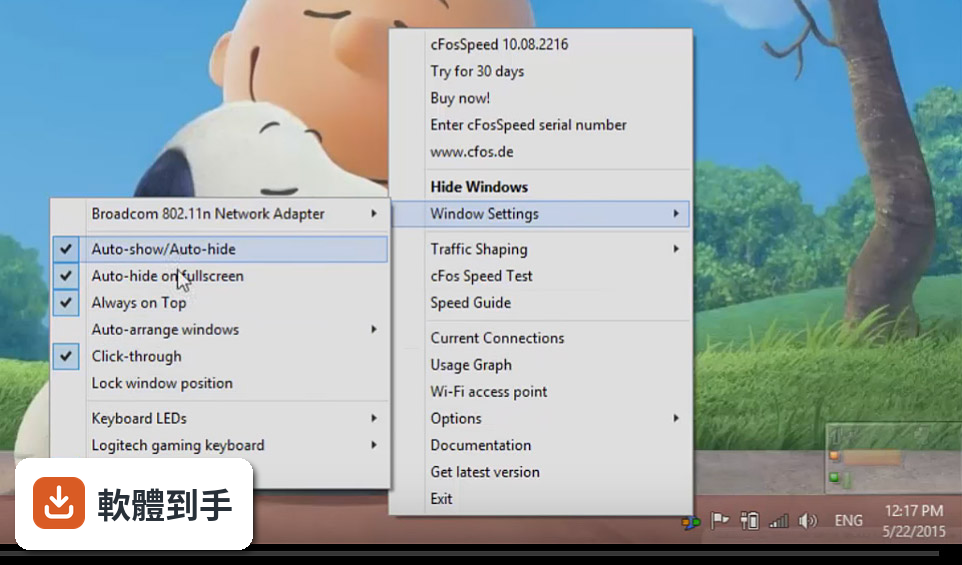
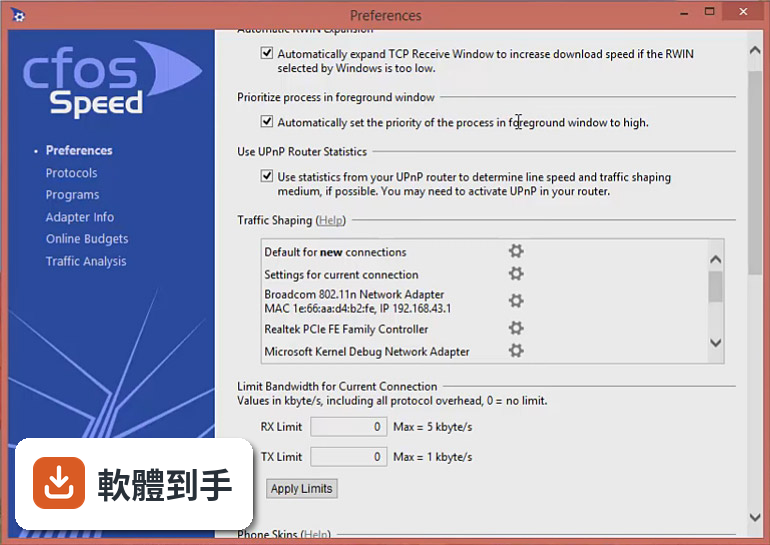
安裝完成後它會自動整合進系統並開始優化流量,不需要太多手動設定。如果你想要更精細的控制,可以開啟主介面,即時看到每個程式佔用的頻寬,然後針對特定應用程式調整優先權,或建立自訂設定檔,讓不同情境下有不同的流量規則。
04它支援哪些網路類型?
官方說明表示,它相容於所有類型的網路連線,包括 DSL、Cable、光纖和行動網路。另外也支援 VPN、WLAN、WiFi,並提供 MTU 優化功能。所以無論你是用固網還是手機分享網路,它都能運作。
05它可以看到哪些程式在吃頻寬嗎?
可以。它的主介面會即時顯示網路流量統計,包括 ping 值、下載和上傳速度、資料使用量,以及哪些程式正在使用頻寬。這對你判斷「到底是誰在佔線路」很有幫助,也能直接從這裡臨時調整某個程式的優先權。
06我只是一般使用者,不是玩家或直播主,這套軟體對我有用嗎?
如果你平常會同時開很多網路服務——例如一邊看串流、一邊視訊會議、背景還有雲端備份在跑——它就有用。它可以確保視訊通話的封包優先送出,不會因為其他流量而卡頓。但如果你只是單一裝置、單一用途,例如只開瀏覽器看網頁,它的效果就不明顯。
07它可以在多台電腦上使用嗎?
官方說明指出,它主要是設計給單一電腦使用,但如果你的網路中有多台裝置,可以分別在每台裝置上安裝,各自管理自己的流量。它也有多使用者功能,但具體的設定方式官方沒有詳細說明,需要自行確認是否符合你的需求。
08它的介面是中文的嗎?
不是,介面語言只有英文。如果你對英文介面不熟悉,操作上會需要一些時間適應。不過它的主要功能——調整優先權、看流量統計——介面不算複雜,但所有選項和說明都是英文,這點在安裝前要先想清楚。
09它跟 NetLimiter、NetBalancer 比起來,哪個比較多人用?
以評分人數來看,NetLimiter 有 67 人評分、NetBalancer 有 66 人,而 cFosSpeed 只有 38 人。Speedify 則有 125 人評分,是這幾套裡面最多的。評分人數多寡不代表好壞,但可以反映使用者的普及程度。如果你在意社群討論量和經驗分享的豐富度,可以參考這些數據。
10它的更新頻率如何?會不會買了之後就沒在維護?
根據收錄的版本紀錄,它近 12 個月更新 1 次,近 24 個月更新 3 次,更新不算頻繁。官方網站的說明中也提到,距離上一次更新已經過了一段時間。如果你很在意軟體是否持續維護,這點需要列入考量。
11它是免費軟體嗎?
不是,它是付費軟體,提供 30 天試用版。官方網站上的售價是一次性費用 17.90 美元,買斷後包含免費更新和支援,不是訂閱制。試用期過後如果覺得有用再決定是否付費,可以先安裝試用版看看效果。
12什麼樣的情況不適合用這套軟體?
如果你只使用 Windows 以外的系統,它不支援,因為它只適用於 Windows。如果你的網路問題是來自路由器設定或 ISP 線路品質,它幫不上忙。另外,它需要花時間設定才能達到最佳效果,官方說明也提到這點——如果你不想研究設定,只想裝了就好,它可能不適合你。
下載與官方連結
cfosspeed-v1100.exe · 5.41 MB · 連結指向軟體原廠
版本紀錄
- 2026-03-14 cFosSpeed 13.10 Build 3005 4.72 MB
- 2025-06-18 cFosSpeed 13.10 Build 3004 5.27 MB
- 2024-10-13 cFosSpeed 13.02 Build 3003 5.25 MB
再看 5 筆
- 2024-05-14 cFosSpeed 13.01 Build 3001 5.23 MB
- 2024-02-27 cFosSpeed 13.00 Build 3000 5.23 MB
- 2022-06-27 cFosSpeed 12.50 Build 2525
- 2021-06-16 cFosSpeed 12.00 Build 2512
- 2021-01-05 cFosSpeed 11.10 Build 2483
這一版改了什麼
What's new in this version:
Extensive re-write of the cFosSpeed core networking code:
- Special speed-up for pass-through LAN traffic (not traffic shaped)
- Designed to keep all out-of-band packet info intact, resulting in improved ad hoc VPN compatibility
- Improved analysis of networking edge cases
- Support for NDIS header/data split
- Additional speed improvements of Traffic Shaping path
- Support for Task Offloading: Checksum Offloading (IP and TCP/UDP), Large
- Segment Offloading and Receive Segment Coalescing
- With the new networking code cFosSpeed has only barely noticeable CPU load even at full blast 10 GBit/s LAN traffic!
- Added a new API to get current connections info, which is 20(!) times faster than the old one.
- The current connections dialog now displays a CPS history of the last 15 secs.
- If several routes to the Internet exist simultaneously, cFosSpeed can now use all of them for Traffic Shaping. This is especially useful if you have a balancing setup, e.g., one LAN adapter and one mobile adapter in use at the same time.
- Added new pingers: UDPv6. This should make cFosSpeed's pings even more stable.
- Removed "idle" class. Now every connection with set L7-protocol and known program name gets a class assigned right away.
- Added new "spd gset passthru" modes.
- All dialog pages are now integrated into the main navigation.
- Reaction time in RWIN expansion was speeded thus increasing throughput.
- Changed HTTP requests so they are hopefully more compatible with certain
- proxies.
- For click-through-auto mode, you can now configure the time needed to switch
- off click-through (the time you need to hover the mouse pointer over the
- cFosSpeed window).
- Added "spd flush_usage_logs". Speeded "spd flush".
- To save processing power, the cFosSpeed service now uses routing / address / interface change notifications to monitor route changes instead of a periodic timer.+ Optimized handling of how used programs are tracked and stored. It is now faster and more consistent.
- Used tech from cFos Personal Net to make the internal web server of the cFosSpeed service more responsive.
- "spd pcnt" will only work if new flag global_counters is set to 1. Enable it with "spd gset global_counters 1".
- Added time to "X" type line of metadata dump. This line is printed when a TCP or UDP connection is killed.
- cFosSpeed can now display a toast notification under Win 10 Build 17763+.
- A click on the new version update notification leads to our web page, where you can download the installation archive.
- By default, full screen detections requires that the full screen window is on the same monitor as the cFosSpeed status window. You can change it so full screen is detected even if the full screen window is on a different monitor than the cFosSpeed status window, by setting "per_monitor_fullscreen=0" in the file
- Added a setting where you can turn off full screen detection if the fullscreen window is not on the same monitor.
- Added IPv6 support for IPlists. The format is the same as for IPv4, just with IPv6 addresses instead. Since IPv6 addresses contain ':', it is assumed that Protowall format IPlists do not use ':' in the "name" portion. If that becomes a problem, use Emule format instead.
- cFosSpeed will only use the prefix, i.e., the upper 64 bits of an IPv6 address, since the lower 64 bits are the interface identifier and are entirely local.
- When the stored password to your license is lost or wrong, the screen that asks for it anew will now also accept your 30-char serial number, if that is how you got your key.
- Sometimes the language selected at installation time wasn't used in the demon. Likewise, a language change in the daemon would not change the language for the next installation. Fixed.
- Fixed a condition that could lead to starving TCP connections when RWIN expansion was used.
- Sometimes packets were leaked if expand_rwin was active, i.e., some packets were never freed. This lead to memory problems and hangs when uninstalling/ reinstalling cFosSpeed. This was a long-standing bug. Fixed.
- Fixed TCP connection problem on connections without TCP WSCALE if RWIN expansion was enabled.
- x Fixed bug in bulk detection: if downloading with HTTP, bulk streams would be
- re-classified as HTTP_C for a short time after each new GET. Fixed.
- x Fixed "spd tcb <remote wild>". You can specify a wildcard for the remote
- address:port pair. The wildcard is case-insensitive, IPv6 addresses
- are in "[]" and IPv6 addresses are written as short as possible (omitting
- leading zeros and using the "::" abbreviation.
- x Fixed a long-standing bug in RWIN expansion that could lead to slow
- connection setups.
- x When cFosSpeed was transferring lots of data, spd commands and current
- connections could sometimes answer very slowly. Fixed.
- x Fixed a display bug in "current connections" which didn't indicate user-
- changed prio.
- x Fixed bug which caused 100% load on one core.
- x Fixed a bug where the cFosSpeed status window would not regard the position
- of the system taskbar with auto-arrange. Thanks to George H.
- x Many of the fixes could only be done with help of many friendly users that
- send traces and dump files, like: ckcampbell1963, aleksxp, a11111135, Daniel
- Hänel, myfootstep, leozhdan, Priben Kranz, Drool and Contor. Thanks to you
- all!
- RWIN expansion will now by default negotiate windows that allow full blast
- downloads with an RTT of 200 ms. Change expand_rwin_dest_time if you want
- a different time.
- When allocating memory, only nonpaged memory will now be used. No more
- allocation and locking of paged memory is performed. This worked only
- very rarely anyway.
- Update to Visual Studio 2019.
- Removed variables mtu_limit, data_compression_*, vj_compression_*,
- fixed_speed and add_overhead_*.
- (Re)setting the prio class will now have immediate visual effect, even if
- there is no data on the connection.
- Support for Windows 19H2, November 2019 Update and Windows 19H1 (version
- 1903).
- Removed the option to disable the taskbar icon. You can use the Windows
- taskbar configuration dialog to hide the taskbar icon if you want.
- Removed WMI and keyboard LED support. All variables / values are available
- via our built-in web server