
這是歷史版本頁面 — 看 CINEMA 4D 最新版本
CINEMA 4D 到底能拿來做什麼
 CINEMA 4D 18.057
資料更新 2017-07-12
閱讀約 7 分鐘
你最近是不是在找一套 3D 軟體,想做動態圖形、產品動畫或簡單的角色動作,但打開 Blender 覺得介面很亂,摸半天不知道從哪裡開始?或者你已經在 After Effects 裡做平面動畫,但客戶開始要求「能不能轉個角度、來點 3D 效果」,你發現自己連個立方體都轉不順。你需要的是一套能快速上手、不會讓你卡在「學軟體」而不是「做作品」的工具。
一般人遇到這種狀況,最直覺的反應是上網找免費軟體,但免費的往往介面不友善、教學資源分散,學了一週還在搞懂視窗配置。另一條路是直接買書或上課,但 3D 軟體動輒數萬元,買了才發現自己不適合,錢就白花了。這類工具的切入點其實是:先搞清楚你要做的是哪一種 3D 工作——是動態圖形、角色動畫、還是產品渲染——再挑一套在那一塊特別順手的軟體,而不是從零開始學一套包山包海的怪獸。
01CINEMA 4D 和 Blender 差在哪?
CINEMA 4D 是商業軟體,採訂閱制,介面是英文,但設計得比較直覺,特別是 MoGraph 模組讓動態圖形做起來很快。Blender 免費開源,功能也很完整,但學習曲線明顯更陡,介面較雜亂。如果你主要是做動態圖形或商業影片,C4D 的 MoGraph 和 After Effects 整合會省下很多時間;如果預算有限而且願意花時間摸索,Blender 是可行的替代方案。
02這套軟體能拿來做角色動畫嗎?
可以。它提供角色綁定、關鍵幀動畫和動作捕捉功能,也支援 Mixamo 綁定和分層動畫。意思是你可以把 Mixamo 上的動作套到自己的角色上,再在時間軸上微調細節。不過它的模擬工具比 Houdini 少,如果你要做非常複雜的布料或流體模擬,可能得搭配其他軟體。
03它跟 After Effects 能配合嗎?
能,而且是它的一大強項。透過 Cineware 可以直接在 After Effects 裡編輯 3D 場景,不用來回切換軟體。對做動態圖形的人來說,這代表你可以在 AE 裡保留 3D 圖層的彈性,同時用 C4D 處理比較重的 3D 運算。這條整合線是它比其他 3D 軟體更吸引數位內容創作者的原因。
04渲染一定要用 Redshift 嗎?
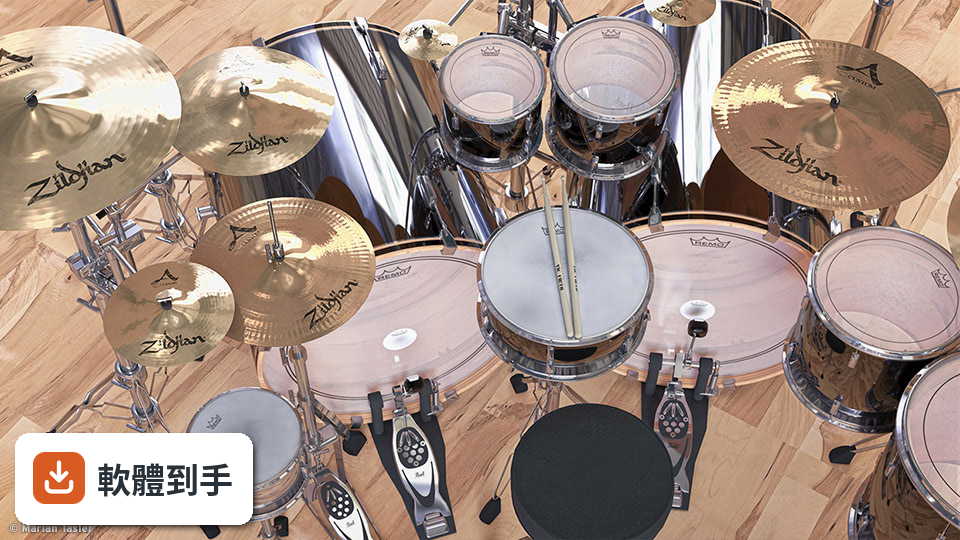
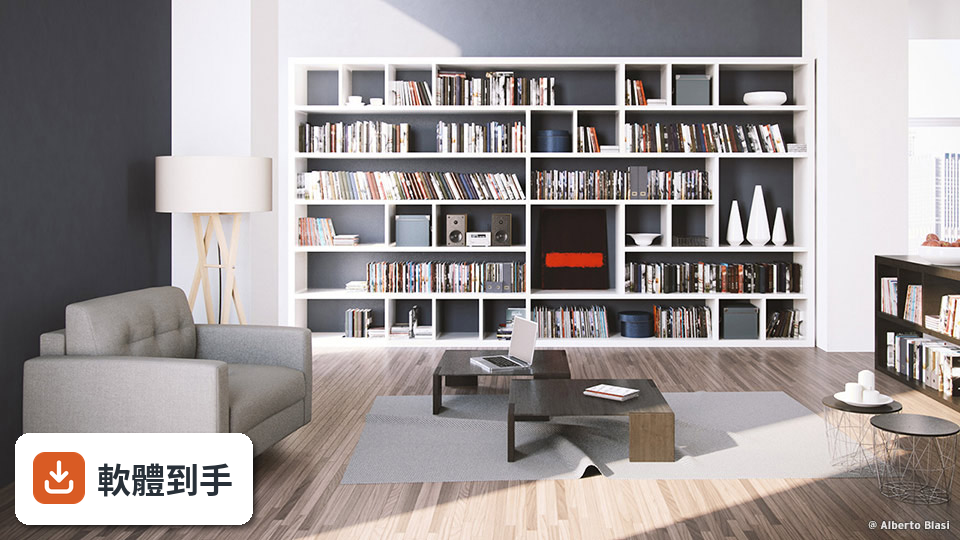
不一定。它內建支援 Redshift,這是 Maxon 自家的 GPU 加速渲染器,但同時也有標準渲染器和物理渲染器,支援 CPU 和 GPU 兩種運算方式。你可以先用標準渲染器跑簡單的專案,等需要更寫實的光影、全局光照或次表面散射效果時,再切到 Redshift。兩者可以並存,不用一開始就綁定。
05MoGraph 到底是什麼?
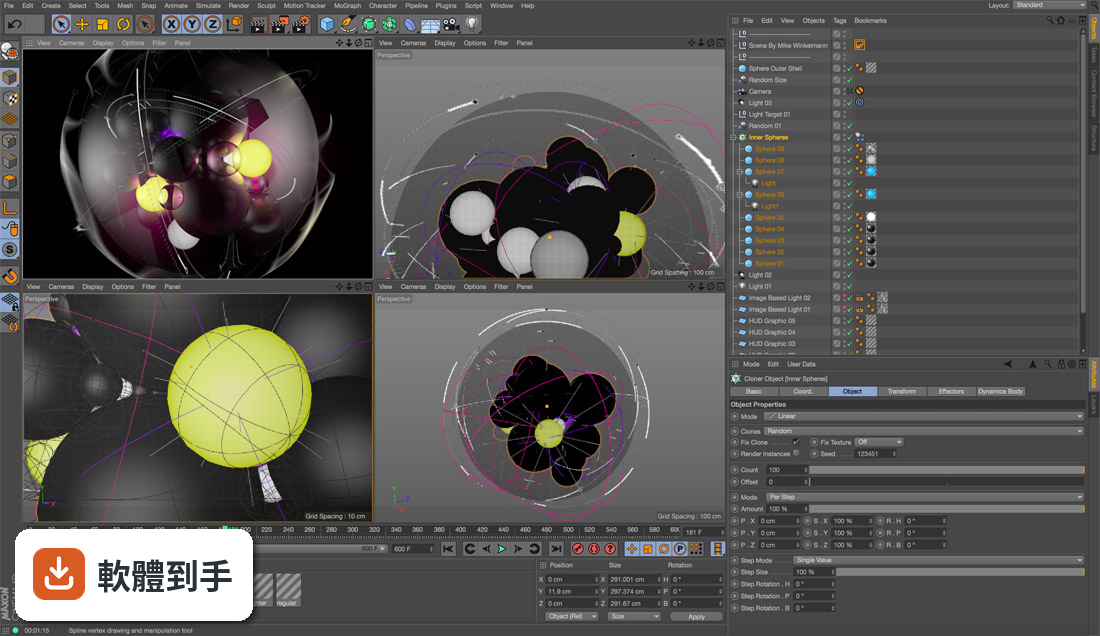
MoGraph 是 C4D 裡專門做動態圖形的模組,核心概念是「克隆」——你可以把一個物體複製出大量副本,再用效果器和欄位去控制它們的位置、旋轉、縮放,做出複雜的動態排列。例如一排方塊依序彈跳、文字碎裂散開、或大量物體繞著圓圈旋轉,這些在 MoGraph 裡都是幾個步驟就能完成的事,不需要手動逐幀調整。
06新手適合用這套軟體嗎?
官方說它對初學者友善,介面乾淨、有邏輯,而且右鍵點擊大部分元素都會跳出簡短說明,這對自學者很有幫助。但要注意它沒有免費版本,只能訂閱,而且介面是英文。如果你完全沒碰過 3D 軟體,建議先看官方教學影片確認工作流程是否符合你的需求,再決定要不要花錢訂閱。

07硬體不夠好跑得動嗎?
最低需求是 Windows 10(版本 1809 以上)或 Windows 11、64 位元 CPU 支援 SSE3、8 GB RAM、OpenGL 4.1 相容顯示卡、10 GB 硬碟空間。但官方也說 GPU 加速功能和複雜模擬會需要更高階的硬體,建議是 32 GB RAM 和 6 GB 以上 VRAM 的 NVIDIA 或 AMD 顯示卡。如果你的電腦只是文書機,跑簡單的建模和動畫可能還行,但渲染會很慢。
08預算有限該選它嗎?
這要看你對「有限」的定義。CINEMA 4D 單獨訂閱是每月 €71.64,年繳 €859.77;Maxon One 全套含 Redshift、ZBrush 等是每月 €118.79。沒有免費版,也沒有一次性買斷的方案。如果你的預算真的吃緊,Blender 是免費的,功能也夠做多數專案,只是要花時間適應它的介面。建議先試用 Blender 一段時間,確認自己真的需要 MoGraph 或 AE 整合再考慮訂閱。
09只做遊戲開發適合嗎?
它不是遊戲引擎,但可以用來建立 3D 資產和動畫,再丟進 Unity 或 Unreal Engine 使用。官方也提到支援 Unreal Engine 的工作流程。不過如果你主要工作是遊戲開發,而且預算有限,Blender 加 Unity 的組合可能更划算,因為 Blender 免費而且遊戲資產管線也成熟。C4D 的強項還是在動態圖形和商業影片,遊戲開發只是它的次要用途。
10介面只有英文會不會很難?
介面語系確實只有英文,沒有官方中文。對不熟悉英文介面的人來說,剛開始會有一段適應期,但它的右鍵說明系統和邏輯化的面板配置可以降低門檻。如果你連英文選單都覺得吃力,可以考慮先看中文教學影片熟悉功能位置,或直接選 Blender——它有社群翻譯的中文介面,但同樣要花時間學。
11它跟 Houdini 比起來哪個好?
兩者定位不同。C4D 的強項是動態圖形、易用性和 After Effects 整合,模擬工具相對少;Houdini 則以程序建模和模擬見長,布料、流體、粒子效果都更強大,但學習曲線陡很多。如果你主要做動態圖形或商業影片,C4D 會比較順手;如果你要大量做特效模擬,Houdini 才是該考慮的選項。
12這套軟體更新頻率會不會太慢?
根據現有紀錄,近 12 個月只更新了 1 次,近 24 個月也是 1 次,更新頻率不算高。這對穩定性來說是好事——不會每次更新都要重新適應介面或外掛相容性——但如果你期待頻繁的新功能,可能會覺得步調偏慢。建議你確認目前版本的功能是否已經滿足需求,而不是等未來的更新。
下載與官方連結
R18InstallerDemoWIN.zip · 4.6 GB · 連結指向軟體原廠
版本紀錄
- 2026-10-15 CINEMA 4D 2027.0.0
- 2026-10-08 CINEMA 4D 2026.4.0
- 2026-08-06 CINEMA 4D 2026.3.4
再看 5 筆
- 2023-10-12 CINEMA 4D 2024.1.0
- 2023-09-29 CINEMA 4D 2024.0.2
- 2023-06-23 CINEMA 4D 2023.2.2
- 2023-05-04 CINEMA 4D 2023.2.1
- 2023-03-30 CINEMA 4D 2023.2.0
這一版改了什麼
What's new in this version:
CINEMA 4D 18.057
ANIMATION:
- Fixed a stability issue
ANNOTATION:
- Fixed an issue with the positioning of annotations
- Fixed an issue with annotations attached to Spline Masks containing spline instances
BODYPAINT 3D:
- Fixed an issue with the Colorize tool
- Fixed an issue with the Color Correction filter
CHARACTER ANIMATION:
- Fixed several issues with Parent Constraint
- Fixed an issue with the Vertex Map Paint tool
- Fixed an issue with the combination of Subdivision Surface and Vertex Map
CAMERA RECONSTRUCTION:
- Fixed an issue with the Motion Tracker and Constraints
COLOR CHOOSER:
- Fixed an issue with the Color Chooser
- Fixed a performance issue with Color Swatch
DEFORMER:
- Fixed several issues with Bevel Deformer
DYNAMICS:
- Fixed an issue with the Spring Connector
EXCHANGE:
- Fixed an issue with BodyPaint 3D exchange
- Fixed an issue with 3DS Max exchange plugin
- Fixed several issues with OBJ import
- Fixed an issue with OBJ exchange and Reflectance channel
- Fixed several stability issues with Alembic
- Fixed an issue with merged Alembic files
- Fixed an issue with Sound Effector on Alembic Export
- Fixed an issue with Hair on Alembic Export
- Fixed an issue with Sweep on Alembic Export
- Fixed an issue with exported Vertex Alembic maps
- Fixed an issue with rendering Alembic animations
- Fixed an issue with SketchUp import and imperial unit system
- Fixed an issue with broken interface after a SketchUp merge
- Fixed an issue with Substance Manager
- Fixed an issue with Substance Shader
- Fixed an issue with Substance Shader in Material Manager
- Fixed several issues with FBX import/export
HOUDINI EXCHANGE:
- Standardized the naming of attributes on Houdini Engine output generators
- Added support for particle orientation to Houdini Engine plugin
INTERFACE:
- Fixed an issue with missing icons
- Fixed an issue with vertical tabs
- Fixed an issue with incorrect markers
- Fixed an issue with materials using identical Reflectance channel
- Fixed several issues with Reflectance layers
- Fixed an issue with usability of minimized windows
- Fixed an issue with refresh behavior of kerning in Viewport
- Fixed an issue with icon color in the Object Manager
- Fixed an issue with ToDo list in the Attribute Manager.
- Fixed an issue with separator line in Attribute Manager
- Fixed an issue with locked icon
- Fixed an issue with User Data
- Fixed an issue with Customize Commands
- Fixed an issue with shortcuts to F13–F19 keys on macOS
- Fixed an issue with some interface elements
- Fixed an issue with the Powerslider keyframe field
- Fixed several stability issues
KERNING:
- Fixed several issues with kerning in Viewport
- Fixed several issues with Horizontal/Vertical Kerning Scale
- Fixed several issues with the Kerning usability
- Improved the accessibility of the scaling handles
- Fixed an issue with the kerning user interface remaining after deleting the text
- Fixed an issue with very short distances in the kerning user interface
LICENSE SERVER:
- Fixed an issue with serial info support
MATERIAL:
- Fixed an issue with the function for selecting materials with the same Reflectance channel setup
- Fixed an issue with the Variation shader and Team Render
- Fixed an issue with additively mixed textures using Parallax bump mapping
- Fixed an out-of-memory issue with missing textures
- Fixed an issue with Thinfilm shader textures when inside a Layer shader
- Fixed an issue with the Texture Manager displaying the wrong name for the Reflectance channel
- Fixed an issue with pasting of shaders in the Layer shader
- Fixed an issue where "First Active Material" command didn't work
- Fixed an issue with Substance Engine and OpenGL on macOS
MOTION TRACKER:
- Fixed an issue with inconsistent tracking by Motion Tracker
MELANGE:
- Fixed naming issue in Melange
- Fixed an issue with several Melange parameters
MODELING:
- Fixed an issue with Weld tool ghost points
- Fixed an issue with the Weld tool and Splines
- Fixed an issue with the Polygon Pen in Polygon Brush mode
- Fixed a stability issue with the Polygon Pen
- Fixed an issue with Polygon Pen projection
- Fixed several issues with Line Cut tool control points
- Fixed several issues with Line Cut tool selections
- Fixed an issue with Line Cut tool in object hierarchies
- Fixed an issue with Line Cut tool and Snapping
- Fixed an issue with Line Cut tool and UV coordinates
- Fixed an issue with the Line Cut tool and Subdivision Surface object
- Fixed an issue with Line Cut tool and "Visible Only"
- Fixed an issue with Line Cut tool creating additional cuts
- Fixed an issue with Line Cut tool precision
- Fixed an issue with Line Cut tool and Backface Culling
- Fixed an issue with the Line Cut tool preview
- Fixed an issue with Line Cut tool when switching views
- Fixed an issue with Line Cut tool and editing temporary cuts
- Fixed an issue with inaccurate line cuts on large objects
- Fixed an issue with Line Cut tool and navigation
- Fixed an issue with the Plane Cut gizmo
- Fixed an issue with Loop Cut tool handling
- Fixed an issue with Loop Cut and cut movage
- Fixed an issue with Loop Cut tool HUD
- Fixed an issue with Loop Cut tool curvature
- Fixed an issue with Plane Cut Tool control points
- Fixed an issue with Plane Cut Gizmo Colors
- Fixed an issue with Spline Mask containing Cloner objects
- Fixed an issue with Spline Mask and Extrude object
- Fixed a Layer issue with nested Spline Mask objects
- Fixed an update issue with Spline Mask hierarchies
- Fixed an update issue with nested Spline Mask shapes
- Fixed an issue with MoSplines under Spline Masks
- Fixed an issue with grouped Spline Mask and Matrix object
- Fixed an issue with Spline Mask animation
- Fixed an issue with Spline Boolean operations
- Fixed an issue with Spline Mask refresh
- Fixed a memory issue with path selection
- Fixed an issue with Spline Mask and instance objects
- Fixed an issue with subordinated Spline Masks
- Fixed an issue with Viewport Solo on polygonal objects
MOGRAPH:
- Fixed an issue with Voronoi Fracture using the Sketch and Toon Spots shader for point distribution
- Fixed an issue with non-ascii letters in external MoGraph cache files
- Fixed an issue with using Cloner object in Radial mode in combination with Push Apart effector
- Fixed an issue with MoExtrude and normal tag handling
- Fixed several issues with updating the Cloner in axis distribution mode
- Fixed a refresh issue with deformed normals
- Fixed a refresh issue with SplineMask in combination with Tracer and Matrix or Cloner object
- Fixed a stability issue
OPENGL:
- Fixed several performance issues with using OpenGL in the Viewport under macOS
PYTHON:
- Added new "def_file" string parameter to LoadDialog()/SaveDialog()
- Fixed an issue with MessageData Timer
- Fixed an issue with UVWTag::CpySlow()
- Fixed an issue with RELAXUV_EDGESEL_POINTER
- Fixed an issue with c4d.Cast()
- Added "lengthunit" optional parameter to c4d.utils.StringToNumber()
- Fixed an issue with BaseDraw.DrawPoints() "vc" and "vn" optional parameters
RENDERER:
- Fixed a stability issue with Material Override
- Fixed an issue with Subsurface Scattering
TAKE SYSTEM:
- Fixed an issue with copying active Takes
- Fixed an issue with Keyframes in active Takes
TIMELINE:
- Fixed several issues with Timeline performance
- Fixed an issue with Timeline navigation
- Fixed several stability issues
- Fixed an issue with duplicate tracks in the Timeline for animated reflectance parameters
UV TOOLS:
- Fixed an issue with locking of the UVW tag
VIEWPORT:
- Fixed an issue with highlighting feature
- Fixed a stability issue
- Fixed an issue with Viewport tessellation and Surface Shading
XPRESSO:
- Fixed an issue with XPresso connections layout
- Fixed an issue with the Spline user interface
- Fixed an issue with XGroup colors
CINEMA 4D 18.048
- Support for Ryzen CPUs added and fixed the related issue with Mesa (Software OpenGL)
- Basic support added for files saved with Substance Designer 6
- Mesa support for macOS 10.12.4 and higher enabled, was already enabled for 10.11, 10.10, 10.9
- Fixed an issue of preview images of Content Library items not being created on macOS 10.12
- Fixed an OpenGL stability issue
CINEMA 4D 18.041
ANIMATION:
New Quaternions workflow:
- There is now a Quaternions group in the Coordinates tab
- The key attributes for Quaternion Rotations have a new option for Quaternion Interpolation types The user can choose between different interpolation presets there
- Constraints workflow
Parent Constraint:
- The new "Local Offset" attributes field presents the internal offset that the constrained object will have with the "parent" targets
- New Interactive Transform checkbox allowing the user to interactively edit the constrained parameters
- New Record button provides an easy way to keyframe the Local Offset and Strength values of the targets
- Negative scales and constraints are now supported
- New Parent Constraint parameters
- "Local Offset" are animatable parameters representing the offset the target (parent) has from the constrained object (child)
- "Interactive Local Offset" is a checkbox that enables the user to interactively adjust constrained parameters and have the Local Offsets update to the new adjustments
- "Auto-Reset (Legacy)" is the Auto-Reset mode which is now implemented as a Legacy mode, for compatibility reasons with old scenes
- "Update Local Offsets" is a new cycle button that will allow to update the Local Offsets based on the constrained object's coordinates, or setting one of the Targets as a new main target This will allow for a seamless transition to that target
- "Record Optimized" is new cycle button which allows recording all the Weights and Local Transforms of all the Targets, in an optimized way
- The new Shift Priority Tag can be used to shift priority values of expressions
- The "Breakdown Color" option in the keyframe attributes of the Timeline now allows setting an alternative color for keyframes
- The Timeline's baking function is now able to bake an Alembic object to native PLA animation
EXCHANGE:
Alembic:
- Alembic module is now based on SDK 158
- Support for vertex colors was added
- The internal tags which represent the data streamed from *abc files are exposed to the user on the Alembic generator now
- There now is a placeholder tag for the Subdivision Surface Weight tag
- The subdivision method is now written to and read from the Alembic SubD scheme
- Alembic generator has a new option for Creases and Corners used for weights of SDS objects
- Alembic generator has a new value to be able to scale SDS weights
New Import options:
- "Color Maps" option allows color information (RGB and RGBA) to be imported and Vertex Color tags to be created
- Importing "Points" with "As Polygon Object" reads the color (RGB or RGBA) property and creates a Vertex Color tag per point mode for it
- Importing "Points" with "As Particle Geometry" reads RGBA (vector4d) color arrays now
- "Creases and Corners" - reads creases and corners as point and edge weights of SDS objects
New Export options:
- "Vertex Colors" - the RGBA data of all Vertex Color tags is exported
- "Display Colors to Vertex Colors" - writes the display color of the object as vertex color information
- "Vertex Colors" + "Points Only (Geometry)" options - exports also RGBA data from points mode only Vertex Color tags
- "Subdivision Surface Weights" - writes point and edge weights of SDS objects as corners and creases
- Export can now be canceled
FBX:
- FBX module is now based on SDK 20162, now supports the 75 file format
New Import options:
- "Vertex Colors" - imports vertex color elements and creates a Vertex Color tag for each of them
- "Convert Grayscale Vertex Colors to Vertex Maps" - in case there are only grayscale colors, a Vertex Map tag will be created instead of a Vertex Color tag
- "Subdivision Surface" - an SDS Weight tag will be created if at least one crease layer was found
New Export options:
- "Vertex Colors" - color information of all Vertex Color tags is exported for every mesh
- "Subdivision Surface" - if an SDS Weight tag exists, the weight information for points and edges is written as two crease layers
- Support for Allegorithmic Substance Engine
- Substance archives (sbsar) can be loaded
- The Substance Asset Manager can be used to organize the Substance assets in the scene
- The Substance Shader is used to reference Substance asset outputs in Cinema 4D's material system and all other parts of Cinema 4D that support shaders
- New Substance Asset mode in the Attributes Manager
- New Substance Engine section in the Preferences
- New Substance Engine sub-menu in Pipeline menu
- C++/Python API supports Substance
- Support for the DDS texture file format (loader)
- BP exchange supports 3ds Max 2017
OBJ:
- Import and Export presets can now be saved and loaded
- The Material Mix Mode can now be specified
HOUDINI EXCHANGE:
- Updated to use Houdini Engine 150313
- The internal tags which are generated by the Houdini asset are now exposed to the user
- During Open Scene, if the asset path is absolute and invalid but an asset file with the same name exists in the C4D scene folder, then this asset file is used and the asset path becomes relative
- Added vertex color support for both marshalled inputs and generated outputs
- GUI improvements
INTERFACE:
- Support for OS X 1011 El Capitan System Font added
MATERIAL:
- Variation shader enhancements
- Support for more than one texture
- UV Rotation can now be quantized and UV can be flipped
- New "Invert Direction" option for Ambient Occlusion
- New parallax mapping support in the Bump channel
- New Shadow Catcher shader
- New Thin Film shader
MODELING:
- New Knife tools
- Interactive modeling workflow using new on screen handles and gizmos
- Line Cut tool
- Cuts polygon objects and splines with polyline cuts
- Cut line can be interactively adapted via control points
- Cuts can be inside of polygons
- Several slice modes
- Cut
- Split
- Remove Part A
- Remove Part B
- Supports snapping and constraints
- Plane Cut tool
- Planar cut for polygon objects
- Cutting plane can be interactively adapted
- Several slice modes
- Cut All
- Split
- Remove Part A
- Remove Part B
- Several plane modes available, defining which coordinate system is used
- Free
- Local
- World
- Camera
- The number and spacing of parallel cuts can be defined
- Supports snapping and constraints
- Loop/Path Cut tool
- Cuts new loops or path into objects
- Loops/Paths can be interactively adapted
- Loops/Paths can be searched bidirectional or not
- Offset modes
- Proportional
- Edge Distance
- The number of parallel cuts can be defined
- Cuts can preserve the curvature of a surface
- Cuts can be shaped using spline GUI
- Support for Pixar's OpenSubdiv
- Baking
- Greatly improved displacement map baking and rendering
- improved accuracy for vector maps (tangent, object and world)
- Using ray casting for intensity maps - new options available (intensity, intensity centered, red-green)
- Also improved normal map baking
- Ray casting also used when not baked in conjunction with a vector displacement map
- Sculpting
- Resolved issue with sculpting at small scales
- Resolved issue with reproject mesh at small scale
MOGRAPH:
- New Effectors
- Push Apart effector
- Helps reduce or avoid clone overlap quickly
- Supports several modes:
- Push Apart
- Hide
- Scale Apart
- Push Apart Along X,Y, or Z Axis
- ReEffector
- Can reset all MoData parameters to initial state within the Effector List it's applied to
- Can also blend back to the initial state in a deformer stack
- Can re-apply multiple effectors to the "fresh" state and blend their effects into the Effector List per parameter
- New distribution modes for MoGraph Cloner and Matrix Objects
- Honeycomb Array
- Clone on Axis
- New behaviors for MoGraph distribution modes
- "Object" mode allows to use a custom object to define the form of the cloning
- Per Step mode for Grid Array and Honeycomb Array
- New handles behavior for these modes to make dragging out fields of clones faster and more intuitive
- Scale clones based on polygon size
- Rewritten MoGraph Cache tag
- Multiple MoGraph Cache tags can now be used and blended between on a single MoGraph object
- MoGraph Cache tags can be saved to external files
- New interface
- New weights workflow
- New MoGraph Weightmap tag
- New MoGraph Weight Paintbrush tool
- New XPresso node for weights
- New Commands
- Swap Cloner/Matrix - Switch selected Cloner objects to Matrix objects or switch selected Matrix objects to Cloner objects
- Hide Selected - Automatically creates a non-destructive setup to hide the current MoGraph selection
- Improvements to the Display options for MoGraph objects
- Display Clone IDs in the viewport (both on the object and within Selection tags)
- Depth Cue and Scaling for better display of MoSelection as well as all other points display modes (UV, Weights, etc)
- Voronoi Fracture
- New Voronoi Fracture generator
- Support for many different point generators (Point Generator, Object, Spline, Particles, MoGraph Matrix, Shader, …) to define the fracture pattern
- The Voronoi Fracture generator is a MoGraph generator and brings full support for effectors and all other MoGraph features
- Inside/Outside Selection tag lets you assign different materials to the outside and inside faces of fracture pieces
- Full dynamics support
- Face, point and edge selections can be created
MOTION TRACKING:
- New object tracking functionality
- New "Lock View on Tracks" mode
- New "Frame All" / "Frame Selected" commands
- New "Nudge Track" command
- New "Auto Update Tracks" mode
- TEAM RENDER / TEAM RENDER SERVER:
- The "Add machine" dialogue now has a small button that presents a list of recently added machine IPs / hostname
- New "Restart Jobs After Unexpected Server Termination" option
Monitor page:
- The jobs and networks table are now multiselection aware and offer the same functionality as the multiselection bars on the Jobs and Networks page
- Jobs can be reordered by clicking on the current position and entering another existing one
- If there is input to an edit field, but the user navigates to another section, an information dialog is presented to inform about unsaved changes
- The number of active and inactive jobs is shown in the header of the jobs table pane
- The number of online and offline clients is shown in the header of the networks table pane
- If logged in as an admin, there is now an option to show only the jobs of the admin instead of all jobs
Jobs page:
- Jobs can be reordered by clicking on the current position and entering another existing one
- If there is input to an edit field, but the user navigates to another section, an information dialog is presented to inform about unsaved changes
- If logged in as an admin, there is now an option to show only the jobs of the admin instead of all jobs
Render Info in Jobs Details:
- In the jobs details page (if a master scene is selected) a new collapsable is shown with useful information from the render settings
- These settings are: Render Settings Name, Take Name, Frame Range, Regular Image, Multipass Image, Renderengine, Frame Rate, Image Resolution
User page:
- When creating a new user or changing the password for the current logged in user, the TeamRender Server interface presents a single dialog instead of a wizard
New FAQ page:
- Questions can be filtered (full text search)
- When hovering with the mouse over a question (in the overview panel) a short excerpt is shown with the first couple of characters characters before and after the entered filter term in case a filter string is found for the first time The matched result is highlighted
- Questions are tagged, and the tags can be selected to restrict the results and the overview panel according to the selected category Q&A can have multiple tags
TEXTURE BAKING:
- Calculation of vector maps of all types has been improved
- Intensity based maps (intensity, intensity centered, red-green) now use a basic ray casting technique to measure displacement between the base and the sculpt mesh
- Baking normal maps only also uses the basic ray casting technique to sample normal vectors on the sculpt mesh
VIEWPORT:
- Shading/Vertex normals can now be displayed in the viewport
- New "Screenspace Ambient Occlusion" option
- New "Reflections" option shows an approximation of the Reflectance Channel in the viewport
- Supports multiple layers, masks, fresnel and roughness
- New "Tessellation" option shows the effect of displacements in the viewport
- Can be set globally and per material
WORKFLOW:
- New preference settings
- Phong tag: Now the default Phong Angle is 40º
- Selection Tools: The setting "Only Select Visible Elements" is disabled by default for Rectangle, Lasso and Polygon Selection
- Render Settings: the default render output size has been changed to 1280x720 and a new Screen preset with that size has been added
- Viewport filter: now "Object Highlighting" is disabled by default
- Weight Tool / Paint Tool: the following default settings have been changed:
- Strength: 100%
- Mode: Absolute
- Falloff: None
- Texture Manager: now all options in "View" menu are enabled by default
- Scroll to First Active: this command has now been assigned the shortcut 'S'
- Extrude Tool: now the "Maximum Angle" setting is 91º by default
- Figure object:
- Now the default figure height is 180 cm
- Now the figure axis is located at its feet
- Soft Selection Tool: now "Mode" is set to "All" by default
- Split Command: (C4D main menu / Mesh / Commands / Split) - The newly created object name will have the "1" suffix, eg "Cube1"
- Color Chooser
- New preference: Remember Last Layout
- New Compact Mode
- Now the first swatch group is shared between all Cinema 4D documents
- New contextual menu options handle the default swatch set:
- "Reload Default Group": current swatches in shared group will be replaced with the stored default swatch set
- "Save this Group as Default Group": the swatches in the clicked group will be saved as default group set
- "Save Selected Swatches as Default Group": the currently active swatches will be saved as default group set
- Dragging single or multiple swatches over a gradient converts them to color knots
- C++/Python API supports Color Swatches
- Improved ALT key handling for left-handers on Windows
- Metaball Solidity option makes polygonal metasurfaces solid
- The Reflectance channel now supports multi edit for materials with the same layer setup
- Pasting a Reflectance layer into a Reflectance channel with a selected layer now replaces that layer instead of adding a new layer
- The previews in the Material Manager now indicate which materials have the same reflectance layer setup as the selected material
- New "Select Materials with same Reflectance" menu command in the Material Manager
- New "Set from Projection" command for UVW Tags to easily create new UVW tags or modify existing ones on multiple objects
OTHER:
- The Structure Manager has two new modes to show weights per vertex and weights per edge
- Improved baking for multiple tags
- Reduced file size for particle storage and improved speed
- Loading/saving of large number of image sequences is now much faster
- Cinema 4D startup speed increased
- Mesa library is now used for viewport rendering on the CPU
- Support for the RLM license manager
- Support for vertex colors
- New Vertex Color tag
- Extended Paint Tool now can paint vertex colors
- The Vertex Map shader now supports vertex colors
- The Vertex Map shader supports OGL
- New Vertex Color XPresso node
- The Structure Manager now supports vertex colors
- New Vertex Map Converter converts between vertex map and vertex color
- C++/Python API supports vertex colors
- Python API now supports custom nodes description methods, BodyPaint 3D UV commands and texture baking functions