
這是歷史版本頁面 — 看 Comodo Antivirus 最新版本
Comodo Antivirus 免費防毒現在還值得裝嗎
 Comodo Antivirus 10.0.2.6420
資料更新 2017-11-24
閱讀約 6 分鐘
電腦突然跳出「發現病毒」的視窗,你連開個網頁都提心吊膽,深怕哪個按鍵按下去就中了勒索軟體。想找一套防毒軟體,打開搜尋引擎滿滿都是付費方案,免費的又怕功能殘缺、廣告一堆,裝了等於沒裝。你只是想要一台能安心開機、正常上網的電腦,不想被病毒搞到重灌,也不想每個月多付一筆軟體訂閱費。
一般人遇到這種狀況,直覺就是裝 Windows 內建的 Defender,或上網抓一套號稱免費的防毒。但 Defender 對進階威脅的反應有時不夠即時,而某些免費防毒其實是付費版的試用閘門,時間一到就開始跳出付費提醒,甚至偷偷裝上工具列。這類工具的切入點,是提供一套不用花錢、但功能不縮水的完整防護,把可疑檔案隔離起來觀察,而不是直接刪除或放行,讓你在「怕誤刪」和「怕中毒」之間有個緩衝。
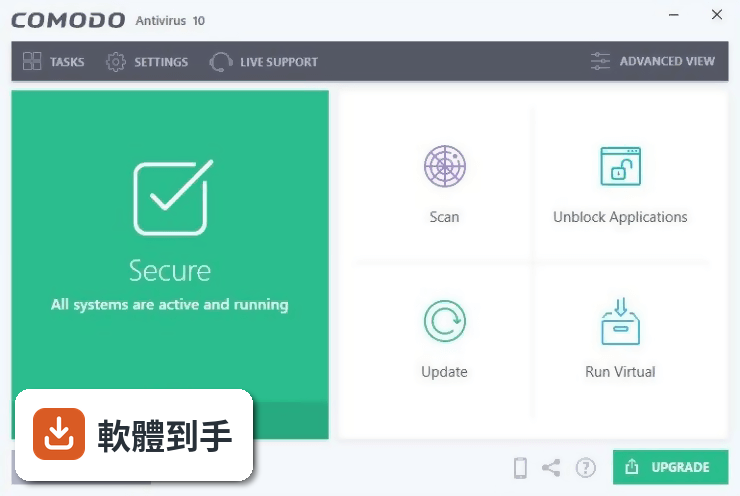
01Comodo Antivirus 是免費的嗎?還是試用版?
這套軟體標榜提供完整的 PC 防護,不是付費產品的精簡版,授權型式標示為 Demo,但官方說明強調免費使用。要注意的是,它支援的系統最高到 Windows 10,如果你用的是 Windows 11,官方資料沒有提到支援,安裝前最好先確認相容性。另外介面只有英文,沒有中文語系。
02它跟 Windows 內建的 Defender 比起來,有什麼不一樣?
最大的差異在於它多了沙盒技術和行為分析。Defender 主要是靠特徵碼比對,遇到沒看過的檔案會先擋下來問你;Comodo 則會把可疑檔案丟進「Antivirus Jail」隔離區,先封鎖再觀察,如果是病毒就刪除,不是就放行。這種做法對未知威脅的處理比較有彈性,不會動不動就誤殺正常檔案。
03它的掃描功能有哪些?可以只掃特定資料夾嗎?
可以。它提供即時監控和手動掃描兩種模式,手動掃描分成快速、完整和自訂三種,你可以指定要掃描的磁碟或資料夾。安裝完成後即時防護會自動開啟,不需要另外設定。如果你只想檢查某個下載來的檔案,直接對那個檔案按右鍵掃描就行。
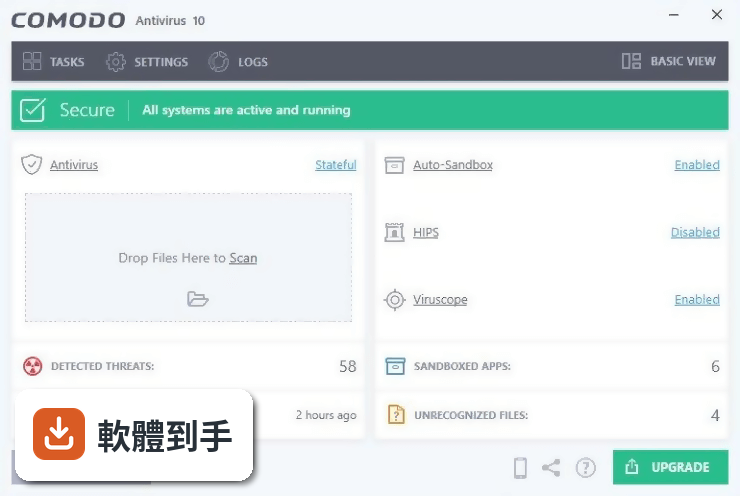
04什麼是沙盒技術?對一般使用者有什麼實際幫助?
沙盒就是一個隔離的執行環境。當你下載到一個來路不明的程式,不確定它是不是病毒,可以讓它在沙盒裡先跑一遍。就算它真的是惡意軟體,也只會在沙盒裡搗亂,不會影響到你原本的系統。這對常常需要測試軟體、或會從論壇下載檔案的人來說很實用,等於多了一層保險。
05它有沒有防火牆?還是只有防毒功能?
官方功能說明裡有提到它包含防火牆,會過濾進出的網路流量,防止未經授權的存取。另外還有自動沙盒、安全購物環境、遊戲模式和 TrustConnect VPN 等功能。不過要注意,這些功能是不是全部包含在免費版裡,官方說明沒有寫得很清楚,建議安裝後實際確認一下。
06我電腦很舊,跑得動這套軟體嗎?
它支援 Windows XP 到 Windows 10,所以老電腦在系統相容性上沒問題。但官方資料沒有提到硬體需求,也沒有人數夠多的評測可以參考,實際跑起來順不順,要看你的記憶體和處理器等級。建議先裝起來試用看看,如果覺得卡頓再移除,反正它是免費的。
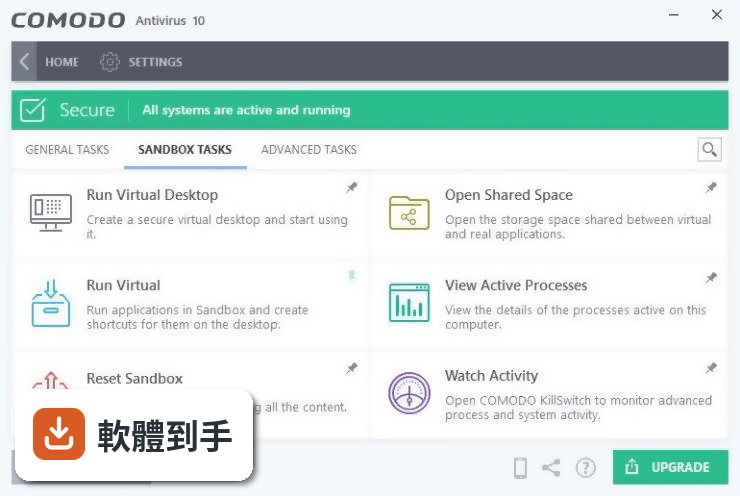
07這套軟體適合什麼樣的人用?
適合不想花錢、但又想要完整防護功能的人,尤其是會下載破解軟體、或常逛一些比較危險的網站的使用者,它的沙盒機制可以讓你在執行可疑檔案時多一層保護。另外,如果你對英文介面不排斥,也願意花一點時間研究設定,這套軟體的功能面確實比一般免費防毒完整。
08我英文不好,介面只有英文會不會很難操作?
會。它的介面語系只有 English,沒有中文,這對不熟悉英文的人來說是個門檻。雖然基本功能像是掃描、隔離檔案的操作不會太複雜,但進階設定像是防火牆規則、沙盒選項,如果看不懂英文,很容易設定錯誤或找不到功能。如果你完全無法閱讀英文,建議考慮其他有中文介面的防毒軟體。
09這套軟體跟 Comodo 出的其他防毒產品有什麼不同?
官方資料列出幾個功能相近的產品,包括 Comodo Cloud Antivirus、Comodo Firewall、Comodo Cleaning Essentials 和 Comodo Cloud Scanner。Cloud Antivirus 和 Cloud Scanner 偏向雲端掃描,Firewall 是純防火牆,Cleaning Essentials 是清理工具。這套 Antivirus 是整合型的,包含防毒、防火牆和沙盒,功能比較全面,但相對也比較佔資源。
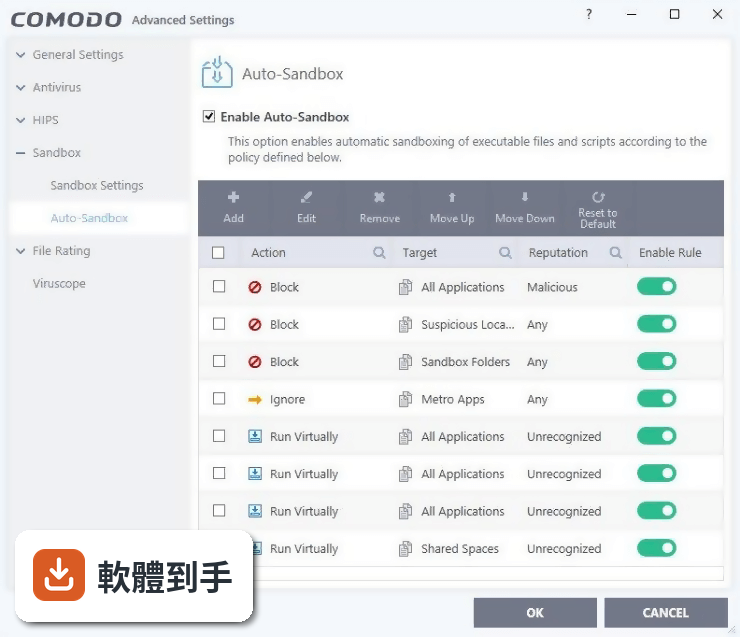
10它的更新頻率如何?病毒碼會不會很久沒更新?
根據版本紀錄,這套軟體近 12 個月只更新了 1 次,近 24 個月也是 1 次,更新頻率不算高。官方說明有提到自動更新功能,但實際病毒碼的更新頻率沒有明確資料。如果你很在意即時防護的更新速度,這點需要自行確認,或考慮其他更新更頻繁的防毒軟體。
11網路上對它的評價如何?可以放心用嗎?
目前看到的使用者評分是 6.6/10,共有 257 人評分,分數不算高。評分人數也不算多,參考價值有限。它的開發商 Comodo Group 是知名的資安公司,這點沒問題,但評分偏低可能跟介面難用、更新緩慢或誤判率有關。建議你先裝在比較不重要的電腦上試用一段時間,再決定要不要當主力防毒。
12有沒有其他更多人用的免費防毒可以選?
官方資料裡列出的比較對象都是 Comodo 自家的產品,沒有提到其他品牌的免費防毒。如果你想要有更多使用者評價、更新更頻繁的選擇,可以自行搜尋其他免費防毒軟體,例如 Avast、AVG 或 Bitdefender 免費版,這些都有中文介面且使用者基數較大。不過每個軟體的資源佔用和誤判率不同,建議都先試用再決定。
下載與官方連結
cav_installer.exe · 連結指向軟體原廠
版本紀錄
- 2026-02-18 Comodo Antivirus 12.2.2.8012 5.4 MB
- 2019-04-24 Comodo Antivirus 12.0.0.6818 5.4 MB
- 2019-03-26 Comodo Antivirus 12.0.0.6810 5.4 MB
再看 5 筆
- 2019-03-06 Comodo Antivirus 11.0.0.6802 5.4 MB
- 2019-01-09 Comodo Antivirus 11.0.0.6744 5.3 MB
- 2018-10-31 Comodo Antivirus 11.0.0.6728 5.3 MB
- 2018-10-01 Comodo Antivirus 11.0.0.6710 5.3 MB
- 2018-06-27 Comodo Antivirus 11.0.0.6606 5.3 MB
這一版改了什麼
What's new in this version:
Comodo Antivirus 10.0.2.6420
- Change log not available for this version
Comodo Antivirus 10.0.2.6408
- Change log not available for this version
Comodo Antivirus 10.0.2.6396
Fix:
- We have been reviewing Windows preview builds and came across crash in Edge browser in one of Insider Preview builds as pointed here. These changes in Windows 10 could go into RS3 release, which could happen any time mid September, 2017 onwards
- Crash in Excel in certain scenarios as reported here
Changes:
- If CIS is updated, it will also update Internet Security Essentials(ISE) to latest v94 in case installed in system
- When you install CIS afresh, Secure Shopping section in it will not have default websites list. You can always configure a new website and will be alerted. At the moment we do not have remember choice option in those alerts and thus was inconvenient
Comodo Antivirus 10.0.1.6294
- Change log not available for this version
Comodo Antivirus 10.0.1.6258
Fixes:
- Stability fixes with respect to HTTPS browsing in Edge browser
- Even though you had latest v6254, you still had seen updates for iseupdate, it should not happen now
- Reported cmdagent crash is fixed
Changes:
- Geek Buddy product is not selected by default for installation in Components section. Geek Buddy will be removed completely from CIS package in next release
Comodo Antivirus 10.0.1.6254
Fixes:
- Incompatibility with Microsoft Update KB4022716 (OS Build 15063.447)
- Multiple entries related to cmdagent in error section of Windows Events as posted here
- Invalid entry in "Blocked by" column in Unblock application window as posted here
New:
- Additional http fallback entry in update URL for Windows 7. In addition to https, you will see 2nd http entry for download.comodo.com.
- We have also released recognizer v1.6.2.27 as tested here in production in alert mode
Comodo Antivirus 10.0.1.6246
- Change log not available for this version
Comodo Antivirus 10.0.1.6223
Fixes:
- Comodo Security Agent could not be started
- Comodo Application shortcuts could not be deleted, renamed or moved
- IP4 and IP6 entry names could be distorted
- Some of Windows XP PCs could not download updates
- Cygwin fails at post-install scripts and apps like Dash, Bash become unresponsive / consume abnormal CPU usage
- In Containment settings, checkbox 'Do not show privilege elevation alert' was selected after clean install, it should have been de-selected by default
- Some users reported that Windows firewall was disabled even though they installed Comodo Antivirus rather Comodo Firewall
- File Lookup Service(FLS) could fail in some cases
- Trusted vendor list could see reduced list of entries for CIS versions older than v10 in last major update
New:
- “Pseudo File Downloaders” file group has been updated with additional entries for: *cmd.exe | *.bat | *.cmd for enhanced security. This file group is referenced in 3rd "Run Virtually" rule set
Comodo Antivirus 10.0.1.6209
New:
We now have a new tab "Advanced Protection" under "Advanced Settings" where:
- a - "Virus Scope" and "Secure Shopping": These used to be separate tabs are now part of this "Advanced Protection" section.
- b - "Miscellaneous": From HIPS Settings, we have moved 4 settings and made part of this section. "Heuristic Command Line Analysis" and "Embedded Code Detection" are integrated under one interface as "Do Heurristic Command Line Analysis". So embedded code detection is expanded in that interface and connected with related parsers. Also we have moved "shell code injection detection" and "browser configuration modification" settings under this section.
- Comodo Secure DNS is back in installation offering now
Changes:
- You will see word "Sandbox" is now replaced with word "Containment" across whole GUI as that is easier to understand by layman while Sandbox has been more technical.
Improved:
- Support of Python interpreter in heuristic command line analysis
Fixed:
- All GUI issues experienced with upcoming Windows 10 RedStone-2 / Creators Update are fixed in this release.
- Main focus of CIS v10 has been to make it more stable and bug free and as part of that aim, hundreds of bugs are fixed, below are few particular fixes:
- BSOD after launched Opera in Sandbox
- Critical bypasses of Sanbdox
- Keyboard can be intercepted in Virtual Desktop
- Several apps crash caused by guard32/64.dll
- PowerShell scripts are not sandboxed
- Missed fileless malware cases
Comodo Antivirus 10.0.0.6092
- Change log not available for this version
Comodo Antivirus 10.0.0.6086
New:
Brand New User Interface Themes:
- Simplicity and usability are the focus of Arcadia and Lycia themes
Firewall Advanced:
- Comodo Firewall lovers here ! Comodo provides you the option to use Unlimited Live Expert Virus Removal with Firewall Advanced package including Geekbuddy 7/24 live help service
Unblock Applications:
- Ever tried to run a program only to find your security software is blocking it - then can't figure out what you need to do to get it running? Our new ‘unblock applications’ feature allows you to release applications with a single click from whatever security component has blocked them.
Improved:
- Wordings, icons, navigation, consistency, usability
- Internal improvements to file hash tracking
- Internal improvements to file rating system
- Various bug fixes and tweaks
Comodo Antivirus 8.4.0.5165
- Change log not available for this version
Comodo Antivirus 8.4.0.5076
- Change log not available for this version
Comodo Antivirus 8.4.0.5068
- Change log not available for this version
Comodo Antivirus 8.2.0.5027
- Change log not available for this version