
這是歷史版本頁面 — 看 Comodo Backup 最新版本
Comodo Backup 免費備份軟體,英文介面值得用嗎
 Comodo Backup 4.1.2.28
資料更新 2012-04-17
閱讀約 7 分鐘
你電腦裡那些花了好幾個小時做出來的文件、累積多年的照片、怎麼都捨不得刪的影片,平常就散落在各資料夾裡。你心裡知道該找時間把它們複製到外接硬碟或網路空間,但每次想到要手動挑檔案、比對哪些是新檔、哪些要覆蓋,就覺得麻煩,於是又拖了一天。直到某次硬碟發出怪聲,或系統突然無法開機,你才開始後悔當初怎麼沒好好備份。
Windows 內建的備份功能不是不能用,但介面陽春、設定選項有限,排程和增量備份的邏輯也不夠直覺。很多人轉而想找一套免費的備份工具,卻又怕功能太複雜、或裝了一堆用不到的附加軟體。這類工具的核心做法其實很單純:你指定要保護的檔案和目的地,它負責在固定時間自動複製、壓縮、加密,並在出錯時通知你。剩下的,就是選一套介面你能接受、更新狀況也還算正常的軟體。
01Comodo Backup 可以備份哪些東西?
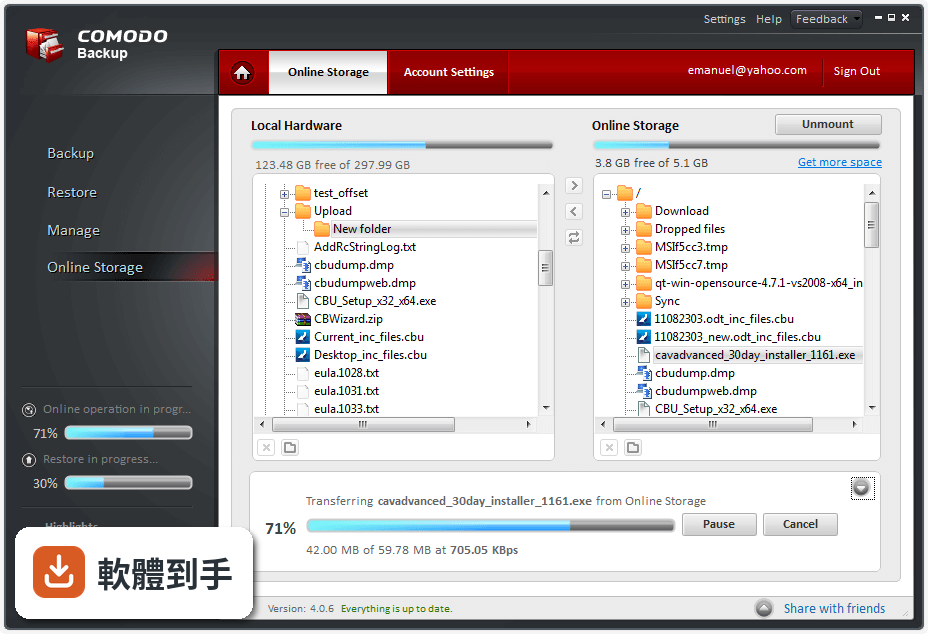
它可以備份單一檔案或整個資料夾,目的地支援本機磁碟、外接硬碟、網路磁碟機、FTP 伺服器、CD/DVD、ISO 映像檔,也能壓縮成 ZIP 格式。官方資料提到它提供 10GB 線上儲存空間,但僅限 90 天,這點使用前要留意。另外它支援磁碟鏡像和自解壓縮備份,但官方說明沒有詳細列出系統還原的完整流程,實際操作前建議先確認。
02可以設定時間讓它自動備份嗎?
可以。它提供彈性的排程功能,你可以指定每天、每週或每月執行備份工作,也能設定在 Windows 啟動時自動執行,或是以 Windows 服務的方式在背景運行。排程建立後,它會依照你設定的時間自動啟動備份,不需要每次手動開啟。第一次設定時建議先跑一次手動備份,確認排程觸發的條件和路徑都正確,再放給它自動執行。
03備份出來的檔案會不會很佔空間?
它支援 ZIP 壓縮,可以節省磁碟空間,也提供增量備份和差異備份兩種模式。增量備份只記錄上次備份後有變動的檔案,差異備份則是從上次完整備份後的所有變動,兩者都能減少重複資料佔用的空間。如果你備份的內容主要是文件、圖片這類壓縮率高的檔案,ZIP 壓縮的效果會比較明顯;影片和已壓縮的檔案格式則空間節省有限。
04它可以把檔案同步到另一台電腦或隨身碟嗎?
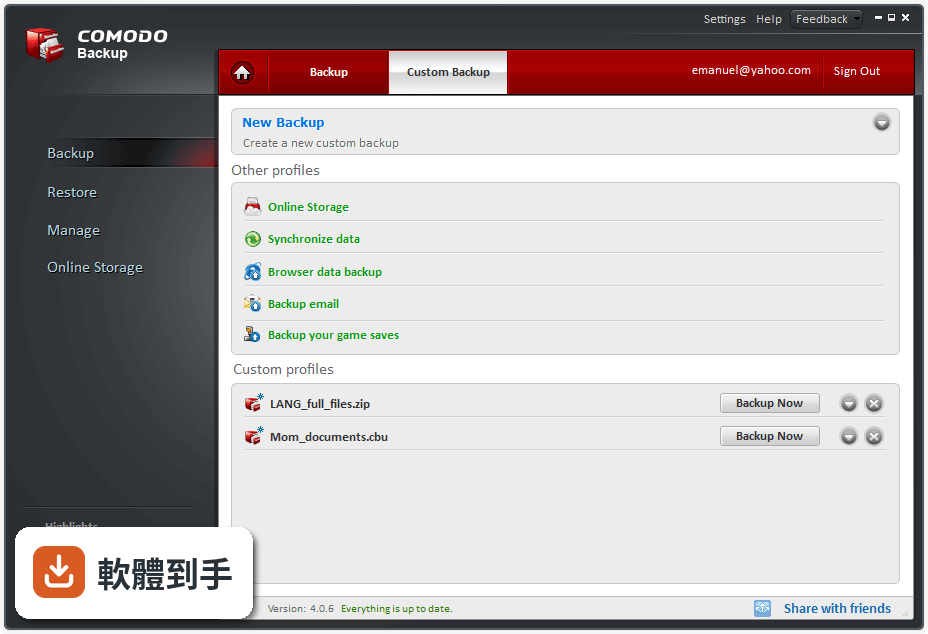
可以。它內建同步模式,當你設定好同步工作後,只要來源端的檔案有變動,它會即時複製到目的地,讓兩邊的資料保持一致。這對經常在不同電腦間切換工作的人來說很方便,例如辦公室電腦和家用電腦之間的檔案同步。要注意的是,同步和備份的邏輯不同,同步會讓兩邊資料完全一致,如果來源端誤刪檔案,同步後目的地也會刪除,重要資料建議另外保留版本紀錄。
05備份過程可以加密嗎?
可以。官方資料指出它提供可設定的加密演算法,你可以在建立備份工作時選擇加密選項,保護備份檔案不被未授權的人讀取。加密會增加備份和還原時的處理時間,但對含有個人資料、財務文件或商業機密的備份來說是必要的保護。設定加密時請務必記住密碼,一旦忘記,備份檔案就無法還原,這點官方說明沒有提供密碼救援機制。
06我英文不好,介面只有英文會不會很難用?
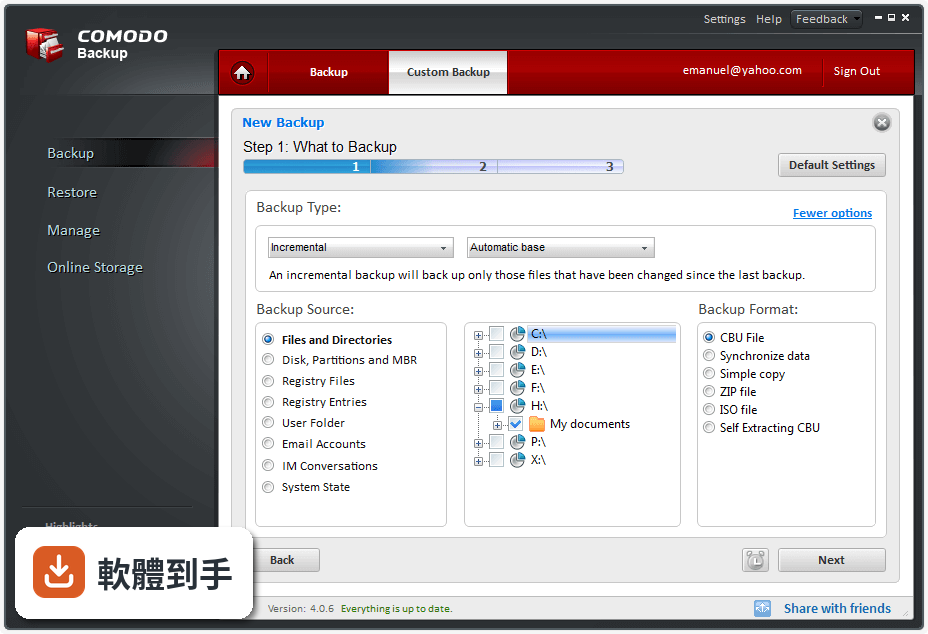
它的介面確實只有英文,但官方資料強調設計上力求直覺,主要功能選項都放在明顯的位置,建立備份工作時有精靈引導,一步步選擇來源、目的地、排程和備份類型。如果你有基本英文閱讀能力,或願意花一點時間對照操作說明,應該能上手。但如果你完全看不懂英文,操作時容易誤設選項,備份設定錯誤可能導致備份失敗或資料沒被正確保護,這種情況建議考慮有中文介面的其他工具。
07這套軟體適合什麼樣的人用?
根據官方說明,它同時標榜適合初學者和網路管理員,介面設計讓一般使用者能快速設定,也提供進階的規則篩選、郵件通知和 Windows 服務模式,滿足需要自動化管理的進階需求。如果你需要一套免費、無廣告、功能完整的備份工具,而且不排斥英文介面,它可以勝任基本到中階的備份工作。但如果你需要的是完整的系統映像還原、開機救援媒體這類災難復原功能,官方資料著墨不多,需要自行確認。
08它跟其他免費備份軟體比起來,選哪個比較好?
以使用者評分人數來看,Macrium Reflect 有 260 人評分,AOMEI Backupper Standard 有 111 人評分,Comodo Backup 只有 70 人評分,樣本數較少,參考價值有限。功能面上,Comodo Backup 涵蓋檔案備份、排程、增量備份、加密、壓縮、同步和 FTP 上傳,對一般檔案備份需求來說相當完整。但如果你需要的是整顆硬碟的映像備份和系統還原,Macrium Reflect 和 AOMEI Backupper 在這一塊的討論度和使用者經驗可能更豐富,建議依你的主要需求來決定。
09這套軟體很久沒更新了,還適合繼續用嗎?
它的版本紀錄顯示最後一次更新停在 2014 年,距今已經超過十年,近兩年完全沒有新版本釋出。這代表它沒有針對新版 Windows 的相容性問題進行修補,也沒有修復已知漏洞。如果你使用的是 Windows 10 或 Windows 11,安裝前建議先確認能否正常運作,並留意是否有安全性疑慮。備份軟體本身不常接觸網路,風險相對較低,但長期未更新的軟體在遇到系統更新或新硬體時,可能出現無法預期的錯誤。
10它可以備份整個系統,讓電腦掛掉時直接還原嗎?
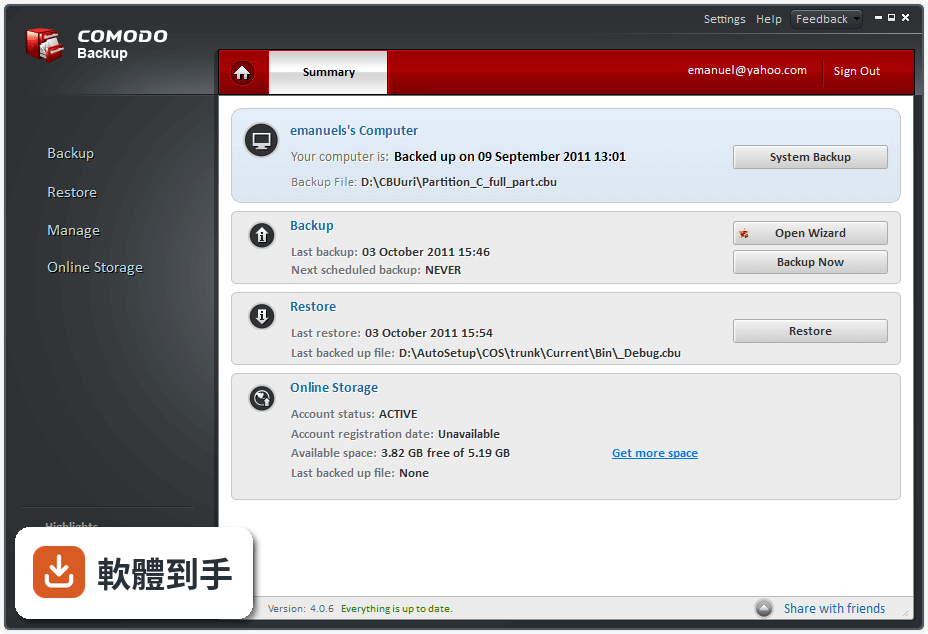
官方 FAQ 宣稱它可以建立完整的系統備份,也提到具備災難復原能力,能在系統崩潰時還原到先前的狀態。但官方功能說明中,對於系統映像備份的細節著墨不多,沒有明確說明還原的步驟、是否需要建立開機救援媒體、以及還原時的限制。如果你把系統還原當作主要需求,建議先閱讀官方文件或論壇討論,確認實際操作流程,再決定是否以它作為唯一的備份方案。
11免費版有什麼限制嗎?
官方資料標示為 Freeware,並宣稱提供免費終身授權,下載後可永久免費使用,包含所有更新。但要注意的是,它提供的 10GB 線上儲存空間僅限 90 天,超過期限後是否能繼續使用、是否需要付費,官方說明沒有交代清楚。另外,官方提到有專家提供全天候協助,但沒有說明免費使用者是否能獲得同等級的支援服務。如果你打算依賴它的雲端空間,建議先確認 90 天後的收費或續用條件。
12我只需要把特定幾個資料夾定期複製到外接硬碟,這套會不會太複雜?
不會。它的核心功能就是檔案和資料夾備份,你可以建立一個備份工作,指定來源資料夾、目的地外接硬碟、排程頻率,之後它就會自動執行。官方資料提到它提供預先定義的設定檔,能自動偵測並分類文件、照片、音樂和影片,讓你用一鍵完成備份。如果你只需要簡單的複製備份,不需要加密、壓縮或同步,這些進階功能可以忽略,不影響基本操作。
下載與官方連結
CB_setup.exe · 34.21 MB · 連結指向軟體原廠
版本紀錄
- 2014-10-08 Comodo Backup 4.4.1.23
- 2014-09-04 Comodo Backup 4.4.0.0 21.4 MB
- 2014-07-25 Comodo Backup 4.3.9.27 24.44 MB
再看 5 筆
- 2014-02-11 Comodo Backup 4.3.7.17 24.38 MB
- 2014-01-13 Comodo Backup 4.3.6.6 24.39 MB
- 2013-12-20 Comodo Backup 4.3.5.2 24.38 MB
- 2013-12-18 Comodo Backup 4.3.4.7 24.39 MB
- 2013-12-03 Comodo Backup 4.3.3.19 24.37 MB
這一版改了什麼
What's new in this version:
What's new:
- "Create Rescue Disk" button in settings which automatically create a WinPE disc or WinPE ISO image
- List view replaced the tree view in backup step 1, 2, restore step 1 and in online storage TAB. An address bar will be visible with the list view.
- Clicking Backup TAB will start a new backup process, so you can immediately set what, where, how and when to backup.
- Shortcuts and profiles where moved into a separate TAB
- Option not to restore NTFS security attributes
- Option to right click -> copy log when backup/restore operation finishes
- Last backup is now a predefined profile in shortcuts TAB
- Right click menu for Online Storage TAB
- Options to exclude system or hidden files from backup
- We support network shares as sources for backup;
- CCloud drive and all mounted backups are visible as removable drives (before they were visible as fixed drives)
- Custom profiles can be scheduled
What's fixed & improved:
- Double-clicking on a CB backup file has no effect if UAC is enabled and CB is open;
- No behavior is implemented when restoring a partition backup while CB is not elevated;
- Backup failing with error code 101003 for "Files and Directories", "Registry Files", "User Folder", "System State" backup jobs using Email as destination;
- Memory leak while submitting files for malware scan;
- The “CBU BackUP” contextual menu shortcut does not work if CB is open and UAC is enabled;
- CB hang when switching between the snapshots for a .cbu backup stored on CCloud;
- A folder transfer from CCloud to the local system hang at 100%;
- Error code 9/crash when trying to save a backup on a CD/DVD already written;
- Messages referring to computer shut down when choosing to restart after restore
- Fixed the file transfer error from online storage to local machine;
- Fixed the first item omission in CCloud tab when deleting a group of files;
- Fixed the file copy error from local to CCloud when CCloud is empty;
- Fixed issue reported by user here ;
- Fixed issue with windows PE function and issue reported by user here ;
- Fixed password issue reported by user here ;
- Fixed issues with shell extension not allowing to backup paths that include the space separator;
- Fixed "An error occurred" and "Check your system date" messages that were randomly displayed when CCloud server was not working properly;
- Fixed "Simple Copy to a network/ftp/ccloud location is successful with no network connection reported here;
- Fixed crash reported by user here;
- Fixed issue with invalid path when setting a network share as location for backups reported in 4.1 BETA and BETA2;
- Fixed restore verify process cancelling issues;
- Gui blocking and hangups for CCloud operations on backup, restore, other profiles and online backup pages;
- COSService monitor Sync Service and vice versa in case one unextpectedly terminates, the other will try to restart it;
- Diagnostics which didn't work properly when a file was replaced with an older version;
- CB automatically cleans left over files from the installation of redistributable pack;
- issue with "Checking if file ... can be used as backup base." displayed when file doesn't exist.
- Mirror (clone) backup crash when multiple disks are present in the system;
- 'Restore now' crash occuring when a text search is in progress;
- Hang at cbwizard logout from CCloud;
- Crash when right clicking the properties menu on a file in the restore screen;
- Mirror (clone) crash when clicking backup now and there`s no destination available;
- Error "file not found" during the file transfer in "Online Storage" which sometimes occurred;
- Custom incremental/differential profiles that could not be edited if the backup base no longer existed;
- Compression issue reported by user here
- Option to remember connection credentials which was not present sometimes in Schedule page for network backups;
- Crash produced during cd backup when the file is larger than the available space on disk;
- Regsitry keys/values backups that failed with code 92 or that could not be exported to script;
- Issue with opening self extracting backups;
- Issue reported here;
- Issue with nothing happening when cbu is elevated and the user double clicks on a backup file;
- Issue with filters, when switching between backup step 2 and 3;
- Issues with Last backup in otherprofiles;
- Issues with address bar in backup step 2, restore step 1 and Online Storage TAB
- Issues with WinPE;
- Issues with shortcuts TAB;
- Issues with sync to CCloud which sometimes may not have worked properly;
- Setup checks first if newer version of CB is available on website and notifies user;
- Changed the way schedules and custom profiles are stored in registry. Now they can be edited using regedit in HKEY_LOCAL_MACHINESOFTWAREComodoGroupComodoBackupScheduleList;
- Issue with long and special characters passwords for COMODO Cloud;
- Issue with simple copy sparse files from NTFS to FAT;
- CBReparse.sys starting slower on some OS causing diagnostic report to say it's not running;
- Backup verification after creation which failed if macros were used;
- Potential issue with loop when checking for missed schedules;
- Delete propagation issue on simple copy (delete shouldn't propagate on simple copy);
- Potential error code 3 when running scheduled backups;
- Small logging improvements;
- Backup error code 43 for |DATE3| macro;
- 0 KB files created when attempting to create simple copy backups for Microsoft Outlook 2010 when the application is opened;
- Snapshot selection which displayed wrong information in restore step 2 for cbu files that contained more than 1 snapshot;
- Mounting large disk/partition backups which seemed to hang;
- Split backups unmountable;
- Fixed command line multiple partition backup issue;
- Dbginfo.bat file in installation directory to collect debug information for analysis;
- BSOD when scanning computer with CIS caused by cbufs.sys;
- Bug with restoring files from an incremental backup that are partially changed, the files didn't restore properly;
- Xlsx files that could not be edited with Microsoft Excel from CCloud drive;
- Some crashes with COSService.exe;
- Added extra command line parameter "/dont_restore_file_security" to avoid restoring NTFS security attributes;
- Restore issue when part of cbu backup footer is corrupted;
- Fixed issues when logging in/out from CCloud an CB program didn't changed it's state;
- .Zip backup not created correctly when the "Scan for malware" option was selected;
- Mounting and unmouting the CCloud drive several times causing CB to continuously display the last wait dialog;
- CB crashes when attempting to unmount .cbu backups when CB is not elevated;
- CB crashes when submitting files for CIMA scan;
- .Zip backup is not created correctly when the "Scan for malware" option is selected;
- Continuous BSOD when installing CTM 2.9, then CB;
- Some speed optimizations for instant scan;
- Context menu for items in CBWizard;
- Issues with sync to CCloud;
- Error 29 when performing cbu incremental on sparse file;
- Error 29 at the end of the restore process when restoring sparse files from cbu backup;
- Restoring corrupted cbu backups (in previous version error 14 occurred sometimes when trying to restore a corrupted cbu backup);
- Query allocated ranges for sparse files with zero data only;
- Sparse files treated as empty if no data present;
- Large memory leak when restoring sparse files;
- Scheduling predefined backup profiles issue;
- GUI hang after several backup operations and no interaction with the application;
- Improper display of the Manage-Events-"Delete" button tool-tip message;
- Some translation updates and errors fixed;
- "Restore directory structure" enabled for partition backups ;
- Restoring self-extractable backups is now possible with CB;
- Potential crash when mounting a disk backup;
- Scripts issue when ENTER or TAB characters are present inside script;
- The 'Use Default' option not working properly in backup/restore;
- Improper GUI behavior when executing two or more .cbu files;
- Logging issue and potential errors with reparse points;
- The date and time for snapshots for Email Accounts and IM Conversations backups not being displayed in restore step 2 when changing the snapshot;
- Some speed improvements when browsing GUI;
- Backup failes with error code 4 when attempting to create an ISO backup for the system partition;
- Scheduled backup fail with error code 1;
- CBU.exe crash during startup;
- SFX successfully restored to non existent location;
- All the files on an ISO type backup saved with Upper Case;
- Backup fail with error code 97 when attempting to create SFX CBU backups to cd/dvd;
- COSService crash when canceling a .cbu backup to the Online Storage;
- CB crash when closing the application during a file transfer from the online drive;
- Sharing a status on Yahoo Messenger from "Share with friends" not working;
- CB Wizard can create backup during instant scan;
- The used and free space of a mounted drive are not retrieved properly;
- GUI hangs when attempting to start the backup operation during the list population of the backup sources;
- Mixup between compressed/uncompressed size in restore step 3;
- The "Scan all files on this computer" option in the Settings menu appears unchecked by default;
- Improper behavior when editing a custom profile created after a backup operation is complete;
- The "Restore" from the Summary screen not available;
- Items backed up to the installation folder without a .CBU extension if Step2 is skipped, a default path is set and one or more macros are added;
- Invalid path when setting a non-existing path on an existing volume in settings;
- Backup fail with error code 9 when attempting to create ISO backups to cd/dvd;
- CB crash after creating the second snapshot based on a schedule;
- Backup fails with error code 53 for an Email Accounts inc & diff simple copy backup to a FTP Server;
- The "Mount at Windows startup" option;
- Issue with mounting backups and network drives;
- Simple backups to email not working;
- Destination path is not visible for a schedule / history event to CCloud (CCloud was not visible in Manage TAB);
- HKEY_LOCAL_MACHINESOFTWAREComodoGroupCommonSettings registry key has options to configure debug log size and to set whether diagnostics should be performed or not;
- Added /noWizard parameter in CB setup in case wizard installation fails it can be installed without wizard;
- Issue with backup created with 3.0 version that contained more than 1 snapshot;
- Self extractable backups created on x64 systems that could not be restored on x86 systems;
- Disabled log attachment for success mail notification in setup tool;
- Isolated first split backups are flagged as corrupted when verified;
- Issue when uninstalling CB, no restart then uninstalling CCloud;
- Other crashes with CBU.exe and CBWizard.exe;
- Some typos
- Other minor issues