
這是歷史版本頁面 — 看 dBpowerAMP Music Converter 最新版本
音檔格式轉換老是掉標籤?dBpowerAMP 能處理什麼
 dBpowerAMP Music Converter 17
資料更新 2020-04-13
閱讀約 6 分鐘
你手上有一批音樂檔案,可能是從 CD 轉出來的 WAV,或是從網路下載的 FLAC,現在想全部轉成 MP3 放進手機裡聽。你試著用線上轉檔網站,一次只能傳幾首,傳完還要等佇列,轉出來的檔案標題、封面、專輯資訊常常全部不見,變成一片空白。或者你有一整張專輯要轉,卻發現免費軟體轉到一半就跳出廣告、限制檔案數量,甚至偷偷幫你裝其他程式。
一般人的習慣是打開免費轉檔軟體、或找線上服務應急,但這些做法在「整批處理」和「保留音樂標籤」這兩個需求上往往幫不上忙。這類工具真正的切入點,是讓你在本機上一次處理大量檔案,同時把曲目名稱、封面、專輯等中繼資料完整帶過去,而不是轉完之後還要手動一張一張補資料。下面用問答方式,直接回答你可能會遇到的問題。
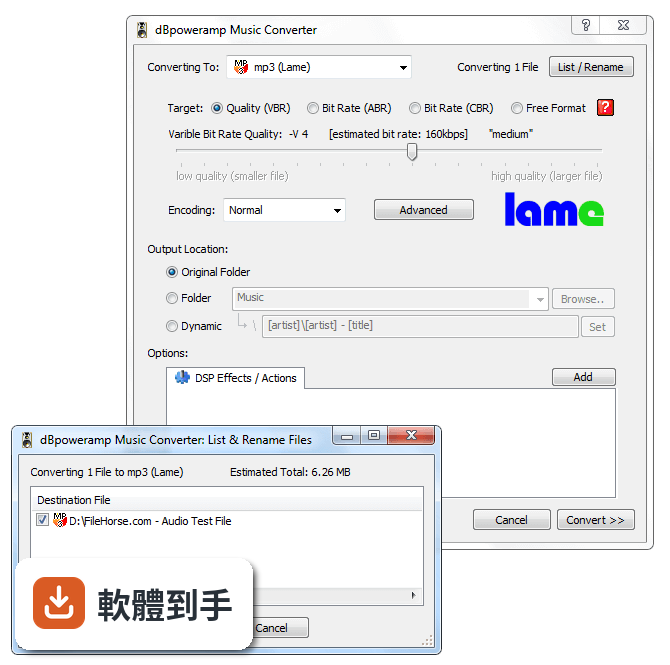
01dBpowerAMP 可以轉哪些音樂格式?
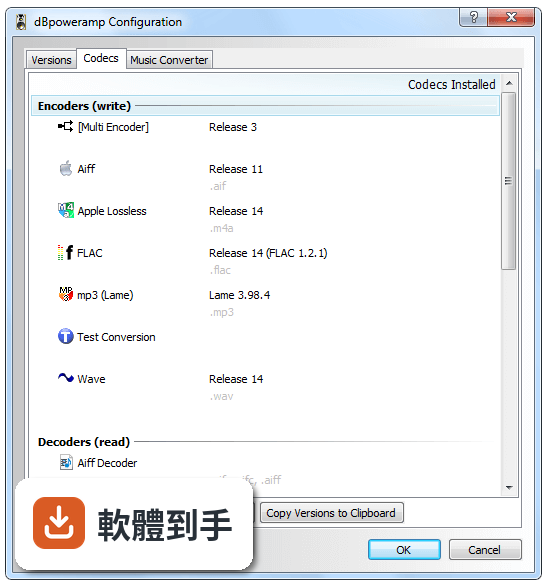
官方說明指出它支援 MP3、WAV、FLAC、AAC、OGG、AIFF、WMA 等多種格式之間的互轉。也就是說,從常見的無損檔轉成有損檔、或從有損檔轉回無損檔,都在它的處理範圍內。如果你手上的格式不在這份清單裡,官方沒有列出完整支援表,建議安裝前先確認你要轉的副檔名有沒有在支援之列。
02它能不能一次轉很多檔案?還是只能一首一首轉?
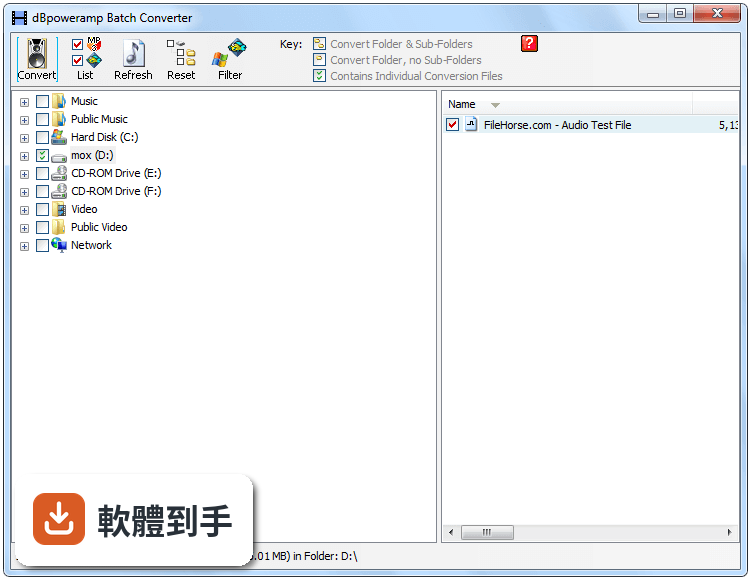
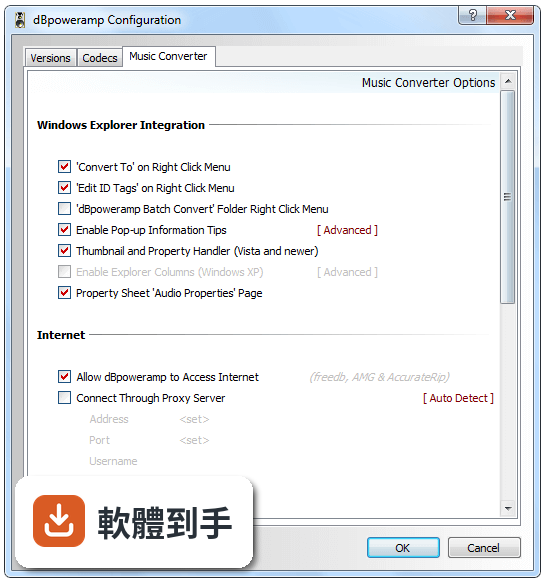
可以批次處理。官方功能說明明確提到 Batch Processing,也就是一次選取多個檔案同時轉換,不需要逐首點擊。實際操作上,你可以在 Windows 檔案總管中選取多個音檔,按右鍵選擇轉換,或把檔案拖進軟體視窗再設定輸出格式。轉換效率會受到電腦處理器核心數影響,官方建議使用雙核心以上的處理器。
03轉檔之後,原本的專輯封面和曲目資訊會不會不見?
官方說明指出它會保留專輯封面、曲目名稱和其他中繼資料(Metadata Preservation)。這表示你在轉檔時,原本的標籤資料會被帶到新檔案中,不需要事後手動補齊。不過,如果你轉換的來源檔案本身標籤就是空的,那轉出來自然也不會有資料,這點要留意。
04它能不能把 CD 轉成數位檔案?
可以。軟體本身整合了 dBpowerAMP CD Ripper,官方描述為高品質 CD 擷取工具,並具備準確的中繼資料檢索功能。也就是說,你放入 CD 後,它可以抓取曲目資訊並轉成你指定的格式。這對想要把實體 CD 數位化的人來說,等於一套工具同時處理擷取和轉檔兩件事。
05除了轉格式,它還能對聲音做什麼調整?
官方列出的 DSP 效果包含音量標準化、淡入淡出、等化器(Equalization)等。這些效果可以在轉檔時一併套用,例如把整張專輯的音量統一,或是在每首歌結尾加上淡出效果。如果你只是要轉格式、不想動聲音,這些效果可以選擇不啟用,不會強制套用。
06這套軟體適合什麼樣的人用?
適合手上有一批音樂檔案需要轉換、而且在意轉檔後標籤資料是否完整的人。特別是收藏大量無損音樂、想轉成手機可播放格式的用戶,或是想把 CD 轉成數位檔案保存的人。它的介面是英文,但操作邏輯是右鍵選單和拖放,對習慣 Windows 操作的人來說門檻不高。如果你只是偶爾轉一兩首歌,用免費線上工具可能就夠了。
07我電腦是 Windows 7,可以用嗎?
官方列出的支援系統包含 Windows 7、8、10、11,所以 Windows 7 在支援範圍內。不過官方在系統需求中建議使用 Windows 10/11,並要求至少 2GB 記憶體、100MB 安裝空間。如果你還在用 Windows 7,安裝前最好確認你的硬體規格有達到最低需求,以免轉檔時效能不足。
08它有沒有 Mac 版本?
沒有。官方說明在缺點部分明確寫了「No Mac version available」,這套軟體只支援 Windows 系統。如果你用的是 Mac,這套軟體不適用,需要找其他跨平台或 macOS 專用的轉檔工具。
09這套軟體是免費的嗎?
不是。官方提供 21 天試用期,試用結束後需要購買授權。標準版定價從 39 美元起,參考版(Reference)定價 68 美元,後者包含 PerfectMeta 和額外的 DSP 效果。也就是說,你可以在試用期內完整測試功能,但長期使用必須付費。如果你需要的是永久免費的方案,這套軟體不符合你的需求。
10它和 MediaHuman Audio Converter 比起來,差在哪?
MediaHuman Audio Converter 在資料中標示為免費的簡易替代方案,同樣具備批次處理功能。dBpowerAMP 的優勢在於內建 CD Ripper、DSP 效果和較多的格式支援,但這些功能需要付費才能持續使用。如果你的需求只是簡單轉檔、不想花錢,MediaHuman 是免費選項;如果你需要 CD 擷取和進階音效處理,dBpowerAMP 的功能範圍較廣,但代價是授權費用。
11我聽說有些轉檔軟體轉完之後檔案會損壞或聲音變怪,這套會嗎?
官方沒有提供關於轉檔後檔案損壞率的數據,無法從資料中判斷。不過可以確認的是,它支援多核心處理器加速轉換,理論上在轉檔速度上會有幫助。如果你擔心轉檔品質,建議先用一兩首歌曲試轉,聽過沒問題再大量轉換。另外,轉檔本身是重新編碼的過程,從無損轉有損本來就會犧牲部分音質,這是格式特性,不是軟體瑕疵。
12它的評分人數不多,會不會是冷門軟體?
資料顯示目前有 57 人評分,平均 7.44/10,評分人數確實不算多。相較之下,Zortam Mp3 Media Studio 有 221 人評分、KeepVid Music 有 365 人評分,能見度較高。評分人數少不代表軟體不好,但代表你能參考的使用者經驗比較有限。如果你在意社群回饋和長期維護,可以多看看評分人數較多的替代方案,再決定要不要投入試用期去測試。
下載與官方連結
前往官方網站 下載 dBpowerAMP Music Converter
dMC-R17-Ref-Trial.exe · 59.32 MB · 連結指向軟體原廠
版本紀錄
- 2026-10-19 dBpowerAMP Music Converter 2026.10.19 52.4 MB
- 2026-09-13 dBpowerAMP Music Converter 2026.09.13 51.3 MB
- 2026-09-08 dBpowerAMP Music Converter 2026.09.05 49.2 MB
再看 5 筆
- 2026-05-26 dBpowerAMP Music Converter 2026.05.25 46.4 MB
- 2023-11-02 dBpowerAMP Music Converter 2023.11.01
- 2023-11-02 Select Version
- 2022-03-18 dBpowerAMP Music Converter 17.7
- 2022-02-24 dBpowerAMP Music Converter 17.6
這一版改了什麼
What's new in this version:
- his new release features many enhancements, it is 20% faster on multi-core machines and is future-proofed through handling 64 cores. A new DSD encoder is included as standard (Reference), as well as many previously optional codecs, which are all updated to the latest releases. A new Quick Convert right explorer right click menu is a welcome addition to those who have many conversions to run a day, skipping over the codec options page, saving time. CD Ripper gains a manual metadata search page, de-emphasis CDs handling and improvements to metadata searching.
- Minimum supported Windows: Vista (XP no longer supported)
- New explorer right click option 'Quick Convert' which invokes the converter without showing the options page
- CD Ripper & Music Converter handle [Multi-Encoder] internally, this allows file overwrite and proper CPU resource allocation
- All programs - added a crash reporter
- All Programs - Graphics upgraded to be independant of display resolution
- All programs - better handle High Contrast Theme
Support for artist in m3u playlist:
- dBpoweramp Control Centre: Tests if Windows defender is limiting access to the system and warns
- dBpoweramp Control Center: can exclude popup info tips, and right click 'Convert To', for set file types
- High quality SSRC (frequency resampler) enabled for all frequency conversions
- Right Click >> Edit ID Tags option in art menu to resize existing art to a maximum KB size
- Added a new Screen Reader Option in Control Centre to enable non-graphical buttons
- Converter + Tag Editor: if select all files in a folder, right click, convert to or edit id tags, any non audio files are excluded
- Naming added [GROUP] so for example if an artist was 'Drake' and [group]4,[artist][] would generate 'a-d' the first letter of the tag is used and number signifies the letters to group together, 2 would be a-b c-d e-f
- Naming added [SPLIT] for exmaple artist was 'A1/A2/A3/A4' [split]/,[artist],2[] would return 'A2' to split on comma enter [split],[artist],2[]
- Naming updated [REPLACE] can replace with , or search , buy setting a blank entry: [REPLACE],@,[artist][] would replace , with @
- Updated naming dlg for Move File On Error DSP effect
- New conversion option: substitute Unicode spaces and remove leading or ending spaces in tags - there are various non-standard unicode space characters (such as thin space), these will be replaced with a standard space. Also white spaces at the start or end of tags are removed.
- Popup info: if a zero byte file then says so
- Edit ID Tags >> Art Menu >> Added 2000x2000, 1800x1800, 1600x1600, 1400x1400, 1200x1200 options
- Menu check marks larger on higher dpi screens
- Fixes bug in various Window Managers (such as total commander) which do not follow Windows API specification
- Added option in configuration to hide specific unused encoders
- Popup Info: rating range shown 0-10 range same as ID Tag editor
New DSP effect: speed up, slow down:
- Utility codecs [ID Tag Update] and [Replaygain] included as standard
- ID Tag Processing: option to set multi artist to '; ' for non multi-artist aware programs now works with Artist Sort and Album Artist Sort
- Multi Encoder, allows sub encoders to be utility codecs
- ID3v2 COMM tag, now works again for iTunes
- m4a grup tag renamed to @grp as it was causing issues for iTunes
- FLAC updated to 1.3.3
- Encoders added as standard: Opus, m4a AAC (dBpoweramp reference), m4b, Monkeys Audio (v4.81), WMA 10, Wavpack, Ogg Vorbis
- Decoders added as standard: DSD, Speex, Ogg Vorbis, Musepack
- Added DSD Encoder (dBpoweramp reference)
- DSD - shows 1 bit and dsd frequency in dBpoweramp Popup Info & Audio Properties page
- AAC Decoder better able to read non-standard files
- mp3 lame encoder supports 64 bit float source
- m4a FDK supports 64 bit float source
- Opus files in .ogg now supported
- Codec Update Wavpack to 5.2
- Codec Update - Opus 1.3.1
- Codec Update - m4a FDK updated to v2
- Added new Apple Core Audio Format (CAF) decoder
- ID Tag Editor - popup suggestion now appears 1/3 to the right of the box, so as not to get in way
- ID Tag Editor - resizing auto sizes the edit box
- ID Tag Editor - can drag and drop art on id tag editor
- ID Tag editor - supports embedding PNG album art, also resizing existing PNG stays as PNG
- ID Tag editor - buttons could overlap at certain resolutions
- Music Converter - can handle 64 cores
- Music Converter - will use 100% of CPU capacity by default (around 20% faster encoding on a 4 core system)
- Music Converter - output to box shows <not required for encoder> for encoders such as multi-encoder
- batch converter added filter on date - last week, yesterday, last month, last year
- Batch Converter when generating conversion list shows the number of files already discovered
- Batch Converter added new profile option to not store file selections with a profile (only Extension exclusions and later in music converter DSPs and Encoder auto selected)
- batch converter lists correct frequency and bits for DSD
CD Ripper:
- Improved drive speed detection
- Manual Metadata review, added replace text option (replace fixed string value in all metadata)
- Album art improvements: discogs art, PerfectTUNES art priority
- HDCD detection for technical column improved
- Album title shown on title bar when ripping
- shows which metadata providers are remaining on lookup
- Added Style to toolbar
- added de-emphasis option to CD ripper, and DSP effect for music converter
- when add technical column, track listing is refreshed
- displays on info page the AccurateRip status icon
- Added manual metadata search form, auto shown if disc has no metadata
- if screen resolution changes and is showing maximized or too big for screen, then make maximized again
- art menu redesigned, new Add Additional Art menu, default actions replace main art
- art added from files, if PNG then left as PNG. New option in Metadata options 'Store Scanned Art as PNG'
- default allowed maximum album art size is now 1000x1000 and 750KB
- naming box shows <not required for encoder> for encoders such as multi-encoder
- CD Text and ISRC metadata takes preference over other providers
- custom ID Tags are applied now if on manual metadata review a specific provider is chosen
- default naming changed to [MAXLENGTH]80,[IFVALUE]album artist,[album artist],[IFCOMP]Various Artists[][IF!COMP][artist][][][][MAXLENGTH]80,[album][][MAXLENGTH]80,[track] [artist] - [title][]
- default secure log saved to [rippedtopath]Secure Ripping Log.txt
- dbpoweramp implemented own freedb server to combat the retiring of the old freedb
Bug Fixes:
- Edit ID Tags removed small white line in album art
- cd ripper - if reading previously ripped disc metadata from db cache would not set compilation check based on last time
- Thumbnail and Property Handler exclusions were not working
- Opus tag reader could crash on malformed tags
- Batch Converter was reading file metadata, even if no filtering was in place
- ID Tag processing does not export folder.jpg when doing filename check (dmc or multi-encoder)
- musicbrainz was not always looking up discs
- Replaygain now writes iTuneNORM which is compatible with the latest iTunes
- Ogg Decoder - fixed issue where ogg-flac would trigger a memory error
- RunIDTagsThroughDSPEffects possibly altering origfilename etc
- All programs - if taskbar is set to hidden, maximizing (CD Ripper, or Batch Converter) would stop it appearing
- Network share reliability fixes