
這是歷史版本頁面 — 看 dBpowerAMP Music Converter 最新版本
音檔格式轉換老是掉標籤?dBpowerAMP 能處理什麼
 dBpowerAMP Music Converter 14
資料更新 2010-09-16
閱讀約 6 分鐘
你手上有一批音樂檔案,可能是從 CD 轉出來的 WAV,或是從網路下載的 FLAC,現在想全部轉成 MP3 放進手機裡聽。你試著用線上轉檔網站,一次只能傳幾首,傳完還要等佇列,轉出來的檔案標題、封面、專輯資訊常常全部不見,變成一片空白。或者你有一整張專輯要轉,卻發現免費軟體轉到一半就跳出廣告、限制檔案數量,甚至偷偷幫你裝其他程式。
一般人的習慣是打開免費轉檔軟體、或找線上服務應急,但這些做法在「整批處理」和「保留音樂標籤」這兩個需求上往往幫不上忙。這類工具真正的切入點,是讓你在本機上一次處理大量檔案,同時把曲目名稱、封面、專輯等中繼資料完整帶過去,而不是轉完之後還要手動一張一張補資料。下面用問答方式,直接回答你可能會遇到的問題。
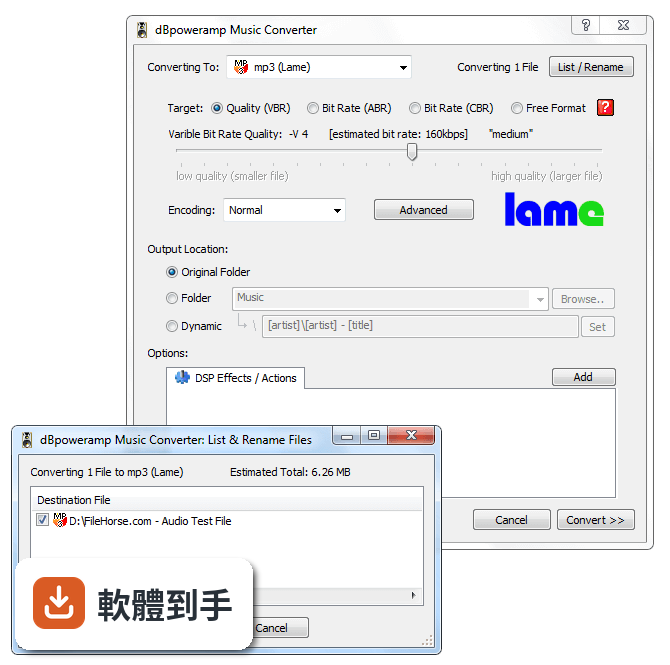
01dBpowerAMP 可以轉哪些音樂格式?
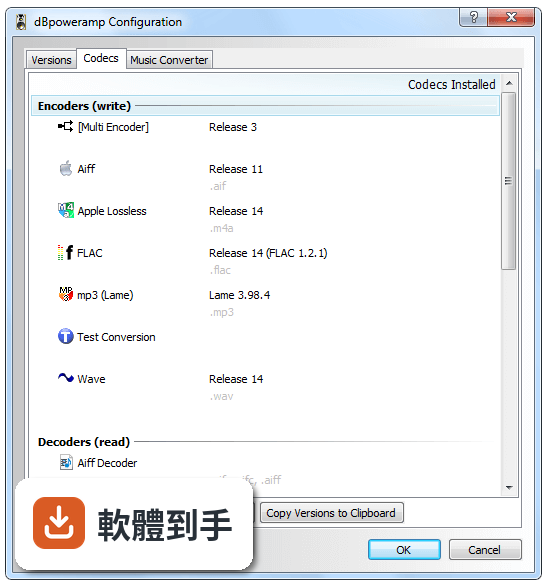
官方說明指出它支援 MP3、WAV、FLAC、AAC、OGG、AIFF、WMA 等多種格式之間的互轉。也就是說,從常見的無損檔轉成有損檔、或從有損檔轉回無損檔,都在它的處理範圍內。如果你手上的格式不在這份清單裡,官方沒有列出完整支援表,建議安裝前先確認你要轉的副檔名有沒有在支援之列。
02它能不能一次轉很多檔案?還是只能一首一首轉?
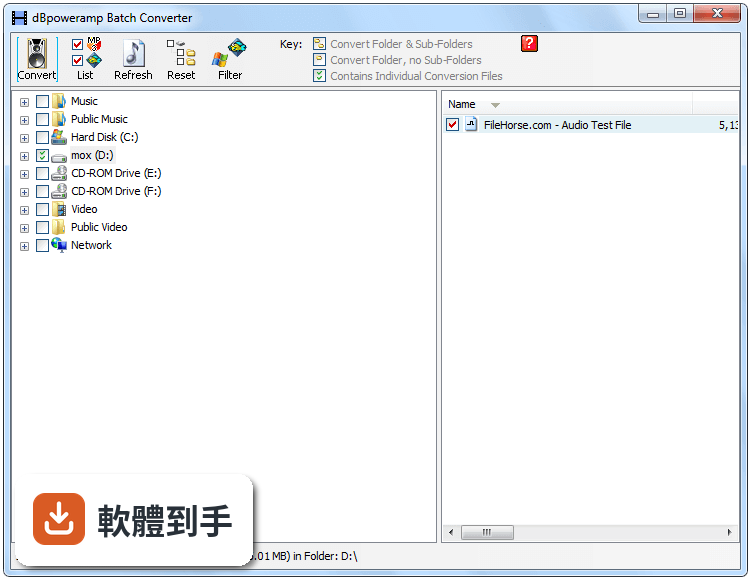
可以批次處理。官方功能說明明確提到 Batch Processing,也就是一次選取多個檔案同時轉換,不需要逐首點擊。實際操作上,你可以在 Windows 檔案總管中選取多個音檔,按右鍵選擇轉換,或把檔案拖進軟體視窗再設定輸出格式。轉換效率會受到電腦處理器核心數影響,官方建議使用雙核心以上的處理器。
03轉檔之後,原本的專輯封面和曲目資訊會不會不見?
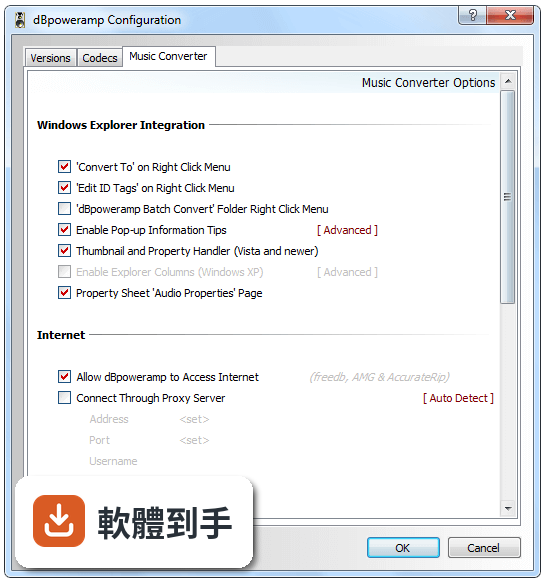
官方說明指出它會保留專輯封面、曲目名稱和其他中繼資料(Metadata Preservation)。這表示你在轉檔時,原本的標籤資料會被帶到新檔案中,不需要事後手動補齊。不過,如果你轉換的來源檔案本身標籤就是空的,那轉出來自然也不會有資料,這點要留意。
04它能不能把 CD 轉成數位檔案?
可以。軟體本身整合了 dBpowerAMP CD Ripper,官方描述為高品質 CD 擷取工具,並具備準確的中繼資料檢索功能。也就是說,你放入 CD 後,它可以抓取曲目資訊並轉成你指定的格式。這對想要把實體 CD 數位化的人來說,等於一套工具同時處理擷取和轉檔兩件事。
05除了轉格式,它還能對聲音做什麼調整?
官方列出的 DSP 效果包含音量標準化、淡入淡出、等化器(Equalization)等。這些效果可以在轉檔時一併套用,例如把整張專輯的音量統一,或是在每首歌結尾加上淡出效果。如果你只是要轉格式、不想動聲音,這些效果可以選擇不啟用,不會強制套用。
06這套軟體適合什麼樣的人用?
適合手上有一批音樂檔案需要轉換、而且在意轉檔後標籤資料是否完整的人。特別是收藏大量無損音樂、想轉成手機可播放格式的用戶,或是想把 CD 轉成數位檔案保存的人。它的介面是英文,但操作邏輯是右鍵選單和拖放,對習慣 Windows 操作的人來說門檻不高。如果你只是偶爾轉一兩首歌,用免費線上工具可能就夠了。
07我電腦是 Windows 7,可以用嗎?
官方列出的支援系統包含 Windows 7、8、10、11,所以 Windows 7 在支援範圍內。不過官方在系統需求中建議使用 Windows 10/11,並要求至少 2GB 記憶體、100MB 安裝空間。如果你還在用 Windows 7,安裝前最好確認你的硬體規格有達到最低需求,以免轉檔時效能不足。
08它有沒有 Mac 版本?
沒有。官方說明在缺點部分明確寫了「No Mac version available」,這套軟體只支援 Windows 系統。如果你用的是 Mac,這套軟體不適用,需要找其他跨平台或 macOS 專用的轉檔工具。
09這套軟體是免費的嗎?
不是。官方提供 21 天試用期,試用結束後需要購買授權。標準版定價從 39 美元起,參考版(Reference)定價 68 美元,後者包含 PerfectMeta 和額外的 DSP 效果。也就是說,你可以在試用期內完整測試功能,但長期使用必須付費。如果你需要的是永久免費的方案,這套軟體不符合你的需求。
10它和 MediaHuman Audio Converter 比起來,差在哪?
MediaHuman Audio Converter 在資料中標示為免費的簡易替代方案,同樣具備批次處理功能。dBpowerAMP 的優勢在於內建 CD Ripper、DSP 效果和較多的格式支援,但這些功能需要付費才能持續使用。如果你的需求只是簡單轉檔、不想花錢,MediaHuman 是免費選項;如果你需要 CD 擷取和進階音效處理,dBpowerAMP 的功能範圍較廣,但代價是授權費用。
11我聽說有些轉檔軟體轉完之後檔案會損壞或聲音變怪,這套會嗎?
官方沒有提供關於轉檔後檔案損壞率的數據,無法從資料中判斷。不過可以確認的是,它支援多核心處理器加速轉換,理論上在轉檔速度上會有幫助。如果你擔心轉檔品質,建議先用一兩首歌曲試轉,聽過沒問題再大量轉換。另外,轉檔本身是重新編碼的過程,從無損轉有損本來就會犧牲部分音質,這是格式特性,不是軟體瑕疵。
12它的評分人數不多,會不會是冷門軟體?
資料顯示目前有 57 人評分,平均 7.44/10,評分人數確實不算多。相較之下,Zortam Mp3 Media Studio 有 221 人評分、KeepVid Music 有 365 人評分,能見度較高。評分人數少不代表軟體不好,但代表你能參考的使用者經驗比較有限。如果你在意社群回饋和長期維護,可以多看看評分人數較多的替代方案,再決定要不要投入試用期去測試。
下載與官方連結
前往官方網站 下載 dBpowerAMP Music Converter
dMC-R14-Ref-Trial.exe · 6.5 MB · 連結指向軟體原廠
版本紀錄
- 2026-10-19 dBpowerAMP Music Converter 2026.10.19 52.4 MB
- 2026-09-13 dBpowerAMP Music Converter 2026.09.13 51.3 MB
- 2026-09-08 dBpowerAMP Music Converter 2026.09.05 49.2 MB
再看 5 筆
- 2026-05-26 dBpowerAMP Music Converter 2026.05.25 46.4 MB
- 2023-11-02 dBpowerAMP Music Converter 2023.11.01
- 2023-11-02 Select Version
- 2022-03-18 dBpowerAMP Music Converter 17.7
- 2022-02-24 dBpowerAMP Music Converter 17.6
這一版改了什麼
What's new in this version:
# Major Features
* CD Ripper - AccurateRip v2: able to check across pressings & improved CRC implementation
* Reference can support up to 16 simultaneous CPUs when encoding
* Choose Album Art button in CD Ripper - searches the internet for album art
* Windows 7 & Vista audio property & thumbnail support (Details tab on properties, details section in Explorer & Explorer Columns)
* Reference comes complete with time unlimited PerfectMeta
* Music Converter & CD Ripper shows % on a Windows 7 taskbar
* Encoder settings stored at start of conversion and used through-out conversion (allows a 2nd conversion to take place at the same time with different settings)
* Multi-encoder added as standard
* mp3 Sort Tags supported TSOA - Album, TSO2 - Album Artist, TSOP - Artist, TSOC - Composer and TSOT - Title (sam as iTunes)
* mp3 year tag written as YYYY only
* Scripting now 64 bit compatible
* Explorer Shell - Audio Property tab shows correctly in X64 Windows
* Professional Frequency Conversion enabled by default (option to disable removed)
* .bwf added to wave decoder
* Batch Converter supports Windows Libraries on Windows 7
* PerfectMeta - matches [xxx] & (xxx), ' / ' & '/' as same
* Naming - [IFCOMP] tests against anything that is not 'no' and 'false' rather than '1'
* mp3 Lame Encoder - quality settings expanded to include half quality values (ie -V 4.5)
* m4a Apple Lossless encoder and decoder included as standard
* AIFF encoder & decoder included as standard
* mp3 ID Tagging - Comment Tags (other than simple comment, such as iTunesNorm) are preserved, also language code correctly set for comment
* mp3 ID Tagging - Lyrics ID3v2 tag (unsync) supported
* Profiles for music converter (have to first enable in dBpoweramp Configuration >> Music Converter >> Enable Profiles in Converter), create profiles by selecting [Create New Profile] in the encoder box
* Edit ID Tag page redesigned, Album art can be added to multiple files in one go, the add button allows adding art from: Internet, File, Scanner, etc
* CD Ripper & Batch Converter - if move the page to another larger display the page is drawn correctly
# CD Ripper
* Secure Options >> new option: Cancel Disc Ripping After any Insecure Track
* Right click on a track >> Detect Artists from Track Names
* Gap detection and index detection implemented (new columns to add these items to the display), also used for the [Cue Sheet Image] and Audio CD - Gap Removal DSP
* Options >> file name character replacement
* Can drag and drop album art onto it
* Default naming now: [IFVALUE]album artist,[album artist],[IFCOMP]Various Artists[][IF!COMP][artist][][][album][track] [artist] - [title]
* freedb can split track specific artists when only indicated on a single track
* Retrieves sort tags (does not write by default)
* Added extra meta data fields
* Added +50 and +100 offset to track number
* Any metadata which came in Artist, the is replaced The Artist (before the rule to put to Artist, The)
* New settings page for Meta >> dBpoweramp cache, option so can set size of cache (defaults to 6MB)
* Info display defaults to on for first run
* If have the technical column on then write to the log file (ie pre-emph will be written to the log)
* Shows SonataDB when classical data comes from SonataDB (in manual meta review and popup meta info)
# Bug Fixes
* Xclass where make legal filename - where shorten a folder, this can leave a ' ' or . on the end which is not allowed
* CD Ripper >> Review Metadata >> if 'To All' was clicked would only do for items on screen
* CD ripper if enabled to over read but drive could not then it was possible to ask for 26 frames but the drive would return all 0's for the 26 frames, new code to ask for
* all Bug Bug Fix: mp3 - if had id3v1 & apev2 tag at the end, could lead to reported stream errors
* Checksum written to FLAC & mp3
* Reads Blocks outside of lead out separately so even if the drive cannot over read it would not give zero data back for a large number of frames (and fail AR check)
* When adding Album Art from a png file in the CD Ripper the picture is gray and show size 0x0 in the GUI. The written tag is OK.