
這是歷史版本頁面 — 看 EaseUS Partition Master Free 最新版本
C槽空間不夠又不想重灌?EaseUS Partition Master 能做什麼
 EaseUS Partition Master Free 12.10
資料更新 2018-08-14
閱讀約 6 分鐘
你的C槽又滿了。明明沒裝什麼東西,Windows 更新檔、暫存檔、桌面上的檔案,不知不覺就把幾百GB吃光。你想把D槽的空間挪一點過來,打開Windows內建的「磁碟管理」,卻發現「延伸磁碟區」的選項是灰的——因為C槽和D槽中間隔著一個回復分割區,系統就是不肯讓你直接搬。你開始想:難道真的要備份全部資料、重灌系統、重新設定一切?那太累了。
很多人第一個念頭是找第三方工具來切分割區,但又怕弄壞系統、怕操作太複雜、怕免費版其實什麼都不能做。這類磁碟分割工具的核心切入點,其實就是讓你在Windows視窗裡用滑鼠拖一拖、按幾下,就能完成調整分割區大小、合併分割區、複製整顆硬碟這些事,而且過程中盡量不動到你原本的資料。它們把以前要打指令、要進命令列才能做的事,變成圖形介面的幾個步驟。
01EaseUS Partition Master Free 到底能幫我處理哪些磁碟問題?
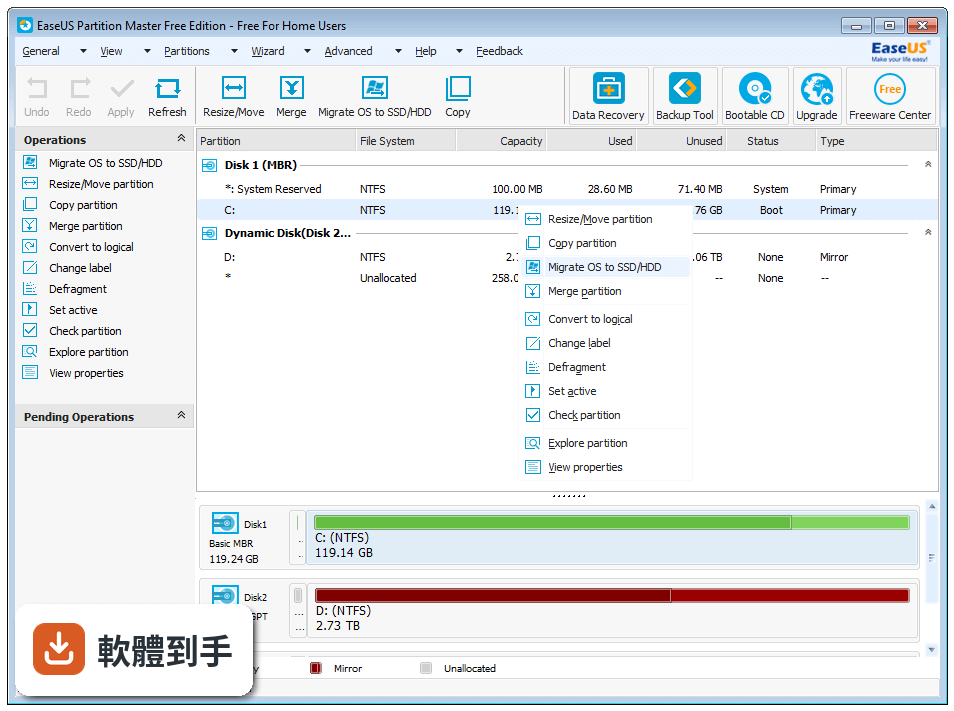
它能調整分割區大小和位置、合併相鄰分割區、格式化或刪除分割區、複製整顆磁碟或單一分割區、轉換FAT32與NTFS檔案系統、檢查壞軌、清除分割區資料、變更磁碟機代號與標籤。另外也支援將MBR磁碟轉成GPT,以及SSD的4K對齊。這些都是官方列出的免費版功能。
02我C槽空間不夠,可以用它把D槽的空間分給C槽嗎?
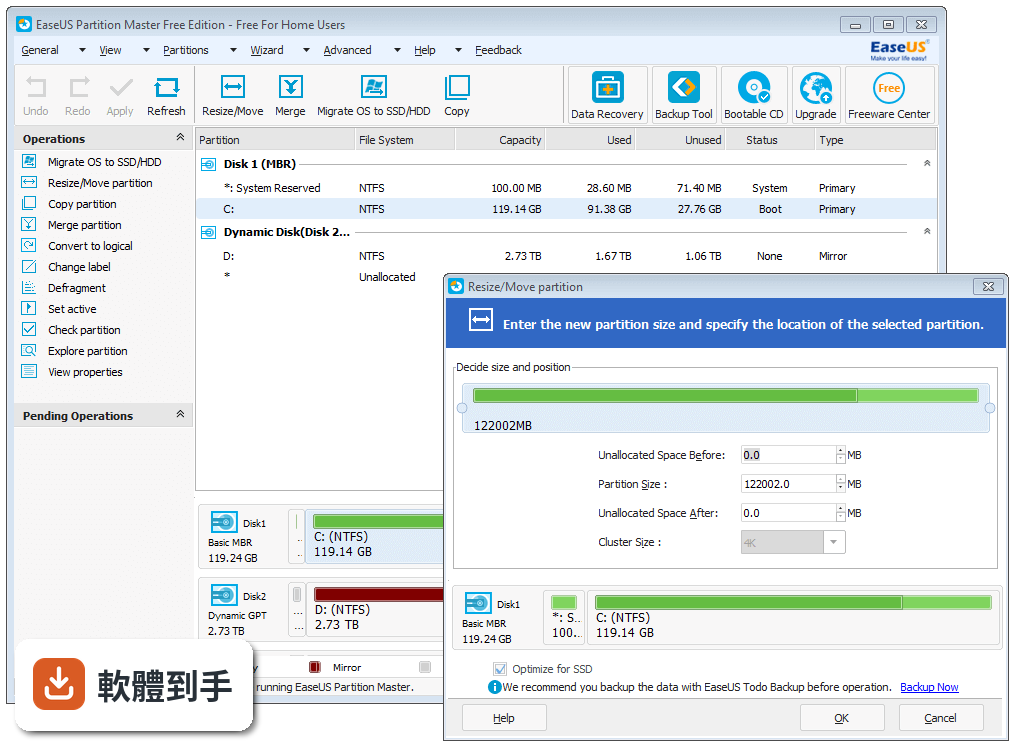
可以。免費版支援調整分割區大小,也能合併相鄰的分割區。操作方式是選取要調整的分割區,按「Resize/Move」拖曳滑桿改變大小,再套用變更。如果C槽和D槽中間隔著回復分割區,合併時會受到限制,這點要先確認你的磁碟配置。
03我想把整顆舊硬碟複製到新的SSD,免費版做得到嗎?
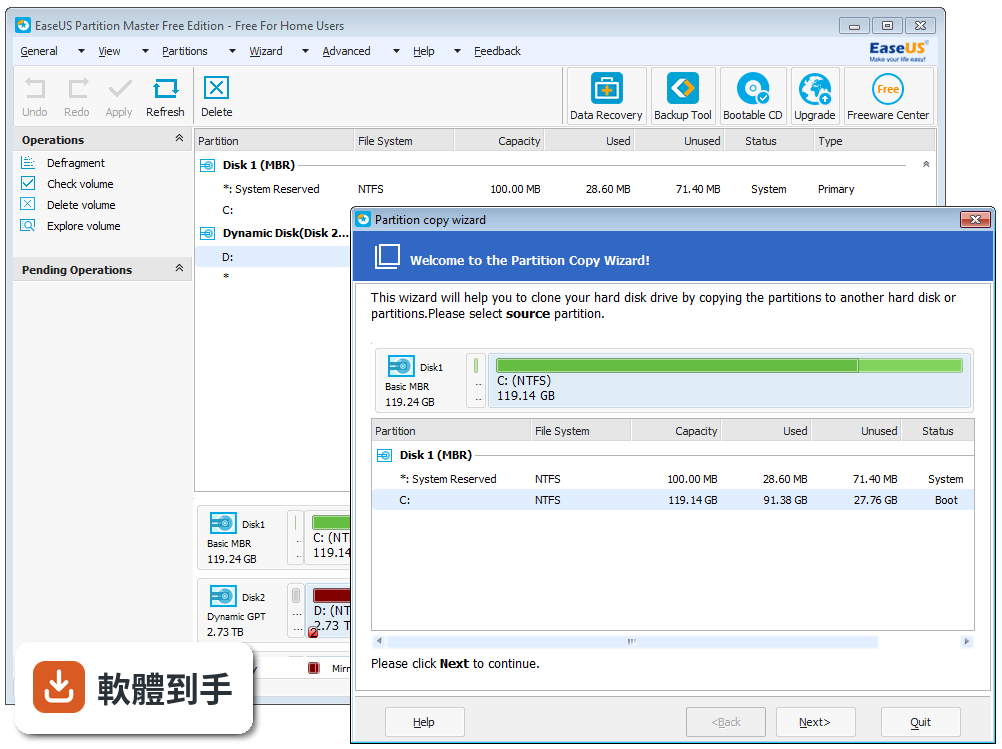
做得到。免費版支援磁碟複製,可以將整顆硬碟或單一分割區複製到另一顆硬碟,包含SSD。官方說明特別提到支援複製到SSD。操作方式是選取來源磁碟,按「Clone」,再指定目標磁碟並確認。複製前記得確認目標磁碟容量夠大。
04它可以把系統碟從MBR轉成GPT嗎?我想升級Windows 11。
可以。官方功能說明中明確列出「Convert MBR to GPT for Windows 11 upgrade」,免費版支援將資料磁碟轉換為MBR或GPT,也支援將MBR磁碟轉成GPT。不過轉換系統碟前,建議先確認主機板支援UEFI開機,並做好備份。
05我不小心刪掉了一個分割區,裡面的檔案還有救嗎?
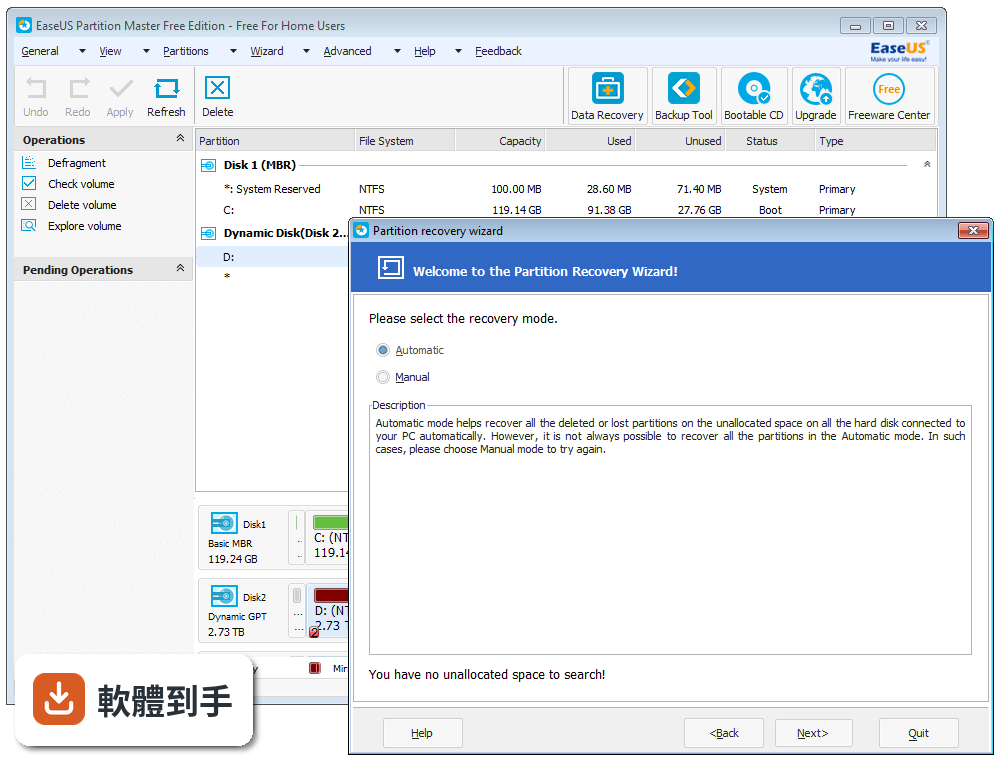
免費版有「Partition Recovery」功能,可以掃描磁碟並找回遺失或被刪除的分割區。操作方式是點選「Partition Recovery」,選擇要掃描的磁碟,再依精靈指示進行。不過官方也強調這功能在免費版可用,但動態磁碟管理需要Pro版才能處理。
06這套軟體適合什麼樣的人用?
適合一般個人使用者,官方定位就是「for individual users」。如果你只是想把C槽變大、把兩個分割區合併、把系統複製到新硬碟,不需要碰動態磁碟或進階功能,免費版就夠用。介面是英文的,但操作流程是圖形化點選,不太需要懂英文也能照步驟做。
07我完全不懂電腦,用這套會不會把系統弄壞?
官方宣稱內建防止資料遺失的機制,操作時也會先讓你預覽變更、確認後才套用。但任何磁碟分割操作都有風險,建議先備份重要資料再動手。如果你連「分割區」是什麼都不太確定,可以先從「Disk Check」或「Check Partition」這類檢查功能開始,不會立刻改動磁碟結構。
08什麼情況不該選這套軟體?
如果你需要管理動態磁碟,免費版不支援,要買Pro版。如果你需要中文介面,這套只有英文。如果你的需求只是偶爾格式化USB或記憶卡,Windows內建的磁碟管理就夠了,不需要額外裝軟體。另外,如果你要的是長期持續更新的工具,這套近兩年只更新過一次,更新頻率偏低。
09它跟AOMEI Partition Assistant或MiniTool Partition Wizard比起來,哪個比較多人用?
以評分人數來看,MiniTool Partition Wizard Free有361人評分,AOMEI Partition Assistant有214人,EaseUS Partition Master Free有244人,Paragon Partition Manager Free只有69人。EaseUS的評分是8.38/10,介於中間。評分人數多寡可以反映使用者的普及程度,但實際好不好用還是看你自己的操作習慣。
10免費版和付費版差在哪?我會不會用一用被鎖功能?
免費版可以做:建立、延伸、縮小、調整/移動、刪除、合併、隱藏/取消隱藏分割區,格式化、清除分割區或磁碟,變更磁碟機代號和標籤,檢查檔案系統和磁碟表面,轉換基本磁碟到動態磁碟、轉換邏輯/主分割區,初始化MBR/GPT、重建MBR,轉換資料磁碟MBR/GPT、NTFS/FAT32,複製分割區。付費版才有的功能包括:AI智慧調整空間、複製系統、遷移OS到HDD/SSD、複製磁碟、分割區復原、WinPE建立工具。免費版不會「用一用被鎖」,但進階功能確實被擋在付費牆後面。
11它支援多大的硬碟?我的新硬碟是18TB,裝得下嗎?
官方標示最大支援16TB的磁碟。如果你的硬碟超過16TB,這套軟體可能無法完整辨識或操作。購買或下載前建議先確認你的硬碟容量是否在支援範圍內。
12這套軟體還在持續更新嗎?會不會裝了之後沒人維護?
官方版本紀錄顯示,從2017年開始收錄了18個版本,最近一次更新在2026年6月,近12個月更新過1次、近24個月也是1次。也就是說它還在更新,但頻率不高,大約一年一次左右。如果你需要的是頻繁修正問題的工具,這點要列入考量。
下載與官方連結
前往官方網站 下載 EaseUS Partition Master Free
epm.exe · 36.2 MB · 連結指向軟體原廠
版本紀錄
- 2026-09-25 EaseUS Partition Master Free 20.8.0 2.3 MB
- 2026-06-26 EaseUS Partition Master Free 20.3.0 2.3 MB
- 2023-09-19 EaseUS Partition Master Free 18.0
再看 5 筆
- 2023-09-19 Select Version
- 2023-01-20 EaseUS Partition Master Free 17.6
- 2022-12-05 EaseUS Partition Master Free 17.5
- 2022-10-07 EaseUS Partition Master Free 17.0
- 2022-07-04 EaseUS Partition Master Free 16.8
這一版改了什麼
What's new in this version:
EaseUS Partition Master Free 12.10
New Features:
- Resize/Move partition faster with better performance
- Support to resize and move EXT2/3 partition
EaseUS Partition Master Free 12.9
- Stability improvements on partition merge function
- Ability to modify drive letter and volume label
- Resize dynamic volume which is distributed on both GPT and MBR disks with WinPE boot disk
- Multiple other fixes and improvements
EaseUS Partition Master Free 12.8
- New: Support GPT dynamic hard disk
- New: Completely support dynamic hard disk with 4096 bytes sector size
- New: Support resizing system partition on mirrored volume
- New: Support resizing dynamic hard disk with WinPE bootable media
- Improved the product to resize partition more quickly and safe
- Improved: If there is extend partition on basic disk, the volumes would be - splitted and cause boot issue after converting to dynamic
- Improved: Partition would become RAW/Unformatted after moving
- Improved: Unable to move dynamic volume by drag operation
- Bug fix: Location of created dynamic volume is different from previewed
- Bug fix: Partition is missed in Disk Map after Convert from MBR to GPT
EaseUS Partition Master Free 12.5
- Manage dynamic disks better – resize, format, move dynamic volumes and convert basic disk into dynamic
- Disk partitioning on large capacity hard disks of any sizes
- Simplify disk cloning process to get it done faster
- Make target disk same as the original one after cloning and solve bootable issue
- Improved: Reduce the size of installation package
- Improved:Optimize the resize and other functions to avoid some operations needs rebooting to execute
- Bug fix: Deleted dynamic volume would reappear after refresh in WinPE bootable disk environment
EaseUS Partition Master Free 12.0
New features:
- Support creating volumes on dynamic disk. (Not available in Free Edition)
- Minor update for the product UI
- Support Danish and Traditional Chinese
- Support the 4KB sector disk better
- Change the disk number to the same as in the system
- Bug fix: After converting the disk, there is missing/offline disk left in Windows Disk Management
- Bug fix: Partition lost or system failed to boot after converting or resize disk
- Bug fix: Pending operation cannot execute after rebooting
- Bug fix: System cannot boot from the cloned drive
- Bug fix: GPT disk cannot be convert to MBR in some cases
EaseUS Partition Master Free 11.10
- Change log not available for this version
EaseUS Partition Master Free 11.9
- Change log not available for this version
EaseUS Partition Master Free 11.8
New Features:
- Able to resize EFI partition on GPT disk
- Optimize the function converting disk from MBR to GPT
- Improve the quality of system disk clone
- Be capable of doing more operations without rebooting
- Newly support Italiano and Nederlands
List of features improved:
- Fix: Meaningless error information "unknown error"
- Fix: Partition is intact but reported as abnormal
- Fix: Some operations would abort in Native mode
- Fix: Support to resize Storage Space in Native mode
EaseUS Partition Master Free 11.5
- Convert GPT system disk to MBR safely
- Support ReFS file system
- Support Windows Storage Space
- Be capable of managing the Bitlocker partition
EaseUS Partition Master Free 11.0
- Clean and optimization tools keep your computer high-performance.
- Create more efficient WinPE bootable.
- Very easy to find commonly used functions.
- Migrate and clone system stably.
EaseUS Partition Master Free 10.8
- Convert system disk from MBR to GPT safely.
- Fixed some bugs.