
這是歷史版本頁面 — 看 f.lux 最新版本
晚上用電腦眼睛酸又睡不著?f.lux 能幫你什麼
 f.lux 4.109
資料更新 2019-08-29
閱讀約 5 分鐘
你大概有過這種經驗:晚上關了燈還在用電腦,螢幕白得刺眼,看沒多久眼睛就乾澀痠痛。好不容易關機躺上床,腦子卻還是很清醒,翻來覆去睡不著。你隱約覺得跟剛才盯著螢幕有關,但又不確定問題出在哪,只能繼續撐著,或是在手機上把亮度調到最低,勉強讓自己好過一點。
很多人習慣手動調低螢幕亮度,但這其實不太夠——亮度變暗了,色溫還是偏冷,藍光依然刺眼。而且每天都要手動調整,久了就懶得做。這類工具切入的點,是讓螢幕顏色跟著當地日出日落自動變化:白天維持正常色溫,入夜後逐漸轉為偏暖的橘黃色,減少藍光刺激。你不用每次記得去調,它自己會動。
01f.lux 到底是做什麼的?
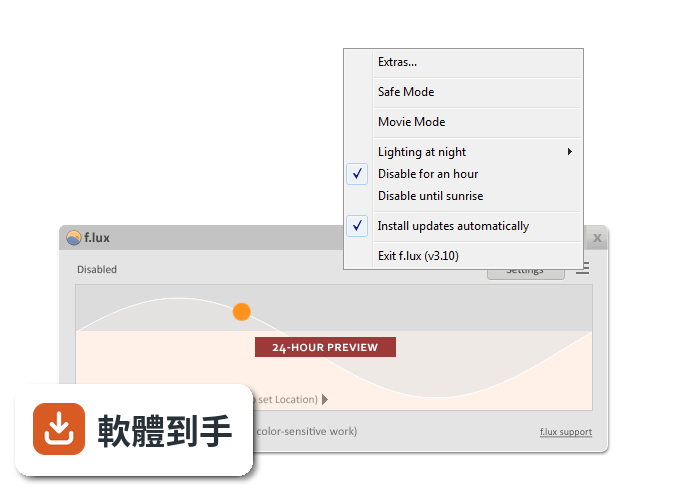
它是一套 Windows 免費軟體,會依照你所在位置的日出日落時間,自動調整螢幕色溫。白天螢幕維持正常色調,入夜後慢慢轉為偏暖的橘黃色,目的是減少藍光對眼睛的刺激,也降低睡前用電腦對睡眠的干擾。安裝後它會常駐在系統列,背景執行,不需要你手動開關。
02安裝之後要怎麼設定?
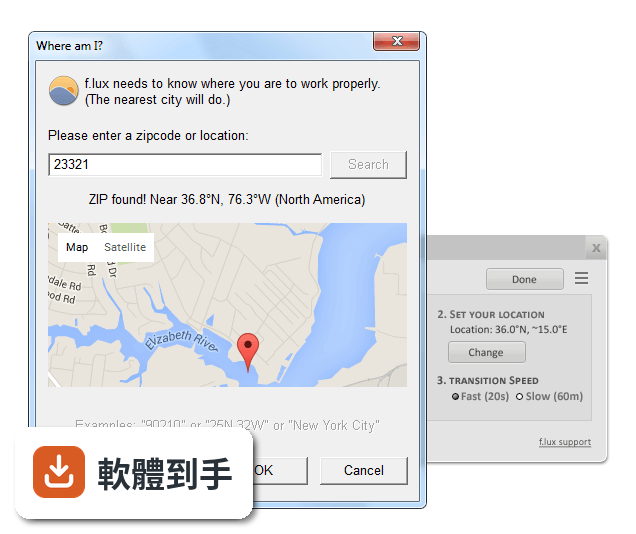
安裝完第一次啟動,它會要求輸入你的城市或經緯度,用來判斷當地的日出日落時間。接著會看到一個色溫調整滑桿,可以手動拉出你覺得舒服的暖色程度。之後它就會照著時間自動切換,不用再管。如果覺得顏色變動太突兀,可以在設定裡調整過渡速度。
03它有哪幾種模式可以用?
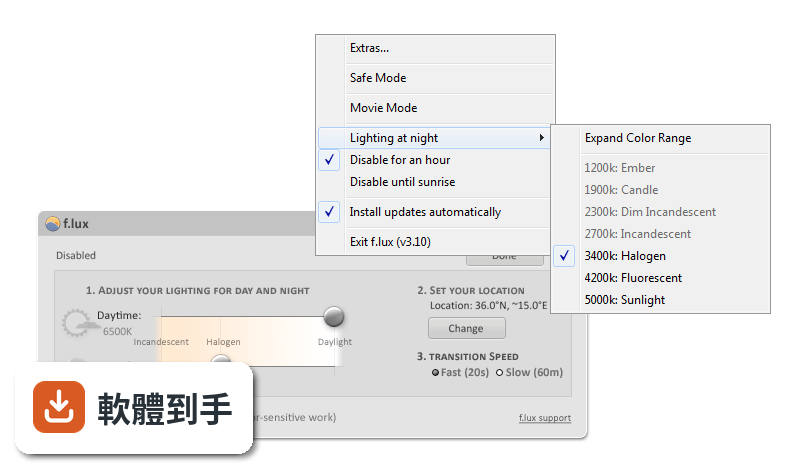
官方列出的預設模式包括「Working Late」(工作到很晚)、「Movie Mode」(看影片)和「Darkroom Mode」(暗房模式)。另外還有 Gaming Mode,可以在玩遊戲時暫時關閉色溫調整,避免顏色跑掉影響遊戲畫面。這些模式都可以從系統列圖示的右鍵選單切換。
04能不能針對特定軟體關閉色溫調整?
可以。在系統列圖示上按右鍵,選「Disable when using (app)」,然後指定要排除的程式,例如 Photoshop 這類需要色彩準確度的軟體。設定之後,只要那個程式在前景執行,f.lux 就會自動暫停作用,關掉該程式後又恢復正常。
05它對睡眠品質真的有幫助嗎?
官方說法是「可以」,原理是減少夜間藍光暴露,有助於維持生理時鐘。但要注意,它只是降低藍光比例,不是完全消除。如果你對藍光特別敏感,官方也提到可以搭配濾藍光眼鏡。實際效果因人而異,建議自己試用幾週觀察看看。
06我晚上要修圖、剪影片,用這套軟體會不會有問題?
會。它會改變螢幕整體色溫,任何需要色彩準確度的工作都會受影響。官方也明確說它可能干擾修圖或剪輯。如果你有這類需求,可以把它設定成只在特定時段啟用,或是在工作時用「Disable for an Hour」暫時關掉。但如果你每天都要在夜間做色彩相關工作,這套軟體可能不適合你。
07玩遊戲的時候會被影響嗎?
會,因為它會改變螢幕顏色。官方有提供 Gaming Mode,可以暫時停用色溫調整,讓遊戲畫面恢復正常色彩。另外也可以直接從系統列選「Disable for an Hour」暫時關閉。如果你常常玩到一半才發現顏色怪怪的,建議先開好遊戲模式再進遊戲。
08它的介面是英文的,我看不懂怎麼辦?
這套軟體介面確實只有英文,沒有中文語系。不過它的操作很簡單,主要就是一個滑桿和幾個選單,不太需要閱讀大量文字。如果你完全看不懂英文,可以對照官方網站的截圖操作,或找網路上別人寫的中文教學。如果連基本英文都覺得吃力,可能要考慮其他有中文介面的替代軟體。
09這套軟體多久更新一次?
根據現有紀錄,它收錄了 27 個版本,最近一次更新在 2026 年 5 月,過去 24 個月內更新過 1 次。也就是說它還在維護中,但更新頻率不算高。如果你需要非常頻繁的功能更新,這點可能要納入考量。不過對一個功能單純的工來說,穩定比頻繁更新更重要。
10它跟 Free Alarm Clock 比起來,哪個比較多人用?
以評分人數來看,Free Alarm Clock 有 238 人評分,f.lux 只有 72 人。但兩者功能完全不同——Free Alarm Clock 是鬧鐘軟體,f.lux 是螢幕色溫調整工具。如果你只是想要定時提醒,Free Alarm Clock 的使用者基數比較大;如果你要的是夜間護眼,f.lux 是這個類別的工具,沒有直接可比性。
11我電腦是 Windows 7,可以用嗎?
可以。官方列出的支援系統包含 Windows 7、8、10、11。不過要注意,Windows 7 已經停止支援很久了,如果你還在用,建議確認一下這套軟體在舊系統上的運作狀況。另外它需要網路連線來判斷位置,如果電腦沒接網路,可能無法自動調整。
12它有沒有可能跟其他軟體衝突?
官方說明中有提到,它針對 Qualcomm Snapdragon 系統(Adreno GPU)和外接螢幕做了相容性改善,也修了遠端桌面連線時的問題。但這不代表它跟所有軟體都相容。如果你有特殊硬體或常用遠端桌面,建議先裝來試用一段時間,確認沒有異常再長期使用。
下載與官方連結
flux-setup.exe · 716.8 KB · 連結指向軟體原廠
版本紀錄
- 2026-05-30 f.lux 4.141 673.34 KB
- 2024-08-09 f.lux 4.137 670.28 KB
- 2024-03-06 f.lux 4.134 670.28 KB
再看 5 筆
- 2024-02-21 f.lux 4.133
- 2024-01-18 f.lux 4.131
- 2023-12-06 f.lux 4.130
- 2023-09-30 f.lux 4.127
- 2023-09-27 f.lux 4.126
這一版改了什麼
What's new in this version:
f.lux 4.109
- Works around multiple monitor issues
- Improves support for DisplayLink (docking stations and USB-connected displays) and older GPUs. If you adjust the “gamma ramp” registry keys, it will work again.
- Fixes some crashes
f.lux 4.108
- Improves support for DisplayLink (docking stations and USB-connected displays) and older GPUs.
- Fixes some crashes
f.lux 4.104
- We are seeing a memory leak from a bug in the latest version of Windows 10 (18362). This build slows down the leak, and for now, we’ve made f.lux restart (quietly) when RAM usage gets too high. Hopefully this will be fixed soon.
- The “surface keys” menu item is visible again in options
- Fixed a problem with fullscreen disable
f.lux 4.103
- We are seeing a memory leak from a bug in the latest version of Windows 10 (18362). This build slows down the leak, and for now, we’ve made f.lux restart (quietly) when RAM usage gets too high. Hopefully this will be fixed soon
- The “surface keys” menu item is visible again in options
f.lux 4.100
- Adds per-monitor disable for people with TVs and e-Paper displays
- Fixes a Philips Hue brightness problem
- Fixes a problem that broke Darkroom below 1900K
- Adds option to turn off GPU usage below 1900K (off for Windows 7)
- Fixes maps “search” button
- Defers to corporate installs on same machine
- Handles unicode menus better
- Makes disable until morning wait until after sunrise
- Fixes a file handle leak
- Fixes for Windows Insider (18351+)
f.lux 4.99
- Adds per-monitor disable for people with TVs and e-Paper displays
- Fixes a Philips Hue brightness problem
- Fixes a problem that broke Darkroom below 1900K
- Adds option to turn off GPU usage below 1900K (off for Windows 7)
- Fixes maps “search” button
- Defers to corporate installs on same machine
- Handles unicode menus better
- Makes disable until morning wait until after sunrise
- Fixes for Windows Insider (18351+)
f.lux 4.97
- Adds per-monitor disable for people with TVs and e-Paper displays
- Fixes a Philips Hue brightness problem
- Fixes a problem that broke Darkroom below 1900K
- Adds option to turn off GPU usage below 1900K (off for Windows 7)
- Fixes maps “search” button
- Defers to corporate installs on same machine
- Handles unicode menus better
- Makes disable until morning wait until after sunrise
- Color changes work again on Windows Insider (as of 18351)
f.lux 4.84
- This new version of f.lux has a grayscale mode and new key to turn it on: Windows + End
- You may already know about Tristan Harris and the Center for Humane Technology. They’ve explained how apps mess with our attention, so even the colors used on our screens are chosen to distract you. At first, we didn’t think this problem would be as bad on the desktop as it is on your phone
- The big surprise is how distracting the icons on the top and bottom of your screen are. These icon colors are the kind of thing you see in candy stores and on fire alarms, but we have to ignore them just to get work done. Without those colors, your computer looks more like a magazine that can help you focus on reading or thinking—it feels different, like a sheet of paper
- Also, turning your devices to grayscale does not remove blue light, so f.lux will continue to do what it does
- In this version, there’s also dusk-to-dawn support for people with Hue lights, so you can put Hue lights outside and use f.lux to turn them off during the day
- There are some bugfixes too
f.lux 4.78
- Fixed bugs that caused sliders to draw wrong at 125% and 200%
- Slightly slower dimming with Alt-PgDn
- Windows 10 fixes
- Installer fixes
f.lux 4.76
- More flashing fixes
- Disabled function-key hotkeys (you can turn them on again by hand)
- Fixes a problem with the recent Windows 10 April update that resets f.lux’s color settings when devices are added to the system (including headphones and mice).
- Fixes some crash bugs
- Adjust warmth of Hue lights (relative to screen)
- Early support for LIFX via LAN API
- Early support for YeeLight (Xiaomi Mi) via LAN API
- Options menu reorganized (so there can be more)
- Checkbox to allow a laptop to sleep even when lighting controller is on
- Some installer and crash fixes
f.lux 4.75
- More flashing fixes
f.lux 4.74
- One more update to fix a problem with DisplayLink
f.lux 4.73
- Change log not available for this version
f.lux 4.72
- A recent Windows 10 update makes f.lux’s color settings reset sometimes when devices are added to the system (including headphones and mice). This build offers a partial fix that will make your screen flash for less than a second when the bug happens (rather than sticking around)
- Fixed some crash bugs
f.lux 4.66
- Clicking the graph now shows you the “advanced” three-slider mode. A second click previews (like it used to)
- New darkroom hotkey: Alt-Shift-End
- Maps display uses a newer browser version for Google Maps compatibility
- Starting f.lux from the start menu shows the app again
- Multiple monitor disable now uses color profile
- 0 latitude is now allowed
- Adjusted long fade timing just a bit
- Hue brightness is re-calibrated (somewhat brighter)
- Disable for remote desktop now works faster
- Stops showing app window on Alt+Shift+PgDn
- More accurate “disable” timing
- Options menu now reports more monitor info
- Fixed a crash bug in the way we use Windows Location (thanks Microsoft app compatibility team)
- Better crash reporting (it is optional to send)
f.lux 4.64
- Change log not available for this version
f.lux 4.63
- Clicking the graph now shows you the “advanced” three-slider mode. A second click previews (like it used to)
- New darkroom hotkey: Alt-Shift-End
- Maps display uses a newer browser version for Google Maps compatibility
- Starting f.lux from the start menu shows the app again
- Multiple monitor disable now uses color profile
- 0 latitude is now allowed
- Adjusted long fade timing just a bit
- Hue brightness is re-calibrated (somewhat brighter)
- Disable for remote desktop now works faster
- Stops showing app window on Alt+Shift+PgDn
- More accurate “disable” timing
- Options menu now reports more monitor info
- Fixed a crash bug in the way we use Windows Location (thanks Microsoft app compatibility team)
- Better crash reporting (it is optional to send
f.lux 4.55
- Several text changes to menus (explaining difference between “current colors” and “effects”)
- Remote Desktop automatically disables (on remote side)
- Avoids showing notifiers when f.lux is disabled
- Fixes for location dialog (Windows 7 especially)
- Help setting up your wake time, one time
- About box links to fluxometer
- “Classic f.lux” is now more like v3: simple graph, wake time features are disabled
- Hue brightness fixes (when f.lux is disabled)
- Windows Store apps can be disabled individually now
- Options menu now can show your video card version (for debugging)
- Many fixes for disable by app (now shows the full list so you can re-enable)
- Notifier fixes: layout and text about color changes
f.lux 4.54
- Several text changes to menus (explaining difference between “current colors” and “effects”)
- Remote Desktop automatically disables (on remote side)
- Avoids showing notifiers when f.lux is disabled
- Fixes for location dialog (Windows 7 especially)
- Help setting up your wake time, one time
- About box links to fluxometer
- “Classic f.lux” is now more like v3: simple graph, wake time features are disabled
- Hue brightness fixes (when f.lux is diabled)
- Windows Store apps can be disabled individually now
- Options menu now can show your video card version (for debugging)
- Many fixes for disable by app (now shows the full list so you can re-enable)
f.lux 4.47
- Fixed a problem with fast transitions and sunset timing
f.lux 4.43
- Fixes fullscreen disable bug (sometimes would disable for desktop)
f.lux 4.42
- If you want to receive beta builds in the future, please use the About box to opt in
- Major fixes for Hue lights (White Ambiance)
- Added About box with info, links and options
- Made a close button for notifiers
- Fixed a crash at exit
- Fixed a sunset timing problem
- Avoided using bad monitor data
f.lux 4.41 Beta
- Stopped changing tray tooltips so much, to fix a bug on Windows 7
f.lux 4.33 Beta
- Change log not available for this version
f.lux 4.31 Beta
- Disable for fullscreen apps (using this allows you to disable one monitor for movies)
- Disable by app works for 64-bit apps again
f.lux 4.30 Beta
- Disable by app fade timing is improved
- Cursor is set to hardware mode at exit
- Minor text edits
f.lux 4.29 Beta
- “Disable by app” only notifies you once per session, not all the time
- Actual app names are now shown for “disable by app”. (You may have to disable some apps again.)
- Tray icon now stays hidden when you hide it
- Some menu text changes
f.lux 4.28 Beta
Menus and oopses:
- Menus are juggled around to help simplify the UI (we are not done yet)
- Mouse cursor checkbox was broken, now fixed
f.lux 4.26 Beta
Some fixes:
- Software mouse cursor now switches on automatically when colors change, so you keep a hardware cursor during the day (you’ll have to turn it on again in Options)
- When you don’t enter your location, defaults are quite a bit better
- Fixes some cases for wake from sleep
- Some adjustments to vignette mode
f.lux 4.25 Beta
- We noticed a lot of laptops are looking very “green-yellow” so we spent some time to figure out what was going on. We were able to pull some data out of the monitors that describe their colors better than Windows does, and so we’re trying to use that data to do more accurate colors now. In the Options menu, there is a checkbox called “Use Monitor Data for Calibration”. We’re turning this on for everyone in this build, so we’d like to know if you think it looks better, or worse!
- Second, we’ve improved “crushed shadows” by adjusting the response automatically when you dim your screen, so we think photos look a lot better in this new build
- There’s a new full-screen vignette mode we’re trying out, which manages to show about 60% less light, while still being readable (for some things).
- Enabling software mouse cursor doesn’t require a logout anymore
- Bugs fixed on wake from sleep. f.lux should always come back now.
- Notifiers should never steal keyboard focus, and hotkeys are usable in fullscreen apps/games, because we don’t pop notifiers that kick you back to the desktop
f.lux 4.21 Beta
- In this version, we’re showing everyone a little bit of the way we think about f.lux, giving you some measurements that we think are important. So far, we’ve not really brought “you” and your circadian timing into the f.lux interface.
How light affects you:
- In this new build, we’ve exposed one of our models of how the light from screens affects your body (based on your screens’ sizes, and using our 5,000-person survey to approximate your viewing distance).
- As you adjust settings in f.lux now (or even as you change your laptop’s backlight, which is important), you’ll see one of five common-sense scores for how much light you’re seeing.
- As well, you’ll see a percentage, which we call “% daylight”. It’s a score for how much circadian effect the light you’re seeing might have, compared to broad daylight.
- But it’s also important to say, everyone’s a little bit different, so this is just a guideline. You might be more sensitive (especially if you’re under 20) or less sensitive (if you’re over 50, or if you spend a lot of time outdoors).
Is light making you earlier or later? It’s about time too:
- Light you see in the morning makes your internal clock “advance” or set itself earlier, and light you see at night makes your clock “delay”. When these adjustments cancel out, your clock stays in about the same place. When you see too much light at night, your clock delays and you want to stay up later.
- This new f.lux version indicates the times of day that light is likely to make you later or earlier, so if you open the Preferences screen at night you will see “Light is making you later” and correspondingly “Light is making you earlier” in the morning.
Other changes and fixes in this update:
- Notifications are redesigned, when you use the hotkeys (alt-pgup, alt-end, etc)
- Some extra support for wide color ranges on Windows 7
- Gaming mode (safe mode) is removed, because we’ve incorporated everything it does, finally. Use “very fast” transitions if you notice problems
- We now ask for the “earliest” time you wake up, to clarify what you should do when you have a variable schedule
f.lux 4.20 Beta
- Optimized background performance more (should improve framerate drops), fixed some bugs
- Added ability to toggle software cursor in the Options (prevent white cursors!) - requires a reboot or logout
f.lux 4.19 Beta
- Default to “slow transition” on purpose! We thought we had done that already, but people who had the old version were getting a fast transition.
- If you don’t like this, change it in options
f.lux 4.18 Beta
New:
- Bedtime mode: warmer light before bed gets you ready for sleep, and works with all kinds of schedules
- Disable by app (so you don't forget Photoshop)
- Backwards alarm clock: reminder not to stay up late
- Presets to help adjust your settings
- Color filters for eyestrain and other uses
- A wider range of color settings
- New hotkeys to adjust color (alt+shift+PgUp and alt+shift+PgDn)
Changes:
- Reduced impact on game framerates
- Resolution independent interface, for high DPI displays
- DisplayLink monitors (connected by USB) work in a lot more cases now
Smart Lighting:
- Hue integration now supports more light types
- LAN API with support for telling other devices when f.lux changes