
這是歷史版本頁面 — 看 GOM Media Player 最新版本
下載到一半的影片播不了?GOM Player 能幫上什麼忙
 GOM Media Player 2.3.10.5266
資料更新 2016-12-20
閱讀約 6 分鐘
你大概遇過這種狀況:從論壇或雲端硬碟抓了一個影片檔,檔案明明下載完了,雙擊下去卻跳出「無法播放」或畫面卡在黑色一片。尤其是那種用續傳軟體抓了好幾個小時的 AVI 檔,因為網路不穩或來源中斷,檔案結構早就壞了,偏偏裡面可能有你不想重抓的內容。當下只想把這檔案救回來,而不是再花時間重新下載一次。
一般人第一個念頭是換播放器試試,但多數播放器遇到不完整的檔案,要嘛直接拒絕開啟,要嘛播到一半就當掉。也有人會去搜尋「修復影片檔」的工具,但那些軟體多半要付費,而且修復流程複雜。其實這類問題的切入點很簡單:找一個能「跳過損壞片段」的播放器,讓它直接忽略壞掉的部分、把能看的畫面播出來。這正是某些播放器存在的理由,也是它們跟其他免費播放器最不一樣的地方。
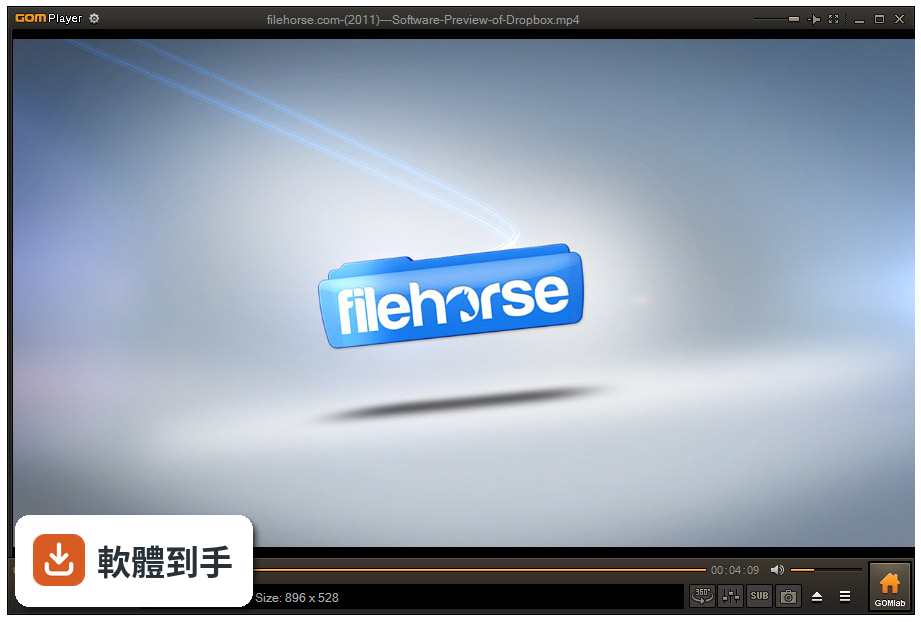
01GOM Player 跟其他播放器比,最特別的功能是什麼?
它主打能播放「不完整或損壞的 AVI 檔」,遇到壞掉的影格會直接跳過,不會整個卡住。另外也支援播放「鎖定中」或「只下載一部分」的檔案,意思是檔案還在下載、還沒完成時,它也有機會先播出來。這在免費播放器裡比較少見,其他同類軟體多半遇到壞檔就放棄。
02它是不是號稱不用另外裝解碼器?真的什麼檔都能開嗎?
官方說明指出,它內建了常見的影音編碼器,AVI、MP4、MKV、FLV、WMV、MOV 這些主流格式預設就能播,不用自己去找解碼器包。但「常見」不等於「全部」,如果遇到比較冷門的格式,它有個 Codec Finder 功能,會幫你搜尋缺哪個解碼器,並引導你去下載。所以不是萬能,但至少不用從零開始裝一堆東西。
03字幕支援的狀況如何?我常看外語片。
它支援字幕,而且做法很直覺:把字幕檔跟影片放在同一個資料夾、檔名取一樣,開啟影片時就會自動載入。也可以從右鍵選單手動調整字幕設定。官方還提到會「自動搜尋並同步字幕」,但這部分沒有細節,實際效果可能要自己試。如果你很依賴字幕功能,這套算是該有的都有。
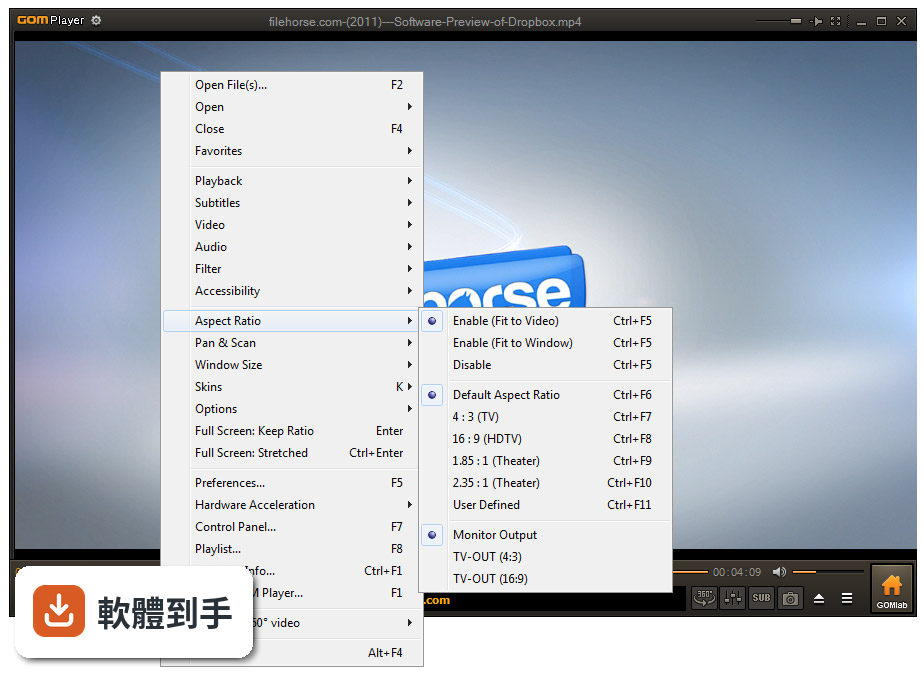
04除了播放,它還有哪些實用的附加功能?
官方列出的功能不少:A-B 重複播放(設定一段範圍循環)、螢幕截圖(預設快捷鍵 Alt+G)、錄音、播放速度調整、影片特效(亮度、對比、飽和度)、360 度 VR 影片播放、3D 支援。介面可以換皮膚,按鍵也能重新對應。這些功能對一般使用者來說,等於不用再另外裝截圖或慢速播放工具。
05介面操作起來複雜嗎?我只需要基本播放功能。
官方描述它的介面是「極簡設計」,播放控制按鈕都在底部,右鍵也有選單可以叫出進階選項。安裝過程可以自己選要關聯哪些檔案類型,不想要它吃下所有影片檔的話,安裝時可以取消勾選。整體來說,初學者用預設設定就能播片,進階功能藏在選單裡,不會擋路。
06這套軟體適合什麼樣的人用?
最適合的族群是「常抓檔、而且抓的檔案常常不完整」的人,尤其是 AVI 檔。另外,不想花時間研究解碼器的人也很適合,因為它內建編碼器,裝完就能播大部分格式。如果你需要一個播放器同時搞定字幕、截圖、慢速播放,又不想裝好幾套軟體,它也算是一站式方案。
07我電腦是 Windows 7,跑得動嗎?
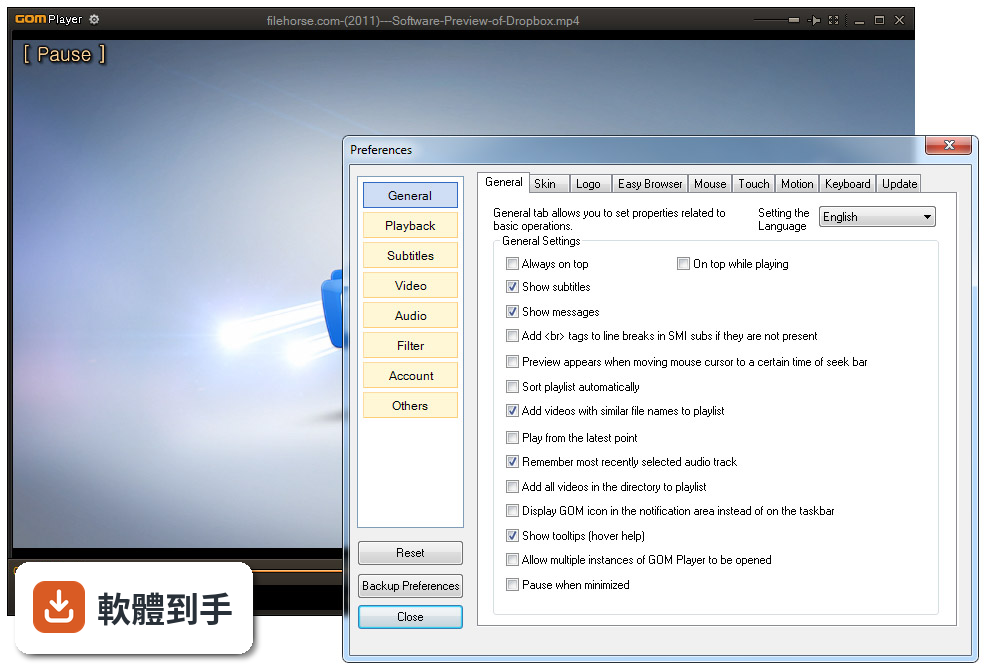
官方列出的支援系統從 Windows 7 一路到 Windows 11,所以 Windows 7 在支援範圍內。不過要注意,介面語言只有英文,雖然播放器的操作邏輯不難懂,但如果你對英文介面很排斥,這點要先有心理準備。另外,官方 FAQ 提到有 Mac 版,但這次提供的資料只確認 Windows 版的存在。
08它跟 KMPlayer 或 PotPlayer 比起來,選哪個比較好?
這三套都是免費播放器,功能也互相重疊。GOM Player 的獨特優勢是「播放損壞或不完整的 AVI 檔」,這點在官方說明中寫得很明確。KMPlayer 和 PotPlayer 的評分人數都比 GOM Player 多(分別是 1476 人和 821 人,GOM 是 887 人),表示討論度和使用者基數可能更大。如果你沒有「救壞檔」的需求,另外兩套也可以考慮,但如果你常遇到下載到一半的影片,GOM 的這個功能是它最不一樣的地方。
09什麼情況不該選 GOM Player?
如果你很在意介面語言,它只有英文,沒有中文介面,這對某些人來說是硬傷。另外,它只支援 Windows 系統,如果你需要在手機或 Mac 上播放,這套不適合。還有,如果你追求的是「持續頻繁更新」的軟體,它的更新頻率不算高(近兩年只有兩次更新),雖然不算停擺,但也不是那種每個月都在改版的軟體。
10它既然是免費軟體,會不會安裝時夾帶其他東西?
官方說明提到安裝過程可以自己選擇設定和檔案關聯,但沒有提到是否會預設安裝其他軟體。這類免費播放器有時會在安裝時預先勾選額外的工具列或贊助軟體,安裝時建議留意每個步驟的勾選項目。這部分官方資料沒有明說,實際情況要自己安裝時確認。
11我有一堆老舊的 AVI 檔,有些播到一半會卡住,它能解決嗎?
這正是它的主要應用場景。官方說明指出,它會「跳過損壞的影格」來播放不完整或損壞的 AVI 檔,也會「重建即時索引」來處理 AVI 的索引損壞問題。如果你的 AVI 檔是「下載到一半」或「來源本身就有問題」,它比一般播放器更有機會播出來。但如果是檔案嚴重損毀到完全無法辨識,那任何軟體都救不了。
下載與官方連結
GOMPLAYERGLOBALSETUP.EXE · 32 MB · 連結指向軟體原廠
版本紀錄
- 2026-10-13 GOM Player 2.3.123.5393 214 MB
- 2026-08-18 GOM Player 2.3.122.5392 32.9 MB
- 2026-07-21 GOM Player 2.3.121.5391 32.9 MB
再看 5 筆
- 2024-02-20 GOM Player 2.3.94.5364
- 2023-06-22 GOM Player 2.3.88.5358
- 2023-06-20 GOM Player 2.3.88.5357
- 2023-05-16 GOM Player 2.3.87.5356
- 2023-04-20 GOM Player 2.3.86.5355
這一版改了什麼
What's new in this version:
GOM Player 2.3.10.5266
- FFMPEG Upgrade
- Upgrade the default built-in codec performance
- DVB subtitle support
- Disable some options during dvd playback
- Fixed the problem that playback stops when playing Mp3 file with album art
- Miscellaneous corrections and changes
GOM Player 2.3.9.5265
- Enhanced playback performance through filter upgrades
- Added HEVC content playback in DXVA2 H/W acceleration
- Added EM4A (Panasonic MP4) codec playback function
- Enhance subtitle function
- Fixed ASS subtitle output bug
- Fixed Arabic output bug
- Modify behavior related to moving bookmarks
- Move to the previous/next bookmark based on your current playback position
- Fixed an error that looks like a full screen(: stretched) when running full screen(: keep ratio)
- Miscellaneous corrections and changes
GOM Player 2.3.8.5262
- DMB, Wi-Di functions removed
- Fixed some audio playback problems
- Improve DVD subtitle color performance and aspect rati
- Revised the error when uploading subtitles
- Add LG 360 VR Preferences
- Offer GOM Software promotion
- Add GOM Software Button
- Add GOM Remote status pop-up
- Expanded screen size in Dodge game
- Added a update item in menu
- Miscellaneous corrections and changes
GOM Player 2.3.6.5260
- Add subtitles find window
- The Youtube 360 degree separation up down of the stereoscopic video playback support
- Youtube Video subtitle support
- Add supported subtitles(sup, psb)
- Fixed crash error when used touch function
- Add GOM 2016 skin
- Other miscellaneous corrections, fixes, and changes
GOM Player 2.3.3.5259
- Change log not available for this version
GOM Player 2.3.3.5258
- Improved switching subtitles
- Opensubtitles.org subtitles support
- Fixed image quality error in high-definition monitor
- txt, sbv, vobsub format subtitles support
- Add 360degree video menu
- Fixed 403 error in youtube video playback
- Fixed AB repeat end position error
- Other miscellaneous corrections, fixes, and changes
GOM Player 2.3.3.5254
- Added GOM REMOTE connection
- FFMPEG version upgrade
- Other miscellaneous corrections, fixes, and changes
GOM Player 2.3.2.5252
- Change log not available for this version
GOM Player 2.3.2.5251
- Multi-language subtitle support
- Add GOM ID authentication
- Intel real sense Motion Support
- Other miscellaneous corrections, fixes, and changes
GOM Player 2.3.0.5248
- Fixed HW acceleration wizard
- Improving URL open feature
- Other miscellaneous corrections, fixes, and changes
GOM Player 2.2.80.5243
- Added HW acceleration wizard
- Added 360 VR video screen capture support
- Other miscellaneous corrections, fixes, and changes
GOM Player 2.2.77.5240
- Added Playback 360° video
- Play List function improvement
- Fixed some file playback bar display problem
- Other miscellaneous corrections, fixes, and changes
GOM Player 2.2.76.5239
- Update Hotkeys list
- Added Hotkeys related to Bookmarking
- Now supporting Multiple Timeframe setting
- Added Privacy tap in preference
- Added playback in original orientation/format option
- Now supporting f4v file in playlist
- Add a Subtitle features
- Other miscellaneous corrections, fixes, and changes
GOM Player 2.2.74.5237
- Improving accessibility settings
- Improving touch operation stability
- Additional Text-To-Speech (TTS) options
- Simple UI access improvements
- Other miscellaneous corrections, fixes, and changes
GOM Player 2.2.71.5231
- Added "Touch Setting" feature for touch screen devices
- Added "Search box" feature on playlist. (Ctrl+F)
- Supported "HTTPS URL" for youtube or net radio playback. (Ctrl+U)
- Added "Music Tap" on preferences related to play music files
- Improved performance related to "speed of add & delete" of files on playlist
- Other miscellaneous corrections, fixes, and changes
GOM Player 2.2.69.5227
- Added GIF Animation Output feature
- Added “Enable Hardware Decoding (If possible)” feature
- Added YouTube Playback feature
- Added “Disable Internal Filters Settings” feature
- Solved the problems in the version 2.2.67.5221 of GOM Media Player
- Added some more filters in the “Disabled Filters List”
- Change of the video output type at default
- Added File Info in the Playing File Info…
- Added “Limit color range: 16-235” feature
- Compatible with Windows 10 Preview
- Other miscellaneous corrections, fixes, and changes
GOM Player 2.2.67.5221
- Added Preview Feature
- Added “Hide skin during playback” Feature
- Added “Hide mouse cursor after 2 seconds without using the mouse during playback” Feature
- Added “Auto Rotate” Feature
- Solved the problems in the version 2.2.64.5211 of GOM Media Player
- Support V210 playback
- Improvement of subtitle support
- Added “Subtitle Priority” Feature
- Added “Enable Intel HEVC(H.265) decoder” option
- Added “Play to match the audio when audio out of sync (video comes after audio)” option
- Added “Quality optimization mode” option
- Change of the video output type at default
- Added “Seek bar loads according to the file analyzed progress when playing damaged MKV files” option
- Change of file playback operation
- Other miscellaneous corrections, fixes, and changes
GOM Player 2.2.64.5211
- Added the Preference Backup feature
- GOM2.2 Skin update
- Solved the problems in the Version 2.2.62.5209 of GOM Player
- Added "Maximize window when dragged to the top edge of the screen" feature
- Improved the subtitle display feature/li>
- Changed the default setting of the Video Output Type
- Added filters in the Disabled Filters List
- Deleted the Configuration Wizard
- Solved the crashing issue after updating Windows 7
- Other miscellaneous corrections, fixes, and changes
GOM Player 2.2.62.5207
Improved Subtitle Support
Added support for ASS/SSA subtitles
Added support for VP9 video playback
Some image files can now be opened
Improved the Bookmarks feature/li>
Improved the Advanced Capture feature
Corrected an issue with A-B Repeat and custom skins
Improved Support for FLAC & M4A audio files
Corrected an issue regarding a CPU error message
Corrected an issue with file associations in Win 8.1/li>
Other miscellaneous corrections, fixes, and changes
GOM Player 2.2.57.5189
Changes to minimum system requirements
Major improvements to the internal source filter
FLAC audio file (.flac) playback support added
Added Internal support for several video and audio codecs
Improvements to the Bookmarks feature
Jump to specific time feature added
“Play in single thread” set to off by default
Improved .LNK file playback
Corrected DAT file associations
Updated the Codec Finder window
Improved the Subtitle Explorer window
Fixed a security issue
Enhanced the security of the installer package
Misc. changes and fixes
GOM Player 2.2.56.5183
GOM Media Player now officially supports Windows 8.1.
Fixed an issue where MP3 files containing album art information would not play while using Enhanced Video Renderer.
Modified file access rights during playback.
Improved playback support for files requiring the TSCC codec.
Fixed an issue affecting the Enhanced Video Renderer video output setting.
Fixed an issue where MP4 files made with Windows Movie Maker wouldn't play properly.
Fixed an issue affecting ASX and video/audio streaming from the Internet.
Fixed an issue affecting .AVI files created with Casio Digital Cameras.
Improved playback while playing files with Intel Quick Sync Video enabled.
Intel Quick Sync Video and the ASF source filter are now both disabled by default.
Other misc. corrections and fixes.
GOM Player 2.2.56.5181
- Made major improvements to the Gretech Source Filter
- 90, 180, and 270 degree rotation feature added
- Added Playback support for H.265 (HEVC) video files
- If available, album art will now be displayed when playing MP3 files
- Added hardware playback support for Intel Quick Sync Video
- Improved the "Move by keyframe" feature
- Added support for AC3-SPDIF Output
- Added support for Apple Closed Caption subtitles
- Fixed an issue where DVD playback on certain 32bit OS would cause forced terminations of GOM Media Player
- Added links to the Official Gom Media Player website, FAQ, etc. to the default GOM2.2 skin
- Corrected a security issue
- Other misc. changes and fixes
GOM Player 2.2.53.5169
- A new default GOM Player 2.2 Skin has been applied
- Volume can now be boosted to 200%
- UI Transparency Slider added
- Bookmark Feature Improved
- Changes the File Associations window for Windows 8
- Playback status icon added to taskbar icon
- Message reflecting window size changes added
- Internal support added for multiple codecs
- A buffer overflow security issue has been corrected
- Audio sync issue with some Xvid videos corrected
- Improved ability to properly recognized display aspect ratio
- Improved ability to display "Current Frame" information
- Other misc. corrections and fixes
GOM Player 2.1.50.5145
- Modified the software's AAC codec
- Removed AC3 Tab and internal options
- Corrected a sync issue with certain TS files
- Corrected a playback issue with certain MP4 files
- Added playback history management options (Win7 +)
- Minor misc changes and fixes
GOM Player 2.1.49.5139
- Corrected an issue with the MPEG source filter
- Added support for 10bit AVC files
- Corrected a playback speed control issue (WMV)
- Improved FLV playback with internal filters
- Improved playback for certain MTS files
- Improved the seek function for H.264 videos
- Playback Speed Control improved (0.2x - 16x)
- Improved Easy Browser preferences
- Snapshot Preview shortcut added (CTRL + Q)
- Corrected a volume message display issue
- Misc fixes and changes
GOM Player 2.1.47.5133
- Windows 8 Support Added / Windows 98SE support dropped
- Default MPEG Transport Stream changed
- Added additional Aspect Ratio options
- Audio playback issue corrected
- RTL Language Subtitle Support is now enabled by default
- File Playback Information will now include the version of GOM Media Player being used
- Various fixes in phrasing and spelling
- Other miscellaneous issues have been addressed and corrected
GOM Player 2.1.43.5119
- Improved AAC Audio Support
- AVI Playback Issue Corrected
- SRT Subtitle Display Issue Corrected
- RTL Subtitle Support Added (beta)
GOM Player 2.1.40.5106
- Disable Splash Screen Function (window that appears when closing the player) added
- Improved the Gretech MP4 Source Filter
- Altered default screen size settings
- Added the LAV Audio Decoder to the Disabled Filters List
- Corrected the Gretech FLV Source Filter
- Improved the Gretech AVI Source Filter
- Product information added to the Windows Control Panel
- Impoved the Playback Window size adjustment feature
- Adjusted the default AC3 options
GOM Player 2.1.39.5101
- A security vulnerability related to the "Open URL" feature has been addressed and corrected
GOM Player 2.1.37.5085
- An error where only one audio track would be available when playing certain multiple-audio MP4 files has been corrected
GOM Player 2.1.36.5083
- When stopping a video file after making changes to subtitle sync settings, a message will now be displayed asking whether or not to save the changes. This message can be turned on and off from the Preferences window.
- Added a feature whereby default playback window size settings will only be applied when launching a new instance of GOM Media Player
- Improved playback for uncompressed AVI files
- Various minor changes and corrections
GOM Player 2.1.33.5071
- Changed the background image that is displayed when playing audio files
- Added the ability to select 3D Subtitle Mode
- Added the ability to change filters for playing TS files
- Improved the internal MKV source filter *
- Improved the internal MP4 source filter for MOV playback **
- Fixed a bug that caused playback errors with full screen mode when using the "default" skin
- Added the ability to select whether or not to play files in a single thread
- AB Repeat feature now works properly during DVD playback
- Corrected an issue were some OpenDML AVI files over 2GB in size could not be played properly
- Links that appear in the text bar of the main window will now open in the user's default browser when clicked (as opposed to IE)
- Updated the GOM Media Player EULA
- Other minor fixes
- * There was an issue where subtitles weren't displaying properly on certain MKV files. This problem has been addressed and improved, but may not be 100% corrected for all files
- ** The Gretech Mp4 Source Filter is now used by default when playing MOV files
GOM Player 2.1.28.5039
- Added the MPEG2 source filter with improved search quality and playback error
- Fixed a browsing error in some TS files
- Fixed a synchronizing error with video and audio in some TS files
- Added MPEG source filter options to Filter Preferences
- Fixed an average frame calculation error in the Gretech ASF Source filter
- Fixed a sound issue with the Gretech Audio filter
GOM Player 2.1.27.5031
- Changed extension Icon
- Fixeda problem of rapid playback of some proportionate MP3 files
- Fixed a bug of the ‘%’ character of SRT subtitles not appearing normall
- Fixed an error of SRT subtitles in Unicode form not appearing
- Changed the volume feature adjusted by 1% when under 5%
GOM Player 2.1.25.5015
- Modified source filter of MP3 local files
- Added 'Maximize' option to display resize menu
- Added ‘Fit to full screen’ options under Preferences(F5)>’Playback’ Menus>’Playback’ Tab>’Default screen size when playing’
- Enhanced subtitle’s quality in ‘VMR-Renderless’ mode
- Updated blocking filter lists
- Linked to mts, m2ts, m2t extensions
- Selections available in the default linked programs list
- ASX 3.0 StartTime, Duration options applied to playlists
- Fixed an issue with afterimages on the player skin
- Fixed an issue with not working function of extension connect/disconnect
- Fixed mouse inputting errors in ‘VMR-Renderless’ mode while DVD playing
- Fixed codepage recognizing error of some subtitle files
- Fixed an issue that some WMV files are not connected with built-in source filter
- Changed 'Random Play' function to 'Shuffle Play' function
- Enhanced functions which adjust & save subtitle syncs
- Add Gretech MP3 source filter
- Modified source filter of FLV local files
- Modified source filter of MPEG local files
- Modified source filter of MP4 local files
GOM Player 2.1.21.4846
- Security patches (Solving vulnerabilities when downloading a logo file and executing external files)
- When using the Intel chipset graphic card, text error fixed in a particular Renderer
- Bug fixed mismatching problem between SRT subtitles and assigned code-page
- When saving SRT subtitles sync, it will changed to SMI
- Problem fixed codec finding in some MOV files
- Bug fixed when keeping file handle after finishing playing OGG, MKV file
- Bug fixed when playing MP4 by an imbedded source filter, recognize problem about some MP3 audio streaming
- Improving downloading OGG file-playing function
- Improving damaged FLV file-playing function
- Improving local MKV file-playing function
- Error Fixed problem when connecting some external file splitters
- Bug fixed problem that pop-up finding subtitles page when trying to play a file which does not exist
- Error fixed problem that making unintentional file-names when capturing audio/video of on-line videos
- Error fixed video black-out problem in some conditions
- Changing format of bookmark file to Unicode type and Improving speed of reading/writhing of bookmark
- Adding shortcuts about move by a frame (next frame : Ctrl + > , former frame : Ctrl + < )
- Adding sizes in "Easy Browser" option (1280*1024 / 1920*1080)
- Adding Exif information to jpeg file captured
- Add disabled filter list
GOM Player 2.1.18.4762
- Bug fix: Abnormal video output problem in system with some non-intel CPU
- Bug fix: Subtitle sync problem in the specific environment when using a built-in source filter
- Bug fix: Gretech MKV Source Filter
- Bug fix: Gretech OGG Source Filter
- Adjusted the text font size in the Easy Browser
GOM Player 2.1.17.4710
- Fix: Abnormal video-output in some non-intel-type cpu system
- Bug fix: When using built-in source filter, subtitle's sync problem at specific circumstance
- Adjustment of text font size in Easy Browser
- Bug fix: About Gretech MKV Source Filter
- Bug fix: About Gretech OGG Source Filter
GOM Player 2.1.16.4631
- Modify 'Deadlock problem' occasionally happened when you shut down the player
- Improve Vorbis audio decoder performance
GOM Player 2.1.15.4610
- Supporting AVC Video codec on FLV Local file / Network File
- Supporting AAC Audio codec on FLV Network File
- Putting the skin image file in order
GOM Player 2.1.14.4525
- Fixed the bug that brought the DVD back to the beginning when playing after pausing
- By using the TAB key, you can now see see how far along in the video you are due to the new implemented time function
- Fixed the subtitle file bug that that crashed on the initial code page
- Fixed so that subtitles can now be set between 0.1 seconds and 1.0 seconds to your preference
- On the Right Click menu, the option to full screen will now correctly fullscreen, instead of maximizing as before
- Fixed the bug that did not allow the execution of an entry of ASX format when an ASX file existed previously
- In the case that in an ASX file there is another ASX file, then ti would not execute correctly
- Fixed the bug that did not allow Audio/Video scenes to be captured correctly due to UNICODE
- New EVR (Enhanced Video Renderer) option has be added
- In the case that that you cannot use VMR9/EVR there will be an error message with an X to let you know that you are not able to use it
- When clicking on a link, GOM will utilize your default browser instead of opening with IE
- Fixed the interface of the Video output page
- Has the ability to make a log
- Fixed the issue where the MKV video and A/V did not sync (The time bar no longer goes backwards)
- Fixed the problem where particular AVI files had issues with audio syncing
- OpenDML play support has been built-in the AVI source filter
- Changed the priority order in the ASF/WMV file filter
- Improved Gretech ASF Source 2
- FLV Network Filter production
- Theora Local File Source filter production
- AAC support in the Flv Source Filte
- Built-in support to find the appropriate codec for .MOV files
GOM Player 2.1.9.3754
- UI bug for Preferences window
- Bug related to Gretech ASF Source 2 Index Reading
GOM Player 2.1.9.3753
- This minor update addresses a video/audio sync issue with certain MKV files
GOM Player 2.1.9.3752
- New feature: Quick Play Mode enables DXVA hardware acceleration, providing a smoother playback for high definition files
- Fixed a bug where bookmark file names were corrupted on certain Windows language settings
- Better update alert window
- Addition of a confirmation window when deleting files/folders from Easy Browser
- Fixed audio sync issue with Gretech Asf Source 2
- Combined external subtitle filter settings and filter settings
- Fixed a bug with screen saver option
- New options to select when internal source filters are used
- Random button on the playlist
- Link .TS, .TRP, .SVI files to GOM Player
- Edited the list of commands for user-defined shortcut keys
- Other minor fixes/improvements
GOM Player 2.1.8.3683
- Bug fix: buffer overflow
- New feature: delete files from Easy Browser using DELETE key
- New feature: option to automatically sort files when you add a file to playlist
- Bug fix: properly plays MP4(AVC1) files made by certain programs
- New feature: option to recursively add all files under a directory on playlist
- New feature: option to pause when minimized
- Bug fix: playback for certain video types
- New feature: option to sort by directory name on playlist
- New feature: black list filter
- New feature: option to maintain the new play speed
- Bug fix: properly finds keyframe when seeking
- Supports Bluetooth multimedia keys
- Supports FLV4 video codec
- New feature: audio sync control
- Better recognition of TS files
- Other minor fixes/updates
GOM Player 2.1.2.3407
- This release fixes the sorting feature for the playlist
GOM Player 2.1.1.3401
- Code Change in Preferences>Subtitle>Others. Works properly in this version
GOM Player 2.1.1.3399
- Addressed several incorrectly display texts
- No longer creates GomPlayer folder in My Documents by default
- File association for .mov, .mqv added
- Better subtitle support for ASF files
- Better deinterlacing
- Supports .m2t
- Fixed issues with .flv
- Other minor problems
GOM Player 2.0.6
- First English Version