
這是歷史版本頁面 — 看 HandBrake 最新版本
HandBrake 免費轉檔,舊 DVD 也能變 MP4
 HandBrake 1.7.0
資料更新 2023-11-17
閱讀約 5 分鐘
你手邊有一堆影片檔,有些是從舊 DVD 備份出來的,有些是手機拍的、網路下載的,格式亂到播放器不認、電視不讀、手機也不理。你想把它們通通轉成一個通用的格式,好丟進隨身碟、傳給別人、或上傳到雲端,但打開檔案總管看到那一排 .vob、.mkv、.avi,就不知道從哪裡開始。
一般人會先想到線上轉檔網站,但檔案一大就卡住,傳上去等半天還可能失敗;或者去裝一堆解碼包,結果播放器是能開了,但檔案還是那個格式,問題根本沒解決。這類轉檔工具的切入點,是直接幫你把影片重新編碼成指定格式,同時處理解析度、位元率、字幕這些細節,讓輸出檔案在各種裝置上都能正常播放。
01HandBrake 能把 DVD 轉成 MP4 嗎?
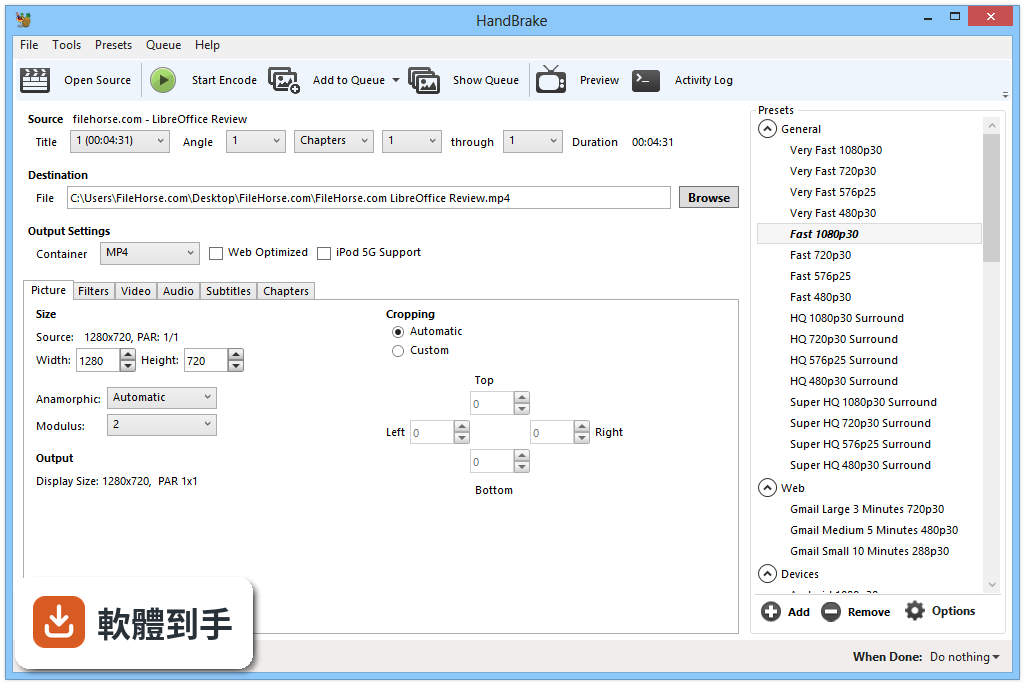
可以,但僅限沒有加密保護的碟片。如果是市售的商業 DVD 或 Blu-ray,內建防盜拷機制,HandBrake 無法處理,需要先用其他工具解除保護才能轉。一般自己錄製、或沒有版權保護的光碟,直接放入光碟機、開啟 HandBrake 選取來源就能開始轉檔。
02它支援哪些輸入和輸出格式?
輸入方面,官方說明指出能處理 MP4、MKV、AVI 等常見格式,幾乎涵蓋你手邊會遇到的影片檔。輸出則支援 MP4、MKV、WebM 三種容器,影片編碼可選 AV1、H.265、H.264、MPEG-4、MPEG-2、VP8、VP9,音訊可選 AAC、MP3、FLAC、AC3、Opus 等,算是相當完整。
03一次要轉很多檔案,它能批次處理嗎?
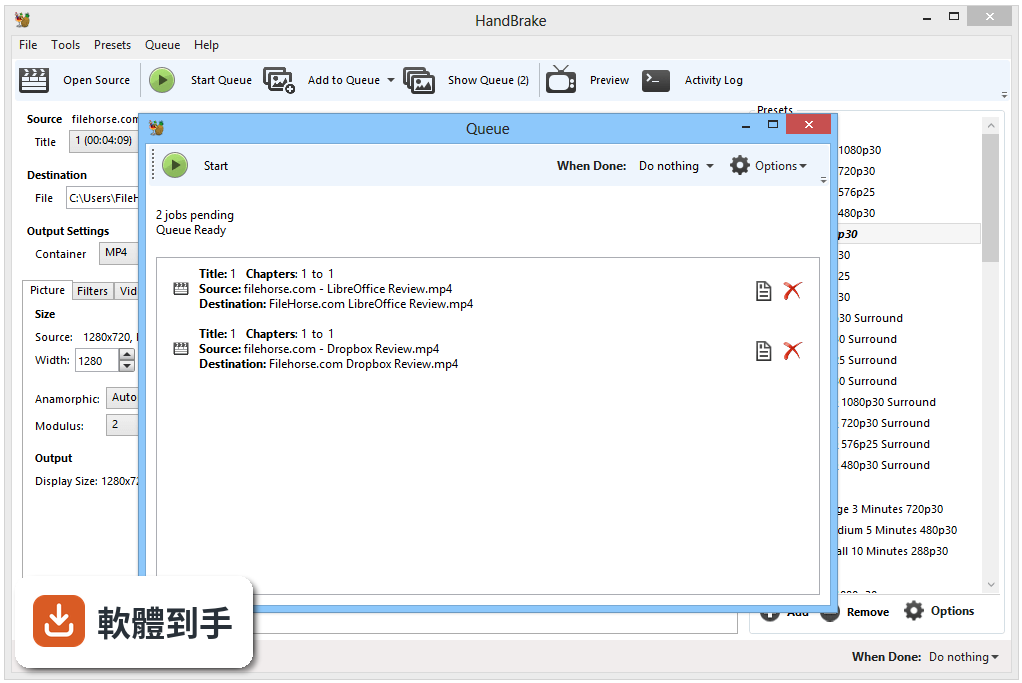
可以。HandBrake 有佇列功能,你可以把多個檔案加入佇列,它會依序處理,不用一支一支手動轉。操作方式是載入第一個檔案、設定好輸出選項後,點選「Add to Queue」,再載入下一個檔案重複動作,最後一次按下開始,它就會把整批轉完。
04轉檔時想保留字幕,要怎麼設定?
在字幕分頁裡可以選擇要保留哪些字幕軌,HandBrake 支援 SRT、SSA、VobSub 等格式,可以選擇直接嵌入(pass-through)保留原字幕,也可以燒進畫面裡(burn-in)。如果你只是想要影片有字幕,選 pass-through 就好,檔案不會多一層畫質損失。
05轉檔速度很慢,有沒有辦法加速?
如果你的電腦顯示卡有支援,HandBrake 提供硬體加速編碼,支援 Intel QSV、NVIDIA NVENC、AMD VCE 三種技術。在設定裡開啟硬體加速後,轉檔速度會明顯提升,但要注意輸出檔案大小和畫質可能與純軟體編碼略有差異,建議先轉一小段測試看看。
06我完全不懂編碼設定,只用預設值可以嗎?
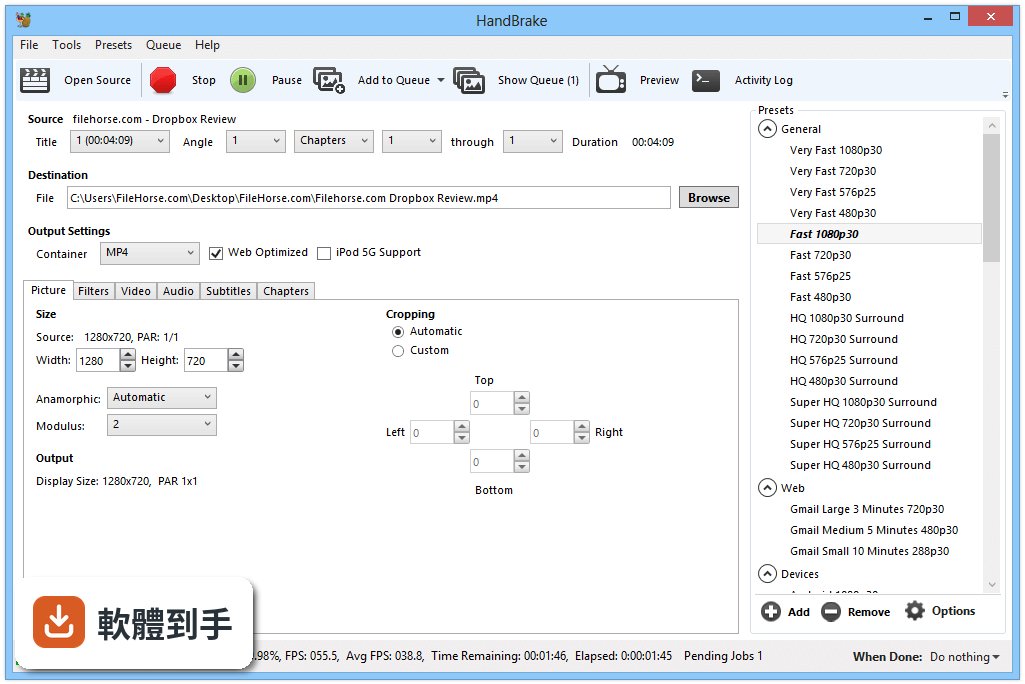
可以。HandBrake 內建多種裝置預設,例如 iPhone、Android、Roku 等,你只要在右側面板選一個符合目標裝置的預設,再選輸出資料夾,按下開始就能轉。預設值已經調整好解析度、位元率、編碼器等參數,對一般使用者來說夠用了。
07這套軟體適合什麼樣的人用?
適合需要把影片轉成通用格式、或針對特定裝置(手機、電視、播放器)調整影片規格的人。它的預設功能讓新手也能快速上手,而進階使用者可以手動調整編碼器、位元率、解析度、濾鏡等細節,所以從偶爾轉一兩支影片的普通人,到需要大量轉檔的工作者都適用。
08它是免費軟體嗎?會不會有廣告或綁架軟體?
它是開源軟體,完全免費,沒有付費版本,官方說明也強調沒有廣告、沒有捆綁其他軟體。安裝過程很乾淨,不會偷偷裝工具列或第三方程式。不過要提醒,下載時請從官方網站取得安裝檔,避免從不明來源下載到被改過的版本。
09我想順便剪掉影片片段,它能做嗎?
它的編輯功能很有限。HandBrake 可以選擇要轉檔的章節或時間範圍,也能做裁切、縮放、去交錯、降噪等濾鏡處理,但沒有剪接、合併、加轉場這類功能。如果你需要真正的剪輯軟體,它不適合,建議找專門的影片編輯工具。
10介面是英文的,我看不懂怎麼辦?
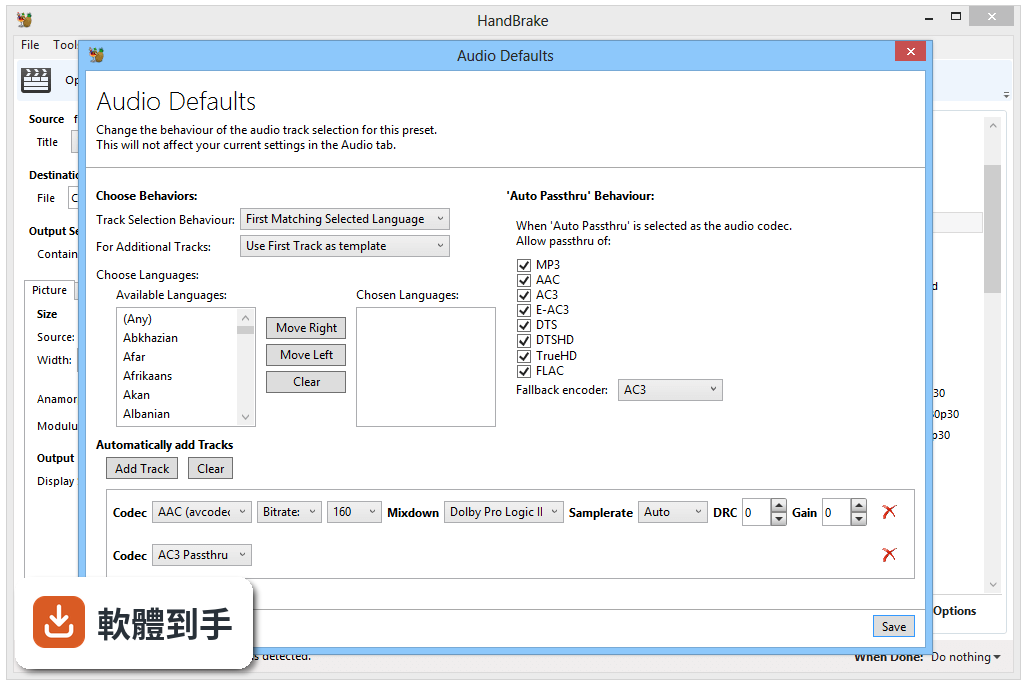
這套軟體的介面只有英文,沒有內建中文語系。不過基本操作流程不複雜:載入檔案、選預設、選輸出位置、按開始,這幾個步驟的英文都不難。如果你完全無法接受英文介面,可以考慮其他有中文的轉檔軟體,但功能上可能沒有它完整。
11它能轉加密的 DVD 或 Blu-ray 嗎?
不行。官方說明明確指出,HandBrake 只能處理未受保護的光碟,商業發行的 DVD 和 Blu-ray 都有 DRM 保護,它無法繞過。如果你手上的光碟是租來的或買的電影,需要先用其他工具解除保護,這部分涉及法律問題,請自行確認當地法規。
12這套軟體和 FFmpeg 比起來,哪個比較好用?
兩者定位不同。FFmpeg 是命令列工具,控制力最強,但學習曲線很陡,適合熟悉指令的使用者;HandBrake 有圖形介面,用預設就能完成大部分轉檔需求,對一般使用者友善得多。如果你只是要轉檔,HandBrake 比較容易上手;如果你需要自動化或特殊處理,FFmpeg 更靈活。
下載與官方連結
HandBrake-1.7.0-x86_64-Win_GUI.exe · 連結指向軟體原廠
版本紀錄
- 2026-06-08 HandBrake 1.11.2 24.16 MB
- 2026-03-23 HandBrake 1.11.1 24.13 MB
- 2026-03-09 HandBrake 1.11.0 24.11 MB
再看 5 筆
- 2025-09-07 HandBrake 1.10.2 23.18 MB
- 2025-08-24 HandBrake 1.10.1 23.19 MB
- 2025-08-11 HandBrake 1.10.0 23.18 MB
- 2025-02-24 HandBrake 1.9.2 23.16 MB
- 2025-02-13 HandBrake 1.9.1 23.13 MB
這一版改了什麼
What's new in this version:
General:
- Added Apple VideoToolbox hardware presets
- Updated Creator presets
- Disabled interlacing detection and removal; assume creators are working with progressive sources by default
- Updated Social presets
- Target higher quality and frame rate over shorter durations, without interlacing detection and removal
- Better suited for modern social sharing of short live action clips and screen/game captures
- Removed Email presets in favor of revised Social presets
- Please stop sending videos via email or use the new Social presets
- Miscellaneous bug fixes and improvements
Video:
- Added AMD VCN AV1 encoder
- Added NVIDIA NVENC AV1 encoder
- Added support for SVT-AV1 multi-pass ABR mode
- Added support for preserving ambient viewing enviroment metadata
- Added QSV Rotate and Format filters
- Improved performance on arm64 / aarch64 / Apple Silicon architectures
- Latest FFmpeg provides faster HEVC decoding, 30% faster bwdif filter
- New SVT-AV1 assembly optimizations provide up to 4x increase in performance
- Improved video conversion speed by removing unneeded frame copies for better memory efficiency
- Improved Dolby Vision dynamic range metadata pass through
- Supported encoders: x265 10-bit
- Supported profiles and cross-compatibility IDs: 8.4, 8.1, 7.6 (base layer only, converted to 8.1), 5.0
- Improved HDR10+ dynamic range metadata pass through
- Supported encoders: x265 10-bit, SVT-AV1
- Improved QSV support on Linux
- Updated NVENC to not use multi-pass by default; user configurable advanced option
- Renamed 2-pass encode option to multi-pass
- Fixed Intel QSV encoder outputting green video in some cases
- Fixed pixel format conversion slightly altering colors when using a 10-bit hardware encoder
- Fixed scan failures by using swscale instead of zscale when source resolution is not mod 2
- Fixed incorrect PAR when reading from an anamorphic AV1 video track
- Removed an artificial bitrate limit on VP9 CQ mode
Command line interface:
- Renamed --two-pass to --multi-pass and --no-two-pass to --no-multi-pass, removed -2
- Fixed automatic cropping enabled despite using preset with cropping disabled
Audio:
- Fixed low volume level when downmixing ac3 and eac3
- Fixed left-only and right-only mono mixdowns
Subtitles:
- Fixed locale settings potentially causing incorrect decimal separator in SSA headers
- Fixed a potential issue affecting zero-duration subtitles
Build system:
- Added Meson build system for the Linux GUI
Third-party libraries:
- New libraries
- libdovi 3.2.0 (Dolby Vision dynamic range metadata)
- Updated libraries
- AMF 1.4.30 (AMD VCN video encoding)
- FFmpeg 6.1 (decoding and filters)
- FreeType 2.13.2 (subtitles)
- Fribidi 1.0.13 (subtitles)
- HarfBuzz 8.2.2 (subtitles)
- libass 0.17.1 (subtitles)
- libdav1d 1.3.0 (AV1 video decoding)
- liblzma (xz) 5.4.5 (LZMA video decoding, e.g. TIFF)
- libopus 1.4 (Opus audio encoding)
- libjpeg-turbo 3.0.1 (preview image compression)
- libvpx 1.13.1 (VP8/VP9 video encoding)
- libxml 2.11.5 (general)
- oneVPL 2023.3.1 (Intel QSV video encoding/decoding)
- SVT-AV1 1.7 (AV1 video encoding)
- x264 164 r3107 (H.264/AVC video encoding)
- x265 r12776 (H.265/HEVC video encoding)
- zimg 3.0.5 (color conversion)
- zlib 1.3 (general)
Windows:
- Added support for drag and drop of multiple files at once
- Added support for selecting multiple files at once in the Open Source dialog
- Added support for recursive folder scanning in the Open Source dialog
- Enable/disable in Preferences > Advanced
- Added support for excluding file extensions when opening files in batch mode
- Default exclusions are common image, subtitles, and text file extensions; edit list in Preferences > Advanced
- Improved Preview window native video playback to support most containers and codecs
- Modern codec support requires Microsoft Codec Packs from the Microsoft Store
- Improved automatic file naming Preferences UI and added new options: {width} {height} {quality_type} {encoder_bit_depth} {modification-time} {modification-date} {encoder} {encoder_bit_depth} {preset}
- Improved Queue window UI to optionally show additional status information on the left progress panel
- Improved Presets panel
- Manage Presets button replaced with a menu of discrete options for quicker access to functionality
- Added an option to display the description for the selected preset
- Added the ability to clone a preset (create a new preset based on an existing one)
- Improved Add Selection window to make sorting feature more discoverable
- Improved Process Isolation reliability
- Fixed automatic file naming when using physical drive sources
- Fixed Title Specific Scan for physical drive sources
- Fixed an potential issue that could cause an unmodified preset to display as "modified"
- Fixed an potential issue where changes to queue order were not retained
- Fixed an Audio tab issue where using a non-fallback encoder could lead to duplicated tracks
- Fixed an issue where swapping graphics cards might cause hardware presets to be incorrectly shown as disabled
- Fixed a potential crash on startup related to Windows Notifications Service failures
- Miscellaneous bug fixes and improvements
- Added new translations
- Czech (česky) (partially complete)
- Greek (Ελληνικά) (partially complete)
- Estonian (Eesti) (partially complete)
- Basque (Euskara)
- Finnish (Suomi) (partially complete)
- Updated existing translations