
ImgBurn停更多年,燒錄光碟還能靠它嗎
 ImgBurn 2.5.8.0
資料更新 2013-06-17
閱讀約 6 分鐘
手邊還有一疊空白光碟,電腦卻一直跳出「燒錄失敗」的訊息。你想把下載好的ISO檔燒成安裝片,或把舊專輯壓成映像檔留底,偏偏Windows內建的燒錄功能只能應付最簡單的ISO,連BIN、CUE這些格式都認不得。更別提燒完之後想確認資料有沒有完整寫進去,系統根本沒有驗證的選項。
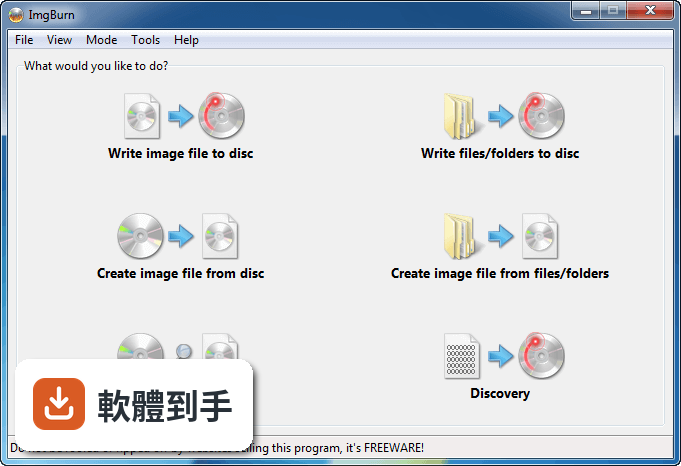
一般人遇到這種狀況,第一個念頭是找一套免費燒錄軟體。但免費軟體常常夾帶廣告、綁安裝工具列,或是介面複雜到不知道從哪裡開始。ImgBurn這類工具的切入點很直接:把「讀光碟」「做映像檔」「燒映像檔」「驗證資料」拆成四個獨立模式,每個模式只專心做一件事。你不需要理解光碟格式的技術細節,只要選對模式、按幾個按鈕,剩下的交給程式處理。
01ImgBurn到底能做哪些事?
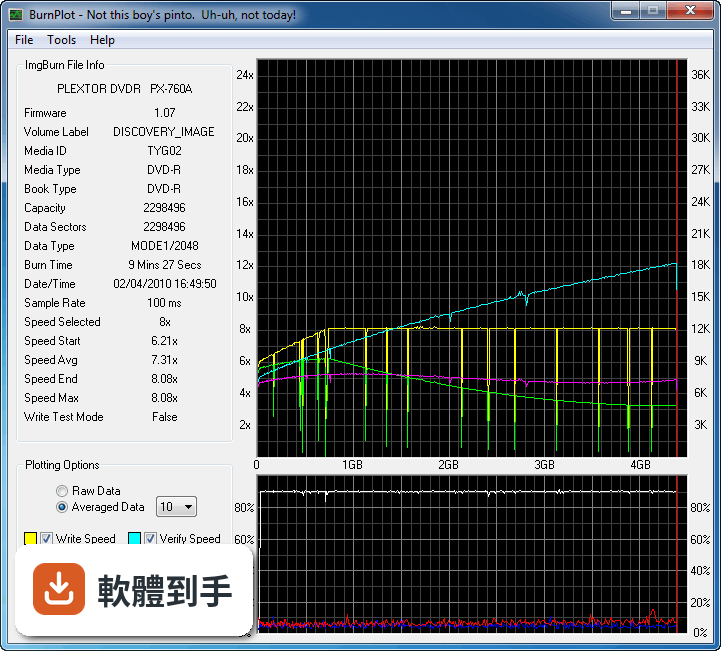
它把光碟操作拆成四種模式:Read是讀取光碟內容並轉成映像檔,Build是從電腦或網路上的檔案建立映像檔或直接燒進光碟,Write是把映像檔寫入光碟,Verify是檢查燒錄後的資料是否完整可讀。另外還有Discovery模式,搭配DVDInfoPro可以檢測燒錄品質。涵蓋了光碟備份、映像檔製作、燒錄、驗證的完整流程。
02可以把實體光碟轉成ISO檔備份到電腦嗎?
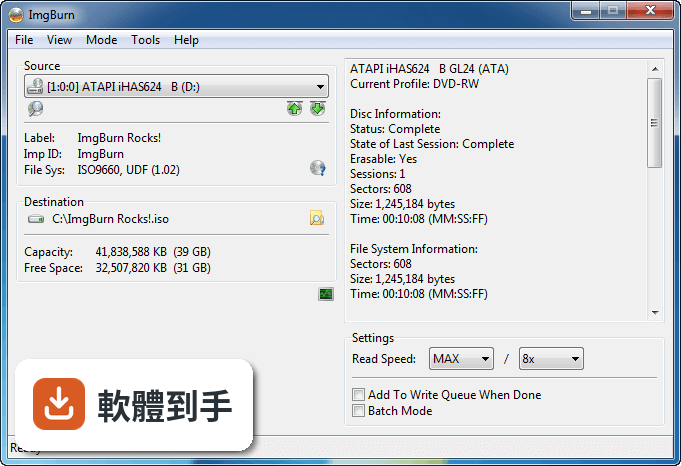
可以。在Read模式下,選擇來源光碟機、指定映像檔的儲存位置和檔名,按下Read按鈕就會開始讀取。它支援輸出ISO、BIN等多種映像檔格式。讀取過程需要一段時間,取決於光碟容量和光碟機讀取速度,完成後你就會得到一個完整的映像檔,之後不需要實體光碟也能使用內容。
03它支援哪些映像檔格式?
官方列出的支援格式包括BIN、CCD、CDI、CUE、DI、DVD、GI、IMG、ISO、MDS、NRG、PDI。也就是說,除了最常見的ISO,其他燒錄軟體常用的映像檔格式它也認得。如果你手上的映像檔是NRG或MDS這類格式,ImgBurn可以直接讀取並燒錄,不需要先轉檔。
04燒完光碟之後,怎麼確認資料有沒有燒成功?
用Verify模式。燒錄完成後,程式可以比對光碟內容和原始映像檔,確認每個位元組都正確寫入。如果比對結果有差異,它會明確標示哪些部分不一致。另外它也支援測試燒錄,先模擬整個燒錄流程但不實際寫入資料,用來確認光碟片和燒錄機的狀態是否正常。
05可以燒音樂CD嗎?
可以。它支援透過DirectShow或ACM處理音訊檔案,包括AAC、APE、FLAC、M4A、MP3、MP4、MPC、OGG、PCM、WAV、WMA、WV這些格式。你可以把各種格式的音樂檔集中起來,建立成音樂CD的映像檔或直接燒錄,燒出來的CD可以在一般家用音響播放。
06介面只有英文,英文不好會很難操作嗎?
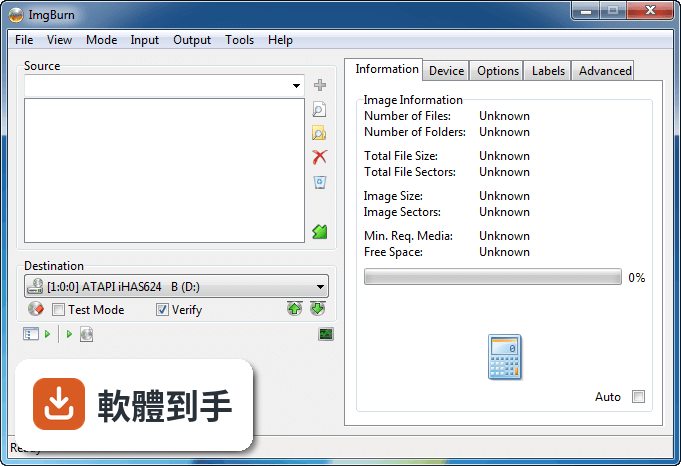
介面確實是英文,但操作流程不算複雜。主視窗分成幾個區塊,每個區塊對應一種模式,按鈕上的文字也直接標明動作,例如「Read」「Write」「Verify」。如果你只是要燒ISO檔,選Write模式、選映像檔、選光碟機、按Write,大概四個步驟就完成了。比較進階的設定選項都收在選單裡,不影響基本操作。
07這套軟體適合什麼樣的人用?
適合需要處理光碟映像檔的人,特別是手上有多種格式映像檔、需要製作DVD或藍光影片光碟、或是燒錄後想驗證資料完整性的使用者。它提供細部設定,例如分層點設定、檔案系統類型、緩衝區設定,對有經驗的使用者來說可以微調燒錄參數。但如果你只是偶爾燒一片資料光碟,Windows內建功能可能就夠了。
08安裝的時候有什麼要注意的?
安裝過程本身很快,但要注意安裝程式會詢問是否安裝額外的捆綁軟體。官方建議在安裝時留意這些選項,如果你想要乾淨的安裝環境,記得取消勾選那些額外軟體。另外,建議從官方網站或可信的下載來源取得安裝檔,避免從不明網站下載到被竄改的版本。
09這套軟體已經停止開發了,還安全嗎?
官方已明確標註這套軟體停止開發,最後一個版本停留在多年前,長期沒有新版本釋出。從官方網站或可信來源下載的話,程式本身沒有已知的安全問題,但停止開發意味著未來如果發現漏洞,不會有人修補。如果你用它燒錄一般資料光碟,風險相對低,但如果你對安全性有較高要求,可以考慮其他仍在維護的燒錄軟體。
10有沒有其他更多人用的燒錄軟體可以選?
有幾個功能相近的選擇。BurnAware Free有287人評分,UltraISO有160人評分,PowerISO (32-bit)有481人評分,ISO Workshop有82人評分,InfraRecorder有24人評分。ImgBurn本身有293人評分,分數8.4分。這些軟體各有不同的授權方式和功能範圍,你可以依照自己的需求比較看看。
11這套軟體支援Mac嗎?
不支援。官方說明明確指出ImgBurn是Windows-based的應用程式,支援系統是Windows所有版本。如果你用的是Mac,這套軟體無法安裝使用。Mac使用者可以尋找macOS原生支援的燒錄工具,或是透過虛擬機器安裝Windows來執行ImgBurn,但後者會增加操作複雜度。
12可以燒藍光光碟嗎?
可以。官方功能說明提到它支援CD、DVD、HD-DVD和Blu-ray的燒錄,也可以從BDAV或BDMV資料夾建立藍光影片光碟。不過要燒藍光光碟,你的燒錄機必須支援藍光燒錄,一般DVD燒錄機無法燒藍光片。另外,藍光燒錄對光碟片品質和燒錄設定比較敏感,建議燒完後用Verify模式確認資料正確。
下載與官方連結
SetupImgBurn_2.5.8.0.exe · 連結指向軟體原廠
這一版改了什麼
What's new in this version:
- Added: Holding the ALT key when clicking on DLE window's Disc pane column header will now remove the sort order (so they're then essentially sorted by addition order).
- Added: Ability to incrementally search the Explorer pane in the 'Disc Layout Editor' window.
- Added: The effective USB connection speed (1.1, 2.0, 3.0) for USB devices to the initial device scan log entries.
- Added: Log entry when burning showing the effective layer break position.
- Added: Log entry when burning that shows the number of discs a Lite-On drive thinks it has burnt.
- Added: Pioneer drives now list their 'Kernel Version' next to the firmware version.
- Added: The Windows 7+ taskbar button/progress display now turns red if an I/O error box pops up during a read/write (etc.) operation.
- Added: The ability to set the 'Platform ID' when building a bootable disc - thus enabling the creation of UEFI bootable discs.
- Added: Internal version of the 'BurnerMax Payload' code (well, what I could figure out) to allow for overburning DVD+R DL on many MediaTek chipset based drives. In practice, this only seems to work on Lite-On (and clone) drives that have 'Force HyperTuning' enabled.
- Added: MSF info to the 'Sector Viewer' tool.
- Added: Allow for larger I/O buffer (1GB).
- Added: Option to pick the transfer size (32KB -> 512 KB) used when reading / writing files.
- Added: Option to enable/disable the OS's buffering when writing image files.
- Added: Ability to make the Explorer pane in the DLE window 'Read Only'.
- Added: Support for Opus audio compression format.
- Added: Support for TAK lossless audio compression format (including embedded CUE sheets).
- Added: Ability to use a '*' wildcard for 'backup list' directory entries in an IBB project file (applies to Advanced input mode).
- Added: A few keyboard shortcuts to the DLE window. (Ctrl+Shift+C = New Disc (Clear), Ctrl+Shift+D = Add Folder (Directory), Ctrl+Shift+F = Add Files, Ctrl+Shift+N = New Folder)
- Changed: No longer bundling/offering the Ask.com toolbar in the setup program, OpenCandy now handles product offerings during installation.
- Changed: Buffered I/O is now enabled by default for reading/writing files.
- Changed: Update the splashscreen logo.
- Changed: The 'Delete' option/button in the Disc Layout Editor has been renamed to 'Remove' so it matches the one in Standard input mode (and so people aren't put off by the term 'Delete' - thinking it'll actually delete the file on their hard drive).
- Changed/Fixed: Detect oversized UDF File Entry descriptors and don't attempt to parse them.
- Changed/Fixed: Restore 'Disc Layout Editor' window's focus when the application becomes active.
- Changed/Fixed: Workaround for the new 16x LG Blu-ray writers that report the wrong (a truncated) current write speed value in the 'GET PERFORMANCE' response when burning at 16x.
- Changed/Fixed: Workaround for newer LG drives with the 'Silent Play' feature that seem to ignore attempts to set the read speed via the 'SET STREAMING' command. They get fixed on 1x and won't read any faster!
- Changed/Fixed: Attempt to block users from trying to write discs their 'combo' drive doesn't support (i.e. a DVD+RW/BD-ROM combo drive trying to burn BD-R).
- Changed/Fixed: Potential errors were being ignored/lost when setting a 'changeable' layer break position to its current/maximum value. The program now reports them.
- Changed/Fixed: Tweaked the 'browse for folder/file' dialog code to hopefully stop the OS from throwing up a 'There is no disk in the drive. Please insert a disk into drive X:.' error when the MRU location is a drive that no longer has a disc in it.
- Changed/Fixed: Reworked some commands that could optionally not use 'Immediate I/O'. Old code could fall back to 'Non-Immediate I/O' and loose the initial error message from the 'Immediate I/O' version of the command.
- Changed/Fixed: Made an adjustment (potential bug fix) to my drag+drop component's code. It may cut down on crashes / weird things happening as a result of the user having performed a d+d operation.
- Changed/Fixed: 'Shutdown Computer' checkboxes should have read 'Shut Down Computer'.
- Changed/Fixed: Recently added 'MID' info to was missing from the disc info text in Read / Verify modes.
- Fixed: Cosmetic issue displaying numbers when the user's 'thousands separator' is set to nothing.
- Fixed: Displaying wrong firmware subversion on newer LG Blu-ray drives (BH14+).
- Fixed: Memory leak when burning Audio CDs that use DirectShow for decoding.
- Fixed: Memory leak when burning an Audio CDs where the files are already in the correct format for burning (no decode required).
- Fixed: Potential access violation when reading a field in a UDF 'File Set Descriptor'.
- Fixed: Old (orphaned) AWS related registry/ini file entries were being left behind - this was perfectly fine, it's just nice to keep the place tidy!
- Fixed: DLE Window's Disc Toolbar wasn't being resized for higher DPI systems - meaning the buttons weren't fully visible.
- Fixed: When outputting Mode2/Form1/2352 from Build mode, the program didn't take into account any additional data type conversion required for the drive - this could produce a corrupt disc.