
這是歷史版本頁面 — 看 IsoBuster 最新版本
光碟讀不到、刮傷救不回?IsoBuster 能做什麼
 IsoBuster 4.2
資料更新 2018-06-22
閱讀約 6 分鐘
你翻出抽屜深處那張舊光碟,裡面是十年前出國玩的照片,或是已經停產軟體的安裝檔。放進光碟機,聽到它轉了幾圈後安靜下來,檔案總管顯示「請放入光碟」或直接沒有反應。你又試了另一台電腦,結果一樣。這張碟片外觀沒什麼大傷,但就是讀不到,你知道資料還在裡面,卻拿不出來。
一般人遇到這種狀況,會先想到換一台光碟機試試,或拿酒精、牙膏擦拭碟片表面。這些做法有時有效,但更多時候只是讓情況更糟——刮痕被磨得更花,或光碟機根本讀不到就是讀不到。市面上多數燒錄軟體只能處理「讀得到的碟片」,面對實體損壞就束手無策。這類工具切入的角度不同:它不經過 Windows 的檔案系統,直接對碟片逐個區塊嘗試讀取,把能救的資料一點一點挖出來。
01IsoBuster 到底能救哪些光碟?
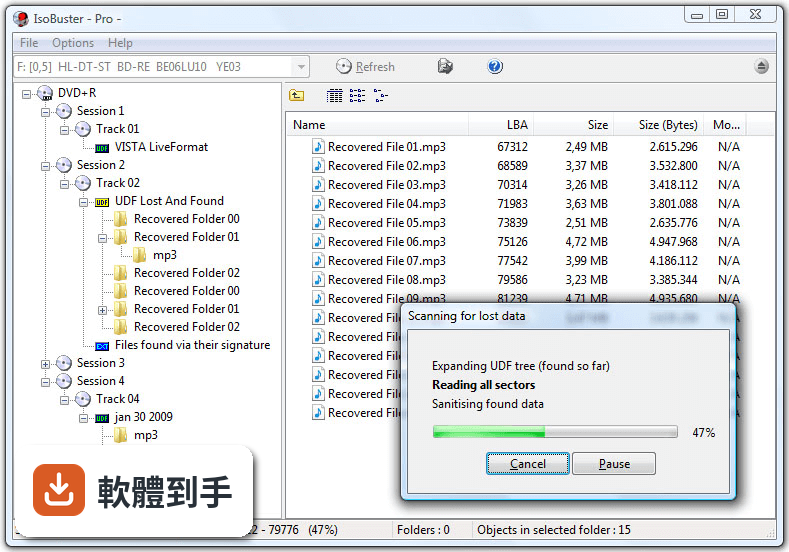
它主要處理 CD、DVD 和藍光光碟,包括刮傷、表面污損、燒錄失敗或讀取不順的碟片。官方說明指出它也能用在 USB 隨身碟、記憶卡、硬碟和 SSD 上。支援的檔案系統涵蓋 ISO9660、Joliet、UDF、HFS、NTFS、FAT 等。實際能救回多少,取決於碟片物理損壞程度,完全碎裂或嚴重變形的光碟可能無法處理。
02它能從映像檔裡抽檔案出來嗎?
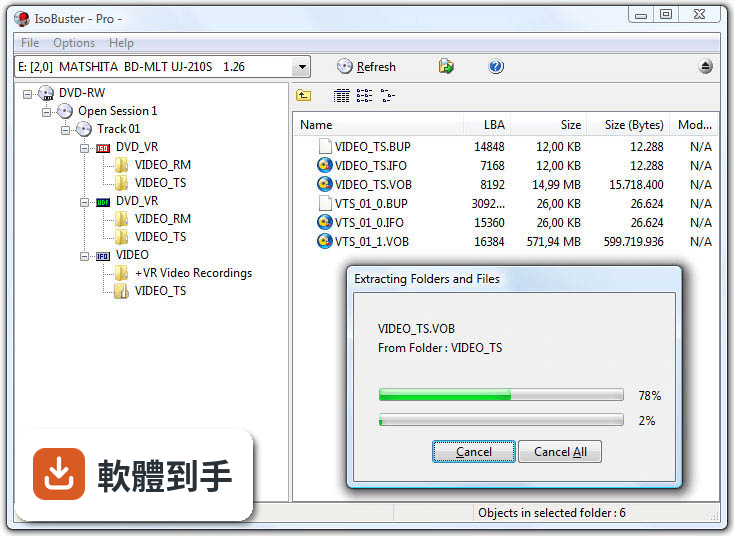
可以。它支援從 ISO、BIN、IMG、NRG 這幾種常見的磁碟映像檔中直接擷取檔案,不需要先燒錄成光碟或掛載虛擬光碟機。如果你手上有舊的映像檔,但裡面的檔案需要個別取出,這會比整片燒出來再讀取更省事。操作方式是開啟軟體後選擇映像檔,瀏覽內部結構,勾選需要的檔案匯出。
03光碟刮得很嚴重還有救嗎?
它有深層掃描功能,會針對嚴重受損的磁區反覆嘗試讀取,並透過錯誤處理機制盡可能還原資料。官方特別提到,這套軟體擅長從損壞媒體中恢復資料,但如果是物理性毀損導致完全無法讀取的碟片,可能還是救不回來。建議先讓它跑一次快速掃描,如果讀不到再改用深層掃描,但掃描時間會明顯拉長。
04免費版和付費版差在哪?
免費版提供基本恢復功能,但限制較多,官方說明中沒有列出免費版具體能用的功能範圍。付費的 Pro 版要價 39.95 美元,一次買斷不用訂閱,解鎖進階恢復功能,例如 UDF 和 NTFS 檔案系統的完整支援。如果你要救的光碟是 UDF 格式(多數 DVD 影片和燒錄資料碟都是),免費版可能無法完整處理,需要先確認。
05我只有一張舊光碟要救,適合用嗎?
如果你的需求是「救這一張就好」,可以先下載免費版試試。介面是樹狀檔案總管風格,開啟後選取光碟機,再選掃描方式就能開始,基本操作不難。但免費版功能受限,若這張碟片剛好是 UDF 格式,可能無法完整恢復。這種單次需求,先試免費版看能不能讀到檔案,再決定要不要花錢買 Pro 版。
06它適合一般使用者還是專業人員?
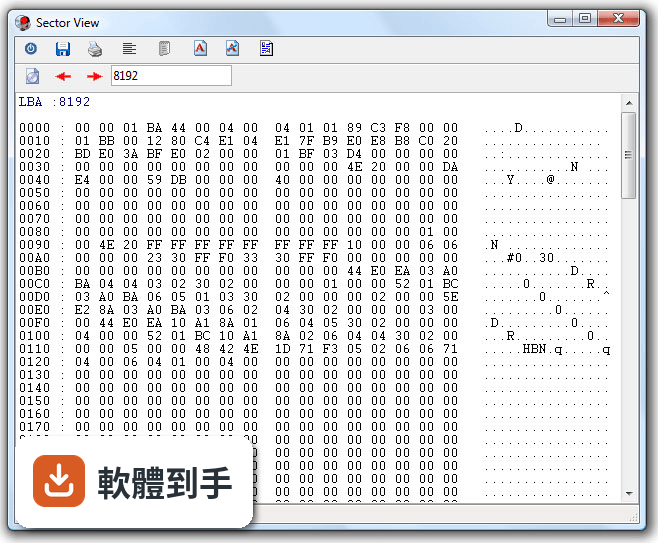
基本操作對一般使用者算友善,介面類似 Windows 檔案總管,瀏覽和匯出檔案不難理解。但進階功能——十六進位檢視、磁區掃描工具、錯誤報告——明顯是為資料救援專業人士和鑑識人員設計的。官方也提到它沒有自動恢復精靈,對完全沒經驗的人來說,遇到複雜狀況時會不知道下一步該做什麼。介面只有英文,不習慣英文操作介面的人會比較吃力。
07我常處理舊光碟和映像檔,這軟體夠用嗎?
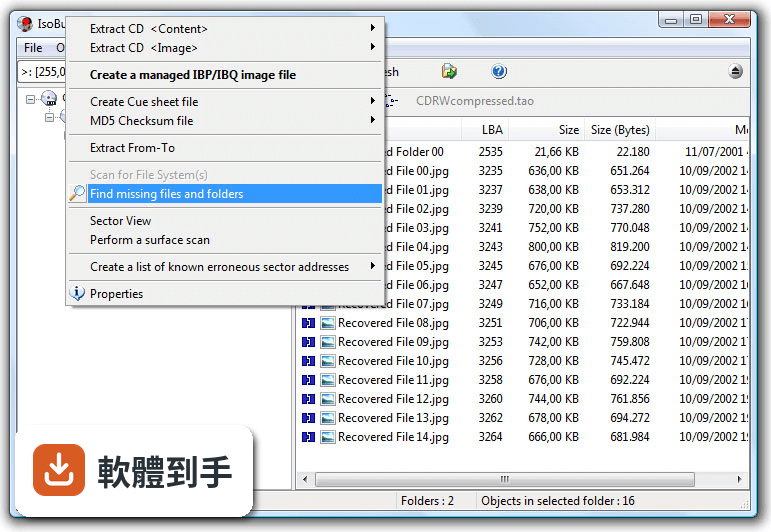
如果你工作或興趣經常接觸光碟媒體、映像檔,它涵蓋的範圍算完整:多種檔案系統、多種映像檔格式、多區段燒錄存取、原始資料讀取都有。官方說明中列出的功能包括從可重寫光碟的不同燒錄區段中恢復檔案,這是一般工具少見的能力。不過它的介面停留在傳統風格,沒有現代化的向導流程,使用上需要自己摸索。
08我只是要整理光碟內容,不需要救援,適合嗎?
不適合。它是資料救援工具,不是光碟管理或燒錄軟體。如果你的光碟讀取正常,只是想複製檔案出來或整理內容,用 Windows 內建的檔案總管或一般燒錄軟體就夠了。它的價值在於「讀不到的時候還能嘗試救資料」,而不是日常的光碟檔案管理。用在這類需求上,操作反而比一般工具麻煩。
09我主要用 Mac,可以用嗎?
不行。官方列出的系統需求只有 Windows 7、8、10、11,沒有 macOS 版本。Mac 使用者如果遇到光碟讀不到的問題,需要找其他支援 macOS 的資料救援軟體,或找一台 Windows 電腦來執行這套工具。另外它也不支援雲端儲存空間的恢復,只能處理本機連接的裝置。
10我完全不懂電腦,操作起來會很困難嗎?
會比較吃力。雖然基本介面不複雜,但官方明確指出它沒有自動恢復精靈,這意味著你必須自己判斷該選哪種掃描方式、怎麼瀏覽找到的檔案、以及如何正確匯出。加上介面只有英文,對不熟悉英文操作介面的人門檻更高。如果你完全沒有資料救援經驗,建議先找有中文介面和逐步引導的軟體,或請懂電腦的朋友協助。
11它的更新狀況如何?還有人在維護嗎?
根據收錄的版本紀錄,這套軟體從 2015 年到最近都有持續釋出新版本,近 24 個月內更新了 6 次,近 12 個月內更新了 2 次,屬於持續維護中的軟體。開發商 Smart Projects 仍在使用者評分較少的情況下維持更新,這對需要長期依賴特定工具的人來說是正面訊號。不過評分人數只有 47 人,參考樣本偏少。
下載與官方連結
isobuster_install.exe · 5.02 MB · 連結指向軟體原廠
版本紀錄
- 2026-05-12 IsoBuster 5.8 12.79 MB
- 2025-11-24 IsoBuster 5.7 12.43 MB
- 2025-05-13 IsoBuster 5.6 10.4 MB
再看 5 筆
- 2025-01-26 IsoBuster 5.5.2 10.29 MB
- 2025-01-13 IsoBuster 5.5.1 10.29 MB
- 2024-12-09 IsoBuster 5.5 10.3 MB
- 2024-06-06 IsoBuster 5.4.1 8.12 MB
- 2024-05-21 IsoBuster 5.4 8.12 MB
這一版改了什麼
What's new in this version:
Changes / New:
- Rewrote the options dialog to look fresh and most importantly te be decluttered and intuitive again. Added to that, selecting a language or changing a font now changes all options' text immediately, so that you can see the effect
- Added BDXL, M-Disc, UHD, Triple Layer (TL) and (Quadruple Layer) QL BD(RE) disc support
- Ability to start IsoBuster 'idle' without any drive auto-selected (not the default but can be set in Options)
- Search (now by default) searches the entire region of the selected object, and not just the most relevant File System. For instance when a Session is selected, all tracks and file systems in those tracks will be searched and not just the most relevant file system in the most relevant track. The old way can still be turned on again in options
- Work around for issue (most likely a buggy USB bridge driver) that causes less bytes to be transfered when reading raw (2352 bytes per block) on some systems
- Ability to specify where the IBQ range ends, to influence filling gaps and where finishing at the end starts [Professional license]
- Implemented more flavours of Rimage Image files (*.rmg)
- Show text portions of certain Image files via an extra option in the main menu (e.g. for: *.cue, *.rmg, *.ewf, *.ccd)
- Rewrote the file export / report functionality to make it much faster, 10 times faster or more than before
- Rewrote CUE file parsing to better deal with multi-file images and improve the overall functionality
- Support reading in the first pregap on a CD (addresses -150 to -1), for instance with Sector View
- The Edit window / Sector Viewer can be set (and will remember) its own font for both normal text and text that requires a fixed width font
Improvements:
- Make sure the correct encoding is always used for XML, RTF and TXT in the Edit Window (TXT is now the default over RTF, using UTF8)
- Allow any extension, if more appropriate, when saving a file from the edit window
- Improved search functionality engine for even faster and more accurate search results
- Improved resolving of a path copied in the breadcrumb control / edit bar, to show the proper object(s)
- Do not display "Processing File-System" when mounting an Audio CD
- Show better caption on the extraction dialog when cloning a drive or partition
- Better detection of Atari DOS discs/images
- Improve display of Mac 'Type' and 'Creator', in case of illegal (non-printable) characters
- Implemented a more generic approach to store and use the ISO9660 / Joliet 'associated file'. The associated file is used as resource fork on Mac created discs but can in theory also exist on its own, for other implementations. We now treat it as a stream and also extract it as such
- Added tags {%ASCII} and {%ANSI} to the file (encoding) export functionality
- Added tags {%SUID} and {%PSUID} as unique object identifiers to the file export functionality
- Added tags <%TSNSHT> and <%TSNSHRESET> to measure time of certain processes to the file export functionality
- Added tags {%DFXML}, {%ISO8601}, <%TIMEDATETZ> and <%SYSTIMEDATETZ> to support ISO 8601 date and time formatting (which is required in DFXML exports)
- Always escape single and double quotes in XML exports, but the caller can disable this with commands {%ASQ} and/or {%ADQ}
- Always escape '<' and '>' characters in XML exports, but the caller can disable this with commands {%A>} and/or {%A<}
- Added tag {%ONLYUNREADABLE} to only log unreadable objects in file exports
- Changed the export logic so that width is now explored first rather than the depth, but it can be changed with {%DEPTHFIRST} or {%FLAT}
- Default, folders are now also exported in File Lists / Reports
- Changed the embedded XML export list, to take advantage of new commands and tags
- Changed the embedded DFXML export list, to take advantage of new commands and tags
- Replace single quotes by double quotes in the predefined XML layout, so that files with single quotes (and apostrophe) do not cause problems parsing the XML
- Show text in combobox control when no drives are found but finding them has been disabled in options, so that you better realizes what is going on
- Improved display of the application when starting up and when certain devices are slow to respond (Show "Finding Devices" in combobox meanwhile)
- Add Catalogue and ISRC to the CUE file (if present / per track)
- Display ISRC per track and Catalogue per CD, in properties, even when no CD-Text is present
- Add (and retrieve) more CD-Text to/from CUE files
- If the ISO is smaller than what the CUE suggests, the last track will still get a minimum size (2 seconds = 150 blocks) so that the track is shown with errors
- If the ISO / BIN image file is too small for what the CUE describes we immediately update the sector bitmap so that the effect can be seen in the blocks map (for instance via properties)
- Make sure there's a red X displayed next to a session icon as well, when one of its tracks contains unreadable sectors
- Improved NTFS parsing speed and efficiency by not going deep automatically on embedded folders, by retaining the required information differently, until exploring the folder is requested (via display, extract, search or ..)
- Considerable speed improvements when opening *.ibdat and *.ibadr files, by keeping track of bad ranges
- Made IBP/IBQ image file reading in case of erroneous sectors 5 to 15 times faster
- Made searching for missing files and folders in an IBP/IBQ image with lots of errors up to 26 times faster
- Display grey blocks in the blocks map, for ranges beyond the bitmap readable range (as in when an IBP/IBQ has not yet been fully read)
- Improve blocks map hints when the address range is contiguous
- Deselect the last square in the blocks map when moving outside the squares (but still inside the control)
- Zoom-in via double click on the blocks map squares shown in properties [Professional license]
- Sector View via double click on a single-sector square in the blocks map (e.g. via object properties) [Professional license]
- Double clicking middle or right mouse buttons zooms out again
- Added commands /cfpr /fs and /el on the command line
- Speed improvement when reading audio from 2352 bytes per block image files
- Expose relevant NTFS extent properties. For instance to show extents of compressed files as compressed (blue)
- ListView icons also reflect the compressed or encrypted state of an object
- Sparse parts of a file or folder are shown in a light blue color
- Clear what we know about the destination drive's content after making a clone, since its content will have changed entirely, so a refresh is needed
- Support hex notation ..h (for instance FFFFh or aah) aside from the already supported 0x.. notation in address and length input fields
- Also show CD/DVD/BD properties on blank media
- Plenty of other improvements, changes and re-writes in the core code / engine, as this is a living project and to deal with the ever growing new functionality
- Various other GUI improvements
Fixes:
- Fixed issue causing the online help to not always show the correct page
- Fixed sorting issue that only really showed when exploring the root of ISO9660 or derivative file systems
- Properly detect audio in the first track's pregap inside an image so that reading raw in the pregap doesn't trigger completing the sync bytes, or fails entirely
- <%SYSTIMELAPSEDSEC> in File Lists / Reports was calculated wrongly (with a factor 100)
- Fixed it so that the MD5 is automatically created again after making an image file if that is how it is set in options
- Do not create an MD5 or CUE after making a clone, if that is what is set in options after making an image file
- Fixed issue introduced in IB 4.1 for NTFS files that are highly fragmented. The full file size would not be taken in account for files consisting of more than 22,799 extents. Now tests with +1,507,519 extents worked perfectly
- Fixed the edit window toolbar height changing slightly every time the window was shown again
- Fixed rare issue that truncated the size of a file (with a few bytes), when extracting (audio) blocks using From-To functionality and wrapping the data in a WAVE RIFF header
- Fixed image file generation and overal handling of audio discs when track 1 does not start on address 0