
這是歷史版本頁面 — 看 IsoBuster 最新版本
光碟讀不到、刮傷救不回?IsoBuster 能做什麼
 IsoBuster 4.6
資料更新 2020-06-23
閱讀約 6 分鐘
你翻出抽屜深處那張舊光碟,裡面是十年前出國玩的照片,或是已經停產軟體的安裝檔。放進光碟機,聽到它轉了幾圈後安靜下來,檔案總管顯示「請放入光碟」或直接沒有反應。你又試了另一台電腦,結果一樣。這張碟片外觀沒什麼大傷,但就是讀不到,你知道資料還在裡面,卻拿不出來。
一般人遇到這種狀況,會先想到換一台光碟機試試,或拿酒精、牙膏擦拭碟片表面。這些做法有時有效,但更多時候只是讓情況更糟——刮痕被磨得更花,或光碟機根本讀不到就是讀不到。市面上多數燒錄軟體只能處理「讀得到的碟片」,面對實體損壞就束手無策。這類工具切入的角度不同:它不經過 Windows 的檔案系統,直接對碟片逐個區塊嘗試讀取,把能救的資料一點一點挖出來。
01IsoBuster 到底能救哪些光碟?
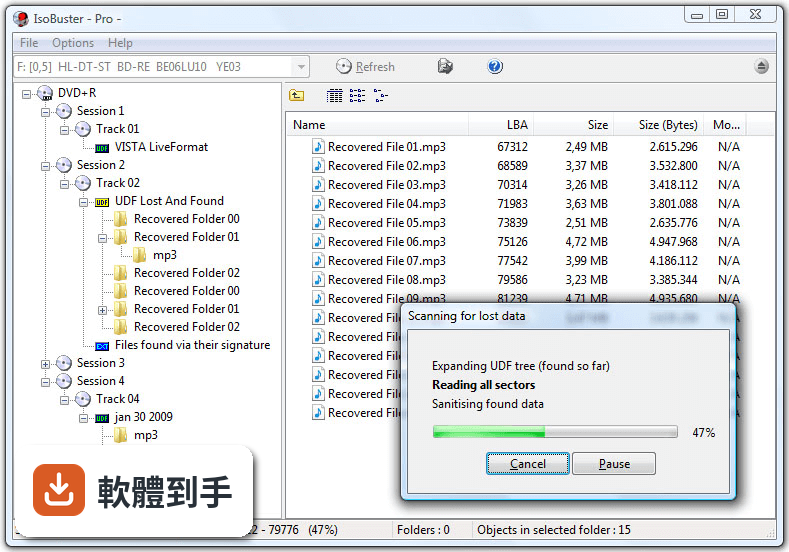
它主要處理 CD、DVD 和藍光光碟,包括刮傷、表面污損、燒錄失敗或讀取不順的碟片。官方說明指出它也能用在 USB 隨身碟、記憶卡、硬碟和 SSD 上。支援的檔案系統涵蓋 ISO9660、Joliet、UDF、HFS、NTFS、FAT 等。實際能救回多少,取決於碟片物理損壞程度,完全碎裂或嚴重變形的光碟可能無法處理。
02它能從映像檔裡抽檔案出來嗎?
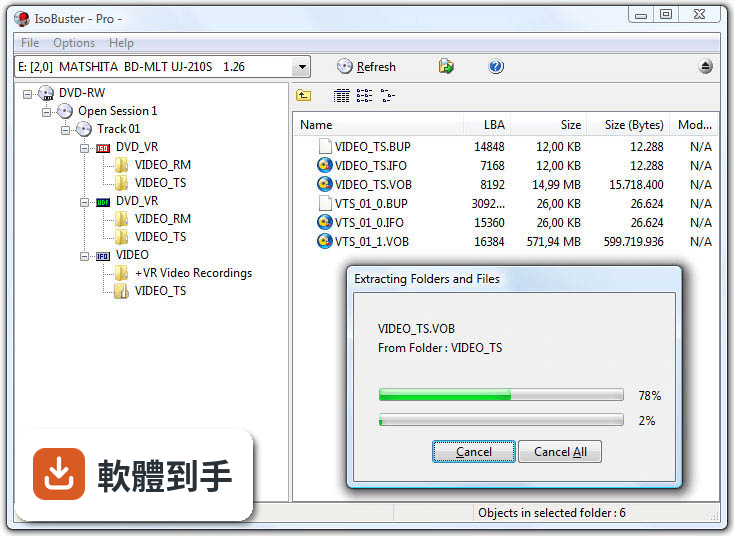
可以。它支援從 ISO、BIN、IMG、NRG 這幾種常見的磁碟映像檔中直接擷取檔案,不需要先燒錄成光碟或掛載虛擬光碟機。如果你手上有舊的映像檔,但裡面的檔案需要個別取出,這會比整片燒出來再讀取更省事。操作方式是開啟軟體後選擇映像檔,瀏覽內部結構,勾選需要的檔案匯出。
03光碟刮得很嚴重還有救嗎?
它有深層掃描功能,會針對嚴重受損的磁區反覆嘗試讀取,並透過錯誤處理機制盡可能還原資料。官方特別提到,這套軟體擅長從損壞媒體中恢復資料,但如果是物理性毀損導致完全無法讀取的碟片,可能還是救不回來。建議先讓它跑一次快速掃描,如果讀不到再改用深層掃描,但掃描時間會明顯拉長。
04免費版和付費版差在哪?
免費版提供基本恢復功能,但限制較多,官方說明中沒有列出免費版具體能用的功能範圍。付費的 Pro 版要價 39.95 美元,一次買斷不用訂閱,解鎖進階恢復功能,例如 UDF 和 NTFS 檔案系統的完整支援。如果你要救的光碟是 UDF 格式(多數 DVD 影片和燒錄資料碟都是),免費版可能無法完整處理,需要先確認。
05我只有一張舊光碟要救,適合用嗎?
如果你的需求是「救這一張就好」,可以先下載免費版試試。介面是樹狀檔案總管風格,開啟後選取光碟機,再選掃描方式就能開始,基本操作不難。但免費版功能受限,若這張碟片剛好是 UDF 格式,可能無法完整恢復。這種單次需求,先試免費版看能不能讀到檔案,再決定要不要花錢買 Pro 版。
06它適合一般使用者還是專業人員?
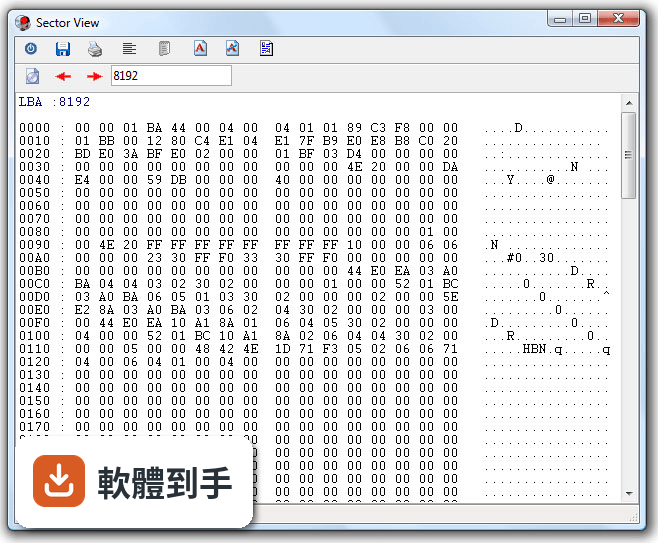
基本操作對一般使用者算友善,介面類似 Windows 檔案總管,瀏覽和匯出檔案不難理解。但進階功能——十六進位檢視、磁區掃描工具、錯誤報告——明顯是為資料救援專業人士和鑑識人員設計的。官方也提到它沒有自動恢復精靈,對完全沒經驗的人來說,遇到複雜狀況時會不知道下一步該做什麼。介面只有英文,不習慣英文操作介面的人會比較吃力。
07我常處理舊光碟和映像檔,這軟體夠用嗎?
如果你工作或興趣經常接觸光碟媒體、映像檔,它涵蓋的範圍算完整:多種檔案系統、多種映像檔格式、多區段燒錄存取、原始資料讀取都有。官方說明中列出的功能包括從可重寫光碟的不同燒錄區段中恢復檔案,這是一般工具少見的能力。不過它的介面停留在傳統風格,沒有現代化的向導流程,使用上需要自己摸索。
08我只是要整理光碟內容,不需要救援,適合嗎?
不適合。它是資料救援工具,不是光碟管理或燒錄軟體。如果你的光碟讀取正常,只是想複製檔案出來或整理內容,用 Windows 內建的檔案總管或一般燒錄軟體就夠了。它的價值在於「讀不到的時候還能嘗試救資料」,而不是日常的光碟檔案管理。用在這類需求上,操作反而比一般工具麻煩。
09我主要用 Mac,可以用嗎?
不行。官方列出的系統需求只有 Windows 7、8、10、11,沒有 macOS 版本。Mac 使用者如果遇到光碟讀不到的問題,需要找其他支援 macOS 的資料救援軟體,或找一台 Windows 電腦來執行這套工具。另外它也不支援雲端儲存空間的恢復,只能處理本機連接的裝置。
10我完全不懂電腦,操作起來會很困難嗎?
會比較吃力。雖然基本介面不複雜,但官方明確指出它沒有自動恢復精靈,這意味著你必須自己判斷該選哪種掃描方式、怎麼瀏覽找到的檔案、以及如何正確匯出。加上介面只有英文,對不熟悉英文操作介面的人門檻更高。如果你完全沒有資料救援經驗,建議先找有中文介面和逐步引導的軟體,或請懂電腦的朋友協助。
11它的更新狀況如何?還有人在維護嗎?
根據收錄的版本紀錄,這套軟體從 2015 年到最近都有持續釋出新版本,近 24 個月內更新了 6 次,近 12 個月內更新了 2 次,屬於持續維護中的軟體。開發商 Smart Projects 仍在使用者評分較少的情況下維持更新,這對需要長期依賴特定工具的人來說是正面訊號。不過評分人數只有 47 人,參考樣本偏少。
下載與官方連結
isobuster_install.exe · 5.09 MB · 連結指向軟體原廠
版本紀錄
- 2026-05-12 IsoBuster 5.8 12.79 MB
- 2025-11-24 IsoBuster 5.7 12.43 MB
- 2025-05-13 IsoBuster 5.6 10.4 MB
再看 5 筆
- 2025-01-26 IsoBuster 5.5.2 10.29 MB
- 2025-01-13 IsoBuster 5.5.1 10.29 MB
- 2024-12-09 IsoBuster 5.5 10.3 MB
- 2024-06-06 IsoBuster 5.4.1 8.12 MB
- 2024-05-21 IsoBuster 5.4 8.12 MB
這一版改了什麼
What's new in this version:
New:
- Support for NTFS cluster sizes of 128 KB and higher. Since Windows 10 v1709 and Windows Server 2019 the older maximum 64 KB boundary has been increased to 2 MB, so changes needed to be made
- Support for multiple NTFS MFT records in a single sector
- Faster extraction and cloning, depending on write and read speeds but obviously still limited by the read speed on failing media or devices
- Work-around for a certain type of data corruption that appears to happen frequently using certain USB card readers (internal and external). Symptoms are the sudden loss of files and or partitions etc. Usually in combination with FAT. Remaining files and/or folders may get names such as "USBC◘╧è◘" or "USBC..". Possibly related to ADATA NH92 adaptors though that is not certain! After researching the issue online it seems a lot of people think this is a virus. I see mention of the "USBC virus" and "USBC malware", yet it's not. It's a hardware / firmware failure that happened while data was being written to the SD card. IsoBuster is now able to detect and compensate for such issues on the fly so that files and folders can still be found and extracted
- IsoBuster now displays the average speed when extracting
- Support for ISO9660 and its derivatives, Joliet, Rock Ridge etc. mistakenly copied/cloned to a USB stick with 512 bytes per block
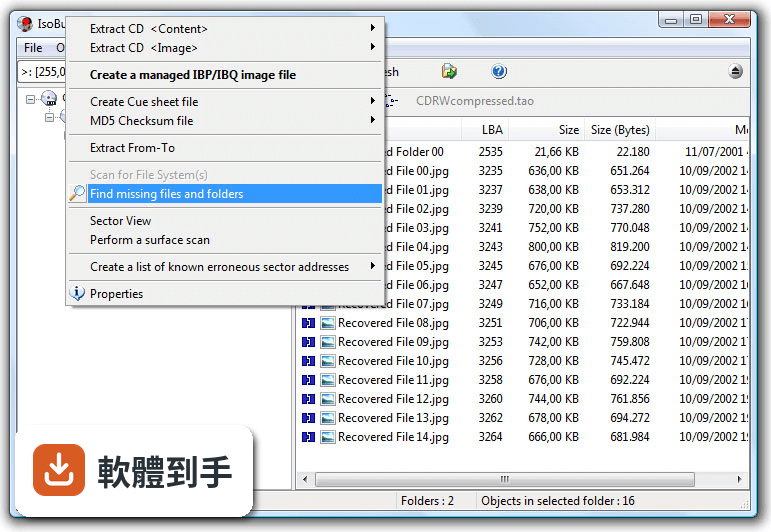
- Right-Mouse-Click when holding SHIFT adds the option to work on a range (From-To) when doing a -Surface Scan- or -Scan for missing files and folders [Professional license]- or -List erroneous sectors-
- Right-Mouse-Click when holding SHIFT adds the option to create a managed image file or clone that is [Empty]. No actual reading is done yet and the user has full control over which type completion is to be performed or what type of engineering is to be done [Professional license]
- Right-Mouse-Click when holding SHIFT adds the option to show the Sector View dialog with the object's last LBA instead of its first LBA
Improvements:
- Various speed and memory improvements when parsing NTFS
- Various speed and memory improvements when parsing Brother-FAT and FAT
- Various speed and memory improvements when parsing ISO9660 and its derivatives, Joliet, Rock Ridge etc.
- Various speed and memory improvements when parsing the Pioneer DVR file system
- Improved FAT parsing when only the backup boot sector is available
- Both FAT addresses are shown in the FAT File system properties dialog (if there are two FATs)
- Improvements in the 'debug dump' image file functionality. Activated when contacted to try and debug an issue
- The search-suggestions-drop-down now displays under the search control instead of to the right of it, very much like previous-search-commands
- An object (for instance file) with no size (0 bytes) cannot have unreadable sectors (so it should not be listed as such, even if its address is in unreadable space)
- Improved support for old style Macintosh Partition maps
- Better file signature detection of quick time formats: mp4, mov, 3gp, 3g2, m4a, m4b, m4p, m4v during a scan for missing files and folders
- Improved file signature detection and assembly of fragmented *.avi files
- Improved *.swf, *.wmf, *.pxc, *.exe, *.dwg and *.ico file signature detection (less chance of false positives)
- Added file signature detection for: *.alb, *.pwm, *.pwp, *.amr
- Added more shortcuts, Ctrl+ and Crtl-, to read and show sectors in Sector View
- Also allow the creation of a customizable file system from a single track session or a single partition USB/HDD/SSD
- TreeView now does 'hot tracking' when hovering over objects
- Better internal click and right click management when making further selections afterwards, e.g. search
- Changed the layout of the right-mouse-click popups to hopefully make more sense (may need a small adjustment when you're used to the old layout)
- Dynamically create right-mouse-click popups to allow much more flexibility in the future
- Plenty of other improvements, quite a few changes and re-writes in the core code / engine, as this is a living project and to deal with the ever growing new functionality
- Various other GUI improvements
Fixes:
- No known, reported or encountered bugs .. so nothing needed to be fixed