
Junkware Removal Tool 停止維護,還值得拿來清廣告軟體嗎
 Junkware Removal Tool 8.1.4
資料更新 2017-07-17
閱讀約 6 分鐘
你的電腦最近是不是開機變慢、瀏覽器首頁被換掉、三不五時彈出奇怪的廣告視窗?你懷疑是之前裝免費軟體時不小心夾帶的廣告程式或工具列在搞鬼,想找個工具把它們清乾淨,但又不想為了這件事去裝一套功能龐大、還要常駐背景的防毒軟體。你只是想要一個簡單、免安裝、用完就丟的清理程式,把這些「跟屁蟲」掃掉就好。
一般人遇到這種狀況,通常會先打開 Windows 的「新增移除程式」手動刪,但廣告軟體往往會殘留登錄檔、排程工作或瀏覽器擴充元件,手動清不乾淨。用正規防毒軟體掃毒,又常常對這類「潛在不需要的程式」睜一隻眼閉一隻眼。於是市場上出現一類專門針對廣告軟體、工具列和 PUP 的清除工具,它們的做法是快速掃描系統中已知的垃圾軟體特徵,然後一次移除,不跟你囉嗦。
01Junkware Removal Tool 到底是做什麼用的?
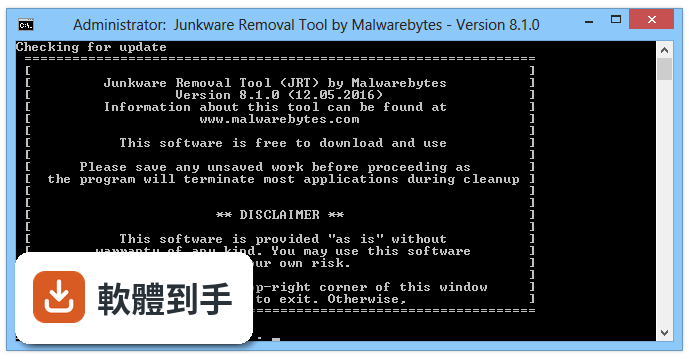
它是由 Malwarebytes 推出的免費清除工具,專門掃描並移除電腦裡的廣告軟體、惡意工具列、瀏覽器輔助物件,以及其他潛在不需要的程式(PUP)。官方說法是可以偵測超過 250 種垃圾軟體變種,掃描加清除通常在五分鐘內完成。它會自己解壓縮到 Temp 資料夾執行,不需要安裝,用完直接刪掉就好。
02這套軟體要安裝嗎?還是下載就能用?
它設計成可攜式工具,不需要安裝。官方說明指出,你可以把它放在 USB 隨身碟裡,插到電腦上直接執行,它會自我解壓縮到暫存資料夾並開始運作。這對不想在系統裡留下痕跡、或是要幫別人修電腦的人來說很方便,用完之後整個資料夾刪掉就行。
03它跟一般防毒軟體有什麼不同?能取代防毒軟體嗎?
它的定位是「針對性清除工具」,不是即時防護軟體。它不會常駐在背景、不會即時攔截威脅,而是當你懷疑電腦已經中了廣告軟體或工具列時,拿出來掃一輪。一般防毒軟體主要防病毒和木馬,對 PUP 這類灰色程式的處理態度比較消極,而這套工具就是專門補這個洞。它不能取代防毒軟體,兩者用途不同。
04掃描速度真的像官方說的那麼快嗎?
官方宣稱「通常五分鐘內完成消毒」,這在它剛推出的年代算是相當快。不過實際速度取決於你的硬碟讀寫速度和系統檔案數量,傳統機械硬碟可能比固態硬碟慢一些。另外,它採用命令列介面(CLI),沒有華麗的圖形視窗,這也讓它執行起來比較輕量。但要注意,這套軟體已經停止維護,掃描引擎停留在舊版本,對近年新出現的廣告軟體可能不認識。
05它支援哪些 Windows 版本?
根據收錄資料,它支援 Windows XP、Vista、Windows 7、Windows 8 和 Windows 10。不過因為軟體已經停止更新,在 Windows 10 後續版本或 Windows 11 上能否正常運作,官方沒有提供保證。如果你還在用舊電腦、系統停留在 Windows 7 或 XP,它可能還算堪用;但如果你用的是較新的系統,相容性需要自行測試。
06這套軟體適合什麼樣的人用?
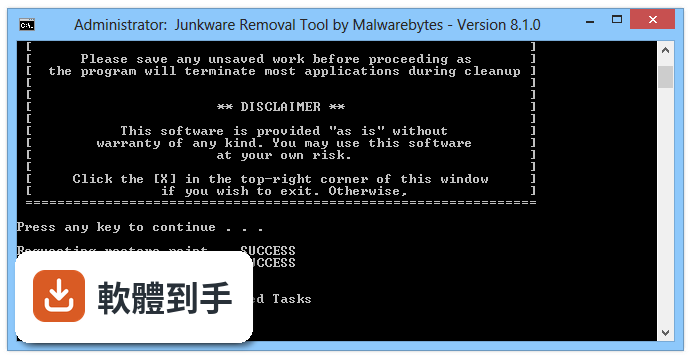
適合輕度使用者,就是電腦被廣告軟體或工具列綁架、但不想深入研究系統登錄檔的人。因為它操作簡單,執行後等它掃完、按個鍵就開始清除,不需要學習門檻。另外,它免安裝的特性也適合電腦維修人員,可以放在隨身碟裡,到客戶端直接執行,不用在對方電腦上安裝任何東西。
07我電腦已經裝了 AdwCleaner,還需要這套嗎?
兩者功能重疊度很高,都是專門清廣告軟體和 PUP 的工具。AdwCleaner 目前仍有持續更新,使用者評分人數也遠多於 JRT(462 人對 28 人),代表它還在被廣泛使用。JRT 已經停止維護,掃描特徵庫不會再增加。如果你已經有 AdwCleaner,沒有特別理由需要改用或加裝 JRT,選一個有在更新的工具比較實際。
08它的使用者評分很低,是不是代表很爛?
它的評分是 3.78/10,但要注意只有 28 個人評分,樣本數非常小,參考價值有限。評分低可能跟它停止維護、對新版 Windows 相容性差有關,也可能是使用者遇到誤判或清除不乾淨的狀況。相較之下,同類工具 AdwCleaner 有 462 人評分、Kaspersky Virus Removal Tool 有 233 人評分,這些數字代表更多人實際用過並留下意見,可信度較高。
09這套軟體現在還值得下載來用嗎?
坦白說,它已經在 2017 年 10 月由官方宣布停止維護,收錄的版本也只有一個,距今已經很久沒有更新。這意味著它對近年出現的廣告軟體變種可能完全沒有偵測能力。如果你的電腦只是輕微被綁架,它或許還能派上用場;但如果你想要有效且持續更新的清除工具,市場上其他選擇會更可靠。
10有沒有其他功能相近、還在維護的替代工具?
有。AdwCleaner 同樣是 Malwarebytes 出的,目前仍在更新,評分人數也較多;Kaspersky Virus Removal Tool 是卡巴斯基的免費掃描工具,涵蓋範圍更廣;Loaris Trojan Remover 和 Ultra Adware Killer 也是類似定位。這些工具在官方資料中都被列為功能相近的比較對象,你可以根據自己對品牌的信任度或介面偏好來選。
11我電腦是 Windows 11,可以用這套嗎?
官方支援列表只寫到 Windows 10,而且軟體已停止維護,沒有針對 Windows 11 做過相容性測試。在 Windows 11 上執行可能會有驅動程式不相容、掃描異常或無法啟動的風險。如果你的系統是 Windows 11,建議直接找其他有持續更新的清除工具,不要冒險使用這套老舊軟體。
下載與官方連結
JRT.exe
這一版改了什麼
What's new in this version:
Junkware Removal Tool 8.1.4
- False positive fixes
Junkware Removal Tool 8.1.3
- Updated: Whitelist -> Processes
Junkware Removal Tool 8.1.2
- Change log not available for this version
Junkware Removal Tool 8.1.1
- Updated: Whitelist -> Processes
- Updated: Whitelist -> Tasks
- Updated: Whitelist -> Toolbars
- Updated: Database
- False positives fixes
Junkware Removal Tool 8.1.0
- Added: Wajam service and driver remediation
- Updated: Whitelist -> Browser Helper Objects (BHOs)
- Updated: Whitelist -> Processes
- Updated: Whitelist -> Services
- Updated: Database
- Improved: Search patterns
- False positive fixes
- Removed: AdPeak service remediation
- Removed ConvertAd service remediation
Junkware Removal Tool 8.0.9
- Updated: CreateRestorePoint.exe - resolved an issue where sometimes a restore point would not be created. Read more here
- Minor bug fixes
Junkware Removal Tool 8.0.8
- Improved: Browser scan. This area is now scanned for blacklisted extensions: %localappdata%GoogleChromeUser DataDefaultLocal Extension Settings
- Updated: Whitelist -> Processes -> SimpleHelp
- Updated: Whitelist -> Processes -> DisplayFusion
- Updated: Database
- Minor Bug Fixes
Junkware Removal Tool 8.0.7
- New Heuristic -> Tasks -> PriceFountain
- Updated: Whitelist -> Browser Helper Objects (BHOs)
- Updated: Whitelist -> Processes -> AnyDesk remote support software
- Updated: Whitelist -> Toolbars
- Updated: Heuristic -> Folders -> MintCast
- Updated: Heuristic -> Services -> MintCast
- Updated: Malwarebytes.org references to .com
- Updated: Database
- Minor bug fixes
Junkware Removal Tool 8.0.6
- Updated: Database
- Minor bug fixes
Junkware Removal Tool 8.0.5
- Minor bug fixes
Junkware Removal Tool 8.0.4
- New Heuristic -> Certificates -> PennyBee
- New Heuristic -> Folders -> DNSUnlocker
- New Heuristic -> Folders -> Amonetize Wrapper
- Updated: Database
- Updated: Heuristic -> Services -> MintCast
- Updated: Heuristic -> Folders -> MintCast
- Updated: Heuristic -> Startup -> EoRezo
- Updated: Heuristic -> Folders -> EoRezo
Junkware Removal Tool 8.0.3
- Updated: Database
- Updated: Whitelist -> Processes -> mIRC, RogueKillerPE, MBARW
- Updated: Whitelist -> Internet Explorer -> Toolbars
- Updated: Heuristic -> Tasks -> CouponMarvel
- Updated: Heuristic -> Folders -> EoRezo
- Updated: Heuristic -> Content.IE5 folders
- Updated: Browsers -> Internet Explorer -> Included more x64 registry keys
- Bug Fix: Temporary Internet File Folders not being deleted on Windows XP
- Bug Fix: HTTPS Everywhere FireFox extension subfolders accidentally being deleted
Junkware Removal Tool 8.0.2
- New heuristic: MintCast
- Updated: Database
- Updated: Whitelist -> FireFox -> GreaseMonkey custom scripts
- Updated: Heuristic -> Content.IE5 folders -> Now includes support for Windows Vista, 7, 8, 8.1, 10
Junkware Removal Tool 8.0.1
- Updated: Database
- Updated: Whitelist -> FireFox -> Blocksite extension
- Updated: Whitelist -> Processes -> McAfee AV, Norton AV, ESET AV, MBAM, D7
- Updated: Heuristic -> Service -> Vitruvian
- Updated: Heuristic -> Drivers -> Vitruvian
- Updated: Log -> HKEY_CURRENT_USER replaced to HKCU
- Updated: Tool should now completely empty %TEMP%JRTJRT_NewerVersion contents before checking for an update
- Bug Fix: Error during Processes scan
- Bug Fix: Report not opening from Desktop in non-English OS versions
- Bug Fix: Moved JRT_NewerVersion folder to %TEMP%JRTJRT_NewerVersion to accommodate non-English OS versions
Junkware Removal Tool 8.0.0
- Tool rebuilt from scratch. Overall the tool should be smarter by not running certain scans unless it actually has something to work on.
- New heuristic: BrowseFox FireFox extensions
- New heuristic: AdLyrics FireFox extensions
- New heuristic: Content.IE5 folders (XP only)
- New feature: Clear Event Viewer Logs
- Updated: Database
- Updated: Report
- Updated: Console output
- Updated: Services whitelist (many W10 services added)
- Updated: Processes whitelist
- Delisted: "SpamFighter" software related entries per user request
- Removed heuristic: PullUpdate
- Removed heuristic: Sanbreel (Update / Util)
- Bug Fix: Tool crashing if encountered username with special character(s). e.g. '&'
- Bug Fix: Tool crashing if cannot gather FireFox profile name
- Bug Fix: Tool ignoring Ctrl-C (Close) command