
這是歷史版本頁面 — 看 KeePass Password Safe 最新版本
密碼多到記不住?KeePass 免費開源密碼管理器能做什麼
 KeePass Password Safe KeePass 2.06 Beta
資料更新 2008-11-01
閱讀約 6 分鐘
你手上至少有十幾個帳號:Windows 登入、Email、網站會員、FTP、論壇……每個都要密碼,而且最好都不一樣。以前偷懶用同一組,結果某個論壇被駭,連 Email 都被登入,才發現事情大條。現在想好好整理,卻不知道從哪裡開始——用瀏覽器記住密碼是方便,但換電腦、換瀏覽器就全部不見,而且瀏覽器本身也不夠安全。
一般人最常做的就是把密碼寫在記事本或 Excel 裡,但這等於把鑰匙放在門口地墊下。密碼管理器的切入點很簡單:你只需要記住一組主密碼,其他所有密碼都鎖在一個加密的資料庫裡,要用時再解鎖。KeePass 就是這個領域的老牌開源工具,從 2005 年開發到現在,靠的是社群信任和可審查的原始碼,而不是華麗的介面。
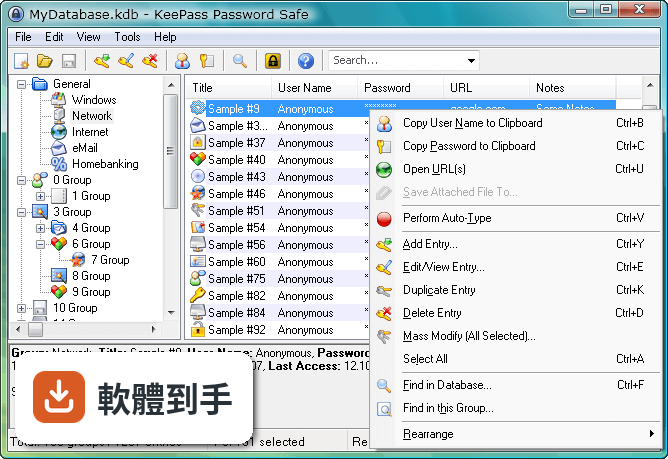
01KeePass 是什麼?跟一般記密碼的軟體有什麼不同?
KeePass 是一套開源密碼管理器,把所有的帳號密碼集中存放在一個加密資料庫裡,用一組主密碼或金鑰檔案解鎖。跟瀏覽器內建記密碼功能不同,它的資料庫是用 AES 和 Twofish 加密,而且原始碼公開,任何人都可以檢查加密有沒有實作正確。免費、無廣告,也不需要註冊帳號。
02密碼存在哪裡?會不會被偷?
所有密碼存在一個以主密碼或金鑰檔案鎖住的資料庫檔案裡,檔案本身用 AES 和 Twofish 加密。沒有主密碼或金鑰檔案,就無法開啟內容。你可以把這個檔案放在自己的隨身碟、NAS 或雲端硬碟,但 KeePass 本身沒有內建雲端同步,傳輸和備份的責任在自己身上。
03可以帶著走嗎?還是只能裝在電腦上?
有提供免安裝的便攜版,放在隨身碟裡直接執行,不需要安裝。資料庫檔案也可以跟著隨身碟走,換一台電腦就能用。不過要注意,便攜版需要目標電腦有安裝 .NET Framework 4.7 以上版本,而且介面是英文的。
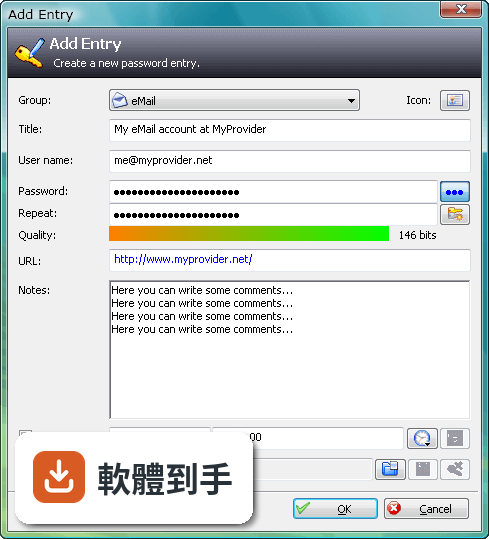
04可以從別的密碼軟體匯入資料嗎?
可以。KeePass 支援從多種格式匯入,也支援匯出成 TXT、HTML、XML 和 CSV。如果你原本用 Excel 或 CSV 記密碼,可以先整理成 CSV 再匯入。匯出功能也可以用來備份或轉移到其他軟體,但匯出後的檔案是明文,要小心存放。
05自動輸入密碼是怎麼運作的?
內建 Auto-Type 功能,可以設定讓 KeePass 自動幫你輸入使用者名稱和密碼。它會模擬鍵盤輸入,所以不需要複製貼上,避免密碼留在剪貼簿裡。也可以設定全域快速鍵,在任何視窗按下快捷鍵就自動填入。但這功能在部分網站或應用程式上可能因為輸入框設計不同而失效,需要自己調整設定。
06適合什麼樣的人用?
適合願意花時間自己管理資料庫的人。KeePass 的運作方式是把所有責任交給你:主密碼自己記、資料庫自己備份、同步自己處理。如果你習慣把東西掌握在自己手裡,不喜歡雲端服務,也不介意英文介面,那它很夠用。它也適合需要管理大量帳號的 IT 人員,可以用群組分類和自訂欄位。
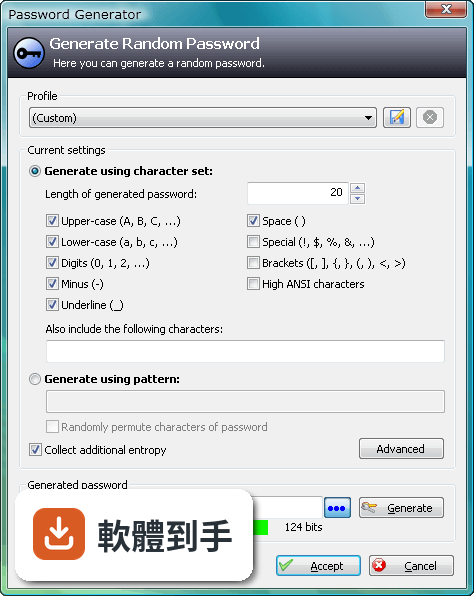
07跟瀏覽器內建的密碼管理比起來,有什麼差別?
瀏覽器內建功能方便,但綁定特定瀏覽器,換瀏覽器或重灌電腦就麻煩。KeePass 的資料庫是獨立檔案,不受瀏覽器限制,而且加密強度更高。但相對的,KeePass 沒有自動填表單的功能,需要靠 Auto-Type 或手動複製貼上,使用上沒有瀏覽器那麼順手。
08手機上能用嗎?
官方沒有提供手機版。資料庫檔案格式是公開的,市面上有第三方 App 可以開啟 KeePass 資料庫,但那些 App 不是官方出品,相容性和安全性需要自行確認。如果你主要用手機記密碼,KeePass 可能不是最方便的選擇。
09需要雲端同步嗎?KeePass 有內建嗎?
KeePass 沒有內建雲端備份或同步功能。如果你要把資料庫放在 Dropbox、Google Drive 之類的地方,需要自己設定,而且每次修改後要手動上傳。如果多台電腦要同步,也要自己處理檔案衝突的問題。不想自己管理同步的人,用起來會覺得很麻煩。
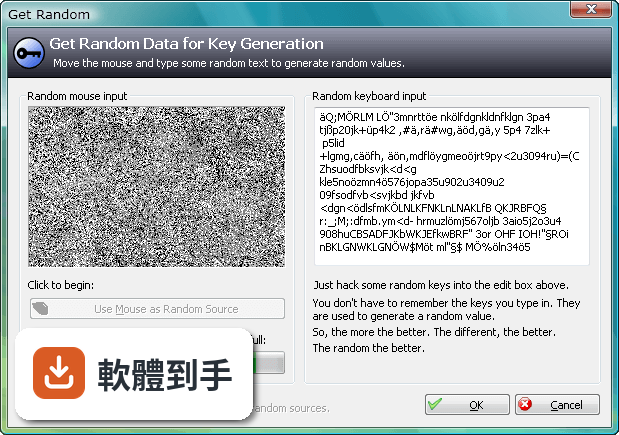
10介面只有英文,看不懂怎麼辦?
介面語系只有英文,沒有官方中文。不過 KeePass 支援多國語言套件,可以另外下載中文語言檔,但需要自己安裝設定。如果連安裝語言檔都覺得困難,或希望介面預設就是中文,那這套軟體對你來說門檻會比較高。
11跟其他密碼管理器比起來,為什麼評分人數不多?
在收錄的比較名單中,KeePass 有 98 人評分,RoboForm 有 117 人,Kaspersky Password Manager 有 77 人。評分人數少不代表不好,但表示使用者的基數相對小。KeePass 的介面停留在早期風格,沒有現代密碼管理器常見的自動填表、雲端同步、行動裝置 App,這些都是它評分人數不多的可能原因。
12什麼樣的人不建議用 KeePass?
如果你需要手機和電腦之間無縫同步、想要自動填寫網頁表單、或希望介面是中文且現代化,那 KeePass 會讓你花很多時間在設定和維護上。它沒有官方手機版、沒有內建雲端同步、介面老舊且只有英文。這些需求可以考慮其他有持續更新、介面較現代的密碼管理器,但那些通常是付費或訂閱制。
下載與官方連結
前往官方網站 下載 KeePass Password Safe
KeePass-2.06-Beta-Setup.exe · 1.68 MB · 連結指向軟體原廠
版本紀錄
- 2026-05-02 KeePass 2.61.1 4.38 MB
- 2026-03-05 KeePass 2.61 4.38 MB
- 2025-11-03 KeePass 2.60 4.23 MB
再看 5 筆
- 2025-07-10 KeePass 2.59 4.15 MB
- 2025-03-05 KeePass 2.58 4.34 MB
- 2024-10-08 KeePass 2.57.1 4.32 MB
- 2024-06-02 KeePass 2.57 4.2 MB
- 2024-02-05 KeePass 2.56 4.19 MB
這一版改了什麼
What's new in this version:
New Features:
- Translation system is now complete (translations to various languages will be published on the KeePass translations page when translators finish them).
- When saving the database, KeePass now first checks whether the file on disk/server has been modified since it was loaded and if so, asks the user whether to synchronize with the changed file instead of overwriting it (i.e. multiple users can now use a shared database on a network drive).
- Database files are now verified (read and hashed) after writing them to disk (in order to prevent data loss caused by damaged/broken devices and/or file systems).
- Completely new auto-type/URL placeholder replacement and field reference engine.
- On Windows Vista, some of the message boxes are now displayed as modern task dialogs.
- KeePass is now also available as MSI package.
- Accessibility: added advanced option to optimize the user interface for screen readers (only enable this option if you're really using a screen reader).
- Added standard client icons: Tux, feather, apple, generic Wiki icon, '$', certificate and BlackBerry.
- Secure edit controls in the master key and entry dialogs now accept text drops.
- Added ability to store notes for each group (see 'Notes' tab in the group editing window), these notes are shown in the tooltip of the group in the group tree of the main window.
- Group names in the entry details view are now clickable; click it to jump to the group of the entry (especially useful for jumping from search results to the real group of an entry).
- Added 'GROUPPATH', 'DELAY' and 'PICKPASSWORDCHARS' special placeholders to auto-type sequence editing dialog.
- Wildcards (*) may now also appear in the middle of auto-type target window filters.
- For auto-type target window filters, regular expressions are now supported (enclose in //).
- KeePass now shows an explicit file corruption warning message when saving to a file fails.
- Added option to prepend a special auto-type initialization sequence for Internet Explorer and Maxthon windows to fix a focus issue (option enabled by default).
- Added ability to specify a minimum length and minimum estimated quality that master passwords must have (see help file -> Features -> Composite Master Key; for admins).
- Added field reference creation dialog (accessible through the 'Tools' menu in the entry editing dialog).
- Field references are dereferenced when copying data to the clipboard.
- Entry field references are now dereferenced in drag&drop operations.
- KeePass now follows field references in indirect auto-type sequence paths.
- Added internal field reference cache (highly improves performance of multiple-cyclic/recursive field references).
- Added managed system power mode change handler.
- Added "Lock Workspace" tray context menu command.
- Moved all export commands into a new export dialog.
- Added context menu command to export the selected group only.
- Added context menu command to export selected entries only.
- Added support for importing Password Memory 2008 XML files.
- Added support for importing Password Keeper 7.0 CSV files.
- Added support for importing Passphrase Keeper 2.70 HTML files.
- Added support for importing data from PassKeeper 1.2.
- Added support for importing Mozilla bookmarks JSON files (Firefox 3 bookmark files).
- Added support for exporting to KeePass 1.x CSV files.
- Added XSL transformation file to export passwords only (useful for generating and exporting password lists).
- Added support for writing databases to hidden files.
- When passing '/?', '--help' or similar on the command line, KeePass will now open the command line help.
- When single instance mode is enabled and a second instance is started with command line parameters, these parameters are now sent to the already open KeePass instance.
- KeePass now ships with a compiled XML serializer library, which highly improves startup performance.
- Added support for Uniform Naming Convention (UNC) paths (Windows) in the URL field (without cmd:// prefix).
- Added option to exclude expired entries in the 'Find' dialog.
- Added option to exclude expired entries in quick searches (toolbar; disabled by default).
- The box to enter the name of a custom string field is now a combobox that suggests previously-used names in its drop-down list.
- Added Shift, Control and Alt key modifiers to placeholder overview in the auto-type sequence editing dialog.
- Added support for 64 byte key files which don't contain hex keys.
- Added Ctrl-Shift-F accelerator for the 'Find in this Group' context menu command (group tree must have the focus).
- Added export ability to KPScript plugin.
- Ctrl-Tab now also works in the password list, groups tree and entry details view.
- Added multi-user documentation.
- Plugin developers: DocumentManagerEx now has an ActiveDocumentSelected event.
- Plugin developers: instead of manually setting the parent group property and adding an object to a group, use the new AddEntry / AddGroup methods of PwGroup (can take ownership).
- Plugins can now add new export file formats (in addition to import formats).
- Plugins: added static message service event.
Improvements / Changes:
- When using the installation package and Windows Vista, settings are now stored in the user's profile directory (instead of Virtual Store; like on Windows XP and earlier).
- Accessibility: multi-line edit controls do not accept tabs anymore (i.e. tab jumps to the next dialog control), and inserting a new line doesn't require pressing Ctrl anymore.
- When moving entries, KeePass doesn't switch to the target group anymore.
- When deleting entries from the search results, the entry list is not cleared anymore.
- Improved entry duplication method (now also works correctly in search results list and grouped list views).
- A more useful error message is shown when checking for updates fails.
- Improved formats sorting in the import dialog.
- The 'Limit to single instance' option is now turned on by default (multiple databases are opened in tabs).
- Removed 'sort up', 'sort down' and empty client icons.
- Improved program termination code (common clean-up).
- Improved error message that is shown when reading/writing the protected user key fails.
- The key file selection dialog now by default shows all files.
- Plugins: improved event handlers (now using generic delegate).
- Implemented several workarounds for Mono (2.0.1+).
- Added conformance level specification for XSL transformations (in order to improve non-XML text exports using XSLT).
- Improved key state toggling for auto-type on 64-bit systems.
- Removed several unnecessary .NET assembly dependencies.
- Threading safety improvements.
- Highly improved entry context menu performance when many entries are selected.
- Entry selection performance improvements in main window.
- Improved entries list view performance (state caching).
- List view group assignment improvements (to avoid splitting).
- Removed tab stops from quality progress bars.
- After moving entries to a different group, the original group is selected instead of the target group.
- Layout and text improvements in the master key creation form.
- Text in the URL field is now shown in blue (if it's black in the standard theme).
- Improved auto-type tab in entry dialog (default sequence).
- Improved AES/Rijndael cipher engine initialization.
- Improved build scripts.
- Various code optimizations.
- Minor other improvements.
- Installer: changed AppId to allow parallel installation of KeePass 1.x and 2.x.
- Minor other installer improvements.
Bugfixes:
- The 'View' -> 'Show Columns' -> 'Last Access Time' menu command now works correctly.
- The 'Clipboard' -> 'Paste Entries' menu command now assigns correct group references to pasted entries.