
這是歷史版本頁面 — 看 KeePass Password Safe 最新版本
密碼多到記不住?KeePass 免費開源密碼管理器能做什麼
 KeePass Password Safe KeePass 2.07 Beta
資料更新 2009-03-14
閱讀約 6 分鐘
你手上至少有十幾個帳號:Windows 登入、Email、網站會員、FTP、論壇……每個都要密碼,而且最好都不一樣。以前偷懶用同一組,結果某個論壇被駭,連 Email 都被登入,才發現事情大條。現在想好好整理,卻不知道從哪裡開始——用瀏覽器記住密碼是方便,但換電腦、換瀏覽器就全部不見,而且瀏覽器本身也不夠安全。
一般人最常做的就是把密碼寫在記事本或 Excel 裡,但這等於把鑰匙放在門口地墊下。密碼管理器的切入點很簡單:你只需要記住一組主密碼,其他所有密碼都鎖在一個加密的資料庫裡,要用時再解鎖。KeePass 就是這個領域的老牌開源工具,從 2005 年開發到現在,靠的是社群信任和可審查的原始碼,而不是華麗的介面。
01KeePass 是什麼?跟一般記密碼的軟體有什麼不同?
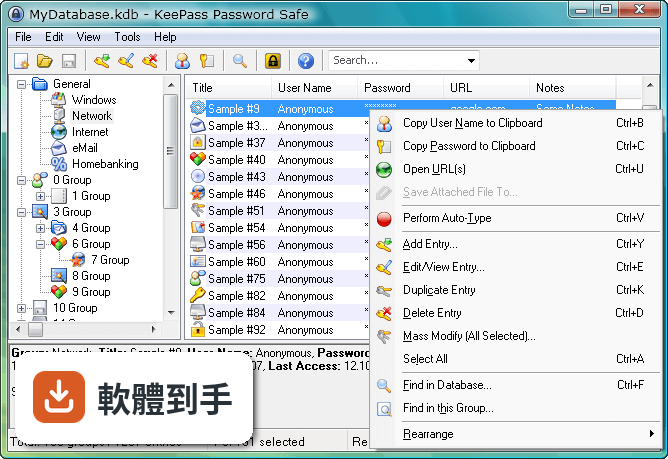
KeePass 是一套開源密碼管理器,把所有的帳號密碼集中存放在一個加密資料庫裡,用一組主密碼或金鑰檔案解鎖。跟瀏覽器內建記密碼功能不同,它的資料庫是用 AES 和 Twofish 加密,而且原始碼公開,任何人都可以檢查加密有沒有實作正確。免費、無廣告,也不需要註冊帳號。
02密碼存在哪裡?會不會被偷?
所有密碼存在一個以主密碼或金鑰檔案鎖住的資料庫檔案裡,檔案本身用 AES 和 Twofish 加密。沒有主密碼或金鑰檔案,就無法開啟內容。你可以把這個檔案放在自己的隨身碟、NAS 或雲端硬碟,但 KeePass 本身沒有內建雲端同步,傳輸和備份的責任在自己身上。
03可以帶著走嗎?還是只能裝在電腦上?
有提供免安裝的便攜版,放在隨身碟裡直接執行,不需要安裝。資料庫檔案也可以跟著隨身碟走,換一台電腦就能用。不過要注意,便攜版需要目標電腦有安裝 .NET Framework 4.7 以上版本,而且介面是英文的。
04可以從別的密碼軟體匯入資料嗎?
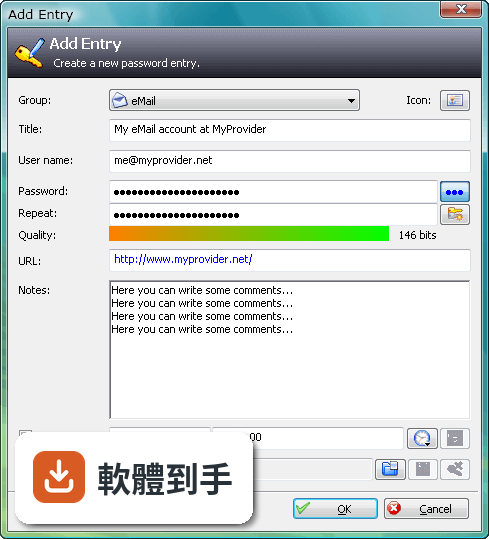
可以。KeePass 支援從多種格式匯入,也支援匯出成 TXT、HTML、XML 和 CSV。如果你原本用 Excel 或 CSV 記密碼,可以先整理成 CSV 再匯入。匯出功能也可以用來備份或轉移到其他軟體,但匯出後的檔案是明文,要小心存放。
05自動輸入密碼是怎麼運作的?
內建 Auto-Type 功能,可以設定讓 KeePass 自動幫你輸入使用者名稱和密碼。它會模擬鍵盤輸入,所以不需要複製貼上,避免密碼留在剪貼簿裡。也可以設定全域快速鍵,在任何視窗按下快捷鍵就自動填入。但這功能在部分網站或應用程式上可能因為輸入框設計不同而失效,需要自己調整設定。
06適合什麼樣的人用?
適合願意花時間自己管理資料庫的人。KeePass 的運作方式是把所有責任交給你:主密碼自己記、資料庫自己備份、同步自己處理。如果你習慣把東西掌握在自己手裡,不喜歡雲端服務,也不介意英文介面,那它很夠用。它也適合需要管理大量帳號的 IT 人員,可以用群組分類和自訂欄位。
07跟瀏覽器內建的密碼管理比起來,有什麼差別?
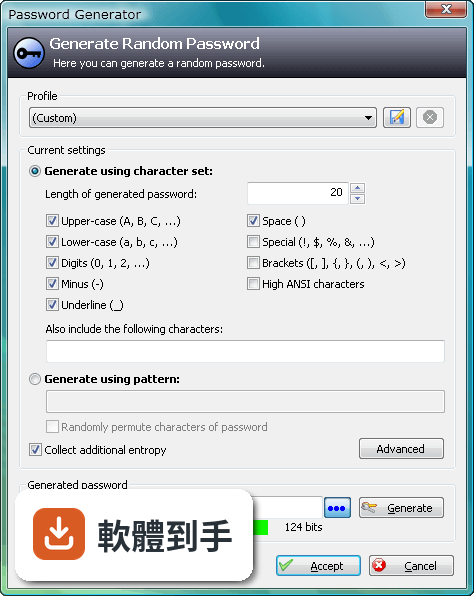
瀏覽器內建功能方便,但綁定特定瀏覽器,換瀏覽器或重灌電腦就麻煩。KeePass 的資料庫是獨立檔案,不受瀏覽器限制,而且加密強度更高。但相對的,KeePass 沒有自動填表單的功能,需要靠 Auto-Type 或手動複製貼上,使用上沒有瀏覽器那麼順手。
08手機上能用嗎?
官方沒有提供手機版。資料庫檔案格式是公開的,市面上有第三方 App 可以開啟 KeePass 資料庫,但那些 App 不是官方出品,相容性和安全性需要自行確認。如果你主要用手機記密碼,KeePass 可能不是最方便的選擇。
09需要雲端同步嗎?KeePass 有內建嗎?
KeePass 沒有內建雲端備份或同步功能。如果你要把資料庫放在 Dropbox、Google Drive 之類的地方,需要自己設定,而且每次修改後要手動上傳。如果多台電腦要同步,也要自己處理檔案衝突的問題。不想自己管理同步的人,用起來會覺得很麻煩。
10介面只有英文,看不懂怎麼辦?
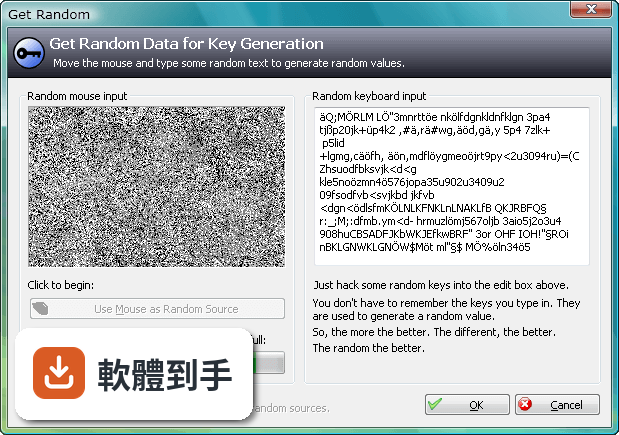
介面語系只有英文,沒有官方中文。不過 KeePass 支援多國語言套件,可以另外下載中文語言檔,但需要自己安裝設定。如果連安裝語言檔都覺得困難,或希望介面預設就是中文,那這套軟體對你來說門檻會比較高。
11跟其他密碼管理器比起來,為什麼評分人數不多?
在收錄的比較名單中,KeePass 有 98 人評分,RoboForm 有 117 人,Kaspersky Password Manager 有 77 人。評分人數少不代表不好,但表示使用者的基數相對小。KeePass 的介面停留在早期風格,沒有現代密碼管理器常見的自動填表、雲端同步、行動裝置 App,這些都是它評分人數不多的可能原因。
12什麼樣的人不建議用 KeePass?
如果你需要手機和電腦之間無縫同步、想要自動填寫網頁表單、或希望介面是中文且現代化,那 KeePass 會讓你花很多時間在設定和維護上。它沒有官方手機版、沒有內建雲端同步、介面老舊且只有英文。這些需求可以考慮其他有持續更新、介面較現代的密碼管理器,但那些通常是付費或訂閱制。
下載與官方連結
前往官方網站 下載 KeePass Password Safe
KeePass-2.07-Beta-Setup.exe · 1.71 MB · 連結指向軟體原廠
版本紀錄
- 2026-05-02 KeePass 2.61.1 4.38 MB
- 2026-03-05 KeePass 2.61 4.38 MB
- 2025-11-03 KeePass 2.60 4.23 MB
再看 5 筆
- 2025-07-10 KeePass 2.59 4.15 MB
- 2025-03-05 KeePass 2.58 4.34 MB
- 2024-10-08 KeePass 2.57.1 4.32 MB
- 2024-06-02 KeePass 2.57 4.2 MB
- 2024-02-05 KeePass 2.56 4.19 MB
這一版改了什麼
What's new in this version:
New Features:
- Added powerful trigger system (when events occur, check some conditions and execute a list of actions; see options dialog in 'Advanced'; more events / conditions / actions can be added later based on user requests, and can also be provided by plugins).
- Native master key transformations (rounds) are now computed by the native KeePassLibC support library (which contains the new, highly optimized transformation code used by KeePass 1.15, in two threads); on dual/multi core processors this results in almost triple the performance as before (by tripling the amount of rounds you'll get the same waiting time as in 2.06, but the protection against dictionary and guessing attacks is tripled).
- Added recycle bin (enabled by default, it can be disabled in the database settings dialog).
- Added Salsa20 stream cipher for CryptoRandomStream (this algorithm is not only more secure than ArcFour, but also achieves a higher performance; CryptoRandomStream defaults to Salsa20 now; port developers: KeePass uses Salsa20 for the inner random stream in KDBX files).
- KeePass is now storing file paths (last used file, MRU list) in relative form in the configuration file.
- Added support for importing 1Password Pro CSV files.
- Added support for importing KeePass 1.x XML files.
- Windows XP and higher: added support for double-buffering in all list views (including entry lists).
- Windows Vista and higher: added support for alpha-blended marquee selection in all list views (including entry lists).
- Added 'EditEntry', 'DeleteEntry', 'AddEntries' and 'DeleteAllEntries' commands in KPScript scripting tool.
- Added support for importing special ICO files.
- Added option to exit instead of locking the workspace after the specified time of inactivity.
- Added option to minimize the main window after locking the KeePass workspace.
- Added option to minimize the main window after opening a database.
- Added support for exporting to KDBX files.
- Added command to remove deleted objects information.
- TrlUtil now checks for duplicate accelerator keys in dialogs.
- Added controls in the entry editing dialog to specify a custom text foreground color for entries.
- KeePass now retrieves the default auto-type sequence from parent groups when adding new entries.
- The password character picking dialog can now be invoked multiple times when auto-typing (use {PICKPASSWORDCHARS}, {PICKPASSWORDCHARS2}, {PICKPASSWORDCHARS3}, etc.).
- Added '-set-urloverride', '-clear-urloverride' and '-get-urloverride' command line options.
- Added '-set-translation' command line option.
- Added option to print custom string fields in details mode.
- Various entry listings now support custom foreground and background colors for entry items.
- Added 'click through' behavior for menus and toolbars.
- File association methods are now UAC aware.
Improvements / Changes:
- User interface is now blocked while saving to a file (in order to prevent accidental user actions that might interfere with the saving process).
- Improved native modifier keys handling on 64-bit systems.
- Improved application startup performance.
- Added image list processing workaround for Windows 7.
- OK button is now reenabled after manually activating the key file checkbox and selecting a file in the master key dialog.
- The master key dialog now appears in the task bar.
- When KeePass is minimized to tray and locked, pressing the global auto-type hot key doesn't restore the main window anymore.
- The installer now by default installs KeePass 1.x and 2.x into separate directories in the program files folder.
- The optional autorun registry keys of KeePass 1.x and 2.x do not collide anymore.
- File type association identifiers of KeePass 1.x and 2.x do not collide anymore.
- File MRU list now uses case-insensitive comparisons.
- Improved preview updates in Print and Data Viewer dialogs.
- Message service provider is thread safe now.
- Threading safety improvements in KPScript scripting plugin.
- Improved control state updates in password generator dialog.
- Improved master password validation in 'New Database' dialog.
- Times are now stored as UTC in KDBX files (ISO 8601 format).
- Last access time fields are now updated when auto-typing, copying fields to the clipboard and drag&drop operations.
- KPScript scripting tool now supports in-memory protection.
- Database is not marked as modified anymore when closing the import dialog with Cancel.
- Added asterisks in application policy editing dialog to make clearer that changing the policy requires a KeePass restart.
- Double-clicking a format in the import/export dialog now automatically shows the file browsing dialog.
- Improved permanent entry deletion confirmation prompt.
- Improved font objects handling.
- Expired groups are now rendered using a striked out font.
- Improved auto-type statement conversion routine in KeePass 1.x KDB file importer.
- Clipboard clearing countdown is not started anymore when copying data fails (e.g. policy disabled).
- Improved synchronization with URLs.
- The database maintenance dialog now only marks the database as modified when it actually has removed something.
- KeePass now broadcasts a shell notification after changing the KDBX file association.
- Improved warning message when trying to directly open KeePass 1.x KDB files.
- Improved Linux / Mac OS X compatibility.
- Improved MSI package (removed unnecessary dependency).
- TrlUtil: improved NumericUpDown and RichTextBox handling.
- Installer now checks for minimum operating system version.
- Installer: file association is now a task, not a component.
- Installer: various other improvements.
- Various code optimizations.
- Minor other improvements.
Bugfixes:
- When cloning a group tree using drag&drop, KeePass now assigns correct parent group references to cloned groups and entries.
- Fixed crash when clicking 'Cancel' in the settings dialog when creating a new database.