
這是歷史版本頁面 — 看 KeePass Password Safe 最新版本
密碼多到記不住?KeePass 免費開源密碼管理器能做什麼
 KeePass Password Safe 2.13
資料更新 2010-09-06
閱讀約 6 分鐘
你手上至少有十幾個帳號:Windows 登入、Email、網站會員、FTP、論壇……每個都要密碼,而且最好都不一樣。以前偷懶用同一組,結果某個論壇被駭,連 Email 都被登入,才發現事情大條。現在想好好整理,卻不知道從哪裡開始——用瀏覽器記住密碼是方便,但換電腦、換瀏覽器就全部不見,而且瀏覽器本身也不夠安全。
一般人最常做的就是把密碼寫在記事本或 Excel 裡,但這等於把鑰匙放在門口地墊下。密碼管理器的切入點很簡單:你只需要記住一組主密碼,其他所有密碼都鎖在一個加密的資料庫裡,要用時再解鎖。KeePass 就是這個領域的老牌開源工具,從 2005 年開發到現在,靠的是社群信任和可審查的原始碼,而不是華麗的介面。
01KeePass 是什麼?跟一般記密碼的軟體有什麼不同?
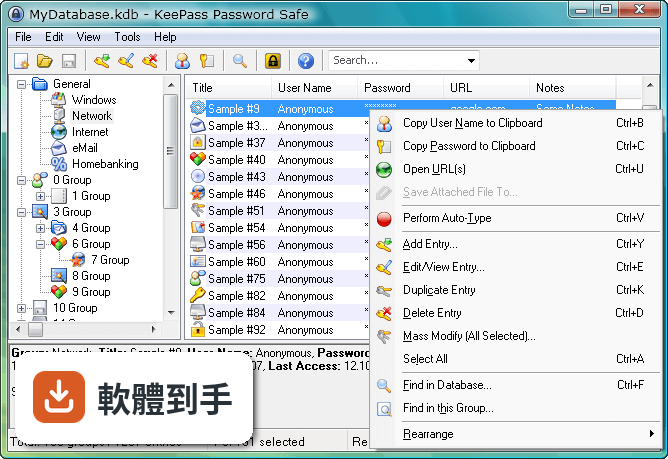
KeePass 是一套開源密碼管理器,把所有的帳號密碼集中存放在一個加密資料庫裡,用一組主密碼或金鑰檔案解鎖。跟瀏覽器內建記密碼功能不同,它的資料庫是用 AES 和 Twofish 加密,而且原始碼公開,任何人都可以檢查加密有沒有實作正確。免費、無廣告,也不需要註冊帳號。
02密碼存在哪裡?會不會被偷?
所有密碼存在一個以主密碼或金鑰檔案鎖住的資料庫檔案裡,檔案本身用 AES 和 Twofish 加密。沒有主密碼或金鑰檔案,就無法開啟內容。你可以把這個檔案放在自己的隨身碟、NAS 或雲端硬碟,但 KeePass 本身沒有內建雲端同步,傳輸和備份的責任在自己身上。
03可以帶著走嗎?還是只能裝在電腦上?
有提供免安裝的便攜版,放在隨身碟裡直接執行,不需要安裝。資料庫檔案也可以跟著隨身碟走,換一台電腦就能用。不過要注意,便攜版需要目標電腦有安裝 .NET Framework 4.7 以上版本,而且介面是英文的。
04可以從別的密碼軟體匯入資料嗎?
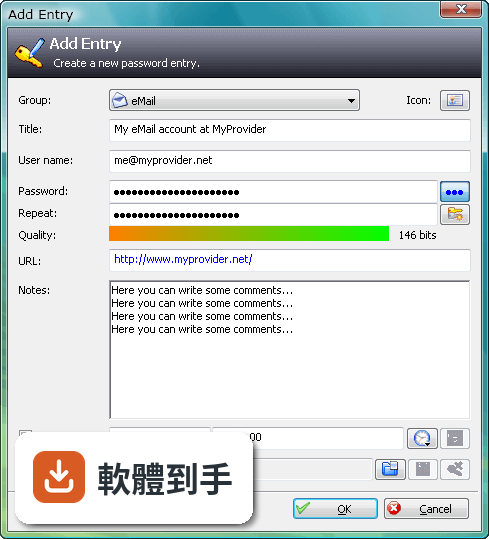
可以。KeePass 支援從多種格式匯入,也支援匯出成 TXT、HTML、XML 和 CSV。如果你原本用 Excel 或 CSV 記密碼,可以先整理成 CSV 再匯入。匯出功能也可以用來備份或轉移到其他軟體,但匯出後的檔案是明文,要小心存放。
05自動輸入密碼是怎麼運作的?
內建 Auto-Type 功能,可以設定讓 KeePass 自動幫你輸入使用者名稱和密碼。它會模擬鍵盤輸入,所以不需要複製貼上,避免密碼留在剪貼簿裡。也可以設定全域快速鍵,在任何視窗按下快捷鍵就自動填入。但這功能在部分網站或應用程式上可能因為輸入框設計不同而失效,需要自己調整設定。
06適合什麼樣的人用?
適合願意花時間自己管理資料庫的人。KeePass 的運作方式是把所有責任交給你:主密碼自己記、資料庫自己備份、同步自己處理。如果你習慣把東西掌握在自己手裡,不喜歡雲端服務,也不介意英文介面,那它很夠用。它也適合需要管理大量帳號的 IT 人員,可以用群組分類和自訂欄位。
07跟瀏覽器內建的密碼管理比起來,有什麼差別?
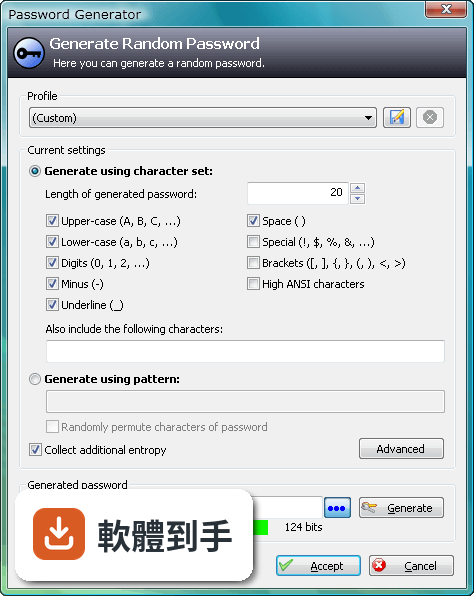
瀏覽器內建功能方便,但綁定特定瀏覽器,換瀏覽器或重灌電腦就麻煩。KeePass 的資料庫是獨立檔案,不受瀏覽器限制,而且加密強度更高。但相對的,KeePass 沒有自動填表單的功能,需要靠 Auto-Type 或手動複製貼上,使用上沒有瀏覽器那麼順手。
08手機上能用嗎?
官方沒有提供手機版。資料庫檔案格式是公開的,市面上有第三方 App 可以開啟 KeePass 資料庫,但那些 App 不是官方出品,相容性和安全性需要自行確認。如果你主要用手機記密碼,KeePass 可能不是最方便的選擇。
09需要雲端同步嗎?KeePass 有內建嗎?
KeePass 沒有內建雲端備份或同步功能。如果你要把資料庫放在 Dropbox、Google Drive 之類的地方,需要自己設定,而且每次修改後要手動上傳。如果多台電腦要同步,也要自己處理檔案衝突的問題。不想自己管理同步的人,用起來會覺得很麻煩。
10介面只有英文,看不懂怎麼辦?
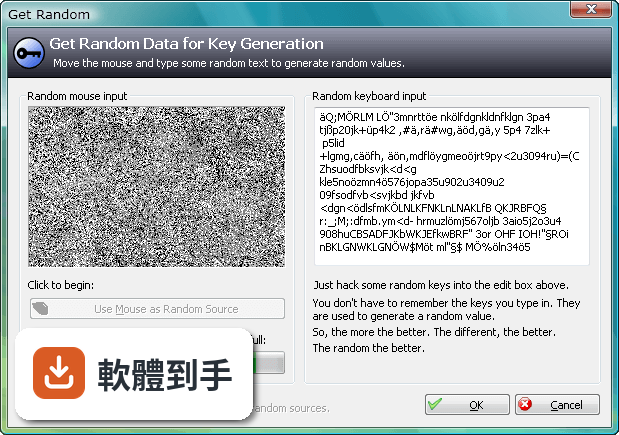
介面語系只有英文,沒有官方中文。不過 KeePass 支援多國語言套件,可以另外下載中文語言檔,但需要自己安裝設定。如果連安裝語言檔都覺得困難,或希望介面預設就是中文,那這套軟體對你來說門檻會比較高。
11跟其他密碼管理器比起來,為什麼評分人數不多?
在收錄的比較名單中,KeePass 有 98 人評分,RoboForm 有 117 人,Kaspersky Password Manager 有 77 人。評分人數少不代表不好,但表示使用者的基數相對小。KeePass 的介面停留在早期風格,沒有現代密碼管理器常見的自動填表、雲端同步、行動裝置 App,這些都是它評分人數不多的可能原因。
12什麼樣的人不建議用 KeePass?
如果你需要手機和電腦之間無縫同步、想要自動填寫網頁表單、或希望介面是中文且現代化,那 KeePass 會讓你花很多時間在設定和維護上。它沒有官方手機版、沒有內建雲端同步、介面老舊且只有英文。這些需求可以考慮其他有持續更新、介面較現代的密碼管理器,但那些通常是付費或訂閱制。
下載與官方連結
前往官方網站 下載 KeePass Password Safe
KeePass-2.13-Setup.exe · 1.9 MB · 連結指向軟體原廠
版本紀錄
- 2026-05-02 KeePass 2.61.1 4.38 MB
- 2026-03-05 KeePass 2.61 4.38 MB
- 2025-11-03 KeePass 2.60 4.23 MB
再看 5 筆
- 2025-07-10 KeePass 2.59 4.15 MB
- 2025-03-05 KeePass 2.58 4.34 MB
- 2024-10-08 KeePass 2.57.1 4.32 MB
- 2024-06-02 KeePass 2.57 4.2 MB
- 2024-02-05 KeePass 2.56 4.19 MB
這一版改了什麼
What's new in this version:
New Features:
- Password quality estimation algorithm: added check for about 1500 most common passwords (these are rated down to 1/8th of their statistical rating; Bloom filter-based implementation).
- Global auto-type (using a system-wide hot key) is now possible on Unix-like systems (see the documentation for setup instructions, section 'Installation / Portability' in the 'KeePass 2.x' group; thanks to Jordan Sissel for enhancing 'xdotool').
- Added IPC functionality for Unix-like systems.
- Added possibility to write export plugins that don't require an output file.
- Tag lists are sorted alphabetically now.
- Password text boxes now use a monospace font by default.
- Added option to select a different font for password text boxes (menu 'Tools' -> 'Options' -> tab 'Interface').
- Added support for importing Password Prompter 1.2 DAT files.
- Added ability to export to Windows/IE favorites.
- Added ability to specify IO credentials in the 'Synchronize' trigger action.
- Added ability to specify IO credentials and a master key in the 'Open database file' trigger action.
- If IO credentials are stored, they are now obfuscated.
- Custom colors in the Windows color selection dialog are now remembered.
- Added high resolution version of the KeePass application icon.
- Improved lock overlay icon (higher resolution).
- PLGX loader: added support for unversioned KeePass assembly references.
Improvements / Changes:
- Added workaround to avoid alpha transparency corruption when adding images to an image list.
- Improved image list generation performance.
- Added workaround to display the lock overlay icon when having enabled the option to start minimized and locked.
- Improved group and entries deletion confirmation dialogs (with preview; only Windows Vista and higher).
- The password character picking dialog now offers the raw password characters instead of an auto-type encoded sequence.
- PINs importer: improved importing of expiry dates.
- Some button icons are now resized to 16x15 when the 16x16 icon is too large.
- Renamed character repetition option in the password generator for improved clarity.
- Improved workspace locking.
- Locking timer is now thread-safe.
- Added code to prevent loading libraries from the current working directory (to avoid binary planting attacks).
- Removed Tomboy references (on Unix-like systems).
- Various code optimizations.
- Minor other improvements.