
這是歷史版本頁面 — 看 KeePass Password Safe 最新版本
密碼多到記不住?KeePass 免費開源密碼管理器能做什麼
 KeePass Password Safe 1.09
資料更新 2007-10-13
閱讀約 6 分鐘
你手上至少有十幾個帳號:Windows 登入、Email、網站會員、FTP、論壇……每個都要密碼,而且最好都不一樣。以前偷懶用同一組,結果某個論壇被駭,連 Email 都被登入,才發現事情大條。現在想好好整理,卻不知道從哪裡開始——用瀏覽器記住密碼是方便,但換電腦、換瀏覽器就全部不見,而且瀏覽器本身也不夠安全。
一般人最常做的就是把密碼寫在記事本或 Excel 裡,但這等於把鑰匙放在門口地墊下。密碼管理器的切入點很簡單:你只需要記住一組主密碼,其他所有密碼都鎖在一個加密的資料庫裡,要用時再解鎖。KeePass 就是這個領域的老牌開源工具,從 2005 年開發到現在,靠的是社群信任和可審查的原始碼,而不是華麗的介面。
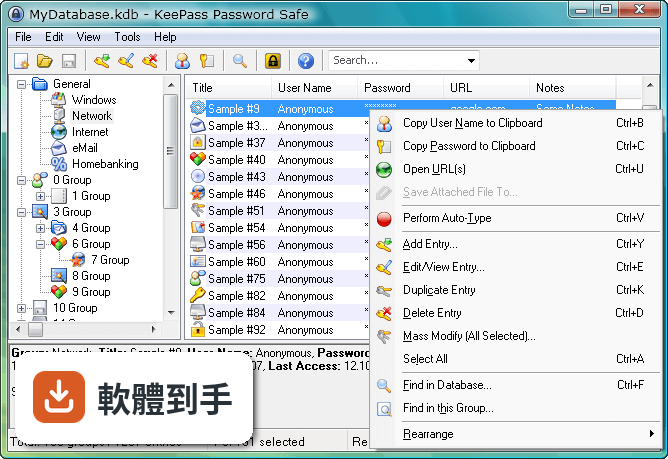
01KeePass 是什麼?跟一般記密碼的軟體有什麼不同?
KeePass 是一套開源密碼管理器,把所有的帳號密碼集中存放在一個加密資料庫裡,用一組主密碼或金鑰檔案解鎖。跟瀏覽器內建記密碼功能不同,它的資料庫是用 AES 和 Twofish 加密,而且原始碼公開,任何人都可以檢查加密有沒有實作正確。免費、無廣告,也不需要註冊帳號。
02密碼存在哪裡?會不會被偷?
所有密碼存在一個以主密碼或金鑰檔案鎖住的資料庫檔案裡,檔案本身用 AES 和 Twofish 加密。沒有主密碼或金鑰檔案,就無法開啟內容。你可以把這個檔案放在自己的隨身碟、NAS 或雲端硬碟,但 KeePass 本身沒有內建雲端同步,傳輸和備份的責任在自己身上。
03可以帶著走嗎?還是只能裝在電腦上?
有提供免安裝的便攜版,放在隨身碟裡直接執行,不需要安裝。資料庫檔案也可以跟著隨身碟走,換一台電腦就能用。不過要注意,便攜版需要目標電腦有安裝 .NET Framework 4.7 以上版本,而且介面是英文的。
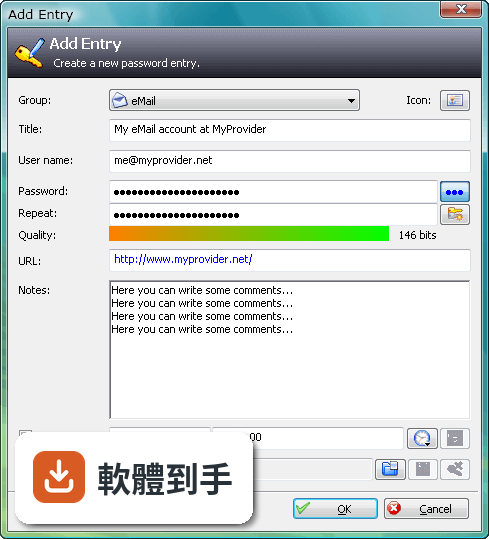
04可以從別的密碼軟體匯入資料嗎?
可以。KeePass 支援從多種格式匯入,也支援匯出成 TXT、HTML、XML 和 CSV。如果你原本用 Excel 或 CSV 記密碼,可以先整理成 CSV 再匯入。匯出功能也可以用來備份或轉移到其他軟體,但匯出後的檔案是明文,要小心存放。
05自動輸入密碼是怎麼運作的?
內建 Auto-Type 功能,可以設定讓 KeePass 自動幫你輸入使用者名稱和密碼。它會模擬鍵盤輸入,所以不需要複製貼上,避免密碼留在剪貼簿裡。也可以設定全域快速鍵,在任何視窗按下快捷鍵就自動填入。但這功能在部分網站或應用程式上可能因為輸入框設計不同而失效,需要自己調整設定。
06適合什麼樣的人用?
適合願意花時間自己管理資料庫的人。KeePass 的運作方式是把所有責任交給你:主密碼自己記、資料庫自己備份、同步自己處理。如果你習慣把東西掌握在自己手裡,不喜歡雲端服務,也不介意英文介面,那它很夠用。它也適合需要管理大量帳號的 IT 人員,可以用群組分類和自訂欄位。
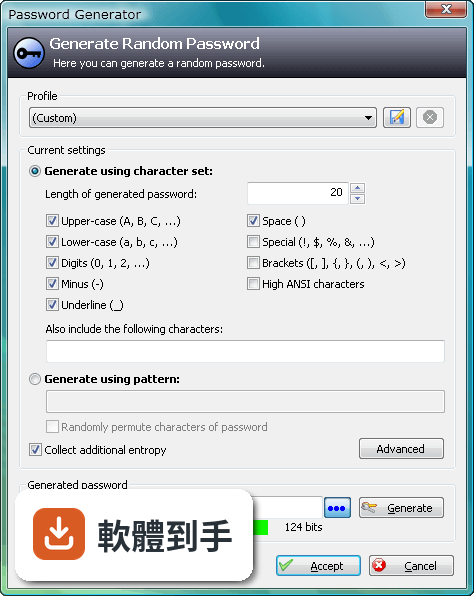
07跟瀏覽器內建的密碼管理比起來,有什麼差別?
瀏覽器內建功能方便,但綁定特定瀏覽器,換瀏覽器或重灌電腦就麻煩。KeePass 的資料庫是獨立檔案,不受瀏覽器限制,而且加密強度更高。但相對的,KeePass 沒有自動填表單的功能,需要靠 Auto-Type 或手動複製貼上,使用上沒有瀏覽器那麼順手。
08手機上能用嗎?
官方沒有提供手機版。資料庫檔案格式是公開的,市面上有第三方 App 可以開啟 KeePass 資料庫,但那些 App 不是官方出品,相容性和安全性需要自行確認。如果你主要用手機記密碼,KeePass 可能不是最方便的選擇。
09需要雲端同步嗎?KeePass 有內建嗎?
KeePass 沒有內建雲端備份或同步功能。如果你要把資料庫放在 Dropbox、Google Drive 之類的地方,需要自己設定,而且每次修改後要手動上傳。如果多台電腦要同步,也要自己處理檔案衝突的問題。不想自己管理同步的人,用起來會覺得很麻煩。
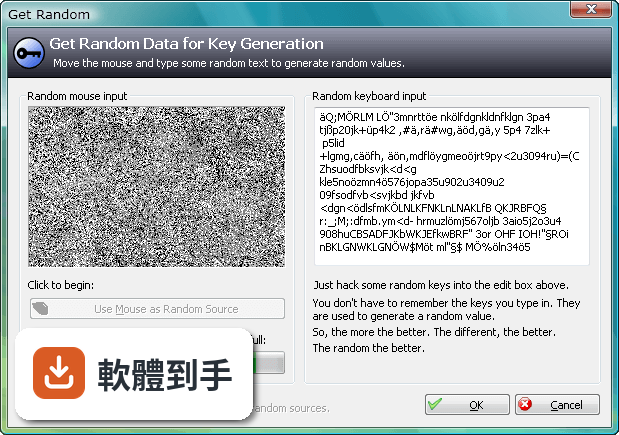
10介面只有英文,看不懂怎麼辦?
介面語系只有英文,沒有官方中文。不過 KeePass 支援多國語言套件,可以另外下載中文語言檔,但需要自己安裝設定。如果連安裝語言檔都覺得困難,或希望介面預設就是中文,那這套軟體對你來說門檻會比較高。
11跟其他密碼管理器比起來,為什麼評分人數不多?
在收錄的比較名單中,KeePass 有 98 人評分,RoboForm 有 117 人,Kaspersky Password Manager 有 77 人。評分人數少不代表不好,但表示使用者的基數相對小。KeePass 的介面停留在早期風格,沒有現代密碼管理器常見的自動填表、雲端同步、行動裝置 App,這些都是它評分人數不多的可能原因。
12什麼樣的人不建議用 KeePass?
如果你需要手機和電腦之間無縫同步、想要自動填寫網頁表單、或希望介面是中文且現代化,那 KeePass 會讓你花很多時間在設定和維護上。它沒有官方手機版、沒有內建雲端同步、介面老舊且只有英文。這些需求可以考慮其他有持續更新、介面較現代的密碼管理器,但那些通常是付費或訂閱制。
下載與官方連結
前往官方網站 下載 KeePass Password Safe
KeePass-1.09-Setup.exe · 1.22 MB · 連結指向軟體原廠
版本紀錄
- 2026-05-02 KeePass 2.61.1 4.38 MB
- 2026-03-05 KeePass 2.61 4.38 MB
- 2025-11-03 KeePass 2.60 4.23 MB
再看 5 筆
- 2025-07-10 KeePass 2.59 4.15 MB
- 2025-03-05 KeePass 2.58 4.34 MB
- 2024-10-08 KeePass 2.57.1 4.32 MB
- 2024-06-02 KeePass 2.57 4.2 MB
- 2024-02-05 KeePass 2.56 4.19 MB
這一版改了什麼
What's new in this version:
Notes:
This is a stable release. It is recommended to upgrade
from any previous 1.x version to 1.09.
Changes:
07/10/12 - 1.09
- Added option to permute passwords generated using a pattern
(this allows generating passwords that follow complex rules)
- Added ability to specify custom character sets in password
generation patterns
- Implemented new URL opening method (as workaround for buggy
Firefox file handler registration on some systems)
- Documents can now be opened using cmd:// URLs (shell execute)
- Added support for CF_CLIPBOARD_VIEWER_IGNORE clipboard format
(clipboard viewers/extenders compliant with this format
ignore data copied by KeePass)
- Improved window position/size/state handling (added support
for Win+M / 'Show Desktop' command, window managers, ...)
- Improved window positioning (PX=0/PY=0 works now)
- Added -readonly command line switch; if present, the database
will be opened in read-only mode
- Added ability to specify the characters a TAN can consist of
- KeePass now stores the user and machine name in .lock files,
so it can show who's currently editing the file when trying
to open a locked file
- Added support for subitem infotips in various list controls
(languages list, export options, plugins, ...)
- Added support for toggling items in option lists by pressing
the Spacebar key
- Installer can now associate .kdb files with KeePass
- The password generator now remembers the last used settings
(even if they are not saved manually as a profile)
- Network administrators: cascading configuration model now
uses a separate enforced configuration file
- Improved configuration saving/loading (improved behavior
under Windows Vista when using the installer, improved out of
the box support for installation by admin / usage by user,
better limited user account handling, ...)
- Added pattern placeholder 'S' to generate printable 7-bit
ASCII characters
- Added pattern placeholder 'b' to generate brackets
- Added quick key file accessibility test in the password
dialog (shows helpful system message on error)
- Temporary files are now named randomly
- The password generator dialog is now shown in the Windows
taskbar if the main window is minimized to tray
- KeePass now offers to open the help file when importing a CSV
file fails
- The 'About' dialog is now automatically closed when clicking
an hyperlink
- Expired/used TAN entries are not shown in the expired entries
dialog any more
- Expired entries are not shown any more in the auto-type entry
selection dialog
- Improved password generator profile management (UI)
- KeePass now shows a descriptive system error message if
executing a cmd:// URL fails
- Improved text in password generator window to allow easier
translation
- Changed password pattern placeholders to support ANSI
- '-' is now treated as TAN character by default, not as
separator any more
- The main window title now shows 'File - KeePass Password
Safe' instead of 'KeePass Password Safe [File]'; improved
tooltip text for tray icon
- Unhiding the master password now requires unsafe operations
permission
- After searching, the first entry is automatically selected
(but the quick-search box still has the focus)
- The option to automatically open the last database is enabled
now by default
- Database is now marked as modified when generating a password
- Minimizing to tray is now enabled by default
- Renamed some menu commands to be more consistent with Windows
- Removed duplicate message box that appeared when checking for
updates and a new version is available
- Removed deprecated API exports; new API must be used by
plugins from now on
- Main window does not move any more when trying to go below
the minimum size
- UI now mostly follows the Windows Vista UI text guidelines
- Improved high ANSI characters support in command lines
- Improved installer (added start menu link to the CHM help
file, publisher information, ...)
- KeePassLibC: Improved 64-bit compatibility
- The expired entries dialog is not shown any more when the
database is unlocked because of a global auto-type operation
- "Tray/Untray" menu item is now correctly disabled when a
dialog is open
- 'New' and 'Open' menu commands are now also enabled when the
workspace is locked
- Unified dialog elements
- Decreased executable file size
- Fixed various problems that occured when KeePass was
minimized to tray ('--exit-all' not working, problems at
Windows shutdown, IPC problems, ...)
- Fixed a bug in the tray icon third-party component that could
leave an unresponsive button in the Windows task bar
- The tray icon does not freeze any more when the Windows
workspace is locked
- Fixed various drawing bugs that occured when disabling the
'Display images on buttons' option
- The button tooltips in the password generator dialog are
translated correctly now
- The hot key to bring the KeePass window to front now also
works when the 'Disable all auto-type features' option is
enabled
- KeePass now selects the correct group when navigating to a
group after performing a search
- Jumping to an entry from the expired entries dialog now also
works correctly when unlocking a database
- The password list is now updated correctly after
drag&dropping entries into another group (view restoration)
- Various other minor improvements and bugfixes