
這是歷史版本頁面 — 看 Kodi 最新版本
電腦裡影片音樂散落各處,Kodi 能幫你整理成媒體庫
 Kodi 17.0
資料更新 2017-02-01
閱讀約 6 分鐘
你電腦裡是不是堆了好幾個資料夾的影片、音樂、照片,有些在「下載」裡,有些在「桌面」上,還有些散在隨身硬碟。想找一部電影來看,得先想起來檔案放在哪,再一層一層點進去,運氣不好檔名還是亂碼,根本認不出來是哪一部。你其實不是缺播放器,是缺一個能把這些亂糟糟的檔案集中管理、自動補上封面和簡介的東西。
一般人遇到這種狀況,最直接的做法是裝個播放器,需要看哪個檔就拖進去播。但這樣每次都要手動找檔案,而且不同格式的影片、音樂、照片要分開開不同程式,久了還是亂。另一種做法是把東西全丟上雲端或串流服務,但上傳要時間、容量要錢,隱私也是問題。這類媒體中心軟體的切入點,是讓你把檔案留在自己電腦裡,用一個介面統一瀏覽、搜尋、播放,甚至自動抓取影片的封面、劇情簡介、字幕,把散落的檔案變成一座有系統的媒體庫。
01Kodi 到底能做什麼,跟一般播放器差在哪?
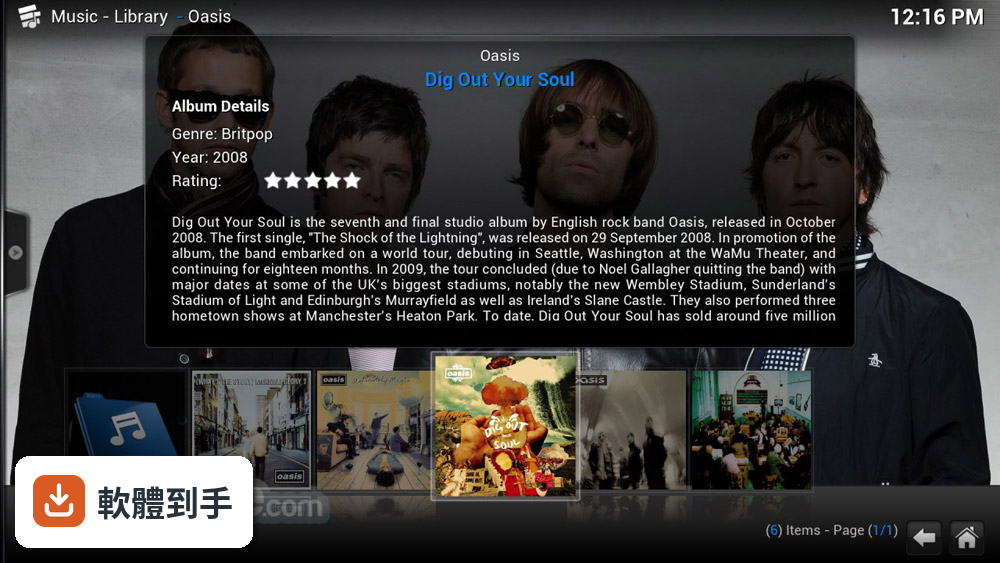
它不只是把檔案打開來播,而是會把影片、音樂、照片集中成一個媒體庫。你指定資料夾之後,它會自動掃描,抓取封面、標題、劇情簡介、字幕等資訊,之後用海報牆或清單的方式瀏覽。也支援幾乎所有常見的影音格式,包括 MP4、MKV、MP3、FLAC。簡單說,它把「找檔案、開檔案」的過程,變成「在媒體庫裡瀏覽、點擊播放」。
02它支援哪些影片和音樂格式?我有些檔案的副檔名很冷門,怕播不了。
官方說明指出它支援幾乎所有常見的影音格式,包含 MP4、MKV、MP3、FLAC 等。但「幾乎所有」不等於保證每一種都順暢,如果你有特別冷門的格式,建議先裝起來實際測試。另外,DVD 和藍光光碟也能播放,但受版權保護的光碟可能需要額外設定,這部分官方文件有提到。
03我有一堆電影和影集,它能自動整理成海報牆那樣嗎?
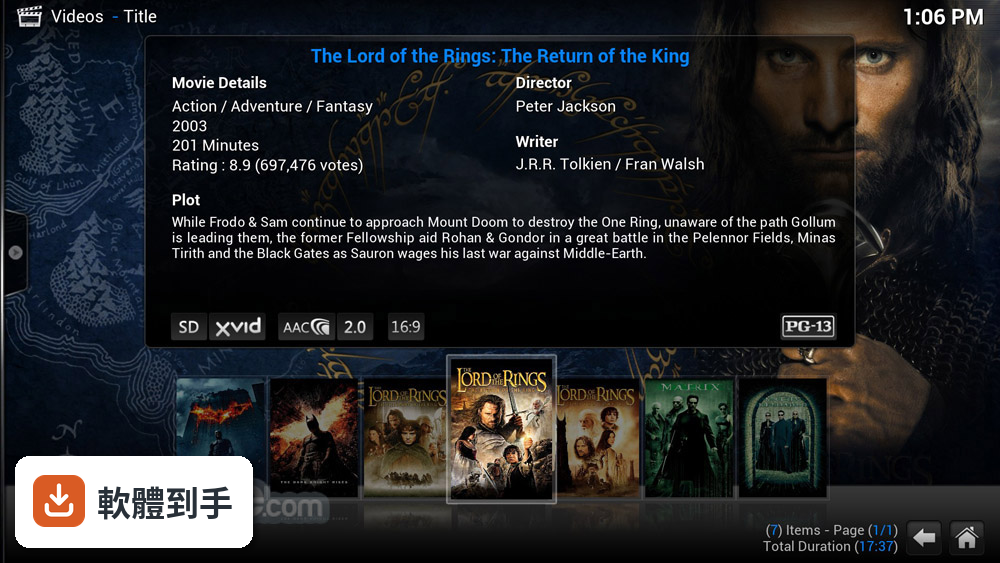
可以。你只要在設定裡把存放影片的資料夾加進來,它就會掃描並自動抓取中繼資料,包括封面、標題、劇情簡介。影集還會依季別、集數分類。不過抓取到的資訊是英文為主,因為介面語系只有英文,中文影片的資料可能抓不完整,這點要先有心理準備。
04它能不能看 YouTube、Netflix 這些串流平台?
YouTube 和 Twitch 可以透過第三方外掛程式來存取,但 Netflix 沒有官方支援,社群開發的外掛程式可能不穩定,官方也明確說這些非官方外掛的可用性和合法性不一。如果你主要目的是看串流平台,這套軟體不是最適合的選擇,它比較偏向管理你自己擁有的檔案。
05它能不能錄電視節目或看直播?
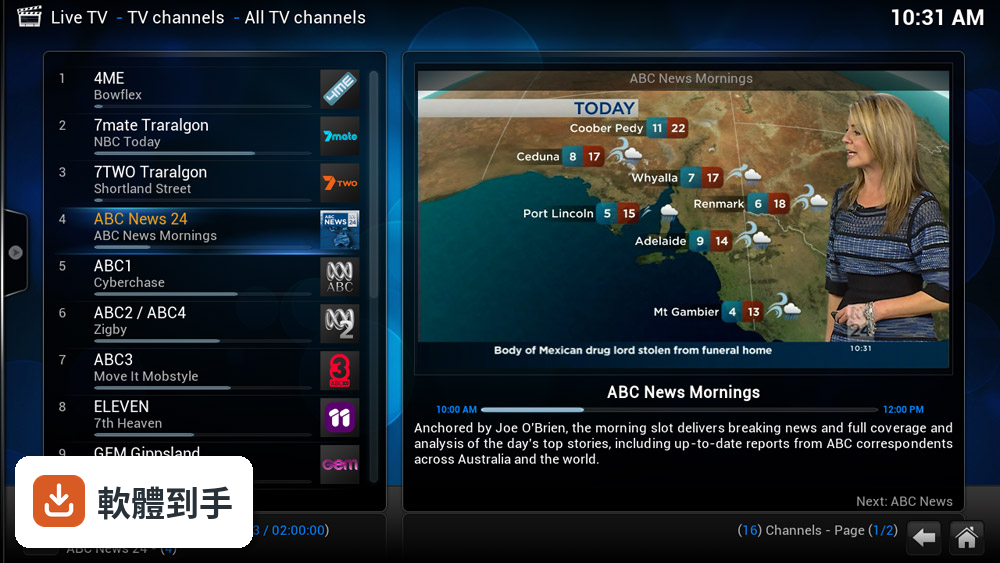
可以,但需要額外接一個後端程式,像是 MythTV 或 NextPVR。設定好之後,就能在 Kodi 裡看電視頻道、錄製節目。這功能比較進階,需要一些網路和伺服器設定的知識,不是裝好就能直接用。如果你只是偶爾想看電視,這個門檻可能偏高。
06什麼樣的人適合用這套軟體?
適合手邊有大量本地媒體檔案、而且願意花時間把媒體庫整理好的人。它特別適合那些已經有收藏習慣、檔案散在多顆硬碟或不同資料夾、想要一個統一介面來瀏覽和播放的使用者。如果你只是偶爾看一部電影、聽幾首歌,不想花時間設定,它對你來說可能太複雜。
07我對電腦不太熟,裝了會不會很難上手?
安裝本身不難,從官網下載安裝檔、照著步驟點就可以了。但初次啟動後,要選擇介面主題、設定媒體庫、新增來源資料夾,這些對新手來說有學習曲線。官方說明也提到,因為自訂選項很多,新使用者可能會需要一點時間適應。如果你不想碰任何設定,這套軟體可能不適合你。
08它可以用遙控器操作嗎?我想把它接在電視上當家庭劇院。
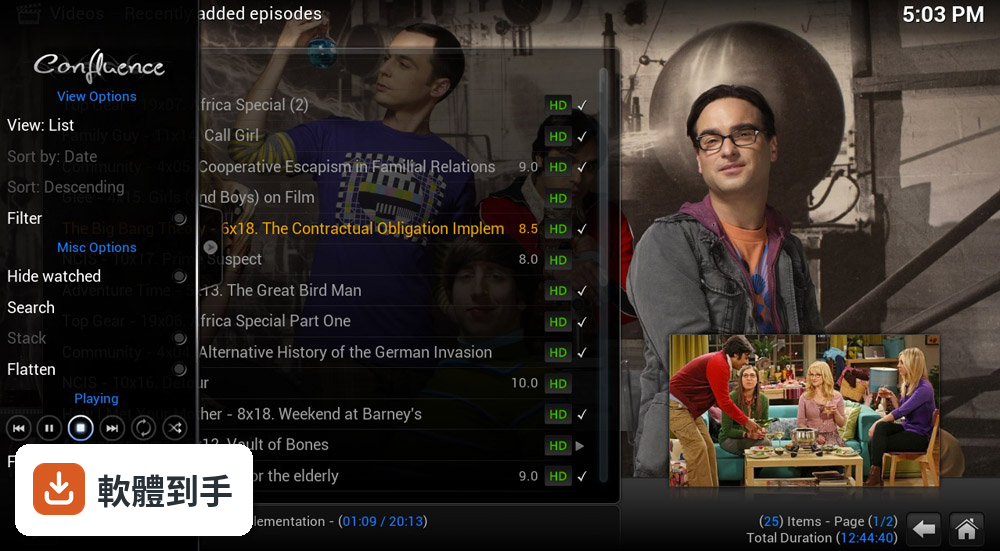
可以。它支援多種遙控方式,包括紅外線遙控器、藍牙遙控器,也可以用手機 App 當遙控器。介面設計也考量了用遙控器操作的場景,主選單清楚分成電影、電視節目、音樂、照片、外掛程式等項目。不過介面只有英文,在電視上操作時要習慣英文選單。
09它的介面只有英文,會不會很難用?
介面語系確實只有英文,這是官方資料明確記載的。對不習慣英文介面的人來說,選單、設定、外掛程式的名稱都會是障礙。雖然操作邏輯不複雜,但如果你對英文不熟悉,每個選項都要查字典,使用體驗會大打折扣。這點在安裝前要慎重考慮。
10它多久更新一次?我擔心裝了之後沒人維護。
根據收錄的版本紀錄,這套軟體從 2014 年到現在持續有更新,近 12 個月更新過 1 次,近 24 個月更新過 2 次,算是穩定維護中的專案。不過更新頻率不算高,如果你習慣追求最新功能,可能會覺得步調偏慢。但開源軟體的特性就是社群驅動,有問題通常社群討論區能找到解法。
11我主要想看 Netflix、Disney+ 這些串流平台,選它適合嗎?
不適合。官方說明明確指出,它沒有原生支援這些主流串流平台,Netflix 只有社群開發的外掛,而且可能不穩定或非官方。如果你主要消費串流內容,Plex 或直接使用瀏覽器會是更直接的路。這套軟體的核心價值在於管理你自己擁有的媒體檔案,不是當作串流平台的入口。
12它跟 Plex 或 VLC 比起來,差在哪裡?
Plex 走的是客戶端—伺服器架構,適合遠端串流,而且介面有官方中文;VLC 是輕量播放器,打開就能播,但沒有媒體庫管理功能。Kodi 介於兩者之間,有強大的媒體庫管理和自訂能力,但介面只有英文,設定也比較複雜。如果你要的是「裝好就能用」,VLC 最簡單;如果要「把整個媒體庫管起來」,Kodi 和 Plex 才是對手。
下載與官方連結
kodi-17.0-Krypton.exe · 79.96 MB · 連結指向軟體原廠
版本紀錄
- 2026-01-26 Kodi 21.3 (64-bit) 73.97 MB
- 2025-01-19 Kodi 21.2 (64-bit) 73.96 MB
- 2024-08-18 Kodi 21.1 (64-bit) 73.65 MB
再看 5 筆
- 2024-04-07 Kodi 21.0 (64-bit) 73.36 MB
- 2024-03-03 Kodi 20.5 (64-bit) 78.21 MB
- 2024-02-11 Kodi 20.4 (64-bit) 78.22 MB
- 2024-01-10 Kodi 20.3 (64-bit) 78.21 MB
- 2023-06-30 Kodi 20.2 (64-bit) 78.32 MB
這一版改了什麼
What's new in this version:
Live TV and PVR (Personal Video Recorder)
- Added enhancement/improvements to PVR addon API (connection state change handling, asynchronous updates & more)
- Added support for navigation controls between EDL (commercial skipping) during PVR recodings playback
- Added support for sorting channels by 'last played' in the Channels window
- Added support to changing of timer type for existing timers to ex. change a episode timer to a series timer
- Added support to echo up important Status info to Timer Rules in the Timer rules window
- Added option to hide disabled timers in the Timer window
- Added support for 'Edit timer' & 'Delete timer' rules to context menu in the EPG & Search windows
- Added support to allow timer creation for EPG in recent past in the EPG window
- Added support to use timer logos depending on its state in the EPG window
- Added "ShowTimerRule" builtin to allow key mapping for "add timer" dialog pre-filled for epg-based timer rule
- Added 'recent recordings' widget (core support and Estuary PVR home screen)
- Added vertical scrollbar to Guide window to allow channel navigation using the mouse (core support and Estuary change)
- Added support for JSON-RPC API sync PVR types fields with current implementation
- Improveed playback of live streams as PVR Live TV streams can now be identified as "live"
- Improved Kodi's Eventlog with extentions to PVR events for 'create/delete timers, timer rules', 'start/stop recordings'
- Improved PVR Guide window performance, especially on first open
- Changes to have separate windows for 'Timer Rules' from 'Timers'
- Changes to separate TV and Radio recordings in the Recordings window
- Changes to make 'group items' setting be persistent in the Recordings window
- Changes to recordings window which now respects "default select action" settings value
- Changes to instant recording behavior to make it configurable (fixed-time vs. current show vs. interactive)
- Refactoring of the PVR Manager (PVRManager) so addons are now owned by Kodi's addon system
- Added, updated, and improved PVR backend clients addons for all popular third-party external PVR backend platforms
Add-ons Framework, API, and Manager
- Added a new API level system to binary addons, refactoring the binary addon library interface for Kodi
- Added a new input system with an API for keyboard and game controllers as "Peripheral Addons"
- Added API support for "Peripheral Addons" for updatable configuration of input devices
- Added support for game controller peripheral addons to system addons
- Added a user-mappable Joystick (Peripheral) Addon for joysticks and gamepad abstraction APIs
- Added "Peripheral Addons" for game controllers, gamepads, joysticks, and input peripherals (in repo)
- Joystick Controller Addon
- X-Arcade (XGaming Tankstick) support for Kodi Addon
- Steam Controller (gamepad) Addon
- Default Game Controller Addon (reference game controller addon based on Xbox 360 gamepad)
- Added support for method to get our useragent string
- Added support for Addons to include screenshots to be visible in Kodi's Addons Manager
- Added support for skins to display 'recently installed' or 'recently updated' addon list in Addon Manager
- Added setting for enabling/disabling ZIP installation of addons from unknown sources (disbaled by default)
- Added a lot of Doxygen related Addons documentation regarding builtin commands to Documentation
GUI Engine (Skinning Engine)
- Added a new default skin called Estuary, with themes & colors, (moving Confluence to addon repo)
- Added a new default touch-screen enabled skin called Estouchy (moving Re-Touched to addon repo)
- Added a new Color Manager to handle loading of madVR 3D LUT ICC profiles for color correction
- Added a new FFmpeg based image loader to guilib for loading pictures
- Added a new FFmpeg based image thumbnails implementation
- Added experimental limited support to guilib for animated APNG images in skin textures and backgrounds/posters
- Added experimental limited support to guilib for animated GIF images in skin textures and backgrounds/posters
- Added support for commercial skipping notifications and toggle action
- Added support for defaultcontrol to grouplists to allow skins to define defaults
- Added support for 'InstallAddon' builtin to allow skins to install addons on demand
- Added Skin.SelectBool builtin support for skinning
- Added support for multi-touch to display adjustment for touch panel calibration
- Improved skinning PVR section by unifying and/or seperating different PVR related windows
- Update guilib ABI (for libgui) to version 5.11.0
- Updated keyboard layout for some languages and added new keyboard layout for French AZERTY & Italian QWERTY
- Changed context menus by refactoring to a global item based system to unify them
- Changed GetThumbSize() to m_imageResso so bookmark/chapter images are same resolution as posters
- Changed background loading of thumbnails so that it is enabled by default
- Changed default icons with updated versions
Platform Independent Playback
- Major refactoring of Kodi's built-in video player core (which also been renamed from "DVDPlayer" to "VideoPlayer")
- Added support for "InputStream" binary addon extension point that can serve as input stream for VideoPlayer
- Added support for "InputStream" (input stream) addons to system addons
- Added "InputStream" (input stream) client addons for common network streaming protocols and popular services
- Added support for 3D LUT (3D Lookup Table) & simple ICC profile linking support for color correction
- Added video stream selection to audio/subtitle dialogue to choose between multiple videos
- Added support for dithering for OpenGL rendering (part of VideoPlayer refactoring)
- Added support for gapless playback on stream change (with the new VideoPlayer)
- Added two new view modes that zoom depending on aspect ratio to match the screen heigh
- Added method for requesting desired video resolution to demuxer to new VideoPlayer
- Added multi-stream input demuxer to support a video stream with external audio tracks/streams
- Added support to change playback speed with audio enabled between 0.8 to 1.5 of normal speed with 'tempo' controls
- Added support for external PGS/.sup (Blu-ray Disc) subtitles
- Added support for hardware video acceleration of DVD-Video (with the new VideoPlayer)
- Added and improved several Audio DSP (Digital Signal Processing) plugins and ADSP addons for Kodi's AudioEngine
- Added and updated many audio decoder and encoder addons for Kodi
- Changed video renderers to separate graphics rendering from main thread (part of VideoPlayer refactoring)
- Improved A/V sync during video playback which reduce time required for audio sync (part of VideoPlayer refactoring)
- Improved switching refresh rates during video playback (part of VideoPlayer refactoring)
- Improved audio pass-through support during video playback (part of VideoPlayer refactoring)
- Improved MMAL playback of H.264 MVC (Blu-ray 3D) stereoscopic video with framepacking decoding on Raspberry Pi
- Improved Stereoscopic 3D playback of 3D videos (as well as better 2D playback of 3D videos)
- Improved and enhanced Blu-ray support (including updated libbluray dependecies from the VideoLAN project
- Upgraded FFmpeg multimedia codec and demux libraries to stable branch release version FFmpeg 3.1 (3.1.6)
- Removed certain audio codecs from core and made them into audio decoder and audio encoder add-ons
Library
- Added support for scraping, storing, and displaying multiple ratings from different sources
- Added support for user rating to the OSD (On Screen Display) for music playback
- Added support for rating and votes label for specific rating
- Added support to filtering by userrating in the mediafilter dialog
- Added support to include watched status for movies in actor search dialog
- Added artist roles tag to the music library to handle tags for ex. Composer, Conductor, DJMixer, etc.
- Added support for MOOD tag scanning for FLAC, Ogg, Xiph, Vorbis, ASF and MP4 audio files to music library
- Added option to exclude singles in recently played albums (set to enabled by default)
- Added support for showning "in progress tv shows" in the filesystem-tree
- Added support Audio and Subtitle Track Count to Smart Playlist selections filtering
- Added support to sort actors by number of movies they are in
- Added support to sort discography ascending by years
- Added support for a method to retrieve video tags
- Added ability to JSON-RPC API to return user ratings
- Improved performance for tag scanning and browsing speed in the Music library
- Improved database performance for addons accessing library
Web Scrapers
- Refactoring and updated scrapers in Kodi for music, movies, tv shows, and music videos
- Added possibility to get information from both .nfo and scraper
AudioEngine
- Added initial support for Audio DSP (Digital Signal Processing) plugins and addons for Kodi's AudioEngine
- Improved the default cross-platform event driven active state machine pattern ActiveAE (Kodi's AudioEngine)
- Improved ALSA sink for ActiveAE for Linux Desktop and generic Linux based Embedded Systems
- Improved PulseAudio sink for ActiveAE for Linux Desktop
- Improved OSS (Open Sound System) sink for ActiveAE for BSD, like FreeBSD and similar BSD Unix based systems
- Improved AudioTrack sink for ActiveAE for Android
- Improved Pi Audio sink for ActiveAE for Raspberry Pi
- Improved DirectSound sink for ActiveAE for Windows
- Improved WASAPI sink for ActiveAE for Windows
- Improved CoreAudio sink for ActiveAE for (Mac) OS X and iOS
- Improved Darwin sink for ActiveAE for (Mac) OS X and iOS
Other
- Added a new default web interface (this new ew webinterface is called "Chorus2" and is currently at version 2.4.1)
- Added support for AppVeyor CI (CI for Windows) build server for regression testing of Kodi and binary addons
- Added support building binary addons to Travis build server for regression testing of Kodi
- Added support for auto creating code documentation with Doxygen including To-Do list
- Added documentation for skinning API to Doxygen, and moved PyDocs of Kodi API to Doxygen
- Added support for IPv6 via cURL
- Added default for the WeTek Play USB remote to peripherals as input device
- Added support for game controller haptics (rumble motors) when the user receives a notification
- Added and updated many audio visualization and screensaver addons for Kodi
- Improved code stability, performance. and security, as well as general code clean-up in many core areas
- Improved render capture which is used by Ambilight implementations (such as example Boblight)
- Improved the the integrated UPnP / DNLA Media Server and Client
- Improved AirPlay compatibility support for iOS 8 (via updated libshairplay)
- Improved Kodi's JSON-RPC API
- Improved the the integrated web server (used for remote control web interface and more)
- Improved HDMI CEC (Consumer Electronics Control) support by updating to LibCEC 4.01 from Pulse-Eight
- Improved "long-press" support functionality of a single button on a remote control
- Updated community maintained translations to over 60+ languages to date for Kodi via Transifex Translation System
- Updated critical dependency libraries such as sqlite, openssl, gnutls, and CMake (used to compile binary addons)
- Updated artwork containing logos with symbol to reflect that Kodi is a registered trademark
- Removed support for RAW image decoding (with removal of CxImage as FFmpeg do not support RAW)
- Removed CxImage, Libgif, and JpegIO (C/C++ libraries) as dependencies in favor of FFmpeg image decoding
- Removed all Boost (C++ libraries) and libsquish as dependencies
Windows Specific
- Converted Kodi to an Desktop Bridge UWP (Universal Windows Platform) compatible app for Windows 10 (x86 only)
- Added initial support to compile Kodi for Microsoft's UWP (Universal Windows Platform) APIs
- Added new CMake based build system of Kodi and binary addons for Windows (as well as for Linux, BSD, and OSX)
- Added support for HEVC Main 10 profile (10-bit) hardware video decoding via DXVA on Windows if drivers support it
- Added support for 10 to 16 bit video output through the DXVA renderer
- Added support for per-monitor DPI and scaling
- Improved rendering system for DirectX 11 and Direct3D 11 native support on Microsoft Windows
- Improved DXVA/DXVA2 (DirectX Video Acceleration) support (requires DXVA/DXVA2 compatible hardware & drivers)
- Changed all external libraries to be built with Microsoft Visual Studio 2015
- Removed unneeded DXVA to D3D11VA wrapper as we now build FFmpeg with D3D11VA support and use it directly