
這是歷史版本頁面 — 看 Komodo Edit 最新版本
免費程式碼編輯器老字號 Komodo Edit 現在還值得用嗎
 Komodo Edit 10.0.0 Build 17209
資料更新 2016-05-17
閱讀約 6 分鐘
寫網頁或寫 Python 腳本時,你打開一個編輯器,想要有語法色、自動補全、按一下就能跳去改某個函式。免費的記事本太陽春,裝了大型 IDE 又覺得卡頓、啟動慢,尤其只是要改個設定檔或寫支小工具,殺雞用牛刀的感覺很明顯。你需要的是一個能專注在「寫程式」這件事上、不會一直打擾你的編輯器。
免費的編輯器很多,但很多不是功能太精簡,就是綁特定語言或平台。有些號稱輕量,裝完才發現要自己東拼西湊外掛,光設定就花掉一下午。Komodo Edit 這類工具的切入點,是提供一個開箱即用的多語言編輯環境,把語法檢查、自動補全、程式碼折疊這些寫程式的基本需求先做好,讓你可以把時間花在寫程式本身,而不是跟編輯器搏鬥。
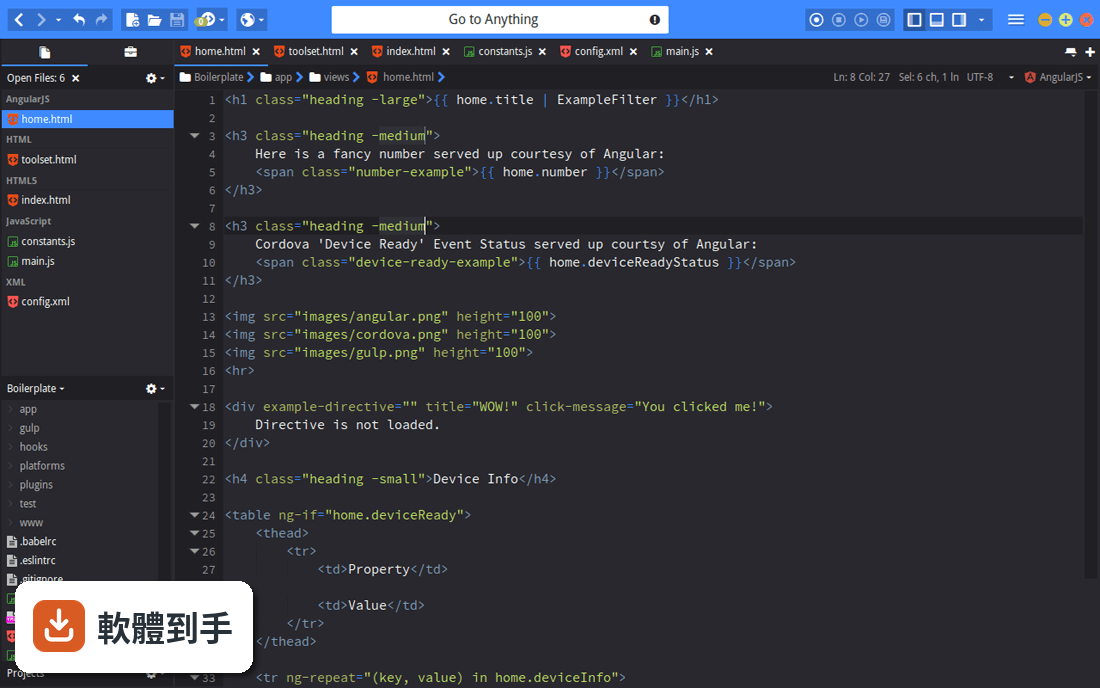
01Komodo Edit 到底能做什麼,跟一般記事本差在哪?
它是一個多平台的程式碼編輯器,支援 PHP、Python、Ruby、Perl、JavaScript、CSS、HTML 等多種語言。跟記事本最大的差別在於,它會在你輸入的當下做背景語法檢查,拼錯或語法不對會立刻標示出來;同時提供自動補全和呼叫提示,寫到一半會跳出建議或函式說明,減少查文件的時間。
02它支援哪些程式語言?我想拿來寫網頁前端可以嗎?
官方列出的語言包含 PHP、Python、Ruby、Perl、Tcl、JavaScript、CSS、HTML,以及 RHTML、Template-Toolkit、HTML-Smarty、Django 這類模板語言。寫網頁前端用的 HTML、CSS、JavaScript 都在支援範圍內,也有語法上色和程式碼折疊,拿來寫靜態網頁或前端檔案是夠用的。
03語法檢查是怎麼運作的?是存檔後才檢查嗎?
它是背景即時檢查,你打字的時候就會在編輯區標出錯誤,不用等存檔。這對抓括號沒閉合、少了分號這類小錯誤很直接,寫到哪檢查到哪。不過要注意,它檢查的是語法層面的錯誤,不是邏輯錯誤,程式能跑但結果不對這種事它管不著。
04除了寫程式,它有沒有其他實用的功能?
有幾個值得一提的。它內建 Markdown 預覽,編輯 .md 檔時可以直接在分割視窗看到轉換後的 HTML,而且不用存檔就會即時更新。另外有一個 Commando 快速面板,可以用模糊比對搜尋檔案、跳到你想要的任何地方,類似「Go to Anything」的概念。還有程式碼片段(Snippets)功能,常用程式碼可以存起來重複插入。
05它能不能像 VS Code 那樣裝外掛擴充功能?
可以,它支援 XPI 擴充套件,機制跟 Firefox 的擴充套件一樣,用的是 Mozilla 標準 API,也支援用 Python 和 JavaScript 自己寫擴充。所以如果你有特定需求,可以去找現成的 XPI 來裝,或自己寫一個。不過擴充生態的規模跟 VS Code 比起來小很多,這點要先有心理準備。
06這套軟體適合什麼樣的人用?
適合需要一個跨平台、多語言編輯器的人,尤其是常寫 PHP、Python、Perl 這類動態語言,又不想被特定 IDE 綁住的使用者。它也適合喜歡自訂編輯器的人,因為可以調色系、改行高,甚至模擬 Vi 或 Emacs 的按鍵操作。如果你只是偶爾改個設定檔、寫點小程式,它提供的功能已經很夠用。
07我習慣用 Vim 或 Emacs 的按鍵,這套軟體能配合嗎?
可以,它內建 Vi 模擬和 Emacs 按鍵綁定,不用另外裝外掛就能切換。這對從終端機編輯器轉過來的人來說比較友善,可以保留原本的操作習慣,同時享有圖形介面的語法檢查和自動補全。不過 Vi 模擬的完整度跟真正的 Vim 比還是有差距,如果你重度依賴 Vim 的某些進階操作,可能要實際測試看看。
08它跟 Komodo IDE 有什麼關係?我該直接買 IDE 嗎?
Komodo Edit 是 Komodo IDE 的免費開源精簡版,IDE 多了除錯、單元測試、程式碼重構、效能剖析,以及跟 Gulp、Grunt、Docker、Vagrant 等工具的整合。如果你只是寫程式、編輯檔案,Edit 就夠了;但如果你需要完整的開發流程工具鏈,IDE 才是你要的。不過 IDE 是付費軟體,而且評分人數比 Edit 少,可以先從 Edit 開始用看看。
09這套軟體一直沒更新,會不會有相容性問題?
它的版本紀錄顯示最近一次更新是 2020 年,之後就沒有新版本了。這代表它不會再修 bug 或支援新的語言特性,如果你用的語言或工具鏈持續在演進,可能會遇到語法檢查不認得新語法的情況。另外它官方支援的系統是 Windows 7 到 10,如果你用 Windows 11,可能要自己確認能不能正常運作。
10介面只有英文,對中文使用者來說會很難上手嗎?
介面確實只有英文,沒有中文語系。對不習慣英文介面的人來說,選單和設定項目需要花點時間熟悉。不過程式碼編輯器的操作邏輯大同小異,常用的功能就那幾個,而且網路上有不少教學文章可以參考。如果你完全無法接受英文介面,可以考慮其他有中文語系的編輯器。
11我該拿它跟 Atom 比嗎?哪個比較好?
tom 的評分人數有 170 人,比 Komodo Edit 的 83 人多,代表 Atom 的使用者基數比較大,社群資源和擴充套件也比較豐富。但 Atom 本身也已經停止維護,兩者都屬於不再活躍開發的專案。如果你在意的是長期維護和社群支援,兩者都不是最佳選擇;如果你只是需要一個能用的編輯器,Komodo Edit 的功能完整度是夠的。
12什麼樣的情況不該選 Komodo Edit?
如果你需要除錯、單元測試、程式碼重構這些進階功能,它沒有,那是 IDE 的範疇。如果你用的是比較新的程式語言或框架,它可能不支援或語法檢查會誤判。如果你很在意軟體是否持續更新,它已經多年沒有新版本,這點要考慮進去。另外,如果你需要中文介面,它只有英文,這也是一個限制。
下載與官方連結
Komodo-Edit-10.0.0-17209.msi · 74.57 MB · 連結指向軟體原廠
版本紀錄
- 2020-02-12 Komodo Edit 12.0.1 Build 18441 74.8 MB
- 2020-01-16 Komodo Edit 12.0.0 Build 18431 74.8 MB
- 2019-01-09 Komodo Edit 11.1.1 Build 18206 74.8 MB
再看 5 筆
- 2018-06-21 Komodo Edit 11.1.0 Build 91033 90 MB
- 2017-12-20 Komodo Edit 11.0.2 Build 18122
- 2017-10-31 Komodo Edit 11.0.1 Build 18119 74.7 MB
- 2017-09-26 Komodo Edit 11.0.0 Build 18063 74.7 MB
- 2017-07-25 Komodo Edit 10.2.3 Build 17708 74.7 MB
這一版改了什麼
What's new in this version:
New User Interface:
- The entire user interface has been given a big facelift. This facelift isn’t just about making Komodo more attractive and enjoyable to use; a ton of user experience work has gone into the facelift. On the technical end, these changes make Komodo far more maintainable and far less prone to interface related bugs. Possibly the biggest feature, though, is that you can define your own colors. Every color scheme now also extends to the user interface, so you can tweak and style not just how your code looks, but also how Komodo looks. Or not–it’s entirely up to you, of course.
- For those who prefer not to have their user interface change too much we’ve also introduced some preferences which let you essentially use the “classic” approach to UI in many places.
- These changes do mean that skins and iconsets for Komodo 8 and 9 will no longer work.
The Dynamic Toolbar:
- The dynamic toolbar is a new UI element in Komodo 10 which holds toolbar buttons that provide contextual actions to your files and project. They show and hide based on what you’re doing and provide information and actions based on how your files and projects are configured. For example the version control dynamic button will show you how many files have changed and allow you to quickly open eg. file or project history, or the commit dialog.
- The dynamic toolbar is very developer friendly, so you can easily create your own buttons or download ones that were contributed by other developers.
First Start Wizard:
- When you first start Komodo (or when you update between major versions) Komodo will now show you a short and simple first start wizard that lets you customize Komodo to your likings. Tabs or spaces? The bias is all yours.
New Default Keybindings:
- Our old defaults (which are still available as “Legacy” keybindings) were an accumulation of 10+ years of changes. Needless to say they became messy and illogical. With Komodo 10 we dumped them entirely and started from scratch. A rule of thumb here was that if something didn’t make sense then it didn’t deserve a default binding, the user can define these themselves. We also reviewed other editors complete default keybinding sets to find commonalities in the industry. The new bindings are based on logic and sensible defaults that programmers have become accustomed to.
Other Editor Keybindings:
- We are introducing keybindings for other editors and IDE’s to facilitate developers transitioning to Komodo. These can be accessed from your Keybinding preferences or via the First Start wizard.
- Improved Node.js and PHP CodeIntel:
- JavaScript and PHP CodeIntel has had significant improvements, NodeJS modules and PSR4 classes are fully supported as well as various new features of each language.
- Support For React, Ember, Angular, TypeScript, ES6:
- We’ve put a lot of focus on individual frameworks in Komodo 10, a trend you can expect to continue. With this iteration we focused on some of the most popular JS frameworks and derivatives.
Performance Improvements:
- Komodo 10 has received significant performance improvements. File opening, closing, saving, typing, .. you name it. Additionally we’ve fixed a long standing memory leak which caused users to have to restart Komodo every few days, that should no longer be the case.
Other Mentionables:
- Improved color picker UI and UX
- New color scheme editor
- New UI SDK (used in our new First Start Wizard)
- and much much more
Detailed Changes and Bug Fixes in Komodo IDE/Edit:
- CodeIntel: Fixed large memory leak that would keep a CI record around after closing a file - fixes #627.
- Collab: Fix issue where user indicators would show on top of windows.
- Collab: Use tooltip instead of panels, to eliminate focus issues.
- ColorScheme Editor: The color scheme editor has been significantly overhauled.
- ColorSchemes: Significantly improved color scheme saving performance.
- Commando: Fix miss-alignment when opened from the toolbar - fixes #789.
- Commando: Fix non-recursive searches not working - fixes #834.
- Console: Fixed object keys not dumping in some cases - fixes #790.
- Date: Fri Mar 4 12:05:32 2016 -0500.
- Debug: Fix run without debugging throwing error - fixes #835.
- Editor: Fix allow file contents to override .. always being on - fixes #995.
- EditorConfig: Reverted a change that made some prefs not apply - fixes #908.
- Find: Don’t show a notification when closing a find result tab - fixes #979.
- Find: Fix “where” section not remembered - fixes #873.
- Find: Keep focus inside find frame when tabbing - fixes #888.
- Find: Restore focus after the find frame closes - fixes #805.
- Fixed regression in Perl interpolated variable highlighting with Scintilla upgrade - fixes #914.
- HTTPInspector: Fix failure to initialize.
- InitService: Implemented partial upgrades.
- JSX: Fixed syntax highlighting bug that created extraneous fold points - fixes #1087.
- Less: Catch file resolving exceptions.
- Less: Fixed highlighting of class selectors - fixes #652.
- Less: Recognize errors from later versions of Less - fixes #1061.
- Linter: Show at most 10 results at a time.
- Linting: Only notify about the first linting error (don’t bombard users with notifications) - fixes #818.
- Non-scannable UDL languages like XML do not have scopes; do not raise errors - fixes #906.
- Notifications: Corner notifications should not be too wide.
- Notifications: Fixed notifications stealing focus, for real this time - fixes #816, fixes #837.
- OpenFiles: Fix tab sorting won’t toggle - fixes #841.
- Packages: Only ever install the latest available - fixes #950.
- Places: view manager fails with no project open.
- Projects: Fix editor prefs missing under Project prefs - fixes #929.
- Projects: Fixed #860 can’t open projects with “ ” in name.
- Projects: Places opens in wrong context in newWindow. fixes #932.
- Python: Fixed autoindentation corner-case with dictionaries - fixes #632.
- Regex Tool: UI Overhaul.
- Runinline: Consider global environment preferences - fixes #810.
- SCC: Added an “Open Web Service” command/menu.
- SCSS: Use ’//’ for line comments in SCSS - fixes #866.
- SDK: Keybindings: Extended SDK and fixed usedBy.
- Schemes: keybindings: new default bindings for all platforms.
- Scope: Sections: Komodo now has project wide symbol browsing.
- UI: Added support for userChrome.less.
- UI: Highlight focused elements in the HUD - fixes #883.
- UI: The new Komodo interface is fully customizable, you can pick your own colors rn=.
- UX: Added classic mode (aka I don’t like changes mode).
- UX: Closing multiple files at the same time is now significantly faster.
- UX: Find: The find frame now no longer closes when focus is lost.
- UX: Improve speed and UX feedback when opening multiple files.
- Unit Testing: Improved the user experience.
- codeintel: Allow autocompletion in anonymous classes - fixes #1140.
- codeintel: Buffers with only one token should not cause errors anymore - fixes #796.
- codeintel: CSS: Added flex support from Defman21’s PR.
- codeintel: CSS: Fixed failure to detect selectors in some instances - fixes #938.
- codeintel: CSS: added pointer-events property from Defman21 - fixes #1090.
- codeintel: Complete PHP interfaces in “use” statements - fixes #176.
- codeintel: Do not create extra, unnecessary CIX files on Windows - fixes #870.
- codeintel: Do not error on blank documents - fixes #895.
- codeintel: Extract correct type information for PHP variables from ’@var’ phpdoc in compound declarations - fixes #752.
- codeintel: Fail gracefully when the database is incomplete - fixes #1351.
- codeintel: Fixed buggy side-effect of identifying PSR-4 autoloaded classes - fixes #1241.
- codeintel: Fixed computation of the section the current line is in - fixes #1171.
- codeintel: Fixed more instances of PHP completion with foreach - fixes #142.
- codeintel: Handle nested selectors in LESS - fixes #1092.
- codeintel: Handle nested selectors in SCSS - fixes #1093.
- codeintel: JQuery: Updated catalog to v1.12.1.
- codeintel: JavaScript: Include HTML5 API by default in stdlib catalog - fixes #1170.
- codeintel: Javascript: Enable local variable visibility for closures - fixes #502.
- codeintel: Javascript: Handle scoped variables in class constructors properly as closures.
- codeintel: Less/SASS: Do not show autocompletions for ’:’ after variable names - fixes #1091.
- codeintel: Less/SCSS: Added autocompletion for variables - fixes #737.
- codeintel: NodeJS: Added “catalogs” for NodeJS v0.10, v0.12, v4.4, and v5.9.
- codeintel: PHP: Added PHP 7.0 stdlib catalog.
- codeintel: PHP: Fixed interface method inheritence - fixes #751.
- codeintel: PHP: Initial implementation of recognizing PSR-4 autoloaded classes.
- codeintel: Perl: Autocomplete builtins - fixes #987.
- codeintel: Perl: Updated Perl stdlib catalog to Perl 5.22.
- codeintel: Python: “Goto Definition” should work on both module names and aliases - fixes #1107.
- codeintel: Python: Added stdlib catalogs for 3.4 and 3.5.
- codeintel: Recognize Javascript ES6 rest parameters.
- codeintel: Recognize Perl private functions - fixes #1084.
- codeintel: Recognize anonymous PHP functions as parameters - fixes #980.
- codeintel: Recognize variables assigned to anonymous classes - fixes #1047.
- codeintel: Ruby: Added stdlib catalogs for Ruby 2.2 and 2.3.
- codeintel: catalogs: Added Ember.js API catalog and CIX generator.
- codeintel: golang: Fixed codeintel crash in some instances of “goto definition” - fixes #461.
- collab: Show all active sessions in tab’s “Share in existing session” context menu - fixes #578.
- color schemes: Ensure consistency in applying color schemes - fixes #730.
- debug: JavaScript: Debugging JavaScript uses Chrome now; use NodeJS to explicitly debug with the NodeJS debugger.
- debugger: All versions of NodeJS should be supported now - fixes #747.
- debugging: Allow removing breakpoint markers that have moved during editing - fixes #256, 807.
- django: Fixed Django linter for Python3 - fixes #140.
- editing: Added command and keybindings to remove previously selected word in multi-caret session - fixes #869.
- editing: Added option to disable Ctrl+Click creating multiple selections - fixes #1081.
- editing: Added option to retain selected text when smart wrapping - fixes #904.
- editing: After smart-selecting XML/HTML tags, typing ’ ’ consolidates the selection to the opening tag - fixes #1019.
- editing: Allow smart wrap selections to work with ‘Shift'ed characters - fixes #986.
- editing: Fixed line duplicate up/down at document boundaries - fixes #1201.
- editing: Fixed regression of in-line selection duplication - fixes #84.
- editing: Handle encoding mismatch when attempting to pre-process saved files - fixes #997.
- editing: PHP: Added preference for selecting the ’$’ in PHP variables - fixes #863.
- editing: Prevent line/block commenting and uncommenting from removing line markers - fixes #1110.
- editing: Smart Wrapping: Define “plain-text” to be in the same Scintilla style - fixes #1023.
- editing: Take care not to delete markers when cleaning EOLs or stripping whitespace - fixes #754.
- editing: XML: Auto-close XML tags with multiple carets - fixes #812.
- editing: spell check: Added command to ignore words - fixes #947.
- editor: Do not auto-expand abbreviations when recording macros or when there is a column selection - fixes #811.
- editor: Fix potential division by zero error in smart backspace - fixes #1106.
- editor: Fixed incorrect indent calculation - fixes #966.
- editor: Fixed never-ending regexp for double-clicking numbers - fixes #1015.
- editor: Fixed out-of-control drag-and-drop for large files and word wrap - fixes #901.
- editor: Ignore smart wrapping when performing a key combination - fixes #865.
- editor: Optimize block selection - fixes #1158.
- editor: minimap: Do not allow markers to be shown - fixes #855.
- elastic tabstops: Drastically improve performance in large files - fixes #1034.
- elastic tabstops: Respect tab width preference - fixes #820.
- find: Give better feedback on bad regular expressions - fixes #443.
- interactive shell: Fixed pasting into non-empty lines in interactive shells - fixes #292.
- interactive shell: Improve toggle interactive shell experience - fixes #1264.
- koextgen: Ensure extension name is valid for user-defined languages - fixes #983.
- languages: Added JSERB from Eric Promislow.
- languages: Added syntax highlighting and linting for TypeScript.
- languages: New AngularJS lexer and codeintel support.
- launch new Window: Fixed #860 opening project.
- lint: JS: Upgraded JSHint to v2.6.3 and removed JSLint and options wizard - fixes #603.
- lint: JavaScript: Use common JSHint options like 'moz’ and 'esnext’ by default - fixes #797.
- lint: Mark whole words in CSS lint warnings - fixes #931.
- lint: Prevent 'unused’ JSHint warning when editing userscripts - fixes #1135.
- lint: Workaround pylint’s handling of relative imports - fixes #1175.
- lint: jsx: Added linting for JSX.
- lint: stop assuming all multi-lang files are markup-based.
- prefs: Prevent tab width from being set to zero - fixes #1009.
- schemes: Legacy: move original keybindings to legacy scheme.
- scintilla: JavaScript: Patched Scintilla to syntax highlight JavaScript ES6 templates.
- spell check: Added option to not spell check the contents of strings - fixes #827.
- unittest: Fixed parsing of Perl’s Test::Simple and Test::More unittest output - fixes #319.
- unittest: Support Ruby 1.9+ and Rails 4+ (Test::Unit only, MiniTest unsupported).
- unittest: Support and require PHPUnit 4+ - fixes #302.