
這是歷史版本頁面 — 看 Light Image Resizer 最新版本
圖片一張張改大小太麻煩?Light Image Resizer 能幫你什麼
 Light Image Resizer 5.1.1.0
資料更新 2017-11-28
閱讀約 6 分鐘
你手上有一堆照片要處理——可能是剛從相機或手機倒出來的原始檔,也可能是客戶寄來的產品圖。每一張都要縮小、轉格式、重新命名,甚至加上版權文字,才能上傳到網站或寄給別人。你心想:「該不會要一張一張用小畫家開吧?」光是想到那個重複動作就讓人提不起勁,尤其數量一多,時間就這樣白白耗掉。
其實這類需求有一套固定的處理方式:把「縮小、轉檔、改名、壓縮」這些動作變成批次流程,一次套用到整個資料夾。你不用理解影像處理的原理,只要告訴軟體「輸出多大、存成什麼格式、放到哪裡」,剩下的它照做。差別在於,不同工具能處理的範圍、操作的直覺程度、以及背後的授權限制都不一樣,選錯反而會卡在更麻煩的環節。
01Light Image Resizer 可以一次處理很多張圖片嗎?
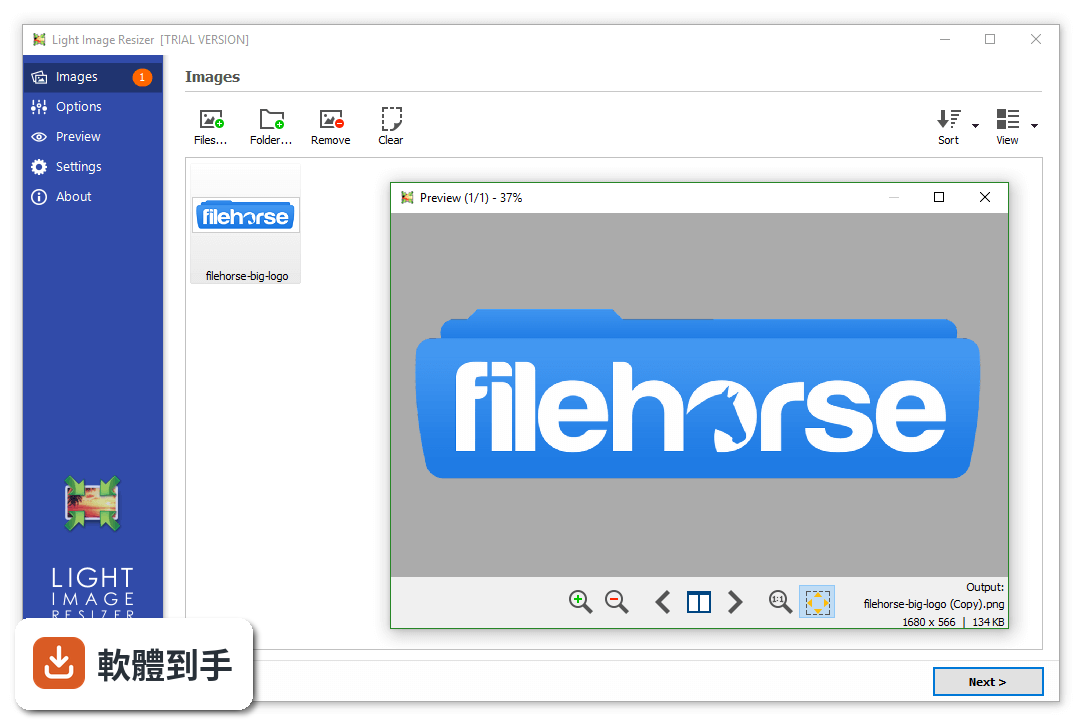
可以。它主打的就是批次處理,你可以選整個資料夾或子資料夾,一次把大量圖片縮小、轉換格式、重新命名或搬移。操作上先設定好輸出解析度、檔案格式和目的地,再按下執行,它就會依序處理完畢。單張圖片也能處理,但這套軟體的主要用途還是應付「數量多到不想一張一張來」的場合。
02它除了改尺寸,還能對圖片做什麼?
它能做的事不少:轉換格式(例如 JPEG 轉 PNG)、壓縮檔案大小、重新命名、搬移檔案、加上浮水印或版權文字、轉成黑白或褐色調、加邊框,還有即時預覽。另外也能把圖片轉成 PDF、從 PDF 抽取圖片、製作拼貼,甚至內建一個小編輯器可以做截圖、加文字、標示和模糊處理。功能範圍算廣,但每個功能都不算太深入。
03我想把照片縮小後寄 email,它有辦法處理嗎?
可以。它有一個 publish 功能,專門把處理好的照片直接當成 email 附件寄出,可以單張寄,也可以打包成 ZIP 檔,而且會注意不要超過郵件伺服器的容量限制。如果你只是偶爾寄幾張照片,用一般郵件軟體手動縮圖再附檔也行;但如果你常常要寄大量照片給客戶或親友,這個功能可以省掉不少步驟。
04它能不能把圖片轉成 PDF?
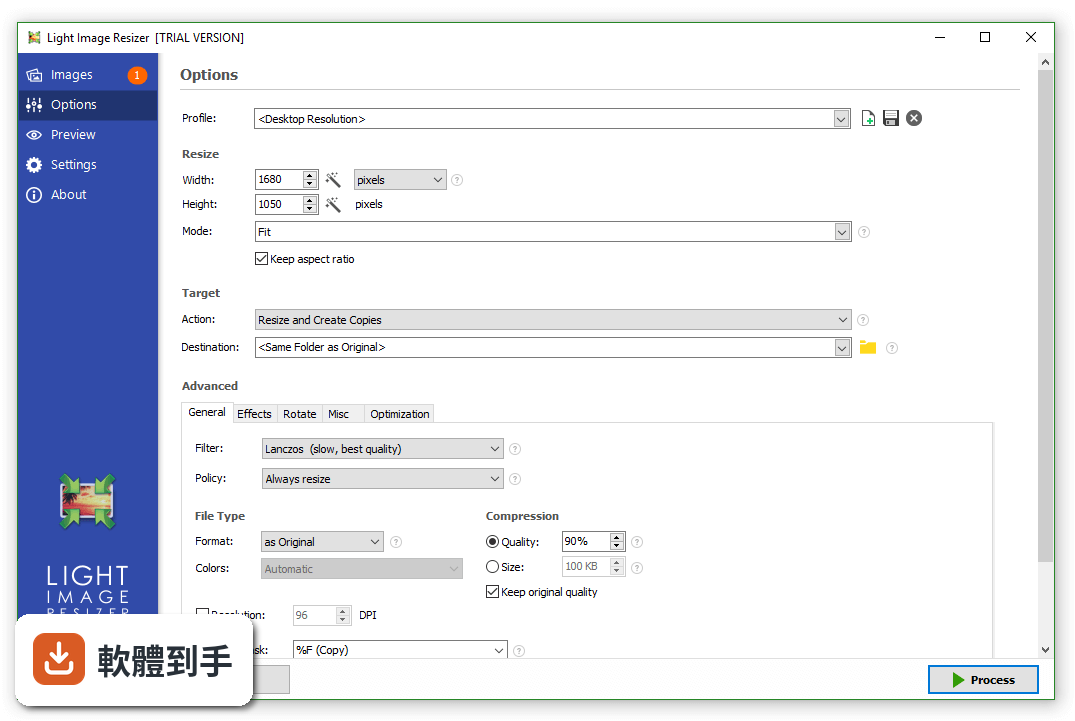
能。你可以把單張或多張圖片轉成 PDF,例如把 JPG 轉成 PDF。若圖片太長,它還有選項可以把長圖拆成多頁 PDF。另外它也支援從 PDF 檔案中抽取圖片。這對需要把多張照片整理成一份文件寄給別人、或存檔的人來說,是滿實用的功能。
05浮水印功能是怎麼運作的?
它可以加上浮水印或版權文字,支援類似 HTML 的文字格式和透明度調整。也就是說,你可以控制文字的樣式、大小、透明程度,也能把檔案大小、圖片尺寸、副檔名這些資訊當成浮水印內容加進去。它還有即時預覽,讓你在處理前先看到成品長什麼樣,不用等跑完才發現位置不對。
06這套軟體適合什麼樣的人用?
適合「手上有一批圖片需要統一調整」的人。例如部落格作者要幫文章圖片統一縮圖、電商賣家要處理商品照、攝影師要輸出縮圖給客戶預覽、或一般使用者想把相機照片縮小後寄出去。它不需要你懂影像處理,只要會設定輸出規則就好。如果你只是偶爾改一張圖,那用小畫家或免費線上工具就夠了,不需要裝這套。
07我不太會英文,用起來會很吃力嗎?
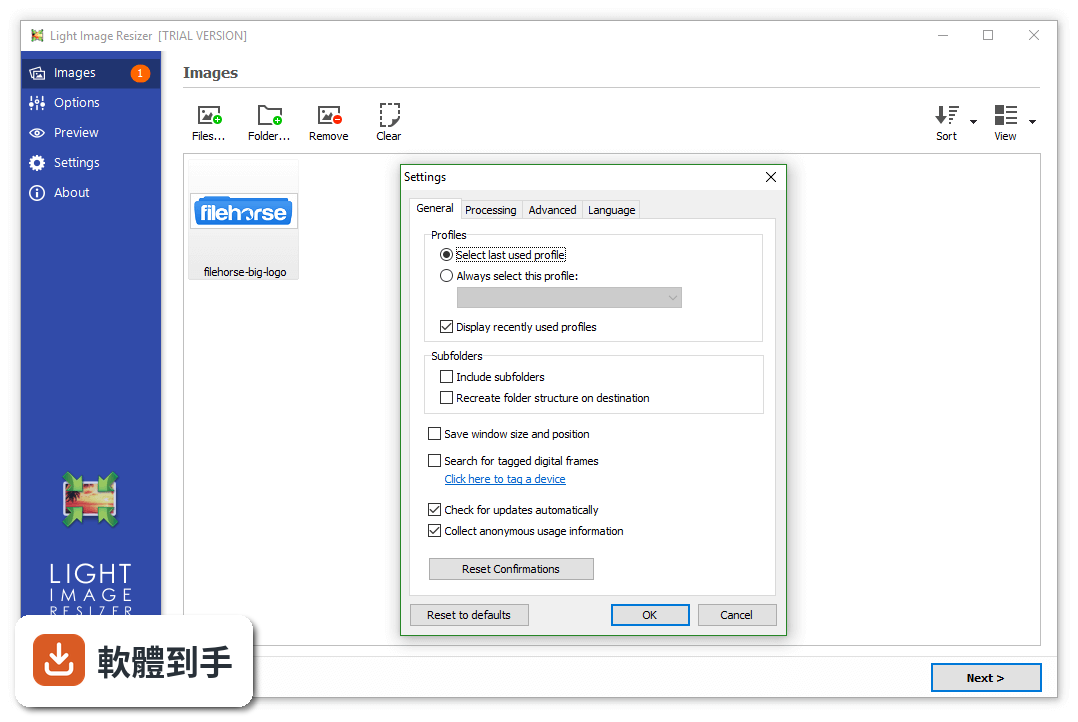
這套軟體的介面是英文,沒有中文語系。它的操作流程不算複雜,主要就是選圖片、設定輸出規則、按執行,但如果你對英文介面不熟悉,還是會有一些門檻,尤其是設定選項比較多的地方。建議你先去官方網站看操作畫面或教學,確認自己能不能接受英文介面再決定。
08它是免費的嗎?
不是,它是 Demo 授權,也就是試用版。試用版通常有功能限制或使用期限,完整版需要付費購買。官方網站上應該有詳細的授權說明和價格,建議你直接去確認。如果你只是偶爾用一次,試用版可能夠用;但若要長期依賴它處理圖片,就要把授權費用算進預算裡。
09它和 FastStone Photo Resizer 比起來,該選哪個?
兩者功能相近,都是 Windows 上的批次圖片處理工具,但 FastStone Photo Resizer 的使用者評分人數較多(49 人),Light Image Resizer 只有 30 人評分,參考樣本都不算大。Light Image Resizer 多了 PDF 轉換、拼貼、OCR 和 HEIC 格式支援,功能面較廣;FastStone 則以輕量、快速著稱。建議你先想清楚自己需要哪些功能,再下載試用版實際比較。
10它的評分只有 7.34 分,是不是代表不好用?
這個分數來自 30 人的評分,樣本數不多,參考價值有限。7.34 分不算差,但也稱不上突出。同類工具中,Fotor for Windows 有 192 人評分,能看出更多人使用。評分低不一定代表軟體有問題,可能是介面不順手、功能不符合預期,或只是用的人少。建議你下載試用版親自操作看看,比只看分數更可靠。
11我只有 Windows 8 或更舊的電腦,可以用嗎?
它支援 Windows 8、Windows 10 和 Windows 11,所以 Windows 8 可以用。如果你的系統是 Windows 7 或更舊版本,官方資料沒有提到支援,可能就無法安裝或執行。建議你先確認自己的系統版本,再到官方網站看詳細的系統需求,避免下載後才發現跑不起來。
12它處理 RAW 檔嗎?
官方資料提到它支援 RAW 格式,但沒有列出具體支援哪些 RAW 副檔名。如果你主要是處理 RAW 檔,建議先確認你的相機型號產出的 RAW 檔是否在支援清單內。另外,它處理 RAW 檔的方式是轉換和縮圖,不是像 Lightroom 那樣的專業 RAW 編輯,這點要先有心理準備。
下載與官方連結
light_image_resizer5_setup.exe · 連結指向軟體原廠
版本紀錄
- 2026-10-28 Light Image Resizer 7.6.8.183 46.3 MB
- 2026-10-20 Light Image Resizer 7.6.7.182 46.4 MB
- 2026-09-10 Light Image Resizer 7.6.6.178 46.1 MB
再看 5 筆
- 2026-08-07 Light Image Resizer 7.6.5.176 45.9 MB
- 2024-02-22 Light Image Resizer 6.2.0.0
- 2022-12-16 Light Image Resizer 6.1.6.0
- 2022-11-07 Light Image Resizer 6.1.5.0
- 2022-07-13 Light Image Resizer 6.1.3.0
這一版改了什麼
What's new in this version:
Light Image Resizer 5.1.1.0
New:
- some additional layouts for collage mode
Fixed:
- crash could occur in some cases when loading failed
- in some cases an installed email client was not detected
- loading of WebP images was broken
Improved:
- try to load embedded JPEG for unsupported RAW files
Light Image Resizer 5.1.0.0
New:
- extract embedded JPEG for FUJI RAW files (.RAF) that use compression (resolution will be lower than original)
- Samsung RAW files (.SRW) added to supported file extensions
Fixed:
- processing images with varying color profiles in a row could lead to incorrect results
- some conversions between color spaces were producing wrong colors
- IPTC metadata could be added twice in some cases
- some output format choices could result in the wrong format being used
- destination for collage could be stuck with a fixed filename when profile was saved
Improved:
- support unicode filenames when sending email
- prevent creation of 0 byte files when disk is full
Light Image Resizer 5.0.9.0
Fixed:
- Processing could freeze when preview window was open
- Some TIFF files with unequal DPI values could appear deformed
- Wrong preview could be loaded when navigating in some cases
Improved:
- Skipping through previews is faster now
- Less delay when processing is cancelled
- Display error details in case loading failed (e.g. “access denied”)
- Use name as secondary sort key when sorting by type, size, or date
Light Image Resizer 5.0.8.0
New:
- Background color selection for collage
Fixed:
- Subfolders command line parameter was not handled correctly
- Parsing of subfolders when using wildcards could add files several times
- Background color of watermark text was not applied
- Don’t add temporary profiles to recent list
- Some collage templates were producing the wrong layout in the saved image
- Profile was not cleared in some cases, which could wrongly override parameters from command line
- Wrong image and file size displayed in preview for multi-page images (TIFF)
- Last used profile was not selected correctly in some cases
Improved:
- Expand relative file paths from command line with working directory
Light Image Resizer 5.0.7.0
New:
- support reading of BigTIFF format
Fixed:
- application title was incorrectly updated during processing
- preview windows did not show error if image could not be loaded
- auto close function was broken
- main menu had no text in rare cases
Improved:
- display an error message if files specified in command line are not found
- better documentation for command line usage (see switches.txt)
- use fallback in case image loading fails
Light Image Resizer 5.0.6.0
Fixed:
- crash or black output could occur if resizing to very large dimensions
- crash could occur when closing preview right before image finished loading
- original preview was not loaded when using Center mode
- memory leak when watermark text rendering failed
- Add Border dialog would not accept decimal places if unit was set to percent
- alignment of watermark text when using rotation
Improved:
- detect read-only flag of target files
Light Image Resizer 5.0.5.1
New:
- watermark image can be tiled now (by setting Resize option to Tile)
- transparent background can be selected for Center mode
- add recent profiles to application jumplist
Fixed:
- rotation for watermark image was broken
- using Percent with Center mode could result in wrong dimensions
- output was not centered in Crop mode when source was smaller than target dimensions
- preview was not refreshed when changing some options
- error after processing in some cases (Error in OnFinished)
- sequential number for watermark text was off by 1 (i.e. starting at 2 when supposed to start at 1)
- processing was slowed down and not working at full performance with lots of files
Light Image Resizer 5.0.4.0
Fixed:
- ICO files were loaded without transparency
- context menu was displayed for some unsupported virtual folders
- state of auto width/height could be wrong when switching profiles
- dialog to add images didn’t allow to select multiple files in some cases
- path auto completion for destination was broken
Improved:
- better check to avoid parsing of compressed folders (ZIP, CAB)
- include hidden files based on system setting
- recreate folder structure now also works if just one folder was added
- folder name can be specified in filename mask before a backslash (e.g. “subfolder%F”)
- use new dialog to select folders (similar to files)
- place backup files in a sub-folder named “LightImageResizer_Backups” for more convenience
- better interface scaling for high DPI (esp. 4K monitors)
- limit threads to 8 on auto setting to avoid memory issues
Light Image Resizer 5.0.3.1
Fixed:
- preview for TIFF with color profile could show wrong colors
- empty shell context menu introduced in last version
Improved:
- synchronize state for shell extension submenu on launch
Light Image Resizer 5.0.3.0
New:
- setting to save window size and position
- option “Fix gamma when resizing” (see Optimization tab), which can prevent images from getting darker
- images with large color profiles may cause corrupted output
- wrong color space chosen in some cases
- selected DPI resolution was not applied for Bitmap output
- Next button could be at the wrong position
- additional frames of multi-page TIFF were not added to combined PDF
- some parts of the interface appeared in black if theming was disabled (classic mode)
- left main menu could be cut off depending on language and font size
- unwanted linebreaks were added in rendered watermark text
- some issues with interface controls on high DPI screens
- font size in watermark options was not loaded correctly in some cases
- in some conditions folders pinned to Windows Explorer were opened in Light Image Resizer instead
Improved:
- rendering of watermark text is a lot faster now
- accept additional files if launched via shell verb
- load and apply color profiles embedded in PNG
- don’t display line break tags (br) in watermark text entry
- adapt offset for watermark text based on font size
Light Image Resizer 5.0.2.0
Fixed:
- resource leak in thumbnail list caused crashes when a lot of images were added
- some valid email addresses were not accepted
- OS version detection could cause crash on startup in rare cases
- target selection for digital frame mode was not working
Light Image Resizer 5.0.1.2
New:
- more camera related EXIF values for watermark text
Fixed:
- crash when using Crop mode and wildcard (width or height empty)
- stretched portrait images when using “Adjust resolution for portrait” option
- crash when saving large log file on close
- processed image could have wrong orientation if source was not landscape
- ICC profile was not copied from TIFF to JPEG, resulting in wrong colors
- XMP metadata could be corrupted when converting from TIFF
- certain JPEG images could cause crashes in the file selection dialog (PhotoMetadataHandler)
- color profile could be added several times in some cases
- metadata for TIFF files was copied even if those options were disabled
- dimensions were not applied if specified via command line
- resizing failed if image type did not match file extension (e.g. PNG with .jpg extension)
Light Image Resizer 5.0.0.20
New:
- redesigned and improved interface
- collage action to create nice photo collages easily
- recently used profiles are displayed on top of the list (can be disabled in settings)
- options to adjust brightness and contrast (see Effects tab)
- colors option to set bit depth for BMP/PNG, and color space for JPEG/TIFF output
- several new tags for watermark text (sequential number, image count, EXIF rating, etc.)
- support for 32bit bitmap (with alpha channel)
- FIXED: action “Create PDF” could fail if output format is not JPEG
Fixed:
- backup files could be deleted/corrupted in certain cases (for example if not enough space)
- status display issue when processing files again
- watermark text might select wrong font when using font name with spaces
Improved:
- overall performance improved
- downsizing of large images to half size (or lower) should work better
- lots of other optimizations and improvements