
這是歷史版本頁面 — 看 Mp3tag 最新版本
音樂檔案標籤亂到不想整理?Mp3tag 能幫上什麼忙
 Mp3tag 3.22
資料更新 2023-08-25
閱讀約 5 分鐘
你從網路上下載了一整張專輯,資料夾裡每首歌的檔名都不一致,有的只有歌名、有的前面掛了一串亂碼,丟進播放器之後,歌手、專輯、年份全部顯示「未知」,連封面圖片都是空白。你想把這幾百首歌的資訊補齊,但一想到要一首一首慢慢改,就覺得不如繼續忍受亂七八糟的媒體庫。
其實你需要的不是一個播放器,而是一個能一次處理大量檔案的「標籤編輯器」。這類工具的核心做法,是讓你先圈選一整批音樂檔案,再統一修改它們的標題、演出者、專輯、年份等資訊,甚至能從線上資料庫自動抓取正確的歌曲資料,省去手動輸入的麻煩。它不負責播放音樂,專心把檔案背後的「身分資料」整理乾淨。
01Mp3tag 到底能拿來做什麼?
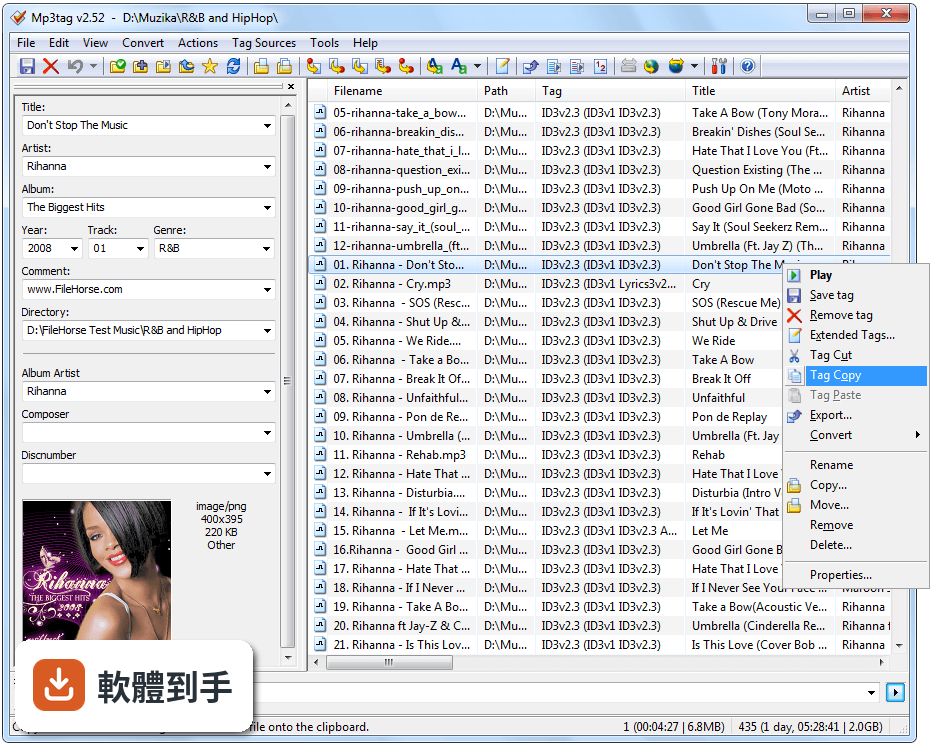
它主要用來編輯音樂檔案的標籤資訊,也就是檔案內嵌的標題、演出者、專輯、年份、曲目編號等中繼資料。你可以一次選取多個檔案,批次修改這些欄位,也能根據標籤內容重新命名檔案,或從 Discogs、MusicBrainz 等線上資料庫下載缺少的歌曲資訊。另外,它支援加入或移除專輯封面圖片。
02我有一堆 MP3 檔名很亂,它能幫我重新命名嗎?
可以。Mp3tag 的重新命名功能是根據檔案內的標籤資訊來產生新檔名,例如設定成「演出者 - 專輯 - 曲目編號 - 標題」的格式。你可以在介面中預覽改名後的結果,確認沒問題再套用。如果檔案原本的標籤就是空的,建議先從線上資料庫抓取資訊,再執行重新命名。
03這套軟體支援哪些音樂格式?
官方列出的支援格式相當廣泛,包含常見的 MP3、AAC、OGG、FLAC、WAV、WMA,也涵蓋 ALAC、APE、MPC、WV 等較少見的無損格式,以及 M4A、M4B、MKA 這類容器格式。基本上你手邊常見的音樂檔案類型,它都能讀取和編輯標籤。
04它能自動抓取專輯資訊和封面嗎?
可以。Mp3tag 內建線上資料庫查詢功能,可連到 Discogs、MusicBrainz、freedb 等來源,輸入演出者與專輯名稱後,它會列出比對結果,選取後就能把曲目、年份、封面等資訊一次寫入檔案。不過實際抓到的資料完整度會因專輯而異,冷門專輯可能找不到對應資料。
05我能不能把標籤匯出成清單或報表?
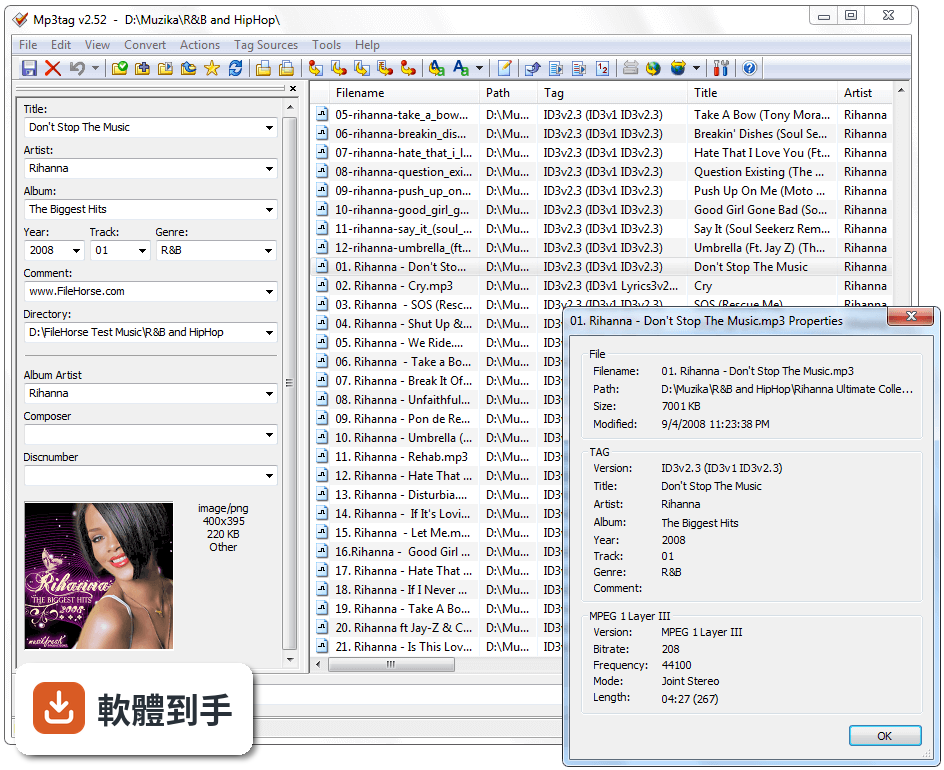
可以。Mp3tag 能將目前檔案列表的標籤資訊匯出成 CSV 檔,或產生 HTML 報表、播放清單(如 M3U)。反過來,你也可以從 CSV 檔案匯入標籤資料,適合用來大量更新資訊。匯出格式的細節可以在設定中調整欄位順序與內容。
06這套軟體適合什麼樣的人用?
適合收藏大量音樂檔案、且對媒體庫整齊度有要求的人。例如從 CD 轉檔、從網路下載專輯,或長期累積了各種來源音樂的使用者,只要檔案數量多到無法手動逐一編輯,Mp3tag 的批次處理就能省下大量時間。它不需要懂程式或腳本,介面是傳統 Windows 視窗風格,拖曳檔案進去就能開始操作。
07我完全不懂技術,只用過 iTunes 或 Windows Media Player,會很難上手嗎?
它的介面是經典的 Windows 應用程式配置,上方是檔案列表、左側是標籤編輯面板,操作邏輯直觀。你只需要把音樂檔拖進視窗,在左側欄位修改資訊,再按儲存即可。進階功能如批次命名、線上查詢,都有對應的按鈕和精靈引導,不需要額外學習指令或語法。
08這套軟體是免費的嗎?有沒有什麼限制?
官方說明指出,Mp3tag 對個人使用是免費的,功能完整,沒有提到重大限制。另外,微軟商店(Microsoft Store)有提供一個付費版本,價格約 5 美元,主要是為了支援開發者並提供額外的支援服務。一般使用者下載免費版就足夠使用。
09我改了標籤之後發現改錯了,能回復嗎?
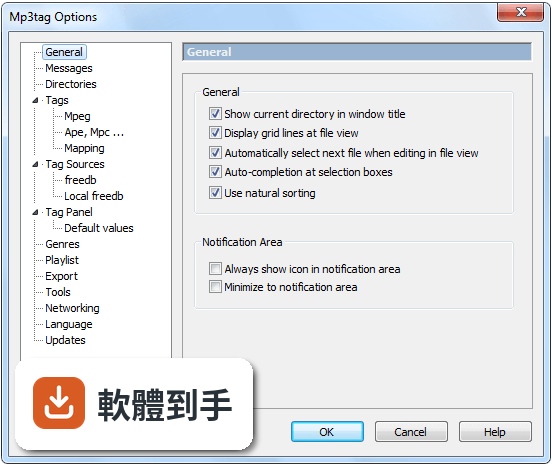
可以。Mp3tag 有復原(Undo)功能,讓你可以還原剛才的修改。如果你已經關閉軟體或做了多步驟操作,復原的範圍可能有限,建議在大量修改前先備份檔案,或使用軟體提供的匯出功能先保存原始標籤資訊。
10它能不能直接播放音樂讓我確認檔案內容?
不行。Mp3tag 沒有內建音樂播放功能,它專注在標籤編輯與檔案管理,不負責播放音訊。如果你想在編輯時試聽,需要另外開啟播放器。這點在官方功能列表中沒有提到播放能力,所以它不適合當作音樂播放器使用。
11我聽說有 AI 自動辨識歌曲資訊的功能,這套有嗎?
官方功能列表中沒有提到任何 AI 自動標籤功能。它依賴的是使用者手動輸入、或從線上資料庫(如 MusicBrainz、Discogs)查詢比對,而不是透過音訊指紋辨識來自動判斷歌曲。如果你需要的是「丟一首歌進去就自動認出歌名」的功能,這套軟體幫不上忙。
12它的介面是英文的,我看得懂嗎?
官方介面語系只有英文,沒有內建繁體中文。不過操作選項不算多,主要功能如「Save」「Rename」「Tag Sources」都是簡單的單字,搭配線上教學或翻譯工具,門檻不高。如果你完全無法接受英文介面,可能需要考慮其他有中文語系的標籤編輯工具。
下載與官方連結
mp3tagv322setup.exe · 連結指向軟體原廠
版本紀錄
- 2026-08-30 Mp3tag 3.36.1 5.73 MB
- 2026-08-28 Mp3tag 3.36 5.73 MB
- 2026-07-02 Mp3tag 3.35.1 5.23 MB
再看 5 筆
- 2026-06-19 Mp3tag 3.35 5.23 MB
- 2026-05-08 Mp3tag 3.34.1 5.21 MB
- 2026-04-10 Mp3tag 3.34 5.2 MB
- 2026-01-22 Mp3tag 3.33 4.59 MB
- 2025-08-19 Mp3tag 3.31a 4.56 MB
這一版改了什麼
What's new in this version:
Changed:
- Microsoft Store version now uses 64bit version by default
- added reporting of syntax errors in web sources scripts via error message in addition to scripterror.log
- copying and pasting individual fields via the extended tags dialog now replaces existing values
New:
- added support for localization of Tag Sources configurations
- LRC files are now also renamed, moved, and copied with corresponding MP3 and FLAC files
- added support for audio MD5 via %_md5audio% for WavPack
- added support for editing Tag Sources configurations via the Tag Sources menu
- added new key `MinAppVersionWin=3.21h` to require a minimum version of Mp3tag for a Tag Source to be used
- added functions `IfVar` and `IfNotVar` to web sources framework to check configuration settings from Tag Sources
- added new key `Settings=Tag Source Configuration.settings` to provide a settings schema for Tag Sources
- added support for checkbox fields on Tag Panel
- added function `SayDuration` to web sources framework
- added scripting function `fmtDuration` to create a formatted duration string based on numerical input
- added JSONrelated function `json_select_many_count` to web sources framework
- extended JSONrelated function `json_select_many` of web sources framework with optional parameters for last item separator and maximum items to select
- added JSONrelated function `json_foreach_counter` to web sources framework
- added JSONrelated function `json_foreach_reverse` to web sources framework, which is to be used with `json_foreach_end`
Fixed:
- runtime error when saving Tag Sources configurations where associated schema contained headings or separators
- custom list values for directory field were still duplicated in some cases
- unchecking a checkbox field sometimes wrote contents of previous Tag Panel field since v3.21e)
- inconsistency between internal function specification for `debug` in web sources framework and documentation regarding third parameter
- last parameter of functions in web sources framework was never checked for validity
- editing mode in lists scrolled too far for columns that exceeded the list width.
- edit field shown when adjusting metadata from Tag Sources was misaligned in some cases
- web sources framework `IfGreater` and `IfLess` did not perform numeric comparison in all cases
- end editing in file list if window is resized
- option to prefer values from tag was shown also when configuring Custom List Values for `_DIRECTORY`
- option to only show userdefined genres was shown also when configuring Custom List Values for other fields than `GENRE` in some cases
- custom list values for directory field were duplicated on file selection change
- LNG: updated Catalan, Corsican, Czech, Danish, French, Italian, Simplified Chinese, Spanish, and Turkish translation.