
這是歷史版本頁面 — 看 MSI Afterburner 最新版本
顯卡超頻怕弄壞?MSI Afterburner 能幫你什麼
 MSI Afterburner 2.2.0
資料更新 2012-04-20
閱讀約 5 分鐘
玩遊戲時畫面卡頓、幀數上不去,打開工作管理員看到顯示卡使用率一直衝高,溫度也跟著飆到八、九十度。你想調整顯示卡設定讓它跑得更順,但又怕亂調會把卡弄壞,於是開始找有沒有工具能安全地調整時脈、風扇轉速,順便監看溫度變化。
一般人遇到這種狀況,直覺是去顯示卡驅動程式裡找設定,但驅動程式內建的超頻選項通常很陽春,看不到即時數據,風扇曲線也不能細調。另一種做法是直接改 BIOS,風險高又麻煩。這類工具切入的點,是提供一個圖形化介面,讓你能拉滑桿調整核心時脈、記憶體時脈和電壓,同時即時顯示溫度、使用率,並把這些數據疊加在遊戲畫面上,邊玩邊看調整效果。
01MSI Afterburner 到底能拿來做什麼?
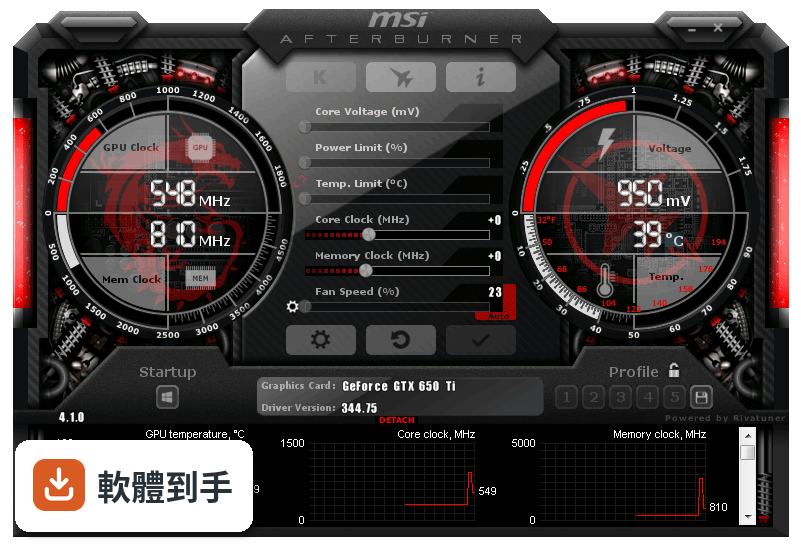
主要做三件事:超頻顯示卡、監控硬體狀態、錄製遊戲畫面。超頻部分可以調整核心時脈、記憶體時脈和電壓,也能自訂風扇轉速曲線。監控功能會即時顯示溫度、使用率、時脈等數據,可以顯示在遊戲畫面上或記錄成檔案。另外內建畫面擷取工具,能錄影或截圖。
02我完全沒超頻過,用這套軟體會不會很危險?
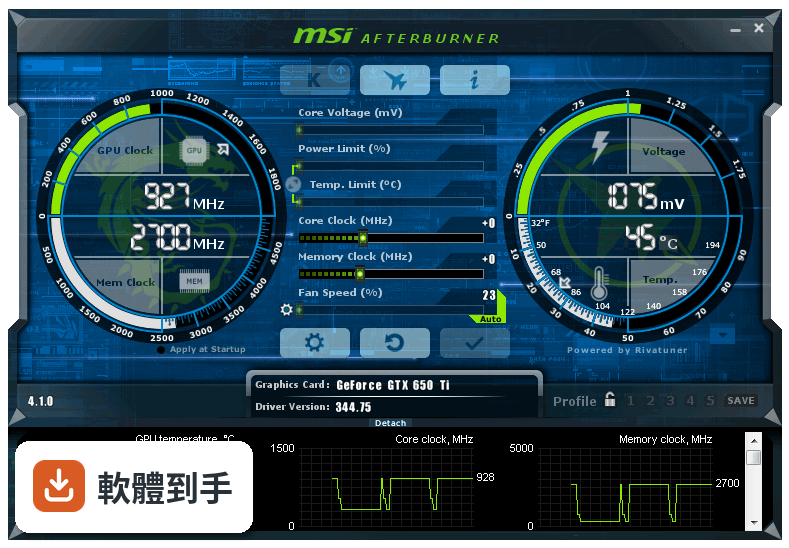
它有提供自動超頻功能,讓軟體自己掃描找出穩定的超頻設定,不需要手動慢慢試。手動調整時,只要照著一般超頻原則——每次小幅增加時脈、調整後跑測試觀察溫度和穩定性——風險是可控的。介面上也有重置按鈕,設定出問題可以一鍵恢復預設值。
03它只能用在 MSI 的顯示卡嗎?
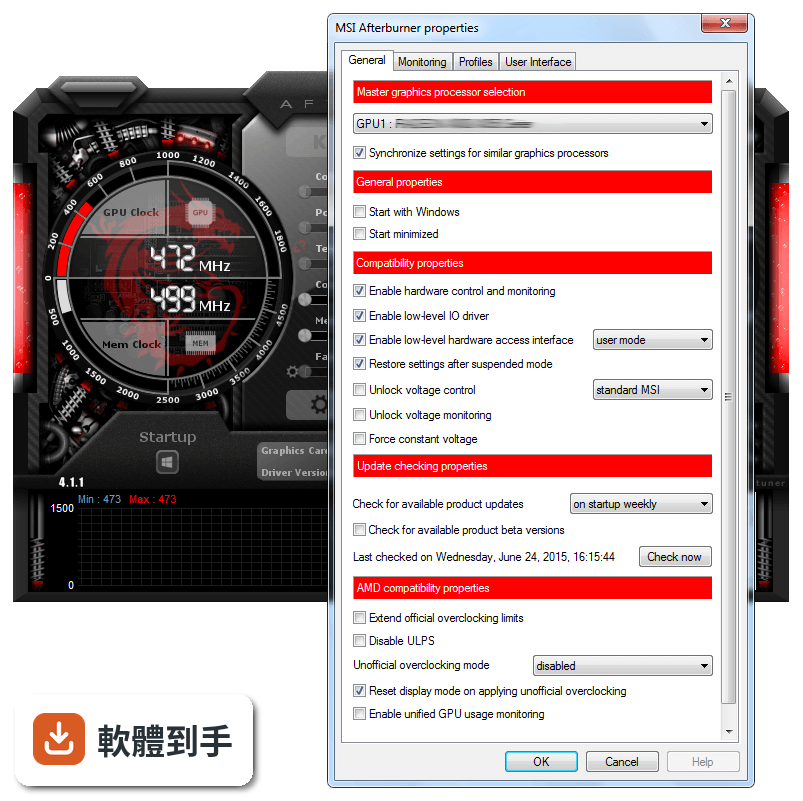
不是。雖然是 MSI 開發的,但它支援多家廠商的顯示卡,官方說明明確指出相容於不同製造商的 GPU。所以就算你的卡是華碩、技嘉或微星的,都能用這套軟體調整。不過實際支援程度還是要看你那張卡的型號,建議安裝後先確認軟體有沒有正確辨識你的顯示卡。
04遊戲中怎麼看目前的溫度和使用率?
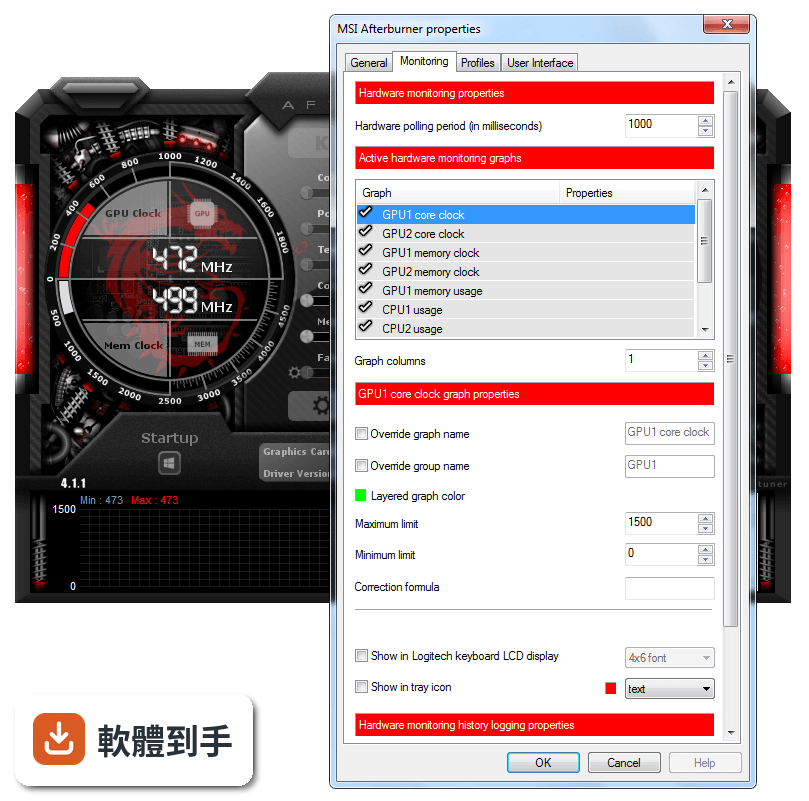
用它的 On-Screen Display(OSD)功能。在設定裡啟用 OSD,選擇要在遊戲畫面角落顯示哪些數據,例如溫度、使用率、時脈、幀數等。進遊戲後這些資訊會疊加在畫面上,你就能即時看到調整設定後對效能的影響,不用跳回桌面切換視窗。
05風扇轉速可以自己控制嗎?
可以。它能自訂風扇轉速曲線,依照不同溫度設定對應的轉速百分比。例如溫度低於五十度時讓風扇轉慢一點減少噪音,超過八十度時全速運轉加強散熱。你可以存多組風扇設定檔,依不同遊戲或應用程式切換。
06這套軟體適合什麼樣的人用?
適合三種人:一是玩遊戲覺得幀數不夠、想透過超頻擠出額外效能的人;二是擔心顯示卡過熱、想自訂風扇曲線控制溫度和噪音的人;三是想錄下遊戲精彩片段或截圖的人。它也有內建錄影功能,支援 H.264 編碼和 WMV、AVI 格式,不用另外裝錄影軟體。
07筆電也能用嗎?
可以用,但有限制。官方說明指出筆電配備獨立顯示卡就能使用,不過因為筆電散熱空間有限,超頻幅度可能受限。如果你只是想在筆電上監看溫度、調整風扇轉速,這套軟體還是能做到。但如果是想大幅超頻提升效能,筆電的散熱條件可能撐不住。
08它能監控 CPU 的溫度嗎?
它主要專注在 GPU 監控,CPU 的部分只有有限的監控能力。如果你需要完整的 CPU 溫度、時脈、電壓數據,官方資料沒有詳細說明這方面的功能。建議另外搭配 CPU 監控工具,或直接看主機板廠商提供的軟體,會比依賴這套軟體更完整。
09介面只有英文,看不懂怎麼辦?
這套軟體的介面確實只有英文,沒有繁體中文選項。不過主要操作介面不複雜,核心時脈、記憶體時脈、電壓、風扇轉速這些都是國際通用的英文詞彙,看久就熟了。如果真的看不懂,網路上有很多中文教學文章和影片,照著步驟操作也能上手。
10它跟 GPU-Z 有什麼不同?我該裝哪個?
GPU-Z 主要功能是顯示顯示卡的詳細規格資訊,例如製程、記憶體類型、匯流排介面等,偏向查規格、看硬體資訊。MSI Afterburner 則偏重調整和監控,能超頻、調風扇、錄畫面。如果你只是想看顯卡規格,GPU-Z 就夠了;想調整效能或監看即時數據,選 MSI Afterburner。兩者不衝突,也可以都裝。
11這套軟體多久更新一次?還有人在維護嗎?
根據收錄的版本紀錄,它從 2010 年就持續更新到現在,最近一年內仍有釋出新版本。開發商 MSI 有持續在維護,不是放著不管的軟體。不過更新頻率不算高,一年大約一兩次,這對穩定運作的工具軟體來說是正常的。
12有沒有其他功能相近的軟體可以比較?
功能相近的軟體有 GPU-Z、HWiNFO、SpeedFan 和 Intel Extreme Tuning Utility。GPU-Z 偏規格查詢,HWiNFO 偏硬體資訊監控,SpeedFan 主要控制風扇轉速,Intel Extreme Tuning Utility 則針對 Intel CPU 超頻。以顯示卡超頻和遊戲內監控來說,MSI Afterburner 是功能最完整的,但如果你只需要其中某一項功能,其他軟體可能更輕量。
下載與官方連結
MSIAfterburnerSetup.zip · 23.09 MB · 連結指向軟體原廠
版本紀錄
- 2025-10-10 MSI Afterburner 4.6.6 43.83 MB
- 2023-10-04 MSI Afterburner 4.6.5
- 2022-06-27 MSI Afterburner 4.6.4
再看 5 筆
- 2021-03-04 MSI Afterburner 4.6.3
- 2019-11-06 MSI Afterburner 4.6.2 48.37 MB
- 2019-10-19 MSI Afterburner 4.6.2 Beta 4 48.37 MB
- 2019-04-22 MSI Afterburner 4.6.1 45.5 MB
- 2019-04-10 MSI Afterburner 4.6.1 Beta 2 45.51 MB
這一版改了什麼
What's new in this version:
- Added NVIDIA Kepler graphics processors family support
- Added GPU power consumption monitoring for NVIDIA Kepler series graphics cards
- Added core clock offset, memory clock offset and voltage offset support for dynamic overclocking on NVIDIA Kepler series graphic cards
- Dynamic clock frequency and voltage monitoring is now performed via new NVIDIA Kepler compatible API on branch 295 and newer NVIDIA display drivers
- Shader clock control is no longer supported via default MSI Afterburner skin, the skin has been redesigned to provide convenient access to modern power control technologies (AMD PowerTune and NVIDIA GPU Boost power target) instead of outdated independent shader clock control technology. Old graphics cards owners may still get access to independent shader clock control via alternate legacy skin, included in MSI Afterburner distributive
- Added AMD Tahiti, Verde and Pitcairn graphics processors family support
- Added uP1637 voltage regulators support
- Added core and memory voltage control for reference design AMD RADEON 7970 and AMD RADEON 7950 graphics cards with CHL8228 voltage regulators
- Added core, memory and auxiliary VDDCI voltage control for custom design MSI R7970 Lightning series graphics cards with CHL8228+uP6262 voltage regulators
- Added memory and VRM temperature monitoring for custom design MSI R7970 Lightning series graphics cards with NCT7718W thermal sensors
- Added core and memory voltage control for reference design AMD RADEON 7870 graphics cards with CHL8228 voltage regulators
- Added core, memory and auxiliary VDDCI voltage control for custom design MSI R7870 Hawk series graphics cards with CHL8228+uP6262 voltage regulators
- Added memory and VRM temperature monitoring for custom design MSI R7870 Hawk series graphics cards with NCT7718W thermal sensors
- Added core, memory and auxiliary VDDCI voltage control for custom design MSI R7850 Power Edition series graphics cards with uP1637+uP6262 voltage regulators
- Added core voltage control for reference design AMD RADEON 7770 graphics cards with L6788A voltage regulators
- Added core, memory and auxiliary VDDCI voltage control for custom design MSI R7770 Power Edition series graphics cards with uP6266+uP6262 voltage regulators
- Added core voltage control for custom design MSI R7750 series graphics cards with uP6266 voltage regulators
- Added core, memory and auxiliary VDDCI voltage control for custom design MSI R7750 Power Edition series graphics cards with uP6204+uP6262 voltage regulators
- Added core, memory and auxiliary VDDCI voltage control for custom design MSI R6930 Twin Frozr III Power Edition series graphics cards with uP6266+uP6262 voltage regulators
- Now MSI Afterburner displays target VID instead of real voltage sensor reading on "GPU voltage" graph on graphics cards equipped with CHL8228 voltage regulators. These changes are implemented to avoid confusing the beginners and prevent the hysteria about voltage drop on AMD RADEON 7970 series graphic cards spreading across different discussion forums. Experienced users, understanding the difference between target and real voltages, may still unlock the previous real voltage monitoring mode via editing the hardware profiles
- Added core voltage control for reference design NVIDIA GeForce GTX 560 Ti 448 cores series graphics cards
- Added core, memory and auxiliary PEXVDD voltage control for custom design MSI N560GTX-448 Twin Frozr III Power Edition series graphics cards with uP6218+uP6262 voltage regulators
- Added core voltage control for reference design AMD RADEON 6990 series graphics cards with VT1556 voltage regulators
- Added voltage control for custom design MSI R6790 series graphics cards with CHL8214 voltage regulators
- Added core, memory and auxiliary VDDCI voltage control for custom design MSI R6950 Twin Frozr III Power Edition series graphics cards with uP6266+uP6262 voltage regulators
- Added core voltage control for custom design MSI R6950 Twin Frozr II series graphics cards with CHL8214 voltage regulators
- Added core, memory and auxiliary PEXVDD voltage control for custom design MSI N580GTX Lightning series graphics cards with uP6218+uP6262 voltage regulators
- Added memory and VRM temperature monitoring for custom design MSI N580GTX Lightning series graphics cards with NCT7718W thermal sensors
- Added memory and VRM temperature monitoring for custom design MSI R6970 Lightning series graphics cards with NCT7718W thermal sensors
- Added core, memory and auxiliary PEXVDD voltage control for custom design MSI N570GTX Twin Frozr III Power Edition series graphics cards with uP6218+uP6262 voltage regulators
- Added core, memory and auxiliary PEXVDD voltage control for custom design MSI N560GTX-Ti Hawk series graphics cards with uP6218+uP6262 voltage regulators
- Added CHL8225 and CHL8318 voltage regulators support to provide compatibility with future MSI graphics cards
- Added core voltage control for alternate revision of reference design NVIDIA GeForce GTX 570 series graphics cards
- Added core voltage control for reference design NVIDIA GeForce GTX 460 V2 series graphics cards
- Improved overclocking profiles format provides compatibility with NVIDIA Kepler series graphics cards. Please take a note that existing overclocking profiles (startup overclocking profile and profile slots) will be ignored and must be recreated in new version
- Improved compatibility with some smart UPS models, MSI Afterburner task is no longer being terminated by Windows task scheduler when the PC is entering suspended mode
- Added new compatibility option to "General" tab, allowing you to select GPU type on some graphics card models using different GPU types (e.g. low-leakage and high-leakage Cayman GPUs on RADEON 6900 series graphics cards). The option affects default reference GPU voltage and 3D voltage control path
- Now MSI Afterburner's startup daemon routine precaches VRM I2C registers state at the first Windows startup. Precached VRM state is being used to detect default voltage instead of hardcoding default voltages into the database. Please take a note that you may forcibly perform precaching later with command line switch or disable the precaching at all via configuration file if necessary and force MSI Afterburner to use the previous hardcoded database based default voltage detection
- Fixed sub-zero temperatures reading on certain custom design MSI graphics cards with LM96163 and NCT7718W dedicated thermal sensors
- Hardware abstraction layer (HAL) architecture has been improved to provide compatibility with NVIDIA Kepler graphics cards series
- Now multi-GPU overclocking and fan control settings synchronization is performed at HAL level instead of display driver wrapper level to improve HAL architecture extendibility and provide compatibility with NVIDIA Kepler graphics cards series
- Added new "Force fan speed update on each period" option to the "Fan" tab. New option may improve compatibility of software automatic fan speed control mode with some bugged display drivers, overriding manually programmed fan speed under certain conditions
- Shared control memory format has been upgraded to v2.0. New format provides power limit adjustment support and forward compatibility with NVIDIA Kepler graphics cards series
- Now it is possible to override group names for values displayed in the On-Screen Display or in Logitech keyboard LCD display
MSI On-Screen Display server has been upgraded to version 4.3.3. New version gives you the following improvements:
- Added audio capture support to video capture engine. The engine supports stereo audio capture via DirectSound under Windows XP and both multichannel or downmixed stereo capture via WASAPI under Windows Vista and newer operating systems
- Primary desktop video capture support for Windows XP and newer operating systems. Please take a note that desktop video capture is not supported under Windows Vista and newer OS with Aero Glass interface enabled, so Aero Glass is being automatically disabled by the server while capturing a video from desktop. Please take a note that both desktop video capture support and forcible Aero Glass interface toggling can be disabled via the configuration files if necessary
- Improved OpenGL On-Screen Display coordinates calculation for framebuffer coordinate space mode
- Added custom raster 3D fonts support to On-Screen Display in addition to the previously available vector 2D / 3D fonts. On-Screen Display 3D mode rendering mode switch has been replaced with new vector 2D / vector 3D / raster 3D rendering modes tri-switch
- Now On-Screen Display coordinates are specified in pixels instead of zoomed units
- Now it is possible to use drag-and-drop in On-Screen Display preview window to adjust On-Screen Display position
- Now On-Screen Display supports tabulation symbols for better appearance in conjunction with new variable width custom fonts
- Improved desktop windows notification mechanism for faster server startup and shutdown
- Windows Sidebar is now captured properly on desktop screenshots
- Updated system profile template mapping rules for application profiles
- Improved bitrate calculation in AVI file headers
- Modified screen/videocapture progress indicator appearance
- Fixed bug causing multiple used OSD slots to overwrite each other instead of merging the slots correctly
- Added screencapture and videocapture support for Direct3D10 and Direct3D11 applications using framebuffers with 10-bit RGB components (e.g. Dirt 3) o Added screencapture and videocapture support for Direct3D10 and Direct3D11 applications using BGR framebuffers (e.g. F.3.A.R.) o Improved video frames timestamping approach may improve smoothness of videos captured on low framerates
- Fixed vertex buffer overflow issue causing improper On-Screen Display rendering or crashing in Direct3D10 / Direct3D11 applications when too many items are selected to be displayed in On-Screen Display
- Improved RTV1 codec provides better compression ratio (significantly better under certain conditions) without affecting the image quality and encoding performance
- Added alternate RTV1 compression mode providing 1.5x - 2x better realtime compression performance at the cost of some minor image quality loss. Video quality slider is now unlocked for RTV1 format, 100% quality selects original compression mode whilst any other value selects new high performance compression mode
- Now MSI Afterburner displays captured video file time, size, per-frame compression ratio and time in the On-Screen Display next to the video capture progress indicator when "Show own statistics" option is enabled in the server's properties
- Added new profile setting "Enable compatibility with modified Direct3D runtime libraries" allowing MSI On-Screen Display Server to detect runtime function offsets dynamically on each 3D application startup. This provides On-Screen Display functionality support in applications using modified Direct3D runtime libraries (e.g. FXAA injection Direct3D runtimes)
- Added new profile settings allowing you to limit the framerate during gaming. Limiting the framerate during gaming can help to reduce the power consumption as well as it can improve gaming experience due to removing unwanted microstutteing effect caused by framerate fluctuations
- Now video capture clients can limit the framerate during video capture. Limiting the framerate during videocapture can improve resulting video smoothness
- Added gamma corrected video capture support
- Added Vector 3D On-Screen Display rendering mode support for OpenGL applications
- Added Raster 3D On-Screen Display rendering mode support for OpenGL applications using ARB shaders (e.g. ID Software's Rage)
- Added workaround for AMD Direct3D driver issues causing OSD to be invisible in Direct3D8 and Direct3D9 applications when using Raster 3D On-Screen Display rendering mode
- Added workaround for AMD OpenGL driver PBO issues causing the driver to crash or perform abnormally slow during videocapture o Added Direct3D9Ex support (DOTA 2 and Darkness 2 demo)
- Improved desktop windows notification mechanism eliminates unwanted beeps occurring on some systems during the server startup / shutdown
- Added video capture compatibility setting allowing cropping output video dimensions to make them multiples of 16 to improve compatibility with some third party MJPG decoders
- Improved tabbed text formatting provides better compatibility with custom On-Screen Display group names
- Dedicated 1/2, 1/3 and 1/4 frame downsampling routines have been replaced with unified arbitrary downsampling routine. Now MSI Afterburner provides arbitrary frame downsampling functionality and allows selecting 360p, 480p, 720p, 900p, 1080p frame sizes for both 16:9 and 16:10 aspect ratios. Please take a note that arbitrary frame sizes list is user extendable so you may add your own custom frame sizes to the configuration file if necessary
- Now multithreaded video capture optimization is forcibly disabled by default on single core CPUs
- Updated profiles list
- Screen and video capture no longer stop working properly after selecting a drive root as a destination folder and restarting the application
- Now SDK includes new sample code, demonstrating On-Screen Display usage from any third party application. The sample is displaying CPU usage in On-Screen Display and provides third party developers helper object for RivaTuner-styled grouped OSD text formatting
- MSI Afterburner is no longer using native AMD ADL SDK GPU indices. Now it always sorts GPUs by PCI location to ensure that GPU indices stay the same in the system regardless of operating system, display driver version and GPU display outputs connection
- Added driver-level fan tachometer monitoring fallback for AMD graphics cards via AMD ADL SDK
- PowerTune settings are now being forcibly reapplied after changing the clocks via unofficial overclocking path to bypass bug in AMD driver causing PowerTune settings to be reset to defaults during programming PowerPlay table
- Unofficial overclocking is now ignored for inactive ULPS enabled AMD graphics cards to prevent system crashing. Please take a note that you still need to disable ULPS to control all graphics cards in unofficial overclocking mode
- Added unofficial overclocking support for AMD graphics cards unattached to Windows desktop
- Now unofficial overclocking can be enabled without typing in the EULA into the configuration file. In this case the EULA is displayed and you're forced to accept it during MSI Afterburner startup
- Added power user oriented command line switches allowing to extend Overdrive clock limits on AMD graphics cards attached to Windows desktop
- ATIPDLXX.DLL is now redistributed with MSI Afterburner to address issues with unofficial overclocking under Catalyst 12.2 and newer AMD drivers
- Improved Catalyst version detection for AMD graphics cards unattached to Windows desktop
- Improved GPU type definition format in hardware database to fix ambiguous GPU type selection on some custom design MSI graphics cards (e.g. MSI R5870 Lightning series)
- Now MSI Afterburner's startup daemon routine precaches graphics card state at the first Windows startup. Precached state is being used to improve default clocks detection and clock sliders calibration in some cases when display driver provides no trustworthy defaults detection mechanism (e.g. on AMD graphics cards in unofficial overclocking mode)
- Added unified vendor independent videomemory usage monitoring layer for graphics cards, having no generic videomemory monitoring interfaces implementation in display drivers. Unified videomemory usage monitoring layer is based upon RivaTuner's VidMem plugin technology under Windows XP and original concepts of accessing Direct3D kernel mode thunk statistics under Windows Vista and Windows 7, introduced by Mark Russinovich in ProcessExplorer 15. By default unified videomemory usage monitoring path is enabled as primary path on AMD graphics cards and as a fallback path on NVIDIA graphics cards when generic NVAPI videomemory usage monitoring is not available (e.g. on NVIDIA graphics cards unattached to Windows desktop, such as dedicated PhysX or other GPGPU graphics cards). Power users may redefine unified and generic videomemory monitoring paths usage behaviors for both AMD and NVIDIA hardware abstraction layers via the configuration file
- Changed current value and time labels rendering Z-order in hardware monitoring graphs renderer
- Improved active monitoring graphs list control in "Monitoring" tab reduces list flickering when hovering mouse cursor over it
- ReadMe file is now provided in RTF format instead of plain text format
- Now beta versions display notification messages informing you that it is about to expire soon in one week or less before the end of trial period
- Added update checking system
- Added RivaTuner-styled command line interface providing direct GPU and I2C device registers access. Logical AND, OR and XOR operations are supported in addition to regular read and write operations. Now MSI Afterburner can be used by vendors for pre-production custom VRM testing and calibration
- Added new compatibility option allowing disabling low-level access to hardware. New option replaces more complex RTCore.cfg renaming related workaround for BFBC2 Punkbuster's bug
- Kernel mode RTCore driver has been upgraded to v1.6. New driver introduces RivaTuner-styled protected MMIO IOCTLs and removes outdated IOCTLs dedicated for some old and currently abandoned RTCore technology based applications (HIS iTurbo and RMClock)
- Added new compatibility option allowing using protected kernel mode low-level access to hardware instead of user mode one. This option can also be used to bypass Punkbuster related stability issues
- Now MSI Afterburner restores default hardware automatic fan control mode when logging off from Windows · Now MSI Afterburner starts significantly faster than before due to optimized I2C devices scanning, cached database access and optimized GPU context switching in profile load routine
- Fixed RTV1 codec installation issue on 64-bit systems
- Now power users may unlock additional hidden video capture formats via the configuration file
- Now screenshot and video capture quality can be adjusted with precise 1% steps instead of 5% steps in the previous version
- Now video capture framerate can be adjusted in [1 FPS; 100 FPS] range with precise 1 FPS steps instead of [25 FPS; 100 FPS] range and 5 FPS steps in the previous version
- Added "Single tray icon mode" option to "User interface" tab. When single tray icon mode is enabled, the primary application tray icon is being replaced with hardware monitoring tray icon(s) if monitoring in system tray is enabled and MSI On-Screen Display server's icon is not being displayed in tray when the server is loaded. Please take a note that MSI On-Screen Display server's properties are still accessible via "More" button in "OSD" tab
- Now shared control memory reinitialization is initiated by delayed fan speed readback mechanism
- Now MSI Afterburner can restart itself automatically instead of displaying restart requirement notification after changing some global compatibility options, e.g. unlocking voltage control or disabling low-level hardware access interface
- Now DirectX web setup is integrated into the installer
- Skin format reference guide has been updated to v1.5 to document new indicator types support
- Now new user interface language selection into MSI Afterburner GUI also results in selecting the same user interface language into MSI On-Screen Display Server
- Updated Korean localization
- Added Simplified Chinese localization
- Added Indonesian localization
- Added Japanese localization
- Added German localization
- Added Polish localization
- Added multilanguage installer