
這是歷史版本頁面 — 看 MuseScore 最新版本
想打譜不想花錢,MuseScore 能取代付費軟體嗎
 MuseScore 3.5.0 (32-bit)
資料更新 2020-08-06
閱讀約 6 分鐘
寫曲子寫到一半,腦子裡有旋律,手邊卻沒有趁手的工具。打開 Word 畫小節線、一個一個對齊音符,弄了半小時連第一行都還沒排好;想找免費軟體,又怕功能太陽春、介面看不懂,最後只能回去用試用期已經過了的付費軟體,每次開啟都跳出提醒視窗。
一般人遇到這種狀況,通常會先想到用繪圖軟體或文書處理器硬幹,但樂譜不是圖畫,音符的時值、拍號、連音線這些規則,靠手動繪製不僅費時,修改一個聲部就要全部重來。這類工具的切入點,是讓你把「寫譜」當成打字一樣:輸入音符、設定節奏,剩下的排版和播放交給程式處理,改哪裡就改哪裡,不用整份重畫。
01MuseScore 是用來做什麼的?
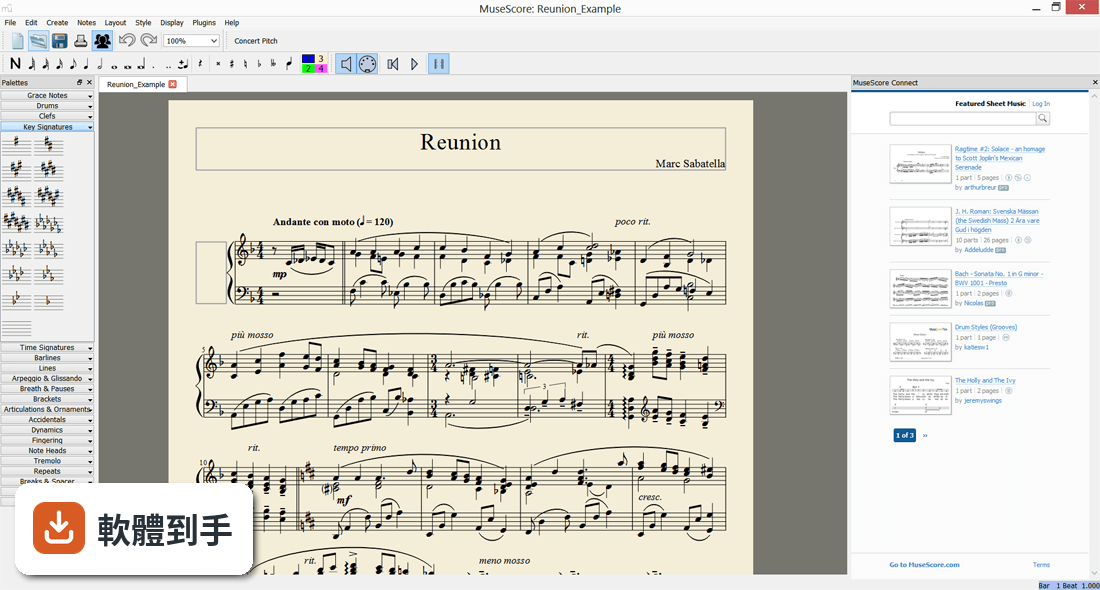
它是一套樂譜編輯軟體,主要工作是讓你在電腦上輸入、編輯、排版並播放樂譜。支援標準五線譜、吉他六線譜和打擊樂譜,可以從空白檔案開始寫,也可以匯入 MIDI 檔轉成譜面。寫完之後能輸出成 PDF、MIDI、MP3、WAV 等格式,也能直接上傳到它的線上平台分享。
02我完全沒用過打譜軟體,這套上手會很難嗎?
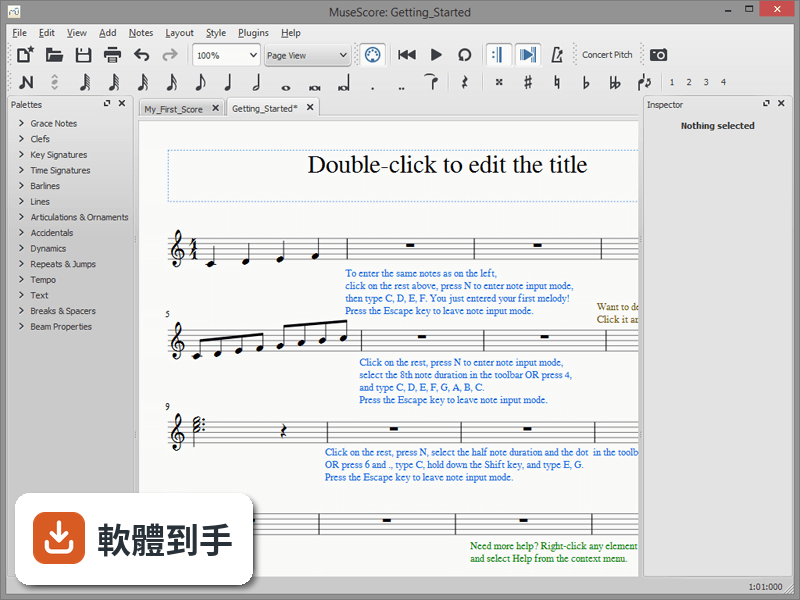
介面是英文的,但基本流程不複雜:開啟後選「File > New」,輸入標題、作曲者和樂器編制,就會產生一份空白譜。輸入音符可以用滑鼠點、鍵盤快捷鍵,或外接 MIDI 鍵盤彈奏輸入。常用功能如力度記號、圓滑線、反覆記號,都是從右側面板拖曳到音符上。對沒接觸過的人來說,前幾個小時會需要適應,但官方有內建教學和範例檔可以參考。
03它能不能處理吉他譜或鼓譜?
可以。建立新樂譜時,樂器選單裡有吉他、貝斯、鼓組等選項,會自動產生對應的譜表。吉他譜會顯示六線譜,鼓譜則用特殊記號表示不同鼓件。輸入方式跟五線譜一樣,只是音符對應的位置不同。如果你要寫的是包含多種樂器的總譜,也可以在同一份檔案裡加入不同類型的譜表。
04寫完的譜要怎麼印出來或轉成其他格式?
從「File > Export」可以輸出成 PDF、PNG、SVG、MIDI、MusicXML、MP3、WAV 等格式。PDF 適合直接列印或寄給團員,MIDI 和 MusicXML 可以丟進其他音樂軟體繼續編輯,MP3 和 WAV 則是把目前的播放結果錄成聲音檔。輸出前記得先到「Format > Page Settings」調整版面,確認譜面大小和邊距符合你的需求。
05它可以用 MIDI 鍵盤輸入音符嗎?
可以。接上 MIDI 鍵盤後,到「Edit > Preferences」裡的 I/O 分頁設定輸入裝置,然後在編輯模式下,選取要輸入的音符時值,直接彈琴鍵,音符就會依序寫進譜面。這樣比用滑鼠點快很多,尤其適合輸入鋼琴伴奏或連續音群。如果沒有 MIDI 鍵盤,也可以用電腦鍵盤的快捷鍵輸入,只是速度慢一些。
06這套軟體適合什麼樣的人用?
適合需要「寫譜」的人,包含作曲者、編曲者、音樂老師、學生,以及要整理民謠或教會詩歌譜的人。因為它免費且開放原始碼,對預算有限但需要正式譜面輸出的人來說,是門檻最低的選項。它也支援多樂器總譜,所以小型管弦樂或合唱團的編制,在功能上足以應付。
07跟 Sibelius 或 Guitar Pro 比起來,它差在哪裡?
這三套的定位不同。Sibelius 是專業打譜軟體,排版引擎和符號細節更精緻,但價格高且學習曲線陡。Guitar Pro 專攻吉他與貝斯,六線譜輸入和音色模擬是強項,但對管弦樂總譜的支援較弱。MuseScore 介於兩者之間:免費、支援的樂器種類廣,但播放音色和複雜排版品質不如付費軟體。如果你只需要交響樂等級的出版品質,它可能不夠用。
08我寫的是流行歌,只需要主旋律加和弦,它夠用嗎?
夠用。建立新樂譜時選「Lead Sheet」範本,就會產生只有旋律譜表加和弦記號的版面。輸入旋律後,從面板拖曳和弦符號(如 C、Am、F、G)到對應拍點上,程式會自動顯示和弦名稱。播放時也會依照和弦配上伴奏音色,方便你檢查和聲進行是否順耳。輸出 PDF 時,和弦記號會跟旋律一起印出。
09什麼情況不該選它?
如果你需要極度擬真的樂器音色來做示範帶,或需要掛載 VST 外掛來使用第三方音源,它目前不支援 VST,內建音色跟高階取樣音源有差距。另外,如果你要製作的譜需要複雜的現代記譜法(如無小節線、圖形譜),或需要跟雲端協作編輯,它的功能可能不足。介面只有英文,對完全不懂英文的人來說,操作上會多一層障礙。
10它跟 MuseScore.com 的付費訂閱有什麼關係?
軟體本身完全免費,開放原始碼,下載安裝後所有編輯功能都能用。MuseScore.com 是另一個線上平台,提供樂譜分享和下載,免費帳號有每月下載次數限制,付費訂閱(每年 49 美元)可以解除限制並使用額外功能。如果你只是自己寫譜、輸出 PDF,完全不需要付費;只有想大量下載別人的譜或使用雲端儲存空間時,才需要考慮訂閱。
11這套軟體還有人在維護嗎?
有。從版本紀錄來看,它持續有更新,近一年內更新了十多次,表示開發團隊仍積極維護。這對使用者來說是好事,代表 bug 會持續修正、功能會陸續增加,也比較不用擔心系統升級後軟體無法運作。如果你在意長期可用性,這點可以放心。
下載與官方連結
Musescore-3.5.0-x86.msi · 連結指向軟體原廠
版本紀錄
- 2026-10-29 MuseScore 4.7.6 129 MB
- 2026-09-09 MuseScore 4.7.5 123 MB
- 2026-07-08 MuseScore 4.7.4 122 MB
再看 5 筆
- 2026-06-11 MuseScore 4.7.3 122 MB
- 2026-05-26 MuseScore 4.7.2 122 MB
- 2026-05-20 MuseScore 4.7.1 122 MB
- 2026-05-14 MuseScore 4.7.0 123 MB
- 2025-12-19 MuseScore 4.6.5 110 MB
這一版改了什麼
What's new in this version:
New:
- Option available in Preferences for playback of chord symbols
- Mid-staff instrument changes now do almost everything automatically (see [below](#instrument-changes))
- Support for Orca (Linux) screenreader
- Hairpins, voltas, and other lines now adapt anchor points when dragged
- Much more functional piano roll editor (see [below](#pre))
- Splash screen displays progress messages while loading MuseScore
- Diatonic pitch up/down (keep degree alterations) shortcuts
- Select Similar Elements: Same Beat
- New Score Wizard automatically numbers instruments
- Property for beam style of tremolo (all strokes attached to stem)
- Style for hiding brackets which span to a single staff when empty staves are hidden
- Properties and styles for measure number positioning, including centered and below staff
- Property and style for position of multimeasure rest numbers
- Property for fretboard diagram rotation
Improvements:
- Double-click a header, footer, or instrument name to access the dialog for editing it
- Score tabs can now be closed using mouse middle button
- tremolos, with and without stem
- Smooth scrolling during playback in Continuous view
- Various improvements to simplify searching and loading backup files
- Metric modulation for dotted eighth to quarter
- Automatic collision avoidance between rests and notes/rests in other voices
- Staff property to automatically merge rests between voices
- Allow selection of multiple similar items with shift+click
- Allow "repeating a note" by clicking a notehead then pressing "R" in normal mode
- Changes made in Preferences are applied significantly faster
- Style options to align chord symbols within systems
- More zoom controls
- Additional plugin capabilities
- Altered keyboard and mouse zoom precision and consistency
- Improved performance of applying preferences
- Chords playback is on by default (untick the "play" property to disable it)
- Adding notes to a tuplet now adds them with respect to the tuplet's space
- MuseScore 3 is now available as a Windows PortableApp
- Altered Shift+L/R for leading space while in edit mode upon notehead
- All symbols are now available for the plugins
Fixes:
- JACK audio/MIDI worked incorrectly on some platforms
- Loop playback skipped final rests in the last measure
- MIDI note-off events were not sent in some cases
- Undoing slur addition to a range only removed one slur
- Canceling a selection worked incorrectly in some cases
- macOS package was not notarized in Apple
- Various fixes for the text editing process
- Fixed an issue when hiding notes or rests in a voice > 1 causes stems/beams to flip in a bad and unexpected way
- Fixed an issue when two grace notes disabling vertical chord alignment (Maximum Shift Above)
- Fixed an issue when "maximum shift above" leading to layout weirdness if measure has rhythm slashes and rests
- Fixed an issue with inactive "Realize chord symbols" command
- Fixed an issue when key signature appears in multiple places on the single staff
- Fixed an issue with missing grid of measures in the "timeline" view
- Fixed an issue with appearing of empty dialog during the "Save Online"
- Fixed an crash during the drag & drop of volta in continuous view
- Brackets were displaced in Continuous View
- Nested tuplets in linked staves led to corruption
- Octave selection was inconsistent in note input mode
- Voices worked incorrectly in the parts dialog in some cases
- Misclicking when attempting to create a range selection caused the current selection to be lost
- On-screen rendering of synthetically emboldened fonts was broken in some cases
- Smooth scrolling worked wrong in Continuous view when dealing with repeats
- Saving Online a yet unsaved or uncompressed (mscx) file didn't work
- Fixed zoom-box 100% selection bug
- Fixed a bug with ignoring of blank lines at top of text elements
- Fixed an issue when cut/paste, drag/drop in Piano Roll Editor does not preserve NoteEvent values
- Fixed a playback of chord symbols attached to fret diagrams
- Fixed a note entry suggested position with no selection and last selected note in voice > 1
- Fixed a display of the bold and underlined texts
- Fixed the "Save Online" on AppImages