
這是歷史版本頁面 — 看 MuseScore 最新版本
想打譜不想花錢,MuseScore 能取代付費軟體嗎
 MuseScore 3.6.0 (32-bit)
資料更新 2021-01-15
閱讀約 6 分鐘
寫曲子寫到一半,腦子裡有旋律,手邊卻沒有趁手的工具。打開 Word 畫小節線、一個一個對齊音符,弄了半小時連第一行都還沒排好;想找免費軟體,又怕功能太陽春、介面看不懂,最後只能回去用試用期已經過了的付費軟體,每次開啟都跳出提醒視窗。
一般人遇到這種狀況,通常會先想到用繪圖軟體或文書處理器硬幹,但樂譜不是圖畫,音符的時值、拍號、連音線這些規則,靠手動繪製不僅費時,修改一個聲部就要全部重來。這類工具的切入點,是讓你把「寫譜」當成打字一樣:輸入音符、設定節奏,剩下的排版和播放交給程式處理,改哪裡就改哪裡,不用整份重畫。
01MuseScore 是用來做什麼的?
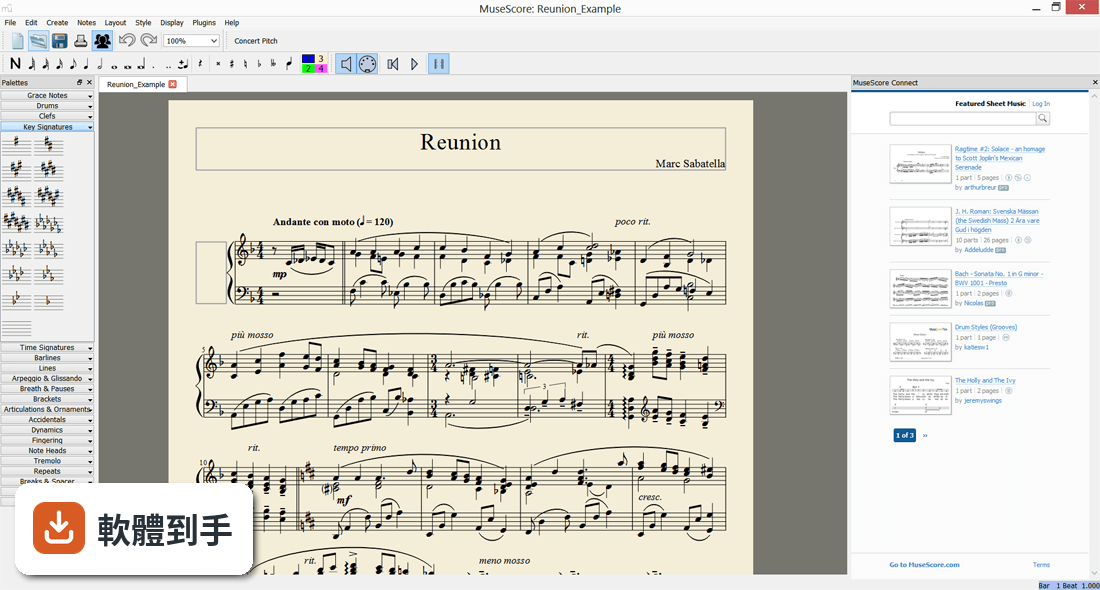
它是一套樂譜編輯軟體,主要工作是讓你在電腦上輸入、編輯、排版並播放樂譜。支援標準五線譜、吉他六線譜和打擊樂譜,可以從空白檔案開始寫,也可以匯入 MIDI 檔轉成譜面。寫完之後能輸出成 PDF、MIDI、MP3、WAV 等格式,也能直接上傳到它的線上平台分享。
02我完全沒用過打譜軟體,這套上手會很難嗎?
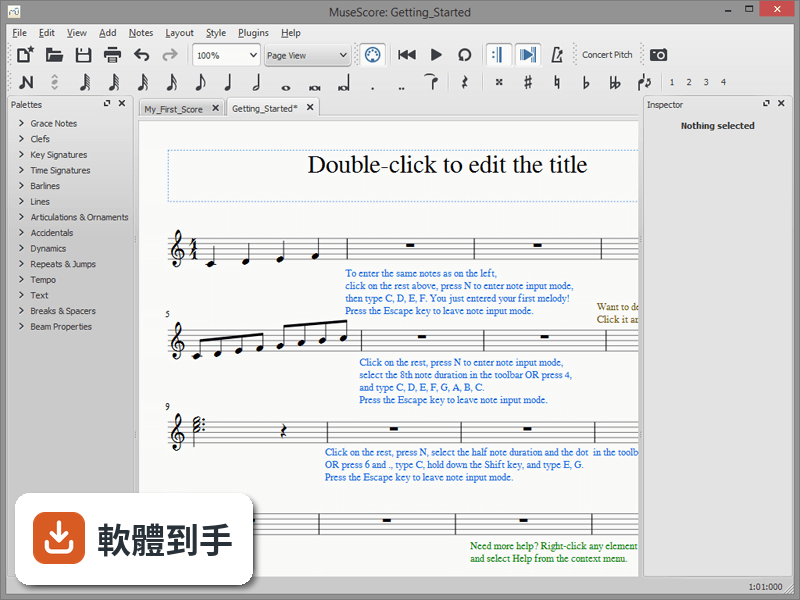
介面是英文的,但基本流程不複雜:開啟後選「File > New」,輸入標題、作曲者和樂器編制,就會產生一份空白譜。輸入音符可以用滑鼠點、鍵盤快捷鍵,或外接 MIDI 鍵盤彈奏輸入。常用功能如力度記號、圓滑線、反覆記號,都是從右側面板拖曳到音符上。對沒接觸過的人來說,前幾個小時會需要適應,但官方有內建教學和範例檔可以參考。
03它能不能處理吉他譜或鼓譜?
可以。建立新樂譜時,樂器選單裡有吉他、貝斯、鼓組等選項,會自動產生對應的譜表。吉他譜會顯示六線譜,鼓譜則用特殊記號表示不同鼓件。輸入方式跟五線譜一樣,只是音符對應的位置不同。如果你要寫的是包含多種樂器的總譜,也可以在同一份檔案裡加入不同類型的譜表。
04寫完的譜要怎麼印出來或轉成其他格式?
從「File > Export」可以輸出成 PDF、PNG、SVG、MIDI、MusicXML、MP3、WAV 等格式。PDF 適合直接列印或寄給團員,MIDI 和 MusicXML 可以丟進其他音樂軟體繼續編輯,MP3 和 WAV 則是把目前的播放結果錄成聲音檔。輸出前記得先到「Format > Page Settings」調整版面,確認譜面大小和邊距符合你的需求。
05它可以用 MIDI 鍵盤輸入音符嗎?
可以。接上 MIDI 鍵盤後,到「Edit > Preferences」裡的 I/O 分頁設定輸入裝置,然後在編輯模式下,選取要輸入的音符時值,直接彈琴鍵,音符就會依序寫進譜面。這樣比用滑鼠點快很多,尤其適合輸入鋼琴伴奏或連續音群。如果沒有 MIDI 鍵盤,也可以用電腦鍵盤的快捷鍵輸入,只是速度慢一些。
06這套軟體適合什麼樣的人用?
適合需要「寫譜」的人,包含作曲者、編曲者、音樂老師、學生,以及要整理民謠或教會詩歌譜的人。因為它免費且開放原始碼,對預算有限但需要正式譜面輸出的人來說,是門檻最低的選項。它也支援多樂器總譜,所以小型管弦樂或合唱團的編制,在功能上足以應付。
07跟 Sibelius 或 Guitar Pro 比起來,它差在哪裡?
這三套的定位不同。Sibelius 是專業打譜軟體,排版引擎和符號細節更精緻,但價格高且學習曲線陡。Guitar Pro 專攻吉他與貝斯,六線譜輸入和音色模擬是強項,但對管弦樂總譜的支援較弱。MuseScore 介於兩者之間:免費、支援的樂器種類廣,但播放音色和複雜排版品質不如付費軟體。如果你只需要交響樂等級的出版品質,它可能不夠用。
08我寫的是流行歌,只需要主旋律加和弦,它夠用嗎?
夠用。建立新樂譜時選「Lead Sheet」範本,就會產生只有旋律譜表加和弦記號的版面。輸入旋律後,從面板拖曳和弦符號(如 C、Am、F、G)到對應拍點上,程式會自動顯示和弦名稱。播放時也會依照和弦配上伴奏音色,方便你檢查和聲進行是否順耳。輸出 PDF 時,和弦記號會跟旋律一起印出。
09什麼情況不該選它?
如果你需要極度擬真的樂器音色來做示範帶,或需要掛載 VST 外掛來使用第三方音源,它目前不支援 VST,內建音色跟高階取樣音源有差距。另外,如果你要製作的譜需要複雜的現代記譜法(如無小節線、圖形譜),或需要跟雲端協作編輯,它的功能可能不足。介面只有英文,對完全不懂英文的人來說,操作上會多一層障礙。
10它跟 MuseScore.com 的付費訂閱有什麼關係?
軟體本身完全免費,開放原始碼,下載安裝後所有編輯功能都能用。MuseScore.com 是另一個線上平台,提供樂譜分享和下載,免費帳號有每月下載次數限制,付費訂閱(每年 49 美元)可以解除限制並使用額外功能。如果你只是自己寫譜、輸出 PDF,完全不需要付費;只有想大量下載別人的譜或使用雲端儲存空間時,才需要考慮訂閱。
11這套軟體還有人在維護嗎?
有。從版本紀錄來看,它持續有更新,近一年內更新了十多次,表示開發團隊仍積極維護。這對使用者來說是好事,代表 bug 會持續修正、功能會陸續增加,也比較不用擔心系統升級後軟體無法運作。如果你在意長期可用性,這點可以放心。
下載與官方連結
MuseScore-3.6.0.487915773-x86.msi · 連結指向軟體原廠
版本紀錄
- 2026-10-29 MuseScore 4.7.6 129 MB
- 2026-09-09 MuseScore 4.7.5 123 MB
- 2026-07-08 MuseScore 4.7.4 122 MB
再看 5 筆
- 2026-06-11 MuseScore 4.7.3 122 MB
- 2026-05-26 MuseScore 4.7.2 122 MB
- 2026-05-20 MuseScore 4.7.1 122 MB
- 2026-05-14 MuseScore 4.7.0 123 MB
- 2025-12-19 MuseScore 4.6.5 110 MB
這一版改了什麼
What's new in this version:
New:
- Added the new default notation fonts "Leland"
- Added the new default text font "Edwin"
- Added a new dialog that suggests trying out the new engraving defaults
- Added automatic score ordering and bracketing
- Added automatic vertical justification of staves
- Added Mountain Dulcimer instrument and 3-string tab presets
- Added portamento for FLUID synthesiser
- Added Petaluma notation font
- Added mnemonics for "Save", "Save As" and "Resource Manager"
Improvements:
- Redesigned the score migration dialog and the algorithm for applying new styles
- Improved the vertical staff justification algorithm
- First system indentation now takes the maximum of the length of the instruments labels and the style parameter
- Added a support of measure number interval at multi-measure rests
- Improved the recognition of instruments when loading a pre-3.6 score
- Altered default canvas background colour
- Improved functionality and appearance of 'Add Palettes' button
- Implemented a new "Export" dialog
- Improved the score symbols appearance
- Updated Bravura notation font to version 1.39
- Extended the set of accidentals
- Implemented a third stroke style for minim-based two-note tremolos
- Added extended fermata symbols to MusicXML I/O
- Updated SMuFL to the latest version 1.3
- Added support for triple sharp and triple flat
- Replaced the accidentals from Emmentaler with improved ones from Parnassus
- Added an indication of sounding pitch if the global concert pitch toggle is off and the current instrument has an actual pitch
- Added heavy, reverse end and heavy double barlines
- Added Sicilianu translation
- The Edit Style dialog is no longer modal: the score can now be traversed while the dialog is open
- Added an alternative choice of “To Coda”
- Added a harmony duration interpretation
- MacOS window title bars now update according to the selected theme in MuseScore
- Added an automatic change of theme in MuseScore according to the MacOS dark/light mode setting
- The width of accidental symbols in the font is now honoured during drawing
- Solo instrument names now end in "solo"
- Improved collision avoidance between accidentals and ledger lines
- Improved the appearance of shadow notes
- Improved layout of the "Edit Style" dialog
- Cleaned up all unnecessary spaces and words used in file export
- Order of buttons in "Score migration" dialog is now platform-specific
- Improved search behavior in "Palettes"
- Added an option for applying new text font (Edwin) to imported MusicXML scores
- Replenished collection of demo scores
- Improved layout of the "Edit Style" dialog
- Improved handling of score orders
- Improved the appearance of ambitus caps
- Improved the appearance of the score migration dialog
Fixes:
- Fixed a bug preventing generation of square braces for an instrument with multiple staves
- Fixed an issue where style dialog loses setting of chord symbol radio buttons
- Fixed an issue with measure numbers not showing when first staff is cut away
- Fixed an issue where ledger lines only showed correctly when staff line spacing set to 0.5 increments (i.e 1.5, 2.0, etc.)
- Fixed an issue with image resize not correctly honouring aspect ratio
- Fixed an issue with "Select Similar Beat" command not working with shortened measures
- Fixed an issue where glissandos collide with double-digit start fretmarks
- Fixed glissando and portamento playback
- Enabled selection of text using the mouse in Palettes search field
- Adjusted the "Range-transpose" shortcuts
- Adjusted the appearance of dotted lines
- Staff visibility changes are now allowed mid-score
- Fixed an issue with the appearance of additive time signatures
- Fixed an issue where Mandolin unintentionally has a Grand Piano sound
- Expanded the list of special characters in "Special characters -> Common Symbols"
- Jump at Volta End no longer skips last measure
- Fixed a crash when switching instruments from an instrument with tabulature
- Fixed an issue when toggling between clefs of unpitched and pitched instruments, which led to a crash
- Fixed an issue where pressing Enter in the Score Properties dialog applies to the "New…" button rather than the "OK" button
- Fixed a crash when deleting header/footer text after hiding
- Fixed an issue where removing tuplets after inserting measures caused corruption/crash
- Reduced useless whitespace in JSON files
- Disabled auto collision avoidance for rests which do not have auto-placement enabled
- Fixed an issue where rests cannot be merged together when the measure has 3 or 4 voices
- Fixed an issue with the "Flatten all Beams" setting being ignored on score reload
- Fixed an issue where voice-1 rests collide with voice-3 rhythm slashes
- Fixed an issue where C time signature does not update
- Fixed an issue with readability of the tempo field by screen readers
- Fixed a palette search shortcut functionality issue
- Fixed an issue with missing space between the key signature and the first note when the time signature is hidden
- Fixed a freeze when a tie has the same start and end note
- Fixed a crash when deleting or changing a time signature in a multi-measure rest
- Fixed an issue with import of MusicXML files from the new version of Finale
- Fixed an incorrect tuplet calculation on a two-note tremolo
- Removed support for the "place at middle of stem" option for single-note tremolos
- Fixed an issue where duplication of voltas leads to following voltas being ignored
- Fixed an issue with MusicXML import of changed transpositions
- Fixed an issue where hairpin export stops halfway
- Fixed an issue with FirstSystemIndentation style setting not taking account of instrument label length
- Fixed an issue where MusicXML import did not honour "measure-style/slash"
- Fix missing kerning in MuseJazz Text
- Fixed an issue with application of new styles to 'recent' scores
- Fixed an issue with application of new styles to pre-3.6 scores
- Fixed an issue with incorrect brace scaling
- Fixed an issue with import of MusicXML tempo changes
- Fixed an issue where aligned pedal lines jump wildly while being dragged
- Fixed an issue with updating of translations
- Fixed an issue with export of fretboard diagrams to MusicXML
- Fixed an issue where atonal key signatures caused spacing issues
- Fixed an issue with the "Show MIDI controls in mixer" checkbox in "Preferences" dialog
- Fixed an issue with inconsistent stem directions on middle-line beamed notes
- Fixed an issue with application of new styles to 'recent' scores
- Fixed an issue with measure numbers colliding with brackets
- Fixed an issue with triggering of translation process after a language switch
- Fixed an issue where fingering was wrongly scaled with note size
- Fixed an issue with cutaway courtesy clefs not showing
- Fixed an issue with export of 32nd-note tuplets into MusicXML format
- Removed unnecessary rounding of BPM value in "Play panel"
- Fixed an issue with unexpected behavior of "Esc" key in "Edit Style" dialog
- Fixed a crash when importing a file with an incomplete tuplet
- Fixed an issue where adding instruments on top of others whose parts have been created leads to score corruption
- Fixed an issue with styles in the "converter" mode
- Fixed an issue where changing any property on a text line resets all styled properties to default
- Fixed an issue where the "Custom" string in "Instrument > Order" shows untranslated