
這是歷史版本頁面 — 看 MySQL Workbench 最新版本
MySQL Workbench 能幫你解決什麼
 MySQL Workbench 6.3.7 (64-bit)
資料更新 2016-06-09
閱讀約 6 分鐘
你正在管理 MySQL 資料庫,但每次要下指令、看資料表結構,都得打開終端機敲指令。打錯一個字就要重來,想畫一張關聯圖給同事看,也不知道從哪裡下手。你只是想找一個視覺化的工具,讓建立資料表、寫查詢、看結果這些事,不用全靠記憶和打字。
用文字介面管理資料庫不是不行,但當你同時要開好幾個資料表、比對欄位、調整索引,或是在本機和遠端伺服器之間切換時,純指令的流程會變得很瑣碎。這類圖形化工具切入點,是把資料庫的結構、查詢、管理功能放進同一個視窗,讓你可以用滑鼠點選、用編輯器寫 SQL,並直接看到執行結果。
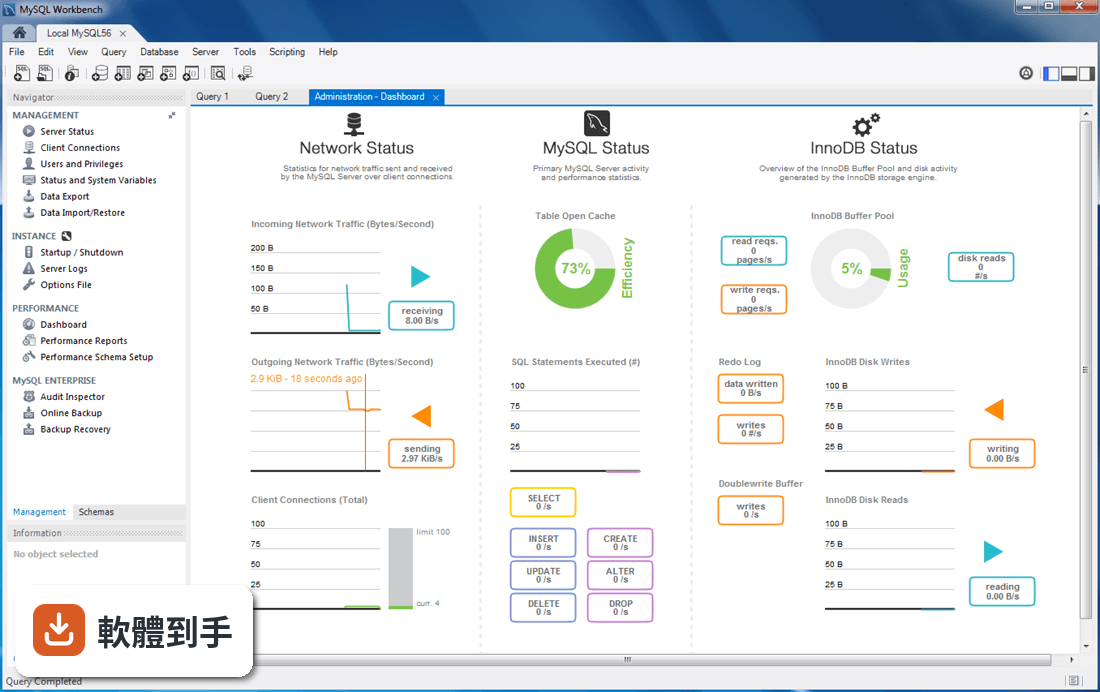
01MySQL Workbench 是用來做什麼的?
它是一套給 MySQL 資料庫用的圖形化管理工具,涵蓋資料庫建模、SQL 開發、伺服器管理和效能監控。你可以用它建立 ER 圖、設計資料表結構、編寫與執行 SQL 查詢、管理使用者權限,也可以把其他資料庫的資料遷移進來。官方說明指出,它主要服務資料庫管理員、開發者和資料架構師。
02這套軟體可以建立資料庫和資料表嗎?
可以。在 Schemas 面板按右鍵選「Create Schema」就能建立資料庫,建立後可以在裡面新增資料表、欄位和索引。它也有模型編輯器,可以用視覺化方式畫 ER 圖,再產生對應的 SQL 腳本。如果你已經有資料庫,也可以用逆向工程把現有結構轉成圖表。
03寫 SQL 查詢的時候,它有什麼輔助功能?
它的 SQL 編輯器有語法高亮和自動完成,輸入關鍵字或欄位名稱時會跳出建議。查詢結果會顯示在下方表格,可以匯出成報告。官方資料提到,它還有 Query Analyzer 和 Performance Schema 工具,可以用來分析查詢效能、找出需要調整的地方。
04它能管理使用者帳號和權限嗎?
可以。在 Administration 分頁裡,可以管理使用者、設定角色和權限,也可以調整伺服器設定、查看日誌。這些操作都有圖形介面,不需要自己記指令。不過實際能設定的權限項目,還是要看 MySQL 伺服器本身支援到什麼程度。
05可以把其他資料庫的資料搬進 MySQL 嗎?
官方說明指出,它支援從 Microsoft SQL Server、PostgreSQL 和 SQLite 遷移到 MySQL,並提供資料遷移精靈引導整個流程。如果你要從這些資料庫轉換過來,可以用這個功能。但如果你是要把 MySQL 搬到別的平台,它就不是設計來做這件事的。
06這套軟體適合初學者嗎?
官方資料自己提到,介面功能很多,初學者可能會覺得複雜。如果你完全沒碰過資料庫,建議先從建立資料庫、寫簡單 SELECT 查詢開始,其他管理功能可以之後再學。它的免費 Community Edition 包含基本功能,足夠練習和日常使用,不需要一開始就考慮付費版本。
07資料庫管理員用它會夠用嗎?
以官方列出的功能來看,管理員常用的使用者管理、伺服器設定、備份管理、效能監控都有涵蓋。它也有 SSH 隧道和遠端連線功能,可以連到遠端伺服器。不過如果你的日常工作需要同時管理多種資料庫系統,它主要還是以 MySQL 為主,其他資料庫只能做遷移用途。
08什麼情況下不該選它?
如果你主要管理的不是 MySQL,而是 PostgreSQL、SQLite 或 SQL Server,這套軟體不適合,它對非 MySQL 資料庫的支援僅限於遷移。另外,如果你的電腦記憶體只有 4GB 或更低,官方建議最低 4GB、建議 8GB 以上,執行起來可能會吃力。介面只有英文,如果你需要中文介面,這套沒有提供。
09它跟 phpMyAdmin 比起來,差別在哪?
phpMyAdmin 是網頁介面,MySQL Workbench 是桌面應用程式。phpMyAdmin 有 102 人評分,MySQL Workbench 有 61 人評分,兩者都有一定使用基礎。phpMyAdmin 的好處是不用安裝、開瀏覽器就能用,MySQL Workbench 則提供完整的桌面體驗,包括 ER 圖建模和效能分析。如果你習慣在瀏覽器操作,可以考慮 phpMyAdmin;如果你需要離線的完整工具,再選這套。
10這套軟體需要付費嗎?
它有 Community Edition 和 Commercial Edition 兩種版本。Community Edition 免費,包含官方列出的主要功能;Commercial Edition 屬於 MySQL Enterprise 訂閱的一部分,價格會依方案而異,部分進階功能鎖在付費版本裡。如果你只是個人開發或學習,免費版通常夠用,但付費版有哪些額外功能,官方沒有列出細節,需要自行到官網確認。
11它只能在 Windows 上跑嗎?
不是。官方說明指出,它支援 Windows、macOS 和 Linux,是跨平台的。不過你提供的資料只列出 Windows 10 64-bit 和 Windows 11 的系統需求,其他平台的安裝方式和硬體要求,需要去官網查詢。另外,官方提到需要 .NET Framework,安裝前要確認系統有裝。
12這套軟體還有人在維護嗎?
從版本紀錄來看,它收錄了 30 個版本,最早在 2016 年,最近一次更新在 2026 年,近 12 個月更新 4 次、近 24 個月 8 次,代表開發團隊持續在釋出新版本。如果你在意軟體是否活躍維護,這個更新頻率算是穩定的,不用擔心放著不管。
下載與官方連結
mysql-workbench-community-6.3.7-winx64.msi · 26.7 MB · 連結指向軟體原廠
版本紀錄
- 2026-04-24 MySQL Workbench 8.0.47 255 MB
- 2026-01-23 MySQL Workbench 8.0.46 250 MB
- 2025-12-02 MySQL Workbench 8.0.45 252 MB
再看 5 筆
- 2025-10-23 MySQL Workbench 8.0.44 252 MB
- 2025-07-23 MySQL Workbench 8.0.43 43 MB
- 2025-04-15 MySQL Workbench 8.0.42 42.98 MB
- 2025-01-21 MySQL Workbench 8.0.41 42.01 MB
- 2024-10-16 MySQL Workbench 8.0.40 41.91 MB
這一版改了什麼
What's new in this version:
Functionality Added or Changed:
- The Default target MySQL version model preference is now an open text field instead of a dropdown select box. For example, rather than choosing a version such as "5.7", you can now enter a specific version such as 5.7.12.
Bugs Fixed:
- A typo was fixed on the Configure Server Management page.
- On OS X, after creating a new model, and new diagram, right-clicking on the empty diagram background would freeze Workbench.
- Executing Data Import/Restore would emit an unhandled exception with Import from Self-Contained File enabled.
- On Linux, the Table Data Export wizard failed to complete the export process.
- The MySQL Enterprise Backup Restore functionality could emit an unhandled exception under some circumstances.
- Editing a remote MySQL options file via the Options File management tool would emit an unhandled exception after clicking Apply.
- Exporting data to JSON was exporting NULL values as NULL instead of null, thus breaking the JSON output.
- Under Users and Privileges, Workbench did not allow hyphens for host names in the "limit to hosts matching" field.
- When viewing the code for an existing view (SQL to create the view), hexadecimal values were truncated.
- Migrating a MySQL source to a MySQL target database would fail for tables that had generated columns, as the target server rejected attempts to insert data into generated columns.
- Selecting "5.7" from Default target MySQL version did not take into account changes to newer versions, as 5.7 behaved like 5.7.0 instead of a newer version. For example, it was not possible to use the JSON data type for variables inside the stored procedure editor as JSON was added in MySQL 5.7.7.
- The Schema filter was slow (poor performance) when a lot (1000+) of schemas were present.
- The database migration wizard database field was described as "Leave blank to select it later" but this text was updated to read as "Cannot be blank" because it is a required field
- The generated SQL generated by the forward engineering wizard would incorrectly output "VIRTUALCOMMENT" instead of "VIRTUAL COMMENT".
- An new option is available to specify a path to the SSH configuration and/or known hosts file. This option overwrites the defaults.
- Workbench's Alter Table functionality did not behave correctly when a column was defined using a TIMESTAMP with fractional seconds, such as TIMESTAMP(1). In this case, some columns would be hidden from the editor.
- Under Reverse Engineering, the information provided in the wild card description to select objects contained a typo.
- After successfully executing the database migration wizard, executing it a second time required Workbench to be restarted.
- When executing Data Export using a remote MySQL connection, the error resulting from a missing mysqldump binary was unclear.
- The PostgreSQL migration wizard could fail to migrate PostgreSQL databases that were generated with tryton.
- The Dashboard and Server Status reported different Select per second values. The Server Status page reported incorrect (inflated by about 3x) values
- The PostgreSQL migration wizard could fail with an "pg_catalog.pg_enum does not exist" error.
- The Workbench interface would incorrectly orient itself to display as Right-To-Left (RTL) when a system's language is set to a RTL language, despite Workbench not being translated to that language.
- Attempting to test custom connection details (a connection not yet created by Workbench) caused Workbench to fail and exit. The Test Connection functionality only functioned for existing or new connections.
- The "Limit to Hosts Matching" field in the user manager would incorrectly report a "Host name contains incorrect characters" error if the host named contained numeric characters.
- Import and export to JSON format failed if the table had column names that were keywords such as key or value.
- The Alter Table functionality did not detect a default value change from no default value to an empty string. In other words, adding a default value of "" resulted in Workbench reporting "No changes detected".
- The DBMS connection keep-alive interval option did not function properly. As a result, Workbench could lose the connection and result in errors similar to "Error Code: 2013. Lost connection to MySQL server during query".
- All generated paths now will use "/" as the directory separator in order to avoid the "s" being interpreted as a space, such as "C:pathtocertsserver-cert.pem" for generated SSL certificates.
- Importing CSV data with from a properly UTF-8 encoded source would sometimes fail, and instead could result with errors such as "'ascii' codec can't encode character u'xcf' at position 29: ordinal not in range(128)".
- With Fabric, Workbench cached the topology information and did not update it when the topology changed, like when switching to a new master.
- Code completion has been further improved to only show relevant details, such as if a table is referenced in the FROM clause then only show columns from that table and not all from the default schema, and entries have been reordered to show columns first (only preceded by keywords).
- Some stored procedure definitions were incorrectly reported as having invalid syntax.
- Executing Alter Stored Procedure with a user lacking SELECT privileges would crash MySQL Workbench
- With the MySQL Firewall plugin enabled, having a user name containing a single quote character (rare, but not illegal) the queries would fail and produce an error in the Users and Privileges area of Workbench. These checks are now properly escaped.
- With the validate_password plugin enabled, when Workbench attempted to check the strength of a new password by sending a query to the server, the password was not properly escaped in this query. In such cases, the password was incorrectly reported as a strong or weak password. The associated "SELECT VALIDATE_PASSWORD_STRENGTH" query is now properly escaped.
- Some internal Workbench queries failed to execute with sql_mode set to ANSI_QUOTES.
- The Total Time field within the Recent Activity grid of the Online Backup / MySQL Enterprise Backup section of Workbench showed an incorrect duration value.
- With MySQL Server 5.5 and lower, executing Alter Table on tables with partitions would fail with an error similar to "Syntax error: 'PARTITION' (identifier) is not valid input at this position".
- MySQL Workbench lacked a CentOS profile, so could fail to make remote connections to a CentOS machine.
- After opening the stored procedure editor from the object browser, clicking Execute would execute a query that did not take into account the IN parameters.
- On Windows, the "DEFAULT NULL" value could unintentionally be removed from the "Alter Table" window when clicking on it.
- The Database Migration migration link on the home page was not functioning immediately after a successful migration.
- Several grammar and spelling corrections were implemented into the GUI.
- Under certain circumstances, sub-queries were reported as syntax errors
- Several SQL Server 2014 database migration improvements.
- While modeling, pressing the Enter key while editing a document's properties would close the document properties window instead of adding a new line
- When copying tables, Workbench makes one connection at the start to disable triggers, makes a separate connection to do the data copy, then returns to the first connection to re-enable triggers. If the copy takes longer than the server's wait_timeout, the first connection timed out.
- The Driver sends Unicode data as UTF-8 advanced database migration option that is available when using an ODBC driver is now disabled by default. Also, connections could hang when this option was enabled.
- Executing Delete Row(s) after selecting more than six rows from the results grid would not delete all of the selected rows.
- Adding a DATETIME with precision (such as DATETIME(3)) from the Table Editor would eventually get reverted to DATETIME (without precision).
- The search (magnifying glass) icon in the schema search field was misplaced after the left sidebar was resized.
- Workbench will now prompt to continue the execution of operations containing loops in stored procedures, instead of just canceling it after ~200 executions.
- The Performance Schema installation procedure in Workbench failed to check user privileges before attempting the installation. For example, if the user had all privileges except "ALTER ROUTINE", it would update sys.version but fail to complete the installation, and also fail to back out thereby leaving the sys.version as current but none of the functions were updated.
- On Linux and OS X, the Options File viewer shortened (cut) long option names in the GUI, although editing their values changed the correct options.
- MySQL connections were leaked when connecting and disconnecting to MySQL databases. It leaked one connection per re-connect to a database.
- A large database caused the size reported under the Schema Inspector to wrap around and display a negative number.
- From the Options File management feature, clicking Discard with the Advanced tab open would always revert the thread_handling option value to "one-thread-per-connection" even if it was set to "no threads".
- The print preview icon dialog was missing the Workbench icon.
- Changes to the modeling Appearance font preference did not save properly, or have an effect.
- On Windows, the Query Stats graph would not render with MySQL Server 5.7.
- The Query Stats information tab was populated even when the Performance Schema was disabled.
- The Toggle whether execution of SQL script should continue after failed statements button was updated to better indicate when the option is enabled or disabled.
- On Windows, after closing and reopening Workbench with several SQL Editor tabs open, the tabs names were hash values (instead of MySQL connection names) if the connection names contained non-standard text.
- In the Table Editor, if a column has NN checked, and NN is then unchecked, then a default NULL value is automatically added to the CREATE TABLE statement when Apply is clicked. The column then shows a default value of NULL in the Table Editor.
- If a setting is (incorrectly) defined twice in my.ini, Workbench separates its values with a newline ("n"). For example, if sort_buffer_size is defined twice, Workbench displays it as "sort_buffer_size=256Kn256K". Workbench now follows MySQL Server behavior, and uses the last defined option.
- The cursor could seemingly disappear after executing a query, as it could remain at its last position when the query started to execute. (Bug #19703074, Bug #74128)
- The model Page setup... functionality was not always preserved when choosing a size for printing.