
這是歷史版本頁面 — 看 NVDA 最新版本
視障者用電腦卡關?NVDA 免費讀屏能做什麼
 NVDA 2011.3
資料更新 2011-11-25
閱讀約 6 分鐘
視覺障礙者或重度視力衰退的人,坐在電腦前不是「看不到螢幕」這麼簡單——是滑鼠游標不知道在哪、視窗開了幾個搞不清楚、網頁讀到哪一段完全沒概念。明明文書、上網、收信都是日常需求,卻因為讀不到畫面,每一步都卡在「現在到底發生什麼事」。這種狀況下,需要的不是放大鏡,而是把螢幕上的文字變成聲音或點字,讓操作者用聽的、用摸的就知道系統狀態。
一般人直覺會想到「把字放大」或「請人幫忙唸」,但前者對全盲沒用,後者不可能隨時在旁邊。系統內建的朗讀功能往往只覆蓋特定程式,遇到網頁或 Office 就斷斷續續。這類工具的切入點,是直接攔截系統和應用程式送出的文字資訊,再用語音合成或點字顯示器輸出,讓使用者在沒有視覺輔助的狀態下,照樣能操作 Windows、瀏覽網頁、編輯文件。
01NVDA 是什麼?裝了之後到底能做什麼?
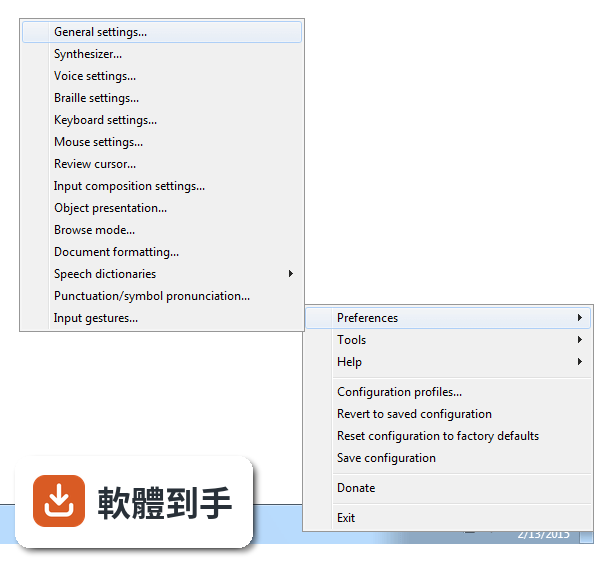
NVDA 是一套免費、開源的螢幕閱讀器,安裝後會用合成語音讀出螢幕上的文字,也能搭配點字顯示器輸出。它讓視障者可以操作 Windows 桌面、瀏覽網頁、使用 Microsoft Office、記事本,以及 Outlook、Thunderbird 等郵件軟體。啟動方式是按下 Ctrl + Alt + N,之後用 Tab 和方向鍵就能在視窗和選單之間移動,系統會即時唸出焦點所在的位置。
02它能不能讀網頁?用鍵盤要怎麼瀏覽?
可以。NVDA 支援 Chrome、Firefox、Edge 等主流瀏覽器,開啟網頁後,用方向鍵上下移動就能逐行讀出文字,按 H 鍵跳到下一個標題,按 K 鍵跳到連結。不需要滑鼠,整頁內容都可以靠鍵盤讀完。遇到圖片或按鈕,它會唸出替代文字或「按鈕」之類的提示,讓你知道這個元素可以做什麼。
03可以接點字顯示器嗎?要怎麼設定?
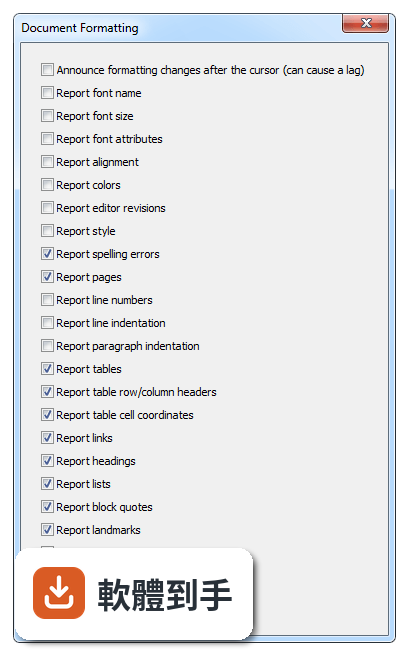
可以。NVDA 支援多種可更新式點字顯示器,透過 USB 或藍牙連線,然後在 NVDA 的設定選單裡找到「點字」項目,選擇你的顯示器型號並調整相關參數。設定完成後,螢幕上的文字會即時轉成點字輸出,適合不想一直聽語音、或需要精確確認拼字的使用者。
04它一定要安裝才能用嗎?能不能帶著走?
不必安裝。NVDA 提供可攜版,可以把程式直接放到 USB 隨身碟裡,插到任何一台 Windows 電腦上就能執行,不需要在該台電腦上安裝軟體。這對需要在不同地方使用電腦的人很方便,例如在學校、圖書館或別人的電腦上,插入隨身碟啟動 NVDA 就能開始操作。
05它支援哪些 Windows 版本?對電腦硬體有要求嗎?
官方說明支援 Windows 7、8、10、11,32 位元和 64 位元都行。硬體需求是處理器 1 GHz 以上、建議 2 GB 記憶體、100 MB 可用磁碟空間,並需要音效輸出裝置來播放語音。點字顯示器是選配,沒有也可以只用語音。整體來說,一般文書用的電腦都跑得動。
06完全看不到的人適合用嗎?還是只有弱視的人能用?
全盲使用者是 NVDA 的主要對象,因為它完全靠語音和點字輸出,不需要任何視覺回饋。弱視的人也可以搭配螢幕放大鏡工具一起使用,NVDA 本身有與放大工具整合的能力,讓還有一點殘餘視力的人同時用聽的和看的來操作。兩種狀況都適用,差別在於怎麼搭配其他輔具。
07不想花錢買商業讀屏軟體的人,用 NVDA 夠嗎?
如果你的需求是讀網頁、用 Office、收發郵件、操作 Windows 基本功能,NVDA 都能勝任,而且完全免費。它更新頻繁,近兩年有多次版本釋出,代表持續在維護。但如果你需要的是商業軟體才有的進階功能,例如更細緻的語音品質或特定專業應用程式的深度整合,NVDA 可能就沒有那些東西。
08它的介面是英文的,不會英文的人能操作嗎?
官方介面語系是英文,但 NVDA 本身支援多種語言的語音輸出,也就是說,它可以用中文或其他語言朗讀螢幕內容。不過,設定選單、快速鍵說明這些操作介面是英文,對完全不懂英文的人來說,初始設定會比較吃力。建議找懂英文的人協助完成第一次設定,之後日常使用主要靠鍵盤指令,不太需要一直看選單。
09有些程式它讀不到,遇到這種情況怎麼辦?
官方說明指出,NVDA 支援大多數標準應用程式,但某些專有或客製化軟體可能功能有限。如果你常用的程式讀不到內容,可以先確認該程式是否有無障礙支援或替代方案,或者改用網頁版。NVDA 本身沒有辦法解決所有應用程式的相容問題,這部分需要自行測試或尋找其他輔助工具搭配。
10它的語音聽起來很機械,會不會影響長時間使用?
官方說明坦承,NVDA 的語音合成品質比商業付費方案粗糙,聽起來確實比較機械。對長時間聆聽的人來說,這可能造成疲勞,但很多人會透過調整語速、音調和詳細程度來改善。如果你對語音品質非常敏感,可以考慮安裝其他語音引擎,但這需要額外設定,而且效果因人而異。
11跟其他讀屏軟體比起來,NVDA 的評價如何?
在收錄的評分中,NVDA 有 168 人評分,平均 8.18 分(滿分 10 分)。這個分數不算低,但評分人數不算多,參考價值有限。跟它放在一起比較的 Foxit Reader、Adobe Digital Editions、ALLPlayer 都不是讀屏軟體,類別不同,無法直接對比。如果你在考慮付費讀屏,建議先試用 NVDA,確認基本需求能不能滿足,再決定要不要花錢。
下載與官方連結
nvda_2011.3_installer.exe · 13.38 MB · 連結指向軟體原廠
版本紀錄
- 2026-10-26 NVDA 2026.3 66.14 MB
- 2026-05-06 NVDA 2026.1 59.96 MB
- 2026-02-16 NVDA 2025.3.3 48.7 MB
再看 5 筆
- 2025-11-24 NVDA 2025.3.1 48.72 MB
- 2025-11-24 NVDA 2025.3.2 48.72 MB
- 2025-09-15 NVDA 2025.3 48.73 MB
- 2025-08-13 NVDA 2025.2 44.03 MB
- 2025-06-23 NVDA 2025.1.2 42.34 MB
這一版改了什麼
What's new in this version:
New Features:
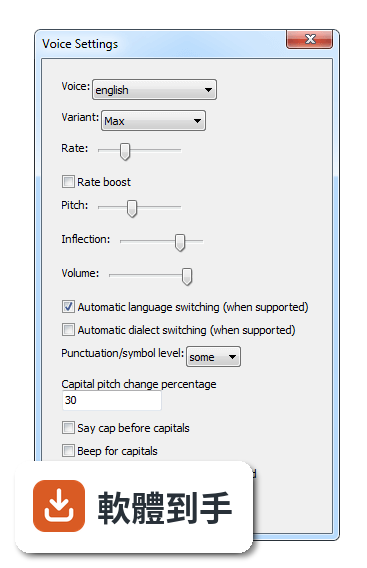
- NVDA can now change the eSpeak synthesizer language on the fly when reading certain web/pdf documents with appropriate language information. Automatic language/dialect switching can be toggled on and off from the Voice Settings dialog. (#845)
- Java Access Bridge 2.0.2 is now supported, which includes support for 64 bit Java Runtime Environments.
- In Mozilla Gecko (e.g. Firefox) Heading levels are now announced when using object navigation.
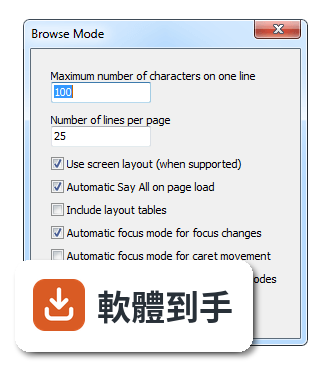
- Text formatting can now be reported when using browse mode in Mozilla Gecko (e.g. Firefox and Thunderbird). (#394)
- Text with underline and/or strikethrough can now be detected and reported in standard IAccessible2 text controls such as in Mozilla applications.
- In browse mode in Adobe Reader, table row and column counts are now reported.
- Added support for the Microsoft Speech Platform synthesizer. (#1735)
- Page and line numbers are now reported for the caret in IBM Lotus Symphony. (#1632)
- The percentage of how much the pitch changes when speaking a capital letter is now configurable from the voice settings dialog. However, this does replace the older raise pitch for capitals checkbox (therefore to turn off this feature set the percentage to 0). (#255)
- Text and background color is now included in the reporting of formatting for cells in Microsoft Excel. (#1655)
- In applications using the Java Access Bridge, the activate current navigator object command now works on controls where appropriate. (#1744)
- New language: Tamil.
- Basic support for Design Science MathPlayer.
Changes:
- NVDA will now restart itself if it crashes.
- Some information displayed in braille has been abbreviated. (#1288)
- the Read active window script (NVDA+b) has been improved to filter out unuseful controls and also is now much more easy to silence. (#1499)
- Automatic say all when a browse mode document loads is now optional via a setting in the Browse Mode settings dialog. (#414)
- When trying to read the status bar (Desktop NVDA+end), If a real status bar object cannot be located, NVDA will instead resort to using the bottom line of text written to the display for the active application. (#649)
- When reading with say all in browse mode documents, NVDA will now pause at the end of headings and other block-level elements, rather than speaking the text together with the next lot of text as one long sentence.
- In browse mode, pressing enter or space on a tab now activates it instead of switching to focus mode. (#1760)
- Updated eSpeak speech synthesizer to 1.45.47.
Bug Fixes:
- NVDA no longer shows bullets or numbering for lists in Internet Explorer and other MSHTML controls when the author has indicated that these should not be shown (i.e. the list style is "none"). (#1671)
- Restarting NVDA when it has frozen (e.g. by pressing control+alt+n) no longer exits the previous copy without starting a new one.
- Pressing backspace or arrow keys in a Windows command console no longer causes strange results in some cases. (#1612)
- The selected item in WPF combo boxes (and possibly some other combo boxes exposed using UI Automation) which do not allow text editing is now reported correctly.
- In browse mode in Adobe Reader, it is now always possible to move to the next row from the header row and vice versa using the move to next row and move to previous row commands. Also, the header row is no longer reported as row 0. (#1731)
- In browse mode in Adobe Reader, it is now possible to move to (and therefore past) empty cells in a table.
- Pointless position information (e.g. 0 of 0 level 0) is no longer reported in braille.
- When braille is tethered to review, it is now able to show content in flat review. (#1711)
- A text control's text is no longer presented twice on a braille display in some cases, e.g. scrolling back from the start of Wordpad documents.
- In browse mode in Internet Explorer, pressing enter on a file upload button now correctly presents the dialog to choose a file to upload instead of switching to focus mode. (#1720)
- Dynamic content changes such as in Dos consoles are no longer announced if sleep mode for that application is currently on. (#1662)
- In browse mode, the behaviour of alt+upArrow and alt+downArrow to collapse and expand combo boxes has been improved. (#1630)
- NVDA now recovers from many more situations such as applications that stop responding which previously caused it to freeze completely. (#1408)
- For Mozilla Gecko (Firefox etc) browse mode documents NVDA will no longer fail to render text in a very specific situation where an element is styled as display:table. (#1373)
- NVDA will no longer announce label controls when focus moves inside of them. Stops double announcements of labels for some form fields in Firefox (Gecko) and Internet Explorer (MSHTML). (#1650)
- NVDA no longer fails to read a cell in Microsoft Excel after pasting in to it with control+v. (#1781)
- In Adobe Reader, extraneous information about the document is no longer announced when moving to a control on a different page in focus mode. (#1659)
- In browse mode in Mozilla Gecko applications (e.g. Firefox), toggle buttons are now detected and reported correctly. (#1757)
- NVDA can now correctly read the Windows Explorer Address Bar in Windows 8 developer preview.
- NVDA will no longer crash apps such as winver and wordpad in Windows 8 developer preview due to bad glyph translations.
- In browse mode in applications using Mozilla Gecko 10 and later (e.g. Firefox 10), the cursor is more often positioned correctly when loading a page with a target anchor. (#360)
- In browse mode in Mozilla Gecko applications (e.g. Firefox), labels for image maps are now rendered.
- With mouse tracking enabled, moving the mouse over certain editable text fields (such as in Synaptics Pointing Device Settings and SpeechLab SpeakText) no longer causes the application to crash. (#672)
- NVDA now functions correctly in several about dialogs in applications distributed with Windows XP, including the About dialog in Notepad and the About Windows dialog. (#1853, #1855)
- Fixed reviewing by word in Windows Edit controls. (#1877)
- Moving out of an editable text field with leftArrow, upArrow or pageUp while in focus mode now correctly switches to browse mode when automatic focus mode for caret movement is enabled. (#1733)