
這是歷史版本頁面 — 看 NVDA 最新版本
視障者用電腦卡關?NVDA 免費讀屏能做什麼
 NVDA 2023.1
資料更新 2023-03-27
閱讀約 6 分鐘
視覺障礙者或重度視力衰退的人,坐在電腦前不是「看不到螢幕」這麼簡單——是滑鼠游標不知道在哪、視窗開了幾個搞不清楚、網頁讀到哪一段完全沒概念。明明文書、上網、收信都是日常需求,卻因為讀不到畫面,每一步都卡在「現在到底發生什麼事」。這種狀況下,需要的不是放大鏡,而是把螢幕上的文字變成聲音或點字,讓操作者用聽的、用摸的就知道系統狀態。
一般人直覺會想到「把字放大」或「請人幫忙唸」,但前者對全盲沒用,後者不可能隨時在旁邊。系統內建的朗讀功能往往只覆蓋特定程式,遇到網頁或 Office 就斷斷續續。這類工具的切入點,是直接攔截系統和應用程式送出的文字資訊,再用語音合成或點字顯示器輸出,讓使用者在沒有視覺輔助的狀態下,照樣能操作 Windows、瀏覽網頁、編輯文件。
01NVDA 是什麼?裝了之後到底能做什麼?
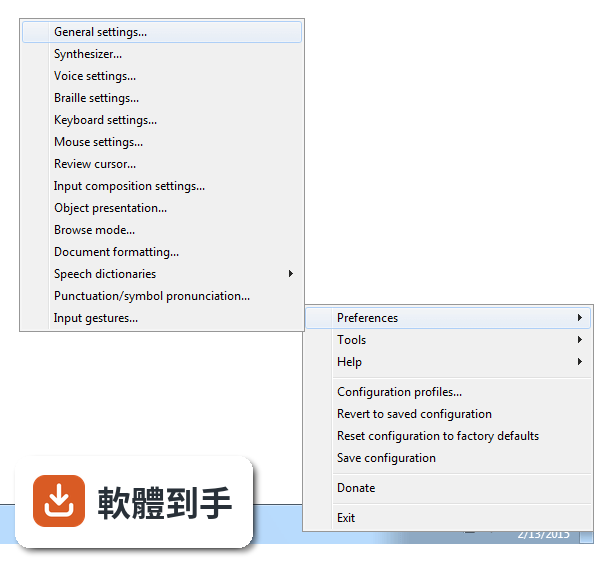
NVDA 是一套免費、開源的螢幕閱讀器,安裝後會用合成語音讀出螢幕上的文字,也能搭配點字顯示器輸出。它讓視障者可以操作 Windows 桌面、瀏覽網頁、使用 Microsoft Office、記事本,以及 Outlook、Thunderbird 等郵件軟體。啟動方式是按下 Ctrl + Alt + N,之後用 Tab 和方向鍵就能在視窗和選單之間移動,系統會即時唸出焦點所在的位置。
02它能不能讀網頁?用鍵盤要怎麼瀏覽?
可以。NVDA 支援 Chrome、Firefox、Edge 等主流瀏覽器,開啟網頁後,用方向鍵上下移動就能逐行讀出文字,按 H 鍵跳到下一個標題,按 K 鍵跳到連結。不需要滑鼠,整頁內容都可以靠鍵盤讀完。遇到圖片或按鈕,它會唸出替代文字或「按鈕」之類的提示,讓你知道這個元素可以做什麼。
03可以接點字顯示器嗎?要怎麼設定?
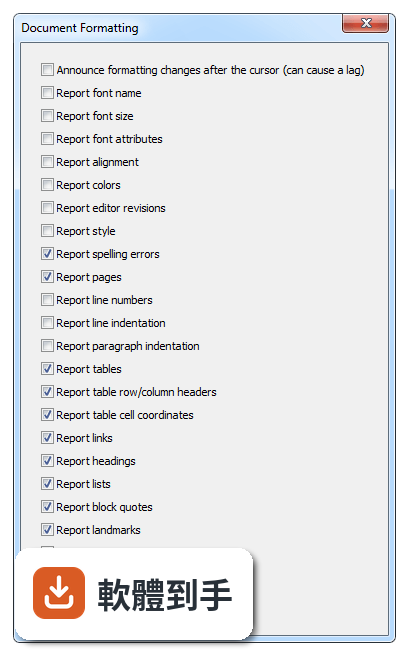
可以。NVDA 支援多種可更新式點字顯示器,透過 USB 或藍牙連線,然後在 NVDA 的設定選單裡找到「點字」項目,選擇你的顯示器型號並調整相關參數。設定完成後,螢幕上的文字會即時轉成點字輸出,適合不想一直聽語音、或需要精確確認拼字的使用者。
04它一定要安裝才能用嗎?能不能帶著走?
不必安裝。NVDA 提供可攜版,可以把程式直接放到 USB 隨身碟裡,插到任何一台 Windows 電腦上就能執行,不需要在該台電腦上安裝軟體。這對需要在不同地方使用電腦的人很方便,例如在學校、圖書館或別人的電腦上,插入隨身碟啟動 NVDA 就能開始操作。
05它支援哪些 Windows 版本?對電腦硬體有要求嗎?
官方說明支援 Windows 7、8、10、11,32 位元和 64 位元都行。硬體需求是處理器 1 GHz 以上、建議 2 GB 記憶體、100 MB 可用磁碟空間,並需要音效輸出裝置來播放語音。點字顯示器是選配,沒有也可以只用語音。整體來說,一般文書用的電腦都跑得動。
06完全看不到的人適合用嗎?還是只有弱視的人能用?
全盲使用者是 NVDA 的主要對象,因為它完全靠語音和點字輸出,不需要任何視覺回饋。弱視的人也可以搭配螢幕放大鏡工具一起使用,NVDA 本身有與放大工具整合的能力,讓還有一點殘餘視力的人同時用聽的和看的來操作。兩種狀況都適用,差別在於怎麼搭配其他輔具。
07不想花錢買商業讀屏軟體的人,用 NVDA 夠嗎?
如果你的需求是讀網頁、用 Office、收發郵件、操作 Windows 基本功能,NVDA 都能勝任,而且完全免費。它更新頻繁,近兩年有多次版本釋出,代表持續在維護。但如果你需要的是商業軟體才有的進階功能,例如更細緻的語音品質或特定專業應用程式的深度整合,NVDA 可能就沒有那些東西。
08它的介面是英文的,不會英文的人能操作嗎?
官方介面語系是英文,但 NVDA 本身支援多種語言的語音輸出,也就是說,它可以用中文或其他語言朗讀螢幕內容。不過,設定選單、快速鍵說明這些操作介面是英文,對完全不懂英文的人來說,初始設定會比較吃力。建議找懂英文的人協助完成第一次設定,之後日常使用主要靠鍵盤指令,不太需要一直看選單。
09有些程式它讀不到,遇到這種情況怎麼辦?
官方說明指出,NVDA 支援大多數標準應用程式,但某些專有或客製化軟體可能功能有限。如果你常用的程式讀不到內容,可以先確認該程式是否有無障礙支援或替代方案,或者改用網頁版。NVDA 本身沒有辦法解決所有應用程式的相容問題,這部分需要自行測試或尋找其他輔助工具搭配。
10它的語音聽起來很機械,會不會影響長時間使用?
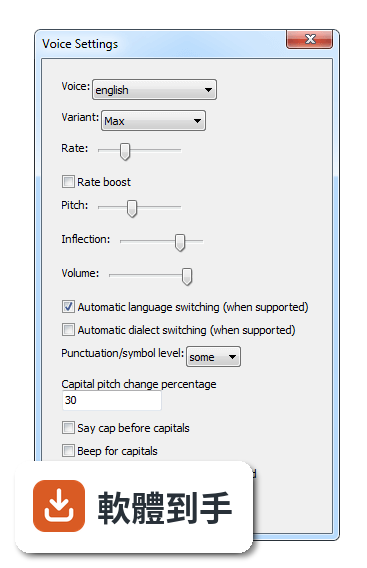
官方說明坦承,NVDA 的語音合成品質比商業付費方案粗糙,聽起來確實比較機械。對長時間聆聽的人來說,這可能造成疲勞,但很多人會透過調整語速、音調和詳細程度來改善。如果你對語音品質非常敏感,可以考慮安裝其他語音引擎,但這需要額外設定,而且效果因人而異。
11跟其他讀屏軟體比起來,NVDA 的評價如何?
在收錄的評分中,NVDA 有 168 人評分,平均 8.18 分(滿分 10 分)。這個分數不算低,但評分人數不算多,參考價值有限。跟它放在一起比較的 Foxit Reader、Adobe Digital Editions、ALLPlayer 都不是讀屏軟體,類別不同,無法直接對比。如果你在考慮付費讀屏,建議先試用 NVDA,確認基本需求能不能滿足,再決定要不要花錢。
下載與官方連結
nvda_2023.1.exe · 連結指向軟體原廠
版本紀錄
- 2026-10-26 NVDA 2026.3 66.14 MB
- 2026-05-06 NVDA 2026.1 59.96 MB
- 2026-02-16 NVDA 2025.3.3 48.7 MB
再看 5 筆
- 2025-11-24 NVDA 2025.3.1 48.72 MB
- 2025-11-24 NVDA 2025.3.2 48.72 MB
- 2025-09-15 NVDA 2025.3 48.73 MB
- 2025-08-13 NVDA 2025.2 44.03 MB
- 2025-06-23 NVDA 2025.1.2 42.34 MB
這一版改了什麼
What's new in this version:
- A new option has been added, "Paragraph Style" in "Document Navigation"This can be used with text editors that do not support paragraph navigation natively, such as Notepad and Notepad++
- There is a new global command to report the destination of a link, mapped to NVDA+k
- Support for annotated web content (such as comments and footnotes) has improvedPress NVDA+d to cycle through summaries when annotations are reported (e.g"has comment, has footnote")
- Tivomatic Caiku Albatross 46/80 braille displays are now supported
- Support for ARM64 and AMD64 versions of Windows has improved
- There are many bug fixes, notably Windows 11 fixes
- eSpeak, LibLouis, Sonic rate boost and Unicode CLDR have been updatedThere are new Georgian, Swahili (Kenya) and Chichewa (Malawi) braille tables
Note:
- This release breaks compatibility with existing add-ons
New Features:
- Microsoft Excel via UI Automation: Automatic reporting of column and row headers in tables
Note: This is referring to tables formatted via the "Table" button on the Insert pane of the Ribbon"First Column" and "Header Row" in "Table Style Options" correspond to column and row headers respectively.
- This is not referring to screen reader specific headers via named ranges, which is currently not supported via UI Automation
- An unassigned script has been added to toggle delayed character descriptions
- Added an experimental option to leverage the UIA notification support in Windows Terminal to report new or changed text in the terminal, resulting in improved stability and responsivity
- Consult the user guide for limitations of this experimental option
- On Windows 11 ARM64, browse mode is now available in AMD64 apps such as Firefox, Google Chrome and 1Password
- A new option has been added, "Paragraph Style" in "Document Navigation"This adds support for single line break (normal) and multi line break (block) paragraph navigationThis can be used with text editors that do not support paragraph navigation natively, such as Notepad and Notepad++
- The presence of multiple annotations are now reportedNVDA+d now cycles through reporting the summary of each annotation target for origins with multiple annotation targetsFor example, when text has a comment and a footnote associated with it
- Added support for Tivomatic Caiku Albatross 46/80 braille displays
- New global command: Report link destination (NVDA+k)Pressed once will speak/braille the destination of the link that is in the navigator objectPressing twice will show it in a window, for more detailed review
- New unmapped global command (Tools category): Report link destination in a windowSame as pressing NVDA+k twice, but may be more useful for braille users
Changed:
- Updated LibLouis braille translator to 3.24.0
- Major updates to Hungarian, UEB, and Chinese bopomofo braille.
- Support for the Danish braille standard 2022.
- New braille tables for Georgian literary braille, Swahili (Kenya) and Chichewa (Malawi)
- Updated Sonic rate boost library to commit 1d70513
- CLDR has been updated to version 42.0
- eSpeak NG has been updated to 1.52-dev commit f520fecb
- Fixed reporting of large numbers
- Java applications with controls using the selectable state will now announce when an item is not selected rather than when the item is selected
Fixed:
Windows 11 fixes:
- NVDA will announce search highlights when opening Start menu
- On ARM, x64 apps are no longer identified as ARM64 applications
- Clipboard history menu items such as "pin item" can be accessed
- In Windows 11 22H2 and newer, it is again possible to use mouse and touch interaction to interact with areas such as the system tray overflow window and "Open With" dialog
- Suggestions are reported when typing an @mention in in Microsoft Excel comments
- In the Google Chrome location bar, suggestion controls (switch to tab, remove suggestion etc) are now reported when selected
- When requesting formatting information, colors are now explicitly reported in Wordpad or log viewer, rather than only "Default color"
- In Firefox, activating the "Show options" button on GitHub issue pages now works reliably
- The date picker controls in Outlook 2016 / 365 Advanced search dialog now report their label and value
- ARIA switch controls are now actually reported as switches in Firefox, Chrome and Edge, rather than checkboxes
- NVDA will automatically announce the sort state on an HTML table column header when changed by pressing an inner button
- A landmark or region's name is always automatically spoken when jumping inside from outside using quick navigation or focus in browse mode
- When beep or announce 'cap' for capitals is enabled with delayed character descriptions, NVDA no longer beeps or announces 'cap' twice
- Controls in tables in Java applications will now be announced more accurately by NVDA
- Some settings will no longer be unexpectedly different when used with multiple profiles
The following settings have been addressed:
- Line indentation in Document formatting settings
- Cell borders in doc formatting settings
- Show messages in braille settings
- Tether Braille in braille settings
- In some rare cases, these settings used in profiles may be unexpectedly modified when installing this version of NVDA.
- Please check these options in your profiles after upgrading NVDA to this version
- Emojis should now be reported in more languages
- The presence of an annotation is no longer missing in braille for some elements
- Fixed an issue where config changes not save correctly when changing between a "Default" option and the value of the "Default" option
- When configuring NVDA there will always be at least one key defined as an NVDA key
- When accessing the NVDA menu via the notification area, NVDA will not suggest a pending update anymore when no update is available
- Remaining, elapsed and total time is now reported correctly for audio files over a day long in foobar2000
- In web browsers such as Chrome and Firefox, alerts such as file downloads are shown in braille in addition to being spoken
- Bug fixed when navigating to the first and last column in a table in Firefox
- When NVDA is launched with --lang=Windows parameter, it is again possible to open NVDA's General settings dialog
- NVDA no longer fails to continue reading in Kindle for PC after turning the page
Changes for Developers:
Note: this is an Add-on API compatibility breaking releaseAdd-ons will need to be re-tested and have their manifest updatedPlease refer to the developer guide for information on NVDA's API deprecation and removal process.
- System tests should now pass when run locally on non-English systems
- In Windows 11 on ARM, x64 apps are no longer identified as ARM64 applications
- It is no longer necessary to use SearchField and SuggestionListItem UIA NVDAObjects in new UI Automation scenarios, where automatic reporting of search suggestions, and where typing has been exposed via UI Automation with the controllerFor patternThis functionality is now available generically via behaviours.EditableText and the base NVDAObject respectively
- The UIA debug logging category when enabled now produces significantly more logging for UIA event handlers and utilities
- NVDAHelper build standards updated
- Now uses the C++20 standard, was C++17.
- Now uses the /permissive- compiler flag which disables permissive behaviors, and sets the /Zc compiler options for strict conformance
- Some plugin objects (e.gdrivers and add-ons) now have a more informative description in the NVDA python console
- NVDA can now be fully compiled with Visual Studio 2022, no longer requiring the Visual Studio 2019 build tools
- More detailed logging for NVDA freezes to aid debugging
- The singleton braille._BgThread class has been replaced with hwIo.ioThread.IoThread
- A single instance hwIo.bgThread (in NVDA core) of this class provides background i/o for thread safe braille display drivers.
- This new class is not a singleton by design, add-on authors are encouraged to use their own instance when doing hardware i/o
- The processor architecture for the computer can be queried from winVersion.WinVersion.processorArchitecture attribute
- New extension points have been added
- inputCore.decide_executeGesture
- tones.decide_beep
- nvwave.decide_playWaveFile
- braille.pre_writeCells
- braille.filter_displaySize
- braille.decide_enabled
- braille.displayChanged
- braille.displaySizeChanged
- It is possible to set useConfig to False on supported settings for a synthesizer driver
API Breaking Changes:
- These are breaking API changesPlease open a GitHub issue if your Add-on has an issue with updating to the new API.
The configuration specification has been altered, keys have been removed or modified:
In [documentFormatting] section
- reportLineIndentation stores an int value (0 to 3) instead of a boolean
- reportLineIndentationWithTones has been removed.
- reportBorderStyle and reportBorderColor have been removed and are replaced by reportCellBorders
In [braille] section
- noMessageTimeout has been removed, replaced by a value for showMessages.
- messageTimeout cannot take the value 0 anymore, replaced by a value for showMessages.
- autoTether has been removed; tetherTo can now take the value "auto" instead
In [keyboard] section
- useCapsLockAsNVDAModifierKey, useNumpadInsertAsNVDAModifierKey, useExtendedInsertAsNVDAModifierKey have been removedThey are replaced by NVDAModifierKeys
- The NVDAHelper.RemoteLoader64 class has been removed with no replacement
- The following functions in winAPI.sessionTracking are removed with no replacement
- isWindowsLocked
- handleSessionChange
- unregister
- register
- isLockStateSuccessfullyTracked
- It is no longer possible to enable/disable the braille handler by setting braille.handler.enabledTo disable the braille handler programatically, register a handler to braille.handler.decide_enabled
- It is no longer possible to update the display size of the handler by setting braille.handler.displaySizeTo update the displaySize programatically, register a handler to braille.handler.filter_displaySizeRefer to brailleViewer for an example on how to do this
- There have been changes to the usage of addonHandler.Addon.loadModule
- loadModule now expects dot as a separator, rather than backslashFor example "lib.example" instead of "libexample".
- loadModule now raises an exception when a module can't be loaded or has errors, instead of silently returning None without giving information about the cause
- The following symbols have been removed from appModules.foobar2000 with no direct replacement
- statusBarTimes
- parseIntervalToTimestamp
- getOutputFormat
- getParsingFormat
- The following are no longer singletons - their get method has been removedUsage of Example.get() is now Example()
- UIAHandler.customAnnotations.CustomAnnotationTypesCommon
- UIAHandler.customProps.CustomPropertiesCommon
- NVDAObjects.UIA.excel.ExcelCustomProperties
- NVDAObjects.UIA.excel.ExcelCustomAnnotationTypes
Deprecations:
- NVDAObjects.UIA.winConsoleUIA.WinTerminalUIA is deprecated and usage is discouraged
- config.addConfigDirsToPythonPackagePath has been movedUse addonHandler.packaging.addDirsToPythonPackagePath instead
- braille.BrailleHandler.TETHER_* are deprecatedUse configFlags.TetherTo.*.value instead
- utils.security.postSessionLockStateChanged is deprecatedUse utils.security.post_sessionLockStateChanged instead
- NVDAObject.hasDetails, NVDAObject.detailsSummary, NVDAObject.detailsRole has been deprecatedUse NVDAObject.annotations instead
- keyboardHandler.SUPPORTED_NVDA_MODIFIER_KEYS is deprecated with no direct replacementConsider using the class config.configFlags.NVDAKey instead
- gui.MainFrame.evaluateUpdatePendingUpdateMenuItemCommand has been deprecatedUse gui.MainFrame.SysTrayIcon.evaluateUpdatePendingUpdateMenuItemCommand instead