
這是歷史版本頁面 — 看 OpenShot Video Editor 最新版本
免費開源影片剪輯卡關?OpenShot 能幫你什麼
 OpenShot Video Editor 2.3.1
資料更新 2017-04-01
閱讀約 6 分鐘
你剛從手機或相機倒出一堆影片檔,想剪掉多餘片段、加上字幕和音樂,弄成一支能丟上網的短片。打開電腦才發現,系統內建的照片App只能做陽春的幻燈片,線上剪輯工具上傳檔案等半天,免費版還浮水印。你只是想快速處理一支家庭出遊或上課筆記的影片,卻卡在「找不到一個順手的工具」這一步。
一般人遇到這種狀況,會先想到找免費軟體,但下載安裝後常常發現介面複雜、教學看不懂,或是功能少到連轉場都做不出來。另一條路是直接用付費軟體的試用版,但剪到一半跳出試用到期,進度全部卡住。這類問題的切入點其實是:有沒有辦法在不用付費、不強制綁雲端的前提下,用一套安裝在電腦上的工具,把剪輯、字幕、音訊、轉場這些基本需求一次處理完。
01OpenShot 這套軟體到底是做什麼用的?
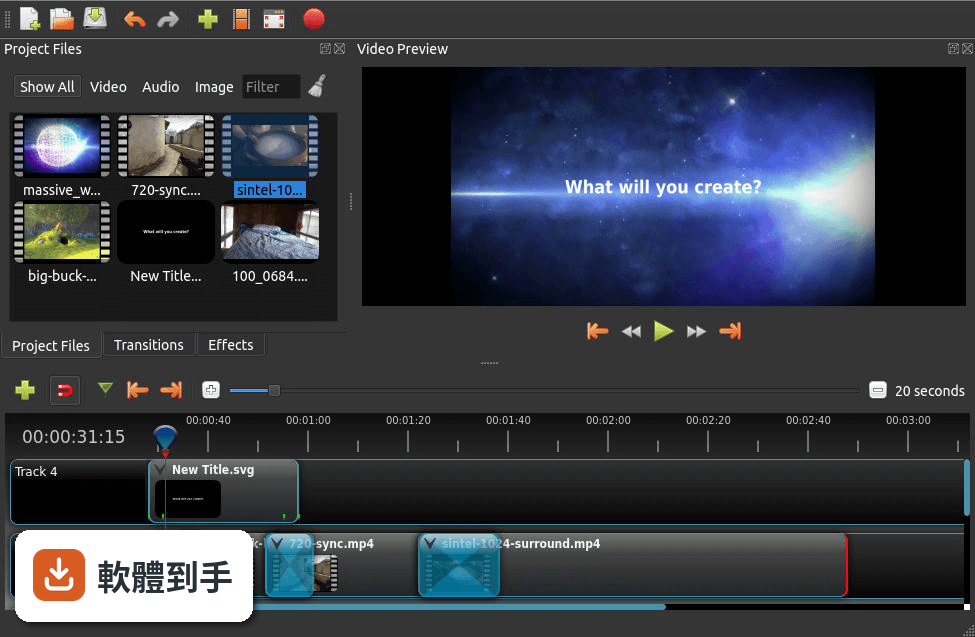
它是一套安裝在電腦上的影片剪輯工具,主要工作是把多段影片、圖片、音樂丟進時間軸,進行裁剪、排列、加上轉場和字幕,最後輸出成一支完整的影片。支援 Windows、macOS 和 Linux,官方說明強調介面直覺、容易上手,適合處理日常影片剪輯需求,例如家庭影片、上課筆記或社群短片。
02它有哪些功能是實際剪片時會用到的?
常見的剪輯操作都有:拖曳檔案進時間軸、裁剪片段長度、調整影片大小和旋轉、加上轉場效果、調整播放速度(包含倒轉)、關鍵幀動畫、音訊波形顯示、以及內建標題編輯器。特效引擎包含模糊、色彩校正、去背綠幕等。官方也提到支援 4K 影片編輯,但實際順暢度會依電腦效能而有差異。
03字幕和文字標題要怎麼處理?
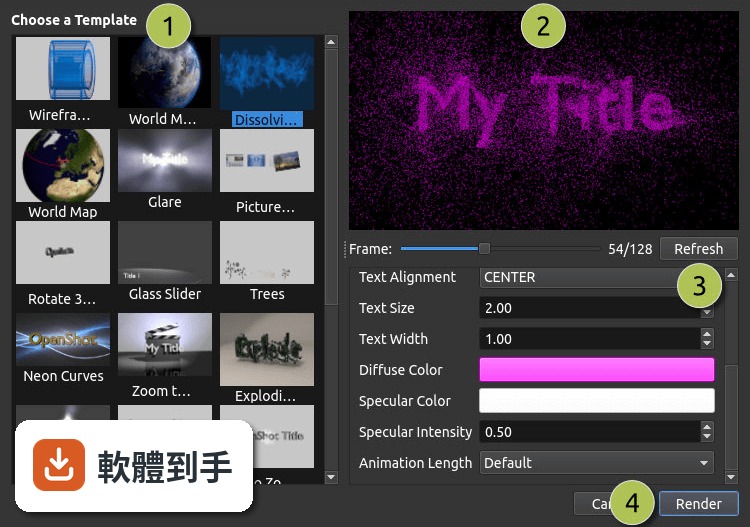
內建標題編輯器可以輸入文字、調整字型、顏色和動畫,也能製作 3D 動態標題,但這部分需要依賴 Blender 運算。基本做法是從「標題」選單建立新標題,編輯完成後拖到時間軸上方的軌道,再調整出現的時間長度。沒有看到直接匯入字幕檔的說明,這部分需要自行確認。
04音訊編輯能做到什麼程度?
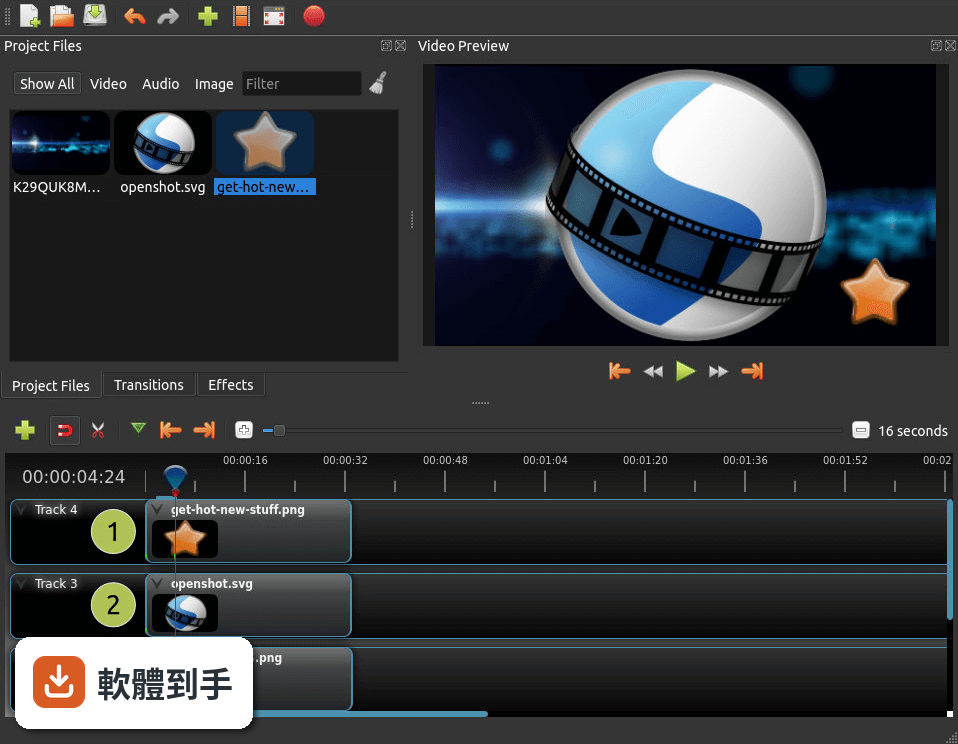
可以把音樂或錄音檔直接拖進音訊軌道,調整音量、設定淡入淡出,也能套用音訊特效。時間軸上會顯示音訊波形,方便對準畫面找音樂下拍點。官方說明提到可以把波形直接輸出成影片的一部分,這在製作音樂相關內容時會用到。但沒有提到多軌混音或降噪等進階功能。
05匯出影片時可以設定哪些選項?
匯出時可以選擇格式、解析度和品質,官方說明沒有列出詳細的格式清單,但表示支援多種影片、音訊和圖片格式。做法是按下「匯出」按鈕,在對話視窗中調整設定,再開始渲染。要注意的是,渲染時間會依影片長度、解析度和電腦效能而不同,4K 影片的輸出時間會明顯拉長。
06這套軟體適合什麼樣的人用?
適合需要基本到中等剪輯功能、不想付費訂閱、而且願意花一點時間熟悉英文介面的人。官方 FAQ 表示它適合初學者到進階使用者,但也坦承缺少專業級軟體的進階功能。如果你只是要剪日常影片、加字幕和音樂,不需要複雜的調色或特效,這套工具在功能上足夠應付。
07完全沒有剪輯經驗的人上手會很困難嗎?
官方設計目標就是「容易使用、快速學習」,介面分為時間軸、預覽視窗和專案檔案區三大區塊,操作以拖曳為主。基本流程是開新專案、匯入檔案、拖到時間軸、裁剪排列、加轉場和字幕、最後匯出。對沒經驗的人來說,最大的門檻不是操作,而是介面只有英文,需要對照翻譯或看教學才能順利設定。
08什麼情況下不該選這套軟體?
如果你需要專業級調色、複雜的動態圖形、多機位同步剪輯或高效能的 4K 即時預覽,這套軟體可能無法滿足。官方 FAQ 也承認它缺少專業級軟體的進階功能。另外,介面只有英文,不習慣英文介面的人會用得很吃力。評分人數僅 38 人,相較於其他同類軟體(如 PowerDirector 有 980 人評分),實際使用樣本數偏少,穩定性有待自行驗證。
09它和 Kdenlive、VSDC 這些免費軟體比起來有什麼不同?
這幾套都是免費或開源方案,但 OpenShot 的評分人數(38 人)明顯少於 Kdenlive(116 人)和 VSDC(192 人),代表實際使用和回報問題的人數較少。功能上,OpenShot 主打拖曳操作和快速上手,而 Kdenlive 以穩定性和豐富功能著稱。如果你重視社群回饋和問題解決資源,評分人數較多的軟體通常有更多討論串可以參考。
10這套軟體還在使用中嗎?會不會裝了之後沒人維護?
根據版本紀錄,這套軟體持續有更新,近 12 個月內更新了 4 次,近 24 個月內更新了 5 次,開發團隊仍在維護。作為開源專案,它依賴社群貢獻和捐款維持開發。安裝前可以到官方網站確認最新版本和系統需求,避免下載到過舊的版本。
11系統需求會不會很高?舊電腦跑得動嗎?
官方列出的最低需求是 64 位元多核心處理器、4 GB RAM(建議 8 GB)、500 MB 可用空間,支援 Windows 7 到 11。以這個規格來看,一般文書電腦都能安裝,但實際剪輯流暢度取決於影片解析度和軌道數量。官方建議遇到效能問題時,可以調整播放設定、降低預覽品質來改善。
12它和付費軟體(如 PowerDirector、Movavi)的主要差異在哪?
最主要的差異是授權型式:OpenShot 完全免費且開源,而 PowerDirector(980 人評分)和 Movavi(201 人評分)都是付費軟體,且評分人數遠多於 OpenShot。付費軟體通常提供更完整的技術支援、繁體中文介面和更穩定的效能,但需要負擔訂閱或買斷費用。如果你預算有限、能接受英文介面,OpenShot 是可行選項;如果重視售後服務和中文介面,付費方案會更適合。
下載與官方連結
前往官方網站 下載 OpenShot Video Editor
OpenShot-v2.3.1-x86_64.exe · 155 MB · 連結指向軟體原廠
版本紀錄
- 2026-09-28 OpenShot Video Editor 4.0.1 (64-bit) 216 MB
- 2026-08-31 OpenShot Video Editor 4.0.0 (64-bit) 218 MB
- 2026-04-08 OpenShot Video Editor 3.5.1 (64-bit) 209 MB
再看 5 筆
- 2026-03-21 OpenShot Video Editor 3.5.0 (64-bit) 209 MB
- 2025-12-16 OpenShot Video Editor 3.4.0 (64-bit) 207 MB
- 2024-12-23 OpenShot Video Editor 3.3.0 (64-bit) 190 MB
- 2024-07-12 OpenShot Video Editor 3.2.1 (64-bit) 189 MB
- 2024-06-25 OpenShot Video Editor 3.2.0 (64-bit) 189 MB
這一版改了什麼
What's new in this version:
Transform Tool:
- We have added a new transform tool, which allows real-time transformations in the video preview window. Right click on any clip, and choose “Transform” to enable the tool. Using your mouse, move and scale the clip as needed, all while enjoying a real-time preview. Animating the location and scale of clips has never been easier!
Zooming Improvements:
- Zooming in and out of the timeline, in order to increase precision of your edits, has been greatly improved. When zooming the timeline, it now centers on your mouse position, similar to image editing applications. The zoom scale is also now saved in each project file, which saves some time when jumping back into a project. When your mouse is over the timeline, hold CTRL+mouse scroll wheel to zoom in and out.
Razor Tool:
- Back by popular demand, the razor tool from OpenShot 1.4.3 has returned from the dead. Click on the Razor toolbar button to switch to razor mode. Now click on any clip or transition to quickly cut them (holding CTRL and SHIFT modify the razor to only keep the left or right side). Alternatively, you can cut a clip at the Playhead position by right clicking and choosing “Slice”, by using CTRL+K, or by grabbing the edge of the clip and dragging.
Improved Title Editors:
- Many improvements have been made to the Title Editor and Animated Title Editor. Both editors now display a grid of thumbnails, to make finding the right title easier. Save dialogs are no longer used, and instead title files are saved directly into your project folder. New “Edit Title” and “Duplicate Title” menus have been added, to assist in quickly making changes to titles.
New Preview Window:
- Previewing files now has its own dedicated video player, which allows for multiple video preview windows at the same time. Also, audio files render a waveform by default. The speed of previewing files is also improved, using the improvements mentioned below.
Huge Performance Improvements for Real-time Previews:
- Performance improvements are always a high priority, and we’ve made some really great improvements to the speed of real-time previews. We’ve also fixed some bugs related to freezes and hangs, caching improvements, frame detection, and better logic to determine the max size of our preview window, so we can optimize by not rendering images and frames larger than the preview window. The end result is the best real-time preview performance yet for OpenShot.
New Documentation:
- I have finally gotten around to publishing a User Guide for OpenShot 2.x. I am using the Sphinx documentation system (which is really great), and I think this will be very useful for new users, and any user who wants to get the most out of OpenShot. It is currently only available in English, but I will soon start the translation process for it.
Audio Improvements:
- Fixes for audio sample distribution, caching, off by 1 errors, and various frame boundary improvements (Thank you Nelson H). Also, improvements to audio device management, which is how OpenShot communicates with the audio system on each OS.
Improved Export Dialog:
- Export dialog has been improved to re-load the project, clear cache, and export without requiring any ties to the real-time preview system. This fixes many freezes and hangs when attempting to export, and is a much more stable approach. Also, on Linux, export progress is now displayed on the launcher icon (in Unity and other launchers).
New Windows Build Server:
- As you might have heard, my Windows development system (and build server) died (again)... stopping all Windows builds for a few weeks. Hard-drive and motherboard issues (and possibly other problems too). A HUGE thanks to John Fields and his band of merry Open Source Saturday folks. They donated a wonderfully nice computer (i7, 16GB RAM), and their only request was that it be called StarLord! Done! StarLord is up and running, and is working beautifully!
GitHub Bug Management:
- With the help of a few volunteers (Ankit, Justin, Jt, and others), we’ve been able to reduce our GitHub bug count from over 380+ bugs to less than 200. Many of those 200 should be resolved with version 2.3, so I still have some work to do in this area, but making great progress! I’ve also added some GitHub templates when filing new bugs, to help increase the quality of new bug reports, and guide users on generating and attaching log files.
Translations:
- OpenShot 2.3 is fully translated in 11 languages, and partially translated in more than 60 others. If you notice untranslated text in your native language, please feel free to submit your own translations on LaunchPad. 100% translated in the following languages: Spanish, French, Italian, Portuguese, Brazilian Portuguese, Greek, Ukrainian
- Catalan, Malay, Icelandic, English (United Kingdom)
Patreon & PayPal Donations:
- If you use OpenShot, support OpenShot, or just want to ensure its continued development, please consider a small donation, or help us spread the word. It is expensive and time consuming to build and distribute OpenShot, and any contribution would be hugely appreciated! We accept PayPal, Bitcoin, and Patreon donations, and we’ll list your name in the credits of OpenShot (which is pretty awesome)!
Additional Features:
- Added new welcome tutorial message, which contains a checkbox for disabling anonymous error and metrics reporting. That can also be adjusted in the Preferences, but it has been often requested to allow new users to opt-out.
- All child windows now center on parent window
- Ability to easily display frame numbers on frames
- Improved accuracy when calculating frame numbers
- Improvements to frame accuracy, especially when zoomed in at max zoom
- Dramatically increased speed of selecting and unselecting large numbers of clips/transitions.
- Refactor loading properties for selected items, to improve speed.
- Refactoring and improving preview playback of files, and preview playback during resize/trim (which now maintains aspect ratio correctly).
- Improving long filename support in file tree/list views, and improving thumbnail/grid view on all listviews (effects, transitions, titles, animated titles, etc...)
- Updating translation files (with a few minor corrections to string formatting arguments).
- Improving test_translations.py script, which helps me detect problems with missing formatting args.
- Fixed an issue preventing the track names from being translated on launch.
- Adding "width x height" to list of profiles on Export and Profiles screens, to make the output resolution more clear
- Improved logic for "Next Marker" and "Previous Marker" buttons to include the selected items (start and end positions), to allow quickly jumping to the beginning or end of a selected clip.
- Prompting user to find missing files when opening a project, and updating translation template.
- Prompt user to save before creating or opening new project file (if needed)
- Make effects container on a clip visible on hover (regardless of how small the clip is).
- Tweak tooltips of clip title so they don't cover up the menu button and effects.
- Making settings save to disk as they are changed in preferences.
- Setting focus to Project Files on launch, so the properties filter doesn't auto get tab focus (preventing certain keyboard shortcuts).
- Switching snapping logic to compare pixels (not time), so it's still useful at close and far zoom levels. Reducing snapping to 10 pixels. Fixing bug when updating new properties for a clip.
Bug Fixes:
- Fixed regression with selection dropdown
- Fixed crash when pasting keyframes onto a clip/transition
- Fixing incorrect placement of a selection handle
- Fixed a bug when caching a mask size (a regression from some of our speed improvements)
- Fixed small bug with Next Marker and Previous Marker buttons (not handling position 0 correctly).
- Fixed bug in transform callback, where transformation was not being disabled when selecting a different clip.
- Adding a lock when updating the JSON of a Timeline (or remapping it), so nobody can request frames while everything is changing. Seems much more stable during live preview.
- Fixing invalid cache after editing effect in a clip, and frame accuracy (converting timestamps into frame numbers). This makes frame by frame editing much better.
- Fixing broken gravity for GRAVITY_BOTTOM_LEFT
- Fixed bug with Build server version detection regex (when releasing new versions).
- Fixed a big bug when pasting deleted clips and transitions.
- Refactoring some tracking code on initial install, and saving settings after launch (since some settings are updated on launch)
- Always settings unique id when sending metrics, which is required or analytics ignores it
- Fixing a crash during initialization of the main window, and a crash during application exit, where threads were not being terminated correctly or safely.
- Fixed a crash when closing the Split Clip dialog.
- Fix align_x bug in newer Blender versions (Thanks mixedbredie)
- Updating Blender compatibility to 2.78, since the API has changed a bit. Also fixing the regex for detecting preview images from Blender, since the output from Blender is now a bit different.
- Refactoring load project flow to take advantage of the new locks in libopenshot (which allow for quicker updates to the live preview after a change is made).
- Fixed a regression detecting missing files that contain expressions (like blender animations).
- Improve speed on Transform method, since it gets called quite often during project load (due to clearing selected clips and transitions)
- Fixing regression with slicing clips (and razor tool).
- Fixing regression on reading large log files (causing slow launch)
- Fixing regression on passing keypresses to timeline. CTRL and SHIFT keys have special uses on the timeline.
- Improve cutting/splitting dialog to use Timeline() object, to support all possible media types (images, videos, etc...) and maintain correct aspect ratio.
- Removing unused files and unneeded translatable strings. Also, adding title names to translation template (forgot about those).
- Removing old effect meta data and old effect icons. New effects will have different translatable metadata.
- Removing uploads folder from mac build script
- Removing app.processEvents from transitions and effects models, due to crashes on OS X. Also, it doesn't make much of a difference anymore.
- Fixing weird bug preventing backup.osp from restoring correctly
- Fixing bug with duplicate title when running in an non-English language
- Improving logic to process files when importing (some were incorrectly marked as invalid)
- Fixing bug when opening legacy projects (1.4.3) that contain effects or markers