
這是歷史版本頁面 — 看 OpenShot Video Editor 最新版本
免費開源影片剪輯卡關?OpenShot 能幫你什麼
 OpenShot Video Editor 2.4.2
資料更新 2018-07-02
閱讀約 6 分鐘
你剛從手機或相機倒出一堆影片檔,想剪掉多餘片段、加上字幕和音樂,弄成一支能丟上網的短片。打開電腦才發現,系統內建的照片App只能做陽春的幻燈片,線上剪輯工具上傳檔案等半天,免費版還浮水印。你只是想快速處理一支家庭出遊或上課筆記的影片,卻卡在「找不到一個順手的工具」這一步。
一般人遇到這種狀況,會先想到找免費軟體,但下載安裝後常常發現介面複雜、教學看不懂,或是功能少到連轉場都做不出來。另一條路是直接用付費軟體的試用版,但剪到一半跳出試用到期,進度全部卡住。這類問題的切入點其實是:有沒有辦法在不用付費、不強制綁雲端的前提下,用一套安裝在電腦上的工具,把剪輯、字幕、音訊、轉場這些基本需求一次處理完。
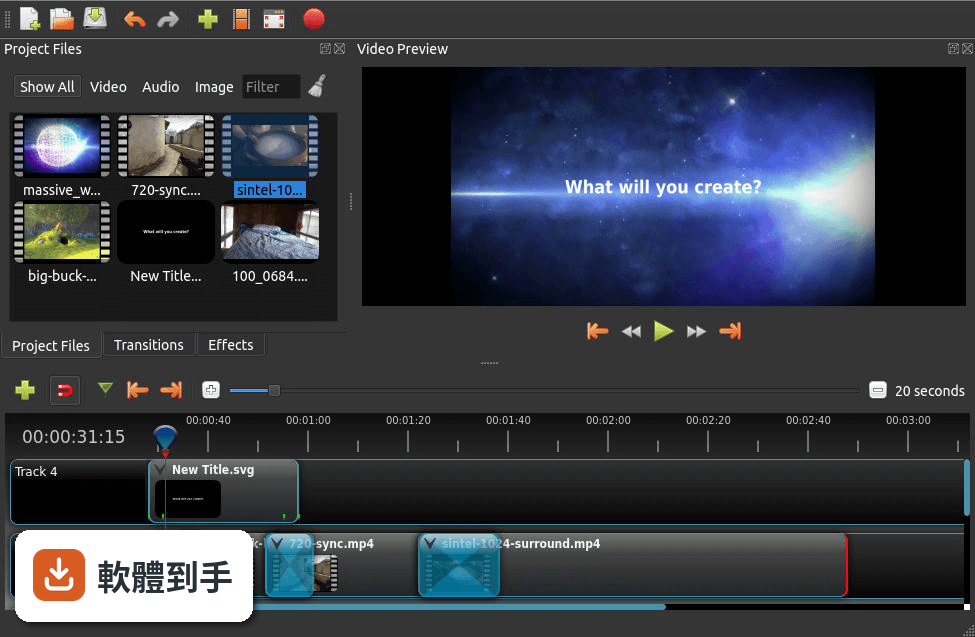
01OpenShot 這套軟體到底是做什麼用的?
它是一套安裝在電腦上的影片剪輯工具,主要工作是把多段影片、圖片、音樂丟進時間軸,進行裁剪、排列、加上轉場和字幕,最後輸出成一支完整的影片。支援 Windows、macOS 和 Linux,官方說明強調介面直覺、容易上手,適合處理日常影片剪輯需求,例如家庭影片、上課筆記或社群短片。
02它有哪些功能是實際剪片時會用到的?
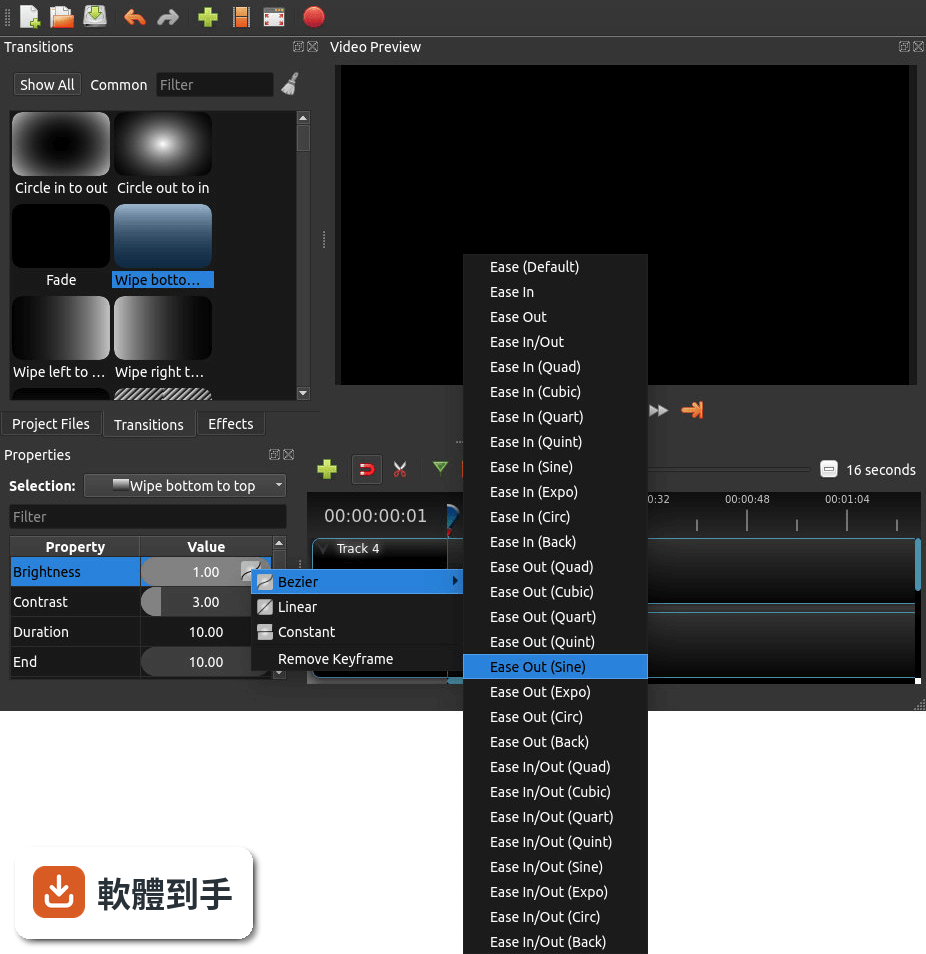
常見的剪輯操作都有:拖曳檔案進時間軸、裁剪片段長度、調整影片大小和旋轉、加上轉場效果、調整播放速度(包含倒轉)、關鍵幀動畫、音訊波形顯示、以及內建標題編輯器。特效引擎包含模糊、色彩校正、去背綠幕等。官方也提到支援 4K 影片編輯,但實際順暢度會依電腦效能而有差異。
03字幕和文字標題要怎麼處理?
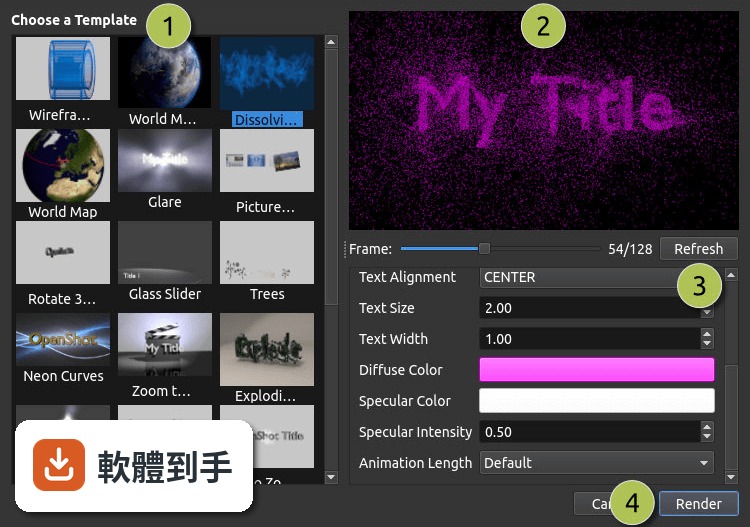
內建標題編輯器可以輸入文字、調整字型、顏色和動畫,也能製作 3D 動態標題,但這部分需要依賴 Blender 運算。基本做法是從「標題」選單建立新標題,編輯完成後拖到時間軸上方的軌道,再調整出現的時間長度。沒有看到直接匯入字幕檔的說明,這部分需要自行確認。
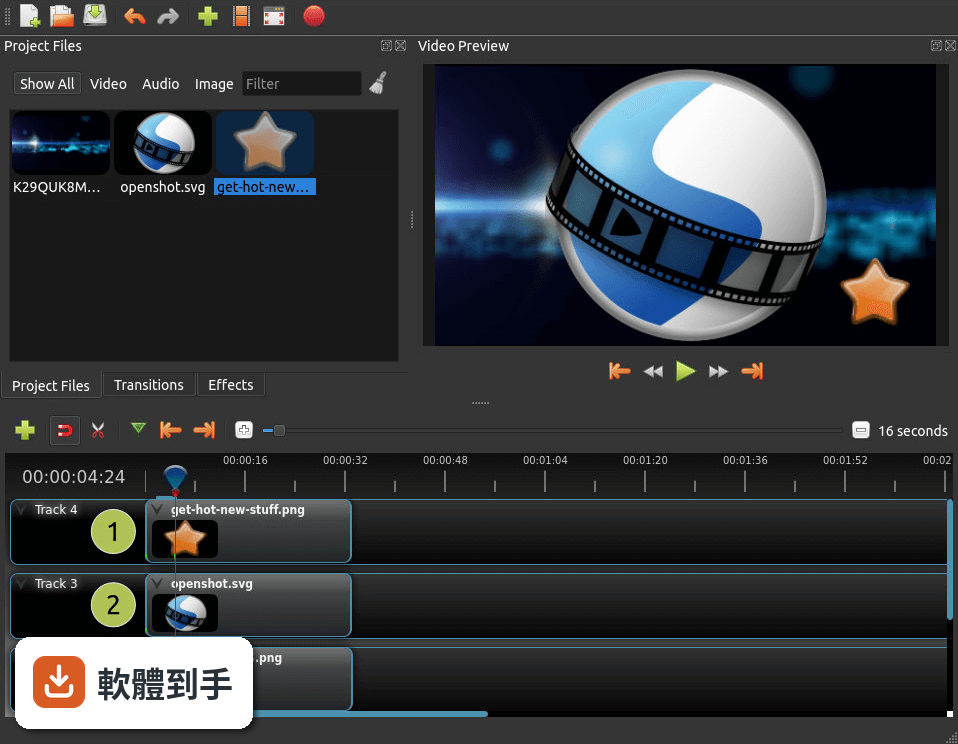
04音訊編輯能做到什麼程度?
可以把音樂或錄音檔直接拖進音訊軌道,調整音量、設定淡入淡出,也能套用音訊特效。時間軸上會顯示音訊波形,方便對準畫面找音樂下拍點。官方說明提到可以把波形直接輸出成影片的一部分,這在製作音樂相關內容時會用到。但沒有提到多軌混音或降噪等進階功能。
05匯出影片時可以設定哪些選項?
匯出時可以選擇格式、解析度和品質,官方說明沒有列出詳細的格式清單,但表示支援多種影片、音訊和圖片格式。做法是按下「匯出」按鈕,在對話視窗中調整設定,再開始渲染。要注意的是,渲染時間會依影片長度、解析度和電腦效能而不同,4K 影片的輸出時間會明顯拉長。
06這套軟體適合什麼樣的人用?
適合需要基本到中等剪輯功能、不想付費訂閱、而且願意花一點時間熟悉英文介面的人。官方 FAQ 表示它適合初學者到進階使用者,但也坦承缺少專業級軟體的進階功能。如果你只是要剪日常影片、加字幕和音樂,不需要複雜的調色或特效,這套工具在功能上足夠應付。
07完全沒有剪輯經驗的人上手會很困難嗎?
官方設計目標就是「容易使用、快速學習」,介面分為時間軸、預覽視窗和專案檔案區三大區塊,操作以拖曳為主。基本流程是開新專案、匯入檔案、拖到時間軸、裁剪排列、加轉場和字幕、最後匯出。對沒經驗的人來說,最大的門檻不是操作,而是介面只有英文,需要對照翻譯或看教學才能順利設定。
08什麼情況下不該選這套軟體?
如果你需要專業級調色、複雜的動態圖形、多機位同步剪輯或高效能的 4K 即時預覽,這套軟體可能無法滿足。官方 FAQ 也承認它缺少專業級軟體的進階功能。另外,介面只有英文,不習慣英文介面的人會用得很吃力。評分人數僅 38 人,相較於其他同類軟體(如 PowerDirector 有 980 人評分),實際使用樣本數偏少,穩定性有待自行驗證。
09它和 Kdenlive、VSDC 這些免費軟體比起來有什麼不同?
這幾套都是免費或開源方案,但 OpenShot 的評分人數(38 人)明顯少於 Kdenlive(116 人)和 VSDC(192 人),代表實際使用和回報問題的人數較少。功能上,OpenShot 主打拖曳操作和快速上手,而 Kdenlive 以穩定性和豐富功能著稱。如果你重視社群回饋和問題解決資源,評分人數較多的軟體通常有更多討論串可以參考。
10這套軟體還在使用中嗎?會不會裝了之後沒人維護?
根據版本紀錄,這套軟體持續有更新,近 12 個月內更新了 4 次,近 24 個月內更新了 5 次,開發團隊仍在維護。作為開源專案,它依賴社群貢獻和捐款維持開發。安裝前可以到官方網站確認最新版本和系統需求,避免下載到過舊的版本。
11系統需求會不會很高?舊電腦跑得動嗎?
官方列出的最低需求是 64 位元多核心處理器、4 GB RAM(建議 8 GB)、500 MB 可用空間,支援 Windows 7 到 11。以這個規格來看,一般文書電腦都能安裝,但實際剪輯流暢度取決於影片解析度和軌道數量。官方建議遇到效能問題時,可以調整播放設定、降低預覽品質來改善。
12它和付費軟體(如 PowerDirector、Movavi)的主要差異在哪?
最主要的差異是授權型式:OpenShot 完全免費且開源,而 PowerDirector(980 人評分)和 Movavi(201 人評分)都是付費軟體,且評分人數遠多於 OpenShot。付費軟體通常提供更完整的技術支援、繁體中文介面和更穩定的效能,但需要負擔訂閱或買斷費用。如果你預算有限、能接受英文介面,OpenShot 是可行選項;如果重視售後服務和中文介面,付費方案會更適合。
下載與官方連結
前往官方網站 下載 OpenShot Video Editor
OpenShot-v2.4.2-x86_64.exe · 118 MB · 連結指向軟體原廠
版本紀錄
- 2026-09-28 OpenShot Video Editor 4.0.1 (64-bit) 216 MB
- 2026-08-31 OpenShot Video Editor 4.0.0 (64-bit) 218 MB
- 2026-04-08 OpenShot Video Editor 3.5.1 (64-bit) 209 MB
再看 5 筆
- 2026-03-21 OpenShot Video Editor 3.5.0 (64-bit) 209 MB
- 2025-12-16 OpenShot Video Editor 3.4.0 (64-bit) 207 MB
- 2024-12-23 OpenShot Video Editor 3.3.0 (64-bit) 190 MB
- 2024-07-12 OpenShot Video Editor 3.2.1 (64-bit) 189 MB
- 2024-06-25 OpenShot Video Editor 3.2.0 (64-bit) 189 MB
這一版改了什麼
What's new in this version:
Highlights:
- 7 New Effects (Crop, Hue, Color Shift, Pixelate, Bars, Wave, Shift)
- Auto Audio Mixing
- Auto Rotate
- Improved Audio Playback
- Improved Stability
- Improved Export Dialog
- New Codec Support (including experimental)
- Growing Team of Developers
- Dramatically Improved Build System
libopenshot-audio 0.1.6 so:6:
- Fix under-linking (pthread and dl), fixes 3
- Integration of GitLab build pipelines
libopenshot 0.2.0 so:15:
- Auto audio mixing strategy per clip (average, reduce, or none)
- Adding new crop effect, which can also be animated for some very cool effects
- Adding new Color Shift effect, which can shift any color (RGBA) with infinite wrapping (and full supports animation)
- Adding new Pixelate video effect, which pixelates a portion (or all) of a frame's image, and is fully animatable
- Adding new video effect: Bars, which allow for animating colored bars around your video, such as a letterbox effect
- Adding new wave video effect, which can be animated in a ton of ways to create lots of cool wave distortion effects
- Adding Hue video effect, to adjust the hue of a frame's image, which can also be animated with a keyframe
- Adding new effect: Shift, an infinite pixel shifting effect which can be animated and wrap images in any direction
- Auto-Rotates any Clip with Reader metadata 'rotate' attribute.
- Experimental codecs now supported in FFmpeg/LibAV
- Audio popping during preview (due to resampling)
- Fixing brightness and Mask effects to calculate factor with a float type, giving more fine control
- Fix Blur.cpp by copying blur_ values back to so horizontal and vertical blurs can be applied in one effect and blur accumulates with increased iterations
- Update and apply frame mapper on any clip changes, to keep timeline offsets in sync (i.e. avoid audio popping due to slight misalignments of clips on the timeline).
- Removing old frames from WorkingCache (when no longer needed). This helps prevent freezing looking for old frame data on certain videos.
- Adding metadata from format, audio stream, and video streams to ReaderBase.info, which in some cases includes the 'rotate' metadata added by certain cameras, and audio metadata like title, album, artist, copyright, dates, etc...
- Added in metadata encoding capabilities (writer.info.metadata["title"] = "My Title"). Only certain tag names are accepted (see FFmpeg for more on which tags are supported by which codecs).
- Optimize and improve speed of Mask effect (used by transitions). This is way faster than before!
- Fixing assignement and copy operators on Frame class (to prevent crashes for unintiailized image and audio pointers), and ensuring both copy and assignment operators work as expected.
- Fixing the color property of Frames, which was being lost on some constructors.
- Increase valid frame rates to 240 fps since many cameras now support this higher frame rate
- Fixing regression on Clip constructor, and simplifying pointer initialization
- Fixing a bug with Frame::AddImage (convertToFormat) not actually doing anything. It returns a new image, and does not convert the format in-place.
- Preventing crash if Seek invoked before QtPlayer are initialized properly
- FFMPEG 3.2 support for FFmpegWriter
- FFMPEG 3.2 support for FFmpegReader
- Fixing FFmpeg version breakage in FFmpegWriter
- Increasing the default amount of cache in FFmpeg, based on the # of processors, to better support high framerate videos.
- Changing some Seek values to be more accurate, and fixes a race condition with Timeline_Tests.cpp.
- Changing some sleep() calls to usleep(), for more accuracy. This is a bit experimental, and hopefully will work on all OSes.
- Do not clobber gainFactor when determining volume adjustments and add a TODO note about current_max_volume always being 0
- Removing anchor from clip properties (since it is unused)
- Adding "dbghelp" dependency for Windows builds (for crash handling support), and improved Windows build instructions using MSYS2.
- Properly set test media files path, fixes 36
- Fixing black frames at end of video clips, if audio stream longer than video stream, and end-of-stream is reached.
- Integration of GitLab build pipelines
- Faster Windows builds
- Fixing audio unit tests
- Avoid mixing audio for clips with no volume or disabled audio.
- Updating cmake file for libopenshot-audio to search $ENV first, and then static folders
- Add missing type cast
- Spelling and typo fixes
openshot-qt 2.4.2:
- More detailed export dialog progress, including estimate time remaining, FPS, and more accurate percentage. Thanks Peter!
- Defaulting to AAC audio codec
- Improving zoom scale calculation, to use a custom bezier curve (zoom gets faster and faster the more you zoom out). 30 levels of precision between 1 second and 7200 seconds.
- Auto-rotate for Readers with 'rotate' metadata. This requires a slightly newer version of FFmpeg, otherwise the 'rotate' tag is never found.
- Adding new Crop video effect
- Adding new Color Shift video effect (with temp icon)
- Adding Pixelate video effect, which can animate a pixelated version of part (of all) of a video clip.
- Adding new Bars video effect, which allow for animating colored bars around your video, such as a letterbox effect.
- Adding new Wave video effect
- Adding Hue video effect
- Adding new Shift effect (which allows for shifting the image in any direction and allows for animation, with infinite wrapping)
- Support for 32-bit and 64-bit Windows builds, and an update to the Windows dependencies (and installer size reduction).
- 32-bit version of Windows is now large address aware, and can make use of more memory, but users might need to run this command first: 'bcdedit /set IncreaseUserVa 3072' in order to utilize this
- No longer crash app if user settings cannot be read. Now we show a message box and reset the user settings.
- Adding save indicator in window title
- Retain track parameters during add/remove track
- Update titles to be compatible with newer versions of Inkscape
- Always apply mapper when opening a project, to ensure no audio starts popping for different framerate projects
- Split Clip dialog now sends focus back to slider after clicking 'Start' or 'End' or 'Play' (to make it easier for frame-by-frame arrow keys)
- Make clip and transition menus trigger on mouse-down, and not move the timeline item when the menu is activate
- Removing max constrains from export length, so user can export blackness at the end of his project if so desired.
- Disabling/Enabling save icon based on if the project needs saving
- Add preset xml file for chromebook target
- Removing unneeded 64-bit/32-bit clean-up code from Windows installer (which breaks on a 32-bit system)
- Fix initial save indicator on a new (blank) project
- Also use import_path for missing-file recovery
- Add import_path tracking to project data
- Updating mac build scripts to use Python 3.6 (with a newer version of OpenSSL)
- Preview controls use media-skip icons
- New razor-tool cursor
- Adding new developer page to documentation, with step by step instructions on getting a Ubuntu development environment setup for libopenshot, libopenshot-audio, and openshot-qt.
- Position is always (frame - 1) / fps
- Utility functions for unit conversion
- Be more explicit about logfile paths
- Adding back in /usr/lib/x86_64-linux-gnu/libfontconfig.so.1 to the AppImage
- Rename dv_pal_wide_animorphic to correct spelling
- Remove duplicate profiles
- Protect slack upload better during build server
- Updating sponsors, donors, and contributors
- Updating translations
- Change the if statement for default language to use system default
- Copy log file for each successful build (for debugging reasons)
- Use QUrl.toLocalFile() to convert dropped URIs
- Add Contributing section
- Update Tutorial, Code tags and contrib link
- Update GitHub info in tutorial
- Use images/ path for images, not _static/ in documentation
- Fix wrapping in Tutorial documentation
- Replace ASCII arrows with Unicode arrow character in documentation
- Also update transition layer on track add/remove
- Small refactor of build server file uploads, and added extra check for 'already uploaded' assets to GitHub
- Improve error message for failed uploads during build server
- Remove torrents if already existing
- Integration of GitLab build pipelines
- Updating font family on built-in titles
- Remove some unneeded copies of libopenshot and libopenshot-audio in the AppImage, reducing size of AppImage
- Fixing issue with Linux AppImage creation on build server
- Migrating from Bzr to Git (on Launchpad)
- Delete old ISSUE_TEMPLATE
- Correct a cut-and-paste wrong comment
- Fixing copyright to use translation-friendly formatting, and hiding hardware decode preference (for now)
- Update websites section and removal of too many caps
- Change readme to be markdown
- Log length of metrics response, not content
- Updated copyrights to 2018 (from 2016). Also edited about.py so the year is automatically updated.
- Adding a few missing dependencies into the developer doc page
- .gitignore: ignore docs/_build & all pycache
Git Changes:
- Implementing GitFlow for project (develop, release, and master branches)
- Protected branches (on all repos), preventing direct pushes
- Must pass unit tests and status checks before merges allowed
- Must go through the Pull/Merge Request flow to be merged into a protected branch
- Automated git repo syncing between GitHub->GitLab->Launchpad
- Automated GitLab CI build pipelines (all builds, tests, installers, daily installers, are run through GitLab CI now)
- Builds and installers also support any branch, making feature branches and test branches much more useful, since we can share installers for them