
這是歷史版本頁面 — 看 Paint.NET 最新版本
Windows 免費修圖軟體 Paint.NET 夠用嗎
 Paint.NET 3.5
資料更新 2009-11-08
閱讀約 5 分鐘
你剛從網路下載了一張圖片,想裁掉多餘的邊角、調亮暗部,順便加上一行文字,卻發現電腦裡除了小畫家之外什麼都沒有。小畫家連基本的去背和圖層都做不到,你只好開始搜尋「免費修圖軟體」,但又怕下載到來路不明的東西,更不想為了偶爾一次的需求去安裝動輒好幾 GB 的專業軟體。你需要的是一個能快速解決問題、又不會把電腦塞滿的工具。
很多人遇到這種狀況,第一個念頭是裝 Photoshop,但它的訂閱費用和複雜介面讓人卻步;也有人轉向 GIMP,卻被密密麻麻的選單嚇到。其實這類輕量影像編輯工具的切入點,是讓你在「夠用就好」的前提下,用最短的時間完成裁切、調色、去背、加字這些常見需求,而不是把你訓練成專業設計師。它們通常體積小、開啟快、操作直覺,裝完就能馬上動手。
01Paint.NET 到底能做什麼?跟小畫家差很多嗎?
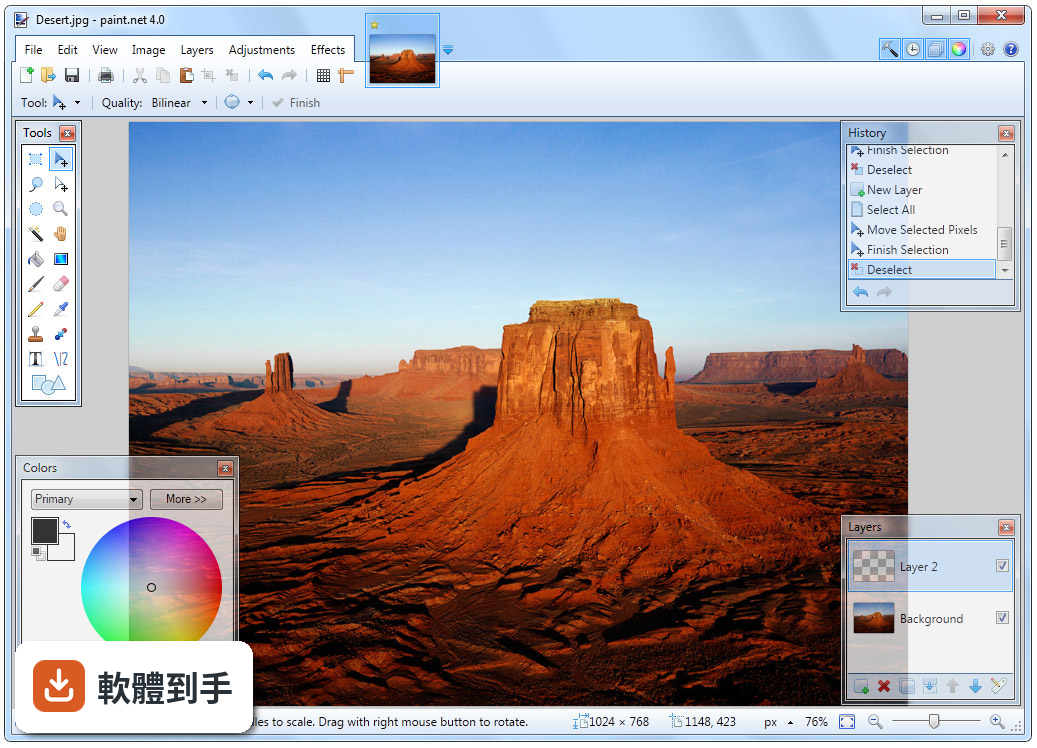
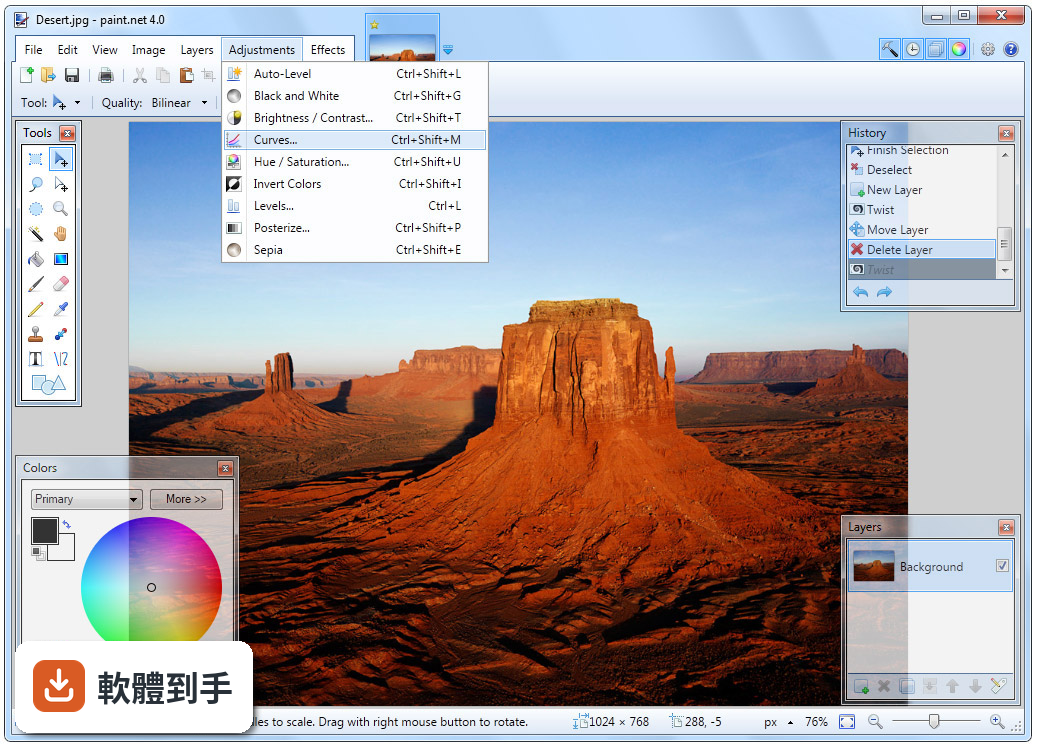
它是一款 Windows 專用的免費影像編輯軟體,核心功能包括圖層、無限步驟的復原紀錄、魔術棒與套索選取工具,以及亮度、對比、色相、曲線等調整項目。跟小畫家相比,最大的差別在於圖層與特效,例如模糊、銳利化、去紅眼、浮水印等都能直接套用,足以應付日常修圖與簡單設計。
02它能不能開 Photoshop 的 PSD 檔?
預設無法直接開啟 PSD 檔,但官方說明提到,安裝名為「PSD Plugin」的外掛之後,就能開啟和編輯 Photoshop 的 PSD 檔案。如果你手上有一堆 PSD 檔要處理,裝完外掛就能用,不需要為了看檔而買 Photoshop。
03這套軟體有圖層功能嗎?操作會不會很複雜?
有完整的圖層支援,可以調整混合模式、透明度,也能重新排列圖層順序,這在合成圖片或加上文字時非常實用。操作上,它採用分頁式介面,每個圖片一個分頁,工具列、圖層視窗和歷史紀錄面板都一目瞭然,官方強調學習門檻低,不需要像 GIMP 那樣面對大量選單。
04我想畫向量圖或 SVG 檔,它支援嗎?
不支援。這套軟體是點陣圖編輯器,沒有原生向量圖功能,也無法直接處理 SVG 檔。如果你需要畫可縮放的向量圖形,應該考慮 Inkscape 或 Adobe Illustrator 這類專門工具,而不是它。
05電腦比較舊,跑得動嗎?
系統需求是 Windows 10(1809 以上)或 Windows 11,處理器 1GHz 雙核心以上、記憶體 1GB(建議 2GB)、顯示卡支援 DirectX 10,硬碟空間約 300MB。以現代標準來看門檻很低,官方也強調它針對效能做過最佳化,支援硬體加速和多執行緒渲染,舊電腦應該能順暢運作。
06專業設計師用這套夠嗎?
官方說法是可以勝任「基本到中等程度」的專業工作,因為它快速又穩定。但進階使用者可能會缺少 CMYK 色彩模式、批次處理和進階文字排版功能。如果你只做網頁圖、社群貼文或簡單合成,它夠用;但如果是印刷輸出或複雜設計,就得另找工具。
07它跟 GIMP 比起來,哪個比較適合一般人?
官方資料指出,GIMP 功能更強大但更複雜,而 Paint.NET 的介面比較親切,不會用過多選單淹沒使用者。GIMP 的優勢是跨平台且開源,但如果你只在 Windows 上使用、又不想花時間熟悉複雜介面,Paint.NET 的學習曲線明顯平緩很多。
08這套軟體有中文介面嗎?
官方資料顯示介面語言是英文,沒有提到內建中文。不過它支援外掛擴充,你可以自行搜尋是否有第三方提供的中文語言包。如果你完全無法接受英文介面,可能要考慮其他有官方中文的免費軟體,例如 Krita。
09它支援 Mac 或 Linux 嗎?
不支援,它是 Windows 限定軟體。官方資料明確說 macOS 和 Linux 用戶可以改用 GIMP 或 Krita。如果你不是 Windows 用戶,這套軟體直接不適合你,不用考慮。
10免費版跟 Microsoft Store 付費版差在哪?
官方網站下載的版本完全免費,功能跟付費版一模一樣。Microsoft Store 的版本售價約 7 美元,主要是付費支持開發者,並包含自動更新。如果你不想花錢,直接從官網下載免費版就好,功能不會被閹割。
11它有沒有批次處理或內容感知填補這類進階功能?
沒有。官方說明列出的限制包括:不支援批次處理、沒有內容感知工具(如內容感知填補)、不支援 CMYK、不支援向量圖。如果你需要大量圖片一次處理,或想一鍵移除照片中的物體,這套軟體做不到,需要找其他專門工具。
12這套軟體還有人在維護嗎?
有。根據版本紀錄,它從 2005 年開始持續更新,最近一年內有 2 次更新,近兩年有 12 次,顯示開發者仍在積極維護。官方也提到有活躍的線上社群,提供論壇、教學和外掛資源,遇到問題不難找到解答。
下載與官方連結
Paint.NET.3.5.Install.exe · 4.8 MB · 連結指向軟體原廠
版本紀錄
- 2026-03-09 Paint.NET 5.1.12 781.06 KB
- 2025-11-10 Paint.NET 5.1.11 788.49 KB
- 2025-08-01 Paint.NET 5.1.9 788.58 KB
再看 5 筆
- 2025-05-20 Paint.NET 5.1.8 787.51 KB
- 2025-03-23 Paint.NET 5.1.7 1.23 MB
- 2025-03-14 Paint.NET 5.1.6 1.23 MB
- 2025-03-12 Paint.NET 5.1.5 1.23 MB
- 2025-02-15 Paint.NET 5.1.4 1.23 MB
這一版改了什麼
What's new in this version:
* New: Refreshed user interface with new icons and visual styling. On Windows 7 and Vista, it is enhanced for Aero and "glass".
* New effect: Blurs -> Surface Blur, by Ed Harvey
* New effect: Distort -> Dents, by Ed Harvey
* New effect: Distort -> Crystalize, by Ed Harvey
* New: Russian translation.
* Performance and memory usage have been extensively optimized throughout the entire program.
* .NET Framework 3.5 SP1 is now required, which has many built-in performance improvements.
* Disk space usage has been reduced by about 12MB by using NTFS compression on installation files related to staging (.MSI) and diagnostics (.PDB).
* Compression for .PDN images has been improved.
* Effect dialog responsiveness has been improved.
* Images open much faster, especially on single CPU systems.
* Startup performance on most systems will be better by about 20%.
* Memory usage has been reduced when more than one image is open.
* Rendering quality has been greatly improved when zoomed in.
* The selection outline is no longer animated. Instead of "dancing ants", a context-sensitive "XOR" stipple pattern is drawn. This has allowed for improved performance and lowered CPU consumption (and longer battery life).
* The font manager for the Text tool has been completely rewritten, which fixes many problems seen with crashes and missing fonts.
* On Windows XP, the Text tool has improved reliability and font selection (it uses GDI instead of GDI+).
* On Windows 7, the Text tool will use DirectWrite (instead of GDI) which gives better performance and greatly improved quality. On Windows Vista, you may install DirectX 11 to enable this feature; otherwise GDI will be used.
* The toolbar font list has improved usability, rendering quality, and significantly improved performance.
* The toolbar font list no longer requires an application restart to recognize newly installed fonts.
* When many fonts are installed, both memory usage and startup performance have been greatly improved.
* It is now drastically easier to move a very small selection.
* All installation prerequisites are now installed automatically, such as .NET and Windows Installer.
* Updates are now downloaded in the background, and installed after you exit the application. In previous versions, this was a foreground task and you could not use Paint.NET while the update was downloaded.
* Added a "Utilities" menu. Updates, Languages, and Plugin Errors have been moved there.
* Added a "Manage Fonts" command to the Utilities menu. This will launch the built-in Windows font control panel.
* Clicking the middle mouse button on an image thumbnail will now close the image.
* Improved the Unfocus effect.
* The DirectDraw Surface (.DDS) file type now allows you to select the resampling algorithm for auto-generated mip-maps.
* A processor that supports SSE is now required (almost all CPUs purchased this decade satisfy this).
* Fixed an issue with Gaussian Blur and its treatment of alpha values.
* Fixed a crash with the "Units" selector in the toolbar.
* Fixed a crash due to an overflow that prevented very large images from working (64-bit only).
* Fixed many other miscellaneous glitches and crashes.
* The Korean translation has been removed. Sadly, we were unable to find the resources to complete this.