
這是歷史版本頁面 — 看 Panda Free AntiVirus 最新版本
免費防毒 Panda Free AntiVirus 英文介面能用嗎
 Panda Free AntiVirus 1.3.0
資料更新 2010-10-30
閱讀約 5 分鐘
電腦突然跳出病毒警示、網頁被綁架、隨身碟一插就中鏢——這些狀況發生的當下,你只想找一套防毒軟體趕快裝上,最好不用花錢。你下載了 Panda Free AntiVirus,安裝過程順利,但開啟介面全是英文,不確定它到底能不能擋住威脅,也不曉得這套軟體還活不活躍,會不會裝了等於沒裝。
免費防毒的選擇很多,但每一套都有代價:有的裝完綁架瀏覽器、有的偷偷收集資料、有的更新慢到像停止維護。Panda 這類工具的切入點是「雲端即時比對」——靠大量使用者的回報來判斷檔案是否危險,而不是隻靠單機的病毒碼資料庫。聽起來聰明,但實際用起來順不順手、防護夠不夠力,還是得看細節。
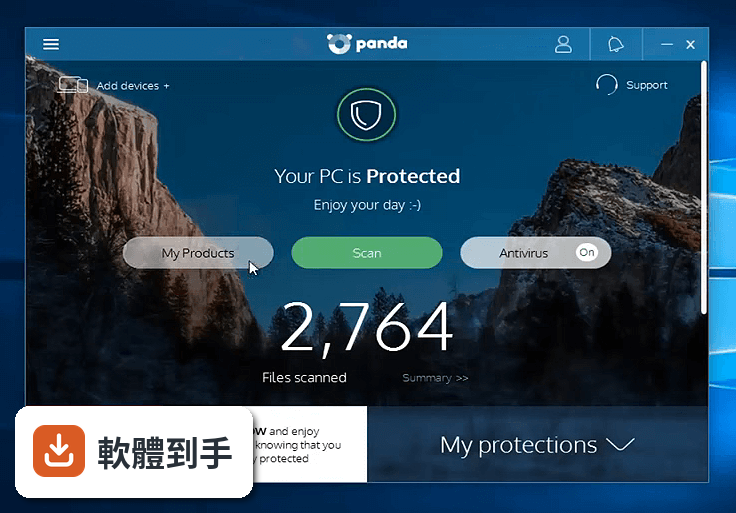
01Panda Free AntiVirus 免費版到底能防什麼?
提供即時防護,掃描並移除病毒和間諜軟體。USB 防護可掃描隨身碟,但預設關閉需手動開啟。還有 Process Monitor 列出所有執行中程式的安全狀態、URL 過濾擋釣魚網站、Wi-Fi 防護檢查無線網路。免費 VPN 每日 150MB 流量,可選 24 國節點。Rescue Kit 可製作救援 USB,用來開機清理無法啟動的電腦。
02USB 隨身碟插進去會不會自動掃?
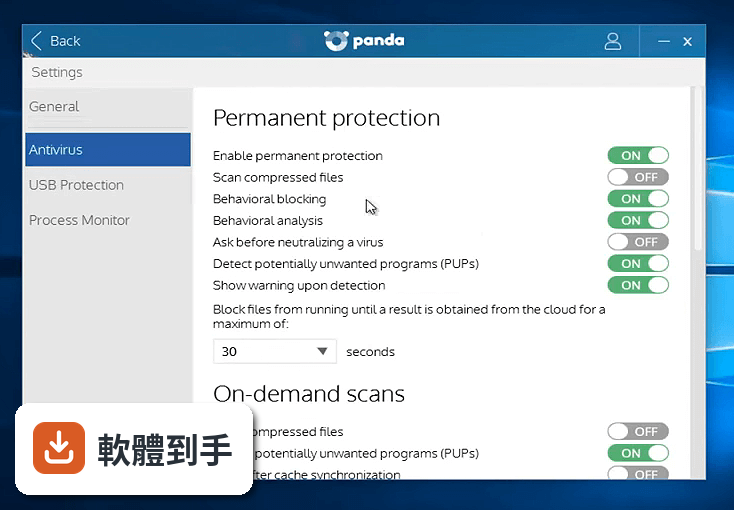
預設不會。USB 防護功能預設關閉,需要到設定裡手動開啟。開啟後會自動掃描插入的隨身碟,防止病毒透過 USB 自動執行。如果常在學校或公司插公用電腦的隨身碟,建議開啟。
03那個免費 VPN 怎麼用?
內建 VPN 每日流量上限 150MB,可瀏覽網頁、看文字內容,但看影片或下載大檔案很快就會用完。可選的節點有 24 個國家,用來隱藏真實 IP 位置。流量用完就要等隔天重置,或升級付費版才有無限流量。
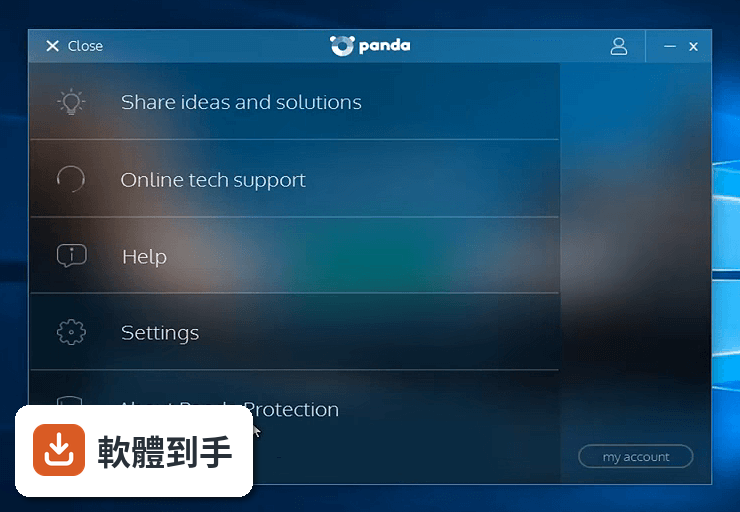
04遊戲模式是幹嘛的?
多媒體/遊戲模式讓防毒軟體在背景執行,不跳通知、不幹擾全螢幕的遊戲或影片。開啟後系統資源優先給遊戲,防毒仍持續運作。適合玩遊戲或看影片時不想被掃描通知打斷的人。
05雲端查毒是什麼?
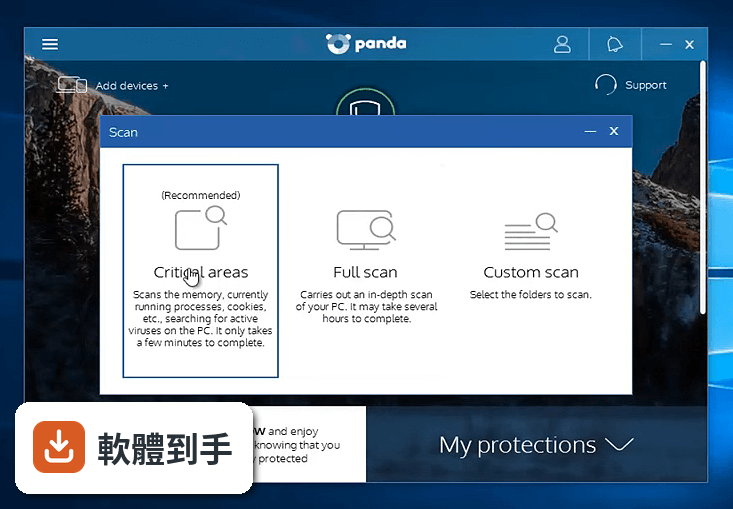
遇到未知檔案時,軟體會先封鎖最多 30 秒,同時連線 Panda 雲端比對資料庫,判斷是否為威脅。這 30 秒是等待雲端回傳結果的時間,可以縮短 20 秒但風險較高。全盤掃描可能花數小時,趕時間可用快速或自訂掃描。
06英文不好的人適合用嗎?
介面只有英文,沒有中文選項。如果看不懂英文,設定 USB 防護、排程掃描、VPN 這些功能會比較吃力。不過主要防護功能預設就會運作,不太需要手動調整。英文程度夠、或願意查單字的人可以用,完全看不懂英文的話建議找有中文介面的防毒。
07電腦很舊跑得動嗎?
官方支援 Windows 7 到 11,舊電腦可以裝。但全盤掃描可能花數小時,執行時系統會變慢。有遊戲模式可減少幹擾,但舊電腦本身效能有限,建議排程在不用電腦時掃描。如果電腦連 Windows 7 都跑不動,裝防毒會更吃力。
08這軟體很久沒更新了,還安全嗎?
近兩年只更新過一次,更新頻率偏低。防毒軟體需要定期更新病毒碼才能防新威脅,更新慢代表新病毒可能無法即時被偵測。雖然雲端查毒會即時比對資料庫,但軟體本身不常更新仍是風險。在意安全性的話,建議選更新頻率高的防毒。
09介面只有英文,看不懂怎麼辦?
介面只有英文,沒有中文選項。主要防護功能預設開啟,不太需要手動操作。但想調整 USB 防護、排程掃描、VPN 設定,就需要看得懂英文。如果完全看不懂,建議找有中文介面的免費防毒,或請懂英文的人幫忙設定一次。
10授權是 Demo,會不會用一用就不能用了?
授權型式是 Demo,代表是試用版,不是永久免費。官方說明提到升級付費版才能用無限 VPN,但免費版的基本防護功能是否永久開放,資料沒有明確說明。建議安裝前先確認免費版的使用期限,避免用一陣子後突然要付費。
11有沒有更多人用的免費防毒?
同系列的 Panda Cloud Cleaner 有 449 人評分,跟這軟體一樣多。Panda Antivirus Pro 只有 62 人、Global Protection 30 人、Internet Security 50 人、Gold Protection 33 人,評分人數都少很多。評分人數多代表使用經驗較豐富,但功能差異需要自行比較。
12這軟體跟 Panda 其他版本差在哪?
同系列有 Cloud Cleaner、Antivirus Pro、Global Protection、Internet Security、Gold Protection 五個版本。免費版提供基本防護,付費版才有銀行防護、家長控制、資料加密、密碼管理等進階功能。評分人數以免費版和 Cloud Cleaner 最多,其他版本使用人數較少。
下載與官方連結
前往官方網站 下載 Panda Free AntiVirus
CloudAntivirus.exe · 31.91 MB · 連結指向軟體原廠
版本紀錄
- 2026-07-15 Panda Dome (Panda Free Antivirus) 3 MB
- 2021-03-17 Panda Dome (Panda Free Antivirus) 20.02.01
- 2019-10-15 Panda Dome (Panda Free Antivirus) 19.00.02 68.3 MB
再看 5 筆
- 2019-06-05 Panda Dome (Panda Free Antivirus) 18.07.04 64.7 MB
- 2019-04-30 Panda Dome (Panda Free Antivirus) 18.07.03 64.7 MB
- 2019-02-04 Panda Dome (Panda Free Antivirus) 18.07.00 63.9 MB
- 2018-11-13 Panda Dome (Panda Free Antivirus) 18.06.01 62 MB
- 2018-06-21 Panda Dome (Panda Free Antivirus) 18.06.00 61.5 MB
這一版改了什麼
What's new in this version:
Main new features:
- Malicious Web & URL Filtering - This feature blocks websites that push malware, exploits and drive-by downloads. It is available both in Free and in Pro Editions and is installed by the toolbar. Unlike similar solutions, this web filtering works at a low level so it works under all browsers: Internet Explorer, Firefox, Chrome, Safari, etc. For those of you that didn’t install the toolbar but would like to install the Web & URL Filtering, you can download it from here and install it manually.
- Unified Recycle Bin and Quarantine - Previously the Recycle Bin handled suspicious detections and the Quarantine handled deleted malware detections. This has been unified into a new Recycle Bin for ease of management. This is included in both Free and Pro Editions.
- Automatic and transparent upgrades to new product versions - previously only available in the Pro Edition, this is now available in the Free Edition as well. All users of Free Editions versions 1.1.0, 1.1.1 and 1.1.2 will automatically and transparently upgrade to the new 1.3. See notes below for the upgrade schedule.
- No more nagging advertising - After listening to many of you we have decided to turn off the nagging advertising popups prompting to upgrade to Pro Edition. If you want to support Panda Cloud Antivirus and wish to get the Pro Edition, you can do so from here, but we won’t bug you anymore from the popups.
- Hot updating of behavioral blocking rules - In order to increase protection on the fly against new vulnerabilities and attacks and to fix false positives, hot updating of behavioural blocking rules allows faster response time in both the Free and Pro Editions.
- Immediate notifications of virus detections - Previously if Panda Cloud Antivirus encountered multiple viruses, it would delay its traybar notification and show them grouped. This behaviour has been changed so that the notifications are shown immediately.
- Suspicious detection counter - Under the statistics window there’s some new counters for the different types of heuristics and behavioural detections.
- New versioning format - Unified versioning format in GUI and other parts of the program.
Many bugfixes:
– Fixed issue with Windows 7 Start menu slow-down.
– Fixed Panda traybar icon disappearing.
– Fixed "you are not connected to the Internet" message when there is connection.
– Fixed issue when Free Edition users can activate behavioural analysis.
– Fixed slow-down and conflicts while playing Allods Online and AION.
– Fixed cloud-response time configuration which defaults to 30 seconds.
– Fixed constant accesses to the floppy disk drive.
– Fixed BSOD issue after install.
– Fixed bug while exporting an empty report to TXT/CSV.
– Fixed Conficker detection.
– Fixed BSOD while compressing malicious PDFs.
– Fixed translation errors.