
這是歷史版本頁面 — 看 Password Safe 最新版本
密碼多到記不住?Password Safe 免費開源密碼管理能做什麼
 Password Safe 3.22
資料更新 2010-05-24
閱讀約 5 分鐘
你手上至少有十幾個網站帳號,從網路銀行、電子郵件到購物平台,每個都要求不同規則的密碼。一開始你還認真想,後來實在記不住,只好把密碼寫在記事本、存在 Excel,甚至乾脆全部用同一組。直到某天收到一封「您的帳號疑似被盜用」的通知信,你才發現那些偷懶的習慣遲早會出事。你需要的是一個能幫你記住所有密碼、又不會被別人偷走的工具。
瀏覽器內建的密碼記憶功能雖然方便,但換電腦、換瀏覽器就全部不見,而且密碼以明文形式存在本機,懂一點技術的人都能翻出來。把密碼存在雲端筆記軟體更危險,等於把鑰匙放在門口地墊下。這類密碼管理工具的切入點很簡單:用一個你記得住的「主密碼」,加密保護一整包你記不住的密碼,要用時再解鎖取出來。
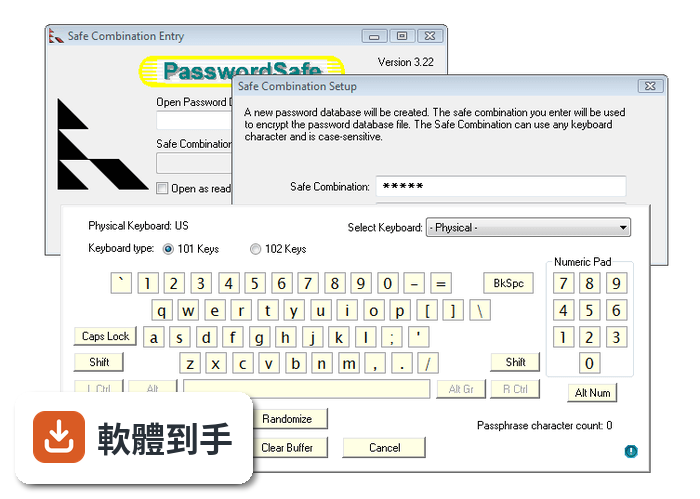
01Password Safe 跟 KeePass 有什麼差別?
兩者都是開源密碼管理軟體,核心功能相近,都提供加密資料庫、密碼產生器和自動輸入。KeePass 的擴充套件較多,社群生態更豐富;Password Safe 的介面相對單純,由 Bruce Schneier 發起,更新頻率穩定。資料顯示 Password Safe 有 80 人評分、KeePass 有 98 人評分,兩者評價都不錯。實際選哪套,建議都裝來試用,看哪個介面你比較順手。
02這套軟體能把密碼存在哪裡?
它把密碼存在一個加密的資料庫檔案裡,預設存放在本機磁碟。你可以把這個檔案複製到隨身碟、外接硬碟,或放到自己的雲端硬碟資料夾(如 Dropbox、Google Drive)做同步。官方說明提到支援備份與同步,但具體同步方式由你自行安排,軟體本身沒有內建雲端服務。
03它怎麼幫我產生不容易被破解的密碼?
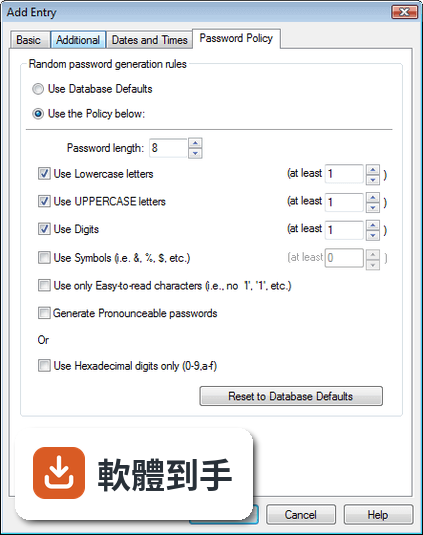
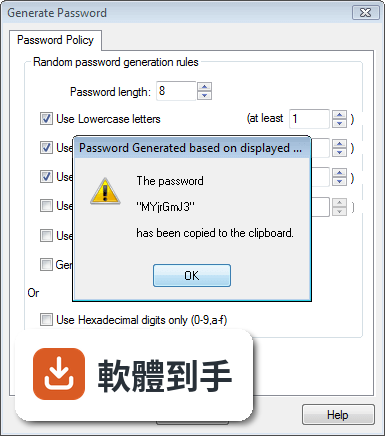
內建密碼產生器,可以依照你的需求設定密碼長度,以及是否包含大小寫字母、數字和特殊符號。產生的密碼會直接存入資料庫,不需要自己記。官方資料顯示它採用 Twofish 加密演算法保護資料,密碼產生器是其中一項標準功能。
04自動輸入帳號密碼是怎麼運作的?
它的 Auto-Type 功能會在你開啟網站或應用程式登入頁面時,自動幫你填入帳號和密碼。官方說明指出,它可以在網站和應用程式中自動輸入登入憑證。使用前需要先設定好對應的條目,把網址或視窗標題跟登入資訊綁在一起,之後開啟該網站就能觸發自動填入。
05我現在用的密碼管理軟體,裡面的資料能轉過來嗎?
官方 FAQ 明確表示可以從其他密碼管理軟體匯入資料,讓轉換過程比較順利。具體支援哪些軟體的匯入格式,官方說明沒有逐一列出,建議下載後在匯入功能選單中確認,或查閱官方文件。
06這套軟體適合什麼樣的人用?
適合不想把密碼交給雲端服務、偏好自己掌控資料的人。它是開源軟體、免費使用,沒有隱藏費用,對預算有限但重視密碼安全的人來說是務實選擇。官方資料提到全球有超過 500 萬使用者,介面設計以簡潔直觀為原則,新手和老手都能快速上手。
07我英文不好,用起來會很吃力嗎?
官方介面語系只有英文,沒有繁體中文。雖然操作介面不算複雜,但如果你對英文介面不熟悉,選單和設定的理解會多花一些時間。官方資料顯示它支援多種語言,包含簡體中文,但繁體中文不在其中。如果你需要全中文介面,可能要考慮其他有繁體中文的密碼管理軟體。
08它能在手機上使用嗎?
官方資料顯示它支援 Windows、macOS 和 Linux,但沒有提到手機版。如果你需要在手機上查密碼,這套軟體可能不適合。你可以把加密資料庫檔案放到手機上,但沒有對應的 App 就無法解鎖讀取。手機使用者建議考慮有手機版、且支援同格式匯入的密碼管理工具。
09這套軟體跟 LastPass 比起來,哪個比較多人用?
以評分人數來看,LastPass 有 122 人評分,Password Safe 有 80 人評分,LastPass 的樣本數較多。但評分人數多不代表一定適合你。LastPass 是商業服務,提供雲端同步和免費方案;Password Safe 是開源軟體,資料完全由你掌控。兩者定位不同,一個是雲端服務、一個是本地資料庫,選擇取決於你對資料存放方式的偏好。
10它的介面會不會很老舊?
官方資料的「缺點」欄位明確提到,介面可能比一些現代軟體顯得老舊,也缺少部分高階密碼管理軟體提供的進階功能。如果你很在意視覺設計和操作流暢度,建議先看官方網站或教學影片的實際畫面,再決定是否安裝。
11我該不該把公司帳號密碼也存進去?
官方資料提到它適合個人和組織使用,但公司帳號通常涉及多人共用、權限管理、稽核紀錄等需求,這套軟體的功能設計偏向個人使用,沒有提到團隊共用或權限控管。公司環境建議先確認資安政策是否允許,並評估是否有更適合團隊協作的密碼管理方案。
下載與官方連結
pwsafe-3.22.msi · 7.58 MB · 連結指向軟體原廠
版本紀錄
- 2026-10-09 Password Safe 3.73.0 22.7 MB
- 2026-09-07 Password Safe 3.72.2 22.7 MB
- 2026-07-04 Password Safe 3.72.1 22.7 MB
再看 5 筆
- 2026-06-20 Password Safe 3.72.0 21.4 MB
- 2026-03-28 Password Safe 3.71.0 21.4 MB
- 2025-11-19 Password Safe 3.70.1 21.2 MB
- 2025-11-09 Password Safe 3.70.0 21.1 MB
- 2025-06-30 Password Safe 3.69.0 21 MB
這一版改了什麼
What's new in this version:
New:
- Support for Danish has been added - thanks to Rejmond for his effort in translating!
- Recently Used Entries are now saved in the database header and so are "persistent". The current Windows user interface limits this to a maximum of the last 25 entries accessed
- Allow date filters to use relative dates
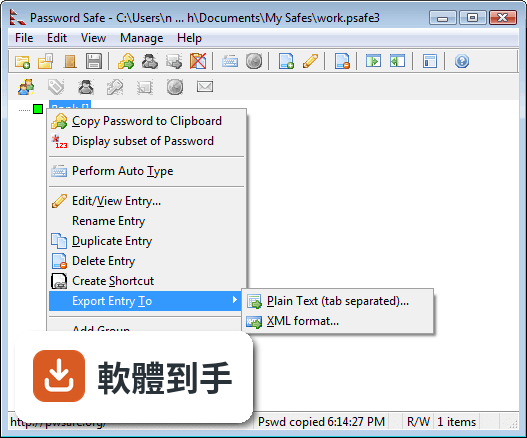
- A single entry can now be exported to a text or XML file via the Edit menu or right-click context menu
- Add Synchronize function to the menu options during review of the results of a Compare database operation
- Validation of databases can now be performed via the Manage menu as well as via the command line flag '-v'. When executed via the menu, it is very similar to opening a new database in that the current open database is closed and the selected database is validated during the open process
- Allow user to select external editor for Notes field in Add/Edit dialog
- Add entry size to the available filters to be able view entries
- Warn users during database open and entry import if there are entries with large text fields (e.g. Notes) that cannot be fully displayed and may be truncated if edited
Changes to Existing Features:
- Preferences are now saved in the 'normal' per-user directory under Windows. Existing installations will use current preferences, but users can migrate to the new location via Manage->Options->System->Migrate PasswordSafe configuration to user directory
- New databases will be created by default in "My Safes" directory under "My Documents"
Bugs fixed:
- Deleting a group of entries works again.
- Swedish version no longer crashes when checking for latest version
- Changing either whether password history is kept and deleting currently saved history now activates the OK Button
- Clicking to rename entries is now disabled when database is read-only
- Database preferences (including the Idle Timer setting) now retained during a locking minimize to the System Tray
- The password expiry date is now updated during edit if the password is changed either via the Generate button or by the user manually editing it
- Can now make password expiration date any value from the current date
- Save toolbar button only enabled if database is R/W and has been changed since last saved
- Fix password length checking to be between 4 and 1024 during menu Generate Password option & Password Policy setting as per previous releases
- Entry selected prior to workstation locking is reselected on being restored after unlocking the workstation
- Ensure that AutoType delay and wait times are not impacted by numeric characters from any entry field substitution
- Shortcut related menu items now returned to the Edit menu and the "Run Command", "Browse to URL", "Browse to URL + Autotype" and "Send email" functions now work again, when a Shortcut entry is selected
- Group expand/collapse state restored after the database is Locked, Minimized or "AutoType with Minimize" and then Restored
- Use of External Editor on Notes field from Edit dialog now activates Apply and OK buttons
- Fix errors if importing an XML file with entries with duplicate unique IDs (UUID elements)
- Remove "Confirm Deletion of Entries" checkbox from theMisc. Options page. New support for Undo/Redo made this unnecessary. Users are always asked to confirm the deletion of Groups or entries that have aliases or shortcuts