
PDFMate PDF Converter 免費版只能轉3頁,還值得裝嗎
 PDFMate PDF Converter Free 1.85
資料更新 2017-11-24
閱讀約 6 分鐘
你手上有一份 PDF,想改幾個字、抽一張圖、或轉成 Word 繼續編輯,結果打開才發現內容鎖死,複製貼上全是亂碼。你上網找轉檔工具,試了幾個線上網站,不是要註冊,就是上傳到一半卡住,還怕檔案外流。其實你只是想要一個裝在電腦裡、不用連網、能把 PDF 轉成可編輯格式的工具,但免費的選擇看起來很多,實際用起來卻處處受限。
一般人最常想到的作法是丟進 Google 雲端硬碟或線上轉檔網站,但這些方式對隱私敏感的文件不適合,而且檔案一大就卡、排隊等轉檔很浪費時間。另一條路是裝完整版 PDF 編輯軟體,但價格不低,對偶爾才轉一次的人來說不划算。PDF 轉檔工具的切入點,是讓你在本機直接處理檔案,不靠網路、不傳檔案出去,同時提供多種輸出格式,一次滿足編輯、閱讀、發布的不同需求。
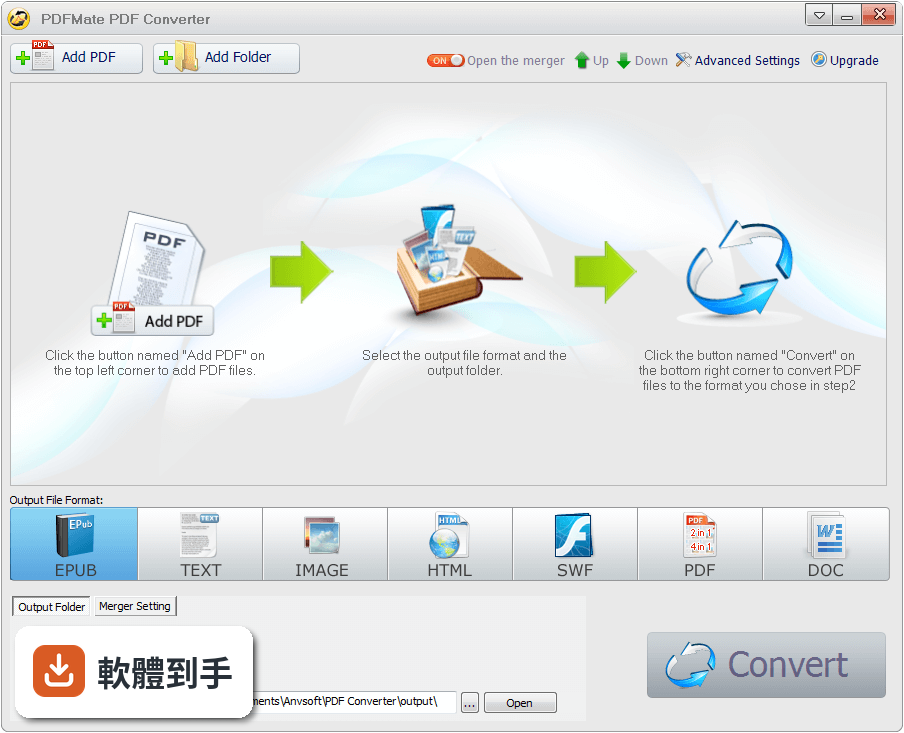
01PDFMate PDF Converter 到底能把 PDF 轉成哪些格式?
它一口氣提供六種輸出:文字檔(TXT)、Word 文件(DOCX)、EPUB 電子書、HTML 網頁檔、SWF 動畫檔,以及 JPG、PNG、GIF、BMP、TIFF 五種常見圖片格式。等於一份 PDF 可以依用途轉成不同格式,例如轉成 Word 繼續編輯、轉成 EPUB 放進閱讀器、轉成圖片貼到簡報裡,不需要另外找其他工具。
02掃描的 PDF 也能轉嗎?我有一堆掃描文件想轉成文字。
可以,它內建 OCR 文字辨識技術,能把掃描文件或圖片型 PDF 轉成可編輯的文字檔或 Word 檔。不過要注意,免費版有 3 頁的上限,掃描文件如果超過 3 頁,就得分批處理或考慮付費版本。另外 OCR 的辨識準確度會受到原稿清晰度影響,太模糊的掃描檔可能效果不理想。
03免費版限制 3 頁,是每轉一次算 3 頁,還是總共只能轉 3 頁?
是每次轉檔最多處理 3 頁,不是總共只能用 3 頁。也就是說,你有一份 30 頁的 PDF,可以拆成 10 次、每次轉 3 頁來完成,只是比較麻煩。如果文件常常超過 3 頁,用起來會很卡,這點在安裝前要先想清楚。
04轉出來的 Word 檔會不會排版亂掉?表格和圖片還在嗎?
官方說明強調輸出會保留原始品質,包括文字、圖片、向量圖形都不會遺失。但 PDF 轉 Word 本來就很難做到 100% 還原,尤其是複雜的表格、浮水印、特殊字體,轉出來可能還是會跑掉。建議轉完之後一定要檢查一遍,特別是重要的文件,不要直接拿去交件。
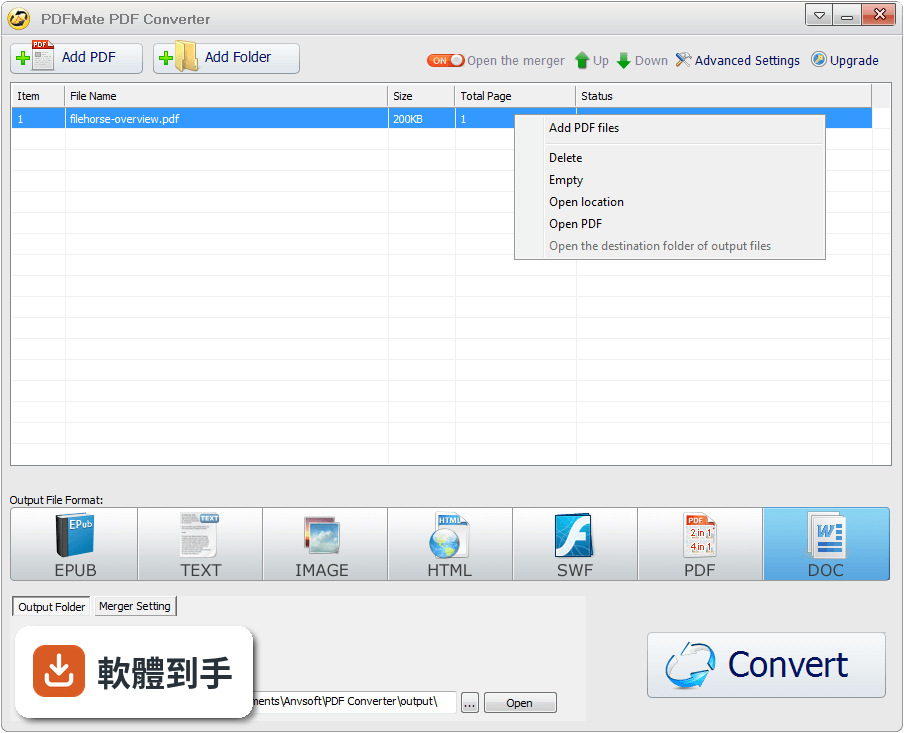
05可以一次轉很多個 PDF 檔嗎?還是只能一個一個來?
支援批次轉檔,你可以一次加入多個 PDF 檔案,統一選擇轉換格式後一次處理。操作流程很簡單,加入檔案、選轉換類型、按轉換,三步就完成。這對手上有一堆 PDF 要轉的人來說很實用,不用守在電腦前一個一個點。
06這套軟體適合什麼樣的人用?
適合偶爾需要把 PDF 轉成其他格式、但不想付費買完整版 PDF 編輯器的人。例如學生要轉講義、上班族要抽 PDF 裡的圖片做簡報、或想把 PDF 轉成 EPUB 放進平板看的人。因為免費版有 3 頁限制,如果你的需求多半是短文件,那它就很夠用;如果常處理長文件,就要考慮付費版或找其他方案。
07跟線上轉檔網站比起來,用這套軟體有什麼差?
最大的差別是檔案不用上傳到別人的伺服器,對隱私比較有保障,而且轉檔速度不受網路影響。線上工具常常限制檔案大小、要排隊等待,這套軟體裝在電腦裡,隨時要用就開,批次處理也比較方便。不過它只支援 Windows,Mac 或手機使用者就沒辦法用。
08這套軟體很久沒更新了,會不會有相容性問題?
它的版本紀錄停留在 2017 年,之後就沒有再更新,官方支援的系統也只到 Windows 8。在 Windows 10 或 Windows 11 上安裝,可能可以跑,但沒人保證一定沒問題。如果你用的是比較新的 Windows 系統,建議先裝來試轉一份文件,確認能正常運作再正式使用。
09我已經有 Adobe Acrobat 了,還需要這套嗎?
如果你已經有 Adobe Acrobat,那它本身就能轉 Word、圖片、HTML,功能更完整,不需要再裝這套。這套軟體是給沒有付費 PDF 編輯器的人用的替代方案。另外,如果你主要是看電子書,Adobe Digital Editions 或 Kindle 電腦版可能更符合需求,因為它們是專門的閱讀器,不是轉檔工具。
10這套軟體跟 Epubor Ultimate eBook Converter 比起來,哪個比較好?
兩者的定位不太一樣。PDFMate 是 PDF 轉多種格式的免費工具,Epubor 則專注在電子書格式轉換,例如 EPUB 轉 MOBI、AZW3 等。如果你的需求是 PDF 轉 EPUB,兩者都能做;但如果你要處理的是其他電子書格式,PDFMate 就幫不上忙。另外,PDFMate 免費版有 3 頁限制,Epubor 的免費版限制要看官方說明,建議先確認再決定。
11這套軟體有中文介面嗎?英文不好會不會很難操作?
官方資料沒有提到介面語言,只說支援多國語言,但沒有明確列出是否包含繁體中文。不過它的操作流程很簡單,就是加入檔案、選格式、按轉換三個步驟,即使介面是英文,看圖示和選單也大概能懂。如果不放心,可以先安裝試用,介面看不懂再找其他工具。
12評分人數只有 47 人,這代表什麼?
47 人評分、平均 9.18 分,代表使用過的人不多,但評價普遍不錯。這有兩層意義:一是這套軟體不是主流大眾工具,討論度和能見度低;二是評分樣本數少,參考價值有限,可能只是少數人覺得好用。建議把它當作「可以試試看」的選項,而不是「大家都說好」的保證。
下載與官方連結
setup_free_pdf_converter.exe
這一版改了什麼
What's new in this version:
PDFMate PDF Converter Free 1.85
- Add the function to convert encoded PDF files to Word, Text, EPUB, Image, HTML, SWF by entering correct password
- Fix the issue of appearing double pages after conversion
PDFMate PDF Converter Free 1.84
- Enable to rename merged files
- Retain the effectiveness of hyperlink after encoding files
- Fix some other minor bugs
PDFMate PDF Converter Free 1.83
- Add the functions to edit & encode output WORD files and merge files in all available output formats
- Fix the issue of appearing extra words in the margin
- Fix the problem of quitting unexpectedly after deleting files from the program
- Fix some other minor bugs
PDFMate PDF Converter Free 1.82
- Enable to convert odd pages or even pages only
- Enable to split one PDF file into several new files in line with selected page range
PDFMate PDF Converter Free 1.81
- Fix the problem of failing to read or convert certain PDF files
- Fix the problem of unmatched page-size in EPUB output format
- Fix the problems of leaving blank pages in Word 2007 and 90 degrees rotated after conversion
PDFMate PDF Converter Free 1.80
- Fix the problems of leaving blank pages in some circumstance and 90 degrees rotated after conversion
- Fix the problems of succeeding in converting one PDF but failing to convert certain merged PDF and the issue of images blurred when merging two PDF files
- Fix the problem of missing some contents when merging PDF files
- Fix some other minor bugs
PDFMate PDF Converter Free 1.75
- Add JPG to PDF conversion function
- Support edge cropping for PDF files
- Improve files loading speed
- Fix some minor bugs
PDFMate PDF Converter Free 1.74
- Add commonly-used layout size of America
- Support setting layout direction
- Support saving settings of merging
PDFMate PDF Converter Free 1.73
- Added support for merging multiple PDF files
- Added support for customizing PDF output layout
- Optimized user interface
- Convert single-page PDF file to image directly without creating folder
- Fix some crash problems and some minor bugs
PDFMate PDF Converter Free 1.72
- Fix the bug that PDF files with BOM can't be added
PDFMate PDF Converter Free 1.71
- Built-in OCR technology enables you to convert scanned PDF to editable file (3-page limit)
- Efficiency-priority and quality-priority recognition modes provided for OCR
- Automatically detect scanned PDFs
- Fix some minor bugs