
這是歷史版本頁面 — 看 Pidgin 最新版本
聊天軟體開一堆視窗好亂?Pidgin 能整合哪些
 Pidgin 2.12.0
資料更新 2017-03-10
閱讀約 5 分鐘
你桌上同時開著 IRC、XMPP、AIM 好幾個聊天視窗,每個都要登入一次,聯絡人分散在不同地方,通知一來還要先想一下是哪個視窗在閃。你只是想跟不同服務的人講話,卻得先應付一堆切換視窗的麻煩。尤其當你用的是舊電腦,多開幾個聊天軟體就開始喘,但你還是得靠這些管道跟人聯絡。
一般人習慣的做法是每個服務裝一套專用軟體,但這樣桌面越來越亂、資源越吃越多,而且每個軟體的介面邏輯都不一樣。這類工具的切入點,是把多個聊天協定收進同一個介面,讓你用一套軟體同時連線不同服務,聯絡人集中在同一份清單,不用再為了回訊息而東點西點。
01Pidgin 到底能幹嘛?
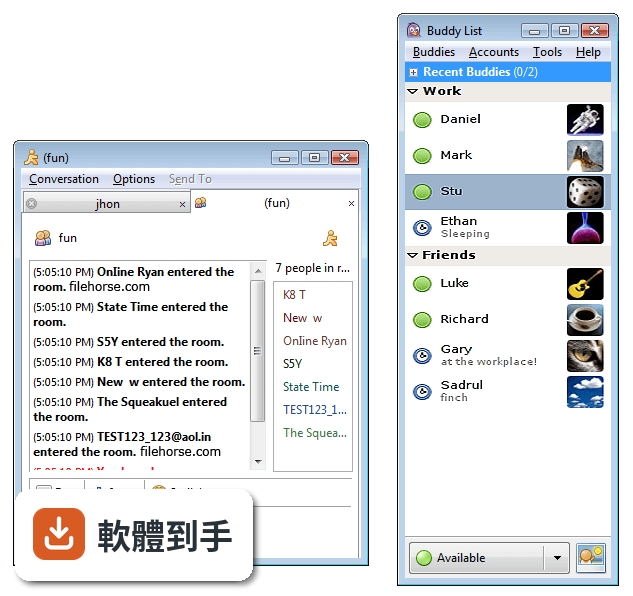
它是一套免費開源的多人聊天整合軟體,可以同時登入多個不同的聊天網路,把聯絡人集中在同一個清單裡。支援的協定包含 XMPP(Jabber)、IRC、AIM 等,透過第三方外掛也能擴充更多。主要用途是讓你不必為了不同聊天服務開好幾個視窗,一個介面就能處理。
02它能不能同時登入好幾個聊天帳號?
可以。它設計上就是讓你同時登入多個聊天網路,聯絡人會合併在同一個好友清單,不用切換視窗。設定方式是在 Accounts 選單裡新增帳號,選好協定、輸入帳號密碼和伺服器設定就能連線。不同服務的聯絡人會一起顯示,方便統一管理。
03它支援哪些聊天協定?
原生支援 XMPP(Jabber)、IRC、AIM 等,透過第三方外掛可以擴充更多協定。不過要注意,它不原生支援 WhatsApp 或 Telegram 這類現代通訊軟體,外掛能提供的支援也有限。如果你主要用的是開放協定或公司內部伺服器,它就能派上用場。
04能不能傳檔案或開群聊?
可以,但要看使用的協定。它支援基本的群組聊天和檔案傳輸,功能取決於你連線的協定本身支援到什麼程度。檔案傳輸能力有限,不是所有協定都支援完整功能。如果你需要大量傳檔或進階群聊功能,可能要搭配其他工具。
05外觀可以改嗎?
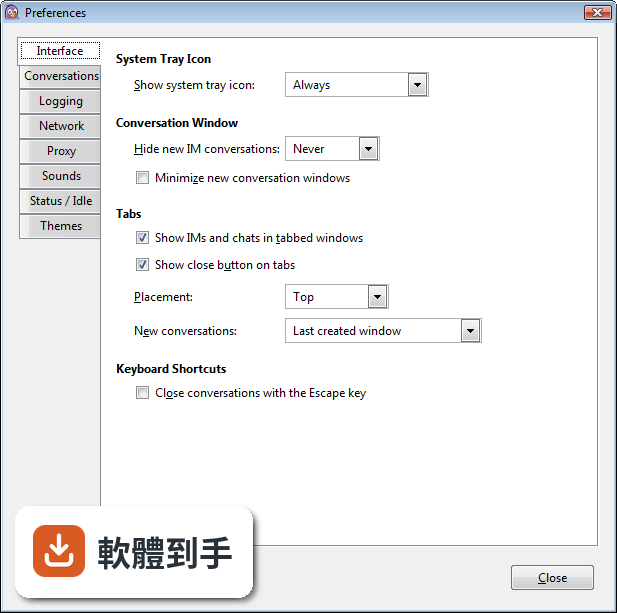
可以。它提供主題、音效和通知的個人化設定,介面走簡潔實用路線,不像現代通訊軟體那麼花俏。主視窗顯示好友清單,聊天視窗是分頁式的,操作直覺。如果你喜歡沒有多餘裝飾的介面,它反而能減少干擾。
06我工作的地方用 XMPP 或 IRC,適合用嗎?
適合。如果你的公司或團隊使用 XMPP、IRC 或類似協定,它可以直接連線,不需要額外安裝其他軟體。設定帳號時輸入公司提供的伺服器資訊就能使用。它也有靜默安裝選項,方便 IT 管理人員大量部署。
07電腦很舊,跑得動嗎?
可以。它對硬體需求很低,最低只要 512MB 記憶體、約 50MB 儲存空間,安裝檔內含 GTK+ 執行環境。對老舊的 Windows 電腦來說負擔很小,不會拖慢系統。如果你只是需要一個輕量的聊天工具,它是個不佔資源的選擇。
08想用 WhatsApp 或 Telegram,可以嗎?
不建議。它不原生支援這些現代通訊軟體,第三方外掛能提供的支援也有限,可能無法完整使用所有功能。如果你主要用 WhatsApp 或 Telegram,直接使用官方應用程式會更可靠。它比較適合用於 XMPP、IRC 或自架伺服器的場景。
09手機上能用嗎?
不行。它主要設計給桌面電腦使用,沒有手機版本。如果你需要在手機上收發訊息,要另外找其他方案。它的設定和聊天紀錄都存在本機,不會自動同步到其他裝置,除非你手動用雲端工具同步。
10這軟體還有在更新嗎?
有,但更新頻率不高。它的社群持續維護,只是版本更新不頻繁。如果你需要的是頻繁更新、快速修 bug 的軟體,它可能不適合。但如果你只是需要一個穩定、功能單純的聊天工具,它仍然可以使用。
11介面只有英文嗎?
是的,介面語系是英文。如果你不習慣英文介面,使用上會有些門檻。不過它的操作邏輯簡單,主要功能都在選單裡,熟悉之後不難上手。如果你需要中文介面,可能要考慮其他軟體。
12它跟其他類似軟體比起來如何?
它和 Gajim、Spark、Miranda、Trillian 都是功能相近的選擇。它的評分人數有 43 人,比 Gajim(9 人)、Spark(51 人)、Miranda(30 人)、Trillian(46 人)都多,但評分 7.8 分不算特別高。選擇時可以根據你需要的協定支援、介面偏好和更新頻率來比較。
下載與官方連結
pidgin-2.12.0.exe · 連結指向軟體原廠
版本紀錄
- 2026-02-17 Pidgin 2.14.14 30.85 MB
- 2024-02-24 Pidgin 2.14.13
- 2023-01-02 Pidgin 2.14.12
再看 5 筆
- 2022-06-03 Pidgin 2.14.10
- 2022-04-29 Pidgin 2.14.9
- 2021-10-15 Pidgin 2.14.8
- 2021-09-17 Pidgin 2.14.7
- 2021-07-09 Pidgin 2.14.6
這一版改了什麼
What's new in this version:
Pidgin 2.12.0
GENERAL:
- purple-url-handler now works with Python 3.x
- Fixed an issue where transient startup statuses could be deleted
PIDGIN:
- The shout smile now matches the default theme
UPDATES TO DEPENDENCIES:
- Cyrus SASL 2.1.26
- libxml2 2.9.2
- NSS 3.20.1 and NSPR 4.10.10
- Perl 5.20.1
- SILC 1.1.12
- Remove support for Tcl plugins
GADU-GADU:
- Updated internal libgadu to version 1.12.1
VOICE/VIDEO:
- GStreamer 1.0 support
- Bump farstream02 requirement to 0.2.7
- Other VV related changes required for the third-party SIPE plugin
AIM:
- Fix for AIM when using gateway proxies (like smarsh)
PLUGINS:
- Don't render smileys in the History plugin's headers
Pidgin 2.11.0
General:
- 2.10.12 was accidentally released with new additions to the API and should have been released as 2.11.0. Unfortunately, we did not catch the mistake until after 2.10.12 was released, but we're fixing it now. See ChangeLog.API for more information.
- Include the Mozilla certificate bundle. This fixes connecting to servers with certificates from Let's Encrypt.
- Remove all 1024-bit CAs
libpurple:
- media: fix an issue with ximagesink displaying only a corner cut-out of a larger webcam video (Jakub Adam)
- mediamanager: update output window destruction so that it reflects recent changes in the media pipeline structure (Jakub Adam)
- Ported Instantbird's CommandUiOps to libpurple (Dequis)
Pidgin:
- Fixed alignment of incoming right-to-left messages in protocols that don't support rich text
- Fix a potential crash while exiting pidgin
AIM:
- Add support for the newer kerberos-based authentication of AIM 8.x
Windows-Specific Changes:
- Use getaddrinfo for DNS to enable IPv6
- Updates to dependencies:
- NSS 3.24 and NSPR 4.12.
Bonjour
- Fixed building on Mac OSX
ICQ:
- Stop truncating passwords to 8 characters like old ICQ clients did. If you actually needed this, truncate your password manually by pressing backspace a few times.
IRC:
- Base64-decode SASL messages before passing to libsasl
MXit
- Fixed a buffer overflow. Discovered by Yves Younan of Cisco Talos. (TALOS-CAN-0120)
- Fixed a remote out-of-bounds read. Discovered by Yves Younan of Cisco Talos. (TALOS-CAN-0140)
- Fixed a remote out-of-band read. Discovered by Yves Younan of Cisco Talos. (TALOS-CAN-0138, TALOS-CAN-0135)
- Fixed an invalid read. Discovered by Yves Younan of Cisco Talos (TALOS-CAN-0118)
- Fixed a remote buffer overflow vulnerability. Discovered by Yves Younan of Cisco Talos. (TALOS-CAN-0119)
- Fixed an out-of-bounds read discovered by Yves Younan of Cisco Talos. (TALOS-CAN-0123)
- Fixed a directory traversal issue. Discovered by Yves Younan of Cisco Talos (TALOS-CAN-0128)
- Fixed a remote denial of service vulnerability that could result in a null pointer dereference. Discovered by Yves Younan of Cisco Talos. (TALOS-CAN-0133)
- Fixed a remote denial of service that could result in an out-of-bounds read. Discovered by Yves Younan of Cisco Talos (TALOS-CAN-0134)
- Fixed multiple remote buffer overflows. Discovered by Yves Younan of Cisco Talos. (TALOS-CAN-0136)
- Fixed a remote NULL pointer dereference. Discovered by Yves Younan of Cisco Talos (TALOS-CAN-0137)
- Fixed a remote code execution issue discovered by Yves Younan of Cisco Talos. (TALOS-CAN-0142)
- Fixed a remote denial of service vulnerability in contact mood handling. Discovered by Yves Younan of Cisco Talos (TALOS-CAN-0141)
- Fixed a remote out-of-bounds write vulnerability. Discovered by Yves Younan of Cisco Talos. (TALOS-CAN-0139)
- Fix a remote out-of-bounds read. Discovered by Yves Younan of Cisco Talos. (TALOS-CAN-0143)