
這是歷史版本頁面 — 看 PSPad 最新版本
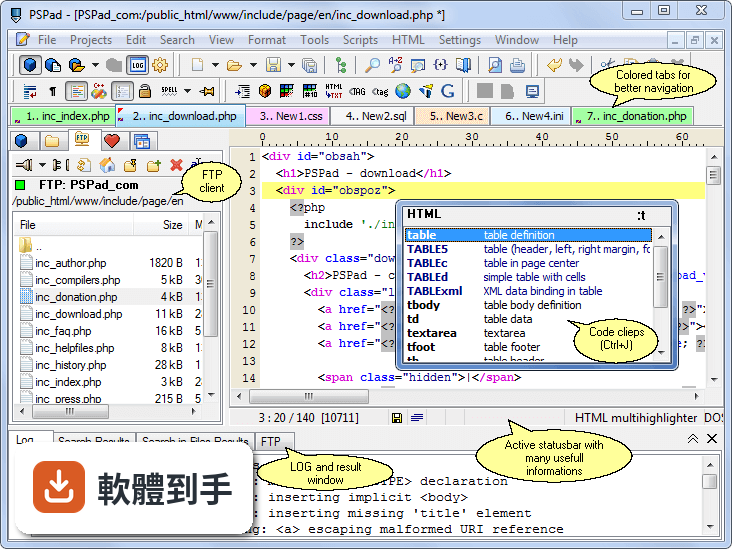
PSPad 5.0.4 Build 543
 PSPad 5.0.4 Build 543
資料更新 2021-01-01
下載與官方連結
pspad504_setup.exe · 連結指向軟體原廠
版本紀錄
- 2026-08-24 Notepad++ 8.9.8 (64-bit) 6.6 MB
- 2026-07-14 Notepad++ 8.9.7 (64-bit) 6.6 MB
- 2026-06-04 Notepad++ 8.9.6.4 (64-bit) 6.6 MB
再看 5 筆
- 2026-06-01 Notepad++ 8.9.6.2 (64-bit) 6.6 MB
- 2026-05-26 Notepad++ 8.9.6.1 (64-bit) 6.6 MB
- 2026-05-21 Notepad++ 8.9.6 (64-bit) 6.6 MB
- 2026-05-11 Notepad++ 8.9.5 (64-bit) 6.6 MB
- 2026-04-27 Notepad++ 8.9.4 (64-bit) 6.6 MB
這一版改了什麼
What's new in this version:
- Autocomplete doesn't complete numbers in automatic mode, in manual mode does
- Own editor font usage without to have install it - put your TTF files into subfolder .Fonts
- Highlighter settings - added possibility to open selected user highlighter definition
- Code explorer - Sort button has "state". You can switch it on/ff for current Window. Default state cames from Program settings / Tools - Sort code explorer
- Code explorer - selected item stays selected after sort change or refresh (if exists)
- Code explorer - search is case insesitive, Alt, Ctrl, Shift doesn't reset search, Ctrl+Enter search for next occurence
- Sort lines uses "stable sort", If lines are same, order isn't changed. It has meaning for sort by column.
- FTP quick search box is case insensitive
- FTP - new field for change folder with history for each server stored in Recent.ini. ENTER confirm entry and send command to FTP server.
- New user highlighter definition for Solidity
- Open files panel - possibility to arrange selected windows Horizontally/Vertically
- Open file list (left tool panel) - possibility select and close more files at once (right mouse)
- File info shows current open file last write time
- Scripts files are sorted alphabetically before adding to scripting engine. Put underscore to the file name begin if you want to compile e.g. your script library as the first
- Program settings / Backup - new options allow switch on/off autosave files with computer suspend
- Program settings - added search option possibility. Repeated Enter key press search for occurences
- Synchronize movement activation is possible even in one splitted window
- Project - speed up big project file loading
- User highlighter - added support for Ruby symbols
- FTP ciphering - updated OpenSSL libraries
- PHP highlighter - added void type support
- AutoIt highlighter marks # as part of the word when double click
- JavaScript highlighter - added support for Template literals (Template strings) and new JScript highlighter attribute Template for color setting
- Current file tab highlight
- Incremental search (Ctrl+E) - extended functionality - Right arrow adds another char, Tab adds string till end of the word
- Favorite panel / Tools - added option Save all files before tool starts
- Status bar was moved to the bottom of main window from the bottom of individual windows. The reason is reading devices support for visually impaired people.
- INI highlighter - hexadecimal numbers are highlighted
- C# highlighter is supported now as basic highlighter instead of user highlighter
- Color schemes are stored per user highlighter slot instead of previous system where all user highlighter slots has common scheme.
- PSPad saves all files in restart/shutdown state include never saved new files.
- Skins - Program settings / Colors - is possible to change program skin to black. In the same place you can load Highlighters scheme. Optimized are PSPad_Light and PSPad_Dark. Creating and modifying schemes stays in Highlighter settings. As Skin is possible to use any Delphi VCL scheme (VSF extension).
- Program settings / Colors - possibility to set color for other occurrence of selected text
- Other occurences of selected text - changed to case insensitive, spaces on the begin/end are trimmed
- Many optimalizations made for Load/Save highlighters scheme
- Open/Save dialog work was rewrited (joined with skins). For Windows Vista and newer new system dialogs are used
- Internal HTML preview - obsolete Mozilla, based on unsupported Mozilla activeX control was replaced for Chromium based Edge. To test it is necessary to install chromium based Edge Canary build. It can coexists with existing Windows 10 edge without problems.
- Editor window - highlight all occurences of selected text. You can switch it off in the Program settings / Editor 2
- Compiled with Delphi 10.4 Denali (still in beta stage)
- New Memory manager version FastMM5
- User highlighter - added "Attribute" for PowerShell - it highlights word after square open bracket
- Find by lines - new function in the Search menu. Input is list of line numbers and result is set of lines from current document in new document.
- Scroll past EOF (Program settings / Editor 1) - separated as standalone option from previous scroll past EOL and EOF
- Splitted editor window - splitter has different color, splitter width depends of screen DPI
- New scripting function tabsToSpaces(input: string): string
- Autocorrect - won't be executed if text is selected
- Format block (left/right/center) works in column selection with limitation - text doesn't contain real tabs.
- User highlighter extended of Variable attribute with possibility highlight PHP like variables (starting with $)
- FTP - added possibility to rename folder with connections. It's possible to use it to join folders too
- FTP - connection popup menu is organized into submenus according to folders
- Updated color scheme PSPad dark and PSPad light