這是歷史版本頁面 — 看 PuTTY 最新版本

Windows連Linux伺服器老是卡住?PuTTY能幫你什麼

PuTTY 軟體圖示 PuTTY 0.52 資料更新 2002-02-14 閱讀約 6 分鐘

你坐在Windows電腦前,想要連進遠端的Linux伺服器改個設定、看一下log,或傳個檔案過去。打開命令提示字元,發現沒有內建好用的SSH工具;上網找了一堆教學,不是要裝東裝西,就是介面複雜到不知道從哪裡開始。你只是想趕快連上線、把事情做完,卻卡在「怎麼連」這一步。

有些人會去裝功能很完整的整合型終端機軟體,但那些軟體體積大、設定多,對只是偶爾連一下伺服器的人來說,反而增加學習成本。也有人直接用瀏覽器開網頁版的終端機,但功能陽春、連線也不穩定。這類工具的核心切入點,其實很單純:用最少的步驟,建立一條安全、可靠的遠端連線通道,讓你可以下指令、傳檔案,就像坐在那台機器前面一樣。
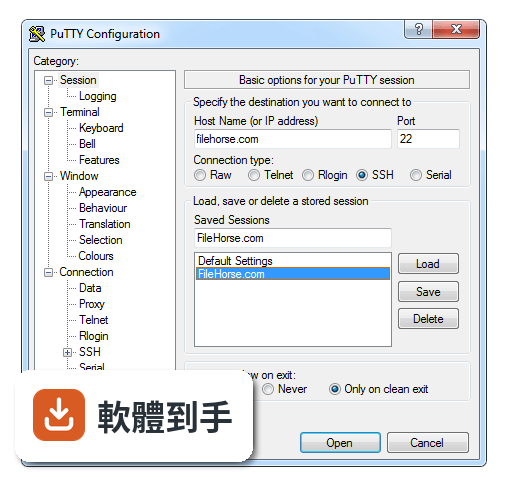
PuTTY 操作介面
PuTTY 的操作介面

01PuTTY到底能做什麼?我看很多人都在用

它是一套免費的Telnet和SSH客戶端軟體,主要功能是讓你在Windows上建立到遠端伺服器的安全連線。連上之後,你輸入的指令會直接送到遠端機器執行,遠端機器回傳的訊息也會顯示在你的視窗裡。另外它還附帶PSCP和PSFTP兩個工具,分別負責SCP和SFTP協定的檔案傳輸,等於連線和傳檔都包辦了。

02它跟Windows內建的命令提示字元有什麼不同?

命令提示字元本身沒有內建SSH連線功能,你無法直接用它連到遠端Linux伺服器。PuTTY是專門為了建立這種遠端連線而設計的,它支援SSH、Telnet和序列埠連線,而且SSH協定有加密保護,傳輸的指令和資料不會被竊聽。如果你需要連到Unix或Linux主機做事,它就是補上Windows缺少的那塊拼圖。

03我要傳檔案到伺服器,這套軟體有辦法嗎?

可以。它附帶的PSCP和PSFTP就是負責檔案傳輸的工具。PSCP適合單次複製檔案,語法類似Linux的scp指令;PSFTP則像一般FTP軟體,可以互動式地瀏覽資料夾、上傳下載多個檔案。兩者都走加密通道,傳輸過程有保護。如果你只是偶爾傳個設定檔或log檔,這兩個工具就很夠用了。
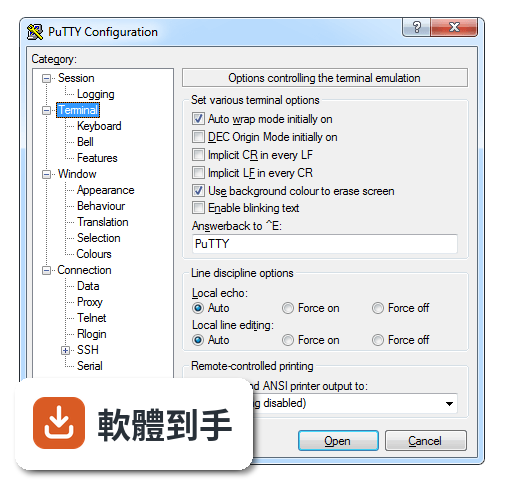
PuTTY 介面畫面 2
PuTTY 介面畫面

04金鑰認證要怎麼設定?我不想每次打密碼

用附帶的PuTTYgen產生一組SSH金鑰對,把公鑰放到伺服器的authorized_keys檔案裡,私鑰留在本機。然後在PuTTY的連線設定中,載入你的私鑰檔案,之後連線就會自動用金鑰認證,不需要再輸入密碼。設定一次之後,之後連線就省事很多。金鑰認證也比密碼認證更安全。

05我同時要管好幾台伺服器,每次都要重新輸入IP嗎?

不用。PuTTY有「Saved Sessions」功能,你可以把每一台伺服器的IP、連接埠、連線類型、金鑰路徑等設定存成一個命名好的session,下次要連線時直接點兩下就建立了。如果伺服器數量多,這功能可以省下不少重複輸入的時間,也避免打錯IP的困擾。

06我是Windows使用者,偶爾才連一次Linux伺服器,這套適合我嗎?

適合。它的介面很樸素,沒有複雜的功能選單,基本操作就是輸入IP、選連線類型、按Open,三步驟完成。不需要安裝額外套件,下載安裝檔執行完就能用。對只是偶爾要登入伺服器改個設定、重啟服務的人來說,它的輕量和直接反而是優點。
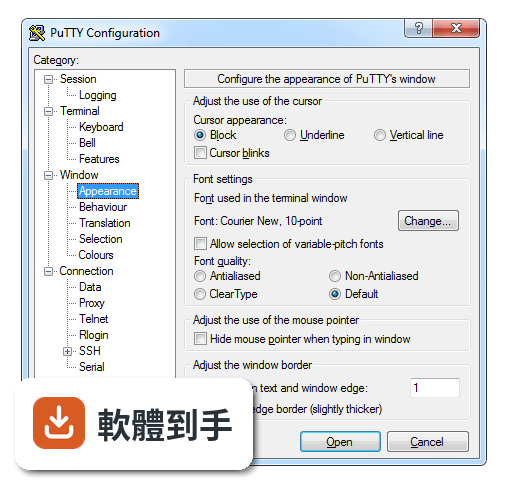
PuTTY 介面畫面 3
PuTTY 介面畫面

07我需要用圖形介面操作遠端伺服器,這套可以嗎?

不適合。PuTTY是純文字介面的終端機模擬器,你只能在上面打指令,沒有滑鼠點選的圖形操作介面。如果你需要管理遠端桌面的圖形環境,這套幫不上忙。不過它支援X11 Forwarding,可以讓遠端伺服器上的圖形應用程式顯示在你的Windows桌面上,但前提是遠端機器有X視窗環境。

08我習慣用中文介面,這套軟體有中文嗎?

沒有。它的介面語言是英文,從安裝到操作都是英文顯示。不過介面本身很精簡,主要欄位就那幾個,就算英文不好,照著教學文章操作也不難上手。如果你完全無法接受英文介面,可以考慮其他有中文化的SSH客戶端軟體,但那些軟體不一定有持續更新。

09我主要用macOS,這套軟體有支援嗎?

官方資料顯示它有macOS版本,可以跨平台使用。不過要注意的是,它的主要開發和維護是以Windows平台為主,macOS版本的支援程度和更新頻率需要自行確認。如果你是在macOS上使用,也可以先試試系統內建的終端機,它本身就支援SSH連線,不一定需要額外安裝軟體。
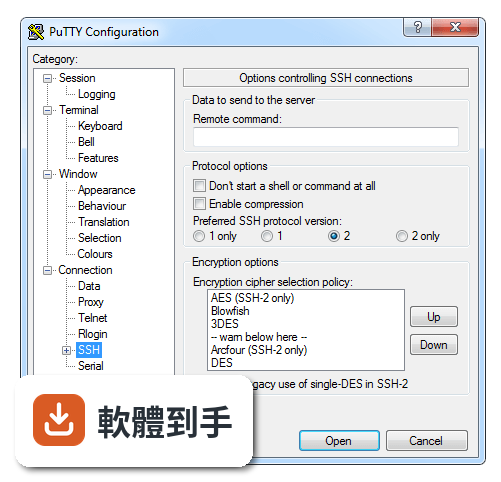
PuTTY 介面畫面 4
PuTTY 介面畫面

10我需要同時開很多個連線視窗,這套方便嗎?

它沒有分頁功能,每個連線都是獨立視窗,開多了工作列會擠滿視窗。如果你習慣像瀏覽器分頁那樣管理多個連線,這套會比較不方便。這方面可以考慮MobaXterm或ConEmu,它們有分頁介面,但功能也相對複雜,看你比較在意輕量還是管理方便。

11這套軟體還有在維護嗎?會不會用一用就沒人更新了

根據版本紀錄,它持續有在更新,近期也還有新版本釋出,不是放著不管的專案。而且它是開放原始碼軟體,社群會持續回報問題和貢獻修正。不過它的開發者主要是一個人,更新節奏不像商業軟體那麼頻繁,如果你需要更積極的維護和技術支援,可以考慮Xshell Free或MobaXterm。

12我聽說WinSCP也可以傳檔案,跟這套有什麼差別?

WinSCP是專門做檔案傳輸的圖形介面軟體,支援SFTP、SCP等協定,操作方式像FTP軟體,可以拖曳檔案上傳下載。PuTTY雖然也有PSCP和PSFTP,但都是指令列工具,沒有圖形介面。如果你主要需求是傳檔案,WinSCP會更直覺;如果你需要下指令操作伺服器,PuTTY才是主力,兩者可以搭配使用。

下載與官方連結

前往官方網站 下載 PuTTY

putty-0.52.exe · 324 KB · 連結指向軟體原廠

版本紀錄

再看 5 筆

看完整版本清單

這一版改了什麼

What's new in this version:

- A full manual has been written, and is supplied as a Windows Help file alongside the program executables.
- Support for public keys in SSH-2, both RSA and DSA. Agent forwarding is supported, but only to OpenSSH servers, because ssh.com have a different agent protocol which they haven't published.
- (Yes, I know I've been claiming DSA is horrifically insecure for ages, but now I've been told about a clever way to get round the insecurity. Details are in sshdss.c for anyone who's interested; credit mostly goes to Colin Plumb for letting me know about it. We still think RSA is better, and recommend you use it if you have the choice.)
- PSCP now uses the new SFTP protocol if possible, and only falls back to the old scp1 form if SFTP can't be found (for example, if your connection is SSH-1). This should allow it to interoperate cleanly with ssh.com's product, and is a security improvement besides.
- PSCP, in old-style scp1 mode, is now much tighter on security. It will refuse to let the remote host write to a file that doesn't have the same name as the file that was requested. NOTE WELL that this disallows remote-to-local wildcards such as "pscp server:*.c .". scp1's implementation of server-side wildcards is inherently unsafe. If you are sure you trust your scp server not to be malicious, you can use the "-unsafe" command line option to re-enable this behaviour. When using the new SFTP-based back end none of this is a problem, because SFTP is better designed.
- Generic port forwarding support is now supported, thanks to a very comprehensive contribution from Nicolas Barry.
-X11 forwarding support. Thanks to Andreas Schultz for doing a large part of the coding for this. Authentication munging is supported. However, PuTTY does not currently attempt to authenticate connections to the local X server, because finding the authentication data to do so is server-dependent and complex and I thought I'd wait to see what servers people actually want to use this with.
- Added an SFTP client, for the improved file transfer protocol that comes with SSH-2.
- Full-screen mode, "like a DOS box". Not really like a DOS box, since it works within the current graphics mode rather than shifting into text mode, but it seems to work.
- Support for resizing the font rather than the terminal when the user changes the window size. Also supports a hybrid mode, in which window resizes change the terminal size but maximising or going full-screen changes the font size. Patch due to Robert de Bath.
- Unicode support in the terminal emulator. In the first place this allows us to support servers which actually send UTF-8 down their terminal sessions; but the architecture changes also mean that instead of specifying the local and remote character sets in the Translation panel, you simply specify what character set you expect the server to be talking, and PuTTY handles the rest automatically. Many thanks to Robert de Bath.
- Experimental rlogin support. Thanks to Delian Delchev for the patch. Note that this may fail because the rlogin protocol relies on TCP Urgent data, which not all operating systems get right, and which not all firewalls pass through correctly. Also, local flow control is unsupported as yet, and the "flush" command is not handled correctly. Despite all this, it worked fine for me!
- Improved support for local echo and local line editing. These are now separate options, controllable independently. PuTTY will make sensible guesses at the right settings, but those guesses can always be overridden by the user.
- Improved bell support. There's now a whole configuration panel; you can choose a bell that plays the Windows default sound, or plays a sound of your choice, or flashes the window, or does nothing. In addition the window's Taskbar entry can be made to flash if a bell goes off when the window is minimised, and also there's an option that disables all bells if it receives them too fast (so that if you cat a binary file into your terminal it won't bleep for a week).
- Support for AES in SSH-2.
- Default Settings can now be used to save a default protocol and port number.
- Scrollback should now automatically scroll if you try to drag-select off the top of the window (or off the bottom of the window when it's scrolled back), so you can easily select more than a screenful.
- We now support rectangular-block selection, triggered by holding Alt while you drag the mouse. (You can also configure rectangular selection to be the default and Alt-drag to be conventional line-by-line selection.)
- The mouse pointer can now be configured to disappear when the PuTTY window is active and text is typed, and reappear when the mouse is moved, à la MS Word. Particularly useful for those of us using focus-follows-mouse, where the pointer is quite likely to be inside the window and obscuring the view.
- The cursor can now be displayed as an underline or as a vertical line, as well as a block. When it's a vertical line, it does something useful when not-quite-wrapping in the rightmost column.
- Keepalive timeouts can now be specified in seconds rather than minutes.
- Support for Diffie-Hellman group exchange in SSH-2.
- If you don't supply a username, PSCP now guesses your remote username to be the same as your local username. (On Win95/98, this might not be useful to everybody, but it's at least no worse than bombing out with a complaint. On WinNT, it might be seriously useful.) Patch due to Christian Biesinger.
- You can now enter a service name such as "finger", in place of a port number. Patch due to Christian Biesinger.
- It's now possible to invoke a second Pageant with some key files on the command line and have it feed those key files to the first Pageant. Also, you can make Pageant start another command once it's initialised itself; for example, "pageant -c wincvs.exe" to start Pageant and then start WinCVS.
- Scrollback on the terminal is no longer implemented by physically copying a huge array. It should now be safe to use very large scrollback buffers without suffering noticeable slowdown.
- Patch due to Roman Pompejus: the "-log" command line option on PuTTY is gone, replaced by a proper GUI-configurable logging facility.
- Implemented a selection option to paste line drawing as the underlying characters or as poor-man's. Thanks to to Robert de Bath.
- Ctrl+Alt can be configured to either have the traditional PuTTY behaviour (Ctrl+Alt+X is equivalent to ESC then Ctrl+X), or to behave like AltGr. Thanks to Robert de Bath.
- Added SCO ANSI function key support (F1 is ESC [ M and F12 is ESC [ X, with all obvious points in between).
- Font changes when the window is maximised now keep it maximised. Thanks to Robert de Bath.
- The Application key on Windows keyboards now behaves like a Compose key all the time. Compose behaviour on AltGr can still be configured on and off. Thanks to Robert de Bath.
- The terminal driver now returns a configurable string when it sees ^E. Thanks to Robert de Bath.
- The About box now has a button that brings up a browser pointing at the PuTTY web site. Thanks to Eric Theriault.
- Bug fix: the long-standing socket buffering bug should now be gone forever. If PuTTY is receiving data faster than it can send it out, it will attempt to slow down the entity it's receiving from rather than continuing to grow its buffers without bound.
- Bug fix: AltGr should now be fixed. It was broken in 0.51.
- Bug fix: repeat key exchange in SSH-2 is now handled correctly. You should no longer see "Server failed host key check" after your session has been running for an hour.
- Bug fix: various socket-handling problems should be corrected. Crashes on network errors, bad handling of TCP Urgent data in telnet and rlogin, and truncation of output when the remote server sends a lot of data and then immediately closes the connection. Thanks to Robert de Bath for the TCP Urgent stuff.
- Bug fix: the cascading-error-boxes bug should be fixed. (This occurred when you had keepalives enabled and got Connection Aborted.)
- Bug fix in the configuration box: controls in panels other than the visible one should now not be able to get keyboard focus.
- Bug fix: Tab and accelerator keys now work in the Event Log and in the About box while a session is running. Thanks to Roman Pompejus for the fix.